
7 Best Software for Remodeling Contractors in 2026, Compared
Compare the 7 best software for remodeling contractors on price, free plans, estimating and client portals, with every price checked November 8, 2026.
 Shamim Mia, Founder, SerpAstraLast verified November 8, 202612 min read
We compare pricing pages, documentation and public reviews. We never accept payment for rankings.

Key takeaways
- Buildertrend is the best fit for most established remodelers, but it is priced by custom quote; JobTread follows at $199/month with every feature included, and Contractor Foreman is the budget pick at $49/month.
- Houzz Pro and Buildxact both offer genuinely free plans — Houzz Pro with a free 3D floor planner, Buildxact with a free Go starter plan.
- The single most important buying factor is the pricing unit: per user, per seat, per project or a flat quote. The unit, not the headline price, decides what a four-person remodeling office actually pays.
- Payment processing and advertising sit outside every subscription here, so budget for them separately — Houzz Pro advertising starts at $499 a month.
On this page
Quick comparison
| Tool | Best for | Starting price | Free plan |
|---|---|---|---|
| Buildertrend | Residential remodelers running several jobs at once who want selections, scheduling and client communication in one system | Custom quote | No (demo only) |
| JobTread | Remodelers who live in their job costs and want one price for every feature, with no tier to upgrade into | $199/mo | No (money-back guarantee) |
| Houzz Pro | Design-build remodelers who sell the look of the job as much as the build, and want leads from the Houzz marketplace | $99/mo | Yes (free plan) |
| Buildxact | Residential remodelers who estimate from plans and want the winning estimate to become the live job-cost baseline | $199/mo | Yes (free Go plan) |
| Buildern | Growing builders and remodelers who want transparent pricing and free seats for field workers, subs and clients | $250/mo | No (7-day trial) |
| Knowify | Trade contractors and remodelers whose office lives in QuickBooks and who bill on AIA progress applications | $149/mo | No (14-day trial) |
| Contractor Foreman | Budget-conscious remodelers who want the most software per dollar and a price that never changes at renewal | $49/mo | No (30-day trial) |
Make one of these tools?
We re-check this list every quarter. Send a correction, request a review, or ask about a clearly labeled sponsored spot.
Request a listingThe best software for remodeling contractors

Buildertrend
Best for: Residential remodelers running several jobs at once who want selections, scheduling and client communication in one system
Buildertrend is the category standard for residential remodelers who run several jobs at once: scheduling, daily logs, change orders, selections, invoicing and a client portal sit in one system, and every plan includes unlimited users and unlimited projects. The price is the catch. Buildertrend stopped publishing prices and now quotes each company on builder type and annual construction volume, so two remodelers can pay very different amounts for the same plan.
What you get for that quote is depth no cheaper tool matches: selections management, warranty tracking and QuickBooks sync, plus a large template and training library. The trade-off is the contract and the learning curve — expect a sales process, an annual agreement and a few weeks before the team is fluent. Buy it when remodeling is the whole business and your volume justifies it.
What we like
- The most complete remodeling workflow here: scheduling, daily logs, change orders, selections, warranty and invoicing
- Unlimited users and unlimited projects on every plan, so the office and the field share one system
- Client portal with selections and payment tracking keeps homeowners informed without extra phone calls
- QuickBooks sync and a large template and training library shorten the setup for established firms
Watch out for
- No published price: every quote is custom, based on builder type and annual construction volume
- Annual agreements and renewal increases are widely reported, so get the quote and the renewal terms in writing
- The depth comes with a learning curve, and smaller remodelers can find the setup heavy for a two-person crew

JobTread
Best for: Remodelers who live in their job costs and want one price for every feature, with no tier to upgrade into
JobTread sells one plan and nothing else: $199 a month for the account, including one internal user, plus $20 a month for each extra user, with every feature switched on. Estimating, budgets, schedules, change orders, time tracking and job costing all come in the single price, and customers, subcontractors and vendors get free portal access. Annual billing drops the base to $159 a month, with extra users at $16.
The model suits remodelers who live in their job costs, because the estimate, the budget and the actuals share one workflow and nothing is held for a higher tier. The limits are the missing takeoff tool and the lack of a free trial — you commit before you try, though monthly plans carry a 30-day money-back guarantee. Pick JobTread when tight budget control matters more than design tools.
What we like
- Every feature is included on the single plan: estimating, budgets, schedules, change orders and job costing
- Published per-user pricing with breaks after 10 users, so the bill scales predictably with headcount
- Customer, subcontractor and vendor portal users are free and unlimited
- Highest G2 score in this list at 4.9/5, with reviewers praising customer support most
Watch out for
- No free trial, only a 30-day money-back guarantee on monthly plans
- The $199 base covers one internal user, so a four-person office pays $259 a month on monthly billing
- No built-in takeoff tool, and invoice editing is more limited than on some rivals

Houzz Pro
Best for: Design-build remodelers who sell the look of the job as much as the build, and want leads from the Houzz marketplace
Houzz Pro comes at remodeling from the design side: 3D floor plans, mood boards, selections and a product clipper sit next to CRM, estimates, invoices and online payments, and the whole thing connects to the Houzz marketplace where homeowners search for remodelers. Design costs $99 a month for one user, Pro costs $199 and adds takeoffs, bid management, change orders, contracts and schedules, and Teams starts at $399 with unlimited users.
The free plan is a real starting point for a solo remodeler, covering the 3D floor planner, estimates and invoicing at $0. The catches are the seat math — every extra user is $50 a month on Design and Pro — and the 12-month contracts that auto-renew. Buy Houzz Pro when design presentation wins you jobs; buy JobTread when job costing is the priority.
What we like
- The only tool here that pairs project software with a homeowner marketplace where clients already search
- 3D floor plans with LiDAR room scanning help homeowners picture the remodel before work starts
- Estimates turn into invoices and online payments in the same workflow, with a client portal included
- A genuinely free plan covers the 3D floor planner, estimates and invoicing for a solo remodeler
Watch out for
- Change orders, takeoffs, contracts and budget management wait for Pro at $199/month, not the $99 Design plan
- Design and Pro include one seat each; every extra user costs $50 a month
- Most plans are 12-month contracts that auto-renew, and the advertising package costs from $499 a month on top

Buildxact
Best for: Residential remodelers who estimate from plans and want the winning estimate to become the live job-cost baseline
Buildxact is built around the estimate. Digital takeoff runs from uploaded plans, live dealer material pricing feeds the quote, and the estimate that wins the job becomes the cost baseline during construction, with estimate-to-actual costing line by line. Foundation costs $199 a month, or $169 billed annually, with unlimited users; Pro costs $399 and Master $599, and a free Go plan covers the basics.
The trade-off is that Foundation is estimating-heavy: scheduling, the Onsite mobile app and accounting sync all wait for Pro at $399 a month, so a remodeler who needs the full job-management workflow pays double the entry price. Blu AI add-ons can also push the bill up. Pick Buildxact when estimating is the main job; pick JobTread when scheduling and job costing matter more.
What we like
- Digital takeoff runs from uploaded plans, and live dealer material pricing feeds the quote
- The estimate that wins the job becomes the cost baseline, with estimate-to-actual costing line by line
- Unlimited users on every plan, so the whole crew and the office share one price
- Blu AI tools on Foundation include the Assembly Assistant for drafting estimates faster
Watch out for
- Scheduling and the Onsite mobile app start on Pro at $399/month, not Foundation
- QuickBooks and Xero sync also wait for Pro, so Foundation buyers still export accounting data by hand
- Monthly subscriptions reportedly carry a 12-month initial contract, so confirm the term before signing

Buildern
Best for: Growing builders and remodelers who want transparent pricing and free seats for field workers, subs and clients
Buildern is the modern challenger in this list: transparent pricing published on its website, no sales call before you see a number, and a workflow where the estimate flows into the budget, then into purchase orders, bills and invoices without re-entering the same figures. Starter costs $250 a month for 2 seats, or $225 billed annually, and Professional costs $400 for 4 seats, with field workers, subs, vendors and clients free.
The honest caveats are youth and price. The integration ecosystem is thinner than Buildertrend's, a few advanced features are still catching up, and $250 a month is a lot for a solo remodeler. The 7-day trial is also short for testing a full job cycle. Pick Buildern when you want Buildertrend-style depth with a published price and free field seats.
What we like
- Published pricing with no sales call needed: Starter $250 a month for 2 seats, Professional $400 for 4
- Field workers, subcontractors, vendors and clients join free and never count as seats
- Estimates flow into budgets, purchase orders, bills and invoices without re-entering the same numbers
- Gantt scheduling with AI-drafted schedules, allowance selections and schedule-of-values billing included
Watch out for
- At $250 a month billed monthly, the entry price is real money for a one-person remodeling shop
- The 7-day free trial is short for a proper evaluation of a full project cycle
- A newer platform with a thinner integration ecosystem than Buildertrend or JobTread

Knowify
Best for: Trade contractors and remodelers whose office lives in QuickBooks and who bill on AIA progress applications
Knowify is job management software for trade contractors whose office lives in QuickBooks: Online, Payroll, Time and Payments sync natively and two-way, so estimates, time and invoices flow into the books without double entry. Core costs $149 a month for one user, or $99 billed annually, and covers CRM, estimates, fixed-price contracts, scheduling, time tracking, change orders and progress billing.
The catch is that the features a remodeler buys Knowify for — job costing, daily logs, the client portal and project budgets — wait for Advanced at $399 a month for 10 users. Core is really a bidding and invoicing tool. Pick Knowify when QuickBooks sync and AIA billing are the job; pick JobTread when job costing must work on the entry plan.
What we like
- The deepest QuickBooks sync here: Online, Payroll, Time and Payments connect natively, two-way
- Licensed G702/G703 AIA pay applications cover commercial-style progress billing
- Real-time job costing and work-in-progress reporting on Advanced show profit while the job runs
- No implementation fee and no contract on the published plans, so a pilot is low risk
Watch out for
- Job costing, daily logs, the client portal and project budgets wait for Advanced at $399 a month
- Core covers one user only, and every extra user costs $29 a month
- Reviewers report invoicing quirks and weak reporting on commissions and tax rates

Contractor Foreman
Best for: Budget-conscious remodelers who want the most software per dollar and a price that never changes at renewal
Contractor Foreman is the value pick in this list because it packs the most software into the lowest price: Basic costs $49 a month billed annually, or $588 a year, and covers estimates, invoices, online payments, scheduling, daily logs, time tracking, a client portal and QuickBooks integration. The price-lock guarantee keeps your rate fixed at signup, which matters in a category where rivals raise prices every year.
The limits are the user tiers and the polish. Basic covers one user only, so a team pays for Standard at $105 or Plus at $166, and reviewers report occasional slow performance and glitches. Local material pricing is also missing from the two lower plans. Pick Contractor Foreman when the budget is the deciding factor and the team is small.
What we like
- Cheapest full-featured option here at $49 a month, with estimating, scheduling, daily logs and time tracking
- A price-lock guarantee keeps your rate fixed at signup, unlike rivals with annual increases
- AIA-style progress billing with retainage tracking is included, not an add-on
- AI Estimator drafts estimates from project details, and every plan includes a 30-day free trial
Watch out for
- Basic covers one user only and is sold on annual billing; a team needs Plus at $166 a month
- Local material pricing is not included on Basic or Standard, only on higher plans
- Reviewers report occasional slow performance and glitches, and support quality varies
The best software for remodeling contractors does three jobs at once: it prices the job accurately, it keeps the schedule and the client informed while work runs, and it proves the job made money when it ends. We ranked the seven tools below by fit for the most common buyer — a US residential remodeler running two to six jobs at a time — starting with the deepest all-in-one and ending with the cheapest full toolkit, and every price was checked on the vendor's own pricing page on November 8, 2026.
How to choose the best software for remodeling contractors
- Count who actually needs a seat. JobTread charges $20 a month per extra user, Houzz Pro $50, Knowify $29 — while Buildertrend and Buildxact include unlimited users and Buildern leaves field workers free.
- Decide whether estimating or scheduling is the weak spot. Buildxact leads with takeoff and estimating; JobTread and Buildertrend lead with schedules, daily logs and job costing.
- Check the client-facing side. Selections, a client portal and 3D plans win remodeling jobs; Houzz Pro and Buildertrend are strongest here, Knowify's portal waits for Advanced.
- Ask about the contract before the demo. Buildertrend quotes by volume, Houzz Pro auto-renews 12-month plans, and Buildxact monthly plans reportedly carry a 12-month initial term.
- Confirm the accounting sync. QuickBooks sync is standard on most tools here, but on Buildxact it waits for Pro at $399 a month — check your tier before you buy.
Remodeling software is one system in your stack, not the whole stack. If the business also needs to be found online, our guide to marketing software for contractors covers the visibility side. And before you publish new pages for the services you sell, run your titles through the free SERP snippet preview tool — it shows exactly how the title and description will look in Google.
Whatever you shortlist, try it with real data before you pay. The free plans and trials in this list are long enough to run one genuine job — your estimate, your schedule, your client — and that job tells you more than any review can. Check two things in the trial: that the estimate flows into the budget without re-typing, and that your accountant can get the numbers out. Every tool here exports to QuickBooks or Xero on at least one plan, so there is no reason to buy before your bookkeeper has looked at it.
Remodeling contractor software pricing: what you will actually pay
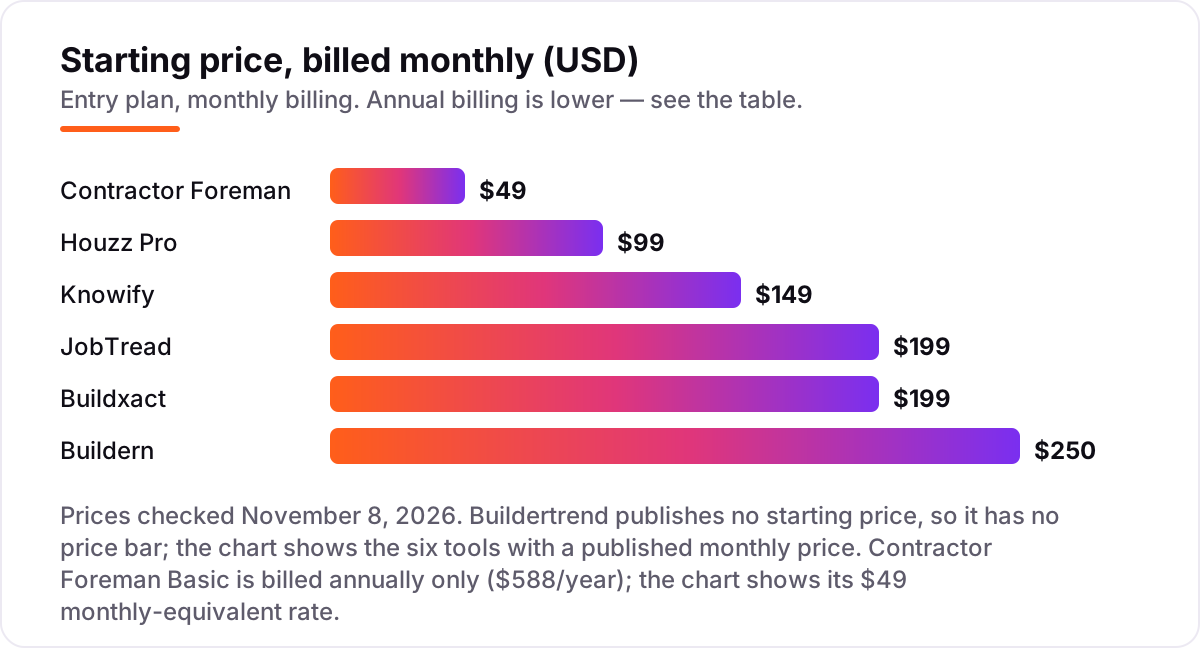
Take a four-person remodeling office: an owner, a project manager, an estimator and a bookkeeper. On list prices, the subscription costs $166 a month on Contractor Foreman Plus, $199 a month on Buildxact Foundation, $236 on Knowify Core, $249 on Houzz Pro Design, $259 on JobTread and $412 on Buildern Starter. Two of those numbers need adjusting before they are real: Knowify Core covers one user, so three extra seats at $29 each bring it to $236, and Buildern Starter covers two seats, so two extra seats at $81 each bring it to $412.
Over a year, that is $1,992 on Contractor Foreman Plus billed annually, $2,028 on Buildxact Foundation billed annually, $2,832 on Knowify Core, $2,988 on Houzz Pro Design, $3,108 on JobTread and $4,944 on Buildern Starter. The same four people and the same jobs cost $1,992 a year at the cheap end and $4,944 at the dear end — a $2,952 gap that comes entirely from seat counts and billing choices, not from features. Buildertrend is not in that maths at all: it quotes by volume, so get its number before you compare.
Three costs sit outside every number above. First, payment processing on the invoices you send, which is charged per transaction rather than per month. Second, advertising: Houzz Pro's advertising package starts at $499 a month on top of the subscription. Third, the plan step-ups — Houzz Pro's change orders need Pro at $199, Buildxact's scheduling needs Pro at $399, and Knowify's job costing needs Advanced at $399. If you run a larger general contracting firm rather than a remodeling shop, the shortlist shifts too — see our guide to the best general contractor software.
Annual billing cuts the bill on most tools here: JobTread drops from $199 to $159 a month, Buildxact from $199 to $169, Knowify Core from $149 to $99 and Buildern Starter from $250 to $225. Contractor Foreman Basic is annual-only, so there is no monthly figure to compare against. One more cost to check before you commit: a second company is a second subscription on every tool in this list, so a remodeler with a separate design business pays double whatever the chart shows.
Know the difference: project management software vs estimating software
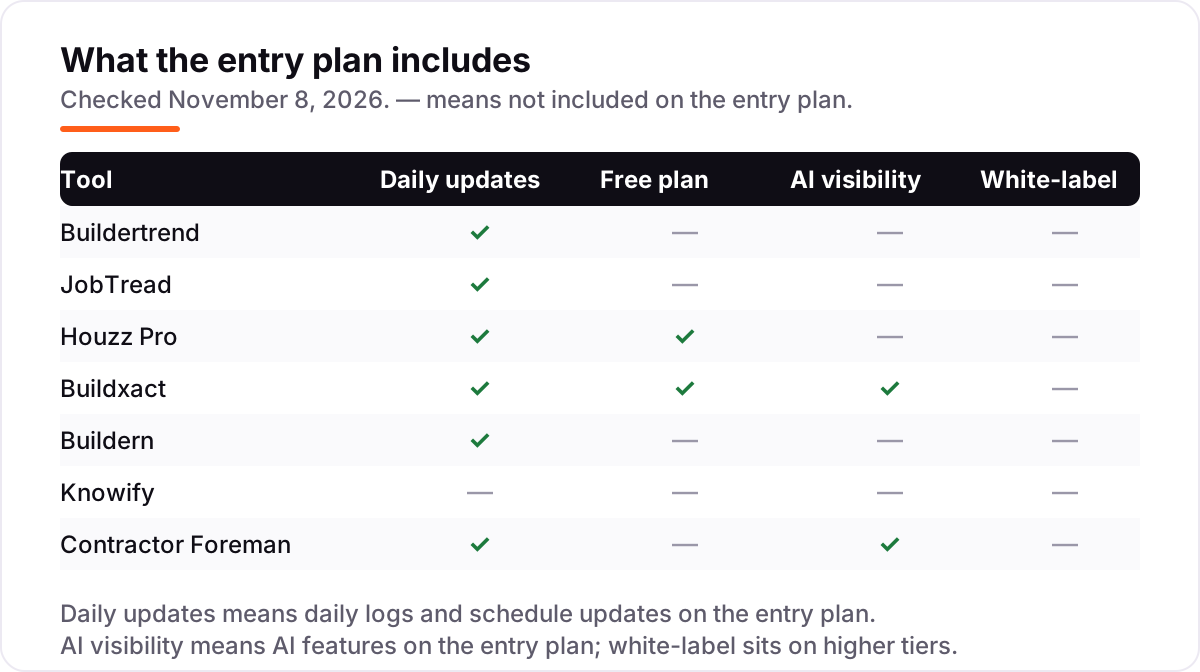
The confusion in this category is between two jobs that share one screen. Estimating software prices the job: takeoff, material pricing, quotes and the bid. Project management software runs the job: schedules, daily logs, change orders, client communication and job costing. Most remodelers need both, and the tools in this list combine them in different proportions — Buildxact leads with estimating, JobTread and Buildertrend lead with running the job.
There is a second, quieter confusion: a CRM is not project software either. A CRM tracks leads and follows up with homeowners; it does not schedule crews, track costs or manage change orders. Houzz Pro is the closest thing here to both, because its CRM and marketplace sit next to its project tools, but even it keeps the two jobs separate inside the product. If a tool only manages leads, it belongs in a different list.
A third distinction worth knowing is the pricing unit. Some tools charge per user, some per seat, some a flat monthly rate and one — Buildertrend — a custom quote by volume. A tool that looks cheap at $49 a month can cost $166 once the team is counted, and a tool that looks dear at $250 can be the cheapest per person when field workers are free. Always price the tool for your actual team size, not for one user.
Quick comparison: tool type by need
| Buyer | Best pick | Why |
|---|---|---|
| Established remodeler, several jobs at once | Buildertrend | Deepest all-in-one workflow, unlimited users, priced by custom quote |
| Remodeler who lives in job costs | JobTread | Every feature on one plan, from $199/month plus $20 per user |
| Design-build remodeler | Houzz Pro | 3D plans and a homeowner marketplace, from $99/month with a free plan |
| Estimator-first remodeler | Buildxact | Takeoff to quote to job costing, from $199/month, unlimited users |
| Growing builder who hates sales calls | Buildern | Published pricing, $250/month for 2 seats, field workers free |
| QuickBooks-first trade contractor | Knowify | Two-way QuickBooks sync and AIA billing, from $149/month |
| Budget-conscious small remodeler | Contractor Foreman | Cheapest full toolkit, $49/month billed annually, price locked at signup |
Mistakes to avoid
- Budgeting on the one-user price. The headline price is rarely the team price: JobTread's $199 covers one user, Houzz Pro's $99 covers one seat, and Knowify's $149 covers one user. Price the tool for your whole office.
- Buying on the free plan, then finding the real features cost extra. Houzz Pro's change orders need Pro at $199, Buildxact's scheduling needs Pro at $399, and Knowify's job costing needs Advanced at $399.
- Signing a 12-month contract without reading the renewal clause. Houzz Pro plans auto-renew, Buildertrend renewals are widely reported to rise, and only Contractor Foreman locks your rate at signup.
- Ignoring the seat that costs the most. The estimator who only reviews bids and the bookkeeper who only exports numbers may still count as paid users — check who counts before you commit.
- Forgetting the second business. If you run a separate design or handyman business, you pay for a second subscription. Price the second set of books before you commit to a tool for the first.
How we chose
We checked each vendor's own pricing page on November 8, 2026 and recorded the starting price exactly as shown, including the annual-billing figure where the page lists one, and we ranked the tools by fit for the most common buyer — a US residential remodeler running two to six jobs at a time — not by brand size. Buildertrend publishes no starting price, so it is listed as custom quote; the $339 to $499 monthly figures circulating in third-party roundups are reported estimates, not vendor-published prices, and we do not present them as its price. Ratings come from fresh G2 pages checked the same day. No vendor paid for a place in this list, and none of the links here are affiliate links.
What to do next
Start with the free plan or trial of your top pick and run one real job through it. Check that the estimate flows into the budget, the schedule holds up in the field, and the client portal keeps the homeowner informed before you commit to a year. If the jobs are sorted but new customers are not finding you, our local SEO service handles the visibility side — or compare providers in our guide to general contractor software. Once your tools are in place, find out what's holding your rankings back.
Your stack only works if people find you
SerpAstra fixes what keeps your site off page one and makes it easy for AI assistants to recommend.
Get a free audit→Sources we checked (14)
- Buildertrend pricing — buildertrend.com/pricing (checked November 8, 2026)
- JobTread pricing — jobtread.com/pricing (checked November 8, 2026)
- Houzz Pro pricing — pro.houzz.com/pricing (checked November 8, 2026)
- Buildxact pricing — buildxact.com/us/pricing (checked November 8, 2026)
- Buildern pricing — buildern.com/pricing (checked November 8, 2026)
- Knowify pricing — knowify.com/pricing (checked November 8, 2026)
- Contractor Foreman pricing — contractorforeman.com/plans (checked November 8, 2026)
- Buildertrend reviews — g2.com/products/buildertrend/reviews (checked November 8, 2026)
- JobTread reviews — g2.com/products/jobtread/reviews (checked November 8, 2026)
- Houzz Pro reviews — g2.com/products/houzz-pro/reviews (checked November 8, 2026)
- Buildxact reviews — g2.com/products/buildxact/reviews (checked November 8, 2026)
- Buildern reviews — g2.com/products/buildern/reviews (checked November 8, 2026)
- Knowify reviews — g2.com/products/knowify/reviews (checked November 8, 2026)
- Contractor Foreman reviews — g2.com/products/contractor-foreman/reviews (checked November 8, 2026)
Shamim
Founder of SerpAstra
A full-stack SEO and digital marketer who spends most days on Local SEO for dental practices, AI search visibility and lead generation.
Frequently asked questions
What is the best software for remodeling contractors?
Buildertrend is the best fit for most established remodelers, with the deepest all-in-one workflow, but it is priced by custom quote. JobTread at $199/month is the best published-price pick, with every feature included. Contractor Foreman at $49/month is the best budget option.
How much does software for remodeling contractors cost?
Entry prices run from $49 to $250 a month, plus Buildertrend on custom quote. A four-person remodeling office typically pays $166 to $412 a month on list prices, depending on the tool. Annual billing cuts most of these figures by 10 to 20 percent.
Is there free software for remodeling contractors?
Yes, with limits. Houzz Pro has a free plan with a 3D floor planner, estimates and invoicing, and Buildxact has a free Go starter plan. Both are useful for a solo remodeler, but change orders, scheduling depth and accounting sync need a paid plan.
What is the difference between Buildertrend and JobTread?
Buildertrend is the deeper all-in-one, with selections, warranty tracking and unlimited users, but it publishes no price and quotes by annual construction volume. JobTread publishes one price, $199 a month plus $20 per user, with every feature included. JobTread suits cost-focused remodelers; Buildertrend suits larger firms.
Do I need estimating software or project management software?
Most remodelers need both, and the tools here combine them in different proportions. Buildxact leads with estimating and takeoff, while JobTread and Buildertrend lead with scheduling, job costing and client communication. Pick the tool whose strong side matches the part of the job that hurts most.
Can I switch remodeling software later?
Yes, but plan the move between jobs, not mid-project. Export your client list, open estimates, active schedules and job-cost history from the old tool, then import them and reconcile one finished job before going live. Most tools here offer free data imports and onboarding help.
Free SEO and AI visibility audit
Find out what is holding your rankings back
Send us your site. Within 2 business days you get a written audit, an AI visibility check and a short fix list ranked by impact. Free, with no contract attached.
Request my free audit→Related guides
 Local Business & Vertical Software12 Best General Contractor Software in 2026, ComparedCompare the 12 best general contractor software tools on price, free plans, estimating and field features, with every price checked November 7, 2026.Read guide →
 Digital Marketing & Ads7 Best Marketing Software for Contractors in 2026, ComparedCompare the 7 best marketing software for contractors on price, reviews and trade-specific features, with every price checked November 5, 2026.Read guide →
 Local Business & Vertical Software8 Best Estimating Software for Contractors in 2026, ComparedCompare the 8 best estimating software for contractors on price, takeoff, cost databases and free trials, with every price checked November 7, 2026.Read guide →