
10 Best Software for Small Business Taxes in 2026, Compared
Compare the 10 best software for small business taxes on price, filing, deductions and sales tax, with every price checked November 4, 2026.
 Shamim Mia, Founder, SerpAstraLast verified November 4, 202615 min read
We compare pricing pages, documentation and public reviews. We never accept payment for rankings.

Key takeaways
- TurboTax Business leads for most sole proprietors at $79 federal; H&R Block Self-Employed is $85 federal, and FreeTaxUSA files any federal return free with state returns at $15.99 each.
- Filing software and year-round tracking are different jobs: the filing tools charge once per return, while Keeper ($199 a year) and Hurdlr ($9.99 a month) keep the books tax-ready all year.
- The single most important buying factor is whether the price covers your whole return: state filing costs $15.99–$39.99 extra on every filing tool here, and S-corp or partnership returns cost far more than Schedule C.
- Sales tax is a separate job from income tax — TaxJar starts at $39 a month and only handles sales tax, so sellers who collect it need it in addition to a filing tool.
On this page
Quick comparison
| Tool | Best for | Starting price | Free plan |
|---|---|---|---|
| TurboTax Business | Sole proprietors who want guided Schedule C filing with a business tax expert on call | $79 federal | No (simple returns free) |
| H&R Block Self-Employed | Self-employed filers who want a brand-name return with an office they can walk into | $85 federal | Yes (Free Online) |
| FreeTaxUSA | Owners who know which forms they need and want the filing done for the price of one state return | $0 federal | Yes (free federal) |
| TaxAct Self-Employed | S-corp owners who want to file the business return online without TurboTax prices | $109.99 federal | Yes (Free plan) |
| Keeper | Freelancers who want business deductions found all year and the return filed in the same place | $16.58/mo (annual) | No (14-day trial) |
| Hurdlr | Drivers and gig workers whose biggest tax deduction is the miles they drive | $9.99/mo | Yes (free plan) |
| QuickBooks Online | Small businesses that want tax-ready books all year so filing is a handoff, not a scramble | $38/mo | Yes (Free plan) |
| Xero | Small teams that want unlimited users on every plan and clean bank reconciliation without per-seat fees | $27/mo | No (30-day trial) |
| FreshBooks | Service businesses that bill by the hour and want tax-time reports from the same tool that tracks income | $23/mo | No (30-day trial) |
| TaxJar | Online sellers who collect sales tax in several states and need the returns filed for them | $39/mo | No (30-day trial) |
Make one of these tools?
We re-check this list every quarter. Send a correction, request a review, or ask about a clearly labeled sponsored spot.
Request a listingThe best software for small business taxes

TurboTax Business
Best for: Sole proprietors who want guided Schedule C filing with a business tax expert on call
TurboTax Business is the filing tool most small business owners reach for first, and the reason is the guided interview: it walks a sole proprietor through Schedule C, asks about home office, vehicle and equipment deductions in plain language, and imports 1099s and W-2s. Expert Assist Business starts at $79 for a federal sole proprietor return and adds unlimited help from a business tax expert plus a final review before you file.
The price to watch is the one for your entity. S-corps and partnerships jump to $639 for Expert Assist, and full-service filing starts at $1,549 — far more than a sole proprietor pays. State filing costs extra on every tier. Buy TurboTax Business when you want the most hand-holding for a Schedule C return; buy FreeTaxUSA when you already know the forms and only need the filing done.
What we like
- Guided Schedule C interview in plain language, with 1099 and W-2 import instead of manual entry
- Expert Assist includes unlimited help from a business tax expert and a final review before filing
- Audit protection is included at no extra cost on the business products
- Imports data from QuickBooks, so the books and the return stay in the same Intuit family
Watch out for
- State filing costs extra on every tier, and the final price depends on the forms your return needs
- S-corps and partnerships jump to $639 for Expert Assist and $1,549 for full service, far above the sole proprietor price
- No free plan for business filers — the Free Edition covers simple Form 1040 returns only

H&R Block Self-Employed
Best for: Self-employed filers who want a brand-name return with an office they can walk into
H&R Block Self-Employed costs $85 for a federal return and $37 per state, and it is the only online tier that supports 1099 income and Schedule C filing. The free online plan covers simple returns at $0 federal and $0 state, and the company's offices give you an in-person fallback that the online-only tools cannot match. For a filer who wants a person to talk to, that office network is the real difference.
The trade-off is the price path: the figure rises as the filing season progresses, and the self-employed tier is the most expensive online plan H&R Block sells. Expert help costs extra through Online Assist, and state filing is always an add-on. Pick H&R Block when you want a brand-name return with an office nearby; pick FreeTaxUSA when the price matters more than the hand-holding.
What we like
- The cheapest of the big-brand self-employed tiers at $85 federal, with Schedule C and 1099 income included
- Free Online covers simple returns at $0 federal and $0 state
- Hundreds of offices give you an in-person fallback the online-only tools cannot match
- In-person audit support is included, so an IRS letter does not mean hiring outside help
Watch out for
- State filing is always an add-on at $37 per state
- Self-Employed is the most expensive online plan H&R Block sells, and the price rises through the filing season
- Expert help costs extra through Online Assist — it is not included in the $85 tier

FreeTaxUSA
Best for: Owners who know which forms they need and want the filing done for the price of one state return
FreeTaxUSA is the cheapest way to file a business return: the federal return is free for every tax situation, including Schedule C, Schedule D, Schedule E, investments, rental income and crypto, and the only mandatory charge is $15.99 per state return. The optional $7.99 Deluxe upgrade adds priority support, live chat, amended returns and audit assistance. FreeTaxUSA is an IRS-authorized e-file provider and a member of the IRS Free File Alliance.
The low price buys less guidance: the interview is plainer than TurboTax or H&R Block, there is no expert review unless you pay for Deluxe support, and filers who want a preparer to check their work will not find one here. Pick FreeTaxUSA when you know the forms and want the filing done for $15.99; pick TurboTax Business when you want the software to find the deductions.
What we like
- Federal filing is free for every tax situation, including Schedule C, D and E, rentals and crypto
- State returns cost only $15.99 each, the lowest state fee in this list
- Deluxe upgrade is $7.99 and adds priority support, live chat, amended returns and audit assist
- IRS-authorized e-file provider and a member of the IRS Free File Alliance
Watch out for
- The interview is plainer than TurboTax or H&R Block, with less hand-holding for first-time filers
- No expert review of the return is included — Deluxe only adds priority support and audit assistance
- Support is limited on the free tier unless you pay the $7.99 Deluxe upgrade

TaxAct Self-Employed
Best for: S-corp owners who want to file the business return online without TurboTax prices
TaxAct Self-Employed costs $109.99 for a federal return and $39.99 per state, and it is the value alternative to TurboTax: Schedule C and Schedule F, freelance and business income, personalized business deductions and depreciation are all included, and it is one of only two online tools in this list that files S-corp returns. A free plan covers simple returns, so you can start the return before deciding whether to pay.
The catches are the add-ons and the moving price. Live tax assistance costs extra through Xpert Assist, state filing is always $39.99 per state, and TaxAct reprices through the season, so December's price is not April's price. Pick TaxAct when you file an S-corp return online or want a cheaper TurboTax alternative; pick H&R Block when you want an office to walk into.
What we like
- One of only two online tools here that files S-corp returns
- Schedule C and Schedule F, freelance and business income, personalized deductions and depreciation included
- Cheaper than TurboTax's S-corp tiers by a wide margin
- Free plan covers simple returns, so you can start the return before deciding to pay
Watch out for
- State filing is always $39.99 per state on top of the federal price
- Live tax assistance costs extra through Xpert Assist — it is not bundled into Self-Employed
- TaxAct reprices through the season, so the December price is not the April price

Keeper
Best for: Freelancers who want business deductions found all year and the return filed in the same place
Keeper is built for the freelancer whose taxes are a year-round problem, not a one-week job. It connects to your bank and card accounts, scans every transaction with AI, and flags the ones that look like business deductions, so write-offs are found as you spend, not reconstructed in April. Standard costs $199 a year ($16.58 a month billed yearly) and covers year-round bookkeeping plus federal and state e-filing.
The filing plans are annual only: there is no monthly billing for Standard, Premium or Business, so the $199 is one payment, and Bookkeeping Only at $20 a month excludes filing. AI-flagged deductions still need your review before they go on a return. Pick Keeper when you want deductions found all year and the return filed in the same place; pick Hurdlr when you only need tracking and mileage.
What we like
- AI scans bank and card transactions and flags likely business deductions as you spend
- Standard includes year-round bookkeeping plus federal and state e-filing in one price
- Quarterly tax estimates run all year, so the April bill never arrives as a surprise
- Connects to gig platforms and payment apps, from Uber and DoorDash to Stripe and PayPal
Watch out for
- Filing plans are annual only — Standard is $199 a year paid upfront, with no monthly billing
- Bookkeeping Only at $20 a month does not include filing at all
- AI-flagged deductions still need your review before they go on a return

Hurdlr
Best for: Drivers and gig workers whose biggest tax deduction is the miles they drive
Hurdlr is the tracker for the self-employed worker whose biggest deduction is the car. The free plan covers manual mileage and expense tracking, and Premium costs $9.99 a month, or $100 a year, and adds automatic mileage tracking by GPS, automatic income and expense tracking, tagging rules and real-time tax estimates, so you always know roughly what you owe before the quarterly payment is due.
Premium does not file your taxes — filing waits for the Pro plan at $200 a year, which adds invoicing, accounting reports and eligible tax filing — and there is no double-entry accounting on Premium, so a business that needs a full ledger still needs QuickBooks Online or Xero. Pick Hurdlr when driving is a large part of your work and you want the mileage captured automatically; pick Keeper when you want the filing included.
What we like
- Automatic mileage tracking by GPS, so every business trip is logged without thinking about it
- Real-time tax estimates show roughly what you owe before each quarterly payment
- Free plan covers manual mileage, expense and income tracking with the tax estimator
- Built for 1099 workers: rideshare, delivery, freelance and gig income are the core use case
Watch out for
- Premium does not file taxes — filing waits for the Pro plan at $200 a year
- No double-entry accounting on Premium; a full ledger still needs QuickBooks Online or Xero
- Automatic tracking needs the paid plan — the free plan means manual entry

QuickBooks Online
Best for: Small businesses that want tax-ready books all year so filing is a handoff, not a scramble
QuickBooks Online is the tax-ready ledger most American accountants already know, so the year-end handoff is easy: invoicing, bills, bank feeds and reporting sit in one subscription, and tax-time reports give your preparer clean books instead of a shoebox of receipts. Simple Start costs $38 a month for one user, and the price climbs with headcount: Essentials is $85 for three users, Plus is $140 for five, and Advanced is $340 for 25.
QuickBooks Online does not file your return — it prepares the books, and you file with a tool like TurboTax Business or FreeTaxUSA. The user caps mean a growing team pays for the next tier, and payroll is a separate add-on on every plan. Buy QuickBooks Online when you want the standard ledger your accountant already knows; buy Xero when per-seat pricing is the deal-breaker.
What we like
- The software most US accountants already use, so finding help and switching accountants is easy
- Full double-entry accounting with invoicing, bills, bank feeds and reporting on every paid plan
- Intuit Intelligence AI features are included on Simple Start, not held for the top tier
- Tax-time reports give your preparer a clean set of books instead of a shoebox of receipts
Watch out for
- Price rises most years — Essentials, Plus and Advanced all went up again for renewals from August 1, 2026
- Hard user caps force upgrades: a second user means Essentials at $85/month, and payroll is a paid add-on
- No free plan beyond the limited QuickBooks Free tier (1 user, 2 invoices a month, no accountant access)
Xero
Best for: Small teams that want unlimited users on every plan and clean bank reconciliation without per-seat fees
Xero's pitch is simple: one flat price per plan and as many users as you like — handy when several people touch the books. Early costs $27 a month and covers quotes, 20 invoices and 5 bills a month, with bank reconciliation and receipt capture. Growing costs $59, removes the invoice and bill caps and adds automated reconciliation; Established costs $97 and adds multi-currency, projects and expense claims.
Like QuickBooks Online, Xero keeps the books but does not file the return — that still goes through a filing tool or a preparer. Most active businesses outgrow Early's 20 invoices quickly, so the real starting price is often Growing at $59; US payroll runs through Gusto at $36 a month plus $6 per person. Choose Xero when several people touch the books and you refuse to pay per seat.
What we like
- Unlimited users on every plan, including Early at $27/month — no per-seat fees at any tier
- Bank reconciliation and Hubdoc receipt capture included from the entry plan
- More than 1,000 app integrations, the widest marketplace in this list
- Single flat price per plan with no annual-billing maze — the monthly price is the price
Watch out for
- Early caps at 20 invoices and 5 bills a month — most active businesses need Growing at $59/month
- Multi-currency, projects and expense claims wait for Established at $97/month
- No native US payroll; payroll comes through Gusto at $36/month plus $6 per person paid

FreshBooks
Best for: Service businesses that bill by the hour and want tax-time reports from the same tool that tracks income
FreshBooks is built for service businesses that bill for time, and the tax angle is the paper trail: invoicing, estimates, expenses and time tracking sit at the front, and tax-time reports turn a year's billable hours into the numbers a preparer needs. Lite costs $23 a month for 5 billable clients; Plus costs $43 for 50 and adds double-entry reports, bank reconciliation and accountant access; Premium costs $70 and removes the cap.
FreshBooks does not file taxes — it is the record-keeping side, and the return needs a filing tool. The client cap decides your bill: a sixth client moves you from Lite to Plus, and every extra team member costs $11 a month. No inventory tracking, no free plan — only a 30-day trial. Pick FreshBooks when invoicing and time billing are the job; pick QuickBooks Online for products.
What we like
- The easiest invoicing in this list: clean invoices, estimates, recurring billing and payment reminders
- Time tracking and expense tracking built in, so billable hours flow straight onto invoices
- Tax-time reports turn a year of billable hours into the numbers a preparer needs
- Plus adds double-entry reports, bank reconciliation and free accountant access for $43/month
Watch out for
- Lite covers only 5 billable clients — a sixth client forces Plus at $43/month
- Every extra team member costs $11/month on top of the plan price
- No inventory tracking, and bank reconciliation and double-entry reports start on Plus, not Lite

TaxJar
Best for: Online sellers who collect sales tax in several states and need the returns filed for them
TaxJar handles the tax most of this list ignores: sales tax. It calculates the right rate at checkout, tracks economic nexus across all 50 states, and files returns through AutoFile — no twenty filing calendars for a seller in twenty states. The Starter plan starts at $39 a month for up to 200 orders a month and includes two AutoFile credits a year.
TaxJar files sales tax returns only — it does not touch income tax, so it sits next to a filing tool rather than replacing one. The bill rises with order volume, extra AutoFile filings cost $50 each beyond the two included, and Starter covers the US only, with no VAT support. Pick TaxJar when you sell online into several states; skip it when you sell services in one state and never collect sales tax.
What we like
- Calculates the right sales tax rate at checkout and tracks economic nexus across all 50 states
- AutoFile files and remits sales tax returns for you, so twenty states do not mean twenty calendars
- Plugs into Shopify, Amazon, WooCommerce and Stripe, where the orders already live
- Now part of Stripe, with the same filing infrastructure behind Stripe Tax
Watch out for
- Starter covers only 200 orders a month — higher volume pushes you to Professional at $99/month
- Extra AutoFile filings cost $50 each beyond the two included on Starter
- US sales tax only — no VAT support and no income tax filing at any tier
The best software for small business taxes does two jobs at once: it keeps the books straight all year, and it turns those books into a filed return without a last-minute scramble. We ranked the ten tools below by fit for the most common buyer — a sole proprietor filing a Schedule C — starting with the filing tools, then the year-round trackers and ledgers, and ending with the sales tax specialist, and every price was checked on November 4, 2026.
How to choose the best software for small business taxes
- Start with your entity type. A sole proprietor files Schedule C, which every filing tool here covers. An S-corp or partnership needs TurboTax Business or TaxAct Self-Employed — the other filing tools cannot file those returns at all.
- Separate filing from tracking. Filing software charges once per return and does the year's paperwork in a week. Tracking software charges monthly and finds deductions all year. Most owners need one of each, not one or the other.
- Count the state return. State filing costs $15.99 to $39.99 extra on every filing tool here, and it is never in the headline price. A federal-plus-one-state return is the number to compare, not the federal price alone.
- Check who else touches the return. If your accountant works in QuickBooks Online or Xero, a ledger they already know saves more at year-end than a cheaper filing tool. Ask them before you buy.
- Decide how much help you want. Guided filing with expert review costs $79 to $109.99 federal; a do-it-yourself return costs $0 to $15.99. The gap buys hand-holding, not a bigger refund.
Before you publish pages for the services you sell, run your titles through the free SERP snippet preview tool — it shows exactly how the title and description will look in Google. And if the business also needs to be found online, our guide to accounting software for small businesses covers the ledgers that keep the books tax-ready.
Whatever you shortlist, try it with real data before you pay. The free plans and trials in this list are long enough to run one genuine month — your invoices, your mileage, your receipts — and that month tells you more than any review can. Check two things in the trial: that the deductions it finds match the ones you actually claim, and that the export hands your preparer a clean file. Every filing tool here lets you start the return for free and pay only when you file, so there is no reason to buy before you have seen the real price.
Small business taxes pricing: what you will actually pay
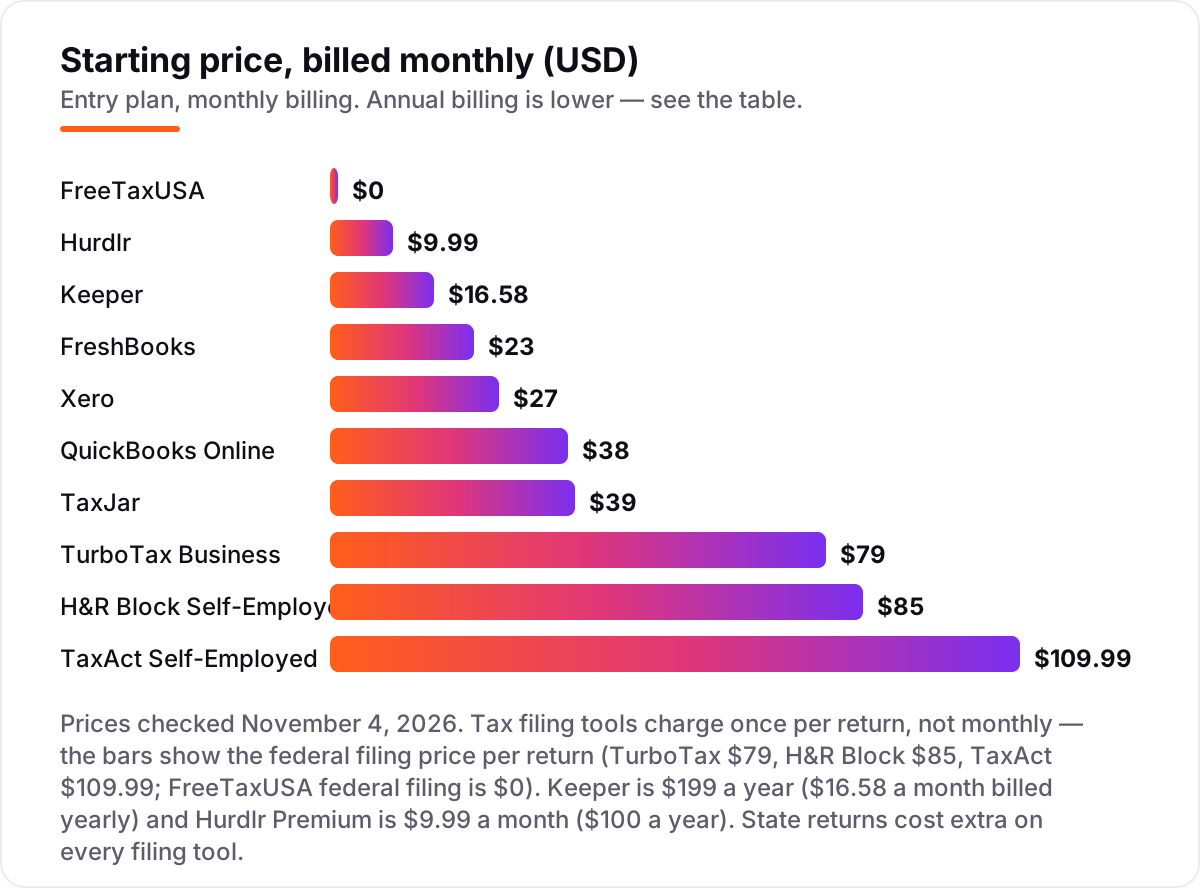
Take a sole proprietor filing one federal return and one state return. On list prices, the return itself costs $15.99 on FreeTaxUSA ($0 federal plus $15.99 for the state), $122 on H&R Block Self-Employed ($85 plus $37), and $149.98 on TaxAct Self-Employed ($109.99 plus $39.99). TurboTax Business starts at $79 federal for a sole proprietor with expert help, with the state return extra on top. The cheapest filing in this list and the dearest differ by $134 for the same two returns.
Add a year of tracking and the picture changes. Keeper Standard costs $199 a year and includes the federal and state filing, so the whole job — tracking plus filing — is $199. Hurdlr Premium costs $119.88 a year and does not file, so pairing it with FreeTaxUSA brings the year to $134.87. A full ledger costs more: QuickBooks Online Simple Start is $456 a year and Xero Early is $324 a year, and neither files the return, so the filing fee sits on top of both.
Three costs sit outside every number above. First, the introductory discounts — 50% off for three months on QuickBooks Online, steep first-month offers on Xero and FreshBooks — end, so budget on the list price. Second, payroll: if the business has employees, payroll runs about $17–$50 a month plus $4–$7 per person paid, on top of the accounting subscription — see our guide to payroll software for small business. Third, sales tax: if you sell online into several states, TaxJar Starter adds $468 a year before the per-filing fees, and that is a separate tax from the income tax return entirely.
Annual billing cuts the bill on the subscription tools: Keeper drops from $20 a month for bookkeeping alone to $16.58 a month billed yearly with filing included, Hurdlr Premium drops from $9.99 a month to $100 a year, and FreshBooks takes 10% off. The filing tools have no annual billing to discount — the per-return price is the whole story, and it rises through the filing season, so the figure you see in November is not the figure you pay in April.
Know the difference: filing software vs tax tracking software vs accounting software
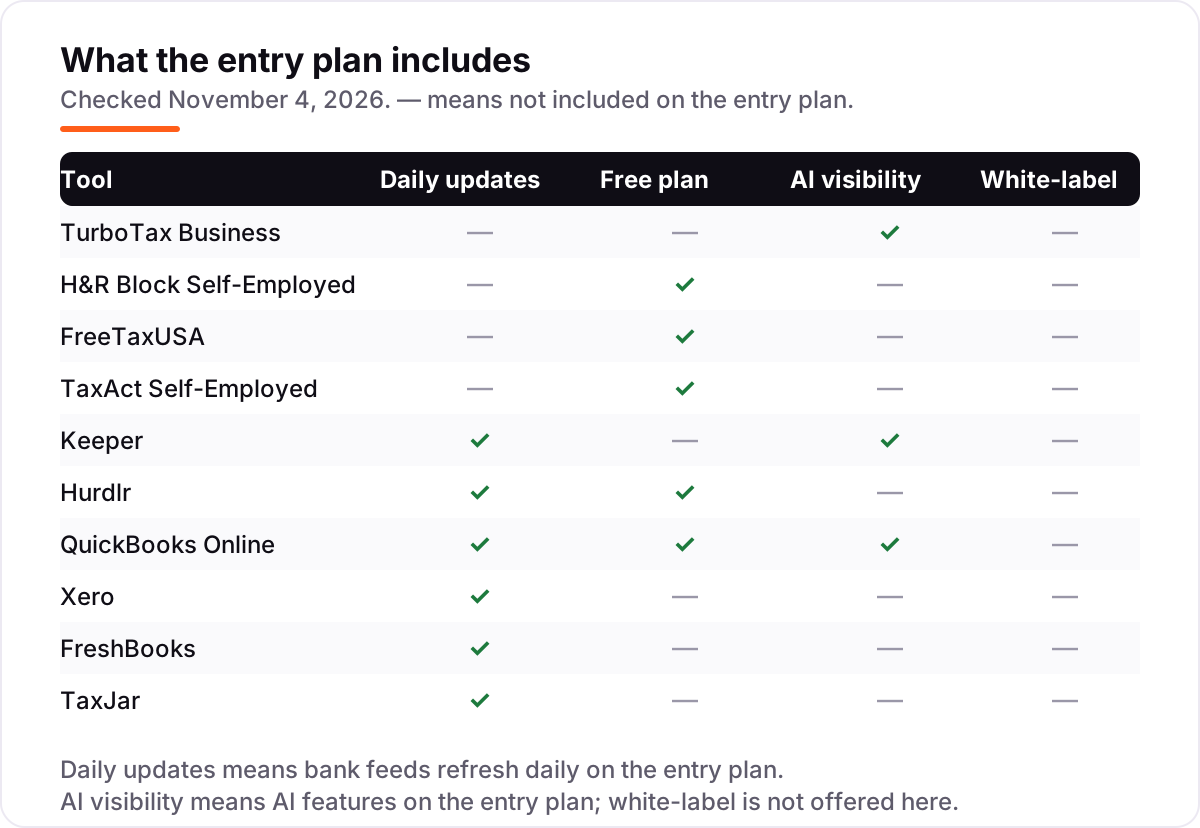
The confusion in this category is between three tools that all say "tax" on the box. Filing software — TurboTax Business, H&R Block, TaxAct, FreeTaxUSA — takes a year's numbers and produces a filed return. It is used for a week or two a year, it charges once per return, and when it is done the job is done. Tax tracking software — Keeper and Hurdlr — runs all year: it watches bank transactions and mileage, flags deductions as they happen, and estimates what you owe each quarter. It does not always file; Hurdlr Premium does not file at all.
Accounting software — QuickBooks Online, Xero, FreshBooks — is the third job: it keeps the double-entry ledger, the invoices and the bills, and produces the reports a preparer needs. It never files the return itself. A business that only buys filing software still has to reconstruct a year of spending in April; a business that only buys accounting software still has to file. The owners who have the calmest April are the ones with one tool from each group, or with Keeper, which is the only tool here that tracks and files in one subscription.
There is a second, quieter confusion: income tax versus sales tax. Everything in this list except TaxJar is about income tax — the return on what the business earned. TaxJar is about sales tax — the tax collected from customers in each state where the business sells. A seller who collects sales tax needs TaxJar in addition to a filing tool, not instead of one, and the two bills are separate.
Quick comparison: tool type by need
| Buyer | Best pick | Why |
|---|---|---|
| Sole proprietor filing Schedule C | TurboTax Business | Guided filing with expert help, from $79 federal |
| Self-employed filer on a budget | FreeTaxUSA | Free federal filing for every form, state $15.99 |
| Freelancer who wants deductions found | Keeper | AI deduction finding plus filing, $199 a year |
| Driver or gig worker with mileage | Hurdlr | Automatic mileage and tax estimates, Premium $9.99 a month |
| Business that wants tax-ready books | QuickBooks Online | Full ledger your accountant already knows, from $38 a month |
| Online seller collecting sales tax | TaxJar | Sales tax calculation and filing, Starter $39 a month |
Mistakes to avoid
- Budgeting on the federal price alone. State filing costs $15.99 to $39.99 extra on every filing tool here, and a second state doubles it. Compare tools on the federal-plus-one-state total, not the headline number.
- Buying filing software and forgetting the year. A filing tool cannot find deductions you never recorded. If nothing tracked the spending, April is a reconstruction job no matter which filer you buy — start Keeper or Hurdlr in January, not in March.
- Filing an S-corp return on the wrong tool. Only TurboTax Business and TaxAct Self-Employed file S-corp returns online in this list. Buying H&R Block or FreeTaxUSA for an S-corp means discovering the gap after you have already entered the numbers.
- Paying for sales tax software you do not need. TaxJar is a real cost — $468 a year before filing fees — and it only earns its keep if you collect sales tax in several states. A service business in one state should skip it entirely.
- Budgeting on the promo price. The 50% and 80% introductory discounts in this list last three to six months, and filing prices rise as the deadline approaches. The list price is what you pay when the discount ends, so compare tools on that number.
How we chose
We checked each vendor's own pricing page on November 4, 2026 and recorded the starting price exactly as shown, including the annual-billing figure where the page lists one, and we ranked the tools by fit for the most common buyer — a US sole proprietor filing a Schedule C — not by brand size. Four prices come from third-party sources because the vendor page could not be opened today, and we say so plainly: H&R Block's page returned an access error and TaxAct's pricing page would not load, so their figures ($85 and $109.99 federal) come from 2026 reviews that quote the vendor's prices; TaxJar's $39 Starter price comes from the vendor's help-center data as checked in September 2026, since the $19 figure still in circulation is stale; Hurdlr's $9.99 Premium price comes from an October 2026 comparison of the vendor's published prices. Filing tools charge once per return, not monthly — the price chart shows the federal filing price per return, and the worked example above prices the whole return including state. This list carries no review ratings because the G2 review pages returned errors when we tried to open them on November 4, 2026, and we would rather show no rating than a stale or estimated one. No vendor paid for a place in this list, and none of the links here are affiliate links.
What to do next
Start with the free plan or trial of your top pick and run one real month through it — your invoices, your mileage, your receipts — before you pay for a year. Check that the deductions it finds match the ones you actually claim, and that the export hands your preparer a clean file. If the books are sorted but new customers are not finding you, our monthly SEO service handles the visibility side — or compare providers in our guide to bookkeeping and payroll software for small business. Once your tools are in place, find out what's holding your rankings back.
Your stack only works if people find you
SerpAstra fixes what keeps your site off page one and makes it easy for AI assistants to recommend.
Get a free audit→Sources we checked (15)
- TurboTax business taxes — turbotax.intuit.com/small-business-taxes (checked November 4, 2026)
- H&R Block online tax filing — hrblock.com (checked November 4, 2026; vendor page returned 403, price from 2026 reviews)
- TaxAct — taxact.com (checked November 4, 2026; price from 2026 reviews)
- FreeTaxUSA — freetaxusa.com (checked November 4, 2026)
- Keeper pricing — keepertax.com/pricing (checked November 4, 2026)
- Hurdlr pricing — hurdlr.com/pricing (checked November 4, 2026)
- QuickBooks Online pricing — quickbooks.intuit.com/pricing (checked November 4, 2026)
- Xero pricing — xero.com/us/pricing-plans (checked November 4, 2026)
- FreshBooks pricing — freshbooks.com/pricing (checked November 4, 2026)
- TaxJar pricing — taxjar.com/pricing (checked November 4, 2026; price from vendor help-center data)
- FinanceBuzz H&R Block review — Self-Employed $85 federal, $37 state (2026)
- FinanceBuzz TaxAct review — Self-Employed $109.99 federal, $39.99 state (2026)
- Kintsugi — TaxJar Starter now $39/month, from the vendor help center (checked September 26, 2026)
- Koody — best expense-tracking apps for self-employed people, Hurdlr and Keeper prices (October 2026)
- FinanceBuzz FreeTaxUSA review — federal free, state $15.99, Deluxe $7.99 (2026)
Shamim
Founder of SerpAstra
A full-stack SEO and digital marketer who spends most days on Local SEO for dental practices, AI search visibility and lead generation.
Frequently asked questions
What is the best software for small business taxes?
TurboTax Business is the best fit for most sole proprietors: guided Schedule C filing with expert help from $79 federal. H&R Block Self-Employed is the cheaper big-brand option at $85 federal. FreeTaxUSA is the best free option — any federal return free, state returns $15.99 each.
How much does small business tax software cost?
Filing a federal return costs $0 to $109.99, plus $15.99 to $39.99 per state. Year-round tracking costs $9.99 to $38 a month, and Keeper bundles tracking with filing for $199 a year. A sole proprietor filing federal plus one state typically pays $15.99 to $149.98 for the return itself.
Is there really free tax software for small businesses?
Yes, for the federal return. FreeTaxUSA files any federal return free, including Schedule C, and charges $15.99 per state. TurboTax, H&R Block and TaxAct all have free plans too, but only for simple returns — a Schedule C pushes you to a paid tier on all three.
Do I need accounting software and tax software?
Usually yes, because they do different jobs. Accounting software like QuickBooks Online or Xero keeps the books tax-ready all year; filing software like TurboTax Business or FreeTaxUSA turns those books into a return once a year. Keeper is the exception here — it tracks and files in one subscription.
What is the difference between income tax and sales tax software?
Income tax software files the return on what your business earned — TurboTax Business, H&R Block, TaxAct and FreeTaxUSA do this. Sales tax software like TaxJar handles the tax you collect from customers in each state and files those returns separately. Sellers who collect sales tax need both.
When should I start tracking expenses for taxes?
On day one of the tax year, not in April. Deductions found as you spend — mileage, meals, supplies, home office — are the ones that survive, while April reconstructions miss most of them. Keeper and Hurdlr exist for exactly this: they flag deductions and estimate what you owe while the year is still running.
Can tax software file my S-corp return?
Only two online tools in this list can: TurboTax Business, from $639 for Expert Assist, and TaxAct Self-Employed. H&R Block and FreeTaxUSA handle sole proprietors and single-member LLCs on Schedule C, not S-corp or partnership returns. For a partnership or multi-member LLC, expect a preparer or a desktop product instead.
Free SEO and AI visibility audit
Find out what is holding your rankings back
Send us your site. Within 2 business days you get a written audit, an AI visibility check and a short fix list ranked by impact. Free, with no contract attached.
Request my free audit→Related guides
 Accounting, Tax & Finance7 Best Accounting Software for Small Businesses in 2026, ComparedCompare the 7 best accounting software for small businesses on price, free plans, bank feeds and AI features, with every price checked November 2, 2026.Read guide →
 Accounting, Tax & Finance10 Best Payroll Software for Small Business in 2026, ComparedCompare the 10 best payroll software for small business on base price, tax filing and free trials, with every price checked November 4, 2026.Read guide →
 Accounting, Tax & Finance10 Best Bookkeeping and Payroll Software for Small Business in 2026, ComparedThe 10 best bookkeeping and payroll software for small business, compared on real 2026 prices, per-employee payroll fees and free plans at your headcount.Read guide →