
9 Best Time Clock Apps for Small Business in 2026
Compare the 9 best time clock app for small business picks on price, GPS punches, scheduling and free plans, with every price checked November 6, 2026.
 Shamim Mia, Founder, SerpAstraLast verified November 6, 202612 min read
We compare pricing pages, documentation and public reviews. We never accept payment for rankings.

Key takeaways
- Homebase is the best free starting point for a single location with up to ten employees, at $0; Connecteam follows for field teams, free for up to ten users, and When I Work is the cheapest per-user pick at $2.50/user/month.
- The single most important buying factor is the pricing model: per-location, per-user and base-plus-per-user prices cannot be compared without a team size — a 10-person team pays $0 on Homebase or Connecteam and $120 a month on QuickBooks Time.
- GPS and photo verification decide the shortlist for remote or multi-site teams — Buddy Punch puts GPS on every punch, while Clockify and Hubstaff hold GPS for paid tiers.
- Payroll is billed on top of every subscription here, so budget for it separately — Homebase payroll is $49 a month plus $6 per employee, and Buddy Punch payroll is $49 plus $8 per user.
On this page
Quick comparison
| Tool | Best for | Starting price | Free plan |
|---|---|---|---|
| Homebase | Single-location hourly teams that want scheduling, time tracking and messaging free to start | $24/mo (annual) | Yes (free plan) |
| Connecteam | Field and deskless teams that want one mobile app for clock-ins, scheduling, forms and chat | $29/mo | Yes (free plan) |
| When I Work | Shift-heavy cafes, clinics and service crews that want scheduling first at the lowest per-user price | $2.50/user/mo | No (14-day trial) |
| Deputy | Retail, hospitality and healthcare teams that need scheduling rules, breaks and overtime handled properly | $5/user/mo | No (31-day trial) |
| Buddy Punch | Small businesses that have had time theft or disputed hours and want proof with every punch | $4.99/user/mo (annual) | No (14-day trial) |
| OnTheClock | Small shops that want every core time-tracking feature in one flat plan with no tiers to decode | $4/employee/mo | No (30-day trial) |
| Clockify | Small offices, agencies and contractors that bill by the hour and want a free, simple record | $3.99/user/mo (annual) | Yes (free plan) |
| QuickBooks Time | Businesses already running QuickBooks Online or Payroll that want hours to flow straight into pay runs | $10/user/mo | No (30-day trial) |
| Hubstaff | Remote and hybrid teams that want hours tied to activity, screenshots and project budgets | $4.99/user/mo (annual) | No (14-day trial) |
Make one of these tools?
We re-check this list every quarter. Send a correction, request a review, or ask about a clearly labeled sponsored spot.
Request a listingThe best time clock app for small business

Homebase
Best for: Single-location hourly teams that want scheduling, time tracking and messaging free to start
Homebase is built for hourly teams in restaurants, retail and other shift-based businesses, and its free plan reflects that focus. One location with up to ten employees gets scheduling, time tracking and team messaging at no cost, which is more than most free tiers offer. Staff clock in from a phone, tablet or point-of-sale system, and managers approve digital timesheets before payroll runs.
The cost picture changes as you grow. Paid plans charge per location, starting at $24 a month billed annually for Essentials, with Plus at $56 and All-in-One at $96, and payroll is an add-on at $49 a month plus $6 per employee paid. A single-location business with a stable team will find the free plan hard to beat. A multi-location business should price every site first, since per-location billing adds up fast.
What we like
- Free Basic plan covers scheduling, time tracking and team messaging for one location and up to 10 employees
- Per-location pricing stays flat as you hire — Essentials is $24/month billed annually with unlimited employees
- POS integrations with Square, Clover and Toast move hours straight to payroll
- PIN and photo clock-in plus geofencing on Essentials catch early and off-site punches
Watch out for
- Paid plans charge per location, so a second site doubles the bill
- Payroll is a paid add-on at $49/month plus $6 per employee paid
- Advanced reporting and hiring tools wait for the Plus and All-in-One tiers

Connecteam
Best for: Field and deskless teams that want one mobile app for clock-ins, scheduling, forms and chat
Connecteam suits teams that rarely sit at a desk. Field crews, cleaners, delivery staff and care workers clock in from a phone with a GPS location stamp, see their schedule, complete forms and message the team in the same app. The free Small Business Plan covers up to ten users with all core features, which makes it a genuine trial for a small crew rather than a demo.
Paid plans start at $29 a month for the first thirty users on annual billing, with Advanced at $49 and Expert at $99 for the same user count. Geofencing, which restricts clock-ins to set sites, sits on higher tiers, so a business that needs strict location control should price that tier, not the entry plan. Connecteam fits a mobile team that wants one crew app, not just a clock.
What we like
- Free Small Business Plan covers up to 10 users with all core features, not a cut-down demo
- Flat $29/month for the first 30 users makes the bill predictable as the crew grows
- GPS clock-in with location stamps plus scheduling, forms, tasks and chat in one app
- Mobile-first design suits cleaners, delivery staff, care workers and construction crews
Watch out for
- The $29 Basic hub covers one hub only — adding hubs multiplies the bill
- Geofencing and auto-scheduling wait for the Advanced and Expert tiers
- No native payroll engine; payroll runs through integrations

When I Work
Best for: Shift-heavy cafes, clinics and service crews that want scheduling first at the lowest per-user price
When I Work starts with scheduling, and the time clock follows the schedule. Managers build shifts, staff claim open shifts and swap with approval, and clock-ins tie back to the shift they were scheduled for, which makes early clock-ins and missed shifts easy to spot. The starting price of $2.50 per user a month for a single location is the lowest per-user figure on this list.
Read the plan before you buy, because multi-location teams pay $5 per user a month, double the single-location rate, and live GPS tracking is not a strength here compared with Buddy Punch or Connecteam. When I Work fits a shift-heavy small business, such as a cafe, clinic or service crew, that values scheduling first and can live without strict GPS enforcement.
What we like
- Lowest per-user price here at $2.50/user/month for a single location
- Scheduling, time tracking and team messaging are included in every plan
- Staff claim open shifts and swap with approval, cutting manager admin
- Payroll integrations move approved timesheets straight to pay runs
Watch out for
- Multi-location teams pay $5/user/month, double the single-location rate
- Live GPS tracking is weaker than Buddy Punch or Connecteam
- Reviewers report occasional app glitches and heavy notifications

Deputy
Best for: Retail, hospitality and healthcare teams that need scheduling rules, breaks and overtime handled properly
Deputy is the choice when scheduling rules matter as much as the clock itself. Its auto-scheduler fills shifts, staff swap shifts in the app, and managers get break and overtime alerts tied to labour rules. Clock-ins can include photo verification, and timesheets flow into payroll integrations with systems like Gusto, ADP and Xero.
Pricing starts at $5 per user a month for Lite, with Core at $6.50 and Pro at $9, alongside a $30 monthly minimum spend per invoice. That per-user model suits a team where headcount is stable, but it can surprise a business with seasonal staff. Deputy fits retail, hospitality and healthcare teams that need scheduling depth and compliance help, not a team that only needs a simple punch button.
What we like
- Auto-scheduler fills shifts and staff swap them in the app with manager approval
- Break and overtime alerts tie to labour rules, and timesheets flow to Gusto, ADP and Xero
- Photo verification at clock-in plus kiosk mode for shared devices
- Deputy AI flags demand patterns, and the 31-day trial covers a full pay cycle
Watch out for
- A $30/month minimum spend applies per invoice, so very small teams pay the floor
- Biometric clocking and advanced labour-law tools wait for Pro at $9/user/month
- Some reviewers report timesheet approval quirks and too many notifications

Buddy Punch
Best for: Small businesses that have had time theft or disputed hours and want proof with every punch
Buddy Punch is built around one problem: making sure the person clocking in is the person on the schedule. Every punch records a GPS location, and higher tiers add geofencing, facial recognition on iOS, QR code punching and kiosk mode. That verification layer is why small businesses with remote or multi-site staff pick it over a basic timer.
The price needs adding up honestly. Starter costs $19 a month plus $4.99 per user a month on annual billing, and scheduling sits on Pro while real-time GPS is an add-on on lower tiers. There is no free plan, only a 14-day trial. Buddy Punch fits a business that has had time theft or disputed hours and wants proof with every punch, and it is worth the base fee only if that verification is a real problem for you.
What we like
- Every punch records a GPS location, and Pro adds geofencing and photo verification
- Facial recognition on iOS and QR code punching stop buddy punching at the door
- PTO tracking, job costing and payroll integrations are included from Starter
- Highest G2 score here at 4.8/5 from 416 reviews
Watch out for
- The $19/month base fee applies on top of the per-user price on every plan
- Scheduling and geofencing wait for Pro at $6.99/user/month; real-time GPS costs extra on lower tiers
- No free plan, only a 14-day trial, and built-in payroll is a $49/month plus $8/user add-on

OnTheClock
Best for: Small shops that want every core time-tracking feature in one flat plan with no tiers to decode
OnTheClock keeps its offer deliberately simple. One plan includes mobile, browser and kiosk clock-ins, GPS location tags, time-off tracking and drag-and-drop scheduling, at $5 a month plus $4 per employee a month. That flat structure makes the monthly total easy to predict for a small team, and the 30-day trial gives enough time to run a full payroll cycle before paying.
The trade is depth. Scheduling covers the basics but does not match Deputy or When I Work for auto-scheduling and shift marketplace features, and native payroll is an add-on rather than built in. OnTheClock fits a small business that wants a reliable, GPS-verified clock with payroll-ready exports and does not need a full workforce suite.
What we like
- One plan includes mobile, browser and kiosk clock-ins, GPS tags, scheduling and PTO
- The flat $5 base plus $4 per employee makes the monthly total easy to predict
- Configurable photo-punch controls and overtime alerts are included, not upsold
- Payroll integrations with Gusto, QuickBooks, ADP and Paychex, plus optional full-service payroll
Watch out for
- No free plan, only a 30-day trial, and full-service payroll costs $40/month plus $6 per employee
- Scheduling covers the basics but not Deputy's auto-scheduling or shift marketplace
- No offline punching for crews without a connection

Clockify
Best for: Small offices, agencies and contractors that bill by the hour and want a free, simple record
Clockify is the odd one out on this list. It is a time tracker first, built for billable hours against projects and clients, rather than a shift clock with kiosk and GPS enforcement. Its free plan covers basic tracking for up to five users, and paid plans start at $3.99 per user a month on annual billing, with GPS tracking on Pro and above.
That profile suits a small office, agency or contractor team that bills by the hour and needs a free, simple record. It suits a retail or field team less well, since there is no shift scheduling and location controls are weaker than Buddy Punch, Connecteam or QuickBooks Time. Choose Clockify when the job is tracking billable time, and a dedicated clock app when the job is proving who was on site and when.
What we like
- Free plan covers unlimited projects and time tracking for up to 5 users
- Basic at $3.99/user/month billed annually adds Kiosk clock-in, billable rates and report exports
- Timer, timesheet and calendar views with 100+ integrations keep billing simple
- Kiosk pricing lets crew members clock in for $0.79/month while only managers pay full price
Watch out for
- Free plan stops at 5 users, so a 10-person team pays for Basic
- No shift scheduling — it tracks billable time, not rosters
- GPS tracking waits for Pro at $7.99/user/month, and location controls are weaker than dedicated clocks

QuickBooks Time
Best for: Businesses already running QuickBooks Online or Payroll that want hours to flow straight into pay runs
QuickBooks Time, formerly TSheets, is the obvious pick for a business already running QuickBooks. Timesheets, GPS-tracked mobile clock-ins, job codes and scheduling sync directly into QuickBooks Online and QuickBooks Payroll, which removes the export and re-entry step that causes payroll errors. Field teams can clock in by job site, and managers approve time in the same system that runs payroll.
The price is the barrier. At $20 a month plus $10 per user a month, a ten-person team pays $120 a month before the QuickBooks subscription itself, which is more than Homebase, Connecteam or When I Work for the same headcount. QuickBooks Time fits a business already committed to QuickBooks, where the saved payroll time justifies the premium, not a team shopping for the cheapest clock alone.
What we like
- Native sync with QuickBooks Online and QuickBooks Payroll removes export and re-entry
- GPS tracking and geofencing are included on all plans, with job and project time tracking
- Scheduling, overtime alerts and mileage tracking sit in the same system as payroll
- The largest review base here at 1,449 G2 reviews, rated 4.5/5
Watch out for
- The most expensive option here for a small team once the base fee and per-user price add up
- Requires a QuickBooks Online subscription for full value — the clock alone is not the whole cost
- Overtime rules may need manual checks, and Elite's $40 base fee doubles the entry cost

Hubstaff
Best for: Remote and hybrid teams that want hours tied to activity, screenshots and project budgets
Hubstaff is a time tracking platform for remote and hybrid teams that need more than tracked hours. It turns work hours into insights, with activity levels, app and URL tracking, optional screenshots and automated timesheets, and it connects time to project budgets and payments through PayPal, Wise, Deel and Gusto. Scheduling and GPS tracking arrive on higher tiers.
Starter costs $4.99 per user a month billed annually, with a two-seat minimum, so a solo user still pays $9.98 a month, and monthly billing is $7 per user. There is no free plan on the pricing page, only a 14-day trial, and the monitoring can feel intrusive, so set expectations with staff first. Hubstaff fits a distributed team that wants proof of work alongside hours, not a shift team that only needs a punch button.
What we like
- Time tracking with activity levels, app and URL tracking and optional screenshots
- Automated timesheets, invoicing and payments through PayPal, Wise, Deel and Gusto
- Geofencing and GPS tracking for field staff, with scheduling on the Team plan
- Project budgets and workforce analytics connect hours to what work actually costs
Watch out for
- No free plan on the pricing page — only a 14-day trial (a 1-seat free plan exists in the help centre)
- A 2-seat minimum means a solo user still pays for two seats, $9.98/month billed annually
- Activity monitoring and screenshots can feel intrusive to staff, so set expectations first
The best time clock app for small business is the one that matches how your team actually works: a cafe with ten staff on one rota needs a different tool than a cleaning crew spread across twenty sites. We ranked the nine tools below by fit for the most common buyer — a US small business with hourly staff — starting with the free plans and ending with the specialist picks, and every price was checked on the vendor's own pricing page on November 6, 2026.
How to choose the best time clock app for small business
- Count your locations first. Homebase charges per location, so one site is cheap and five sites are not; per-user tools like When I Work and Deputy charge by headcount instead.
- Count your staff and their pattern. A 10-person team pays $0 on Homebase or Connecteam, $25 on When I Work and $120 on QuickBooks Time — the same team, very different bills.
- Decide what proof you need. GPS, geofencing and photo checks matter for field and multi-site teams; a single-site shop can live with a PIN or a simple mobile punch.
- Check scheduling depth. Deputy and When I Work build and fill rosters; Buddy Punch and OnTheClock schedule the basics; Clockify does not schedule at all.
- Think about payroll. QuickBooks Time syncs natively with QuickBooks, and the rest export to Gusto, ADP or Paychex — ask your payroll provider which export it accepts before you buy.
A time clock is one system in your stack, not the whole stack. If the business also needs to be found online, our monthly SEO service handles the visibility side. And before you publish new pages for the services you sell, run your titles through the free SERP snippet preview tool — it shows exactly how the title and description will look in Google.
Whatever you shortlist, try it with real staff before you pay. The free plans and trials in this list are long enough to run one genuine pay cycle — your shifts, your sites, your payroll export — and that cycle tells you more than any review can. Check two things in the trial: that punches land where they should, and that the timesheet export matches what your payroll provider expects.
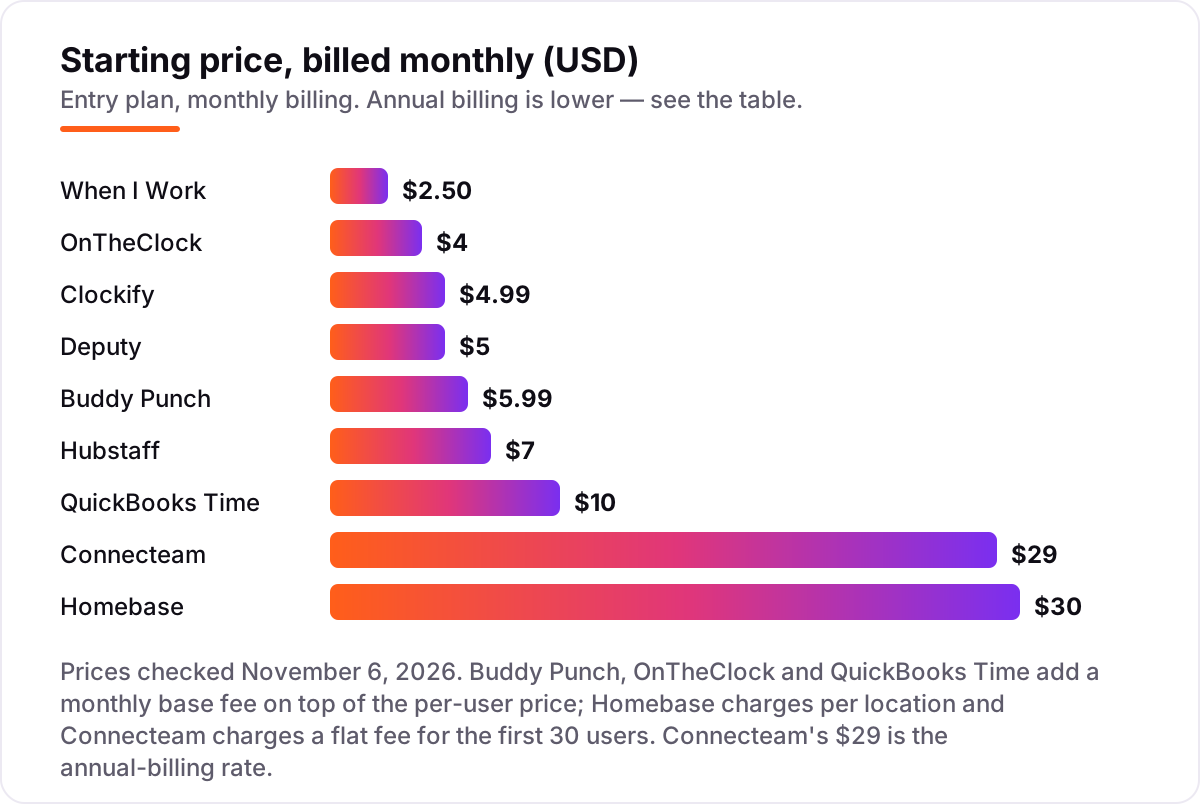
Time clock app for small business pricing: what you will actually pay
Take a 10-person team at one location. On monthly billing, the clock costs $0 on Homebase Basic or Connecteam's Small Business Plan, $25 on When I Work, $45 on OnTheClock, $50 on Deputy, $49.90 on Clockify Basic, $70 on Hubstaff Starter, $78.90 on Buddy Punch Starter and $120 on QuickBooks Time Premium — before the QuickBooks subscription itself.
Over a year, that is $0 on Homebase or Connecteam, $300 on When I Work, $478.80 on Clockify billed annually, $540 on OnTheClock, $598.80 on Hubstaff billed annually, $600 on Deputy, $826.80 on Buddy Punch billed annually and $1,440 on QuickBooks Time. The same ten people and the same shifts cost $0 at the free end and $1,440 at the dear end — a gap that comes entirely from the pricing model, not from features.
Three costs sit outside every number above. First, the introductory discounts — 50% off for three months on QuickBooks Time — end, so budget on the list price. Second, payroll: Homebase charges $49 a month plus $6 per employee, OnTheClock $40 plus $6, and Buddy Punch $49 plus $8 per user. Third, the plan limits: Clockify's free plan stops at five users, so a ten-person team pays for Basic, and Deputy's $30 monthly minimum means a two-person team pays $30, not $10. If you run payroll for a small business rather than just tracking time, compare the payroll side too — see our guide to the best payroll software for small business.
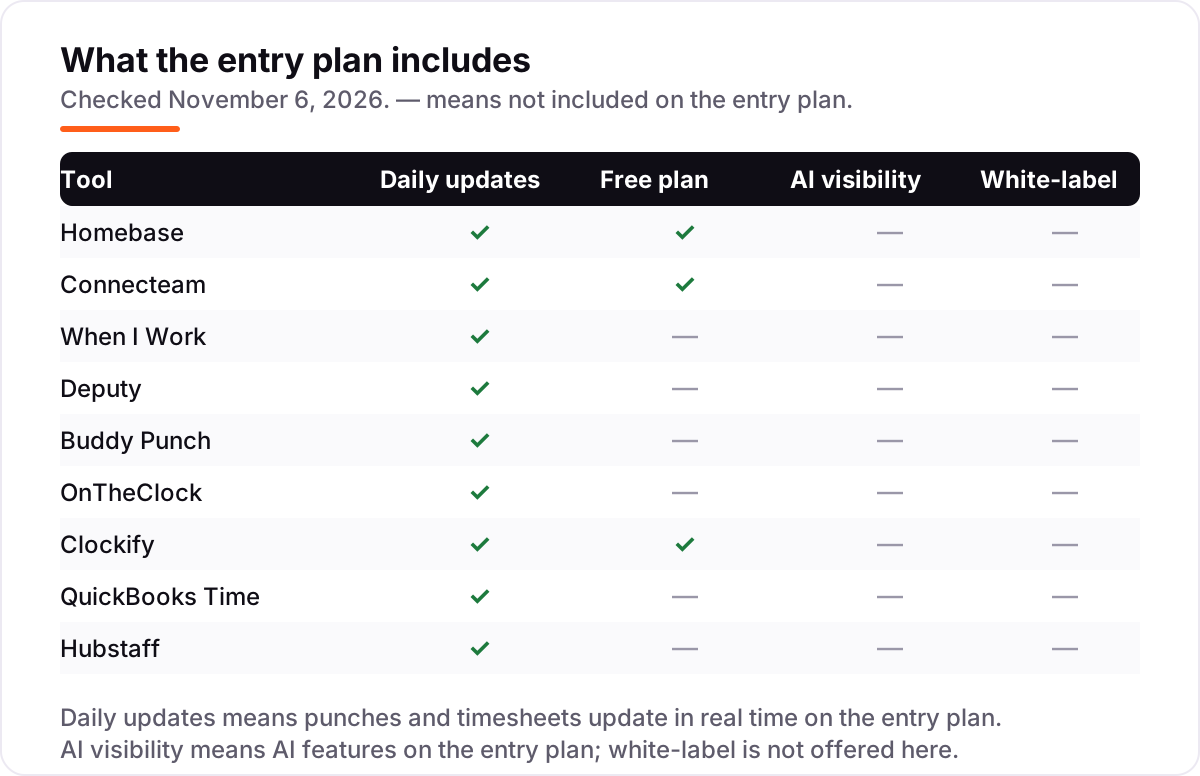
Know the difference: a time clock vs a time tracker
The confusion in this category is between proving attendance and measuring work. A time clock app proves who was where and when: staff punch in from a set place, with GPS, photo or PIN checks, and the hours flow to payroll. A time tracker records how long work took, usually against projects and clients, for billing. Clockify and Hubstaff are trackers first; Homebase, Buddy Punch and OnTheClock are clocks first.
There is a second, quieter confusion: scheduling is not time tracking. A scheduling app builds rosters and fills shifts; a time clock records the hours actually worked against those shifts. When I Work and Deputy do both well, which is why they lead on scheduling. Buddy Punch and OnTheClock schedule the basics. Clockify does not schedule at all, so a team that buys it for rosters will be disappointed no matter how good the timer is.
A third distinction worth knowing is GPS tracking versus geofencing. GPS tracking stamps a location on each punch, so you can see where staff were when they clocked in. Geofencing goes further and blocks punches outside a set site, so staff cannot clock in from home. Buddy Punch puts GPS on every punch and adds geofencing on Pro; QuickBooks Time includes both on every plan; Connecteam holds geofencing for Advanced and Expert. If your team works on site, GPS stamps are enough; if they work across town, geofencing is the feature to price.
Quick comparison: tool type by need
| Buyer | Best pick | Why |
|---|---|---|
| Single location, hourly team on a budget | Homebase | Free Basic plan, Essentials is $24/location/month billed annually |
| Field or deskless crew | Connecteam | Free for up to 10 users, Basic is $29/month |
| Scheduling-first team on a budget | When I Work | $2.50/user/month for a single location |
| Compliance-heavy shift operation | Deputy | $5/user/month with break and overtime alerts |
| Stopping buddy punching | Buddy Punch | GPS on every punch, $19/month plus $4.99/user/month |
| Simplest flat price | OnTheClock | One plan, $5/month plus $4/employee/month |
| Billable hours and free tracking | Clockify | Free for up to 5 users, Basic is $3.99/user/month billed annually |
| Already on QuickBooks | QuickBooks Time | Native payroll sync, $20/month plus $10/user/month |
| Remote team needing proof of work | Hubstaff | Activity tracking, $4.99/user/month billed annually |
Mistakes to avoid
- Budgeting on the promo price. The 50% introductory discount on QuickBooks Time lasts three months. The list price is what you pay in month four, so compare tools on that number.
- Buying on the free plan, then finding the headcount cap. Clockify's free plan stops at five users and Homebase Basic at ten employees, so a growing team pays sooner than the $0 headline suggests — count your staff before you count the saving.
- Ignoring the base fee. Buddy Punch, OnTheClock and QuickBooks Time all add a monthly base fee on top of the per-user price. A $4.99 per-user rate is $68.90 a month for ten people once the $19 base fee is in.
- Paying for GPS you do not need. Geofencing and real-time GPS sit on higher tiers at Connecteam, Buddy Punch and Clockify. A single-site shop that buys Pro for geofencing pays for a problem it does not have.
- Forgetting the second location. Homebase charges per location, so a second site doubles the bill, and When I Work doubles its per-user rate for multi-location teams. Price every site before you commit to a tool for the first.
How we chose
We checked each vendor's own pricing page on November 6, 2026 and recorded the starting price exactly as shown, including the annual-billing figure where the page lists one, and we ranked the tools by fit for the most common buyer — a US small business with hourly staff — not by brand size. Ratings come from G2 review pages crawled within the last few days and checked November 6, 2026. No vendor paid for a place in this list, and none of the links here are affiliate links.
What to do next
Start with the free plan or trial of your top pick and run one real pay cycle through it. Check that punches land where they should and the timesheet export matches what your payroll provider expects before you commit to a year. If the clock is sorted but new customers are not finding you, our monthly SEO service handles the visibility side — or compare providers in our guide to payroll software for small business. Once your tools are in place, find out what's holding your rankings back.
Your stack only works if people find you
SerpAstra fixes what keeps your site off page one and makes it easy for AI assistants to recommend.
Get a free audit→Sources we checked (18)
- Homebase pricing — joinhomebase.com/pricing (checked November 6, 2026)
- Connecteam pricing — connecteam.com/pricing (checked November 6, 2026)
- When I Work pricing — wheniwork.com/pricing (checked November 6, 2026)
- Deputy pricing — deputy.com/pricing (checked November 6, 2026)
- Buddy Punch pricing — buddypunch.com/pricing (checked November 6, 2026)
- OnTheClock pricing — ontheclock.com/pricing (checked November 6, 2026)
- Clockify pricing — clockify.me/pricing (checked November 6, 2026)
- QuickBooks Time pricing — quickbooks.intuit.com/time-tracking/pricing (checked November 6, 2026)
- Hubstaff pricing — hubstaff.com/pricing (checked November 6, 2026)
- Homebase reviews — g2.com/products/homebase/reviews (checked November 6, 2026)
- Connecteam reviews — g2.com/products/connecteam/reviews (checked November 6, 2026)
- When I Work reviews — g2.com/products/when-i-work/reviews (checked November 6, 2026)
- Deputy reviews — g2.com/products/deputy/reviews (checked November 6, 2026)
- Buddy Punch reviews — g2.com/products/buddy-punch/reviews (checked November 6, 2026)
- OnTheClock reviews — g2.com/products/ontheclock-employee-time-clock/reviews (checked November 6, 2026)
- Clockify reviews — g2.com/products/clockify/reviews (checked November 6, 2026)
- QuickBooks Time reviews — g2.com/products/quickbooks-time/reviews (checked November 6, 2026)
- Hubstaff reviews — g2.com/products/hubstaff/reviews (checked November 6, 2026)
Shamim
Founder of SerpAstra
A full-stack SEO and digital marketer who spends most days on Local SEO for dental practices, AI search visibility and lead generation.
Frequently asked questions
What is the best time clock app for small business?
Homebase is the best fit for most small businesses: a free plan for one location and up to ten employees, with scheduling, time tracking and messaging included. Connecteam is the better pick for field teams, since its free plan covers up to ten users and its GPS clock works anywhere. When I Work is the cheapest per-user option at $2.50 a month.
How much does a time clock app cost for a small business?
Entry prices run from $0 to $120 a month for a 10-person team. Homebase and Connecteam are free at that size, When I Work costs $25, OnTheClock $45, Deputy $50, Clockify $49.90 billed monthly and Buddy Punch $78.90. QuickBooks Time is the dearest at $120 a month before the QuickBooks subscription itself. Base fees and per-location charges decide the real total.
Is there a free time clock app for small business?
Yes, with limits. Homebase Basic is free for one location and up to ten employees, Connecteam's Small Business Plan is free for up to ten users, and Clockify is free for up to five users. All three are real working clocks, not trials. Past those limits you pay: Homebase Essentials $24 a location a month, Connecteam Basic $29 a month, Clockify Basic $3.99 a user a month.
What is the difference between a time clock app and a time tracker?
A time clock app proves who was where and when: staff punch in from a place, with GPS, photo or PIN checks, and the hours flow to payroll. A time tracker records how long work took, against projects and clients, for billing. Clockify and Hubstaff are trackers first; Homebase, Buddy Punch and OnTheClock are clocks first. Pick the clock when attendance is the job, and the tracker when billing is.
Do time clock apps work with payroll?
Most do, through integrations or paid add-ons. QuickBooks Time syncs natively with QuickBooks Online and QuickBooks Payroll, which is its main selling point. Homebase, Deputy, Buddy Punch, OnTheClock and When I Work all export approved timesheets to Gusto, ADP, QuickBooks or Paychex. Only Homebase and OnTheClock sell their own full-service payroll, at $49 and $40 a month respectively, plus a per-employee fee.
What should I look for in a time clock app?
Start with proof: GPS, geofencing or photo checks if staff work off site, and a kiosk mode if they share one device. Then check scheduling depth, overtime rules and payroll exports, since those decide whether the app replaces spreadsheets or just moves them. Finally, run the trial with real staff and real shifts, and check the bill for a full team, not just the headline per-user price.
Can I switch time clock apps later?
Yes, but plan the move between pay periods. Export your employee list, schedules, approved timesheets and PTO balances from the old app, then set up the new clock, enrol staff and run both systems for one pay cycle before cutting over. Switching mid-cycle means reconciling two sets of hours, so pick a quiet week and tell staff the new punch routine before day one.
Free SEO and AI visibility audit
Find out what is holding your rankings back
Send us your site. Within 2 business days you get a written audit, an AI visibility check and a short fix list ranked by impact. Free, with no contract attached.
Request my free audit→Related guides
 Accounting, Tax & Finance10 Best Payroll Software for Small Business in 2026, ComparedCompare the 10 best payroll software for small business on base price, tax filing and free trials, with every price checked November 4, 2026.Read guide →
 Accounting, Tax & Finance10 Best Bookkeeping and Payroll Software for Small Business in 2026, ComparedThe 10 best bookkeeping and payroll software for small business, compared on real 2026 prices, per-employee payroll fees and free plans at your headcount.Read guide →
 Accounting, Tax & Finance10 Best Small Business Payroll Software for Startups in 2026, ComparedCompare the 10 best small business payroll software for startups on price, tax filing and contractor pay, with every price checked November 4, 2026.Read guide →