
7 Best Transactional Email Software in 2026, Compared
Compare the 7 best transactional email software options on price, free plans, deliverability and speed, with every price checked November 6, 2026.
 Shamim Mia, Founder, SerpAstraLast verified November 6, 202614 min read
We compare pricing pages, documentation and public reviews. We never accept payment for rankings.

Key takeaways
- Postmark is the best fit for most senders at $15/month; Amazon SES is the cheapest at volume at $0.10 per 1,000 emails, and Resend is the best free start at 3,000 emails a month.
- Twilio SendGrid has no free plan any more — only a 60-day trial — so small senders should start on Resend, Mailjet or Brevo instead.
- The single most important buying factor is the volume your plan actually covers: entry tiers range from 5,000 to 50,000 emails a month, and overage rates decide what you pay next.
- Transactional email is not marketing email: the tools here send password resets, receipts and alerts, and mixing the two streams hurts deliverability.
On this page
Quick comparison
| Tool | Best for | Starting price | Free plan |
|---|---|---|---|
| Postmark | Small businesses and apps that send password resets, receipts and alerts where every email must arrive fast | $15/mo | Yes (100/mo free) |
| Twilio SendGrid | Teams already on Twilio or sending high volumes that want a proven email API with dedicated IPs | $19.95/mo | No (60-day trial) |
| Mailgun | Developers who want a flexible API, inbound routing and email validation in one account | $15/mo | Yes (100/day free) |
| Amazon SES | High-volume senders with the expertise to manage deliverability who want the lowest cost per email | $0.10/1,000 | Yes (free tier) |
| Resend | Developer teams building in React, Next.js or TypeScript who want templates kept as code | $20/mo | Yes (3,000/mo free) |
| Brevo | Small businesses that want transactional email, marketing campaigns, SMS and CRM on one cheap account | $9/mo | Yes (300/day free) |
| Mailjet | European teams and small marketing teams that want collaborative template building with solid APIs | $9/mo | Yes (6,000/mo free) |
Make one of these tools?
We re-check this list every quarter. Send a correction, request a review, or ask about a clearly labeled sponsored spot.
Request a listingThe best transactional email software

Postmark
Best for: Small businesses and apps that send password resets, receipts and alerts where every email must arrive fast
Postmark exists for one job: getting transactional email into the inbox fast. Basic costs $15 a month for 10,000 emails, with extra emails at $1.80 per 1,000, and every paid plan starts at the same 10,000-email base — Pro at $16.50 and Platform at $18 add features rather than volume. Transactional and broadcast mail run on separate streams, so a newsletter cannot damage the reputation of your password resets.
The trade-offs are price at volume and strictness. At 50,000 emails a month Basic costs about $87 once overage is added, far more than Resend or SendGrid, and Postmark reviews new accounts by hand and turns away senders that look like marketing mail. Buy Postmark when each email matters more than its price — resets, receipts and two-factor codes — and look elsewhere when you also send bulk mail.
What we like
- Separate streams keep transactional mail apart from broadcast mail, protecting inbox placement
- Fast delivery and message-level analytics that show exactly what happened to each email
- Simple volume pricing with no contacts, seats or send multipliers to work out
- Free Developer plan with 100 emails a month that never expires
Watch out for
- At 50,000 emails a month Basic costs about $87 with overage, far more than Resend or SendGrid
- New accounts are reviewed by hand and marketing mail is refused, so approval can take time
- No marketing suite and no annual billing, so there is no discount for paying yearly

Twilio SendGrid
Best for: Teams already on Twilio or sending high volumes that want a proven email API with dedicated IPs
Twilio SendGrid is the established choice: the email API most developers have already used, now sold under Twilio. Essentials costs $19.95 a month for 50,000 emails, the largest entry allowance in this list, and Pro costs $89.95 for 100,000 emails with a dedicated IP included. Templates, analytics and deliverability tools are solid, and the Twilio account also covers SMS, voice and identity.
The catch is the missing free plan. Twilio retired the permanent free tier in May 2025, so new accounts get a 60-day trial at 100 emails a day and then must pay $19.95 a month even for a quiet app. Essentials also runs on shared IPs and keeps only 3 days of searchable history. Buy SendGrid when you already run on Twilio or expect real volume soon; start elsewhere when the app is small.
What we like
- Proven at massive scale with detailed analytics, templates and deliverability tooling
- Essentials covers 50,000 emails a month, the largest entry allowance in this list
- Sits inside Twilio, so email, SMS, voice and identity run on one account
- Pro includes a dedicated IP with automated warm-up from $89.95 a month
Watch out for
- No permanent free plan since May 2025, only a 60-day trial at 100 emails a day
- Essentials uses shared IPs and keeps only 3 days of searchable activity history
- Dedicated IPs, email validation and extra support are paid add-ons or higher tiers

Mailgun
Best for: Developers who want a flexible API, inbound routing and email validation in one account
Mailgun is the developer's workhorse: a clean API for sending, tracking and routing transactional email, with inbound parsing that turns replies into app events. Basic costs $15 a month for 10,000 emails, Foundation costs $35 for 50,000 with templates and a dedicated IP, and Scale costs $90 for 100,000. The free plan covers 100 emails a day with one custom domain and full API access.
The limits to watch are retention and add-ons. Log history is short on the entry plans, dedicated IPs cost $59 a month each, and email validation is a paid extra on Basic and Foundation. Support also varies by tier. Choose Mailgun when your app lives in the API and needs inbound routing or validation; choose Postmark when delivery speed matters more than routing.
What we like
- Developer-first API with granular event webhooks and flexible inbound routing
- Email validation service keeps lists clean and protects sender reputation
- Free plan covers 100 emails a day with one custom domain and full API access
- EU sending region available for teams that need data to stay in Europe
Watch out for
- Log retention is short on the entry plans, so old delivery records disappear fast
- Dedicated IPs cost $59 a month each as an add-on on the plans that support them
- Support quality varies by tier, with phone and chat reserved for Scale

Amazon SES
Best for: High-volume senders with the expertise to manage deliverability who want the lowest cost per email
Amazon SES is raw sending infrastructure at a price nothing else here touches: $0.10 per 1,000 emails, with no monthly minimum and no platform fee. At 50,000 emails a month the bill is about $5, against $20 on Resend and $19.95 on SendGrid. New AWS customers get 3,000 message charges free a month for the first 12 months, and SES plugs into Lambda, SNS and CloudWatch for the rest of the stack.
The price is low because the work is yours. There are no templates, no marketing interface and no deliverability team watching your reputation — dedicated IPs cost $24.95 a month and the Virtual Deliverability Manager is $0.07 per 1,000 extra. New accounts also start in a sandbox and must request production access. Buy SES when you send real volume and can manage reputation yourself.
What we like
- Cheapest sending in this list by a wide margin at $0.10 per 1,000 emails
- No monthly minimum, no platform fee and no tier to negotiate — you pay for what you send
- Rock-solid AWS infrastructure that scales to millions of emails a day
- Integrates with the rest of AWS, including Lambda, SNS and CloudWatch
Watch out for
- Bare-bones console with no built-in templates or marketing interface
- Deliverability management, bounce handling and reputation monitoring are your job
- New accounts start in a sandbox and must request production access before sending

Resend
Best for: Developer teams building in React, Next.js or TypeScript who want templates kept as code
Resend is the modern developer favourite: a clean API, documentation that sets the standard, and React Email for building templates in code instead of a drag-and-drop editor. The free plan sends 3,000 emails a month with no expiry, and Pro costs $20 a month for 50,000 emails with no daily cap. For a new app on a React or Next.js stack, setup takes minutes rather than an afternoon.
The trade-off is youth. Resend launched in 2023, so its deliverability track record is shorter than Postmark's or SendGrid's, and there is no email address validation and less deliverability guidance at scale. The free plan's 100-a-day cap also bites on launch days. Pick Resend for a new app where developer experience matters most; pick Postmark when the mail cannot fail.
What we like
- Cleanest developer experience here, with React Email templates written in code
- Most generous free tier in this list at 3,000 emails a month with no expiry
- Pro covers 50,000 emails for a flat $20 with no daily cap and $0.90 per 1,000 overage
- Readable logs, webhooks and inbound email included on every plan
Watch out for
- Shorter deliverability track record than Postmark or SendGrid, which started years earlier
- The free plan caps at 100 emails a day, which is tight on launch days
- No email address validation and thinner deliverability guidance at scale

Brevo
Best for: Small businesses that want transactional email, marketing campaigns, SMS and CRM on one cheap account
Brevo, formerly Sendinblue, is the all-in-one option: one account for transactional email, marketing campaigns, SMS, WhatsApp and a light CRM. The transactional API and SMTP relay are included on every plan and share the monthly volume, so Starter at $9 a month covers 5,000 emails of any kind. The free plan sends 300 emails a day and stores up to 100,000 contacts at $0.
The catches are the caps and the add-ons. Starter stores only 500 contacts at the 5,000-email tier, removing the Brevo logo costs $12 a month extra, and automation waits for Standard at $18 a month. Pick Brevo when one cheap account for every channel beats a specialist for one; pick Postmark or Resend when transactional mail is the whole job.
What we like
- Transactional API and SMTP relay included on every plan, sharing the monthly volume
- Free plan stores up to 100,000 contacts and sends 300 emails a day at $0
- One account covers email, SMS, WhatsApp, chat and a light sales CRM
- Cheapest paid entry here at $9 a month for 5,000 emails
Watch out for
- Removing the Brevo logo costs $12 a month extra on Starter
- Automation is not included on Starter; it starts on Standard at $18 a month
- Low tiers cap stored contacts at 500, so a large list forces a higher email tier

Mailjet
Best for: European teams and small marketing teams that want collaborative template building with solid APIs
Mailjet combines approachable email building with capable transactional APIs: a marketing team designs templates visually while developers send programmatically. The free plan covers 6,000 emails a month, Starter costs $9 for 8,000 with no daily cap, and Essential costs $19 for 15,000 with unlimited contacts. Real-time collaboration — editing and commenting on the same template — is the feature rivals charge extra for.
The limits are the daily cap and the tier gates. The free plan stops at 200 emails a day, so a single large send spreads over days, and automation, A/B testing and landing pages all wait for Premium at $29 a month. Choose Mailjet when a team designs email together and European data practices matter; choose Brevo when you also need SMS and CRM in the same account.
What we like
- Real-time collaboration lets a team edit and comment on templates together
- Free plan covers 6,000 emails a month with API, SMTP relay and webhooks included
- Starter at $9 a month removes the daily cap and the Mailjet branding
- European company with GDPR-conscious data practices, now part of Sinch
Watch out for
- The free plan caps at 200 emails a day, so one send to a large list spreads over days
- Automation, A/B testing and landing pages wait for Premium at $29 a month
- Dedicated IPs are only available on Premium from 100,000 emails a month
The best transactional email software is the kind you never think about: password resets arrive in seconds, order confirmations land before the tab closes, and two-factor codes beat the timeout. When it fails, everything stops — users cannot log in, orders look broken, and support tickets pile up. We ranked the seven tools below by fit for the most common buyer — a small business or app owner sending receipts, alerts and account emails — starting with the most reliable sender and ending with the most collaborative one, and every price was checked on the vendor's own pricing page on November 6, 2026.
How to choose the best transactional email software
- Count your monthly volume first. Entry tiers cover very different volumes: Brevo Starter covers 5,000 emails a month, Postmark and Mailgun cover 10,000, and SendGrid and Resend cover 50,000. The tier that fits your volume is your real starting price.
- Check the free plan's daily cap, not just its monthly total. Resend allows 100 emails a day, Mailjet 200 and Brevo 300, so a launch day or a busy morning can hit the cap long before the month ends.
- Keep transactional mail on its own stream. A marketing blast shares its reputation with everything sent from the same stream or IP, so a bad campaign can delay password resets. Postmark separates the streams by design; on other tools, use a separate subdomain.
- Decide how much deliverability work you will do yourself. Amazon SES is the cheapest per email and gives you the least help, while Postmark and Mailgun watch reputation for you. If nobody on the team owns deliverability, pay for the managed option.
- Think about who builds the templates. Developers want templates in code, which is Resend's React Email; marketers want a visual builder, which is Brevo or Mailjet. Pick the tool your team will actually use.
Choosing a sender is one decision in a bigger visibility job: the emails only matter if people reach your site in the first place, so our guide to email deliverability services covers the reputation side in more depth. And when your transactional emails carry links back to your site, tag them properly — the free UTM builder tool builds clean campaign links in seconds, so you can see which emails actually bring people back.
Whatever you shortlist, test it with real mail before you commit. Every tool here has a free plan or trial that covers a genuine test: send real password resets and receipts to your own team, check they land in the primary inbox rather than spam, and read the delivery logs for bounces. Two things matter in the test: that the email arrives in seconds, and that a bounce or complaint shows up in the dashboard without you having to ask. If either fails, try the next tool on the list.
Transactional email software pricing: what you will actually pay
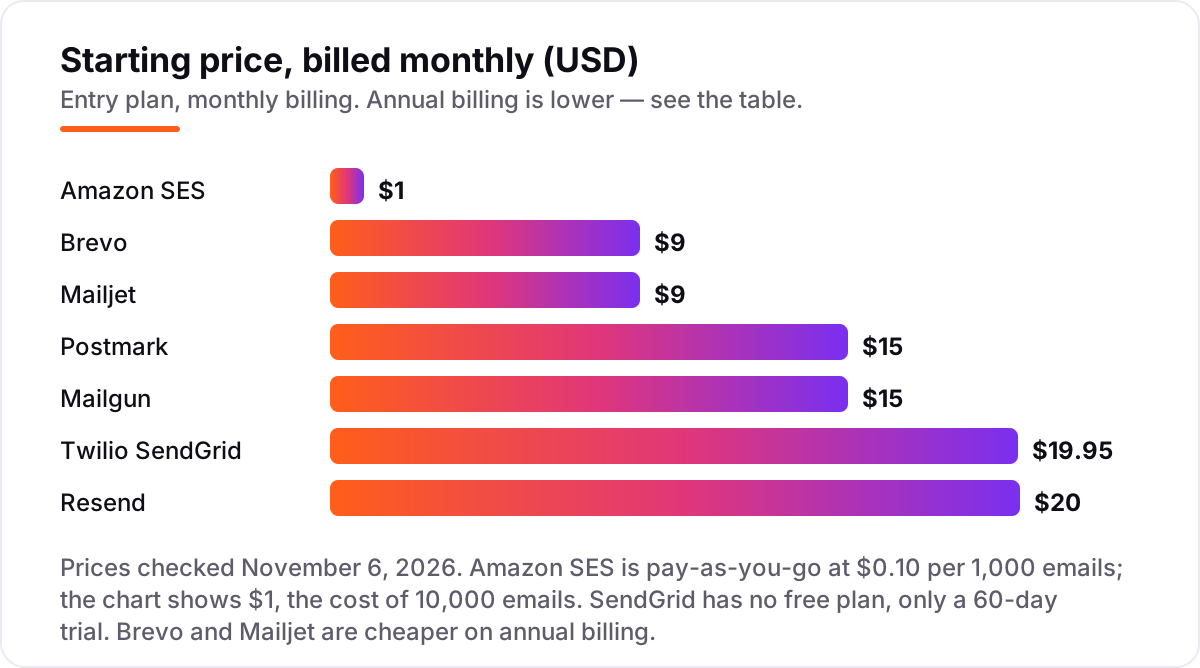
Take an app that sends 5,000 transactional emails a month — password resets, receipts and notifications for a small customer base. On list prices, the monthly cost is $0.50 on Amazon SES, $0 on Mailjet's free plan, $9 on Brevo Starter, $15 on Postmark Basic or Mailgun Basic, $19.95 on SendGrid Essentials and $20 on Resend Pro. Three of those numbers need adjusting before they are real: Mailjet's free plan caps at 200 emails a day, so a busy day breaks it; Resend's free plan covers only 3,000 a month, so 5,000 needs Pro; and SendGrid has no free plan at all, so the $19.95 starts the month the 60-day trial ends.
Over a year, that is $6 on Amazon SES, $0 on Mailjet if the daily cap never bites, $108 on Brevo billed monthly or about $97 billed annually, $180 on Postmark or Mailgun, $239.40 on SendGrid and $240 on Resend. The same 5,000 emails cost $0 at the cheap end and $240 at the dear end — a gap that comes entirely from minimum plan sizes and free tiers, not from features. If volume grows to 50,000 a month, the order flips: SES costs $5, Resend and SendGrid cost about $20, Mailgun Foundation costs $35, and Postmark Basic costs about $87 with overage.
Three costs sit outside every number above. First, dedicated IPs: $24.95 a month on SES, $30 on Resend Scale, $59 per IP on Mailgun, and included only on SendGrid Pro. Second, add-ons: Brevo charges $12 a month to remove its logo on Starter, and Mailgun charges extra for email validation. Third, the deliverability tools: SES charges $0.07 per 1,000 emails for its Virtual Deliverability Manager, and Mailgun sells deliverability monitoring as a separate Optimize product. If you want to compare the automation side of these tools too, see our guide to the best email automation tools.
Annual billing cuts the bill on Brevo and Mailjet only: Brevo Starter drops from $108 to about $97 a year, and Mailjet takes 10% off. Postmark, SendGrid, Mailgun, Resend and SES publish no annual discount, so the monthly figure is the whole story. One more cost to check before you commit: a second app or domain is usually a second sender identity, but not a second subscription — most tools here charge by volume, not by app, so one account can send for several products as long as the volume fits.
Know the difference: transactional email vs marketing email
The confusion in this category is between two kinds of mail that look identical in the inbox. Transactional email is triggered by one person's action — a password reset, an order confirmation, a shipping alert — and the recipient expects it, opens it and acts on it. Marketing email is bulk mail sent to a list, whether or not anyone asked for that particular message. The two kinds follow different rules: transactional mail needs no unsubscribe link and no list, while marketing mail needs both, and inbox providers treat them differently.
There is a second, practical confusion: one tool for both jobs, or one tool for each. Brevo and Mailjet sell one volume pool for both kinds, which is convenient and cheap, but a marketing blast then shares its reputation with your password resets unless you separate them by subdomain. Postmark refuses the compromise entirely and keeps transactional and broadcast mail on separate streams. The safest setup for most teams is one specialist for transactional mail and a separate marketing tool for campaigns — or, if you insist on one account, a separate subdomain and a separate sending identity for each kind.
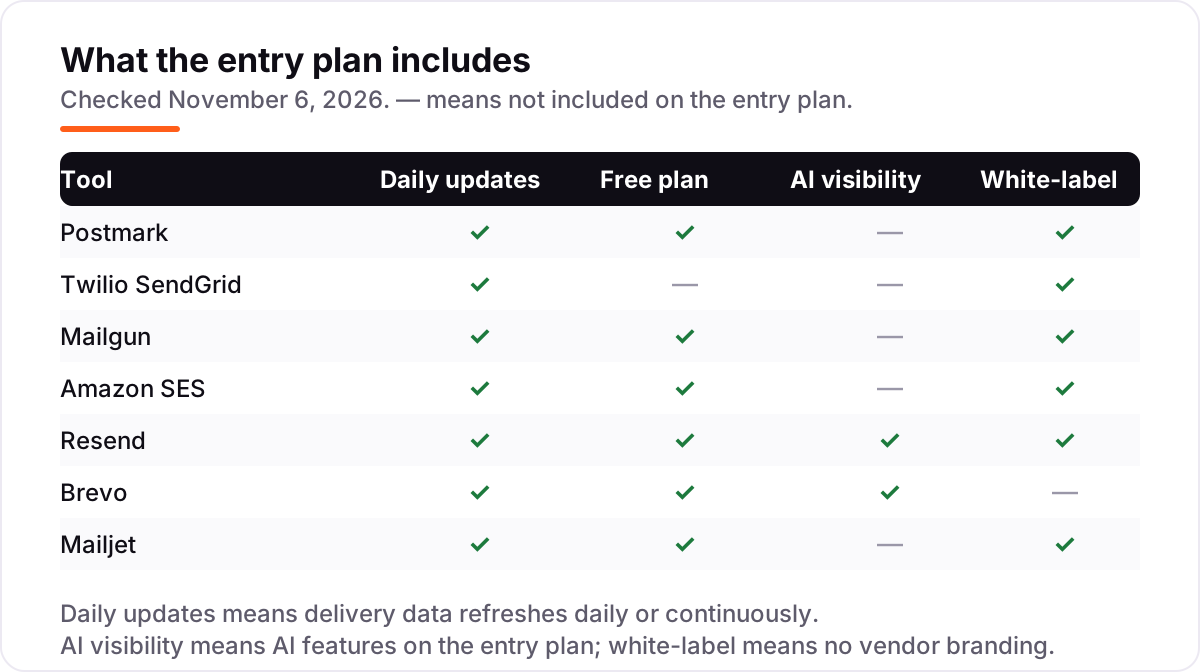
A third distinction worth knowing is API versus SMTP. The API tools — Postmark, Mailgun, Resend and SES — are built for code: your app calls the API and the email goes out. SMTP relay is the simpler path: point your app or website at the provider's SMTP server with a username and password, and it works without writing integration code. Every tool in this list offers both, so the choice is about your team, not the tool — developers take the API, and everyone else takes SMTP.
Quick comparison: tool type by need
| Buyer | Best pick | Why |
|---|---|---|
| Critical account emails that cannot fail | Postmark | Fastest delivery, separate streams, Basic is $15/month for 10,000 emails |
| High volume on the smallest budget | Amazon SES | $0.10 per 1,000 emails, no monthly minimum, no platform fee |
| Modern app on a React stack | Resend | React Email templates, free 3,000/month, Pro is $20/month for 50,000 |
| Team already on Twilio, or big scale | Twilio SendGrid | Proven API, Essentials is $19.95/month for 50,000 emails |
| Developer who lives in the API | Mailgun | Inbound routing and validation, Basic is $15/month for 10,000 emails |
| Transactional plus marketing in one place | Brevo | API on every plan, Starter is $9/month for 5,000 emails |
| Team that designs templates together | Mailjet | Real-time collaboration, free 6,000/month, Starter is $9/month |
Mistakes to avoid
- Budgeting on the free plan, then hitting the daily cap. Resend stops at 100 emails a day, Mailjet at 200 and Brevo at 300. A launch day or a busy morning breaks the free tier long before the monthly total does, so count the daily cap in the price from day one.
- Comparing headline prices without matching the volume. Postmark at $15 buys 10,000 emails while SendGrid at $19.95 buys 50,000 — the cheaper sticker is the dearer buy at 50,000 a month, where Postmark costs about $87 with overage.
- Mixing marketing and transactional mail on one stream. A bulk campaign that draws complaints can delay the password resets sent from the same stream or IP. Keep the two kinds apart, on separate subdomains at least.
- Forgetting the approval step. SES starts new accounts in a sandbox and Postmark reviews new accounts by hand, so neither sends production mail on day one. Apply for production access before launch week, not during it.
- Ignoring overage rates and add-ons. The entry price is rarely the whole bill: overage runs $0.90 to $1.80 per 1,000 emails, dedicated IPs run $25 to $59 a month, and Brevo charges $12 a month just to remove its logo.
How we chose
We checked each vendor's own pricing page and recorded the starting price exactly as shown, including the annual-billing figure where the page lists one, and we ranked the tools by fit for the most common buyer — a small business or app owner sending receipts, alerts and account emails — not by brand size. Our browser could not open vendor pages directly on November 6, 2026, so prices were verified against fresh search-index copies of the vendors' own pricing pages, crawled within the last few days, and cross-checked against independent October and November 2026 reads of the same pages; G2 ratings come from fresh copies of the exact G2 review pages. Amazon SES is pay-as-you-go, so the price chart shows $1 — the cost of 10,000 emails at its published $0.10 per 1,000 rate. No vendor paid for a place in this list, and none of the links here are affiliate links.
What to do next
Start with the free plan or trial of your top pick and send real mail through it for a week: password resets to your own team, receipts to a test customer, alerts to yourself. Check that each email arrives in seconds and in the primary inbox, and that bounces show up in the dashboard. If the mail is sorted but new customers are not finding you, our monthly SEO service handles the visibility side — or compare outreach options in our guide to the best cold email software. Once your tools are in place, find out what's holding your rankings back.
Your stack only works if people find you
SerpAstra fixes what keeps your site off page one and makes it easy for AI assistants to recommend.
Get a free audit→Sources we checked (14)
- Postmark pricing — postmarkapp.com/pricing (checked November 6, 2026)
- Twilio SendGrid pricing — twilio.com/en-us/sendgrid/pricing (checked November 6, 2026)
- Mailgun pricing — mailgun.com/pricing (checked November 6, 2026)
- Amazon SES pricing — aws.amazon.com/ses/pricing (checked November 6, 2026)
- Resend pricing — resend.com/pricing (checked November 6, 2026)
- Brevo pricing — brevo.com/pricing (checked November 6, 2026)
- Mailjet pricing — mailjet.com/pricing (checked November 6, 2026)
- Postmark reviews — g2.com/products/postmark/reviews (checked November 6, 2026)
- Twilio SendGrid Email API reviews — g2.com/products/twilio-sendgrid-email-api/reviews (checked November 6, 2026)
- Mailgun reviews — g2.com/products/mailgun/reviews (checked November 6, 2026)
- Amazon SES reviews — g2.com/products/amazon-simple-email-service-amazon-ses/reviews (checked November 6, 2026)
- Resend reviews — g2.com/products/resend/reviews (checked November 6, 2026)
- Brevo reviews — g2.com/products/sendinblue/reviews (checked November 6, 2026)
- Mailjet reviews — g2.com/products/mailjet/reviews (checked November 6, 2026)
Shamim
Founder of SerpAstra
A full-stack SEO and digital marketer who spends most days on Local SEO for dental practices, AI search visibility and lead generation.
Frequently asked questions
What is the best transactional email software?
Postmark is the best fit for most senders: the strongest deliverability reputation for critical mail, separate transactional streams and fast delivery from $15/month. Resend is the better pick for new React apps, and Amazon SES is the better pick once volume passes about 100,000 emails a month.
How much does transactional email software cost?
Entry prices run from $0.10 per 1,000 emails on Amazon SES to $20 a month on Resend Pro. Postmark and Mailgun both start at $15 a month for 10,000 emails, SendGrid starts at $19.95 for 50,000, and Brevo and Mailjet both start at $9 a month. A 5,000-email app pays $0 to $20 a month.
Is there really free transactional email software?
Yes, with daily caps. Resend gives 3,000 emails a month, Mailjet gives 6,000 a month capped at 200 a day, Brevo gives 300 a day, and Mailgun gives 100 a day. Postmark gives only 100 a month for testing. SendGrid has no free plan at all, only a 60-day trial.
What is the difference between transactional and marketing email?
Transactional email is triggered by one person's action — a password reset, receipt or alert — and is expected, so it reaches the inbox more easily. Marketing email is bulk mail sent to a list. Mixing the two on one stream or IP hurts deliverability, which is why Postmark keeps them on separate streams.
Do I need a developer to set up transactional email?
Usually, yes for the API tools: Postmark, Mailgun, Resend and SES are built for code, though all offer SMTP relay as a simpler path. Brevo and Mailjet are friendlier for non-developers, with visual template builders and SMTP setup. Expect an hour to verify your domain with SPF, DKIM and DMARC records.
Can I switch transactional email providers later?
Yes, and it is easier than switching marketing platforms because there is no list to move. Point your app at the new API or SMTP credentials, verify the domain again, and send a small share of traffic first to warm up the new sender. Keep the old provider running for a week so nothing is lost mid-move.
Free SEO and AI visibility audit
Find out what is holding your rankings back
Send us your site. Within 2 business days you get a written audit, an AI visibility check and a short fix list ranked by impact. Free, with no contract attached.
Request my free audit→Related guides
 Digital Marketing & Ads7 Best Email Deliverability Services in 2026Compare the 7 best email deliverability services on real prices, inbox testing, warmup and monitoring, with every price checked November 5, 2026.Read guide →
 Digital Marketing & Ads10 Best Email Automation Tools in 2026 (Free and Paid, Compared)Compare the 10 best email automation tools on price, free plans and automation depth, with every starting price checked on November 5, 2026.Read guide →
 Digital Marketing & Ads10 Best Cold Email Software in 2026: Pricing, Features and Pros & ConsCompare the 10 best cold email software tools on price, free plans, warm-up and AI features, with every price checked November 5, 2026, before you buy.Read guide →