
11 Best User Behavior Analytics Tools in 2026, Compared
11 best user behavior analytics tools compared on price, free plans and session replay, from free Clarity to quote-only Fullstory. Checked November 2, 2026.
 Shamim Mia, Founder, SerpAstraLast verified November 2, 202614 min read
We compare pricing pages, documentation and public reviews. We never accept payment for rankings.

Key takeaways
- Shortlist: Contentsquare from $49/month, Mouseflow from $25/month and Lucky Orange from $39/month — or start free with Microsoft Clarity, which costs $0.
- Free plans are real here: Contentsquare covers 200,000 sessions a month free, PostHog includes 1M events and 5,000 recordings, and Clarity is unlimited.
- Fullstory publishes no price, and Mixpanel and Amplitude bill on event volume, so the cheapest sticker price is rarely the cheapest bill at scale.
- The single most important buying factor is what counts against your quota — sessions, pageviews or events — because the same traffic can cost $25 or $249 depending on the unit.
- Every price below was checked on November 2, 2026, and every rating is from G2 with the review count shown.
On this page
Quick comparison
| Tool | Best for | Starting price | Free plan |
|---|---|---|---|
| Contentsquare | Ecommerce and marketing teams that want heatmaps, replays and journey analysis with a generous free plan | $49/mo | Yes (200k sessions) |
| Mouseflow | Small businesses and ecommerce stores that want heatmaps, replays, funnels and form analytics for $25/month | $25/mo | Yes (500 sessions) |
| Lucky Orange | Small online stores that want heatmaps, recordings, surveys and live chat in one cheap bundle | $39/mo (annual) | Yes (100 sessions) |
| Crazy Egg | Marketers who want simple heatmaps plus A/B testing without learning a full analytics suite | $29/mo (annual) | No (30-day trial) |
| Microsoft Clarity | Any website owner who wants unlimited heatmaps and recordings for free | Free | Yes (unlimited) |
| Fullstory | Mid-market product and UX teams that need deep session replay with AI summaries | Custom quote | Yes (30k sessions) |
| LogRocket | Product and engineering teams that need replays paired with console logs and error data | $69/mo | Yes (1,000 sessions) |
| Mixpanel | Product teams that need event funnels, retention and cohort analysis at low volume | $0/mo | Yes (1M events) |
| Amplitude | Product and growth teams that want funnels, cohorts, experimentation and session replay in one platform | $61/mo | Yes (Starter) |
| PostHog | Developer-led startups that want analytics, replay, flags and experiments in one open-source platform | Free ($0 base) | Yes (1M events) |
| Inspectlet | Small teams that want every feature included on every plan, starting free | $39/mo | Yes (5,000 replays) |
Make one of these tools?
We re-check this list every quarter. Send a correction, request a review, or ask about a clearly labeled sponsored spot.
Request a listingThe best user behavior analytics tools

Contentsquare
Best for: Ecommerce and marketing teams that want heatmaps, replays and journey analysis with a generous free plan
Contentsquare is the tool Hotjar became. Hotjar merged into Contentsquare in 2025, and its pricing page now redirects to Contentsquare's, where the old Observe features live on as Experience Analytics. The free plan is the most generous paid-vendor free tier here at 200,000 monthly sessions, and Growth adds journeys, zone-based heatmaps and Sense AI from $49 a month billed monthly.
What sets it apart is zoning: instead of one heatmap per page, it scores every element — each button, banner and image — on clicks, engagement and revenue. Sense AI then summarizes sessions and puts a money figure on each friction point, which makes the case for a fix easy to present. The catch is capture: only 5% of sessions become replays on the free plan, and full capture needs the quote-only Pro tier.
What we like
- Free plan covers 200,000 monthly sessions with heatmaps, replays, funnels and basic surveys
- Zone-based heatmaps measure clicks and revenue per page element, not just per page
- Sense AI summarizes sessions and quantifies the revenue impact of each friction point
Watch out for
- Only 5% of sessions are captured as replays on the free plan, and full capture needs Pro or Enterprise
- Reviewers report a steep learning curve for journey analysis and deeper features
- Voice of Customer and Product Analytics are billed as separate products, so the full stack costs more than Growth alone

Mouseflow
Best for: Small businesses and ecommerce stores that want heatmaps, replays, funnels and form analytics for $25/month
Mouseflow is the best value pick in this list because nothing is held back for higher tiers: all seven heatmap types, friction scoring, form analytics, funnels and journey analysis come with every plan, including the free one. The $25 Essential plan covers 5,000 sessions a month on one website, and every plan includes unlimited seats, so the whole team can watch sessions without paying per user.
The standout detail is form analytics: it shows exactly which field makes visitors abandon a form, and friction alerts flag rage clicks and dead clicks as they happen. Mina AI adds a weekly roundup and answers plain-language questions about your data. The weak spot is reporting: segment filters take many clicks to build, and exports are too basic for teams that report by product line or campaign.
What we like
- Seven heatmap types plus friction scoring, form analytics, funnels and journey analysis on every plan
- Unlimited seats on every plan, with a 14-day trial that unlocks all features and no credit card
- Mina AI gives a weekly roundup of what changed and answers questions about your data
Watch out for
- Segment filters take many clicks to build, per G2 reviewers, and reporting exports are limited
- Data retention is only 3 months on Essential, so seasonal comparisons need exports
- No A/B testing, so testing a fix needs a separate tool

Lucky Orange
Best for: Small online stores that want heatmaps, recordings, surveys and live chat in one cheap bundle
Lucky Orange is the friendliest bundle in this list: one tag gives you dynamic heatmaps, session recordings, conversion funnels, form analytics, surveys and live chat, with every feature included on every plan. The free plan tracks 100 sessions a month, and the $39 Build plan covers 3,500 sessions with the whole toolkit. Its Discovery AI answers questions about your data in plain language and pairs each answer with a visual.
For a small store, the live chat is the feature that earns the price: you can watch a visitor hesitate on checkout and offer help in the same minute. The honest limit is volume. One hundred free sessions go fast, and the jump from Build to Grow is steep once traffic grows. Reviewers also note that live tracking can lag during traffic surges.
What we like
- Every plan includes the full toolkit: dynamic heatmaps, recordings, funnels, form analytics, surveys and live chat
- Discovery AI answers plain-language questions about your data and pairs answers with visuals
- Trusted by more than 500,000 websites, per Lucky Orange, with a large small-business review base
Watch out for
- The free plan covers only 100 sessions a month, so real stores outgrow it fast
- Build covers 3,500 sessions, and the per-session cost climbs steeply on higher tiers
- Reviewers report live visitor tracking can lag when traffic surges

Crazy Egg
Best for: Marketers who want simple heatmaps plus A/B testing without learning a full analytics suite
Crazy Egg is the oldest tool in this list, founded in 2006, and it still does one job well: showing where visitors click, scroll and engage, then letting you test a fix. Starter costs $29 a month billed annually and covers 5,000 tracked pageviews with five heatmap reports and 50 recordings a month. Every plan includes unlimited domains and team members, and there are no overage charges, so the bill never surprises you.
The heatmaps go further than most: confetti view splits clicks by traffic source, and overlay view shows click share on each element. The catch is in the fine print. A/B testing only starts on Plus at $99 a month, despite the headline on the pricing page, and there is no free plan — only a 30-day trial. Starter suits a small site, not a busy store.
What we like
- Five heatmap types including confetti and overlay views, plus session recordings from the entry plan
- Unlimited domains and team members on every plan, with no overage charges
- Built-in surveys, CTAs and error tracking, with unlimited A/B testing from Plus
Watch out for
- No free plan, and every plan is billed annually, so the smallest commitment is $348 a year
- Starter tracks only 5,000 pageviews a month, about 167 a day, and caps recordings at 50 a month
- A/B testing starts on Plus at $99/month, despite the pricing page headline promising it

Microsoft Clarity
Best for: Any website owner who wants unlimited heatmaps and recordings for free
Microsoft Clarity is the default starting point for this category, and the reason is simple: it is free, with no paid tier, no session caps and no credit card. You get unlimited session recordings and heatmaps, plus dead-click and error-click views that flag broken interface elements other tools charge to find. Copilot AI summarizes sessions and heatmaps, and a native GA4 integration puts behavior data beside your traffic numbers.
The trade-offs are about depth and data, not money. There are no surveys, feedback widgets or journey mapping, and recordings are kept about 30 days, so long-term trends need another tool. Microsoft also uses aggregated, anonymized data to improve its own products, which rules Clarity out for some healthcare, finance and government sites. For everyone else, install it first and pay later — or never.
What we like
- Completely free with no paid tier, no session caps and no credit card
- Dead-click and error-click heatmaps flag broken UI that other tools charge to find
- Copilot AI summarizes sessions and heatmaps, with a native GA4 integration
Watch out for
- No funnels on the entry experience and no feedback or survey tools at all
- Recordings are kept about 30 days, so long-term trend analysis is limited
- Microsoft uses aggregated, anonymized data to improve its own products, which rules it out for some regulated sites

Fullstory
Best for: Mid-market product and UX teams that need deep session replay with AI summaries
Fullstory is the deepest replay engine in this list. It captures sessions at DOM level with rich metadata, so you can search for almost any behavior and jump straight to the sessions that match. StoryAI summarizes many sessions at once, so a team can review a whole segment without watching hours of video. The free plan is generous too: 30,000 sessions a month with 12 months of retention.
The honest problem is price. Fullstory publishes no paid prices at all: Business, Advanced and Enterprise are sold after a demo, and third-party estimates put entry around $199 a month, rising fast with volume. Large session volumes can also feel overwhelming to filter. Use the free plan to learn whether deep replay earns its keep before you talk to sales.
What we like
- Fullstory Free is the most generous free replay plan here: 30,000 sessions a month with 12 months of retention
- StoryAI summarizes many sessions at once, so you do not have to watch hours of video
- Captures at DOM level with rich metadata, so sessions are searchable by almost any behavior
Watch out for
- No published pricing: Business, Advanced and Enterprise are all sold after a demo
- Third-party estimates put entry around $199/month, and costs rise fast with session volume
- Large volumes of session data can feel overwhelming to filter, and advanced features take time to learn

LogRocket
Best for: Product and engineering teams that need replays paired with console logs and error data
LogRocket is the behavior tool for teams that debug as well as optimize. Every replay plays alongside console logs, network requests, JavaScript errors and performance data, so a vague bug report becomes a precise reproduction in minutes. Conversion funnels show where users drop off, and Galileo AI surfaces the most severe issues first. The Team plan starts at $69 a month for 10,000 sessions, with a free plan covering 1,000.
Galileo goes further than summaries: it can dispatch a debug package straight to coding agents in Cursor, Claude Code or Codex, so a fix can start before anyone files a ticket. The limits are volume and polish. Pricing scales fast as sessions grow, and reviewers say the interface can feel dated and crowded, with a learning curve for new users. It is a power tool, not a first analytics tool.
What we like
- Replays play alongside console logs, network requests, JavaScript errors and performance data
- Conversion funnels with AI insights show where users drop off and why
- Galileo AI can route a debug package straight to coding agents in Cursor, Claude Code or Codex
Watch out for
- The free plan covers only 1,000 sessions a month, and pricing scales fast with volume
- Reviewers say the interface can feel dated and crowded, with a learning curve for new users
- Galileo AI insights sit on the upper plans, not on Team

Mixpanel
Best for: Product teams that need event funnels, retention and cohort analysis at low volume
Mixpanel is event-based product analytics: instead of counting pageviews, it tracks the actions users take — signups, upgrades, feature use — and builds funnels, retention curves and cohorts from them. The free plan covers 1M events a month with core reports and simple funnels, and Growth starts free for the first 1M events a month, then $140 a month at 1.5M events ($120 billed annually), with unlimited saved reports and behavioral cohorts.
The pricing model is the thing to understand. Growth is billed on event volume, so the bill rises with every event you track, and noisy tracking gets expensive fast — a clean event taxonomy is not optional. Session replay is a separate add-on rather than part of the core plans. For a SaaS team with disciplined tracking, it is the cheapest self-serve analytics here.
What we like
- Free plan covers 1M events a month with core reports, retention analysis and simple funnels
- Growth adds unlimited saved reports, behavioral cohorts, group analytics and a modeling layer
- Self-serve by credit card, with an on-page calculator that prices any event volume
Watch out for
- Growth starts free for the first 1M events; the bill rises with event volume and can reach hundreds a month
- Event-based pricing punishes noisy tracking, so a clean event taxonomy is mandatory
- Session replay is a separate add-on, not part of the core analytics plans

Amplitude
Best for: Product and growth teams that want funnels, cohorts, experimentation and session replay in one platform
Amplitude is the broadest product platform in this list: analytics, session replay, experimentation and a customer data platform in one login. The free Starter plan is generous, covering 10,000 monthly tracked users and 2M events with session replay and web experimentation included. Plus starts at $61 a month billed monthly and adds unlimited product analytics, behavioral cohorts, feature tagging and custom audience syncs.
The strength is self-serve analysis: product, marketing and growth teams can build funnels, cohorts and retention charts without waiting on an analyst, and AI Agents answer product questions in plain language. The cost is complexity and price. Growth and Enterprise above Plus are custom quote only, the event taxonomy needs constant care, and reviewers report costs climbing fast as tracked users grow.
What we like
- Free Starter plan covers 10,000 monthly tracked users, 2M events, session replay and web experimentation
- Plus adds unlimited product analytics, behavioral cohorts, feature tagging and custom audiences
- AI Agents answer product questions in plain language, and experimentation is built in rather than bolted on
Watch out for
- Plus is $61/month billed monthly, and Growth and Enterprise above it are custom quote only
- Keeping the event taxonomy clean takes ongoing work, and messy tracking spreads fast
- Reviewers note costs climb quickly as tracked users grow, with renewal price rises reported

PostHog
Best for: Developer-led startups that want analytics, replay, flags and experiments in one open-source platform
PostHog is the all-in-one for developer-led startups: product analytics, session replay, feature flags, experiments, surveys, error tracking and a data warehouse share one bill and one snippet. There is no base fee and no seat fee — every product has a free allowance each month, including 1M events and 5,000 recordings — and usage beyond that is billed per unit, from $0.00005 per event.
The link between numbers and recordings is the real win: from a funnel step you can open the exact sessions behind the drop-off without rebuilding the segment. The risks are billing and breadth. Usage-based pricing has no spending cap unless you set a billing limit, identified events carry an extra person-profile charge, and 13 products in one platform can overwhelm a team that only needs replay and heatmaps.
What we like
- No base fee and no seat fees: 1M events, 5,000 recordings and 1M flag requests free every month
- Analytics, session replay, feature flags, experiments, surveys and error tracking share one bill
- Open-source and self-hostable, so teams that want full data ownership can run it themselves
Watch out for
- Usage-based billing has no spending cap by default, so a traffic spike can surprise you without a billing limit set
- Identified events carry an extra person-profile charge on top of the per-event rate
- The breadth of 13 products in one platform can overwhelm teams that only need replay and heatmaps

Inspectlet
Best for: Small teams that want every feature included on every plan, starting free
Inspectlet takes the opposite approach to most tools here: every feature is included on every plan, including the free one. Session replay, eye-tracking heatmaps, A/B testing, form analytics, surveys and error logging all come standard, and AI Session Insights plus Ask AI work on the free plan too. The free tier covers 5,000 replays a month across three websites, and Micro starts at $39 a month.
The honest caveats are the review base and the setup. Inspectlet has only 26 G2 reviews, and the recent ones cite slow or missing support responses; reviewers also rate ease of setup low, and configuration can be fiddly. Retention is one month on the free plan. If you want every feature without tier-gating and can live with thin support, it is the cheapest full-featured replay here.
What we like
- Every feature is included on every plan: replay, heatmaps, A/B testing, form analytics, surveys and error logging
- AI Session Insights and Ask AI work on the free plan, not just on paid tiers
- Eye-tracking heatmaps and live view come standard, with no separate module to buy
Watch out for
- Only 26 G2 reviews, and the most recent ones cite slow or missing customer support responses
- G2 reviewers rate ease of setup low, and configuration can be fiddly for new users
- Free plan retention is 1 month, and sessions are capped at 5,000 replays a month
The best user behavior analytics tools show you what visitors actually do on your site, not just how many arrived. This list covers 11 of them, sorted by the job they do best: free heatmaps and replays, affordable all-rounders, and deep product analytics for SaaS teams. Prices are the starting price on each vendor's pricing page, checked November 2, 2026.
What a user behavior analytics tool actually does
A user behavior analytics tool records how visitors interact with your pages — where they click, how far they scroll, where they hesitate — and turns those interactions into replays, heatmaps and funnels. Instead of guessing why a page does not convert, you watch real sessions and see the exact moment someone gets stuck. It answers the question pageview analytics cannot: not how many people arrived, but what they did once they got there.
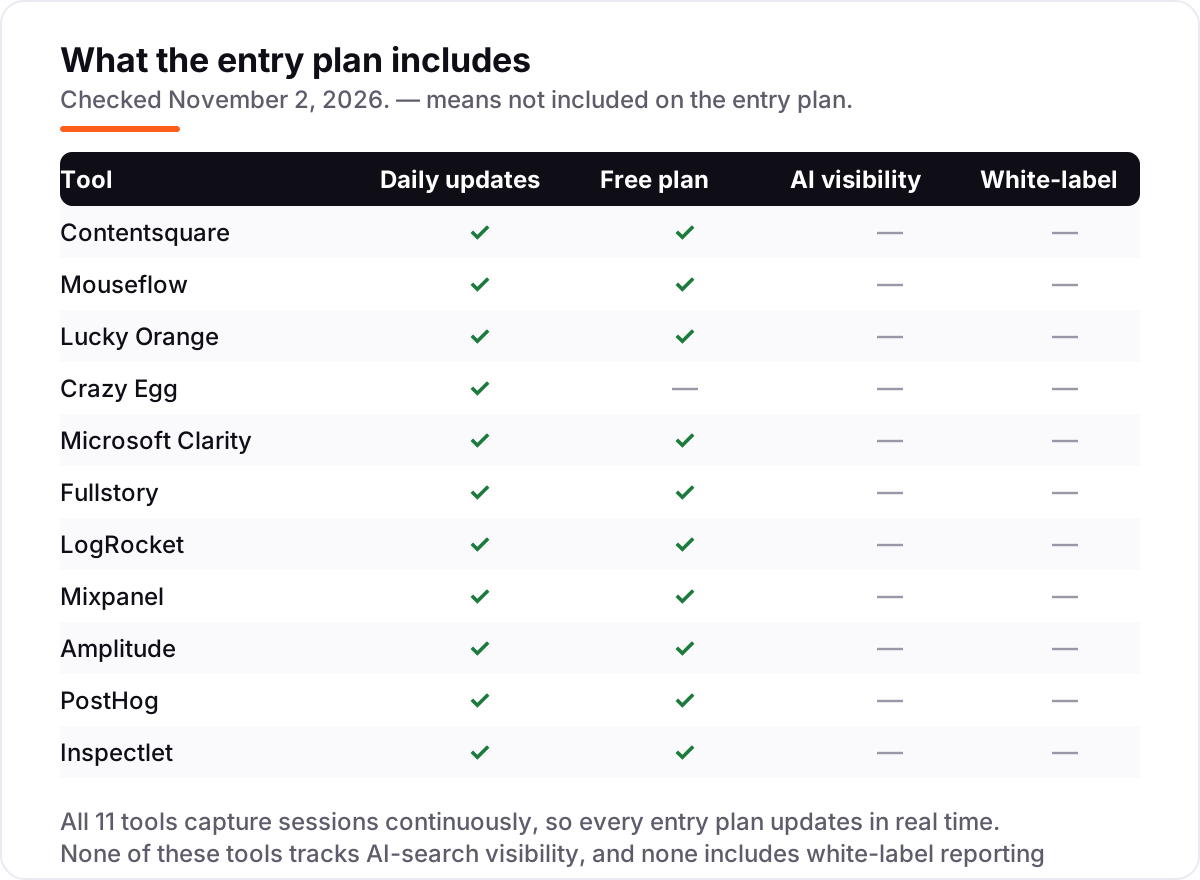
The category splits three ways. Heatmap and replay tools (Contentsquare, Mouseflow, Lucky Orange, Crazy Egg, Inspectlet, Clarity) show individual behavior on your website. Product analytics tools (Mixpanel, Amplitude, PostHog) aggregate events across users into funnels and retention. Debugging-led tools (Fullstory, LogRocket) tie replays to technical data. Most buyers need the first group; SaaS teams need the second as well.
The scale of the free tier shows how competitive this category has become: Contentsquare's free plan covers 200,000 monthly sessions, and Lucky Orange says its tools are trusted by more than 500,000 websites worldwide. Free is a real starting point here, not a demo.
Setup is a single tag on every tool in this list, usually added through Google Tag Manager in minutes, and none of them needs a developer to keep running. The part that does need care is privacy: session replay can capture what visitors type, so check each tool's masking settings for form fields and passwords before you go live, and confirm the tool fits your region's privacy rules.
Free options first
If your budget is zero, start here. Microsoft Clarity is free forever with unlimited recordings and heatmaps, PostHog gives you 1M events and 5,000 recordings a month free, Contentsquare's free plan covers 200,000 sessions, and Fullstory Free covers 30,000 sessions with 12 months of retention. Between them, a small site can run serious behavior analytics without paying anything.
Free plans differ in what they withhold. Clarity withholds nothing on volume but keeps recordings about 30 days and offers no funnels or surveys. Contentsquare caps replay capture at 5% of sessions on free. Fullstory Free is the most complete free replay plan, but its paid tiers are quote-only, so the upgrade path is a sales call. Pick the free plan that matches the job, not just the biggest number.
Heatmaps and session replay for small sites
This is the group most readers need. Contentsquare, Mouseflow, Lucky Orange, Crazy Egg and Inspectlet all record sessions and draw heatmaps, and all of them work from a single tag you can add in minutes. The differences are in the extras: Mouseflow adds form analytics and friction scoring, Lucky Orange adds live chat and surveys, Crazy Egg adds A/B testing, and Inspectlet includes every feature on every plan.
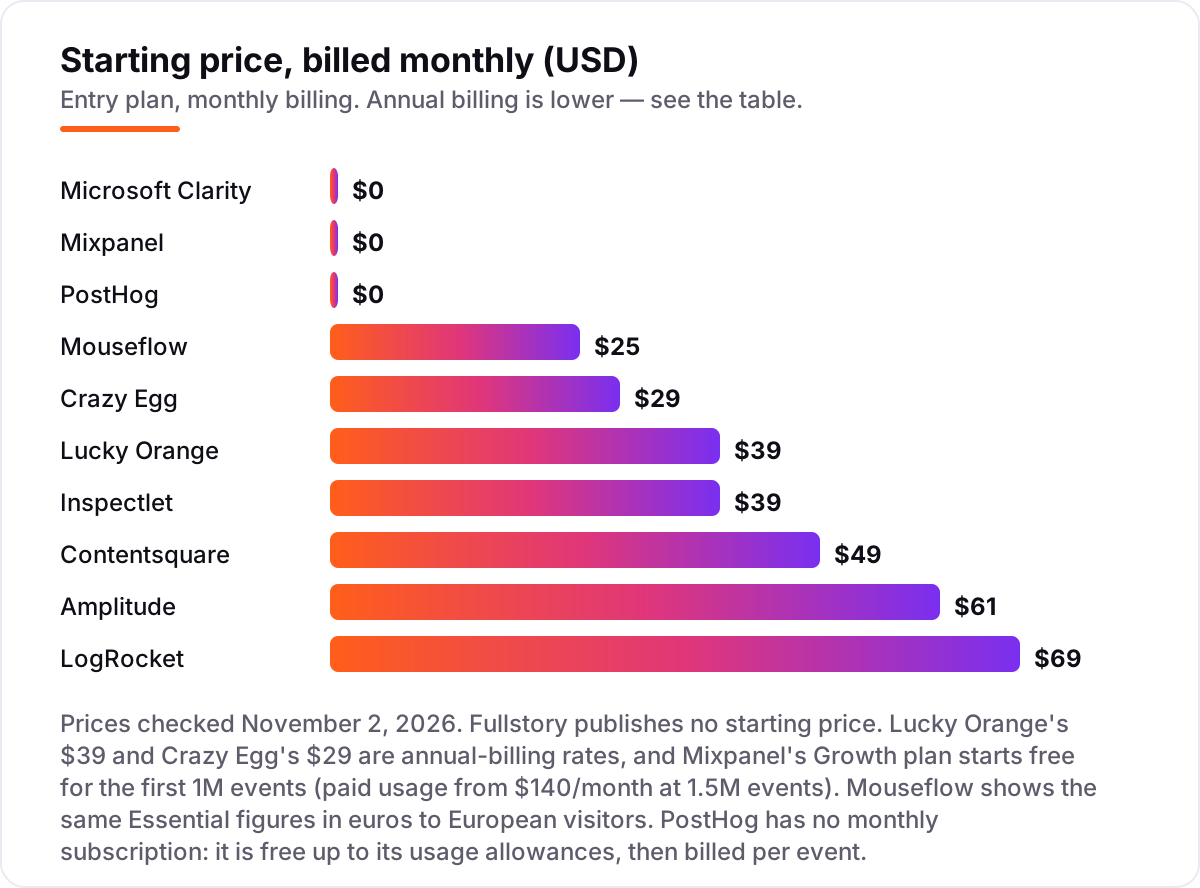
Price these by your traffic, not by the headline. Mouseflow charges per session, Crazy Egg per tracked pageview, Lucky Orange per session, and the same 10,000 monthly visitors can sit comfortably on one tool's entry plan and blow past another's. Check the unit before you compare the number — the decision path below shows how.
Watch a handful of sessions before you change anything. A heatmap shows where attention goes, but a single replay often shows the real problem: a button that looks clickable but is not, a form field that clears itself, a coupon box hidden below the fold on mobile. Those are the fixes that move conversion, and they rarely need a new tool — just eyes on real behavior.
Product analytics for SaaS teams
If you run a SaaS product or an app, heatmaps alone will not answer your questions. Mixpanel, Amplitude and PostHog track events — signups, upgrades, feature use — and turn them into funnels, retention curves and cohorts that show how behavior changes over time. LogRocket and Fullstory sit between the two worlds: replays for the individual story, analytics for the pattern.
These tools cost more in attention than in money. Event-based pricing means a messy event taxonomy becomes a large bill, and a funnel is only as good as the events feeding it. If the data shows pages that lose visitors, our SEO audit service can check whether the page itself — speed, structure, content — is part of the problem before you rebuild the flow.
The other cost is setup time. Product analytics needs events defined and named consistently, which takes a few focused hours and an owner who keeps the taxonomy clean. Teams that skip that work end up with duplicate events, conflicting funnels and dashboards nobody trusts. Start with five events that matter — signup, activation, upgrade, churn signal, support contact — and add more only when a question needs them.
Quick comparison: tool type by need
| Buyer | Best pick | Why |
|---|---|---|
| Small site, zero budget | Microsoft Clarity | Free forever, unlimited recordings and heatmaps |
| Small business, best value | Mouseflow | $25/month, every feature on every plan |
| Small store that wants chat too | Lucky Orange | $39/month, recordings plus surveys and live chat |
| Marketer who wants A/B tests | Crazy Egg | $29/month, heatmaps plus testing from Plus |
| Product team, deep replay | Fullstory | Free plan covers 30,000 sessions; paid plans quote-only |
| SaaS team, event analytics | Mixpanel or PostHog | From $0, with usage billing above 1M events |
How to choose the best user behavior analytics tools
- Count your traffic in the vendor's unit. Sessions, pageviews and events are different currencies — check which one the plan meters before comparing prices.
- Decide replay or analytics. If you need to see why one visitor left, buy replay. If you need to know how many users finish onboarding, buy event analytics.
- Start free and watch real sessions for a week. Clarity costs nothing, and Contentsquare, PostHog and Fullstory all have free plans worth a real trial.
- Check retention against your reporting cycle. A 1-month retention window cannot show a quarterly trend, and longer retention usually needs a paid tier.
- Try before you pay. Every tool in this list has a free plan or a free trial. Run your real pages through it and compare what you learn against Google Analytics before committing.
Before you rebuild pages the data flags as weak, run your titles through the free SERP snippet preview tool — it shows exactly how the title and description will look in Google.
Mistakes to avoid
- Comparing monthly prices without checking the unit. A $25 session plan and a $29 pageview plan are not the same purchase.
- Ignoring replay capture rates. Some free plans record only a fraction of sessions, so the session you need may not exist.
- Paying for product analytics when you only need heatmaps. A $59 analytics platform is wasted on a brochure site that needs a $25 replay tool.
- Trusting a directory price. Old Hotjar and Smartlook prices still circulate widely; Hotjar merged into Contentsquare in 2025 and Smartlook stopped selling in May 2026. Always check the vendor's own page.
- Forgetting the trial ends. Set a reminder for the day the trial converts, and check the numbers against how to track your Google ranking so you know what the tool should be showing.
How we chose
We checked each vendor's own pricing page on November 2, 2026 and recorded the starting price exactly as shown, including the annual-billing figure where the page lists one. Two tools changed shape in 2026: Hotjar merged into Contentsquare in 2025, so it appears here as Contentsquare, and Smartlook was left out because Cisco ended sales on May 31, 2026. Fullstory publishes no price, so it is listed as custom quote; third-party estimates put entry around $199 a month, but that figure is not vendor-verified. Mouseflow lists the same Essential figures in euros to European visitors, and the $25 figure here is the US price. Lucky Orange's $39 and Crazy Egg's $29 are annual-billing rates; Mixpanel's Growth plan starts free for the first 1M events, with paid usage from $140 a month at 1.5M events. Ratings come from G2, opened on November 2, 2026, with review counts shown. We ranked the tools by fit for the most common buyer — a small business or marketing team that wants to see what visitors do and fix what blocks them — not by brand size. No vendor paid for a place in this list, and none of the links here are affiliate links.
What to do next
Start with the decision path above: count your traffic in the vendor's unit, pick replay or analytics, and run a free plan for a week. Watch ten real sessions before you change anything — the fix is usually smaller than the report suggests. If the numbers match Google Analytics and the reports make sense to a colleague, you have your tool. If you'd rather have this set up and read for you, request a free SEO + AI visibility audit and get a ranked fix list in 2 business days.
Rather not run the tools yourself?
Tools show you the data. SerpAstra turns it into higher rankings, more map-pack calls and citations in AI answers.
Get a free SEO + AI visibility audit→Sources we checked (23)
- Contentsquare pricing — contentsquare.com/pricing (checked November 2, 2026)
- Contentsquare on G2 — 4.6/5, 747 reviews (checked November 2, 2026)
- Mouseflow pricing — mouseflow.com/pricing (checked November 2, 2026)
- Mouseflow on G2 — 4.6/5, 694 reviews (checked November 2, 2026)
- Lucky Orange pricing — luckyorange.com/pricing (checked November 2, 2026)
- Lucky Orange on G2 — 4.6/5, 396 reviews (checked November 2, 2026)
- Crazy Egg pricing — crazyegg.com/pricing (checked November 2, 2026)
- Crazy Egg on G2 — 4.2/5, 128 reviews (checked November 2, 2026)
- Microsoft Clarity — clarity.microsoft.com (checked November 2, 2026)
- Microsoft Clarity on G2 — 4.5/5, 55 reviews (checked November 2, 2026)
- Fullstory pricing — fullstory.com/pricing (checked November 2, 2026)
- Fullstory on G2 — 4.5/5, 1,053 reviews (checked November 2, 2026)
- LogRocket pricing — logrocket.com/pricing (checked November 2, 2026)
- LogRocket on G2 — 4.6/5, 2,480 reviews (checked November 2, 2026)
- Mixpanel pricing — mixpanel.com/pricing (checked November 2, 2026)
- Mixpanel on G2 — 4.5/5, 1,386 reviews (checked November 2, 2026)
- Amplitude pricing — amplitude.com/pricing (checked November 2, 2026)
- Amplitude on G2 — 4.4/5, 3,092 reviews (checked November 2, 2026)
- PostHog pricing — posthog.com/pricing (checked November 2, 2026)
- PostHog on G2 — 4.5/5, 1,055 reviews (checked November 2, 2026)
- Inspectlet pricing — inspectlet.com/plans (checked November 2, 2026)
- Inspectlet on G2 — 4.1/5, 26 reviews (checked November 2, 2026)
- Smartlook end of sale, May 31, 2026 — plerdy.com (checked November 2, 2026)
Shamim
Founder of SerpAstra
A full-stack SEO and digital marketer who spends most days on Local SEO for dental practices, AI search visibility and lead generation.
Frequently asked questions
What is the best user behavior analytics tool in 2026?
Contentsquare is the best all-round pick for most teams: the free plan covers 200,000 sessions a month, and Growth adds journeys, zone heatmaps and Sense AI from $49 a month. If you only need heatmaps and recordings, Microsoft Clarity is free and unlimited. Product teams that need deep replay should start with Fullstory Free, which covers 30,000 sessions a month.
How much do user behavior analytics tools cost?
From $0 to custom quote. Microsoft Clarity and PostHog start at $0, Mouseflow starts at $25 a month, Crazy Egg at $29 and Lucky Orange at $39. Contentsquare Growth starts at $49, LogRocket at $69, and Amplitude Plus at $61 billed monthly. Fullstory publishes no price. Remember that most tools bill by sessions, pageviews or events, so the same traffic can cost very different amounts.
Is there a free user behavior analytics tool?
Yes, several. Microsoft Clarity is completely free with unlimited recordings and heatmaps and no paid tier. Contentsquare has a free plan covering 200,000 sessions a month, PostHog includes 1M events and 5,000 recordings a month free, and Fullstory Free covers 30,000 sessions a month. Free plans work well for small sites; growing sites usually pay for longer retention and more sessions.
What is the difference between session replay and product analytics?
Session replay records what individual visitors did — mouse moves, clicks, scrolls — so you can watch a single session like a video and see exactly where someone got stuck. Product analytics aggregates events across all users into funnels, retention curves and cohorts, showing how many people did something. Replay answers why; product analytics answers how many. Most teams eventually need both.
Do I need heatmaps, session replay, or both?
Heatmaps show the aggregate picture: where most visitors click, how far they scroll, and which elements get ignored. Session replay shows the individual story: one visitor hesitating on a form or rage-clicking a dead button. Heatmaps tell you where to look; replay tells you what happened. Start with a tool that includes both, like Contentsquare, Mouseflow or Lucky Orange.
Can I use more than one behavior analytics tool at once?
Yes, and many teams do. A common setup is Microsoft Clarity for free, unlimited heatmaps and recordings alongside a paid tool for funnels or product analytics, such as Mixpanel or Amplitude. Two tags add a little page weight, so keep it to two tools and give each a clear job. Remove a tool once its job is covered elsewhere.
Free SEO and AI visibility audit
Find out what is holding your rankings back
Send us your site. Within 2 business days you get a written audit, an AI visibility check and a short fix list ranked by impact. Free, with no contract attached.
Request my free audit→Related guides
 SEO & AI SearchBest SEO Audit Software for 2026: 10 Options Compared by Use Case10 best SEO audit software tools compared on price, crawl depth and AI visibility. Prices checked on vendor pricing pages, November 1, 2026.Read guide →
 SEO & AI Search7 Best AI Visibility Tools for AEO in 2026 (Free and Paid, Compared)7 best ai visibility tools for aeo compared on price, prompt limits and engines — from $29/month to custom enterprise plans. Prices checked November 1, 2026.Read guide →
 StrategyHow to track your Google ranking (and what the numbers actually mean)Track your Google ranking the right way: Search Console, free checkers and rank trackers explained, and what average position and CTR really mean today.Read guide →