
8 Best Web Content Filtering Software in 2026, Compared
The 8 best web content filtering software tools for schools and small businesses, compared on real prices, free plans and the limits that catch buyers out.
 Shamim Mia, Founder, SerpAstraLast verified November 10, 202611 min read
We compare pricing pages, documentation and public reviews. We never accept payment for rankings.
Key takeaways
- DNSFilter is the best pick for most small businesses: Core DNS filtering from $1.00 a license a month billed annually, with a 14-day trial and MSP-friendly tools.
- Cloudflare Gateway is free for up to 50 users and Control D charges a flat $2 an endpoint a month, so a small team can start without a sales call.
- Schools should shortlist Securly Filter and Lightspeed Filter: both are CIPA-focused and quote-only, so budget from a real quote, not a directory price.
- The single most important buying factor is inspection depth: DNS filtering blocks domains cheaply, while a full web gateway inspects encrypted traffic and costs far more.
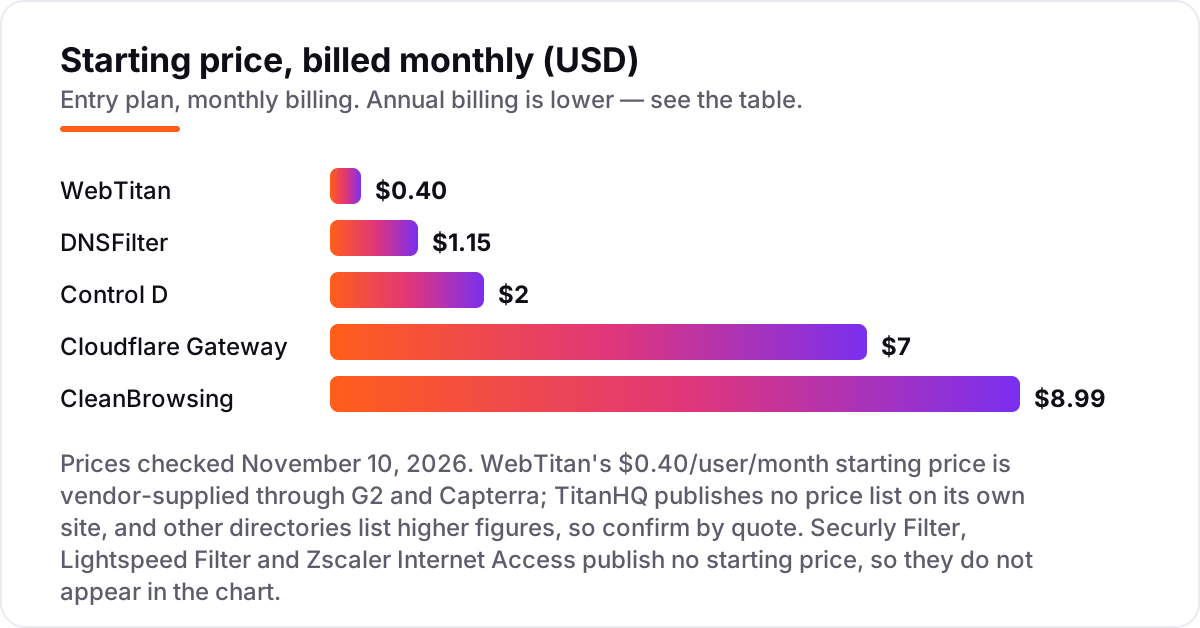
- Every price below was checked on the vendor's own pricing page on November 10, 2026, except WebTitan's $0.40 starting figure, which is vendor-supplied through G2.
On this page
Quick comparison
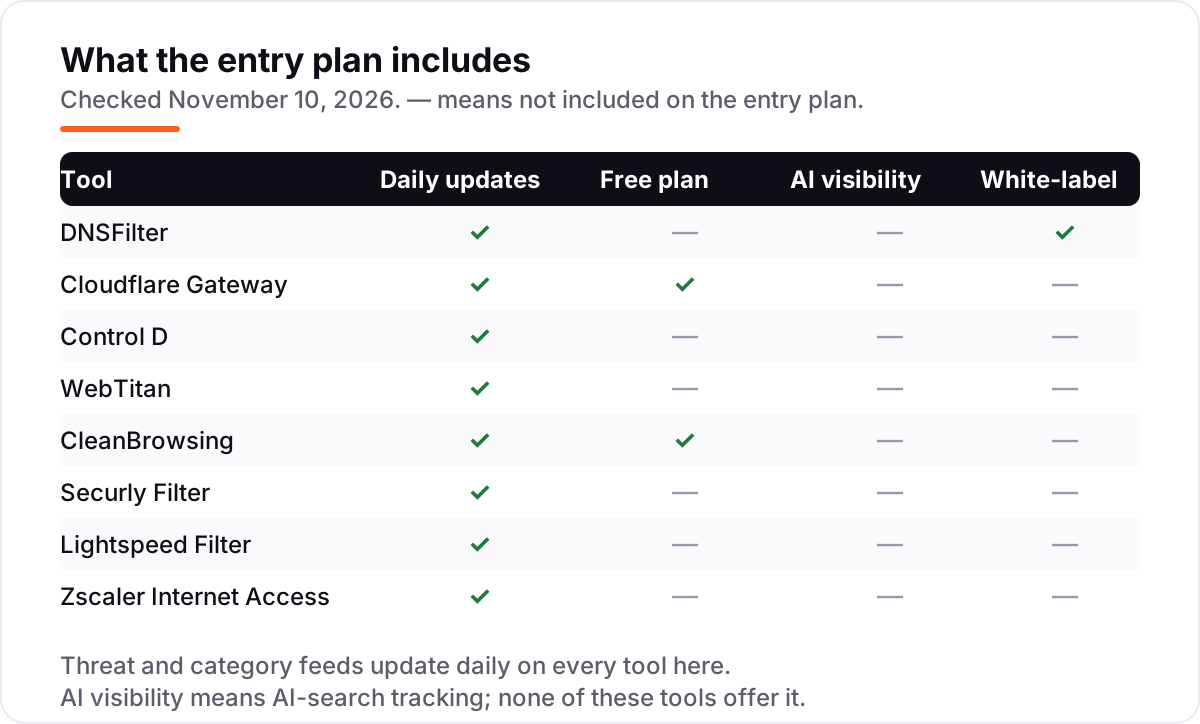
| Tool | Best for | Starting price | Free plan |
|---|---|---|---|
| DNSFilter | Small businesses and MSPs that want transparent per-user DNS filtering from about $1 a month | $1.00/mo (annual) | No (14-day trial) |
| Cloudflare Gateway | Small teams under 50 users that want enterprise-grade DNS and web filtering free | $7/mo | Yes (up to 50 users) |
| Control D | Small teams that want flat per-endpoint pricing with no minimums and no sales call | $2/mo | No (14-day trial) |
| WebTitan | MSPs and regulated small businesses that need granular policies and audit-ready reporting | $0.40/mo | No (free trial) |
| CleanBrowsing | Families, libraries and small organisations that want flat-rate filtering for up to 25 devices | $8.99/mo | Yes (free filters) |
| Securly Filter | K-12 schools that need CIPA-compliant filtering with student-safety alerts | Custom quote | No (demo only) |
| Lightspeed Filter | School districts that want filtering plus classroom management and safety monitoring in one suite | Custom quote | No (free trial) |
| Zscaler Internet Access | Large enterprises that need full secure-web-gateway inspection, DLP and sandboxing at scale | Custom quote | No (demo only) |
Make one of these tools?
We re-check this list every quarter. Send a correction, request a review, or ask about a clearly labeled sponsored spot.
Request a listingThe best web content filtering software

DNSFilter
Best for: Small businesses and MSPs that want transparent per-user DNS filtering from about $1 a month
DNSFilter is the cheapest honest starting point in this list. Core costs $1.00 a license a month billed annually ($1.15 monthly), and it covers AI-powered threat blocking, more than 40 content categories, per-user policies and roaming clients that keep filtering on when laptops leave the office. Setup is a DNS change, not an appliance, so a small team can be protected the same afternoon.
The catch is the minimum spend. Core carries a $240 annual minimum, so a five-user team pays $240 a year, not $60, and data export adds $0.25 a license a month. DNS-only filtering also cannot inspect encrypted page content, so it blocks bad domains rather than bad pages. For a small business or an MSP that wants simple, transparent filtering, that trade is worth it.
What we like
- Core starts at $1.00 a license a month billed annually ($1.15 monthly), with a $240 annual minimum spend
- AI-powered threat detection plus 40-plus content categories, with per-user policies and roaming clients for off-network devices
- MSP program from $150 a month with multi-tenancy, branding and discounted partner rates
Watch out for
- DNS-only filtering cannot inspect encrypted web traffic the way a full web gateway can
- Minimum spends mean a 5-user team pays $240 a year on Core, not $60
- Data export costs $0.25 a license a month extra, and Enterprise is quote-only

Cloudflare Gateway
Best for: Small teams under 50 users that want enterprise-grade DNS and web filtering free
Cloudflare Gateway is the only enterprise-grade filter in this list with a real free plan. Free covers up to 50 users with DNS and HTTP filtering, zero-trust app access, device posture checks and 24-hour logs, and the pay-as-you-go plan is $7 a user a month with no seat cap. Because filtering runs on Cloudflare's global network, remote teams rarely notice it is there.
The free plan has hard edges. Gateway DNS-only use is capped at 150,000 queries a seat a month, about 5,000 a day, and Cloudflare can require extra seats above that. Full DLP, CASB and browser isolation need the custom Contract plan, and setup is genuinely technical: policies, certificates and the WARP client all need IT time. For a team under 50 users with someone technical on staff, it is the best value here.
What we like
- Free plan covers up to 50 users with DNS and HTTP filtering, ZTNA and device posture checks
- Pay-as-you-go is $7 a user a month with no seat cap and no annual contract
- Runs on Cloudflare's global network, so filtering adds little latency for remote teams
Watch out for
- Gateway DNS-only use is capped at 150,000 queries a seat a month, about 5,000 a day
- Full DLP, CASB and browser isolation sit on the custom-priced Contract plan or as add-ons
- Setup is technical: policies, certificates and the WARP client take real IT time

Control D
Best for: Small teams that want flat per-endpoint pricing with no minimums and no sales call
Control D is the simplest price in this list to budget. SMB teams pay a flat $2 an endpoint a month, self-serve, with no seat minimums, no tiers and no mandatory contract, and every plan includes the core filtering features and a 14-day free trial. Per-device profiles, custom rules and real-time analytics come standard, and encrypted DNS (DoH, DoT and DoQ) is supported throughout.
The trade-offs are scope and scale. Control D filters at the DNS layer, so it blocks domains rather than inspecting page content inside encrypted traffic, and schools, non-profits, MSPs and Enterprise buyers all need a custom quote. It is also a younger, smaller vendor than DNSFilter or Cloudflare, with a thinner public review record. For a small team that wants to start today without a sales call, it is hard to beat.
What we like
- Flat $2 an endpoint a month for SMB teams, with no minimums and no mandatory contract
- Per-device profiles with custom rules, plus traffic redirection on the personal Full Control plan
- Supports encrypted DNS (DoH, DoT and DoQ) and deploys in minutes without hardware
Watch out for
- No free plan beyond the 14-day trial, and schools, non-profits, MSPs and Enterprise are quote-only
- DNS-layer only, so it cannot inspect page content inside encrypted traffic
- A small vendor with a thinner review record than DNSFilter or Cloudflare

WebTitan
Best for: MSPs and regulated small businesses that need granular policies and audit-ready reporting
WebTitan is the MSP and compliance favourite in this list. It pairs DNS filtering with granular policies by user, group, time of day, category and domain, plus Active Directory integration and audit-ready reporting, which is why it turns up in regulated medical, legal and financial firms. The vendor-supplied starting price is $0.40 a user a month, the lowest headline rate here, and education discounts are available.
Treat that $0.40 as a starting point, not a quote. TitanHQ publishes no price list on its own site, so buyers get a quote that varies by volume and term, and some reviewers report renewal prices rising year over year. Higher Cloud tiers cost more than the entry figure, and whitelisting across many profiles can be fiddly. If an MSP manages the deployment, those rough edges matter less.
What we like
- Vendor-supplied starting price of $0.40 a user a month is the lowest headline rate here
- Granular policies by user, group, time of day, category and domain, with Active Directory integration
- Strong fit for MSPs and regulated verticals, with audit-ready reporting and education discounts
Watch out for
- No published price list on TitanHQ's own site: buyers get a quote, and renewal prices have risen for some customers
- Higher-tier Cloud features cost more than the $0.40 starting figure, and volume changes the rate
- Some reviewers report fiddly whitelisting across multiple profiles and slower mass imports

CleanBrowsing
Best for: Families, libraries and small organisations that want flat-rate filtering for up to 25 devices
CleanBrowsing is the flat-rate option for families and small organisations. Basic costs $8.99 a month ($75 a year) for up to 25 devices, with 26-plus custom filters, 20-plus predefined platforms, device profiles and encrypted DNS, and the price does not rise per user. The free Family, Adult and Security filters need no signup at all and enforce SafeSearch on Google, Bing and DuckDuckGo.
The limits are about scale and control. There is no free trial on paid plans, support is email-only, and there is no per-user policy engine or Active Directory integration for a larger business network. A 100-device organisation needs Pro 100 at $30 a month, and anything larger needs a custom quote. For a home, library or small office that wants set-and-forget filtering, it is the simplest buy here.
What we like
- Basic is $8.99 a month flat for 25 devices ($75 a year), not per user, so small sites stay cheap
- Free Family, Adult and Security filters need no signup and enforce SafeSearch on major search engines
- Encrypted DNS (DoH, DoT, DNSCrypt) on every plan, with a privacy-first no-logs option
Watch out for
- No free trial on paid plans, and support is email-only with no phone line
- No per-user policies or Active Directory integration for larger business networks
- Device caps mean a 100-device organisation needs Pro 100 at $30 a month, and larger needs a custom quote

Securly Filter
Best for: K-12 schools that need CIPA-compliant filtering with student-safety alerts
Securly Filter is built for one buyer: the K-12 school. It is a cloud filter designed for Chromebooks that follows students on and off campus, enforces CIPA-compliant category blocking, and applies different rules per organisational unit in Google Workspace. Its AI engine flags signs of cyberbullying, self-harm and violence, and a visual audit trail shows the exact searches and video thumbnails behind each alert.
The buying process is the weak point. Securly publishes no price, so every school requests a quote, and the real cost depends on district size and whether Aware and Classroom are bundled in. Some G2 reviewers also report categories occasionally overblocking legitimate educational content, though whitelisting works well. For a school that needs safety monitoring as well as filtering, it is the most complete K-12 option here.
What we like
- Built for schools: CIPA-compliant filtering that follows students on Chromebooks, on and off campus
- AI engine flags cyberbullying, self-harm and violence signals, with a visual audit trail of searches and video thumbnails
- Per-OU policies in Google Workspace, so staff, students and grade levels get different rules
Watch out for
- No published price: schools must request a quote, and costs vary by district size and bundle
- Some G2 reviewers report categories occasionally overblocking legitimate educational content
- Full value needs the wider Securly platform (Aware, Classroom), which adds cost

Lightspeed Filter
Best for: School districts that want filtering plus classroom management and safety monitoring in one suite
Lightspeed Filter is the district-wide choice in this list. The Smart Agent filters on Chromebooks, Windows, Mac and iOS, on and off campus, using a large category database, always-on crawling and machine-learning categorisation maintained by in-house data scientists. It pairs with Lightspeed Alert, Classroom Management and Digital Insight, so one vendor can cover filtering, student safety, classroom control and analytics.
The price is the problem: Lightspeed publishes no pricing, so districts negotiate quotes, and the bundles can include tools a school does not need. Public district records put Filter anywhere from about $2.77 to $9.10 a device a year, which shows how much the quote varies. Setup takes about a month per G2 data, and some reviewers find the console less flexible than GoGuardian. For a large district buying the full suite, it is the most complete package here.
What we like
- Filters on every device with the Smart Agent, including Chromebooks, Windows, Mac and iOS
- Pairs with Lightspeed Alert, Classroom Management and Digital Insight, so one vendor covers safety and analytics
- Machine-learning categorisation plus an in-house database aims for accurate, consistent blocking
Watch out for
- No published pricing: districts negotiate quotes, and bundles can include tools a school does not need
- Reviewers note setup takes about a month and the console is less flexible than GoGuardian for some tasks
- Public district quotes put Filter between about $2.77 and $9.10 a device a year, so budgeting needs a real quote

Zscaler Internet Access
Best for: Large enterprises that need full secure-web-gateway inspection, DLP and sandboxing at scale
Zscaler Internet Access is the full gateway in this list, not a DNS filter. It proxies web traffic through the cloud, inspects encrypted traffic with SSL inspection, and bundles a cloud firewall, DLP, CASB and sandboxing, so policy applies the same way in the office and at home. For a large enterprise replacing several appliances, that consolidation is the point: one cloud service instead of a stack of boxes.
Everything about the price is enterprise-shaped. Zscaler publishes no ZIA price, offers no free plan or free trial, and sells internet access inside platform bundles, so a quote is the only way in. Reviewers also report slow performance at peak hours, complex setup and connection issues. Below roughly 500 users it is overkill: a DNS filter does the core job for a few dollars a month.
What we like
- Inspects encrypted traffic with full SSL inspection, unlike DNS-only tools that see domains alone
- Bundles DLP, CASB, sandboxing and a cloud firewall, replacing several appliances with one cloud service
- Runs on the largest security cloud in this list, with consistent policy for office and remote users
Watch out for
- No published price and no free trial: ZIA sells inside platform bundles, so quotes are enterprise-only
- Reviewers report slow performance at peak hours, complex setup and occasional connection issues
- Overkill and overpriced below roughly 500 users, where DNS filters do the job for dollars a month
The best web content filtering software for a small business or a school is the one that blocks the right sites without blocking the work. This list ranks 8 tools that are actively sold in 2026, from $0.40-a-month DNS filters to enterprise gateways that only quote, sorted by fit for the most common buyer: a small team or a school IT admin who needs filtering running this week, not next quarter.
How to choose the best web content filtering software for your network
- Start with who you are protecting. A 25-person office needs per-user DNS filtering; a school needs per-device agents, CIPA compliance and student-safety alerts; a 5,000-person enterprise needs SSL inspection and DLP. The buyer decides the category before the brand does.
- Decide DNS-only or full inspection. DNS filtering blocks whole domains cheaply and fast, but it cannot see inside encrypted pages. A full web gateway proxies traffic and inspects URLs, files and uploads, at several times the price and with certificates to manage.
- Count the billing unit before the price. DNSFilter and Control D charge per license or endpoint, CleanBrowsing charges per device band, Cloudflare charges per user, and schools pay per student or device per year. A $1-a-month tool with a $240 minimum costs $240, not $12, for a five-person team.
- Check the off-network story. Staff and students browse from home, so a filter that only works on the office network leaves the biggest gap open. Roaming clients and device agents matter more than the dashboard.
- Read the overblocking record. School filters that block legitimate lessons cost teaching time, and G2 reviewers call out overblocking on Securly in particular. Whitelisting should take minutes, not a support ticket.
- Test the renewal price, not just the trial. Several tools here raise prices at renewal, and quote-only tools can change sharply between the first year and the second. Ask for the renewal price in writing before you sign, and check whether the trial converts automatically.
- Check your own visibility before you buy tools. Filtering protects the network, but customers still have to find you first: run your site through the free llms.txt generator and fix the basics before spending on a gateway.
Web content filtering software pricing: what you will actually pay
Take a 25-person team and run the published prices. On DNSFilter Core billed annually, 25 licenses at $1.00 a month cost $25 a month, or $300 a year, which clears the $240 annual minimum. On Control D SMB, 25 endpoints at $2 cost $50 a month, or $600 a year, with no minimum to worry about. On Cloudflare, the same 25 users cost nothing: the free plan covers up to 50 users, and the $7 pay-as-you-go rate only starts above that cap. On CleanBrowsing, a 25-device office fits Basic at $8.99 a month, or $75 a year billed annually.
Now add the second half of the bill. WebTitan's vendor-supplied starting figure of $0.40 a user a month would put the same team at $10 a month, or $120 a year, but TitanHQ publishes no price list, so treat that as a floor and get a quote. Securly, Lightspeed and Zscaler publish no price at all: schools pay per student or device per year, and enterprises pay per user per year inside a bundle, so budget from a quote and ask for the renewal price in writing, since several reviewers report prices rising at renewal.
DNS filtering vs a full web gateway: know the difference
DNS filtering and a full web gateway solve different problems, and vendors blur the line. A DNS filter answers one question per request: is this domain allowed? If the answer is no, the site never loads. That covers malware domains, phishing links, adult content and whole categories, and it works before any connection is made, which is why it is fast and cheap. It cannot tell a safe page from a harmful one on the same domain, and it cannot inspect a file download or a form upload inside encrypted traffic.
The gateway does the heavier job. It proxies the traffic, decrypts it with a certificate installed on each device, and inspects the actual URL, page content, file and upload against policy, DLP rules and sandboxing. That is what Zscaler sells, and it is also what school filters approximate with device agents and keyword matching. The cost is money, setup time and latency: certificates to deploy, exceptions to maintain, and occasional slowdowns at peak hours that Zscaler reviewers report. Most small businesses need DNS filtering only; buy the gateway when you handle sensitive data, regulate uploads, or must prove compliance, not because the brochure says DNS is not enough.
One more distinction matters for schools. A school filter is not just a gateway with a different logo: it adds CIPA compliance, per-grade policies, student-safety alerts and reporting a principal can read. That is why Securly and Lightspeed cost more per device than a business DNS filter, and why comparing them on price per user alone misses the point. If your customers find you through local search, that reporting also feeds the work behind our local SEO service, which is built around proving a business is real and reachable.
Quick comparison: tool type by need
| Buyer | Best pick | Why |
|---|---|---|
| Small business, tight budget | DNSFilter | $1.00 a license a month billed annually, 14-day trial, no appliance |
| Team under 50 users | Cloudflare Gateway | Free plan with DNS and HTTP filtering, $7 a user a month above 50 |
| Small team, no sales call | Control D | Flat $2 an endpoint a month, self-serve, no minimums |
| MSP or regulated business | WebTitan | Granular policies and audit reporting from $0.40 a user a month |
| Family, library or small office | CleanBrowsing | $8.99 a month flat for 25 devices, free filters for families |
| K-12 school | Securly Filter or Lightspeed Filter | CIPA-compliant filtering with safety alerts; both quote-only |
| Large enterprise | Zscaler Internet Access | Full SSL inspection, DLP and sandboxing; quote-only |
How we chose
We checked each vendor's own pricing page on November 10, 2026 and recorded the starting price exactly as shown, including the annual-billing figure where the page lists one. WebTitan is the exception: TitanHQ publishes no price list, so its $0.40-a-user-a-month starting figure is the vendor-supplied price shown on G2 and Capterra, and we say so wherever it appears. Securly Filter, Lightspeed Filter and Zscaler Internet Access publish no starting price, so they are listed as custom quote. Ratings come from G2 where a fresh copy of the G2 page was available on November 10, 2026: DNSFilter, Securly Filter, Lightspeed Filter and Zscaler Internet Access. We omitted ratings for Cloudflare Gateway, because G2 rates the wider Cloudflare One (SASE) product rather than Gateway itself; for WebTitan, because no G2 copy from the last three days was available; and for CleanBrowsing and Control D, because neither has a G2 rating. We ranked by fit for the most common buyer, a small business or school IT admin, not by brand size. We left Cisco Umbrella out: Cisco announced end-of-sale for Umbrella DNS and SIG on September 1, 2026, with last orders on January 31, 2027, and points buyers to Cisco Secure Access instead. No vendor paid for a place in this list, and none of the links here are affiliate links.
What to do next
Start with the decision in the How to choose section: DNS-only or full inspection, then count your users, devices or students and run the worked example above against your own numbers. Then take the free plan or trial of your top pick, Cloudflare Gateway free for up to 50 users or DNSFilter's 14-day trial, and test it on your real network for a week, including a laptop off the office network. If the blocked list looks right and the reports make sense, you have your tool. Once your tools are in place, find out what's holding your rankings back.
Your stack only works if people find you
SerpAstra fixes what keeps your site off page one and makes it easy for AI assistants to recommend.
Get a free audit→Sources we checked (12)
- DNSFilter pricing — dnsfilter.com/pricing (checked November 10, 2026)
- DNSFilter on G2 — 4.6/5, 272 reviews (checked November 10, 2026)
- Cloudflare Zero Trust plans — cloudflare.com/plans/zero-trust-services (checked November 10, 2026)
- Control D business pricing — controld.com/pricing (checked November 10, 2026)
- Control D pricing guide — controld.com/blog/control-d-pricing-guide (checked November 10, 2026)
- WebTitan on G2 — vendor-supplied starting price $0.40/user/month (checked November 10, 2026)
- CleanBrowsing pricing — cleanbrowsing.org/pricing (checked November 10, 2026)
- Securly Filter — securly.com/filter (checked November 10, 2026)
- Securly Filter on G2 — 4.5/5, 51 reviews (checked November 10, 2026)
- Lightspeed Filter on G2 — 4.4/5, 65 reviews (checked November 10, 2026)
- Zscaler Internet Access on G2 — 4.4/5, 290 reviews (checked November 10, 2026)
- Zscaler Internet Access pricing on G2 — no published price, no free trial (checked November 10, 2026)
Shamim
Founder of SerpAstra
A full-stack SEO and digital marketer who spends most days on Local SEO for dental practices, AI search visibility and lead generation.
Frequently asked questions
What is the best web content filtering software in 2026?
DNSFilter is the best pick for most small businesses: Core filtering from $1.00 a license a month billed annually, with a 14-day trial and simple setup. Cloudflare Gateway is the best free start for teams under 50 users. Schools should shortlist Securly Filter, and large enterprises should look at Zscaler Internet Access instead.
How much does web content filtering software cost?
Between $0.40 and $7 a user a month at the published entry level, plus three quote-only tools. DNSFilter Core starts at $1.00 a license a month billed annually, Control D charges a flat $2 an endpoint, and Cloudflare Gateway is $7 a user a month. CleanBrowsing is different: $8.99 a month flat for 25 devices. Schools and enterprises pay per student or user per year by quote.
Is there a free web content filtering software?
Yes, with limits. Cloudflare Gateway is free for up to 50 users, with DNS and HTTP filtering included, and CleanBrowsing offers free Family, Adult and Security filters with no signup. Both work for a small team or a family. Once you need per-user policies, reporting or more than 50 users, a paid plan costs less than the time you lose managing workarounds.
What is the difference between DNS filtering and a web filter?
A DNS filter blocks whole domains before a connection is made: fast, cheap and effective against malware and adult sites, but blind inside encrypted pages. A full web filter or gateway proxies the traffic and inspects the actual URL, page, file and upload. Schools and regulated firms usually need the gateway; most small businesses are fine with DNS filtering alone.
Do schools need CIPA-compliant web filtering?
Yes, if the school takes US federal E-Rate funding. The Children's Internet Protection Act requires schools and libraries to filter obscene content and protect minors online. Securly Filter and Lightspeed Filter are both built for that job, with per-grade policies and student-safety alerts. Ask the vendor for CIPA documentation before signing, and confirm the quote covers every student device.
Can web filtering software block YouTube and social media?
Yes. Every tool in this list filters by category, so you can block social media, video streaming and gaming while allowing work sites, or allow YouTube but block comments and uploads where the tool supports it. Rules can vary by user, group or time of day. Test the exact rule on your own network first, because category labels differ between vendors.
Will a DNS filter slow down my internet?
Barely, in most cases. A DNS filter adds one quick lookup before a site loads, usually a few milliseconds, and Cloudflare and DNSFilter both run on large global networks built for speed. A full gateway is slower because it proxies and inspects traffic, and Zscaler reviewers report slowdowns at peak hours. If speed matters, trial the tool on your busiest connection first.
Free SEO and AI visibility audit
Find out what is holding your rankings back
Send us your site. Within 2 business days you get a written audit, an AI visibility check and a short fix list ranked by impact. Free, with no contract attached.
Request my free audit→Related guides
 IT, Security & DevOps9 Best Network Security Software for Small Business in 2026, ComparedCompare the 9 best network security software for small business options on price, free plans and firewalls, with every price checked November 7, 2026.Read guide →
 Local Business & Vertical Software11 Best Cross-Platform Parental Control Apps in 2026, ComparedCompare the 11 best cross-platform parental control apps on price, device coverage and monitoring, with every price checked November 7, 2026.Read guide →
 IT, Security & DevOps8 Best Small Business Computer Security Software in 2026, ComparedCompare the 8 best small business computer security software options on price, trials and ransomware protection, with every price checked November 7, 2026.Read guide →