
7 Best Web Content Management Software in 2026, Compared
7 best web content management software picks compared on price, ease of use and publishing power, with real 2026 prices checked November 10.
 Shamim Mia, Founder, SerpAstraLast verified November 10, 202615 min read
We compare pricing pages, documentation and public reviews. We never accept payment for rankings.

Key takeaways
- WordPress.com leads for most buyers at $4 a month billed annually, with Wix ($17) the easiest launch and Webflow Premium ($25) the strongest design control.
- The single most important buying factor is who edits the site: a tool your team will use every week beats a more powerful one they avoid.
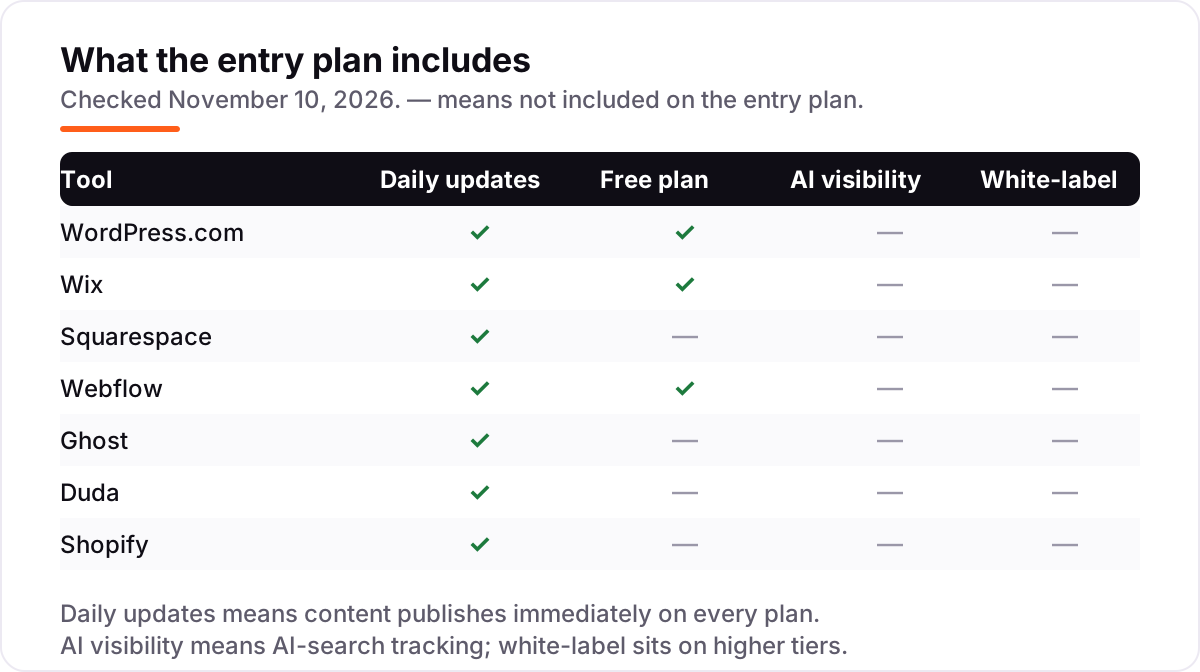
- Free plans exist on WordPress.com, Wix and Webflow, but a custom domain and no ads need a paid plan on every tool here.
- Every price below was checked on the vendor's own pricing page on November 10, 2026, with the annual-billing figure shown where it is lower.
On this page
Quick comparison
| Tool | Best for | Starting price | Free plan |
|---|---|---|---|
| WordPress.com | Bloggers and small business owners who want a cheap hosted WordPress site with a custom domain | $4/mo (annual) | Yes (free plan) |
| Wix | Small business owners who want a professional site live fast without touching code | $17/mo (annual) | Yes (free plan) |
| Squarespace | Design-led small brands and portfolios that need a polished site with light selling | $19/mo (annual) | No (14-day trial) |
| Webflow | Designers and small teams building a custom marketing site with structured blog content | $25/mo (annual) | Yes (Starter plan) |
| Ghost | Independent publishers running a blog and free newsletter for up to 1,000 members | $15/mo (annual) | No (14-day trial) |
| Duda | Agencies and freelancers building and managing client websites at volume | $19/mo (annual) | No (14-day trial) |
| Shopify | Small stores selling online who need checkout, products and content in one place | $29/mo (annual) | No (3-day trial) |
Make one of these tools?
We re-check this list every quarter. Send a correction, request a review, or ask about a clearly labeled sponsored spot.
Request a listingThe best web content management software

WordPress.com
Best for: Bloggers and small business owners who want a cheap hosted WordPress site with a custom domain
WordPress.com is the hosted version of the software behind a huge share of the web, and Personal is the cheapest paid entry on this list: $4 a month billed annually buys a custom domain, no visitor ads, 6 GB of storage and, since April 2026, plugin installation on every paid plan. That change matters, because a $48-a-year site can now run the SEO, form and backup plugins that used to need the $25 Business plan.
The trade-off is the plan ladder. The free plan shows WordPress.com ads and uses a wordpress.com subdomain, and Personal renews at $5 a month after the first year. If you outgrow Personal, Premium ($8 a month billed annually) adds more storage and lower payment fees, but most blogs and small business sites will not need it for a long time.
What we like
- Cheapest paid entry here: Personal is $4 a month billed annually, with a custom domain and no visitor ads
- Plugin installation opened to every paid plan in April 2026, so a $48-a-year site can run SEO and form plugins
- Managed hosting, security, backups and updates are handled, with a huge theme and plugin library behind it
Watch out for
- The free plan shows WordPress.com ads and uses a wordpress.com subdomain
- Personal renews at $5 a month after the first year, and takes an 8% fee on payments
- Serious customization and staging still wait for the $25 a month Business plan

Wix
Best for: Small business owners who want a professional site live fast without touching code
Wix is the easiest tool here to get a professional site live: pick a template, drag blocks into place, and the hosting, security and mobile layout are handled for you. Light costs $17 a month billed annually and covers a custom domain, 2 GB of storage and two collaborators, which is enough for a brochure site or portfolio. The catch is that Light cannot take payments, so any business that sells online needs Core at $29 a month billed annually.
Wix bundles an AI website builder and a large app market, so a small business can add bookings, forms and email marketing without a developer. Watch the second year: intro discounts apply to the first term, and monthly billing ($24 a month for Light) only appears at checkout. For the lowest-fuss route to a finished site, start here.
What we like
- Fastest route to a finished site here: drag-and-drop editor, templates, hosting and mobile layout included
- AI website builder and a large app market add bookings, forms and email marketing without a developer
- Light covers a custom domain and 2 GB of storage for $17 a month billed annually
Watch out for
- Light cannot take payments, so selling online needs Core at $29 a month billed annually
- Monthly billing figures ($24 a month for Light) appear only at checkout, not on the pricing page
- You cannot export your site to another host, so leaving Wix means rebuilding

Squarespace
Best for: Design-led small brands and portfolios that need a polished site with light selling
Squarespace is the design-led pick: its templates look finished with almost no tweaking, which is why photographers, designers and small brands keep choosing it. Basic costs $19 a month billed annually ($25 month to month) and covers a custom domain, a blog, basic selling and invoicing, with two contributors. The 2% transaction fee on store sales is the number to remember if you sell more than a handful of products.
There is no free plan, only a 14-day trial, so budget from day one. Squarespace also keeps its best tools behind higher plans: code injection, Zapier and the mobile call bar start on Core at $29 a month billed annually. Buy it when the look of the site matters as much as the words on it, and when two contributors are enough.
What we like
- Templates look finished with almost no tweaking, which suits photographers, designers and small brands
- Basic covers a blog, basic selling and invoicing for $19 a month billed annually
- Annual plans include a free custom domain for the first year and built-in analytics
Watch out for
- No free plan, only a 14-day trial, so you pay from day one
- Basic adds a 2% transaction fee on store sales, which adds up past a few thousand dollars a year
- Code injection, Zapier and the mobile call bar start on Core at $29 a month billed annually

Webflow
Best for: Designers and small teams building a custom marketing site with structured blog content
Webflow gives designers code-level control without writing code: the visual Designer works with flexbox, CSS Grid and reusable classes, and the CMS holds structured collections for blogs, case studies and listings. The important pricing detail is that Basic ($15 a month billed annually) has no CMS at all, so a content site needs Premium at $25 a month billed annually, which includes 20,000 CMS items and 40 collections.
Premium also adds site search, form file uploads and 50 GB of bandwidth, and every site plan is priced per site, so three sites cost three subscriptions. The learning curve is real: classes and breakpoints take days to learn, and Workspace plans for teams bill separately. Choose Webflow when design control and structured content matter more than getting live in an afternoon.
What we like
- Code-level design control without writing code: flexbox, CSS Grid, reusable classes and design variables
- Premium includes a real CMS with 20,000 items and 40 collections, plus site search and 50 GB of bandwidth
- Built-in SEO controls, including robots.txt and schema support, on paid site plans
Watch out for
- Basic at $15 a month has no CMS at all, so a content site needs Premium at $25 a month billed annually
- Every site plan is priced per site, so three sites cost three subscriptions
- Classes and breakpoints take days to learn, and team Workspace plans bill separately

Ghost
Best for: Independent publishers running a blog and free newsletter for up to 1,000 members
Ghost is a publishing platform first and a website builder second: a fast site, an email newsletter and paid memberships in one product, with 0% platform fees on subscription revenue. Starter costs $15 a month billed annually ($18 month to month) for up to 1,000 members, one staff user and one newsletter, using Ghost's own themes. It cannot sell subscriptions, so a paid newsletter needs Publisher at $29 a month billed annually.
Ghost's price follows your member count, not your page count, so the bill rises as the audience grows. The software itself is open source and free to self-host, but the hosted service is the simple route: hosting, SSL, CDN, backups and email delivery are included, and there is no permanent free hosted plan, only a 14-day trial. Pick Ghost when the newsletter is the product.
What we like
- A fast site, email newsletter and paid memberships in one product, with 0% platform fees on subscription revenue
- Starter is $15 a month billed annually for up to 1,000 members, one staff user and one newsletter
- Hosting, SSL, CDN, backups and email delivery are included, and the software is open source
Watch out for
- Starter cannot sell subscriptions, so a paid newsletter needs Publisher at $29 a month billed annually
- The price follows your member count, so the bill rises as the audience grows
- No permanent free hosted plan, only a 14-day trial, and Starter allows only official themes

Duda
Best for: Agencies and freelancers building and managing client websites at volume
Duda is built for professionals who build sites for clients: strong client management, team collaboration and a white-label option, with hosting on AWS and a 99.5% uptime target. Basic costs $19 a month billed annually ($25 month to month) and includes one published site, unlimited storage and bandwidth, 150 monthly AI credits and email support. The AI tools, including an AI Visibility add-on from $19 a month, are genuinely useful for client work.
The pricing trap is the per-site count: Basic includes one published site, and each extra site costs $19 a month, so an agency with ten client sites pays far more than the headline price. White-label branding waits for the $149-a-month White Label plan, and priority support starts on Agency at $52. Duda is the pick for agencies, not for a single personal site.
What we like
- Built for client work: client management, team collaboration and white-label options in one account
- Basic includes unlimited storage and bandwidth, AWS hosting and 150 monthly AI credits
- AI tools include an AI Visibility add-on from $19 a month for tracking brand mentions in AI answers
Watch out for
- Basic includes only one published site, and each extra site costs $19 a month
- White-label branding waits for the $149-a-month White Label plan
- Priority support starts on Agency at $52 a month billed annually, not on Basic

Shopify
Best for: Small stores selling online who need checkout, products and content in one place
Shopify is the CMS for stores: the content tools exist to serve the catalogue, with product pages, collections, a blog and checkout in one subscription. Basic costs $29 a month billed annually ($39 month to month) and covers unlimited products, hosting, SSL and Shopify Payments at 2.9% plus 30 cents per online sale. New stores get a 3-day free trial, then $1 a month for three months.
The real cost is the stack around the plan: paid themes, apps and a 2% fee on sales through third-party gateways all add up, and there is no free plan and no money-back guarantee. Basic also has no extra staff accounts, so a team shares one login. Buy Shopify when selling is the point of the site; for a brochure site or a blog, the cheaper tools here do more for less.
What we like
- The store and the content live together: unlimited products, collections, a blog and checkout in one subscription
- Basic covers hosting, SSL and Shopify Payments at 2.9% plus 30 cents per online sale
- The largest app ecosystem here, with thousands of add-ons for marketing, shipping and reporting
Watch out for
- No free plan and no money-back guarantee, only a 3-day trial then $1 a month for three months
- Paid themes and apps add up, and third-party gateways carry a 2% fee on Basic
- Basic has no extra staff accounts, so a team shares one login
The best web content management software for most buyers is the one your team will actually use every week, not the one with the longest feature list. This list ranks seven actively sold platforms by fit for a small business or publisher that needs to launch a site, publish content and grow without hiring a developer. Prices are the entry paid plan for one site, checked November 10, 2026, with the annual-billing figure shown where it is lower.
Quick comparison: tool type by need
| Buyer | Best pick | Why |
|---|---|---|
| Blogger on a budget | WordPress.com | $4/month billed annually, free plan, plugins on paid plans |
| Small business, fastest launch | Wix | $17/month billed annually, drag-and-drop, payments from Core $29 |
| Design-led brand | Squarespace | $19/month billed annually, finished templates, 2% store fee |
| Custom design and structured blog | Webflow | $25/month billed annually for Premium with a CMS |
| Blog and newsletter | Ghost | $15/month billed annually, 0% fees, no paid subscriptions on Starter |
| Agency building client sites | Duda | $19/month billed annually, client management, one site included |
| Selling online | Shopify | $29/month billed annually, checkout and unlimited products |
How to choose the best web content management software
- Start with who edits the site. If a non-technical owner edits it, Wix or Squarespace wins on ease. If a designer edits it, Webflow wins. If writers edit it daily, WordPress.com or Ghost wins on the editor.
- List what the site must do, not what it might do one day. Selling needs Shopify or Wix Core; paid newsletters need Ghost Publisher; client sites need Duda. Paying for features you never use is the most common waste in this category.
- Check how much design control you actually need. Templates are enough for most small sites, and Squarespace proves it. Webflow earns its learning curve only when the design is custom and the content is structured.
- Price the whole first year, not the headline month. Annual billing saves 15–25% on every tool here, and transaction fees, extra sites and paid themes can cost more than the plan itself.
- Check the exit before you enter. WordPress.com and Ghost export content cleanly; Wix does not export your site at all. A cheap entry plan is expensive if leaving means rebuilding.
Before you publish new pages on the CMS you pick, run your titles through the free SERP snippet preview tool — it shows exactly how the title and description will look in Google.
Web content management software pricing: what you will actually pay
Take one site for one year, on annual billing, with no sales and no paid themes. WordPress.com Personal costs $48 for the year, Ghost Starter $180, Wix Light $204, Squarespace Basic $228, Duda Basic $228, Webflow Premium $300 and Shopify Basic $348. That is the whole subscription bill for a brochure site or a blog, and the spread between the cheapest and the priciest is $300 a year.
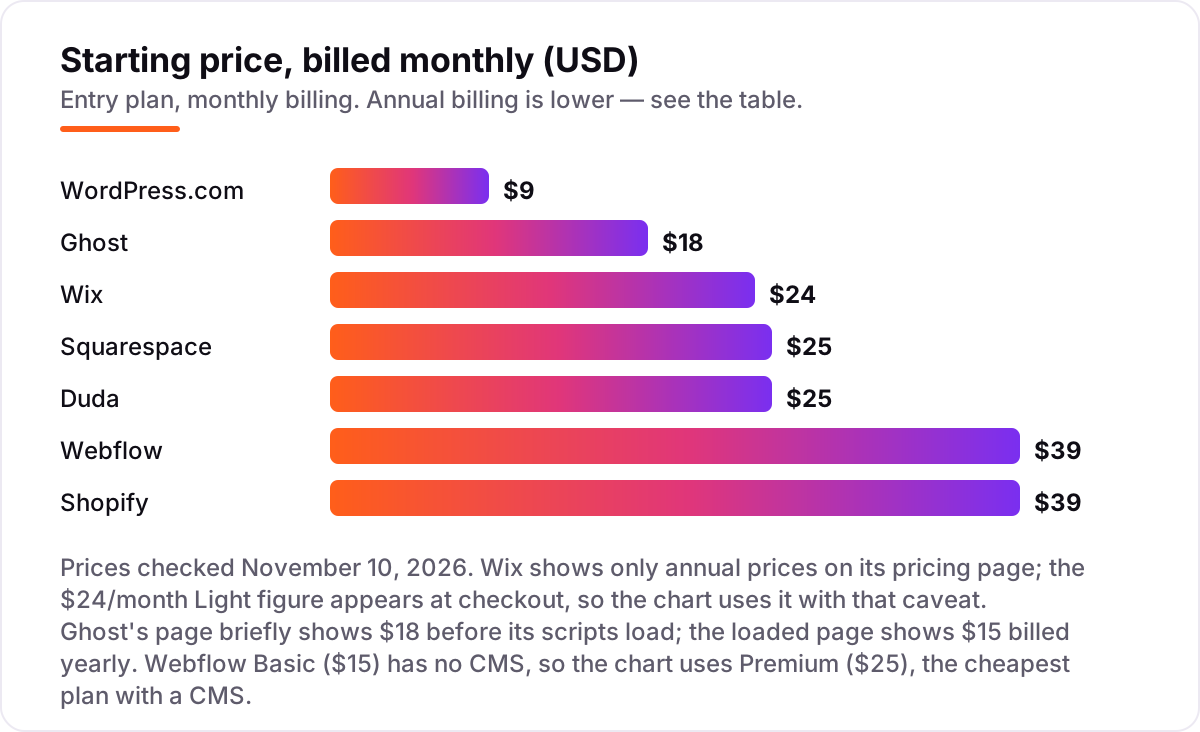
Monthly billing changes the picture. The same plans cost $9, $18, $24, $25, $25, $39 and $39 a month, which adds $60 to $168 over the year, and Wix does not even show its $24 monthly figure on the pricing page — it appears only at checkout. The yearly total is the number to compare, not the headline month.
Then come the costs the plan price hides. Squarespace Basic adds 2% to every store sale, Shopify Basic adds 2.9% plus 30 cents per online sale and 2% on third-party gateways, and WordPress.com Personal takes an 8% fee on payments. Duda charges $19 a month for each extra published site past the first, and Webflow charges a full site plan per site. The step-ups are just as important: selling on Wix needs Core at $29 a month billed annually, paid subscriptions on Ghost need Publisher at $29, and the tools that unlock code and integrations on Squarespace start on Core at $29.
Know the difference: a website builder, a CMS and a store platform
The confusion in this category is the vocabulary, and vendors use it loosely. A website builder is a visual tool for laying out pages — Wix and Squarespace lead with it. A CMS organizes content as structured data — posts, pages, collections and members — so the same content can appear in many places; Ghost and Webflow lead with it. A store platform is a CMS built around a catalogue and checkout, which is Shopify. Most tools here do all three to some degree, and the label on the box is less useful than the answer to one question: where does your content live, as pages or as data?
The second difference is hosted versus self-hosted. Every tool in this list is hosted: the vendor runs the servers, the security and the updates. The well-known alternative is self-hosted WordPress, the free open-source software from WordPress.org, where you pay for hosting and do the maintenance yourself. Self-hosting gives full control and no plan ladder, but the maintenance is yours, including updates, backups and security. Hosted WordPress.com trades some of that control for zero maintenance, and for most small teams that trade is worth it.
The third difference is headless CMS software, such as Contentful or Sanity, which stores content and serves it to any front end through an API. Headless tools are powerful for teams with developers, but they are not in this list: the most common buyer here needs a finished site, not a content API and a separate front end to build. If you have a development team and several channels to feed, headless is a different shortlist.
How we chose
We checked each vendor's own pricing page on November 10, 2026 and recorded the starting price exactly as shown, including the annual-billing figure where the page lists one. Two figures need a note. Wix publishes only annual prices on its pricing page; its $24-a-month Light figure appears at checkout, and we use it with that caveat. Ghost's pricing page briefly shows $18 before its scripts load; the loaded page shows $15 billed yearly, which is the figure we use, and several independent October reads of the same page agree. Ratings come from G2, using fresh search-index copies of the G2 pages checked November 10, 2026. Webflow's cheapest plan with a CMS is Premium, not Basic, so Premium is the price we compare. We ranked the tools by fit for the most common buyer — a small business or publisher launching one site — not by brand size. No vendor paid for a place in this list, and none of the links here are affiliate links.
What to do next
Start with the decision path above: name your editor, list what the site must do, and price the whole first year including fees. Then take the free plan or trial of your top pick and build three real pages — a home page, a service page and a blog post — before you pay. If the editor feels fast and the pages look right, you have your CMS. If your new site also needs to bring in customers from search, our monthly SEO service covers exactly that. Once your tools are in place, find out what's holding your rankings back.
Your stack only works if people find you
SerpAstra fixes what keeps your site off page one and makes it easy for AI assistants to recommend.
Get a free audit→Sources we checked (14)
- WordPress.com pricing — wordpress.com/pricing (checked November 10, 2026)
- WordPress.com on G2 — 4.4/5, 2,716 reviews (checked November 10, 2026)
- Wix pricing — wix.com/plans (checked November 10, 2026)
- Wix on G2 — 4.2/5, 1,889 reviews (checked November 10, 2026)
- Squarespace pricing — squarespace.com/pricing (checked November 10, 2026)
- Squarespace on G2 — 4.4/5, 1,137 reviews (checked November 10, 2026)
- Webflow pricing — webflow.com/pricing (checked November 10, 2026)
- Webflow on G2 — 4.4/5, 995 reviews (checked November 10, 2026)
- Ghost pricing — ghost.org/pricing (checked November 10, 2026)
- Ghost on G2 — 4.0/5, 40 reviews (checked November 10, 2026)
- Duda pricing — duda.com/pricing (checked November 10, 2026)
- Duda on G2 — 4.7/5, 811 reviews (checked November 10, 2026)
- Shopify pricing — shopify.com/pricing (checked November 10, 2026)
- Shopify on G2 — 4.4/5, 5,155 reviews (checked November 10, 2026)
Shamim
Founder of SerpAstra
A full-stack SEO and digital marketer who spends most days on Local SEO for dental practices, AI search visibility and lead generation.
Frequently asked questions
What is the best web content management software in 2026?
WordPress.com is the best pick for most buyers: a custom domain, no ads and plugins from $4 a month billed annually. Wix is the easiest launch at $17, and Webflow Premium is the strongest for custom design at $25. Pick Ghost for a newsletter, Duda for client sites and Shopify when selling is the point.
How much does web content management software cost?
Entry paid plans run from $4 to $29 a month billed annually: WordPress.com Personal $4, Ghost Starter $15, Wix Light $17, Squarespace Basic and Duda Basic $19, Webflow Premium $25 and Shopify Basic $29. Monthly billing costs more on every tool, and transaction fees on sales can add more than the plan itself.
Is there a free web content management software?
Yes, with limits. WordPress.com and Wix both have free plans, and Webflow has a free Starter site plan, but all three show platform branding and use a subdomain. Squarespace, Ghost and Duda offer 14-day free trials instead, and Shopify offers a 3-day trial followed by $1 a month for three months.
What is the difference between a CMS and a website builder?
A CMS organizes structured content, such as posts, pages and collections, so it can be reused across a site. A website builder is a visual tool for laying out pages, and most builders here include a CMS. The practical split is control: a CMS like Ghost or Webflow manages content as data, while a builder like Wix manages it as pages.
Can I move my site from one CMS to another later?
It depends on the tool. WordPress.com and Ghost export content cleanly, so moving is mostly work, not a rebuild. Wix does not let you export your site, so leaving means rebuilding the design by hand. Before you commit, check what exports: posts, pages, images and customer data are the four that matter.
Which CMS is best for SEO?
All seven handle the basics: custom domains, SSL, meta titles and mobile layouts. WordPress.com has the deepest SEO plugin library, and Webflow gives the finest control over robots.txt, schema and page structure. The bigger factor is publishing: the CMS your team posts in every week will outrank the one with better settings that nobody opens.
Free SEO and AI visibility audit
Find out what is holding your rankings back
Send us your site. Within 2 business days you get a written audit, an AI visibility check and a short fix list ranked by impact. Free, with no contract attached.
Request my free audit→Related guides
 SEO & AI Search9 Best SEO CMS Platforms for 2026 (Pros, Cons and Pricing)9 best SEO CMS platforms compared on price, SEO controls, free plans and AI tools. Every starting price checked on the vendor pricing page, November 1, 2026.Read guide →
 Digital Marketing & AdsBest Landing Page Software for 2026: 10 Options Compared by Use CaseCompare the 10 best landing page software tools in 2026 on price, A/B testing, AI builders and free plans, with prices checked November 4, 2026.Read guide →
 SEO & AI Search7 Best Ecommerce Platforms for SEO in 2026 (Pros, Cons and Pricing)The 7 best ecommerce platform for SEO picks compared on price, SEO controls and ease of use, with real 2026 prices checked on each vendor's pricing page.Read guide →