
Best Web Scraping Software Reviews for 2026: 10 Options Compared by Use Case
Compare the 10 best web scraping software reviews by price, free plan and use case, from $19 APIs to enterprise tools, with prices checked November 7, 2026.
 Shamim Mia, Founder, SerpAstraLast verified November 7, 202613 min read
We compare pricing pages, documentation and public reviews. We never accept payment for rankings.
Key takeaways
- Apify is the best all-rounder at $19/month, Bright Data leads for hard enterprise targets on pay-as-you-go pricing, and ScrapingBee is the cheapest API at $19/month with a published credit table.
- The single most important buying factor is the billing unit: credits, records and requests are not the same thing, and rendering or stealth proxies can multiply the cost of one page 5 to 75 times.
- Free plans are real here: Apify gives $5 of usage a month, Diffbot gives 10,000 credits, and WebScraper.io's extension is free for unlimited local use.
- No-code scrapers start cheap but cap fast: Octoparse Standard is $83 a month billed monthly, and ParseHub jumps from free straight to $189.
On this page
Quick comparison
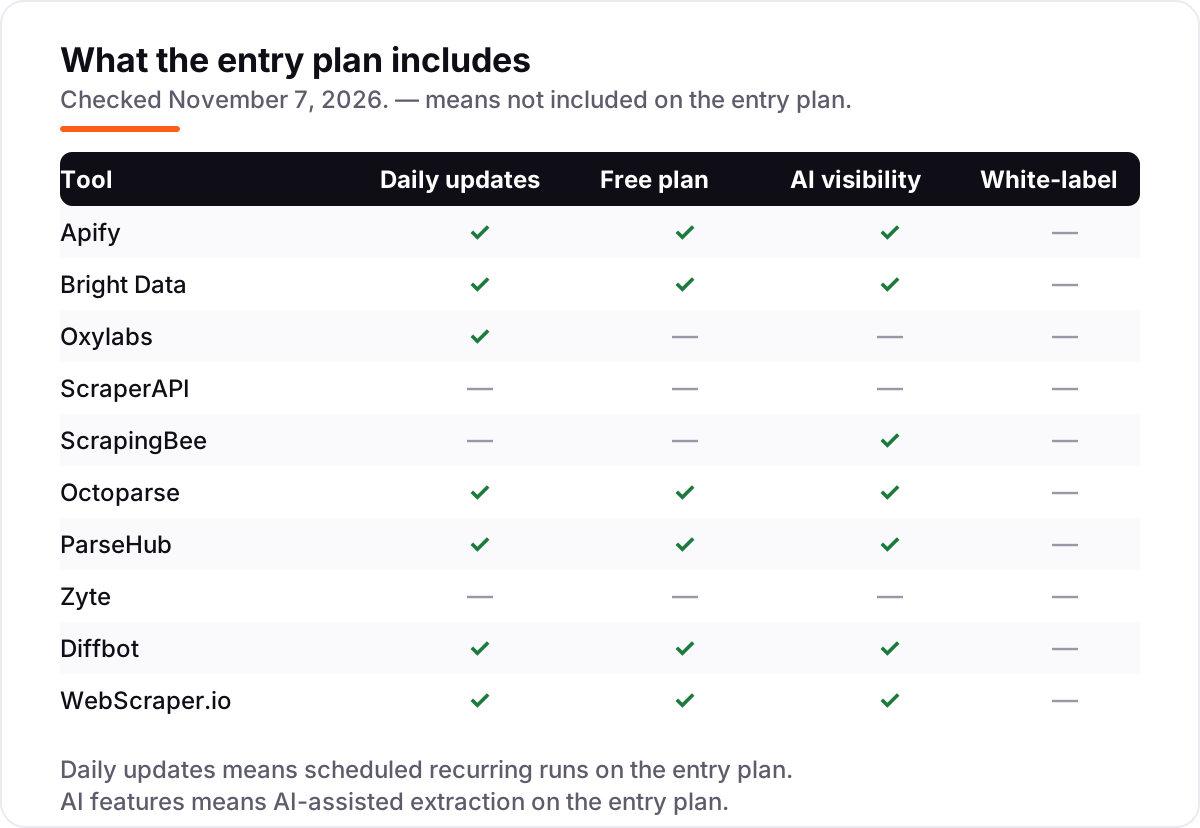
| Tool | Best for | Starting price | Free plan |
|---|---|---|---|
| Apify | Teams that want ready-made scrapers plus a cloud platform to run their own code | $19/mo | Yes (free plan) |
| Bright Data | Large-scale operations scraping hard, protected targets that block lighter tools | From $1.50/1K records | Yes (free tier) |
| Oxylabs | Enterprises that need compliance sign-off and broad geographic coverage | $30/mo | No (trial) |
| ScraperAPI | Developers who want one simple scraping endpoint with no infrastructure to run | $49/mo | No (7-day trial) |
| ScrapingBee | Developers who want transparent per-request credit costs and an API that tries the cheapest setup first | $19/mo | No (1,000-credit trial) |
| Octoparse | Non-technical teams that want visual, scheduled cloud scraping without writing code | $83/mo | Yes (free plan) |
| ParseHub | Analysts who need visual scraping of complex JavaScript-heavy pages on the desktop | $189/mo | Yes (free plan) |
| Zyte | Developers who want pay-per-success pricing without managing proxies themselves | From $0.13/1K responses | No ($5 credit trial) |
| Diffbot | Teams that want AI-structured data from any page plus Knowledge Graph enrichment | $299/mo | Yes (free plan) |
| WebScraper.io | Beginners who want a free browser extension for one-off extraction jobs | Free; Cloud $50/mo | Yes (free extension) |
Make one of these tools?
We re-check this list every quarter. Send a correction, request a review, or ask about a clearly labeled sponsored spot.
Request a listingThe best web scraping software

Apify
Best for: Teams that want ready-made scrapers plus a cloud platform to run their own code
Apify is the most flexible starting point in this list because it covers both ends of the skill range: pick a ready-made Actor from the marketplace and run it in minutes, or write your own Actor in Python or JavaScript and run it on the same platform. The Starter plan costs $19 a month and the fee comes back as $19 of prepaid platform usage, so a light job can cost nothing beyond the subscription.
The catch is the meter. Compute units cost $0.20 each on Starter, proxies and storage bill separately, and a misconfigured Actor can burn credit fast, so set billing limits before a big run. The marketplace is the reason to stay: Actors for Google Maps, Instagram and TikTok mean common jobs need no code at all.
What we like
- Free plan includes $5 of platform usage every month, with no card required
- Starter is $19 a month and includes $19 of prepaid usage, with 10% off billed annually
- Marketplace of thousands of ready-made Actors for Google Maps, Instagram, TikTok and more
- Pay-as-you-go overage beyond the included credit, so light months stay cheap
Watch out for
- Usage billing can spike if an Actor is misconfigured or a target triggers heavy proxy use
- Starter buys the same $0.20 compute-unit rate as the free plan, so the $19 mainly buys overage rights, concurrency and a Store discount
- Building your own Actors has a learning curve for non-developers

Bright Data
Best for: Large-scale operations scraping hard, protected targets that block lighter tools
Bright Data is the heavyweight in this list: one of the largest residential proxy networks, more than 1,000 pre-built scrapers for popular sites, and ready-made datasets, all behind a pay-as-you-go meter. The Web Scraper API costs $1.50 per 1,000 delivered records, with a free tier of 5,000 records a month, and the Scale plan starts at $499 a month for about 380,000 records.
The trade-off is the onboarding and the meter. Identity checks can take up to three business days, and there is no flat monthly subscription to hide behind, so a big job shows up directly on the bill. Buy Bright Data when your targets fight back and lighter tools get blocked; buy a cheaper API when they do not.
What we like
- One of the largest residential proxy networks, with built-in anti-bot bypass
- More than 1,000 pre-built scrapers return structured data without writing selectors
- You pay only for successful requests or delivered records, not for blocked attempts
- Free tier covers 5,000 records or requests a month with no card required
Watch out for
- No flat monthly plan for the scraping APIs, so costs scale directly with record volume
- Identity (KYC) approval can take up to three business days before you can start
- Proxy bandwidth is premium-priced next to budget providers

Oxylabs
Best for: Enterprises that need compliance sign-off and broad geographic coverage
Oxylabs pairs a huge proxy network with a scraping API and a compliance story that enterprise buyers care about: ethically sourced residential IPs, documented data practices, and support that procurement teams can sign off on. In October 2026 it moved all products to one unified subscription, so the $30 Starter plan now covers proxies, the Web API and unblocking together.
The Web API charges by result rather than by plan: generic scraping starts from $0.50 per 1,000 results, with JavaScript rendering and AI parsing priced higher. That makes small jobs cheap and heavy jobs dear, so price your actual targets before committing. Choose Oxylabs when compliance and coverage matter more than the lowest per-page price.
What we like
- More than 175 million residential IPs across 195 countries, with coordinate-level targeting
- One $30 Starter subscription now covers proxies, Web API and unblocking together
- Web API scraping starts from $0.50 per 1,000 results, with AI parsing as an add-on
- Strong compliance posture that enterprise legal and procurement teams accept
Watch out for
- Pricing changed in October 2026 to one unified subscription, so older $49 Web Scraper API figures are stale
- Premium per-gigabyte rates make small jobs expensive next to credit-based APIs
- API-first design with no visual scraper builder for non-developers

ScraperAPI
Best for: Developers who want one simple scraping endpoint with no infrastructure to run
ScraperAPI keeps the model as simple as possible: send a URL to one endpoint and get the page back, with proxy rotation, headless rendering and geotargeting handled for you. Hobby costs $49 a month for 100,000 credits and 20 concurrent threads, and the 7-day trial includes 5,000 credits with no card required.
The thing to understand before you buy is the credit table. A plain page costs 1 credit, but Amazon costs 5, Google 25 and LinkedIn 30, and rendering adds 10 more, so a rendered Google page costs 35 credits. Set a spending cap on day one, because overages auto-upgrade you to the next tier.
What we like
- A single endpoint handles proxy rotation, headless rendering and geotargeting automatically
- Hobby is $49 a month for 100,000 credits with 20 concurrent threads
- 7-day trial with 5,000 credits and no card, plus a 7-day refund window
- 10% off with annual billing, and structured output in HTML, Markdown or text
Watch out for
- Credits per request vary by target, so 100,000 credits are not 100,000 pages: Amazon costs 5, Google 25, LinkedIn 30
- JavaScript rendering adds 10 credits per request, which makes rendered pages cost $4.90 per 1,000 on Hobby
- Auto-upgrade billing bumps you to the next tier unless you set a monthly spending cap

ScrapingBee
Best for: Developers who want transparent per-request credit costs and an API that tries the cheapest setup first
ScrapingBee is the most transparent credit-based API in this list: the documentation publishes exactly what each request costs, from 1 credit for a plain fetch to 75 for a stealth-proxy request with JavaScript rendering. Hobby costs $19 a month for 75,000 credits and 25 concurrent requests, and the trial gives 1,000 credits with no card.
Its best feature is auto mode, which tries progressively heavier setups and bills only the cheapest one that succeeded, so you stop paying the stealth price for pages a plain fetch could have handled. The catch is the default: rendering is on unless you turn it off, at 5 credits a request. Turn it off for plain pages.
What we like
- Published credit table: 1 credit plain, 5 with rendering, 10 or 25 premium, 75 stealth
- Auto mode tries progressively heavier setups and bills only the cheapest one that worked
- You are charged only for successful requests, not for failed attempts
- Dedicated endpoints for Google Search, Amazon, Walmart, YouTube and more
Watch out for
- JavaScript rendering is on by default at 5 credits, and stealth proxies cost 75, so Hobby's 75,000 credits can mean 1,000 stealth requests
- No monthly free tier, only a one-off 1,000-credit trial with no card
- No visual builder, so non-developers need another tool for point-and-click work

Octoparse
Best for: Non-technical teams that want visual, scheduled cloud scraping without writing code
Octoparse is the classic visual scraper: a desktop workflow builder where you click the data you want, add pagination and logins, and let the cloud run it on a schedule. The free plan covers 10 tasks with local extraction, and Standard costs $83 a month billed monthly, or $69 a month billed annually, for 100 tasks and up to 3 concurrent cloud runs.
The limits are the add-ons and the billing. Residential proxy bandwidth and CAPTCHA solving are charged separately, and Trustpilot reviews sit at a polarized 4.1 out of 5, with billing and cancellation complaints prominent among the one-star reviews. Read the plan table, not just the headline price, before you buy.
What we like
- Point-and-click workflow builder with more than 500 preset scraping templates
- Free plan covers 10 tasks with local extraction, so you can learn the tool at $0
- Standard adds scheduling, IP rotation, CAPTCHA solving and the Data Export API
- AI-assisted task creation and automatic field detection speed up new scrapers
Watch out for
- The $69 headline is the annual figure; month-to-month Standard is $83
- Residential proxy bandwidth and CAPTCHA solving bill separately on top of the plan
- Trustpilot reviews are polarized at 4.1/5, with billing and cancellation complaints prominent

ParseHub
Best for: Analysts who need visual scraping of complex JavaScript-heavy pages on the desktop
ParseHub is a desktop visual scraper that has handled awkward pages for years: you click elements to build an extraction project, and its machine-learning engine infers the page structure, follows links, handles dropdowns and forms, and works through logins and infinite scroll. The free plan covers 5 public projects at 200 pages per run.
The problem is the price cliff. There is no plan between free and Standard at $189 a month, which buys 20 private projects, 10,000 pages per run, IP rotation and scheduling. Buy ParseHub when the pages are genuinely hard and visual; buy Octoparse or Apify when a cheaper middle tier matters.
What we like
- Free plan handles 200 pages per run across 5 public projects, with no card
- Machine-learning engine infers page structure from the elements you click
- Handles logins, forms, dropdowns, infinite scroll and AJAX-heavy pages
- Desktop apps for Windows, macOS and Linux, with Dropbox and Amazon S3 export on paid plans
Watch out for
- Steep price jump: nothing sits between the free plan and Standard at $189 a month
- Only 10 reviews on G2, so the 4.3/5 score is directional rather than solid
- Scheduling, IP rotation and API access are all paid-only features

Zyte
Best for: Developers who want pay-per-success pricing without managing proxies themselves
Zyte, formerly Scrapinghub and the company behind the open-source Scrapy framework, sells one API that picks the access method each site needs: plain requests for easy pages, residential IPs or a headless browser for hard ones. You pay only for successful responses, from $0.13 per 1,000 HTTP responses on the simplest sites, with a $5 credit for the first 30 days.
The catch is that you cannot price a job exactly in advance: Zyte assigns each site a difficulty tier from 1 to 5, and browser rendering on the hardest tier costs $16.08 per 1,000 responses pay as you go. Monthly commitments of $100, $200 or $500 cut those rates by up to half. Use the cost estimator on a real URL before you commit.
What we like
- You pay only for successful responses, which is the fairest billing model in this list
- One API picks the access method each site needs: plain requests, residential IPs or a headless browser
- Monthly commitments of $100, $200 or $500 cut the per-request rates by up to half
- Built by the team behind Scrapy, with Scrapy Cloud hosting for your own crawlers
Watch out for
- No monthly plan: your cost depends on the difficulty tier Zyte assigns each site
- Browser rendering on hard sites runs up to $16.08 per 1,000 responses pay as you go
- No free plan, only $5 of credit for the first 30 days

Diffbot
Best for: Teams that want AI-structured data from any page plus Knowledge Graph enrichment
Diffbot takes a different approach from every other tool here: instead of returning HTML, its AI reads the page and returns structured data directly, with no selectors to write or maintain when a site changes. It also maintains a Knowledge Graph of more than 10 billion entities and 1 trillion facts, refreshed every four to five days, which links companies, products and people together.
Startup costs $299 a month for 250,000 credits, and the free plan includes 10,000 credits a month with no card. The credit math matters: extracting a page costs 1 credit, but a Knowledge Graph entity export costs 25, so the same plan buys 250,000 pages or 10,000 entity exports. Buy Diffbot for enrichment, not for cheap bulk pages.
What we like
- AI reads any page and returns structured data directly, with no selectors to maintain
- Knowledge Graph holds more than 10 billion entities and 1 trillion facts, per Diffbot
- Free plan includes 10,000 credits a month across all four APIs, with no card
- Crawlbot spiders whole sites for links and pages at 0 credits per crawl call
Watch out for
- At $299 a month, the entry plan excludes small teams and casual users
- Knowledge Graph queries cost 25 to 100 credits each, so 250,000 credits buy only 10,000 entity exports
- Only 29 reviews on G2, so the 4.9/5 score rests on a small sample

WebScraper.io
Best for: Beginners who want a free browser extension for one-off extraction jobs
WebScraper.io started as a free Chrome extension and it is still the cheapest way to learn scraping: install it, click the data you want, and export it as CSV or XLSX, with no account and no usage cap on local runs. The same sitemaps can move to Web Scraper Cloud, which adds scheduling, an API, proxies and stored results from $50 a month billed annually.
The extension's limits are the reason Cloud exists: it stops when you close the browser, keeps only the latest job's data locally, and has no scheduling or API access. Cloud Project covers 5,000 URL credits a month, so a site with heavy pagination outgrows it fast. Start free, and pay only when a job must run unattended.
What we like
- Free Chrome and Firefox extension with unlimited local scraping and no signup
- Visual sitemap builder lets you define extraction by clicking, with no code
- Cloud adds scheduling, an API, proxies and stored results from $50 a month
- Exports to CSV, XLSX and JSON, plus Dropbox, Google Sheets and Amazon S3
Watch out for
- The extension stops when you close the browser, and scheduling needs Cloud
- Cloud Project covers only 5,000 URL credits a month, which pagination eats quickly
- No AI adaptation: selectors break when a site changes its layout, so you fix them by hand
The best web scraping software reviews agree on one thing: there is no single best scraper, only the right one for your target, your volume and your team's skills. We ranked the 10 tools below by fit for the most common buyer — a team that needs reliable data from public websites without babysitting proxies — starting with the flexible all-rounders and ending with the free extension, and every price was checked on the vendor's own pricing page on November 7, 2026.
How to choose the best web scraping software reviews
- Count your pages first. A job of 1,000 pages a month fits a free tier; 100,000 pages needs a credit plan or pay-as-you-go pricing, and the worked example below prices exactly that volume.
- Decide who builds it. Developers should pick an API such as ScraperAPI, ScrapingBee or Zyte; non-developers should pick a visual tool such as Octoparse, ParseHub or WebScraper.io.
- Check the billing unit before the price. A credit, a record and a request are three different things, and rendering or stealth proxies can multiply the cost of one page 5 to 75 times.
- Check the anti-bot coverage. Protected targets need residential proxies, headless browsers and CAPTCHA handling; plain pages do not, and paying for protection you never use is wasted money.
- Check what free actually covers. A free tier that covers 5,000 records is a real workflow; a 1,000-credit trial is a test drive that ends after one job.
Once you have the data flowing, the next question is what to do with it. If the goal is search visibility, our guide to the best SEO tools for small business covers the analysis side, and before you publish pages built on scraped research, run your titles through the free SERP snippet preview tool — it shows exactly how the title and description will look in Google.
Whatever you shortlist, test it against your hardest target before you pay. The free plans and trials in this list are long enough to run one genuine job — your URLs, your volume, your block rate — and that job tells you more than any review can. Check two things in the test: that the success rate holds on the pages that matter, and that the credit or record count matches what the pricing page promised.
Web scraping software pricing: what you will actually pay
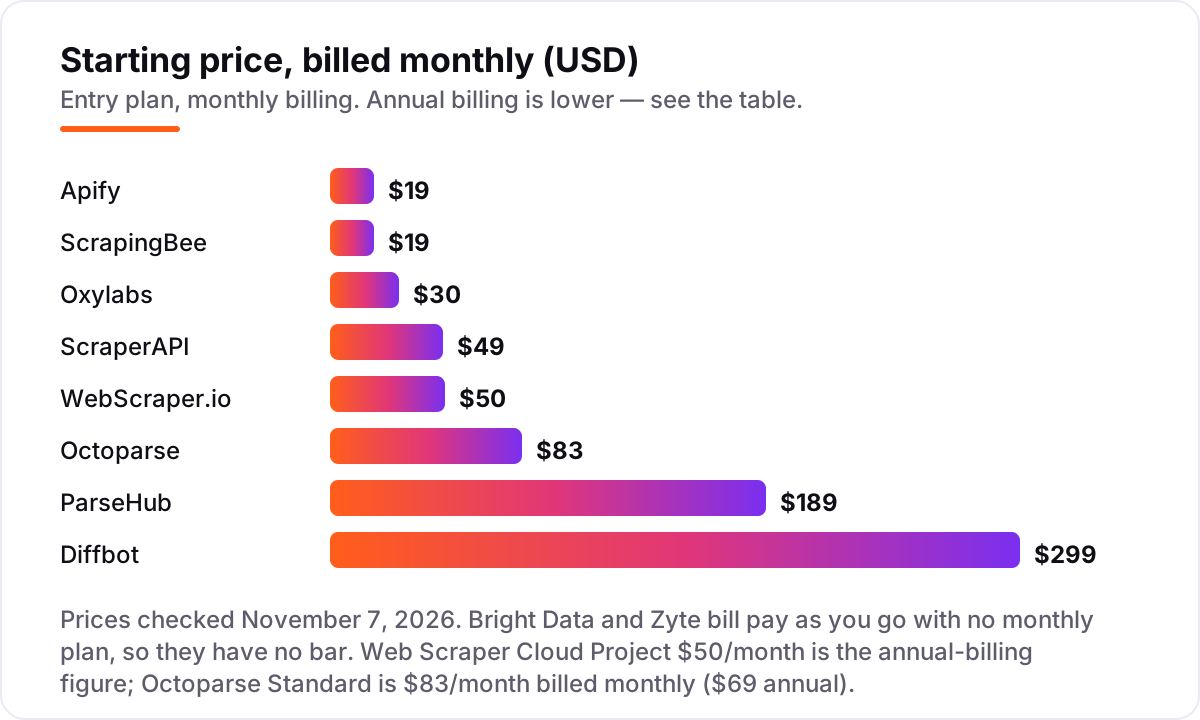
Take a team scraping 100,000 simple product pages a month, with no JavaScript rendering. On pay-as-you-go rates, Zyte costs about $13 at tier 1, Bright Data costs about $150 at $1.50 per 1,000 records, and on monthly plans ScrapingBee Freelance is $49 for 250,000 credits, ScraperAPI Hobby is $49 for 100,000 credits, and Apify Starter is $19 for $19 of platform credit plus overage. The same 100,000 pages cost $13 at the cheap end and $299 at the dear end on Diffbot Startup, which covers 250,000 credits.
Now turn rendering on, because most product pages need it. ScraperAPI charges 10 credits per rendered page, so 100,000 rendered pages need 1,000,000 credits: the $149 Startup plan. ScrapingBee charges 5 credits per rendered page, so the same job needs 500,000 credits: the $99 Startup plan with 1,000,000 credits. Stealth proxies are dearer still: at 75 credits a request, ScrapingBee's $19 Hobby plan covers only 1,000 stealth requests.
Three costs sit outside every number above. First, the annual discount: Apify Starter drops from $228 to $204 a year, ScraperAPI Hobby from $588 to about $529, and Octoparse Standard from $996 to $829. Second, the add-ons: residential proxy bandwidth, CAPTCHA solving and AI parsing are billed separately on most tools here. Third, the retry rate: a tool that bills only for successful responses, like Zyte, costs less on flaky targets than one that bills for every attempt. If the scraped data feeds a search strategy, our monthly SEO service handles the visibility side — the data is only useful once it ranks.
Know the difference: scraping API vs no-code scraper vs managed data
The confusion in this category is between three different products that all get called web scraping software. A scraping API — ScraperAPI, ScrapingBee, Zyte, Oxylabs Web API — takes a URL and returns the page or structured data, and your code calls it. A no-code scraper — Octoparse, ParseHub, WebScraper.io — is a visual tool where you click the data you want and it runs on a schedule. Managed data — Bright Data datasets, Zyte Data, Diffbot's Knowledge Graph — skips scraping entirely and sells you the finished dataset.
The second confusion is the billing unit. APIs sell credits, records or successful responses, and the same page can cost 1 credit on one tool and 75 on another depending on rendering and proxy choices. No-code tools sell tasks, projects or URL credits instead, so the limit that bites is usually a task count or a credit cap, not a per-page price. Managed data sells records or entity exports, and a single Knowledge Graph query can cost 25 to 100 credits.
A third distinction worth knowing is who maintains the scraper when the target site changes. With an API you maintain your own code and the vendor maintains the unblocking; with a no-code tool the vendor maintains the templates but your selectors still break; with managed data the vendor maintains everything and you pay the premium for it. Pick the model that matches who will fix things at 2 a.m. when a site redesigns.
Quick comparison: tool type by need
| Buyer | Best pick | Why |
|---|---|---|
| Solo developer on a budget | ScrapingBee | Published credit table, Hobby is $19/month for 75,000 credits |
| Most teams, mixed jobs | Apify | Actor marketplace and prepaid usage from $19/month |
| Hard, protected targets at scale | Bright Data | Biggest proxy network, pay as you go from $1.50 per 1,000 records |
| Enterprise compliance | Oxylabs | Unified subscription from $30/month, 175M+ residential IPs |
| Non-technical team, scheduled jobs | Octoparse | Visual builder with templates, Standard is $83/month billed monthly |
| Complex JavaScript pages, visual build | ParseHub | Click-to-build extraction for AJAX-heavy pages, from $189/month |
| Developer who hates paying for failures | Zyte | Pay only for successful responses, from $0.13 per 1,000 |
| AI-structured data and entities | Diffbot | AI extraction plus Knowledge Graph, from $299/month |
Mistakes to avoid
- Comparing headline prices without the billing unit. $19 buys 75,000 ScrapingBee credits, $19 of Apify usage or 5,000 Bright Data records — three different amounts of work for the same money.
- Leaving JavaScript rendering on by default. ScrapingBee renders by default at 5 credits a request and ScraperAPI charges 10, so a plain-page job can cost five to ten times what the plan price suggests.
- Buying the visual tool for a developer job, or the API for a non-developer team. The wrong interface costs more in setup time than the price difference between the tools.
- Ignoring the difficulty tier. Zyte assigns each site a tier from 1 to 5, and Bright Data and Oxylabs price by target complexity too — your cheapest site and your hardest site are different bills.
- Forgetting the retry and overage rules. Some tools bill only for successes, others bill for every attempt, and ScraperAPI auto-upgrades your tier unless you set a spending cap first.
How we chose
We checked each vendor's own pricing page and recorded the starting price exactly as shown, including the annual-billing figure where the page lists one, and we ranked the tools by fit for the most common buyer — a team that needs reliable data from public websites — not by brand size. Prices were verified against the vendors' own pricing pages through fresh search-index crawls dated within the last few days and cross-checked across multiple independent reads, because the pricing pages are JavaScript-heavy and do not render in a plain fetch. Two prices carry a change worth naming: Oxylabs moved to a unified $30 Starter subscription in October 2026, replacing the standalone $49 Web Scraper API plan, and Apify cut Starter from $29 to $19 in September 2026. Ratings come from G2 pages as shown in fresh search-index copies crawled within the last few days; ScrapingBee has no G2 listing, so it carries no rating rather than an estimated one. Bright Data and Zyte have no monthly plan, so they appear as pay-as-you-go prices with no bar in the chart. No vendor paid for a place in this list, and none of the links here are affiliate links.
What to do next
Start with the free plan or trial of your top pick and run one real job through it: your hardest URLs, your real volume, your actual block rate. Check that the success rate holds and that the credit or record count matches the pricing page before you commit to a year. If the data is flowing but new customers are not finding you, our monthly SEO service handles the visibility side — or compare providers in our guide to SEO companies for small business. Once your tools are in place, find out what's holding your rankings back.
Your stack only works if people find you
SerpAstra fixes what keeps your site off page one and makes it easy for AI assistants to recommend.
Get a free audit→Sources we checked (19)
- Apify pricing — apify.com/pricing (checked November 7, 2026)
- Bright Data pricing — brightdata.com/pricing (checked November 7, 2026)
- Oxylabs pricing — oxylabs.io/pricing (checked November 7, 2026)
- ScraperAPI pricing — scraperapi.com/pricing (checked November 7, 2026)
- ScrapingBee pricing — scrapingbee.com/pricing (checked November 7, 2026)
- Octoparse pricing — octoparse.com/pricing (checked November 7, 2026)
- ParseHub pricing — parsehub.com/pricing (checked November 7, 2026)
- Zyte pricing — zyte.com/pricing (checked November 7, 2026)
- Diffbot pricing — diffbot.com/pricing (checked November 7, 2026)
- WebScraper.io pricing — webscraper.io/pricing (checked November 7, 2026)
- Apify reviews — g2.com/products/apify/reviews (checked November 7, 2026)
- Bright Data reviews — g2.com/products/bright-data/reviews (checked November 7, 2026)
- Oxylabs reviews — g2.com/products/oxylabs/reviews (checked November 7, 2026)
- ScraperAPI reviews — g2.com/products/scraper-api/reviews (checked November 7, 2026)
- Octoparse reviews — g2.com/products/octoparse/reviews (checked November 7, 2026)
- ParseHub reviews — g2.com/products/parsehub/reviews (checked November 7, 2026)
- Zyte reviews — g2.com/products/zyte/reviews (checked November 7, 2026)
- Diffbot reviews — g2.com/products/diffbot/reviews (checked November 7, 2026)
- Web Scraper reviews — g2.com/products/web-scraper/reviews (checked November 7, 2026)
Shamim
Founder of SerpAstra
A full-stack SEO and digital marketer who spends most days on Local SEO for dental practices, AI search visibility and lead generation.
Frequently asked questions
What is the best web scraping software?
Apify is the best all-rounder at $19/month: a marketplace of ready-made Actors, a free plan with $5 of monthly usage, and prepaid billing that stays cheap on light months. Bright Data is better for hard, protected targets at scale, and ScrapingBee is the cheapest simple API.
How much does web scraping software cost?
Entry prices run from $0 to $299 a month. ScrapingBee and Apify both start at $19, ScraperAPI at $49, Octoparse at $83 billed monthly, ParseHub at $189 and Diffbot at $299. Bright Data and Zyte bill pay as you go instead, from $1.50 per 1,000 records and $0.13 per 1,000 responses.
Is there free web scraping software?
Yes, with limits. WebScraper.io's extension is free for unlimited local use, Apify gives $5 of platform usage a month, Diffbot gives 10,000 credits a month, and ParseHub and Octoparse both have free plans. Free tiers suit learning and small jobs; recurring production work needs a paid plan.
What is the difference between a scraping API and a no-code scraper?
A scraping API takes a URL and returns the page or structured data, so a developer calls it from code and never runs a browser. A no-code scraper is a visual tool where you click the data you want and it runs on a schedule. APIs scale better; visual scrapers suit non-developers with recurring jobs.
Is web scraping legal?
It depends on what you scrape and how: public data, respected robots.txt rules and a site's terms of use are the starting points, and personal data brings privacy law into play. This list is not legal advice. Check the target site's terms and get legal advice before scraping at scale.
Can I switch web scraping tools later?
Yes, but the cost depends on the tool type. API-based tools need only a code change to a new endpoint, while visual scrapers need every sitemap or task rebuilt in the new tool. Export your sitemaps and keep your target list in a spreadsheet, so a switch is a rebuild, not a fresh discovery project.
Free SEO and AI visibility audit
Find out what is holding your rankings back
Send us your site. Within 2 business days you get a written audit, an AI visibility check and a short fix list ranked by impact. Free, with no contract attached.
Request my free audit→Related guides
 Email, SMS & Social Media12 Best Email Scraping Tools in 2026 (Free and Paid, Compared)Compare the 12 best email scraping tools for sales teams on price, free plans, credits and verification, with every price checked November 6, 2026.Read guide →
 Email, SMS & Social Media12 Best LinkedIn Scraping Tools for Recruiters in 2026, ComparedCompare the 12 best linkedin scraping tools for recruiters on price, free plans and data quality, with every price checked on November 6, 2026.Read guide →
 SEO & AI Search7 Best SEO Tools for Small Business in 2026 (Free and Paid, Compared)7 best seo tools for small business compared on price, features and free plans, sorted by what a small team needs, with prices checked November 2, 2026.Read guide →