
10 Best Website Heatmap Tools in 2026 (Free and Paid, Compared)
Compare the 10 best website heatmap tools on price, free plans and session limits, from free Clarity to FullStory, with every price checked November 5, 2026.
 Shamim Mia, Founder, SerpAstraLast verified November 5, 202614 min read
We compare pricing pages, documentation and public reviews. We never accept payment for rankings.

Key takeaways
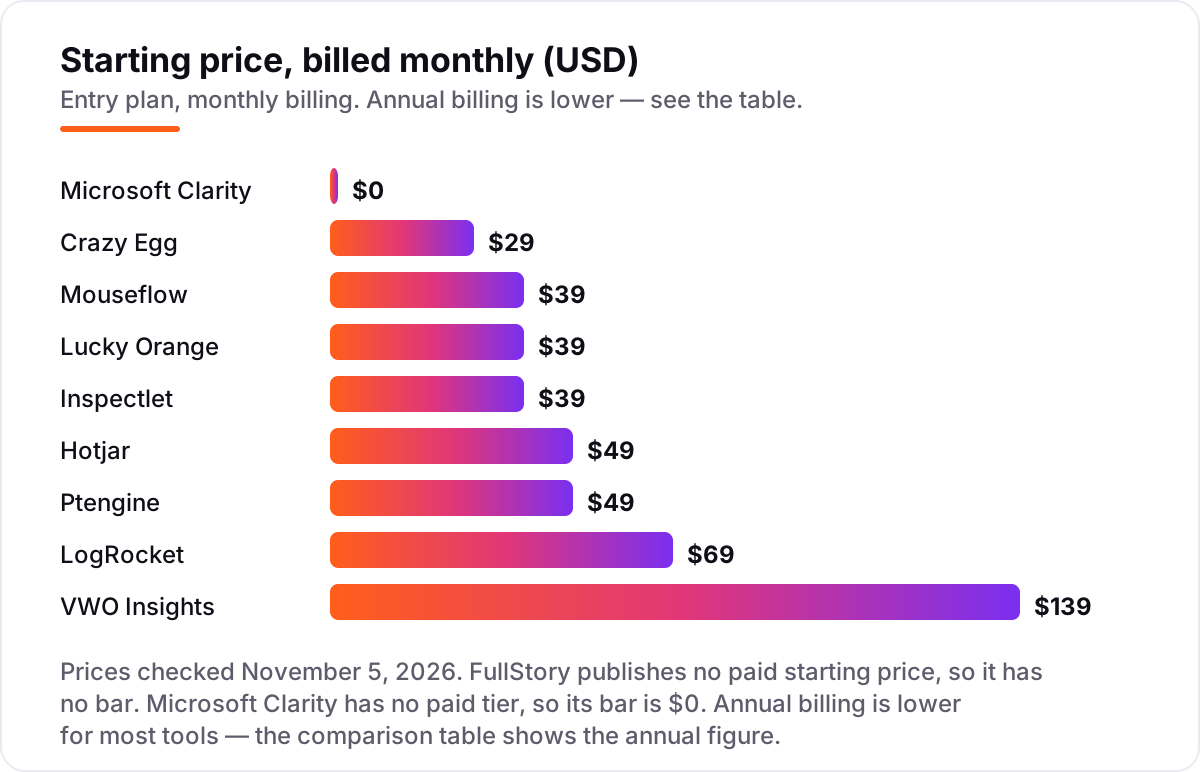
- Microsoft Clarity is free with no paid tier at all, Hotjar starts at $49/month through Contentsquare, and Mouseflow, Lucky Orange and Inspectlet all start at $39/month.
- The meter matters more than the headline price: tools count sessions, pageviews or visitors, and a 5,000 pageview cap covers far fewer real visitors than a 5,000 session cap.
- Start free where you can — Clarity for any site, FullstoryFree for product teams — and pay only when you need longer retention, more sessions or testing tools.
- Smartlook is deliberately absent from this list: Cisco stopped new subscriptions on May 31, 2026, so it cannot be bought by a new customer today.
On this page
Quick comparison
| Tool | Best for | Starting price | Free plan |
|---|---|---|---|
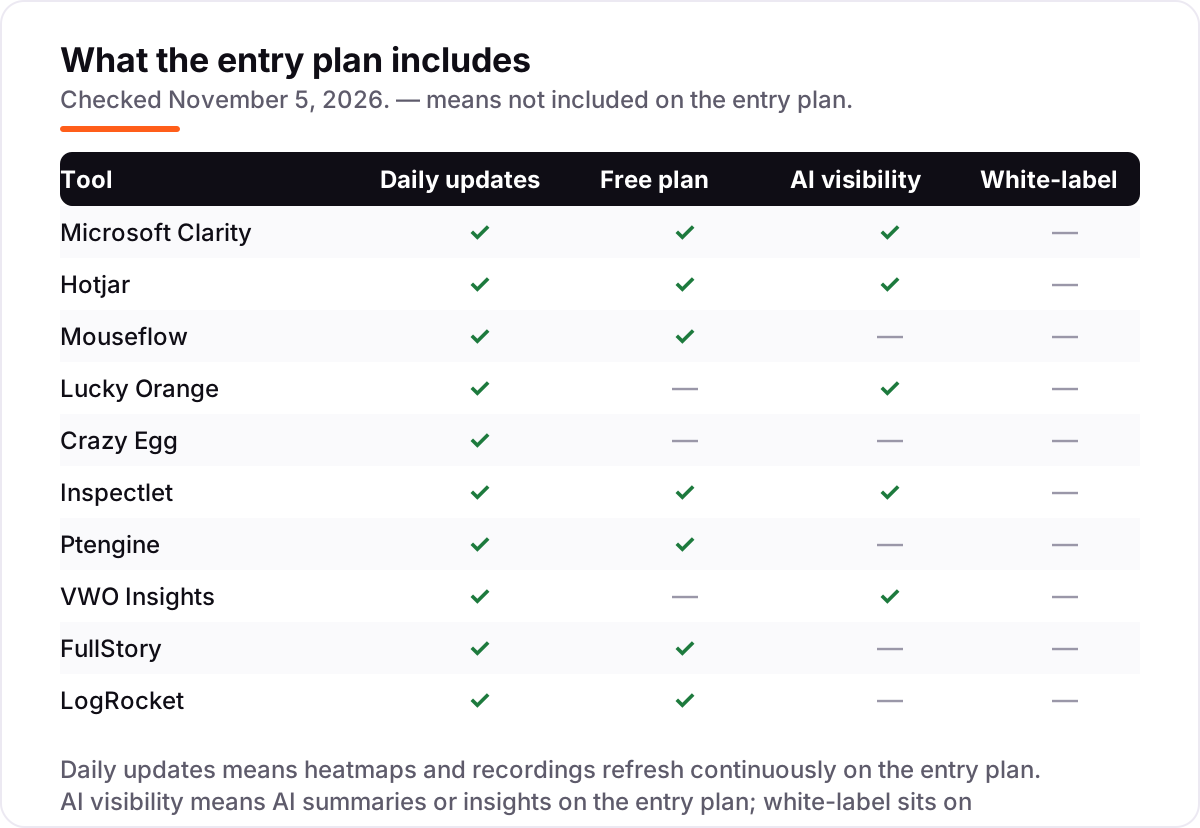
| Microsoft Clarity | Small sites and marketers who want full heatmaps and recordings free, with no session cap to outgrow | Free | Yes (free forever) |
| Hotjar | Small and mid-size teams that want the best-known heatmap brand, now sold through Contentsquare | $49/mo | Yes (free plan) |
| Mouseflow | Small teams that want six heatmap and replay features in one dashboard, with funnels and form analytics | $39/mo | Yes (free plan) |
| Lucky Orange | Shopify stores and small ecommerce sites that want live chat bundled with heatmaps and recordings | $39/mo | No (7-day trial) |
| Crazy Egg | Marketers who want simple heatmaps plus A/B testing in one tool and will read the annual-billing terms | $29/mo | No (30-day trial) |
| Inspectlet | Teams on dynamic or single-page-app sites whose heatmaps must render on the live page, not a screenshot | $39/mo | Yes (free plan) |
| Ptengine | Small businesses that want heatmaps, A/B testing and personalization in one no-code platform | $49/mo | Yes (free plan) |
| VWO Insights | Conversion teams that already test with VWO and want heatmaps and recordings in the same suite | $139/mo | No (free trial) |
| FullStory | Product and engineering teams that need deep behavioral analytics and can live with a sales-led purchase | Custom quote | Yes (free plan) |
| LogRocket | Frontend and product teams that want session replay tied to console errors and network requests | $69/mo | Yes (free plan) |
Make one of these tools?
We re-check this list every quarter. Send a correction, request a review, or ask about a clearly labeled sponsored spot.
Request a listingThe best website heatmap tools

Microsoft Clarity
Best for: Small sites and marketers who want full heatmaps and recordings free, with no session cap to outgrow
Microsoft Clarity is the starting point for almost every buyer in this list, because it costs nothing and has no paid tier waiting at the end of a funnel. You get click, scroll and area heatmaps, session recordings, rage-click and dead-click signals, and Copilot AI summaries, across unlimited websites, with no session cap and no credit card. Heatmap data lasts 13 months, while recordings expire after 30 days.
The trade-offs are scope and data terms. There are no funnels, no form analytics and no surveys, so Clarity diagnoses problems but does not run your testing program. Microsoft also uses aggregated, anonymized data to improve its own products, which rules it out for some regulated teams. For everyone else, install Clarity first and pay for a second tool only when a specific gap appears.
What we like
- Completely free with no paid tier, no traffic limit and no credit card
- Five heatmap types, including click, scroll, area, attention and Shopify conversion maps
- Session recordings with rage-click and dead-click signals built in
- Copilot AI summaries and a native Google Analytics 4 integration
Watch out for
- Recordings expire after 30 days, so findings must be documented promptly
- No funnels, form analytics or feedback tools to match the paid tools here
- Microsoft uses aggregated, anonymized data to improve its own products, which some regulated teams cannot accept

Hotjar
Best for: Small and mid-size teams that want the best-known heatmap brand, now sold through Contentsquare
Hotjar is no longer a standalone product: Hotjar merged into the Contentsquare Group on July 1, 2025, and new users now sign up for Contentsquare Experience Analytics instead. The free plan covers up to 200,000 sessions a month with heatmaps, funnels and error monitoring, though replays capture only a sample of those sessions. Growth starts at $49 a month for 7,000 sessions and adds zone-based heatmaps, journey analysis and 13 months of history.
Buy Hotjar when you want the best-known tool and a free plan big enough for most small sites. Watch the session ladder, because the price rises with volume to $739 a month at 200,000 sessions, and the Voice of Customer surveys are billed as a separate product line starting at $99 a month. If you only need heatmaps, Clarity does the same job free.
What we like
- The most generous free plan here by session count, up to 200,000 sessions a month
- Zone-based heatmaps, journey analysis and AI summaries on the Growth plan
- Surveys and feedback widgets sit beside heatmaps in the same platform
- 13 months of data access on Growth, against 1 month on the free plan
Watch out for
- New users cannot open a standalone Hotjar account; sign-up routes through Contentsquare
- Free-plan replays cover only a sample of sessions, not every visit
- Price climbs steeply with session volume, reaching $739 a month at 200,000 sessions

Mouseflow
Best for: Small teams that want six heatmap and replay features in one dashboard, with funnels and form analytics
Mouseflow is the most complete small-team dashboard: six heatmap types are built automatically for every page, and funnels, form analytics and friction detection sit beside replay. Sessions are the only meter, with unlimited pageviews on every plan, and Starter covers 5,000 sessions a month for $39, or $31 billed annually, with three months of data storage. Reviewers rate it 4.6 out of 5 on G2.
The limits are the free plan and the cap behavior. Free covers just 500 sessions on one website, enough to test a landing page but not to run a store. When a paid cap is hit, tracking stops until the next month rather than billing overages, so a traffic spike leaves a hole in the data. Pick Mouseflow when you want funnels and forms with your heatmaps and your traffic fits the tier.
What we like
- Six heatmap types built automatically for every page, including click, scroll and attention maps
- Funnels, form analytics and friction detection in the same dashboard
- Unlimited pageviews on every plan; sessions are the only meter
- Data hosted in Belgium or Iowa, chosen at sign-up, for EU and US teams
Watch out for
- Free plan covers only 500 sessions a month on one website, so busy pages exhaust it fast
- Form analytics and friction detection depth improve on higher tiers
- Session caps stop tracking when exhausted instead of charging overages, so gaps appear mid-month

Lucky Orange
Best for: Shopify stores and small ecommerce sites that want live chat bundled with heatmaps and recordings
Lucky Orange is the ecommerce pick because every plan includes every feature: dynamic heatmaps, recordings, conversion funnels, surveys, announcements, form analytics and live chat, with unlimited team members throughout. Build costs $39 a month, or $32 billed annually, for 3,500 sessions, and the only thing that changes as you pay more is the session allowance and storage. Shopify stores get a dedicated conversion heatmap as well.
The catch is the session ladder. There is no free plan on the current pricing page, only a 7-day trial, and Build's 3,500 sessions cover a small store, not a growing one: Grow at $89 a month covers 15,000 sessions. Choose Lucky Orange when live chat and real-time visitor watching matter as much as the heatmaps themselves.
What we like
- Every feature on every plan, including live chat, surveys, funnels and form analytics
- Dynamic heatmaps that follow moving and changing page elements
- Live visitor view and visitor profiles for real-time store watching
- Unlimited team members and unlimited heatmaps on all plans
Watch out for
- No free plan on the current pricing page; the old 100-session free tier is not advertised
- Build covers only 3,500 sessions, so a growing store jumps to Grow at $89 a month
- Price jumps sharply at scale, from $249 a month at 50,000 sessions to $1,049 at 300,000

Crazy Egg
Best for: Marketers who want simple heatmaps plus A/B testing in one tool and will read the annual-billing terms
Crazy Egg is the cheapest paid tool here and the simplest to explain: Starter costs $29 a month, billed annually as a single $348 charge, and covers heatmaps, 50 recordings a month, surveys and funnel reports. Confetti and overlay views break clicks down by referrer, device and other segments, which is genuinely useful for landing-page work. There are no overage charges, so a busy month pauses tracking instead of producing a surprise bill.
Read the billing terms before the trial ends, because every plan bills annually with no monthly toggle, and the headline A/B testing does not appear until Plus at $99 a month. Starter's 5,000 tracked pageviews also buy less traffic than a 5,000 session cap, since one visitor loading five pages uses five pageviews. Pick Crazy Egg for simple pages and small traffic.
What we like
- The cheapest paid heatmap tool here, at $29 a month for the Starter plan
- Heatmaps, recordings, surveys and funnel reports from the entry plan
- No overage charges: tracking pauses at the limit instead of billing extra
- Confetti and overlay views show clicks by referrer, device and other segments
Watch out for
- Every plan bills annually by default, with no self-serve monthly toggle on the pricing page
- A/B testing, popup CTAs and error tracking start on Plus at $99 a month, not Starter
- Starter covers only 5,000 pageviews a month, which a multi-page visit burns through fast

Inspectlet
Best for: Teams on dynamic or single-page-app sites whose heatmaps must render on the live page, not a screenshot
Inspectlet's headline advantage is technical: its heatmaps render against the live page instead of a static screenshot, so clicks on modals, tabs, dynamically loaded content and infinite scroll land where visitors actually saw them. That matters most on React, Vue or Angular sites, where screenshot heatmaps misplace clicks. Micro costs $39 a month, or $33 billed annually, for 10,000 replays across 3 websites, with AI Session Insights included.
The rest of the suite is unusually complete for the price: A/B testing, error logging and surveys come on every plan, including the free one. The gaps are evidence and gating — only 26 G2 reviews back the 4.1 rating, and form analytics, targeting and API access wait for Growth at $149 a month. Choose Inspectlet when your pages move after load.
What we like
- Dynamic heatmaps render on the live page, so modals, tabs and infinite scroll stay accurate
- AI Session Insights and Ask AI included on every plan, including the free plan
- Eye-tracking, click, scroll and move heatmaps in one suite
- A/B testing, error logging and surveys included rather than sold as add-ons
Watch out for
- Only 26 G2 reviews, so reviewer evidence is thinner than for the bigger names here
- Form analytics, targeting controls and API access start on Growth at $149 a month, not Micro
- Session retention on Micro is 2 months, so long seasonal comparisons need a higher tier

Ptengine
Best for: Small businesses that want heatmaps, A/B testing and personalization in one no-code platform
Ptengine bundles three jobs that usually need two tools: heatmaps and session recordings for diagnosis, A/B testing for fixing what the heatmaps find, and personalization for showing different content to different visitors, all from a no-code editor. The free plan covers 3,000 pageviews a month, and paid plans start at $49 a month, priced by pageview volume rather than by seats or features.
The pageview meter is also the warning. A site with heavy traffic climbs the price ladder quickly, and reviewers flag high-traffic cost as the main drawback, alongside an interface that takes longer to learn than Clarity or Crazy Egg. Pick Ptengine when you want testing and personalization in the same bill as your heatmaps, and your traffic is modest.
What we like
- Free plan to 3,000 pageviews a month for testing before paying
- Heatmaps plus A/B testing and personalization in one platform
- Real-time visitor tracking with conversion and funnel analysis
- Campaign analysis ties heatmap findings to traffic sources
Watch out for
- Paid pricing scales by pageviews, so the $49 entry figure rises fast on busy sites
- Review volume is tiny (12 G2 reviews), and reviewers call high-traffic pricing expensive
- Interface and tutorials draw criticism from reviewers used to simpler tools

VWO Insights
Best for: Conversion teams that already test with VWO and want heatmaps and recordings in the same suite
VWO Insights makes sense only as part of a VWO workflow: heatmaps, recordings, funnels, form analytics and surveys live beside the testing tools, so a heatmap finding can become an A/B test without exporting data or learning a second product. Insights Growth starts at $139 a month, with AI summaries of recordings and deep segmentation for slicing results by traffic source, device or behavior.
Bought on its own, it is the most expensive self-serve entry in this list and the hardest to justify — Clarity gives away comparable heatmaps free, and Crazy Egg charges $29. There is also no free plan, only a trial. Choose VWO Insights when your team already tests in VWO and wants diagnosis and experimentation in one contract.
What we like
- Heatmaps, recordings, funnels and form analytics beside VWO's testing tools
- AI summaries of session recordings for faster review
- Deep segmentation and GA4 integration for analysis
- On-page surveys included for asking visitors why they stall
Watch out for
- The most expensive self-serve entry here at $139 a month, with no free plan
- Heatmaps alone do not justify the price; it pays only inside a VWO testing workflow
- Survey customization and template options draw reviewer complaints

FullStory
Best for: Product and engineering teams that need deep behavioral analytics and can live with a sales-led purchase
FullStory is a behavioral data platform first and a heatmap tool second: autocapture records clicks, pageviews and interactions without manual event tagging, then heatmaps, funnels, journeys and retention analysis all draw on the same data. FullstoryFree is genuinely useful, with 30,000 sessions a month for up to 10 users and 12 months of retention, which is why product teams start here even when they never buy.
The paid side is the opposite of transparent. Business, Advanced and Enterprise publish no prices, mobile analytics is a paid add-on on every paid plan, and dashboards and StoryAI are excluded from the free tier. Reported contracts commonly run $10,000 to $25,000 a year for Business alone. Use the free plan hard, and budget for a negotiation, not a checkout.
What we like
- The most generous free plan for product teams: 30,000 sessions a month for up to 10 users
- Autocapture records interactions without manual event tagging
- Heatmaps, funnels, journeys and retention analysis in one platform
- 12 months of data retention even on the free plan
Watch out for
- Paid plans publish no prices at all; every paid tier needs a sales conversation
- Dashboards, StoryAI and mobile analytics are excluded from the free plan
- Reported paid contracts run into five figures a year, far above the self-serve tools here

LogRocket
Best for: Frontend and product teams that want session replay tied to console errors and network requests
LogRocket is the debugging pick in a heatmap list: every replay links to the console logs, network requests and application state behind it, so an engineer can see not just that a user struggled, but which failed request or error caused it. Team starts at $69 a month for 10,000 sessions, with heatmaps on the paid plans, and reviewers rate it 4.6 out of 5 across more than 2,400 G2 reviews.
It is a weaker pure heatmap buy than the tools above it. The free plan covers only 1,000 sessions and one user, Galileo AI and performance monitoring wait for Pro at $295 a month, and session pricing escalates quickly at scale. Choose LogRocket when fixing bugs matters more than marketing heatmaps, and pair it with Clarity for cheap, wide coverage.
What we like
- Replay linked to console logs, network requests and Redux state for real debugging
- Heatmaps on the paid plans beside replay and product analytics
- Error and frustration signals flag the sessions that need watching first
- Strong reviewer base: 4.6 out of 5 from more than 2,400 G2 reviews
Watch out for
- Free plan covers only 1,000 sessions a month and 1 user, the smallest free tier here
- Galileo AI and performance monitoring wait for Pro at $295 a month
- Session-based pricing escalates fast: reported averages run far above the $69 entry figure
The best website heatmap tools show you where visitors actually click, scroll and stall, instead of asking you to guess from bounce rates. We ranked the ten tools below by fit for the most common buyer — a small or mid-size site owner who wants answers this week — starting with the free options and ending with the specialist debugging tools, and every price was checked on November 5, 2026.
How to choose the best website heatmap tools
- Start with the meter, not the price. A $29 plan capped at 5,000 pageviews can cost more per real visitor than a $39 plan capped at 5,000 sessions. Convert every cap into your monthly visitors first.
- Match the heatmap type to your pages. Static screenshot heatmaps misplace clicks on dynamic pages; Inspectlet renders on the live page, and Lucky Orange tracks moving elements.
- Decide what else you need in the same bill. Funnels and form analytics come with Mouseflow and Lucky Orange; A/B testing comes with Crazy Egg, Inspectlet, Ptengine and VWO Insights.
- Check retention before you buy. Clarity keeps recordings 30 days, Hotjar Growth keeps data 13 months, and Inspectlet Micro keeps sessions 2 months. Short retention kills seasonal comparisons.
- Try the free tier with real traffic. A week of your own pages tells you more than any demo: check that heatmaps load on your slowest page and that recordings capture your checkout.
Heatmaps are one part of getting found and converting, not the whole job. If the site also needs more search visibility, our guide to marketing platforms for small business SEO covers that side. And before you rewrite the pages your heatmaps flag, run your new titles through the free SERP snippet preview tool — it shows exactly how the title and description will look in Google.
Whatever you shortlist, install it before you redesign anything. Heatmaps are most useful on the pages you already have: one week of clicks on your homepage, pricing page and checkout will rank your fixes better than any opinion in a meeting. Check two things in the trial: that recordings capture your most complex page correctly, and that the cap covers a normal week of traffic without pausing mid-month.
Website heatmap tools pricing: what you will actually pay
Take a site with 10,000 sessions a month. On list prices, the monthly subscription costs $0 on Clarity, $0 on FullstoryFree, $39 on Inspectlet Micro, $39 on Mouseflow Starter only if you ignore its 5,000 session cap, $69 on LogRocket Team, $89 on Lucky Orange Grow, $99 on Crazy Egg Plus, $139 on VWO Insights Growth, and $69 on Hotjar Growth at the 10,000 session step. Two of those numbers need adjusting before they are real: Mouseflow Starter covers only 5,000 sessions, so this site needs Growth at $129 a month, and Crazy Egg Starter covers only 5,000 pageviews, so this site needs Plus at $99 a month billed annually.
Over a year, that is $0 on Clarity or FullstoryFree, $396 on Inspectlet Micro billed annually, $828 on LogRocket Team, $864 on Lucky Orange Grow billed annually, $1,188 on Crazy Egg Plus billed annually, $1,308 on Mouseflow Growth billed annually, $1,668 on VWO Insights, and about $828 on Hotjar Growth at the 10,000 session step billed annually. The same 10,000 sessions cost $0 at the free end and $1,668 at the dear end — a gap that comes entirely from caps, billing choices and bundled testing tools, not from heatmap quality alone.
Three costs sit outside every number above. First, session overages and cap pauses: Mouseflow and Crazy Egg stop tracking at the cap, while Hotjar and Lucky Orange scale the price with volume. Second, add-ons: FullStory mobile analytics, Hotjar Voice of Customer surveys and LogRocket Galileo AI are all billed separately from the base plan. Third, your time: a tool nobody opens is wasted at any price, so budget an hour a week to review heatmaps, or the subscription is decoration. If testing is the real goal rather than diagnosis, see our guide to SEO companies for small business for help running the program.
Know the difference: sessions, pageviews and replays
The biggest buyer confusion in this category is the meter. Sessions, pageviews and visitors are three different units, and vendors quote whichever makes their plan look biggest. A session is one visit, a pageview is one page load, and a visitor is one person who may return several times. Crazy Egg and Ptengine meter pageviews, most others meter sessions, and a pageview cap always buys less real traffic than the same number of sessions. Before comparing any two prices, convert both caps into your own monthly visitors using your analytics.
There is a second confusion: a heatmap is not a recording, and neither is product analytics. A heatmap aggregates many visits into one picture of where people click and scroll; a recording shows one visit end to end; product analytics counts events and builds funnels and retention curves. Most tools here do the first two, FullStory and LogRocket lean hardest into the third, and none of them replaces Google Analytics for traffic sources and revenue. Buy the heatmap for the picture, the recording for the story, and analytics for the counting.
A third point, specific to 2026: do not look for Contentsquare as a separate card in this list, and do not buy Smartlook at all. Hotjar is now Contentsquare's Experience Analytics product, so a separate Contentsquare card would duplicate the Hotjar card's price and features; enterprise Contentsquare Pro and Enterprise tiers are custom quote only. Smartlook, meanwhile, stopped new subscriptions on May 31, 2026, stopped renewals on August 31, 2026, and shuts down on September 30, 2027, so it fails the actively-sold test for this list.
Quick comparison: tool type by need
| Buyer | Best pick | Why |
|---|---|---|
| Any site, free to start | Microsoft Clarity | Free forever, no cap, five heatmap types |
| Best-known brand, big free plan | Hotjar | Up to 200,000 free sessions, Growth is $49/month |
| Small team wanting funnels too | Mouseflow | Six heatmap types plus funnels, from $39/month |
| Shopify store with live chat | Lucky Orange | Every feature on every plan, from $39/month |
| Cheapest paid heatmaps | Crazy Egg | Starter is $29/month billed annually |
| Dynamic or single-page-app site | Inspectlet | Heatmaps render on the live page, from $39/month |
Mistakes to avoid
- Comparing prices without converting the meter. A 5,000 pageview cap and a 5,000 session cap are not the same traffic. Convert both into your visitors before you compare.
- Buying on the free plan, then finding recordings sampled. Hotjar's free replays cover a sample of sessions, and Clarity's recordings expire after 30 days. If you need every session kept, pay for Growth or a longer-retention plan.
- Ignoring the annual-billing trap. Crazy Egg bills annually by default with no monthly toggle, so the $29 headline is really a $348 charge. Check what the checkout totals before the trial ends.
- Paying for testing tools you will not run. VWO Insights at $139 a month only pays when your team actually runs tests in VWO. For diagnosis alone, Clarity or Crazy Egg does the job for $0 to $29.
- Buying a tool that cannot be bought. Smartlook stopped new subscriptions in May 2026. Old roundups still recommend it; do not follow them into a product with a shutdown date.
How we chose
We verified each price against the vendor's own pricing page as captured in fresh search-index copies dated within days of November 5, 2026, because direct vendor-page loads were unavailable from this machine on the day, and we ranked the tools by fit for the most common buyer — a small or mid-size site owner — not by brand size. Three figures need explicit sourcing notes: VWO Insights' $139 Growth price and LogRocket's $69 Team price are vendor-provided listings carried by G2 rather than direct page reads; LogRocket's own session calculator showed $83 a month at 10,000 sessions on annual billing in an October 2026 read, so treat $69 as the list entry and check the calculator at your volume. Mouseflow's G2 vendor listing shows a euro-priced Essential tier for EU visitors, while the US list price used here is $39 a month or $31 billed annually. Ptengine's G2 listing shows a $109 Growth-Beginner band for a higher pageview volume, not the $49 entry figure used here. This list carries no rating for VWO Insights or Ptengine because only stale G2 copies were available for them, and we would rather show no rating than a stale one. No vendor paid for a place in this list, and none of the links here are affiliate links.
What to do next
Start with Clarity on every page, then add one paid tool only when a specific gap appears: retention, funnels, testing or debugging. Run one real week of traffic through the free plan or trial, check that heatmaps render on your most complex page, and confirm the cap covers a normal week before you pay for a year. If the heatmaps show visitors arriving but not converting, our monthly SEO service handles the visibility side — or compare providers in our guide to SEO companies for small business. Once your tools are in place, find out what's holding your rankings back.
Your stack only works if people find you
SerpAstra fixes what keeps your site off page one and makes it easy for AI assistants to recommend.
Get a free audit→Sources we checked (18)
- Microsoft Clarity — clarity.microsoft.com (checked November 5, 2026)
- Contentsquare pricing (Hotjar Experience Analytics) — contentsquare.com/pricing (checked November 5, 2026)
- Mouseflow pricing — mouseflow.com/pricing (checked November 5, 2026)
- Lucky Orange pricing — luckyorange.com/pricing (checked November 5, 2026)
- Crazy Egg pricing — crazyegg.com/pricing (checked November 5, 2026)
- Inspectlet plans — inspectlet.com/plans (checked November 5, 2026)
- Ptengine pricing — ptengine.com/pricing (checked November 5, 2026)
- VWO Insights pricing (vendor-provided via G2) — g2.com/products/vwo-insights-web/pricing (checked November 5, 2026)
- FullStory pricing — fullstory.com/pricing (checked November 5, 2026)
- LogRocket pricing (vendor-provided via G2) — g2.com/products/logrocket/pricing (checked November 5, 2026)
- G2: Hotjar by Contentsquare reviews — g2.com/products/hotjar/reviews (checked November 5, 2026)
- G2: Mouseflow reviews — g2.com/products/mouseflow/reviews (checked November 5, 2026)
- G2: Crazy Egg reviews — g2.com/products/crazy-egg/reviews (checked November 5, 2026)
- G2: Microsoft Clarity reviews — g2.com/products/microsoft-microsoft-clarity/reviews (checked November 5, 2026)
- G2: Lucky Orange reviews — g2.com/products/lucky-orange/reviews (checked November 5, 2026)
- G2: FullStory reviews — g2.com/products/fullstory/reviews (checked November 5, 2026)
- G2: LogRocket reviews — g2.com/products/logrocket/reviews (checked November 5, 2026)
- G2: Inspectlet reviews — g2.com/products/inspectlet/reviews (checked November 5, 2026)
Shamim
Founder of SerpAstra
A full-stack SEO and digital marketer who spends most days on Local SEO for dental practices, AI search visibility and lead generation.
Frequently asked questions
What is the best website heatmap tool?
Microsoft Clarity is the best starting point for most sites because it is free, with unlimited heatmaps and recordings and no paid tier. Hotjar, now sold through Contentsquare, is the best-known paid option at $49 a month. Teams that need funnels and form analytics should look at Mouseflow at $39 a month instead.
How much do website heatmap tools cost?
Entry prices run from $0 to $139 a month. Clarity is free, Crazy Egg costs $29 a month billed annually, and Mouseflow, Lucky Orange and Inspectlet each start at $39 a month. Hotjar Growth is $49 a month, LogRocket is $69, and VWO Insights is $139. FullStory paid plans are custom quote only.
Is there a free website heatmap tool?
Yes, several. Microsoft Clarity is free forever with no session cap, and FullstoryFree covers 30,000 sessions a month. Hotjar's free plan covers up to 200,000 sessions, Mouseflow gives 500 sessions a month, and Inspectlet and Ptengine both offer free plans. Free tiers differ mainly on retention and replay sampling.
Are Hotjar and Contentsquare the same tool now?
Effectively, yes for new buyers. Hotjar merged into the Contentsquare Group on July 1, 2025, and hotjar.com pricing now routes to contentsquare.com/pricing. New accounts sign up for Contentsquare Experience Analytics, whose free plan and $49 a month Growth plan carry the old Hotjar heatmaps, recordings and surveys forward.
What is the difference between sessions and pageviews in heatmap pricing?
A session is one visit, however many pages that visitor loads, while a pageview is a single page load. One visitor viewing five pages uses one session but five pageviews, so Crazy Egg's 5,000 pageview Starter cap covers far fewer visitors than Mouseflow's 5,000 session Starter cap. Always convert the cap into your own visitors before comparing prices.
Can I use a heatmap tool alongside Google Analytics?
Yes, and you should. Google Analytics tells you which pages lose visitors, while a heatmap tool shows you where on the page they click, scroll and stall. Clarity, VWO Insights and most tools here integrate with Google Analytics 4, so you can open recordings for the exact segment that converted or bounced.
Free SEO and AI visibility audit
Find out what is holding your rankings back
Send us your site. Within 2 business days you get a written audit, an AI visibility check and a short fix list ranked by impact. Free, with no contract attached.
Request my free audit→Related guides
 Digital Marketing & AdsBest Free Heatmap Software for 2026: 12 Options Compared by Use CaseCompare the 12 best free heatmap software tools on price, free plans, session caps and heatmap types, with every price checked November 4, 2026.Read guide →
 SEO & AI Search12 Best Marketing Platforms for Small Business SEO in 2026, ComparedThe 12 best marketing platforms for small business SEO, compared on real prices, SEO tools and AI visibility. Every price checked November 1, 2026.Read guide →
 SEO & AI Search8 Best SEO Companies for Small Business in 20268 best SEO companies for small business compared on price, contracts and AI visibility, with prices checked on each agency's own site on November 1, 2026.Read guide →