
8 Best Website Platforms for SEO in 2026 (Pros, Cons and Pricing)
The 8 best website platform for SEO options compared on price, controls, speed and ease of use, with real prices checked November 2, 2026, and pros and cons.
 Shamim Mia, Founder, SerpAstraLast verified November 2, 202614 min read
We compare pricing pages, documentation and public reviews. We never accept payment for rankings.

Key takeaways
- WordPress.org is the best website platform for SEO for most sites: free software, full control of technical SEO, and the largest plugin ecosystem — hosting and a domain cost extra.
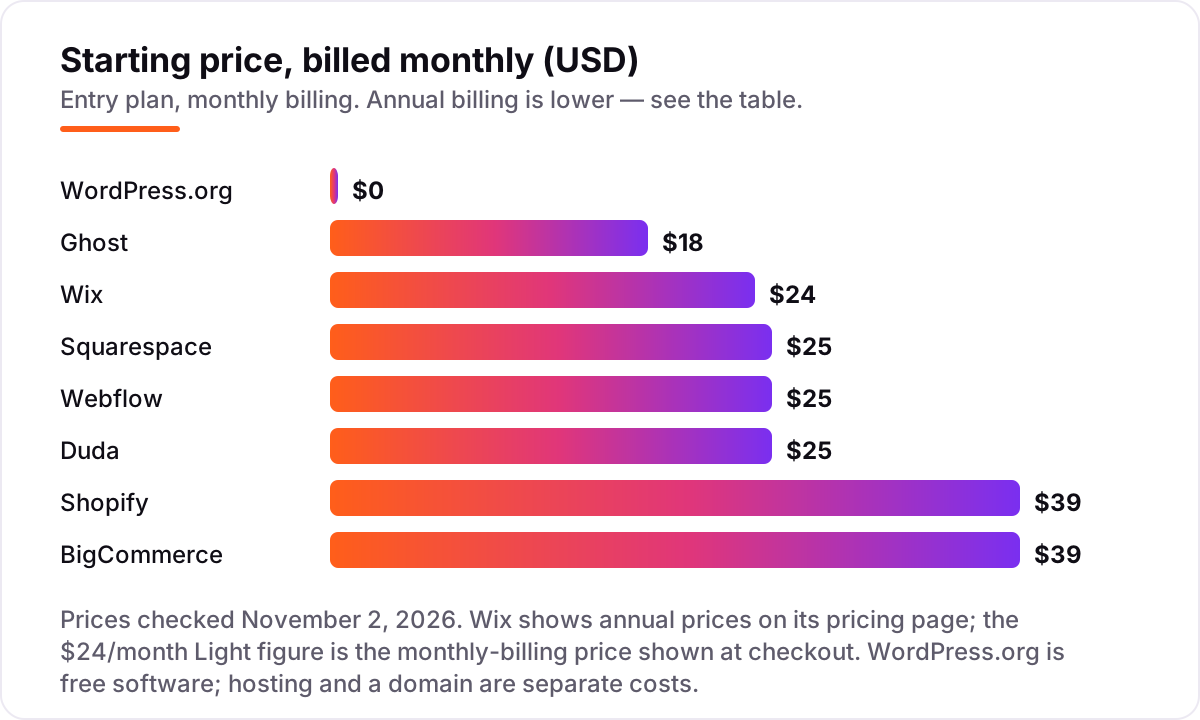
- Wix, Squarespace and Webflow are the best hosted picks: Wix from $24/month, Squarespace from $25/month, and Webflow from $25/month, all with built-in SEO tools and no maintenance.
- Shopify and BigCommerce are the picks when the site is a store: both start at $39/month billed monthly, with product SEO and checkout handled for you.
- The single most important buying factor is control: the more of your technical SEO you can change — URLs, schema, redirects, speed — the further the platform can take you.
- Every price below was checked on the vendor's own pricing page on November 2, 2026. Wix shows annual prices on its page, so its $24/month figure is the monthly-billing price shown at checkout.
On this page
Quick comparison
| Tool | Best for | Starting price | Free plan |
|---|---|---|---|
| WordPress.org | Site owners who want full control of technical SEO and are happy to arrange hosting and updates themselves | Free (software) | Yes (software free) |
| Wix | Small businesses that want a fast, no-maintenance website with built-in SEO tools and a free plan to start | $17/mo (annual) | Yes (free plan) |
| Squarespace | Design-led small businesses, portfolios and blogs that want polished templates and solid SEO basics | $19/mo (annual) | No (14-day trial) |
| Webflow | Design-led marketing teams that want pixel-level control and clean code without managing a server | $15/mo (annual) | Yes (Starter) |
| Shopify | Stores that want a proven checkout, product SEO and app ecosystem in one hosted package | $29/mo (annual) | No (3-day trial) |
| Duda | Agencies and freelancers building fast client sites with strong built-in SEO tools | $19/mo (annual) | No (14-day trial) |
| Ghost | Publishers and newsletter writers who want a fast, focused platform for content and memberships | $15/mo (annual) | No (14-day trial) |
| BigCommerce | Growing stores with large catalogs that want built-in selling features instead of paid apps | $29/mo (annual) | No (15-day trial) |
Make one of these tools?
We re-check this list every quarter. Send a correction, request a review, or ask about a clearly labeled sponsored spot.
Request a listingThe best website platforms for SEO

WordPress.org
Best for: Site owners who want full control of technical SEO and are happy to arrange hosting and updates themselves
WordPress.org is the free, open-source software behind about 40% of all websites, according to W3Techs data from October 2026, and it earns the top spot because no other platform gives you this much control. You own the code, the database and the hosting choice, so every technical SEO lever — URL structure, redirects, schema markup, crawl rules — is available to you.
The catch is that the software is only part of the bill. Hosting starts at a few dollars a month with a shared host, a domain is a small separate annual cost, and you are responsible for updates, backups and security. If you want maximum SEO control and do not mind the maintenance, nothing else here matches it.
What we like
- Full control of technical SEO: URLs, redirects, schema, sitemaps and robots rules are all yours to change
- Largest plugin ecosystem of any platform here, including free SEO plugins such as Rank Math and Yoast SEO
- No platform lock-in: move hosts, change themes and keep your content and data
Watch out for
- You arrange hosting, security, backups and updates yourself, or pay someone to do it
- Speed and security depend on your host and plugin choices, so a bad setup can hold rankings back

Wix
Best for: Small businesses that want a fast, no-maintenance website with built-in SEO tools and a free plan to start
Wix is the easiest way onto this list: pick a template, drag content into place, and the hosting, security and updates are handled for you. The Light plan costs $17 a month billed annually and includes a free domain for the first year, while the free plan lets you publish on a Wix subdomain with Wix ads. Its SEO tools cover the basics well — editable titles and descriptions, automatic sitemaps, structured data and redirect management.
The trade-off is control and portability. You cannot export a Wix site to another host, and the pricing page only shows annual prices — the $24 a month Light figure is the monthly-billing price you see at checkout. For a small business site that needs to rank without a developer, Wix is the most forgiving starting point here.
What we like
- Genuine free plan, so you can build and publish before paying anything
- Built-in SEO tools cover meta tags, sitemaps, structured data and URL control without plugins
- Huge template library and app market, with booking, events and stores built in
Watch out for
- Monthly-billing prices appear only at checkout; the pricing page shows annual prices
- You cannot move a Wix site to another host, and advanced SEO work hits the platform's limits

Squarespace
Best for: Design-led small businesses, portfolios and blogs that want polished templates and solid SEO basics
Squarespace is the design-first pick. Its templates are consistently the most polished in this list, every plan includes SSL, mobile-ready layouts and an automatic sitemap, and the editor stays simple enough that a non-technical owner can publish and optimise pages alone. The Basic plan costs $19 a month billed annually, or $25 month to month, and includes a free domain for the first year on annual billing.
The limits show up when you outgrow the basics. There is no free plan, only a 14-day trial, and the Basic plan takes a 2% fee on store sales. Custom schema and deeper technical changes are harder than on WordPress or Webflow. If the site is a portfolio, blog or brochure site where looks matter, Squarespace is hard to beat.
What we like
- Beautiful, mobile-ready templates with clean code and fast default performance
- SEO basics built in: editable titles and descriptions, automatic sitemaps, SSL and clean URLs
- Annual plans include a free custom domain for the first year
Watch out for
- No free plan, and the Basic plan charges a 2% transaction fee on store sales
- Less flexible than WordPress or Webflow for custom schema and advanced technical SEO

Webflow
Best for: Design-led marketing teams that want pixel-level control and clean code without managing a server
Webflow is the platform for teams that care about design and performance in equal measure. Its visual builder gives near hand-coded control, the output is clean and fast, and paid plans include full control of meta tags, redirects, sitemaps and robots rules. The Basic Site plan costs $15 a month billed annually and covers a simple site on a custom domain.
The catch is that Basic has no CMS, so any site with a blog needs the Premium plan at $25 a month billed annually, with 20,000 CMS items and 50 GB of bandwidth. You also pay one Site plan per published site, and the editor takes longer to learn than Wix or Squarespace. For a marketing site where design and speed both matter, it is the strongest hosted pick here.
What we like
- Visual design control close to hand-coded, with clean, fast-loading output
- Full control of meta tags, redirects, sitemaps and robots rules on paid plans
- Built-in CMS on Premium makes blogs and content sections easy to manage
Watch out for
- Basic has no CMS, so blogs and content sites need Premium at $25 a month billed annually
- Steeper learning curve than Wix or Squarespace, and you pay one Site plan per published site

Shopify
Best for: Stores that want a proven checkout, product SEO and app ecosystem in one hosted package
Shopify is the default choice when the website is a store first and a content site second. The Basic plan costs $29 a month billed annually and includes unlimited products, a proven checkout, automatic sitemaps and editable titles and descriptions on every page. Hosting, security and updates are handled, and the app store covers almost any SEO or marketing add-on you might need.
The costs beyond the subscription matter. Every online card sale costs 2.9% plus 30 cents on Basic, and using a payment provider other than Shopify Payments adds a 2% fee. The blog is serviceable rather than strong, and Shopify's URL structure is less flexible than WordPress. For selling, though, no other platform here converts as reliably.
What we like
- Checkout, payments, product pages and inventory handled in one place
- Fast, reliable hosting with a huge app store for SEO, reviews and marketing tools
- Built-in blogging and automatic sitemaps, with editable titles and descriptions on every page
Watch out for
- Card fees of 2.9% plus 30 cents per online sale on Basic, plus 2% if you use another payment provider
- Blog and content tools are weaker than WordPress or Ghost, and URL structures are less flexible

Duda
Best for: Agencies and freelancers building fast client sites with strong built-in SEO tools
Duda is built for people who make websites for other people. The Basic plan costs $19 a month billed annually for one site, and includes hosting, an AI text assistant, and SEO tools that go further than most builders: built-in schema, redirects, local business markup and site speed that reviewers consistently praise. It holds the highest G2 score in this list, 4.7 out of 5.
The pricing model is per site, which is the thing to budget for. Each extra published site costs $19 a month or $171 a year, so twenty client sites is a real monthly line item, and full white-label branding needs the White Label plan. For a single business site it is a strong, fast pick; for agencies it is the most purpose-built option here.
What we like
- Fast by default, with built-in SEO tools including schema, redirects and local business markup
- Clean editor with team and client management built for agencies
- Highest G2 score in this list at 4.7 out of 5 from 847 reviews
Watch out for
- Basic covers one site only, and each extra site costs $19 a month or $171 a year
- Full white-label needs the White Label plan at $199 a month billed monthly

Ghost
Best for: Publishers and newsletter writers who want a fast, focused platform for content and memberships
Ghost is the specialist in this list: a publishing platform that does one thing — fast, clean content with newsletters and memberships — and does it well. Ghost(Pro) hosting starts at $15 a month billed annually for up to 1,000 members, and the software itself is open source and free to self-host. Pages load quickly, the editor stays out of the way, and paid plans take 0% of your subscription revenue.
The limits are the point of the product. Starter allows one staff user, one newsletter and no paid subscriptions, so a paid newsletter starts at Publisher, $29 a month billed annually. Ghost is not a general builder: if the site needs a store or complex layouts, look elsewhere. For a publication that lives or dies on content, it is the fastest option here.
What we like
- Very fast by default, with clean code and a focused writing and publishing experience
- Newsletters and paid memberships built in, with 0% platform fee on member revenue
- Open-source software is free to self-host if you run your own server
Watch out for
- Starter is capped at 1,000 members with one staff user and no paid subscriptions
- Not a general website builder: stores and complex page layouts need workarounds

BigCommerce
Best for: Growing stores with large catalogs that want built-in selling features instead of paid apps
BigCommerce is the store platform for catalogues that keep growing. The Core plan costs $29 a month billed annually and includes unlimited products, unlimited storage and bandwidth, product reviews, real-time shipping quotes and professional reporting — features Shopify often sells as apps. Orders through its listed payment providers carry no extra platform fee.
The catch is the sales cap. Core covers up to $30,000 in trailing-12-month sales, and passing it auto-upgrades the store to Growth at $79 a month billed annually. Using a payment provider outside the approved list adds a 2% fee on Core. For a store that plans to scale past a small catalogue, it is the most complete hosted option here.
What we like
- Unlimited products, storage and bandwidth on every plan, with more built in than Shopify at the same price
- No platform fee on orders through its listed payment providers
- Built-in product reviews, real-time shipping quotes and professional reporting on Core
Watch out for
- Core auto-upgrades to Growth once trailing-12-month sales pass $30,000
- A 2% fee applies to orders through payment providers outside its approved list
Picking the best website platform for SEO is the highest-leverage decision most small businesses make about search, because the platform decides which SEO levers you can pull at all. A platform that locks down URLs, schema and redirects will cap your rankings no matter how good your content is, while one that hands you the controls lets a small site outrank bigger competitors. This guide ranks eight platforms by fit for the most common buyer — a small business owner who wants rankings without hiring a developer — and it is organised by what you actually need: free and open options first, then hosted builders, then stores and publishers.
What the best website platform for SEO actually does
A website platform for SEO is the software your site runs on, and its job is to turn your content into pages Google can crawl, understand and rank. That means clean URLs, editable titles and descriptions, automatic sitemaps, fast loading, mobile layouts, and control over redirects and structured data. When any of those are missing or locked away, rankings suffer no matter how well you write.
The scale of the choice is visible in the numbers: W3Techs put WordPress on 39.6% of all websites in October 2026, more than seven times the share of Shopify, the next platform, at 5.3%. That dominance is why WordPress tops this list — but market share is not the same as fit, and for many buyers a hosted builder is the better buy. What matters is whether the platform gives you the specific controls your site needs, at a price and maintenance level you can live with.
Speed is part of the job too, and it is where platforms differ most. A platform that serves lean, fast pages gives every page a head start in rankings, while a slow one forces you to fight the template. Mobile layouts matter just as much: most searches now happen on a phone, so a platform whose templates are genuinely mobile-first, rather than squeezed down from desktop, saves a round of fixes later. The platform cannot write your content or earn your links — that work is still yours — but it decides how much of that work actually reaches Google intact.
Free and open options first
If you can handle a little setup, the free and open platforms give you the most SEO for the least money. WordPress.org costs nothing for the software itself — you pay only for hosting and a domain — and it is the only platform in this list where every technical decision is yours. Ghost is the same shape at a smaller scale: open-source software you can self-host for free, with paid Ghost(Pro) hosting from $15 a month billed annually if you would rather not run a server.
Start here if rankings are the priority and you, or someone you hire, can look after updates and backups. The trade-off is real: nobody patches your site for you, and a neglected WordPress install is a security and speed risk. But the ceiling is the highest in this list, because nothing about the platform stands between you and the search engines.
The hosting choice matters as much as the software. A cheap shared host can undo WordPress's speed advantage, while a good managed host handles caching, backups and updates for a few dollars more a month. Plugins deserve the same care: a handful of well-kept plugins is fine, but every extra plugin is another thing to update and another possible point of failure. Keep the install lean — one SEO plugin, one caching setup, one backup routine — and WordPress stays fast and safe.
Hosted builders for most small businesses
For most small businesses, a hosted builder is the sensible middle ground: the vendor runs the servers, the security and the updates, and you get a visual editor plus built-in SEO tools. Wix is the easiest of the four here, with a genuine free plan and the widest template and app library. Squarespace is the most design-led, with the most polished templates and solid SEO basics. Webflow gives the most design control and the cleanest code, which shows up in page speed. Duda is the quiet specialist: fast by default, with schema and local business markup built in, and the highest G2 score in this list.
The hosted builders differ most in what they lock away. Wix and Squarespace keep advanced technical SEO behind their own limits, Webflow's entry Basic plan has no CMS at all, and Duda charges per site. None of that matters for a brochure site or a small blog — but it matters a lot once the site becomes the main way customers find you.
The other question to ask is what leaving costs. Moving a site between hosted builders is never a one-click job: templates do not transfer, and every URL needs a redirect to its new home. WordPress.org is the exception, because you own the files and the database and can move hosts without rebuilding. That portability is worth weighing against the convenience of a hosted builder, especially if the site is a long-term asset rather than a quick launch.
Stores and publishers
When the site has one clear job, pick the platform built for that job. For a store, Shopify and BigCommerce both start at $39 a month billed monthly and handle the parts that matter for product SEO: clean product URLs, automatic sitemaps, fast hosting and a proven checkout. Shopify has the bigger app ecosystem and the simpler admin; BigCommerce builds more selling features in at the same price and never charges for unlimited products, storage or bandwidth.
For publishing, Ghost is the focused pick: a fast platform for content, newsletters and memberships, with 0% platform fees on member revenue. WordPress.org covers publishing too, and it is the stronger choice when the publication also needs a store, a forum or custom features. The wrong move is picking a general builder for a store, or a store platform for a publication — each one makes its own job easy and the other job hard. If your store already ranks but converts poorly, our SEO audit service looks at exactly that gap between traffic and sales.
The two store platforms differ in ways that show up in search results over time. Shopify's blog and URL structure are less flexible than a content-first platform, so a store that plans to win through articles and guides may feel the ceiling sooner. BigCommerce is more generous with built-in features at the same price, but its sales cap forces an upgrade sooner than many owners expect. Either way, the store's SEO lives or dies on product pages: clear titles, unique descriptions, and a fast checkout matter more than any single platform feature.
Quick comparison: tool type by need
| Buyer | Best pick | Why |
|---|---|---|
| Solo owner who wants maximum control | WordPress.org | Free software, full technical control, hosting extra |
| Small business that wants no maintenance | Wix | $17/month billed annually, free plan, built-in SEO tools |
| Design-led portfolio or blog | Squarespace or Webflow | Polished templates (Squarespace) or design control (Webflow) from $15–$19/month billed annually |
| A store first, content second | Shopify | $29/month billed annually, proven checkout, huge app store |
| Agency building client sites | Duda | $19/month billed annually per site, fast, built-in schema and local SEO |
| Publisher or newsletter | Ghost | $15/month billed annually, fast, memberships built in |
How to choose: a short decision path
- Decide hosted or self-hosted first. If you never want to think about updates, backups or security, pick a hosted platform. If you want every SEO lever available and can handle maintenance, pick WordPress.org.
- Match the platform to the site's main job. A store belongs on Shopify or BigCommerce, a publication on Ghost or WordPress.org, and a brochure or portfolio site on Wix, Squarespace or Webflow. The wrong shape costs more than the wrong price.
- Check the SEO controls before you pay. Can you edit titles, descriptions and URLs on every page? Are redirects, sitemaps and schema available? Before you publish, run your headings through the free heading structure checker — it shows whether a page's heading outline is one Google can follow.
- Price the first year, not the first month. Annual billing cuts most plans by 20–25%, but remember the extras: a domain and hosting on WordPress.org, transaction fees on Squarespace Basic and Shopify Basic, and per-site fees on Duda.
- Try before you pay. Every platform in this list has a free plan or a free trial. Build three real pages, publish them, and check that titles, URLs and the sitemap look right before you commit to a year.
Mistakes to avoid
- Comparing monthly prices without checking billing. Annual billing is usually 20–25% cheaper, and Wix only shows annual prices on its pricing page — the monthly figure appears at checkout. Ghost's Starter is $15 a month billed annually but $18 month to month.
- Choosing a store platform for a content site, or the reverse. Shopify's blog is serviceable, not strong, and Ghost has no real store. Pick the platform built for the site's main job.
- Ignoring the caps that force an upgrade. BigCommerce Core auto-upgrades once trailing-12-month sales pass $30,000, and Ghost Starter caps at 1,000 members with no paid subscriptions. Check the cap before you build on the plan.
- Forgetting the domain and hosting are separate on WordPress.org. The software is free, but the site is not: hosting and a domain are separate costs, and cheap hosting can undo the platform's speed advantage.
- Picking on templates alone. A pretty template that loads slowly or locks down URLs will cost more rankings than a plain one with full SEO control. Check speed, URL control and schema before you fall for the design — and keep an eye on how to track your Google ranking once the site is live, so you know whether the platform is actually delivering.
How we chose
We checked each vendor's own pricing page on November 2, 2026 and recorded the starting price exactly as shown, including the annual-billing figure where the page lists one. One exception: Wix shows only annual prices on its pricing page, so its $24 a month Light figure is the monthly-billing price shown at checkout, not a number from the pricing page itself. Ratings come from G2, with review counts shown. We ranked the platforms by fit for the most common buyer — a small business owner who wants search rankings without hiring a developer — not by brand size or market share. No vendor paid for a place in this list, and none of the links here are affiliate links.
What to do next
Start with the decision path above: hosted or self-hosted, the site's main job, the SEO controls, the first-year price, and a trial run of three real pages. Then take the free plan or trial of your top pick and publish those pages properly — titles, descriptions, URLs and all. If the pages index cleanly and the editor feels right, you have your platform. If you'd rather have this set up and read for you, request a free SEO + AI visibility audit and get a ranked fix list in 2 business days.
Rather not run the tools yourself?
Tools show you the data. SerpAstra turns it into higher rankings, more map-pack calls and citations in AI answers.
Get a free SEO + AI visibility audit→Sources we checked (18)
- WordPress.org — free open-source software (checked November 2, 2026)
- WordPress.org on G2 — 4.4/5, 9,546 reviews (checked November 2, 2026)
- Wix pricing — wix.com/plans (checked November 2, 2026)
- Wix on G2 — 4.2/5, 1,910 reviews (checked November 2, 2026)
- Squarespace pricing — squarespace.com/pricing (checked November 2, 2026)
- Squarespace on G2 — 4.4/5, 1,136 reviews (checked November 2, 2026)
- Webflow pricing — webflow.com/pricing (checked November 2, 2026)
- Webflow on G2 — 4.4/5, 996 reviews (checked November 2, 2026)
- Shopify pricing — shopify.com/pricing (checked November 2, 2026)
- Shopify on G2 — 4.4/5, 5,152 reviews (checked November 2, 2026)
- Duda pricing — duda.co/pricing (checked November 2, 2026)
- Duda on G2 — 4.7/5, 847 reviews (checked November 2, 2026)
- Ghost pricing — ghost.org/pricing (checked November 2, 2026)
- Ghost on G2 — 4.0/5, 40 reviews (checked November 2, 2026)
- BigCommerce pricing — bigcommerce.com/pricing (checked November 2, 2026)
- BigCommerce on G2 — 4.2/5, 584 reviews (checked November 2, 2026)
- W3Techs WordPress usage statistics, October 2026 (via WordPress Statistics 2026)
- BigCommerce trial — support.bigcommerce.com Quickstart Guide (checked November 2, 2026)
Shamim
Founder of SerpAstra
A full-stack SEO and digital marketer who spends most days on Local SEO for dental practices, AI search visibility and lead generation.
Frequently asked questions
What is the best website platform for SEO in 2026?
WordPress.org is the best website platform for SEO for most sites: free software, full control of technical SEO, and the largest plugin ecosystem. If you want no maintenance, Wix is the easiest hosted pick and Webflow is the strongest for design-led marketing sites.
How much does a website platform for SEO cost?
From free to $39 a month at the entry level. WordPress.org software is free, with hosting extra. Wix starts at $17 a month billed annually, Squarespace and Duda at $19, Webflow and Ghost at $15, and Shopify and BigCommerce at $29 — all billed annually.
Is there a free website platform for SEO?
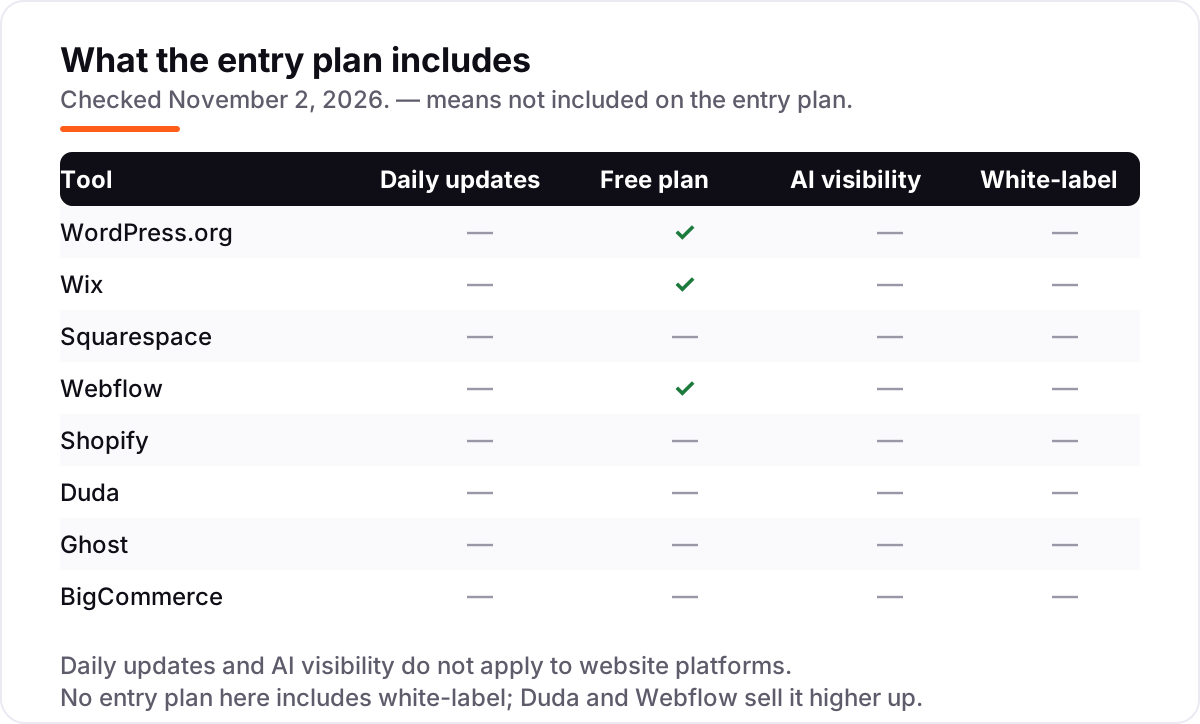
Yes, with limits. WordPress.org is free software, though hosting and a domain cost extra. Wix has a genuine free plan and Webflow has a free Starter plan, both on subdomains. Squarespace, Shopify, Duda, Ghost and BigCommerce offer free trials instead of free plans.
Wix vs WordPress for SEO: which is better?
WordPress wins on control: you can change anything, from URL structure to schema to server settings. Wix wins on ease: hosting, security and updates are handled, and the built-in SEO tools cover the basics. Choose WordPress if you want maximum rankings control, Wix if you want to launch fast without a developer.
Can I switch website platforms later without losing SEO?
Yes, if you plan the move. Map every old URL to a new one with 301 redirects, keep titles and descriptions, and re-submit your sitemap. WordPress makes this easy because you own the data. Wix sites cannot be exported, so leaving Wix usually means rebuilding the site.
Do I need a separate SEO plugin on a website builder?
Usually not. Wix, Squarespace, Webflow, Duda, Shopify and BigCommerce all include editable titles and descriptions, sitemaps and SSL. WordPress.org is the exception: it needs an SEO plugin such as Rank Math or Yoast SEO for titles, sitemaps and schema, though both have capable free versions.
Which platform is best for an online store's SEO?
Shopify is the best pick for most stores: a proven checkout, product SEO and the largest app ecosystem, from $29 a month billed annually. BigCommerce suits larger catalogues, with unlimited products and more selling features built in at the same starting price.
Free SEO and AI visibility audit
Find out what is holding your rankings back
Send us your site. Within 2 business days you get a written audit, an AI visibility check and a short fix list ranked by impact. Free, with no contract attached.
Request my free audit→Related guides
 SEO & AI SearchBest CMS for SEO in 2026: 8 Options Ranked and Reviewed8 best CMS for SEO compared with real 2026 prices, free plans and SEO controls. WordPress, Webflow, Shopify and more, ranked by fit for a small business site.Read guide →
 SEO & AI Search12 Best Blogging Platforms for SEO in 2026 (Pros, Cons and Pricing)Compare the best blogging platform for SEO for your budget: 12 platforms ranked on price, SEO controls and ownership, from free WordPress to Ghost and Webflow.Read guide →
 SEO & AI Search7 Best Ecommerce Platforms for SEO in 2026 (Pros, Cons and Pricing)The 7 best ecommerce platform for SEO picks compared on price, SEO controls and ease of use, with real 2026 prices checked on each vendor's pricing page.Read guide →