
Best Wifi Heatmap Software for 2026: 11 Options Compared by Use Case
Compare the 11 best wifi heatmap software options on price, measured vs predicted maps and client reports, with prices checked November 5, 2026.
 Shamim Mia, Founder, SerpAstraLast verified November 5, 202614 min read
We compare pricing pages, documentation and public reviews. We never accept payment for rankings.
Key takeaways
- NetSpot is the best fit for most buyers — free to start, $49 one-time for Home — UniFi Design Center plans a UniFi site free, and VisiWave gives the clearest client-ready maps at $379 a year.
- The single most important buying factor is whether the map is measured or predicted: a measured survey shows your real signal, a predicted map only simulates it.
- One-time licences beat subscriptions for occasional surveys: NetSpot Pro costs $149 once, while TamoGraph renews at $999 a year, and Ekahau AI Pro is the outlier at $5,995 plus $1,995 a year for Connect.
- Two prices here are not on the vendor's own page: Hamina Onsite at $780 a year and Hamina Network Planner Basic at €269 a year come from third-party listings, so confirm both with the vendor before buying.
On this page
Quick comparison
| Tool | Best for | Starting price | Free plan |
|---|---|---|---|
| NetSpot | Home users and small offices that want a real floor-plan heatmap without paying anything to start | Free (Home $49) | Yes (free version) |
| UniFi Design Center | Small businesses planning a UniFi install who want a predicted coverage map before buying hardware | Free | Yes (free tool) |
| VisiWave Site Survey | Surveyors who want clear 2D and 3D heatmaps with GPS positioning for indoor and outdoor sites | $379/yr | No (evaluation) |
| TamoGraph Site Survey | Small and mid-size IT teams that need professional surveys and reports without enterprise pricing | $999/yr | No (30-day trial) |
| Acrylic WiFi Heatmaps | Network engineers who need a dedicated Windows survey tool with GPS mapping for large sites | €129 | No (15-day trial) |
| Hamina Network Planner | Wireless designers who want a browser-based predictive planner as a cheaper alternative to Ekahau | Free (Basic €269/yr) | Yes (free plan) |
| Hamina Onsite | Field teams that survey with an iPhone or iPad and sync results to a cloud planner | $780/yr | No (subscription) |
| iBwave Wi-Fi Mobile | Field engineers who survey and design Wi-Fi on a phone or tablet instead of a laptop | $215/30 days | No (free trial) |
| AirMagnet Survey PRO | Enterprise teams that need calibrated, voice-grade surveys with predictive planning in one tool | Custom quote | No (quote only) |
| Ekahau AI Pro | Enterprise wireless engineers designing large multi-floor networks who need the industry-standard tool | $5,995 once | No (demo only) |
| NetSurveyor | Windows users who want a free scanner with channel heatmaps and PDF reports for troubleshooting | Free | Yes (freeware) |
Make one of these tools?
We re-check this list every quarter. Send a correction, request a review, or ask about a clearly labeled sponsored spot.
Request a listingThe best wifi heatmap software

NetSpot
Best for: Home users and small offices that want a real floor-plan heatmap without paying anything to start
NetSpot is the easiest way to get a Wi-Fi heatmap without paying: upload a floor plan, walk the rooms, and tap each spot to record the signal. The free version covers one zone with 50 data points per snapshot, enough for a flat or small office, and the map shows signal, noise and channel overlap. When the free limits pinch, Home costs $49 once and Pro $149 once, with no subscription to renew.
The catch is the free tier's size, not its quality. One zone means a larger house or office needs a paid licence, and exports, active scanning and the full survey mode are paid too. NetSpot is still the right first download for almost everyone: it pairs a genuinely free heatmap with paid licences cheap enough for a small business.
What we like
- The free version maps Wi-Fi coverage on your own floor plan on Windows and macOS
- Home licence costs $49 one-time, Pro $149 one-time, with no subscription to renew
- More than 12 heatmap visualisations cover signal, noise, channel overlap and data rates
- Runs on Windows, macOS, Android and iOS from the same account
Watch out for
- The free version covers only 1 zone with 50 data points per snapshot, so larger spaces need a paid licence
- Full survey mode, active scanning and exports are paid features, not in the free version
- Purchases are final and non-refundable on Pro and Enterprise licences

UniFi Design Center
Best for: Small businesses planning a UniFi install who want a predicted coverage map before buying hardware
UniFi Design Center answers a different question from the survey tools: what should the network look like before you buy anything? Upload a floor plan, trace the walls, drop access points onto the plan, and the tool draws simulated coverage in 2D and 3D, then totals a bill of materials with store prices. Automatic placement even suggests how many access points each room needs.
The catch is that it only plans Ubiquiti hardware, and the map is a prediction, not a measurement — walls, furniture and neighbours all bend real signal in ways the simulation cannot see. Use it to plan the purchase and the AP positions, then verify with NetSpot after the install. For a UniFi shop, it is free money.
What we like
- Free browser tool: upload a floor plan, trace walls, place access points and see simulated coverage
- Automatic access-point placement picks AP counts from the capacity zones you draw
- Generates a bill of materials with store prices for the planned hardware
- 2D and 3D coverage views plus camera coverage simulation on the same plan
Watch out for
- Only models Ubiquiti hardware, so it cannot plan a Cisco, Aruba or Meraki network
- Coverage is a simulation, not a measurement — you still need a walk-through survey after install
- Needs a UI account to save and sync designs

VisiWave Site Survey
Best for: Surveyors who want clear 2D and 3D heatmaps with GPS positioning for indoor and outdoor sites
VisiWave Site Survey is the visual pick in this list: its heatmaps render in 2D and 3D with colour coding a client reads at a glance, and it collects data three ways — one point at a time, continuous walks through the survey area, and GPS positioning for outdoor sites. Custom report templates and Google Earth export finish the job, and the $379-a-year subscription includes all updates and support while it is active.
The limits are the platform and the upsell. It is Windows only, there is no free plan beyond the evaluation version, and predictive surveys — the feature that simulates coverage before hardware exists — need the Pro edition at a higher price. For a surveyor who sells the map as much as the survey, the 3D views are worth the subscription.
What we like
- Heatmaps render in 2D and 3D with colour coding that clients read at a glance
- Three collection methods: one point at a time, continuous walks, and GPS for outdoor surveys
- Custom report templates and Google Earth export for the finished survey
- One licence per computer with all updates and support included while the subscription is active
Watch out for
- No free plan, only a free evaluation version, and the subscription costs $379 a year per licence
- Predictive surveys need the Pro edition, which costs more than the base subscription
- Windows only, so Mac-based surveyors need a Windows machine

TamoGraph Site Survey
Best for: Small and mid-size IT teams that need professional surveys and reports without enterprise pricing
TamoGraph Site Survey sits between the free tools and Ekahau: a professional survey tool that an IT team can learn in a day. It runs passive and active surveys, draws heatmaps for signal, interference, data rates and throughput, and produces reports ready to hand to a client. It works on Windows and macOS, supports 802.11ax, 6E and 7, and the maps are easy enough to read that a non-specialist can follow them.
The price is the trade-off: there is no free plan, only a fully functional 30-day trial, and Standard costs $999 for a one-year licence. Predictive modelling and GPS support need Pro at $1,999, and full validation can need extra adapters. For a team that surveys offices a few times a year, it is the cheapest route to professional-grade maps.
What we like
- Passive and active surveys with heatmaps for signal, interference, data rates and throughput
- Runs on Windows and macOS from the same licence
- Fast to learn: maps are easy to read and reports are ready to hand to a client
- Supports 802.11ax, 6E and 7 networks, so it covers current hardware
Watch out for
- No free plan, only a 30-day trial, and the Standard licence costs $999 for one year
- Predictive RF modelling and GPS support need the Pro edition at $1,999
- Full validation can need extra hardware: compatible USB adapters and a spectrum analyzer

Acrylic WiFi Heatmaps
Best for: Network engineers who need a dedicated Windows survey tool with GPS mapping for large sites
Acrylic WiFi Heatmaps is a dedicated survey tool for engineers who map large sites: it handles indoor plans where GPS does not reach, and outdoor GPS mapping for campuses, warehouses and smart-city areas. At each measured point it records signal strength and quality, then renders the coverage map and generates editable reports with a diagnosis of the network and advice on how to improve it. CSV export feeds the data into other tools.
The price is the catch for casual users: there is no free plan, only a 15-day trial, and the shortest licence is one month at 129 euros. It is also Windows only. For a one-off professional survey, though, the one-month licence is the cheapest way to get a proper tool for the job, and you stop paying when the survey ends.
What we like
- Built for surveys: indoor plans without GPS and outdoor GPS mapping for campuses and smart-city areas
- Shows signal strength and quality at every location with multiple parameters on one map
- Exports CSV data and generates editable reports with a diagnosis and improvement advice
- Simple licence terms: 1 month, 3 months, 1 year or perpetual, so you pay only for the survey window
Watch out for
- No free plan, only a 15-day trial, and the shortest licence is a 1-month term at 129 euros
- Windows only, so Mac-based engineers need a second machine or a virtual machine
- Licences are per user and priced in euros, so US buyers pay the converted amount

Hamina Network Planner
Best for: Wireless designers who want a browser-based predictive planner as a cheaper alternative to Ekahau
Hamina Network Planner is the browser-based challenger to Ekahau: open a browser, upload a floor plan, and build a predictive design with 2D and 3D heatmaps and automatic access-point placement, with no heavy desktop install and no perpetual licence to buy. The free plan covers 30 locations, enough to design a house or test the tool, and paid tiers scale by location count rather than by seat.
The limits are scope and currency. Thirty locations will not cover a real office, so most buyers need Basic at 269 euros a year, and the tiers are priced in euros, so US buyers pay the converted amount. It also predicts rather than measures: pair it with Hamina Onsite when you need a walk-through survey of the finished network.
What we like
- Runs in a browser with no heavy desktop install, and the free plan covers a small design
- Predictive heatmaps in 2D and 3D with automatic access-point placement
- Vendor hardware integration covers Meraki, Aruba and other major access-point lines
- Subscription pricing with no up-front perpetual licence to buy
Watch out for
- The free plan covers only 30 locations, so a real building plan needs a paid tier
- Paid tiers are priced in euros, so US buyers pay the converted amount
- Measured surveys need the separate Onsite product and compatible survey hardware
Hamina Onsite
Best for: Field teams that survey with an iPhone or iPad and sync results to a cloud planner
Hamina Onsite is the field companion to the Planner: an iPhone and iPad app that records real signal as you walk, in continuous, line or point modes, then syncs the survey to the cloud planner for analysis. It works offline, so a basement or warehouse with no signal still gets surveyed, and the results land in the same project as the predictive design, so the plan and the measurement sit side by side.
Two warnings before you buy. First, the $780-a-year figure comes from a third-party comparison, not a vendor price page we could re-read, so confirm it with Hamina first. Second, accurate surveys need compatible hardware such as the Oscium Nomad, which is a separate purchase, and Android field teams are out of luck — the app is Apple-only.
What we like
- Mobile survey app that syncs with Hamina Network Planner in the cloud
- Continuous, line and point survey modes for different site conditions
- Works offline and syncs when the surveyor is back online
- Live monitoring of access points and clients is available on the Planner Plus tier
Watch out for
- No published vendor price page we could re-read, so the $780 figure is third-party reported — confirm it before buying
- Needs compatible survey hardware such as the Oscium Nomad for accurate measurements
- Apple-only mobile app, so Android field teams need another tool

iBwave Wi-Fi Mobile
Best for: Field engineers who survey and design Wi-Fi on a phone or tablet instead of a laptop
iBwave Wi-Fi Mobile puts indoor wireless design on a phone or tablet: survey a site, sketch a simple design, and sync the work to the PC product for full modelling, with 10 GB of cloud storage and a read-only Viewer licence included. It is purpose-built for indoor wireless work, so the workflow follows how a site survey actually runs, rather than bolting a map onto a generic scanner.
The term is the thing to plan around. Thirty days at $215 suits a single project, but a multi-month job needs repeated renewals, and large multi-floor models are still easier on the PC product. Treat Mobile as the field half of an iBwave workflow, not a standalone replacement for the desktop design tool.
What we like
- Survey and simple design on a mobile device, with results that feed the PC design product
- Includes 10 GB of cloud storage and a read-only Viewer licence
- Annual maintenance and support is included for the subscription term
- Purpose-built for indoor wireless design, not adapted from a generic scanner
Watch out for
- The 30-day term is short for a long project, so a multi-month job needs repeated renewals
- Mobile-first design means large multi-floor models are easier on the PC product
- No free plan, only a free trial, and the subscription must be renewed to keep access

AirMagnet Survey PRO
Best for: Enterprise teams that need calibrated, voice-grade surveys with predictive planning in one tool
AirMagnet Survey PRO is the enterprise surveyor's workhorse: it runs passive and active surveys at the same time, adds predictive planning through the Planner module, and includes voice-grade survey modes for hospitals, warehouses and offices where call quality is the requirement. Spectrum analysis integration helps track down the interference source, and the reporting is built for enterprise sign-off.
The price is the unknown. NetAlly publishes no starting price and sells through partners, so budget on a quote, and ignore the old $3,995 list price still floating around online — it is years out of date. Factor in supported adapters and NetAlly hardware too: the software licence is rarely the whole bill for an AirMagnet deployment.
What we like
- Passive and active surveys at the same time, with predictive planning in the Planner module
- Voice-grade survey modes for sites where call quality is the requirement
- Spectrum analysis integration for tracking down interference sources
- Detailed reporting suited to enterprise sign-off and handover
Watch out for
- No published starting price — NetAlly sells through partners, so budget on a quote, not a list price
- Old list prices online ($3,995 with Planner) are years out of date and must not be used
- Needs supported adapters and, for full surveys, NetAlly hardware, which adds to the bill

Ekahau AI Pro
Best for: Enterprise wireless engineers designing large multi-floor networks who need the industry-standard tool
Ekahau AI Pro is the industry standard for enterprise Wi-Fi design, and the price shows it: the perpetual licence costs $5,995 once, and a one-year Connect subscription at $1,995 a year is required with it. In return you get AI-powered design that places access points and plans channels across whole buildings, predictive surveys, spectrum analysis and capacity planning, plus mobile Survey and Analyzer apps and cloud project sync.
The catch is everything around the licence. Full survey features need the Sidekick 2 measurement device, sold separately, and the software is heavy on system resources. For a home or a small office this is vast overkill. For an enterprise engineer designing a hospital, campus or warehouse, it is the tool the client, the team and the next hire all expect.
What we like
- AI-powered design automates access-point placement and channel planning across floors
- Predictive surveys, spectrum analysis and capacity planning in one desktop and online tool
- Cloud project sync, mobile Survey and Analyzer apps, and the Optimizer for existing networks
- The tool most enterprise wireless engineers already know, so hiring and handover are easy
Watch out for
- The most expensive tool here: AI Pro costs $5,995 one-time plus a required $1,995-a-year Connect subscription
- Full survey features need the Sidekick 2 measurement device, sold separately
- Heavy on system resources and overkill for a home or a small office

NetSurveyor
Best for: Windows users who want a free scanner with channel heatmaps and PDF reports for troubleshooting
NetSurveyor is the free Windows classic: freeware with no licence, no account and no limit on machines. It discovers nearby access points in real time and shows them in six diagnostic views, including a channel heatmap, a spectrogram and timecourse charts. A Map screen lets you upload a floor plan and collect samples by clicking your location, and the tool generates PDF reports and plays back recorded data for later analysis.
The trade-offs are age and scope. NetSurveyor is no longer actively updated, so newer Wi-Fi standards and adapters may not be covered, and its heatmap shows channel usage over time rather than coverage on a floor plan. For free Windows troubleshooting with logging and reports, though, it still earns its place.
What we like
- Freeware with no licence: download it and run it on as many machines as you like
- Six diagnostic views including a channel heatmap, spectrogram and timecourse charts
- A Map screen lets you upload a floor plan and collect samples by clicking your location
- Generates PDF reports with the access-point list and chart images, and plays back recorded data
Watch out for
- No longer actively updated, so newer Wi-Fi standards and adapters may not be covered
- The heatmap shows channel usage over time, not coverage on a floor plan
- Windows only, with an interface that looks dated next to newer tools
The best wifi heatmap software turns a vague complaint — "the Wi-Fi is bad in the back room" — into a coloured floor plan that shows exactly where signal fades. We ranked the 11 tools below by fit for the most common buyer — a home user, small office or IT team mapping one building — starting with the free tools and ending with the enterprise options, and every price was checked November 5, 2026.
How to choose the best wifi heatmap software
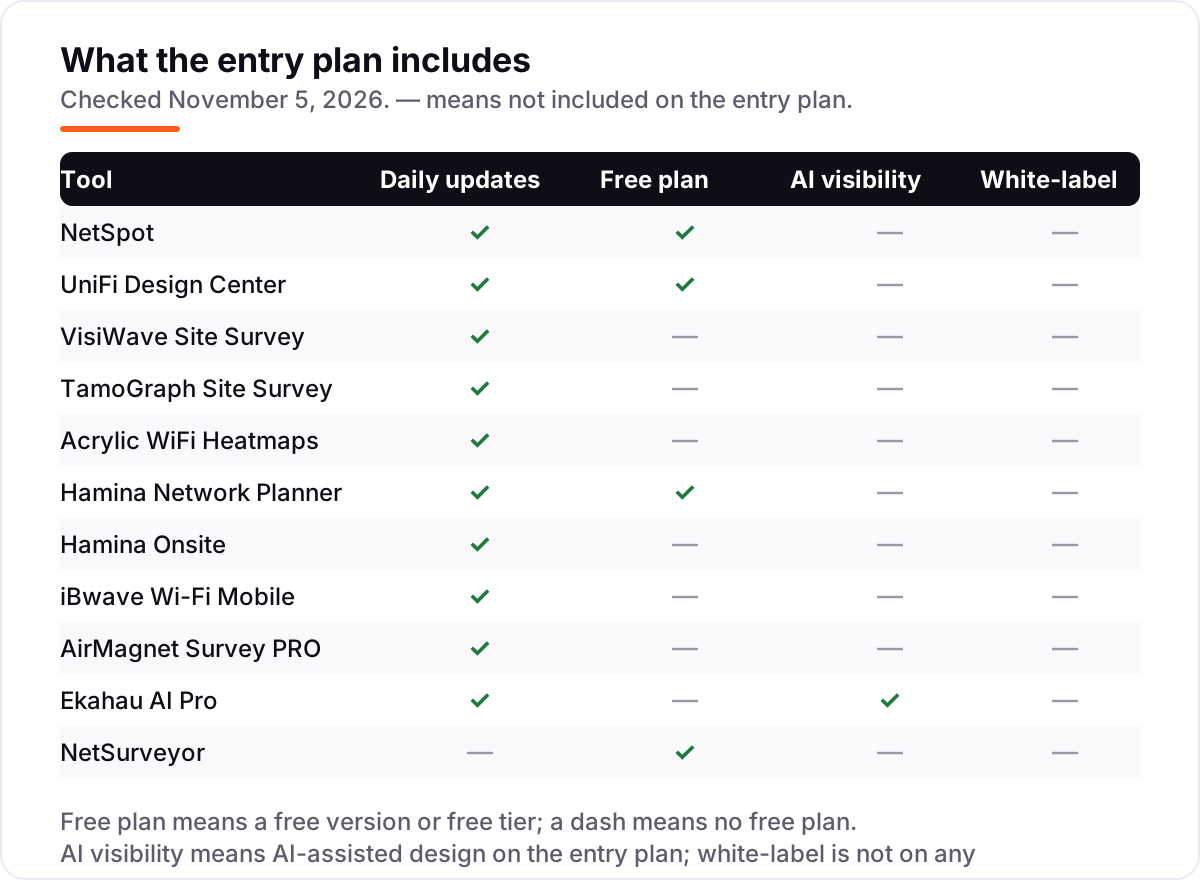
- Decide measured or predicted first. NetSpot, Hamina Onsite, TamoGraph and VisiWave measure your real signal as you walk; UniFi Design Center and Hamina Network Planner predict coverage before hardware exists. A prediction never replaces a measurement.
- Start with your phone or laptop, not your wallet. NetSpot's free version and UniFi Design Center map a building for $0, so try them before paying for anything.
- Match the tool to the building. One flat needs a phone app or a free desktop tool; a multi-floor office needs a desktop survey tool with zones, snapshots and reports.
- Check the operating system. Acrylic, VisiWave and NetSurveyor are Windows only, while NetSpot and TamoGraph also run on Mac, and Hamina Onsite and iBwave Wi-Fi Mobile run on phones and tablets.
- Mind the free limits. NetSpot's free version covers one zone with 50 data points per snapshot, Hamina's free plan covers 30 locations, and UniFi's planner only models Ubiquiti hardware — read the limit before you start the survey.
A Wi-Fi map is one system in your stack, not the whole stack. If the business behind the network also needs to be found online, our guide to local SEO tools covers the visibility side. And before you publish new pages for the services you sell, run your titles through the free SERP snippet preview tool — it shows exactly how the title and description will look in Google.
Whatever you shortlist, try it with real data before you pay. The free versions in this list are good enough to run one genuine survey through — your floor plan, your rooms, your router — and that survey tells you more than any review can. Check two things in the trial: that the heatmap matches the dead zones you already know about, and that you can export or share the result. If either fails, the price does not matter.
Wifi heatmap software pricing: what you will actually pay
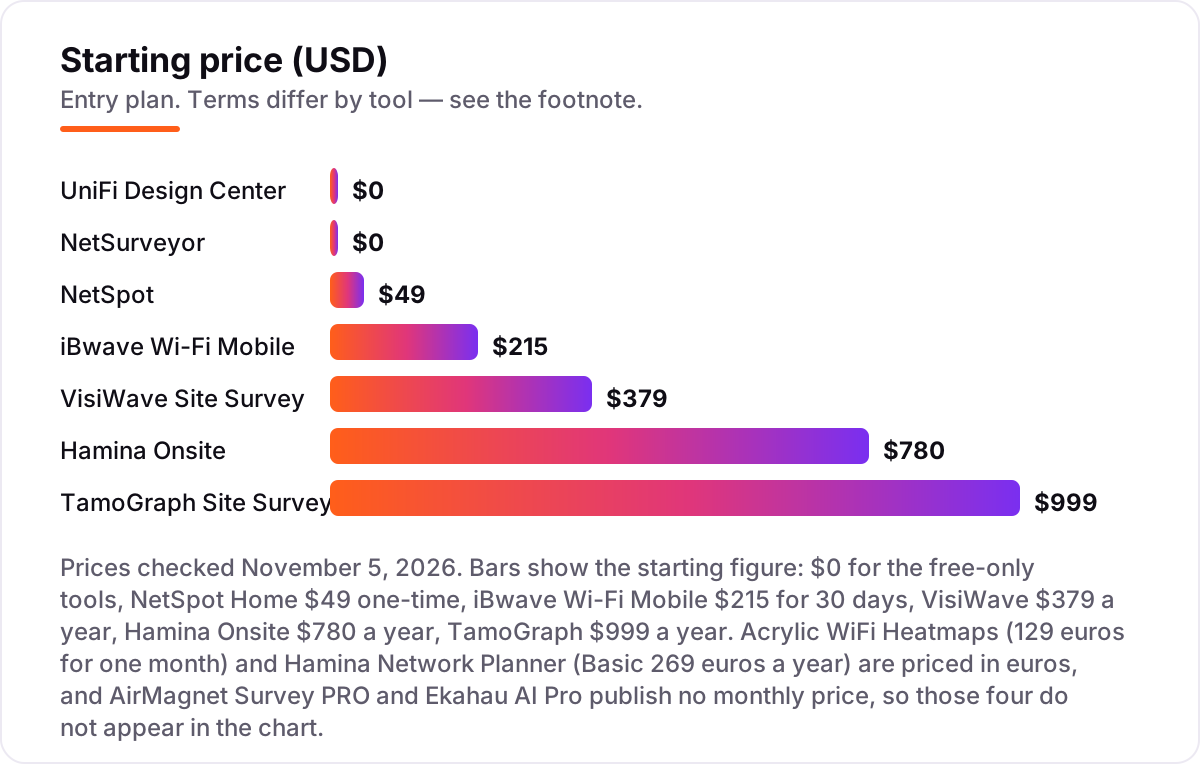
Take a small IT team that surveys one office floor four times a year. On list prices, a year of surveys costs $0 on NetSpot's free version, UniFi Design Center or NetSurveyor, $49 once on NetSpot Home, $149 once on NetSpot Pro, $215 on iBwave Wi-Fi Mobile for a single 30-day term, $379 on VisiWave for a year, $780 on Hamina Onsite for a year, $999 on TamoGraph Standard for a year, and $7,990 on Ekahau AI Pro in the first year ($5,995 once plus the required $1,995 Connect subscription).
Two of those numbers need adjusting before they are real. First, the renewal: NetSpot's one-time licences never renew, while VisiWave and TamoGraph charge again next year, so the same four surveys cost $149 once on NetSpot Pro but $758 over two years on VisiWave and $1,998 on TamoGraph. Second, the free tier's limit: NetSpot's free version covers one zone, so a two-floor office needs the $49 Home licence, and Hamina's free plan covers 30 locations, so a real building needs a paid tier. If you are choosing tools for a small practice, our guide to SEO audit software shows how the free and cheap end of another market compares.
Three costs sit outside every number above. First, the hardware: Ekahau's full survey needs the Sidekick 2 device, sold separately, and Hamina Onsite surveys need hardware such as the Oscium Nomad. Second, the second tool: most buyers here pair a heatmap tool with a planner or a scanner, which adds a step even when it is free. Third, the time: a proper walk-through survey takes an hour or two per floor, and that hour dwarfs the software cost on a free tool.
Know the difference: measured heatmaps vs predicted heatmaps vs channel scanners
The confusion in this category is between three different pictures that share the word heatmap. A measured heatmap — NetSpot, Hamina Onsite, TamoGraph, VisiWave and iBwave Wi-Fi Mobile — records your real signal strength as you walk the building, so the colours show what your devices actually receive. A predicted heatmap — UniFi Design Center and Hamina Network Planner — simulates coverage from a floor plan and a list of access points, so the colours show what the signal should be if the walls, furniture and neighbours behave as modelled.
There is a second, quieter confusion: scanners are not mappers. A scanner shows nearby networks, channels and signal strength as lists and graphs, but draws no map of your building. NetSurveyor sits on the boundary here: its Map screen collects samples on a floor plan, but its headline heatmap shows channel usage over time, not coverage room by room.
The practical rule is simple. If the network already exists and something is wrong with it, measure it: walk the building with NetSpot or Hamina Onsite and map the real signal. If the network does not exist yet and you are choosing hardware, predict it: plan the access points in UniFi Design Center or Hamina Network Planner, buy the kit, then measure the result after install. Buying a predicted map and expecting it to match reality is the most common expensive mistake in this category.
Quick comparison: tool type by need
| Buyer | Best pick | Why |
|---|---|---|
| Best start for most people | NetSpot | A real floor-plan heatmap free, Home $49 one-time when you outgrow it |
| Planning a UniFi install | UniFi Design Center | Free predicted coverage map and bill of materials before you buy |
| Clearest client-ready maps | VisiWave Site Survey | 2D and 3D heatmaps with GPS from $379 a year per licence |
| Mid-price pro surveys | TamoGraph Site Survey | Full survey heatmaps and client reports from $999 a year |
| One-off professional survey | Acrylic WiFi Heatmaps | GPS mapping and auto-generated reports from €129 for one month |
| Browser-based planning | Hamina Network Planner | Predictive 2D and 3D heatmaps free for 30 locations |
| Enterprise wireless design | Ekahau AI Pro | AI-powered design, from $5,995 once plus $1,995 a year for Connect |
| Free Windows troubleshooting | NetSurveyor | Channel heatmaps, logging and PDF reports at $0 |
Mistakes to avoid
- Paying before trying the free tier. NetSpot's free version and UniFi Design Center map a building for $0. Run one real survey first; the dead zones you already know about are the test.
- Trusting a predicted map as if it were measured. UniFi Design Center and Hamina Network Planner simulate coverage; walls, furniture and neighbours bend real signal. Always walk the site after install.
- Buying a scanner and expecting a coverage map. NetSurveyor's headline heatmap shows channel usage over time, not room-by-room coverage. Budget for a survey tool too when coverage is the question.
- Ignoring the free limit. NetSpot's free version covers one zone with 50 data points per snapshot, and Hamina's free plan covers 30 locations. Read the limit before you start.
- Forgetting the second cost. Ekahau needs the Sidekick 2 device, Hamina Onsite needs survey hardware, and VisiWave and TamoGraph renew every year. The licence is rarely the whole bill.
How we chose
We checked each vendor's own pricing page on November 5, 2026 and recorded the starting price exactly as shown, and we ranked the tools by fit for the most common buyer — a home user, small office or IT team mapping one building — not by brand size. Two prices could not be re-read on the vendor's own page, so they are disclosed as third-party-sourced here and in the cards: Hamina Onsite at $780 a year comes from a third-party comparison of Hamina and Ekahau, and Hamina Network Planner Basic at €269 a year comes from G2's pricing page, which G2 says is supplied by the vendor. AirMagnet Survey PRO publishes no starting price and is shown as a custom quote, and the old $3,995 AirMagnet list price online is years out of date and is not used. Ratings come from fresh search-index copies of the review pages, crawled within the last three days: NetSpot at 4.7 out of 5 on Trustpilot (86 reviews) and Ekahau AI Pro at 4.4 out of 5 on G2 (17 reviews); where a tool has no such page, we show no rating rather than estimate one. No vendor paid for a place in this list, and none of the links here are affiliate links.
What to do next
Start with the free tier of your top pick and run one real survey through it. Walk every room, tap every spot on the floor plan, and check that the heatmap matches the dead zones you already know about before you pay for anything. If the map shows a weak room, move the router or add an access point, then re-survey to prove the fix worked. If the tools are sorted but new customers are not finding you, our monthly SEO service handles the visibility side — or compare providers in our guide to analytics software. Once your tools are in place, find out what's holding your rankings back.
Your stack only works if people find you
SerpAstra fixes what keeps your site off page one and makes it easy for AI assistants to recommend.
Get a free audit→Sources we checked (12)
- NetSpot Pro and Enterprise editions — netspotapp.com (checked November 5, 2026)
- NetSpot reviews on Trustpilot — trustpilot.com (checked November 5, 2026)
- UniFi Design Center — design.ui.com (checked November 5, 2026)
- VisiWave purchase page — visiwave.com (checked November 5, 2026)
- TamoGraph Site Survey — tamos.com (checked November 5, 2026)
- Acrylic WiFi Heatmaps — acrylicwifi.com (checked November 5, 2026)
- Hamina Network Planner pricing, vendor-supplied via G2 — g2.com (checked November 5, 2026)
- Hamina vs Ekahau comparison (Onsite $780) — lever.co.uk (checked November 5, 2026)
- iBwave Wi-Fi Mobile store — store.ibwave.com (checked November 5, 2026)
- Ekahau AI Pro and Connect pricing — ekahau.com (checked November 5, 2026)
- Ekahau AI Pro reviews on G2 — g2.com (checked November 5, 2026)
- NetSurveyor user guide — nutsaboutnets.com (checked November 5, 2026)
Shamim
Founder of SerpAstra
A full-stack SEO and digital marketer who spends most days on Local SEO for dental practices, AI search visibility and lead generation.
Frequently asked questions
What is the best wifi heatmap software?
NetSpot is the best fit for most buyers: a real floor-plan heatmap free, with Home at $49 one-time when you outgrow the free limits. VisiWave is the better pick for client-ready 2D and 3D maps at $379 a year, and Ekahau AI Pro is the enterprise standard for large multi-floor designs.
How much does wifi heatmap software cost?
From $0 to $5,995. NetSpot, UniFi Design Center and NetSurveyor are free, iBwave Wi-Fi Mobile starts at $215 for 30 days, VisiWave costs $379 a year, TamoGraph costs $999 a year, and Ekahau AI Pro costs $5,995 once plus a required $1,995-a-year Connect subscription.
What is the difference between a measured and a predicted heatmap?
A measured heatmap records your real signal as you walk the building, so the colours show what devices actually receive. A predicted heatmap simulates coverage from a floor plan and access-point list, so it shows what signal should be if the model is right. Always measure after install, even when you planned with a prediction.
Can I map Wi-Fi coverage with my phone?
Yes, with limits. Hamina Onsite surveys from an iPhone or iPad and syncs to its cloud planner, and iBwave Wi-Fi Mobile designs on a phone or tablet. NetSpot also runs on Android and iOS. For a full professional survey with client reports, though, a desktop tool such as TamoGraph or VisiWave is still the stronger choice.
Do I need extra hardware to survey Wi-Fi?
Not always. NetSpot, VisiWave and TamoGraph work with a laptop's built-in adapter for basic surveys, though compatible USB adapters improve accuracy. Ekahau's full survey needs the Sidekick 2 device, and Hamina Onsite needs hardware such as the Oscium Nomad for accurate measurements, so check the hardware list before buying.
Is there really free wifi heatmap software?
Yes. NetSpot's free version draws a real heatmap on your own floor plan, UniFi Design Center plans a UniFi site free, and NetSurveyor is freeware for Windows. The free versions have limits — NetSpot's free tier covers one zone, and UniFi's planner only models Ubiquiti hardware — but they draw real maps, not demos.
Free SEO and AI visibility audit
Find out what is holding your rankings back
Send us your site. Within 2 business days you get a written audit, an AI visibility check and a short fix list ranked by impact. Free, with no contract attached.
Request my free audit→Related guides
 SEO & AI SearchBest Local SEO Tools for 2026: 11 Picks Ranked by What You Need11 best local SEO tools with real prices checked November 1, 2026 — from $14/month trackers to quote-only enterprise platforms, sorted by what you need.Read guide →
 SEO & AI SearchBest SEO Audit Software for 2026: 10 Options Compared by Use Case10 best SEO audit software tools compared on price, crawl depth and AI visibility. Prices checked on vendor pricing pages, November 1, 2026.Read guide →
 AI, Data & Analytics12 Best Analytics Software in 2026: Pricing, Features and Pros & ConsThe 12 best analytics software tools for 2026, compared on price, free plans and what each one measures, with every price checked on the pricing page.Read guide →