
7 Best YouTube SEO Tools in 2026 (Free and Paid, Compared)
7 best YouTube SEO tools compared on price, keyword research and rank tracking, from free to $29 per month. Prices checked November 2, 2026.
 Shamim Mia, Founder, SerpAstraLast verified November 2, 202614 min read
We compare pricing pages, documentation and public reviews. We never accept payment for rankings.

Key takeaways
- vidIQ is the best all-round pick for most creators: keyword research, competitor tracking and AI title tools from $19/month, with a free plan to start.
- TubeBuddy is the workflow pick — SEO Studio plus the only title and thumbnail A/B testing here — from $15/month; Morningfame is the cheapest paid tool at $4.90/month.
- YouTube Studio is free and every creator already has it: start there, and pay only when you need keyword research or rank tracking.
- The single most important buying factor is whether the tool tells you what to publish next — keyword data and video grades — not just how past videos performed.
- Every price below was checked November 2, 2026. vidIQ, TubeBuddy and Morningfame prices are third-party sourced because their pricing pages did not load; ratings are G2 where shown.
On this page
Quick comparison
| Tool | Best for | Starting price | Free plan |
|---|---|---|---|
| vidIQ | Growing creators who want keyword research, competitor tracking and AI title ideas inside YouTube for about $19/month | $19/mo | Yes (free plan) |
| TubeBuddy | Creators who want SEO, bulk edits and title and thumbnail A/B testing inside YouTube Studio | $15/mo | Yes (Starter) |
| Morningfame | Small channels that want plain-English analytics and a guided growth plan for under $5/month | $4.90/mo | No (1st month free) |
| TubeRanker | Creators on a tight budget who want keyword research and rank tracking for under $10/month | $9.90/mo | Yes (free tools) |
| YouTube Studio | Every creator — the free baseline for analytics, search terms and audience retention | Free | Yes (free) |
| Ahrefs | SEOs and agencies already paying for Ahrefs who want YouTube keyword data on top of Google research | $29/mo | Yes (free tool) |
| Keywords Everywhere | Keyword researchers who want YouTube search volume and competition inside the browser | $84/yr | Yes (free features) |
Make one of these tools?
We re-check this list every quarter. Send a correction, request a review, or ask about a clearly labeled sponsored spot.
Request a listingThe best YouTube SEO tools

vidIQ
Best for: Growing creators who want keyword research, competitor tracking and AI title ideas inside YouTube for about $19/month
vidIQ is the most complete YouTube SEO tool in this list, and the one most creators should start with. The Boost plan's keyword research shows search volume, competition and related terms for any query, with a 0–100 score that makes it easy to judge whether a keyword is worth chasing. The browser extension overlays the same data on YouTube itself, so you can see a competitor's tags, views per hour and trending videos without leaving the page.
The trade-off is the credit system. AI tools for titles, thumbnails and video ideas run on monthly credits, and heavy users can drain the allowance fast. The free plan is genuinely useful for a new channel, but full keyword data needs Boost at $19 a month. If you want one tool that covers research, packaging and competitor tracking, start here.
What we like
- Keyword research with search volume, competition scores and related terms, plus a 0–100 score for every keyword
- Browser extension overlays data on YouTube itself — competitor tags, views-per-hour and trending videos
- AI tools for titles, descriptions, thumbnails and daily video ideas, with channel audits on Boost
Watch out for
- The AI Coach's suggestions can feel generic, and the monthly AI-credit allowance drains fast on heavy use
- Full keyword data and bulk SEO tools sit on Boost — the free plan caps daily ideas and keyword searches
- Pricing has changed repeatedly in 2026, so confirm the plan at checkout

TubeBuddy
Best for: Creators who want SEO, bulk edits and title and thumbnail A/B testing inside YouTube Studio
TubeBuddy lives inside YouTube Studio as a browser extension, and it is the best tool here for the work that happens after research: packaging and publishing. SEO Studio scores each upload and suggests tags, titles and descriptions before you publish, and the thumbnail generator and retention tools sit in the same panel. It is the only tool in this list with A/B testing for titles and thumbnails, so you can test two versions against real viewers instead of guessing.
The catch is the tier split. A/B testing, bulk processing and advanced analytics all need Legend at $32.99 a month; Pro at $15 covers the basic SEO tools only. The free Starter plan exists but the pricing page does not show it. Buy TubeBuddy when you publish often and want to test and fix videos at scale.
What we like
- SEO Studio scores every upload and suggests tags, titles and descriptions before you publish
- The only A/B testing for titles and thumbnails in this list, on Legend
- Bulk processing updates titles, descriptions and tags across a whole back catalog at once
Watch out for
- A/B testing, bulk processing and advanced analytics need Legend ($32.99/month) — Pro is the basic SEO tier
- The pricing page lists paid plans only; the free Starter plan is visible only after sign-in
- Creator licences are per channel, so multi-channel creators pay per channel or move to Enterprise

Morningfame
Best for: Small channels that want plain-English analytics and a guided growth plan for under $5/month
Morningfame is built for small channels, and it shows in the way it talks: plain English, not dashboards full of jargon. It combines your YouTube and Google Analytics into simple channel reports, grades every video you publish, and tells you exactly what to fix before the next upload. There is a guided plan that walks a new creator through the first weeks, which no other tool in this list offers.
Two honest limits. It is invite-only, so you need an invitation from an existing user to join, and there is no free plan — though the first month is free. Basic also limits the keyword planner to 24 hours every 12 days. Pick Morningfame when you want someone to tell you what to do next, not another dashboard to interpret.
What we like
- Combines YouTube and Google Analytics into plain-English channel reports a beginner can read
- Grades every video and tells you exactly what to fix before you publish the next one
- The cheapest paid tool in this list — Basic is $4.90/month, $3.90/month billed annually
Watch out for
- Invite-only — you need an invitation from an existing user to join
- Basic limits keyword research to 24 hours every 12 days; unlimited keyword research needs Plus ($12.90/month)
- No free plan, and no rank tracking or bulk editing — it is analytics and guidance, not a full SEO suite

TubeRanker
Best for: Creators on a tight budget who want keyword research and rank tracking for under $10/month
TubeRanker is the cheapest way to get proper rank tracking for YouTube. The Basic plan includes a keyword tool, a rank tracker that follows your videos' positions over time, a channel audit, and generators for tags, hashtags, titles and descriptions. At $9.90 a month — or $4.95 a month billed annually — it undercuts vidIQ and TubeBuddy by a wide margin for the core research-and-tracking job.
The trade-offs are depth and proof. Its analytics are lighter than the big two, and it has no public review base on G2 or Capterra, so there is no independent rating to check. Directory sites also disagree on its price, though the vendor's own page lists $9.90. It is the right pick for a creator on a tight budget who mainly needs keywords and positions.
What we like
- Rank Tracker follows your videos' positions for tracked keywords over time
- Keyword Tool, tag extractor, hashtag and title generators included on every plan
- Annual billing halves the price — Basic drops to $4.95/month ($59.40/year)
Watch out for
- Directories disagree on its prices ($9.90 vs $19 for Basic) — the vendor's own page lists $9.90, and that is the figure we use
- Smaller tool with no public review base on G2 or Capterra, so there is no independent rating to check
- No free plan for keyword tracking, and analytics are lighter than vidIQ or TubeBuddy

YouTube Studio
Best for: Every creator — the free baseline for analytics, search terms and audience retention
YouTube Studio is not a third-party tool at all — it is YouTube's own creator dashboard, and every channel already has it for free. Its analytics show the search terms people used to find your videos, click-through rates on every thumbnail, audience retention second by second, and which videos YouTube suggests yours next to. Because the data comes straight from YouTube, it is the ground truth every paid tool is estimating against.
What it cannot do is look forward. Studio shows what people searched to find you, not what you should target next, and it has no competitor data, no tag suggestions and no title scoring. Use it as the baseline: check it weekly, learn which topics already bring viewers, and pay for a research tool only when you need to find new keywords.
What we like
- Real search terms, click-through rates and audience retention straight from YouTube's own data
- Shows exactly which videos YouTube suggests yours next to, and how often viewers click
- Free forever, with no limits, no trial and no upsell — it is part of every channel
Watch out for
- No keyword research: it shows what people searched to find you, not what you should target next
- No competitor data, no tag suggestions and no title scoring
- Search-term data is limited to your own channel, so you cannot research a niche before publishing

Ahrefs
Best for: SEOs and agencies already paying for Ahrefs who want YouTube keyword data on top of Google research
Ahrefs is a Google SEO suite first, but its YouTube Keyword Tool is a solid reason for an SEO team to skip a second subscription. It shows search volume and clicks for YouTube queries across more than 170 countries, and it sits on the same 110-billion-keyword database as the Google research tools. If your team already pays for Ahrefs, the YouTube data is already in the plan you own.
As a creator-only tool it is the wrong buy. The $29 Starter plan is built for Google SEO, Rank Tracker updates weekly by default, and there is no free trial. The free YouTube Keyword Tool is worth trying first — it shows limited data without an account. Buy Ahrefs for YouTube only if the Google research is already part of your job.
What we like
- YouTube Keyword Tool shows search volume and clicks for YouTube queries across 170+ countries
- Sits on Ahrefs' 110-billion-keyword database, so YouTube data comes with Google keyword and backlink research
- Free YouTube Keyword Tool gives a taste of the data without an account
Watch out for
- YouTube keyword data is a side feature — the $29 Starter plan is built for Google SEO, not creators
- Rank Tracker updates weekly by default; daily updates need a paid add-on
- No free trial, and the YouTube Keyword Tool's free version shows limited data

Keywords Everywhere
Best for: Keyword researchers who want YouTube search volume and competition inside the browser
Keywords Everywhere is the simplest tool in this list: a browser extension that shows search volume, CPC, competition and a 12-month trend for keywords right on the YouTube results page. There is no dashboard to learn and no channel to connect — you search YouTube, and the numbers appear under each result. Bronze costs $84 a year for 100,000 credits, which works out to about $0.84 per 1,000 keyword lookups.
The limits are what it does not do. There is no rank tracking, no channel analytics and no video optimization — it shows keyword demand and nothing else. Credits also expire 12 months after purchase, and leaving every widget on drains them fast. Pick it when you research keywords constantly and want the numbers where you already search.
What we like
- Search volume, CPC, competition and a 12-month trend for YouTube keywords, right on the results page
- Bronze is $84 a year for 100,000 credits — about $0.84 per 1,000 keyword lookups
- Every plan includes the extension, the API and an MCP server, so the same credits work in AI tools
Watch out for
- Credits drain fast when every widget is on — one search page can use dozens of credits
- Credits expire 12 months after purchase, so unused credits do not roll over
- Shows keyword data only — no rank tracking, channel analytics or video optimization
What the best YouTube SEO tools actually do
The best YouTube SEO tools do three jobs: they tell you which keywords people search for on YouTube, they help you package each video — title, description, tags and thumbnail — around those keywords, and they track whether your videos climb or fall for them over time. That is the whole job. No tool in this list can make a video rank on its own; what it can do is stop you guessing about demand before you record.
The scale explains why the research matters. YouTube has 2.58 billion monthly active users, according to DataReportal's Digital 2026 report, which makes it the second-largest search engine in the world after Google. Every one of those users types queries into the same search box, and the videos that match those queries best — with the strongest titles, watch time and click-through rates — win the top spots. The tools in this list exist to find those queries and to check whether your videos are winning them.
People search for this category three ways — YouTube SEO tools, YouTube keyword tools and video ranking software — and they all mean roughly the same thing. The products differ in where they sit in the workflow: some are research tools, some live inside YouTube Studio and help you publish, and some are full SEO suites that happen to cover YouTube. The price follows the job, not the brand.
One thing to know before comparing prices: YouTube SEO is not the same job as Google SEO. On YouTube, the ranking signals are watch time, click-through rate and session time, and the metadata that feeds them is the title, description, tags and thumbnail. A good tool helps with all four — it finds the query, suggests the wording, and then shows whether viewers clicked and stayed. A tool that only reports traffic is not doing YouTube SEO; it is doing analytics.
Free options first
If you are starting a channel, you may not need to pay at all. YouTube Studio is free and already in your account, and it shows the search terms people used to find your videos, click-through rates and audience retention. vidIQ and TubeBuddy both have free plans that add keyword data and upload scoring on top of Studio, and Ahrefs has a free YouTube Keyword Tool that shows search volume for a query without an account. Keywords Everywhere has free features too, though volume data needs credits.
The free tiers are honest products, not demos — but they cap out fast. vidIQ's free plan limits daily ideas and keyword searches, TubeBuddy's free Starter hides the deeper tools, and Keywords Everywhere's free features stop short of volume data. The moment you research keywords every day or track more than a handful of videos, a paid plan is cheaper than the time you lose guessing. For a single new channel, start with Studio plus one free plan and upgrade when the limits start costing you videos.
Dedicated YouTube tools vs all-in-one suites
The 7 tools in this list split into two camps. The dedicated YouTube tools — vidIQ, TubeBuddy, Morningfame and TubeRanker — do one job and do it well. They research YouTube keywords, score uploads, track video positions and stay inside the YouTube workflow. They are cheaper per feature and faster to learn, and two of them cost under $10 a month.
The suites — Ahrefs and Keywords Everywhere — cover YouTube as one feature among many. Ahrefs bundles YouTube keyword data with Google research and backlinks; Keywords Everywhere overlays keyword data on Google, YouTube, Amazon and more. You pay for the breadth, not the YouTube depth. The right camp depends on what you already pay for: if you own a suite, use its YouTube feature; if you only need YouTube, a dedicated tool costs less. Our video SEO guide explains how the research from either camp turns into better titles and descriptions.
There is one buyer who should skip both camps for now: the creator who has not published ten videos yet. With fewer than ten videos, you have no retention data to learn from, and no tool can tell you what your audience wants before the audience exists. Publish ten videos with Studio alone, read the retention graphs, and only then buy research. The tools will still be there, and your money will buy answers instead of guesses.
Keyword research and rank tracking
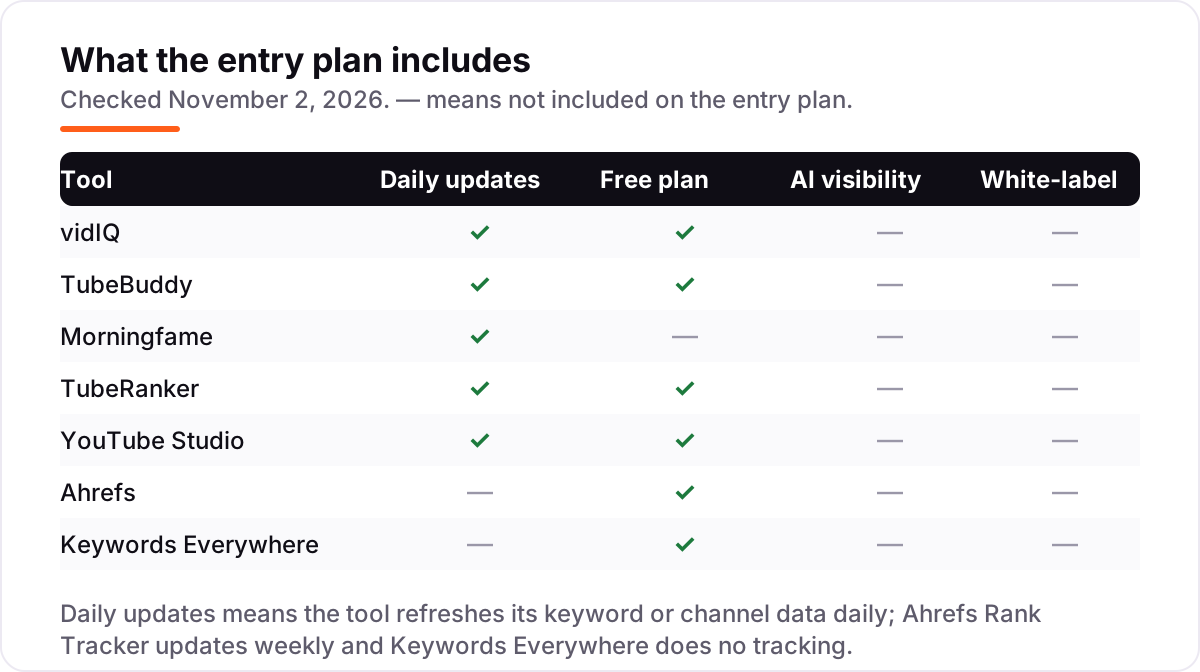
Keyword research is the first half of YouTube SEO: finding the phrases people type, checking how many search them, and judging whether your channel can compete. vidIQ scores every keyword 0–100 on volume and competition, TubeBuddy's Keyword Explorer weighs the results for your channel size, and TubeRanker and Keywords Everywhere show volume and competition in a simpler form. Morningfame's keyword planner is the lightest here — Basic only opens it for 24 hours every 12 days — which is fine for planning two weeks of videos at a time, but not for daily research.
Rank tracking is the second half: checking where your videos sit for the keywords you target, and whether they move after you change a title or thumbnail. TubeRanker and TubeBuddy track positions over time, vidIQ tracks competitor positions alongside your own, and Ahrefs' Rank Tracker covers YouTube inside its Google tracking — though it updates weekly by default. YouTube Studio does not track keyword positions at all; it shows the search terms that already brought viewers, which is the other side of the same coin. If you want to see how keyword research fits the wider SEO workflow, our guide to the best free SEO keyword research tools covers the Google side of the same habit.
Quick comparison: tool type by need
| Buyer | Best pick | Why |
|---|---|---|
| New creator, no budget | YouTube Studio | Free, real data, already in your account |
| Growing channel, best all-round | vidIQ | Keyword research plus AI tools from $19/month |
| Publishing workflow and A/B testing | TubeBuddy | SEO Studio and title/thumbnail tests from $15/month |
| Small channel, cheapest paid | Morningfame | Plain-English analytics from $4.90/month |
| Budget rank tracking | TubeRanker | Keyword tracking from $9.90/month |
| SEO team that already owns a suite | Ahrefs or Keywords Everywhere | YouTube data inside tools you already pay for |
How to choose: a short decision path
- Start with Studio, free. Check your search terms, click-through rates and retention for two weeks. If the data already tells you what to make next, you may not need a paid tool yet.
- Count how often you research keywords. Once a week or less, a free plan covers you. Daily research needs a paid plan — vidIQ for depth, TubeRanker for budget, Keywords Everywhere for speed.
- Decide research or workflow. If you need keyword data and competitor tracking, buy vidIQ. If you publish often and want scoring, bulk edits and A/B tests, buy TubeBuddy.
- Check the per-channel math. TubeBuddy licences are per channel and vidIQ credits are monthly, so a multi-channel creator pays more than the headline price. Price the channels you actually run.
- Try before you pay. Every tool in this list has a free plan, a free tier or a free first month — Morningfame's first month is free, though it needs an invitation. Run your real keyword list for a week and compare the numbers against Studio before committing.
Before you publish the next video, run your title through the free title tag checker — it shows whether the title fits and reads well before YouTube shows it to anyone.
Mistakes to avoid
- Paying before checking Studio. YouTube's own analytics already answer half the questions a paid tool sells you. Look at your search terms first.
- Chasing a keyword you cannot win. A high-volume keyword with big channels on page one is not a target for a new channel. vidIQ's 0–100 score and TubeBuddy's weighted results exist to stop exactly this.
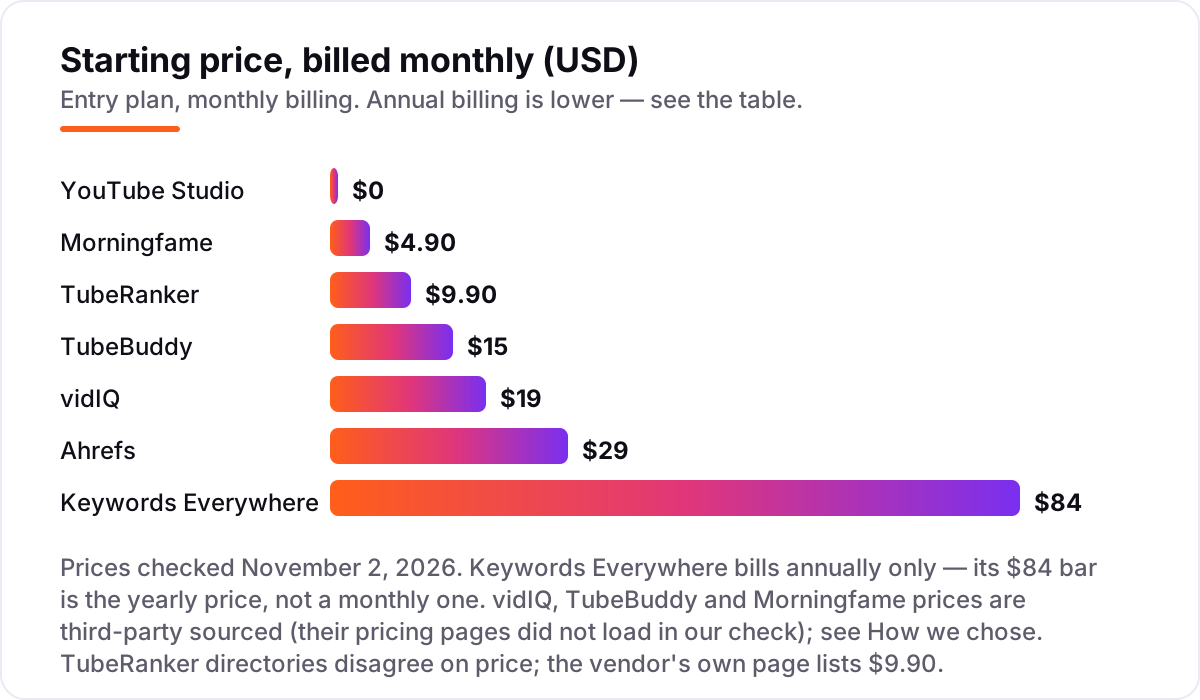
- Comparing monthly prices without checking billing. Annual billing cuts most prices by about 20%, and Keywords Everywhere bills annually only — its $84 is a yearly price, not a monthly one.
- Trusting a directory price. TubeRanker still shows $19 on several directories; the vendor's own pricing page lists $9.90. Always check the vendor's own page.
- Buying a suite for one YouTube feature. Ahrefs is a great SEO suite, but $29 a month is a lot to pay for a keyword tool you open twice a week. If YouTube is your only job, a dedicated tool costs less.
- Forgetting the invite. Morningfame is invite-only. Ask an existing user for an invitation before you plan around it, or you will wait at the door.
- Tracking keywords you never act on. A rank tracker only helps if you change something when a position falls. Pick five keywords, check them weekly, and rewrite the title or thumbnail of any video that slips — otherwise the tracking is just a chart.
How we chose
We checked each vendor's own pricing page on November 2, 2026 and recorded the starting price exactly as shown, including the annual-billing figure where the page lists one. Three pricing pages did not load in our check — vidIQ, TubeBuddy and Morningfame — so their prices are third-party sourced: vidIQ's $19 Boost from G2's vendor-provided listing and in-product measurements, TubeBuddy's $15 Pro from its pricing page as checked by independent reviewers in August and October 2026, and Morningfame's $4.90 Basic from TubeBuddy's own comparison and independent reviews. TubeRanker's price comes from its own pricing page, though directories disagree and list $19. Ratings come from G2 where a product has a public G2 page; TubeRanker, Morningfame and YouTube Studio have none, so no rating is shown for them. We ranked the tools by fit for the most common buyer — a growing creator who needs keyword research and honest analytics — not by brand size. No vendor paid for a place in this list, and none of the links here are affiliate links. If a price has moved since our check, the vendor's own page is the number that counts.
What to do next
Start with the decision path above: check Studio for two weeks, count how often you research keywords, and decide research or workflow. Then take the free plan or trial of your top pick and run your real keyword list for a week. If the keyword scores match what Studio shows and the reports make sense before you publish, you have your tool. Keep the second-place tool's free plan installed too — it costs nothing, and a second opinion on a keyword is useful when the two disagree. If your channel needs more than a tool — a full audit of what is holding its rankings back — our SEO audit service covers exactly that. If you'd rather have this set up and read for you, request a free SEO + AI visibility audit and get a ranked fix list in 2 business days.
Rather not run the tools yourself?
Tools show you the data. SerpAstra turns it into higher rankings, more map-pack calls and citations in AI answers.
Get a free SEO + AI visibility audit→Sources we checked (12)
- vidIQ pricing — vidiq.com/pricing (checked November 2, 2026; page did not load — price third-party sourced, see How we chose)
- vidIQ on G2 — 4.5/5, 34 reviews (checked November 2, 2026)
- TubeBuddy pricing — tubebuddy.com/pricing (checked November 2, 2026; page did not load — price third-party sourced, see How we chose)
- TubeBuddy on G2 — 4.6/5, 44 reviews (checked November 2, 2026)
- Morningfame pricing — morningfame.com/pricing (checked November 2, 2026; page did not load — price third-party sourced, see How we chose)
- TubeRanker pricing — tuberanker.com/pricing (checked November 2, 2026)
- YouTube Studio — studio.youtube.com (checked November 2, 2026)
- Ahrefs pricing — ahrefs.com/pricing (checked November 2, 2026)
- Ahrefs on G2 — 4.5/5, 722 reviews (checked November 2, 2026)
- Keywords Everywhere pricing — keywordseverywhere.com/compare-plans.html (checked November 2, 2026)
- Keywords Everywhere on G2 — 5.0/5, 8 reviews (checked November 2, 2026)
- YouTube audience size — DataReportal Digital 2026 (2.58 billion monthly active users, via Sprout Social)
Shamim
Founder of SerpAstra
A full-stack SEO and digital marketer who spends most days on Local SEO for dental practices, AI search visibility and lead generation.
Frequently asked questions
What is the best YouTube SEO tool in 2026?
vidIQ is the best all-round pick for most creators: keyword research, competitor tracking and AI title tools from $19/month, with a free plan. TubeBuddy wins on publishing workflow and A/B testing, Morningfame is the cheapest paid option at $4.90/month, and YouTube Studio is the free baseline every creator should already use.
How much does a YouTube SEO tool cost?
From free to $29 a month. YouTube Studio is free, Morningfame starts at $4.90/month, TubeRanker at $9.90, TubeBuddy at $15 and vidIQ at $19. Ahrefs starts at $29/month, and Keywords Everywhere is $84 a year. Annual billing cuts most prices by about 20%, and every tool here has a free plan or a free tier except Morningfame.
Is there a free YouTube SEO tool?
Yes. YouTube Studio is free with every channel and shows real search terms, click-through rates and retention. vidIQ and TubeBuddy both have free plans, Ahrefs has a free YouTube Keyword Tool, and Keywords Everywhere has free features. Free plans work for a new channel; once you research keywords daily, a paid plan is worth the few dollars a month.
Do I need vidIQ or TubeBuddy?
Pick vidIQ if keyword research and competitor tracking matter most — its keyword scores and AI packaging tools are deeper. Pick TubeBuddy if you publish often and want SEO Studio, bulk edits and title and thumbnail A/B testing inside YouTube Studio. Many creators run both free plans first, then pay for the one they open every day.
Can a YouTube SEO tool get my videos ranked?
No tool can guarantee a ranking. These tools help you pick keywords people actually search for, write better titles and descriptions, and track whether your positions move. Whether a video ranks still depends on click-through rate, watch time and relevance. Use the tool to choose better topics, then make the video worth watching.
What should I check before paying for a YouTube SEO tool?
Four things: whether the keyword data covers your niche and country, whether rank tracking is included or costs extra, whether the price is per channel or per account, and whether the free plan covers your real workload. TubeBuddy licences are per channel, vidIQ credits are monthly, and Morningfame needs an invitation — all three change the real cost.
Do these tools work for YouTube Shorts?
Mostly for long-form video. vidIQ has Shorts tools for ideas and clipping, and YouTube Studio shows Shorts views and retention for free. But keyword research and rank tracking in these tools are built around standard video search. If Shorts are your main format, Studio's own Shorts analytics plus a free vidIQ plan cover most of what you need.
Free SEO and AI visibility audit
Find out what is holding your rankings back
Send us your site. Within 2 business days you get a written audit, an AI visibility check and a short fix list ranked by impact. Free, with no contract attached.
Request my free audit→Related guides
 ContentVideo SEO: how to rank videos on Google and YouTubeVideo SEO explained: how to rank videos on Google and YouTube with titles, thumbnails, chapters, transcripts and the signals each platform actually rewards.Read guide →
 SEO & AI Search11 Best Free SEO Keyword Research Tools in 2026, Compared11 best free SEO keyword research tools compared with real prices and free limits — Google Keyword Planner, Ahrefs, Semrush, Moz and more, sorted by need.Read guide →
 AI SearchBest AI SEO tools in 2026: honest picks by jobBest AI SEO tools in 2026, picked by job: Semrush and Ahrefs for research, Surfer and Clearscope for content, Otterly for AI tracking, with 2026 prices.Read guide →