
7 Best Accounting Software for Real Estate Developers in 2026, Compared
Compare the 7 best accounting software for real estate developers on job costing, multi-entity reporting and price, with every price checked November 7, 2026.
 Shamim Mia, Founder, SerpAstraLast verified November 7, 202616 min read
We compare pricing pages, documentation and public reviews. We never accept payment for rankings.

Key takeaways
- Six of the seven tools are sold by custom quote — only QuickBooks Online publishes a price, at $38/month — so compare developer tools on job costing and multi-entity reporting, not on a price tag.
- Yardi Voyager (4.2/5 on G2) and MRI Software (4.1/5) lead for multi-entity firms with outside equity; Sage Intacct (4.3/5) leads for firms that want dimensions-based fund accounting in the cloud.
- Developers who self-perform construction should shortlist Viewpoint Vista, Foundation Software and Buildertrend — job costing is the core of the first two, and Buildertrend pairs operations with the ledger.
- Budget for implementation as well as subscription: Sage Intacct typically takes 3–6 months to implement and Viewpoint Vista 6–12 months, according to the vendors and G2 reviewers.
On this page
Quick comparison
| Tool | Best for | Starting price | Free plan |
|---|---|---|---|
| Yardi Voyager | Mid-size to enterprise developers, owner-operators and managers running many entities under one roof | Custom quote | No |
| MRI Software | Developers and investment managers running many project LLCs who need clean consolidated and investor reporting | Custom quote | No |
| Sage Intacct | Development firms that want true cloud fund accounting with dimensions instead of a chart of accounts per project | Custom quote | No |
| QuickBooks Online | Small developers and single-project LLCs that want the ledger every US bookkeeper already knows | $38/mo | Yes (Free plan) |
| Buildertrend | Developers who self-perform construction and want scheduling, field communication and job cost accounting in one login | Custom quote | No |
| Viewpoint Vista | Developers acting as their own general contractor on large or complex jobs | Custom quote | No |
| Foundation Software | US developers and contractors who want job cost control as the core of the system, not an add-on | Custom quote | No |
Make one of these tools?
We re-check this list every quarter. Send a correction, request a review, or ask about a clearly labeled sponsored spot.
Request a listingThe best accounting software for real estate developers

Yardi Voyager
Best for: Mid-size to enterprise developers, owner-operators and managers running many entities under one roof
Yardi Voyager is the enterprise standard for developers who hold, build and manage. The platform covers the whole arc: land acquisition, development budgeting, construction job costing, lease-up and stabilized operations. Development accounting and construction management modules let a firm run multiple projects through one chart of accounts, with consolidated reporting across entities and compliance with GAAP and IFRS standards.
The honest catch is scale. Voyager is priced and implemented for companies with real accounting staff: G2 reviewers most often report going live in 1–3 months, and the interface feels dated next to cloud-first tools. Small developers will find the sales process, the implementation timeline and the training load heavy. If you run dozens of entities with outside equity, it is the safe pick; if you run a handful of projects with a bookkeeper, it is more system than you need.
What we like
- Development and construction accounting modules built for the full project lifecycle, from land to lease-up
- One chart of accounts with consolidated reporting across entities, GAAP and IFRS compliant
- Deep ecosystem of add-ons for procurement, forecasting and investor reporting
- Long track record with large US developers and managers
Watch out for
- Implementation is a project in itself and typically takes 1–3 months to go live, longer for large portfolios
- Interface feels dated and the learning curve is steep for small teams
- Modular pricing adds up quickly and customization often incurs additional costs

MRI Software
Best for: Developers and investment managers running many project LLCs who need clean consolidated and investor reporting
MRI Software competes directly with Yardi for the same buyer: the developer or investment manager running many entities under one roof. Its strength is financial structure. Multi-entity consolidation, intercompany accounting and investor reporting come from one ledger, which matters when each project is its own LLC and the parent needs a clean consolidated view.
MRI also covers the development side with budgeting, forecasting and project accounting, plus property management if you hold what you build. The modular pricing means you pay for what you use, but it also means the quote grows as you add pieces. Get the full module list priced before you sign, and check which integrations your lender or fund administrator needs.
What we like
- Native multi-entity consolidation with investor and fund reporting from one ledger
- Strong development accounting for budgeting, forecasting and project accounting
- Open integration approach with an active partner ecosystem
- 24/7 live support alongside chat and phone support
Watch out for
- Modules are priced separately, so the full stack adds up as you add pieces
- Interface quality varies across modules, according to reviewers
- Some users report slow performance on large datasets and report runs

Sage Intacct
Best for: Development firms that want true cloud fund accounting with dimensions instead of a chart of accounts per project
Sage Intacct takes a different approach to the multi-entity problem. Instead of a separate chart of accounts per project, it uses dimensions: every transaction is tagged by project, location, department or fund, and reports slice across any of them. For a developer with twenty project LLCs, that design keeps the books sane in a way traditional accounting software does not.
The construction and real estate editions add job costing, billing and project accounting, and built-in finance AI agents handle close tasks, AP automation and anomaly checks. The catch is pricing structure: per-entity and per-user fees compound as you add projects, and the platform really needs an implementation partner. Budget for both the subscription and the setup, and expect implementation to take 3–6 months.
What we like
- Dimensions tag every transaction by project, entity and fund without a bloated chart of accounts
- Strong construction and real estate editions with job costing and project accounting
- Built-in finance AI agents for close, AP automation and anomaly detection
- Well-regarded reporting and dashboards with real-time multi-entity visibility
Watch out for
- Priced per entity and per user, which gets expensive as the project count grows
- Implementation typically takes 3–6 months and usually needs a certified partner
- No published price list — every subscription is a custom quote, so budgeting starts with a sales call

QuickBooks Online
Best for: Small developers and single-project LLCs that want the ledger every US bookkeeper already knows
QuickBooks Online is not developer accounting software, and that is exactly why small developers use it. If you run one to three projects at a time with a part-time bookkeeper, the development-specific platforms above are overkill. QuickBooks handles the core books, and add-ons cover job costing, bill pay and document storage. Simple Start costs $38 a month for one user, with Essentials at $85 and Plus at $140 as the team grows.
The limits show up as you grow. Job costing by phase and cost code needs an add-on or disciplined use of classes. Consolidating five project LLCs into one investor report is spreadsheet work. And outside equity partners tend to ask for controls and audit trails that QuickBooks does not provide. Use it while you are small; plan the migration when investor reporting becomes a monthly event.
What we like
- Familiar to every US bookkeeper and CPA, so hiring help is easy
- Huge app ecosystem with construction add-ons for job costing and draw tracking
- Low entry cost with month-to-month billing and a 30-day trial
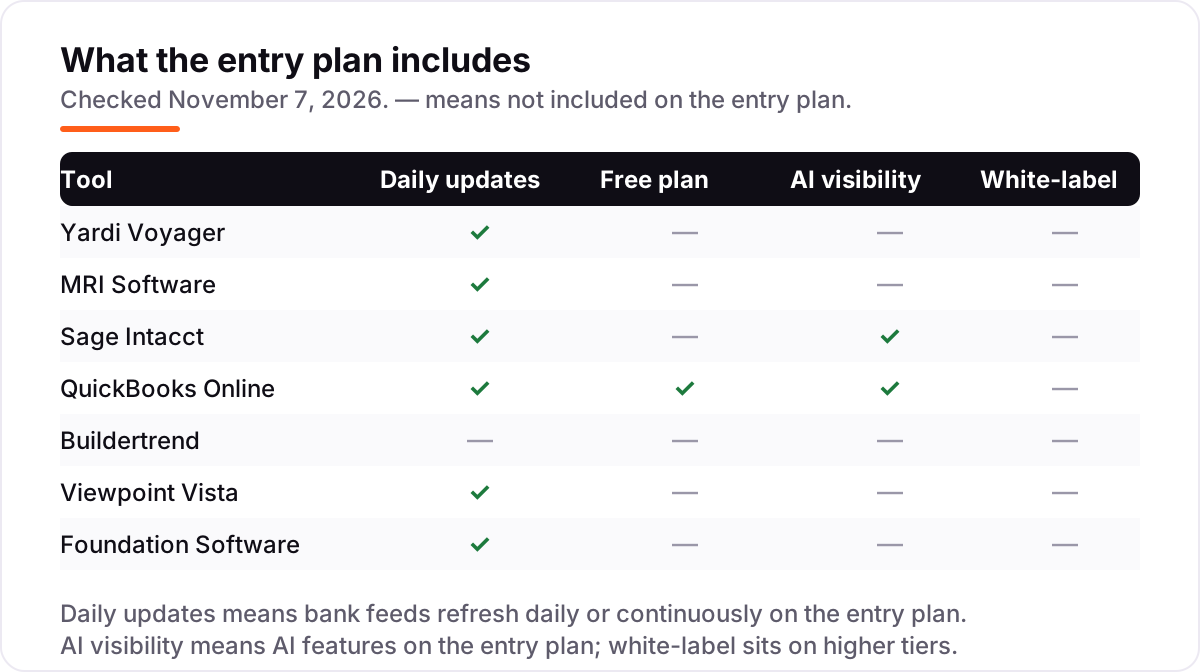
- Intuit Intelligence AI features are included on Simple Start, not held for the top tier
Watch out for
- Job costing is basic without add-ons — phases and cost codes need an add-on or disciplined use of classes
- Multi-entity reporting is manual work; consolidating several project LLCs means spreadsheet work
- Audit trails and controls are thin for outside equity partners

Buildertrend
Best for: Developers who self-perform construction and want scheduling, field communication and job cost accounting in one login
Buildertrend sits between project management and accounting, which is where many small developers live. If you develop and build, your team needs schedules, daily logs, change orders and selections management as much as it needs a ledger. Buildertrend puts the job cost accounting next to the operations data, so budget versus actual updates as the field reports progress.
The trade-off is accounting depth. Buildertrend is not a general-ledger replacement for a complex multi-entity firm; most users pair it with QuickBooks for the formal books. Pricing is quote-only and based on annual construction volume, with unlimited users and projects on every plan and 10% off for annual billing. It fits the developer-builder doing a steady stream of projects who wants one system the office and the field both use.
What we like
- Project management, scheduling, daily logs, client communication and job cost accounting in one system
- Unlimited users and unlimited projects on every plan
- Purpose-built for residential and light commercial builders
- Strong mobile app for field teams, with 10% off for annual billing
Watch out for
- Not a general-ledger replacement for a complex multi-entity firm — most users pair it with QuickBooks
- Pricing is quote-only and varies with annual construction volume, so two similar firms can pay different amounts
- Accounting depth is lighter than a true construction ERP

Viewpoint Vista
Best for: Developers acting as their own general contractor on large or complex jobs
Viewpoint Vista is construction accounting for companies that build at scale. Developers who act as their own general contractor on commercial or multifamily work need certified payroll, union reporting, equipment costing and deep job cost control, and Vista covers all of it in one database. The Trimble connection adds estimating, project management and field technology around the accounting core.
This is more system than a pure developer needs if you hire GCs. But if your firm self-performs, Vista's job costing and operational depth are hard to match. Expect a serious implementation: G2 reviewers most often report going live in 6–12 months, and the work is best handled by experienced partners. Firms that commit usually keep it for a decade, which tells you something about both the switching cost and the staying power.
What we like
- Deep construction ERP with job costing, payroll, equipment and project management in one database
- Strong compliance and certified payroll for public or prevailing-wage work
- Backed by Trimble's construction technology ecosystem, including estimating and field tools
- Flexible customization for company-specific workflows and fields
Watch out for
- Implementation is expensive and typically takes 6–12 months to go live
- On-premise roots show in the interface and deployment options
- Best handled by experienced partners — not a self-serve purchase

Foundation Software
Best for: US developers and contractors who want job cost control as the core of the system, not an add-on
Foundation Software has sold one thing for decades: job cost accounting for contractors. Developers who self-perform like it for the same reason contractors do. Every dollar lands against a job, phase and cost code, payroll flows into job cost automatically, and the reporting answers the one question that matters: which jobs are making money and which are slipping.
The product makes no attempt to be modern-looking, and the reporting is less flexible than cloud competitors. What you get instead is depth in the construction accounting workflow and support from people who know the trade: the vendor says more than 43,000 construction professionals use FOUNDATION. Pair it with a document management tool if your field teams need modern mobile workflows, and budget for a demo-led sales process — there is no published price.
What we like
- Job costing is the core of the product, not an add-on, with detailed cost tracking by phase and code
- Payroll flows into job cost automatically, with multi-state and certified payroll support
- US-based support from construction industry specialists
- More than 43,000 construction professionals use FOUNDATION, according to the vendor
Watch out for
- Dated interface that prioritizes function over modern design
- Reporting flexibility lags newer cloud competitors
- Some users report slow loading on large lists and reports
A real estate developer's books look nothing like a landlord's. The best accounting software for real estate developers has to carry land through entitlement, fund predevelopment costs, track construction draws against lender budgets, allocate interest during construction, and report to equity partners who expect clean capital account statements. Generic small-business accounting software records what happened. Developer accounting software tells you where each project stands against budget, in real time, before the lender asks.
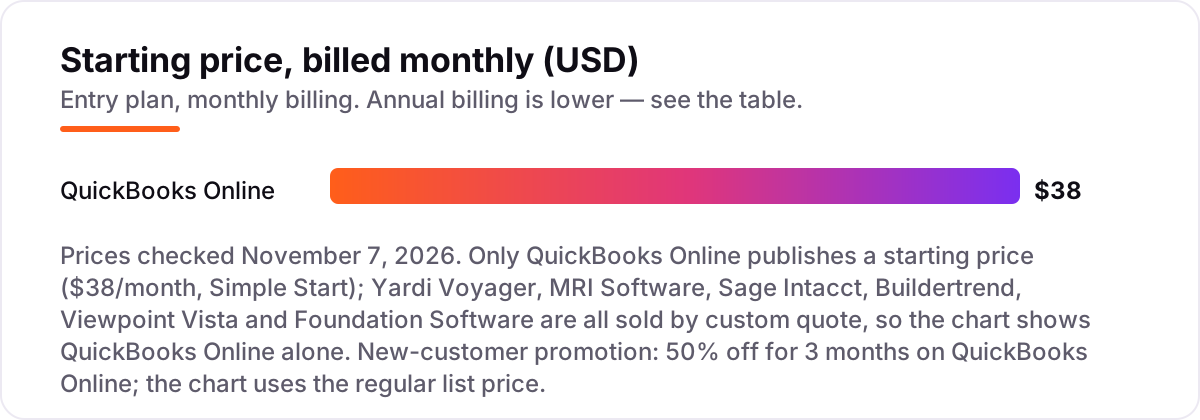
The seven platforms below cover the real market: development-specific ERPs, construction accounting systems for developers who self-perform, and the small-business option that works when the project count is low. Six of them publish no starting price at all, which is normal in this category — enterprise development software is quoted per firm, per entity count and per module. Only QuickBooks Online puts a number on its pricing page. That changes how you should read this list: the ranking below is by fit for the buyer, not by price, and the pricing section works through what the quotes actually mean instead of pretending the numbers are comparable.
How to choose the best accounting software for real estate developers
- Count your entities first. If every project is its own LLC, you need multi-entity consolidation — Yardi Voyager, MRI Software or Sage Intacct. If you run one or two LLCs, QuickBooks Online with classes will carry you for years.
- Decide who builds. Developers who hire general contractors need a strong ledger and lender reporting. Developers who self-perform need job costing by phase and cost code, certified payroll and equipment costing — Viewpoint Vista or Foundation Software.
- Check the draw process. Your lender releases money against a budget and a schedule of values. The software has to track draws, retainage and change orders against that budget, or your project manager will rebuild it in a spreadsheet every month.
- Ask who else reads the books. Outside equity partners want capital account statements, audit trails and fund reporting. That requirement alone rules out the small-business tools, however cheap they are.
- Budget for implementation, not just the subscription. Sage Intacct typically takes 3–6 months to implement and Viewpoint Vista 6–12 months. A tool that goes live after your next project starts is a tool you bought twice.
Accounting is one system in your stack, not the whole stack. If the firm also needs to be found online — by investors, partners and buyers — our guide to commercial real estate companies covers the visibility side of the market. And before you publish new pages for the projects you sell, run your titles through the free SERP snippet preview tool — it shows exactly how the title and description will look in Google.
Whatever you shortlist, evaluate it with your own project data before you sign. The enterprise tools in this list sell through demos, not trials, so ask for a demo built on one of your real projects — your budget, your cost codes, your lender's draw format — and watch how the system handles a change order mid-draw. That one exercise tells you more than any sales deck can. Check two things in the demo: that a draw report reconciles to the lender's schedule of values without manual fixes, and that the consolidated report across your entities matches what your accountant expects. If either needs spreadsheet work after the demo, the tool has not solved your problem.
Real estate developer accounting pricing: what you will actually pay
Take a developer running five concurrent projects, each in its own LLC, with one bookkeeper and an outside CPA. On list prices, the subscription costs $38 a month on QuickBooks Online Simple Start — $456 a year — and that is the only published number in this list. Everything else is a quote, and the quotes land in a different range entirely. Sage partners Rand Group and Cargas report entry subscriptions for Sage Intacct around $9,000–$12,000 a year for a single business user with core financials, with most mid-market customers spending $25,000–$35,000 a year once users, entities and modules are counted. Those are partner-reported estimates, not a Sage price list, and your quote will depend on your entity count and module list.
Implementation is the second bill, and it is often as large as the first. Partner estimates put Sage Intacct implementation at roughly one to one and a half times the annual subscription, so a $12,000-a-year entry subscription can mean $12,000–$18,000 of setup before the first month is live. Viewpoint Vista follows the same pattern at a larger scale: no published price, implementation typically taking 6–12 months, and third-party estimates in the tens to low hundreds of dollars per user per month depending on scale. Foundation Software and MRI Software are quote-only in the same way, and Buildertrend quotes on annual construction volume rather than seats — its last published plans, from December 2024, started at $449 a month billed annually for Essential, but Buildertrend stopped publishing prices in early 2025, so treat that figure as a historical reference point, not a price you can buy today.
The honest way to compare these tools is total first-year cost, not the monthly figure. A small developer on QuickBooks Online pays about $456 a year for the ledger, plus a construction add-on for job costing and draw tracking — typically a few hundred dollars a year more — and no implementation bill to speak of. A mid-size developer moving to Sage Intacct should expect roughly $21,000–$30,000 in year one for an entry setup: $9,000–$12,000 of subscription plus a similar amount of implementation, before training. A firm moving to Yardi Voyager or Viewpoint Vista should expect more, and should get the implementation quote in writing alongside the subscription quote, with the module list itemized. Three costs sit outside every number above. First, the per-entity and per-user fees on Sage Intacct, Yardi Voyager and MRI Software compound as you add projects — each new LLC is a new billing unit. Second, training: a dated interface on Yardi Voyager or Viewpoint Vista means real training time for the team, and that time is a cost even when the vendor does not charge for it. Third, the add-ons: Buildertrend's estimating and change-order tools, Yardi's procurement and forecasting modules and MRI's additional modules are all priced separately, so the quote you sign is rarely the quote you end up paying.
One more cost to check before you commit: the exit. Enterprise development software is sticky — firms that adopt Viewpoint Vista usually keep it for a decade — so the switching cost is part of the price. Ask each vendor, in writing, what it costs to export your full transaction history, your chart of accounts and your project budgets if you leave, and how long the data stays available after the contract ends. A vendor that answers that question cleanly is a vendor you can trust with ten years of project history.
Know the difference: developer accounting vs landlord accounting
The confusion in this category is between two kinds of real estate books. A landlord's books are about rent: collect it, track arrears, pay the mortgage, report the yield. A developer's books are about projects: land cost, entitlement, predevelopment spend, construction draws, retainage, interest capitalization and capital accounts for equity partners. Landlord software such as Stessa or Landlord Studio tracks rent rolls and is priced per unit. Developer software tracks budgets against actuals by cost code and is priced per entity or per quote. Buying landlord software for a development firm is the single most common mistake in this category, and it shows up the first month a lender asks for a draw report the software cannot produce.
There is a second, quieter confusion: project management tools are not accounting software. Buildertrend sits deliberately between the two, but most tools that call themselves construction software are scheduling and field tools with a light billing layer on top. They do not keep a double-entry ledger, produce a balance sheet, or give your CPA a tax-ready set of books. All seven tools in this list keep a real ledger — Buildertrend pairs with QuickBooks Online for the formal books — which is what the phrase "accounting software" means here. If a tool only schedules and invoices, it belongs in a different list.
A third distinction worth knowing is fund accounting versus project accounting. Project accounting tracks one job: its budget, its costs, its margin. Fund accounting tracks the money behind many jobs: which equity partner contributed what, how returns are allocated, and what each capital account holds. Yardi Voyager, MRI Software and Sage Intacct do fund accounting natively — that is why they cost what they cost and why they need implementation partners. QuickBooks Online, Buildertrend, Viewpoint Vista and Foundation Software do project accounting well and fund accounting only with manual work. If your investors receive quarterly capital account statements, that distinction decides the shortlist before price does.
The practical test is the draw. Ask any vendor to show you a lender draw package built from your own project: the schedule of values, the percentage complete by line item, the retainage held, the change orders approved since the last draw, and the amount requested this period. A developer accounting system produces it from the ledger. A landlord system or a project management tool makes you build it by hand. Run that test on two vendors and the shortlist usually writes itself.
Quick comparison: tool type by need
| Buyer | Best pick | Why |
|---|---|---|
| Enterprise developer, many entities + outside equity | Yardi Voyager | Full lifecycle + consolidated reporting, custom quote |
| Multi-entity firm that wants investor reporting | MRI Software | Consolidation + fund reporting from one ledger, custom quote |
| Growing firm that wants cloud fund accounting | Sage Intacct | Dimensions-based books + AI agents, custom quote |
| Small developer, 1–3 projects | QuickBooks Online | Standard ledger at $38/month, add-ons for job costing |
| Developer who also builds | Buildertrend | Operations + job costing in one login, custom quote |
| Self-performing GC on large jobs | Viewpoint Vista | Deep construction ERP, certified payroll, custom quote |
| Job-cost purist | Foundation Software | Every dollar by job, phase and cost code, custom quote |
Mistakes to avoid
- Shopping on the monthly price. Six of the seven tools publish no price, so a monthly comparison is meaningless. Compare total first-year cost — subscription plus implementation plus training — and get the implementation quote in writing before you sign.
- Buying landlord software for development work. Rent-roll tools cannot produce a lender draw package or a capital account statement. If the software is priced per unit and talks about tenants, it is not developer accounting.
- Ignoring the entity count. On Sage Intacct, Yardi Voyager and MRI Software, each new project LLC is a new billing unit. A firm that doubles its project count can double its subscription without adding a single user.
- Skipping the draw test in the demo. If the vendor will not build a draw package from your own project data, the system cannot do it. A slide deck is not a demo.
- Following stale links to a vendor's old domain. Foundation Software's former fndinc.com address is now a parked domain listed for sale — use foundationsoftware.com. Old bookmarks and roundups still point at the dead address.
- Forgetting the exit cost. Enterprise tools are sticky, and your project history lives in them. Ask in writing what a full export costs and how long data stays available after the contract ends.
How we chose
We checked each vendor's own pricing or product page on November 7, 2026. Only QuickBooks Online publishes a starting price — Simple Start at $38/month — and that figure comes from Intuit's own pricing page. Yardi Voyager, MRI Software, Sage Intacct, Buildertrend, Viewpoint Vista and Foundation Software publish no starting price, so we record them as custom quote and do not assert a price for them. The Sage Intacct entry range of $9,000–$12,000 a year and the Buildertrend Essential figure of $449 a month billed annually are third-party-reported, not vendor-published: the Intacct range comes from Sage partners Rand Group and Cargas, and the Buildertrend figure is the last published plan from December 2024, before Buildertrend stopped publishing prices in early 2025. Ratings come from each tool's G2 review page, opened on November 7, 2026. We ranked the tools by fit for the most common buyer — a developer choosing between a general ledger, a construction ERP and an enterprise multi-entity platform — not by brand size. No vendor paid for a place in this list, and none of the links here are affiliate links.
What to do next
Start with the demo, not the quote. Shortlist two tools — one enterprise platform and one smaller option — and ask each vendor to build a draw package from one of your real projects. Check that the draw reconciles to the lender's schedule of values and that the consolidated report across your entities matches what your accountant expects. If the books are sorted but new investors and buyers are not finding you, our monthly SEO service handles the visibility side — or compare providers in our guide to e-signature software for real estate, which most developers need alongside the ledger for remote closings. Once your tools are in place, find out what's holding your rankings back.
Your stack only works if people find you
SerpAstra fixes what keeps your site off page one and makes it easy for AI assistants to recommend.
Get a free audit→Sources we checked (14)
- QuickBooks Online pricing — quickbooks.intuit.com/pricing (checked November 7, 2026)
- Buildertrend pricing — buildertrend.com/pricing (checked November 7, 2026)
- Sage Intacct product page — sage.com/en-us/products/sage-intacct (checked November 7, 2026)
- Yardi Voyager product page — yardi.com/products/yardi-voyager (checked November 7, 2026)
- Foundation Software — foundationsoftware.com (checked November 7, 2026)
- Viewpoint Vista — viewpoint.com/products/vista (checked November 7, 2026)
- MRI Software — mrisoftware.com (checked November 7, 2026)
- Yardi Voyager reviews — g2.com/products/yardi-voyager/reviews (checked November 7, 2026)
- MRI Property Management reviews — g2.com/products/mri-property-management/reviews (checked November 7, 2026)
- Sage Intacct reviews — g2.com/products/sage-intacct/reviews (checked November 7, 2026)
- QuickBooks Online reviews — g2.com/products/quickbooks-online/reviews (checked November 7, 2026)
- Buildertrend reviews — g2.com/products/buildertrend/reviews (checked November 7, 2026)
- Viewpoint Vista reviews — g2.com/products/viewpoint-vista/reviews (checked November 7, 2026)
- FOUNDATION reviews — g2.com/products/foundation/reviews (checked November 7, 2026)
Shamim
Founder of SerpAstra
A full-stack SEO and digital marketer who spends most days on Local SEO for dental practices, AI search visibility and lead generation.
Frequently asked questions
What is the best accounting software for real estate developers?
Yardi Voyager is the best fit for enterprise developers with many entities and outside equity, at 4.2/5 on G2. Sage Intacct, at 4.3/5, is the better pick for firms that want cloud fund accounting with dimensions. Small developers running one to three projects should start with QuickBooks Online at $38/month.
How much does accounting software for real estate developers cost?
Only QuickBooks Online publishes a price: $38/month for Simple Start. The other six tools are sold by custom quote. Sage partners report entry subscriptions around $9,000–$12,000 a year for Intacct, and implementation often costs about as much as the first year of subscription, so budget for setup as well as the licence.
Can QuickBooks Online handle real estate development accounting?
Yes, for small developers. One to three projects with a part-time bookkeeper work fine, especially with a construction add-on for job costing and draw tracking. It breaks down at scale: multi-entity consolidation becomes spreadsheet work, and outside equity partners usually want the controls and audit trails that QuickBooks does not provide.
What is the difference between Yardi Voyager and MRI Software?
Both are enterprise platforms for multi-entity developers, and both score near 4.1–4.2/5 on G2. Yardi covers the fuller lifecycle, from land and development budgeting through lease-up and stabilized operations. MRI's strength is financial structure: consolidation, intercompany accounting and investor reporting from one ledger.
Do I need construction accounting software or regular accounting software?
It depends on who builds. If you hire general contractors and only need the books, a general ledger such as QuickBooks Online or Sage Intacct is enough. If you self-perform, you need job costing by phase and cost code, certified payroll and draw tracking — that means Viewpoint Vista, Foundation Software or Buildertrend.
Is there free accounting software for real estate developers?
No tool in this list has a free plan built for development work. QuickBooks Online has a limited free tier — one user and two invoices a month — but it is not a development accounting system. The enterprise tools offer demos, not trials, so expect a sales-led evaluation with a demo on your own project data.
Free SEO and AI visibility audit
Find out what is holding your rankings back
Send us your site. Within 2 business days you get a written audit, an AI visibility check and a short fix list ranked by impact. Free, with no contract attached.
Request my free audit→Related guides
 Accounting, Tax & Finance7 Best Accounting Software for Small Businesses in 2026, ComparedCompare the 7 best accounting software for small businesses on price, free plans, bank feeds and AI features, with every price checked November 2, 2026.Read guide →
 Local Business & Vertical Software9 Best Commercial Real Estate Companies in 2026Compare the 9 best commercial real estate companies on tenant-rep volume, coverage and conflicts, with fees quoted per deal and facts checked November 7, 2026.Read guide →
 Local Business & Vertical Software10 Best E-Signature Software for Real Estate in 2026, ComparedCompare the 10 best e-signature software for real estate on price, free plans, forms and broker review, with every price checked November 7, 2026.Read guide →