
11 Best AI Data Analytics Tools in 2026 (Free and Paid, Compared)
Compare the 11 best ai data analytics tools on price, free plans, credits and AI features, ranked by use case, with every price checked November 6, 2026.
 Shamim Mia, Founder, SerpAstraLast verified November 6, 202612 min read
We compare pricing pages, documentation and public reviews. We never accept payment for rankings.

Key takeaways
- Julius AI ($20/month), Rows (free, Plus $8/user/month) and ThoughtSpot ($25/user/month) are the short-list for most buyers: chat analysis, spreadsheet AI and search-driven BI.
- The single most important buying factor is where your data lives: files point to Julius, Rows or Polymer, while warehouse data points to ThoughtSpot, Hex or Sigma.
- Four tools publish no price at all — Hex, Sigma, Obviously AI and Akkio are custom quote only, so budget a sales call, not a subscription.
- Watch the billing unit: Julius sells credits, Power BI and Tableau sell seats, and Qlik sells a flat $300 a month for the whole team.
On this page
Quick comparison
| Tool | Best for | Starting price | Free plan |
|---|---|---|---|
| Julius AI | Non-technical users who want to chat with a spreadsheet and get charts, statistics and explanations back | $20/mo | Yes (free plan) |
| Rows | Business teams that live in spreadsheets and want an AI analyst on tap for reporting | $8/mo | Yes (free plan) |
| ThoughtSpot | Teams that want to search company data in plain language and get governed, explainable answers | $25/mo | No (free trial) |
| Microsoft Power BI | Microsoft shops that want full BI with AI visuals at the lowest per-user price here | $14/mo | Yes (free Desktop) |
| Tableau | Analysts who want the most polished dashboards and the widest-known BI brand | $75/mo | No (14-day trial) |
| Hex | Data teams that want notebooks, AI chat and governed apps in one workspace | Custom quote | Yes (free plan) |
| Sigma | Warehouse-first companies that want business users building AI apps on live governed data | Custom quote | No (free trial) |
| Qlik | Mid-size teams that want governed AI analytics with a fixed monthly price, not per-seat billing | $300/mo | No (free trial) |
| Obviously AI | Business users who need predictions — churn, forecasts, lead scores — without a data scientist | Custom quote | Yes (free plan) |
| Akkio | Media agencies that want AI workflows, predictions and reporting across client data | Custom quote | No (free trial) |
| Polymer | Product teams that want AI-generated dashboards embedded inside their own app | $20/mo | No (14-day trial) |
Make one of these tools?
We re-check this list every quarter. Send a correction, request a review, or ask about a clearly labeled sponsored spot.
Request a listingThe best AI data analytics tools

Julius AI
Best for: Non-technical users who want to chat with a spreadsheet and get charts, statistics and explanations back
Julius AI is the fastest way from a spreadsheet to an answer: upload a CSV or Excel file, ask a question in plain English, and get back charts, statistics and a written explanation. Under the surface it runs real Python, and it shows you the code, so you can check the work instead of trusting a black box.
Plus costs $20 a month ($16 billed annually) for 2,000 credits, Pro is $45 for 5,000 credits, and Business is $450 with database connectors and up to 50 team members. Pick Julius when the question lives in a file and you want the answer today; pick Hex or ThoughtSpot when the data lives in a warehouse.
What we like
- Chat with your data in plain English: upload a file and get charts, statistics and explanations without writing code
- Shows the Python code it ran, so technical users can check exactly how each answer was produced
- Free plan with a daily credit allowance, and paid plans add frontier models, more credits and database connectors
- SOC 2 Type II compliant, with Business plans adding Postgres, BigQuery and Snowflake connectors
Watch out for
- Usage runs on credits, so heavy analysis can burn through a cheap plan faster than a flat subscription
- Files auto-delete after 7 days on paid plans (1 hour on the free plan), so it is not a place to store data
- A personal analyst, not a governed BI platform: no semantic layer or row-level permissions for regulated teams

Rows
Best for: Business teams that live in spreadsheets and want an AI analyst on tap for reporting
Rows is a spreadsheet rebuilt around AI: import data from 50-plus sources, then ask the built-in AI Analyst questions in plain language. It summarizes takeaways, finds questions worth asking on its own, runs pivots and trend analysis, and generates charts — even extracting data from PDFs and images.
The free plan covers unlimited spreadsheets and members with 5 AI tasks a month, and Plus costs $8 per user a month ($6 billed annually) for 200 AI tasks and daily automated refresh. Pick Rows when the team already lives in spreadsheets and wants reporting that updates itself.
What we like
- AI Analyst answers questions in plain language, runs pivots and trend analysis, and builds charts for you
- Free plan is genuinely usable: unlimited spreadsheets and members, 10 integrations and 3 guests
- Plus automates data tables daily from 50-plus sources, including ad platforms and CRMs
- Embeds and shares reports anywhere, with automatic refresh on paid plans
Watch out for
- Free plan covers only 5 AI tasks a month, so regular reporting needs Plus at $8/user/month
- Pro adds a $79/month platform fee on top of the per-user price, which is steep for tiny teams
- Rows joined Superhuman, so the independent roadmap may change — check before committing long-term

ThoughtSpot
Best for: Teams that want to search company data in plain language and get governed, explainable answers
ThoughtSpot works like a search engine for company data: type a question, get a chart, then keep asking follow-ups. The semantic layer sits underneath, so the AI cannot invent its own definitions of revenue or churn — the answers stay consistent across the team. Essentials costs $25 per user a month, billed annually.
The catch is that the Spotter AI agent is not on Essentials at all: it starts on Pro at $50 per user a month, capped at 25 queries per user a month. Pick ThoughtSpot when the data already sits in a warehouse and non-technical staff need to ask it questions safely.
What we like
- Search-driven analytics: type a question and get a chart, with a semantic layer that keeps definitions consistent
- Spotter AI agent on Pro answers follow-up questions and flags changes in your KPIs
- Live connections to Snowflake, Databricks, Redshift and BigQuery, with no data movement
- Essentials covers 5 to 50 users and up to 25 million rows at a published price, not a quote
Watch out for
- Essentials has no Spotter AI agent — the conversational agent starts on Pro at $50/user/month
- Pro caps Spotter at 25 queries per user a month, with overage charges beyond that
- All plans are billed annually, with no month-to-month option

Microsoft Power BI
Best for: Microsoft shops that want full BI with AI visuals at the lowest per-user price here
Power BI is the value pick among full BI platforms: the Desktop app is free for building reports, and Pro costs $14 per user a month for publishing, sharing and collaboration. It brings AI visuals, key-influencer analysis and natural-language Q&A, plus more than 100 connectors and 8 scheduled refreshes a day.
The price to remember is $14, not the $10 that directories still show: Microsoft raised Pro by 40% in April 2025. The deeper AI, including Copilot, needs Premium Per User at $24 a month. Pick Power BI when the company already runs on Microsoft 365 and every seat counts.
What we like
- Cheapest full BI platform here: Pro is $14/user/month and the Desktop app is free
- AI visuals, key-influencer analysis and natural-language Q&A are built into the platform
- Deep Microsoft 365 integration, and Pro is included in Microsoft 365 E5
- More than 100 data connectors and 8 scheduled refreshes a day on Pro
Watch out for
- Pro rose from $10 to $14/user/month in April 2025, and G2 still lists the old $10 price
- Copilot and the deeper AI features need Premium Per User at $24/month or Fabric capacity
- Every person who publishes or views a shared report needs a paid licence, so costs scale with headcount

Tableau
Best for: Analysts who want the most polished dashboards and the widest-known BI brand
Tableau remains the benchmark for visual analytics: Creators get Tableau Desktop, web authoring and Prep Builder for $75 per user a month, billed annually, while Explorers pay $42 and Viewers $15. Tableau Agent answers plain-language questions and explains what a chart means, right on the dashboard.
Budget on the whole team, not the cheapest seat: every deployment needs at least one Creator, and all billing is annual. The Tableau+ AI bundle is priced separately through Salesforce. Pick Tableau when dashboard quality is the priority and the team can support the seat maths.
What we like
- The most polished visual analytics in this list, with Tableau Desktop and Prep Builder included for Creators
- Tableau Agent answers questions in plain language and explains charts on the dashboard
- Role-based pricing lets viewers in at $15/month and explorers at $42/month
- Huge community, training library and connector ecosystem built over more than a decade
Watch out for
- Annual-only billing: there is no month-to-month option on any Tableau Cloud tier
- Every deployment needs at least one Creator at $75/month, so the $15 Viewer price is never the whole bill
- Tableau Agent and the Tableau+ AI features need a separate conversation with Salesforce sales

Hex
Best for: Data teams that want notebooks, AI chat and governed apps in one workspace
Hex is the AI workspace for companies where data teams and business users share one place: practitioners run SQL and Python in collaborative notebooks and publish interactive data apps, while business users ask questions in plain language and get AI-generated analysis grounded in the same data.
The context engine is the differentiator — semantic models, business rules and metric definitions combine into a curated layer that powers every AI answer. Paid plans are quoted, with no prices on the page, and the free Community plan covers individual work. Pick Hex when a data team sets the definitions.
What we like
- Notebooks, AI chat threads and published data apps share one workspace and one semantic layer
- Context engine grounds AI answers in approved metric definitions, with evals and observability
- Deep dbt integration and Git export fit modern data stacks
- Free Community plan covers individual work, and students and educators get Professional free
Watch out for
- The pricing page lists no dollar prices — paid plans are quoted, so budgeting needs a sales call
- AI features consume credits, and the credit grant differs by plan and seat
- Scheduled runs, alerts and unlimited published apps wait for Team, not the entry Professional plan

Sigma
Best for: Warehouse-first companies that want business users building AI apps on live governed data
Sigma calls itself the AI runtime for business: teams chat with live cloud warehouse data, build AI agents that act on it, and deploy workflows that write back to source systems, all without moving data. The familiar spreadsheet interface stays the entry point, now joined by natural-language chat and AI-built dashboards.
The requirement is a modern cloud warehouse — Snowflake, Databricks, BigQuery or Redshift — and the price is a quote: the pricing page redirects to a contact form. Pick Sigma when the warehouse is already the source of truth and business users should build on it directly.
What we like
- Spreadsheet interface on live warehouse data — no extracts, no data movement
- AI chat builds dashboards and reports, and agents can write back to source systems
- Governance inherits from the warehouse, with SOC 2, HIPAA and GDPR compliance
- Reviewers rate support highly, with a 9.1 quality-of-support score on G2
Watch out for
- No published prices at all: the pricing page redirects to a contact form, so every deal is a quote
- Requires a modern cloud warehouse (Snowflake, Databricks, BigQuery or Redshift) — nothing to connect means nothing to analyse
- Reviewers report slow loading on very large or complex workloads

Qlik
Best for: Mid-size teams that want governed AI analytics with a fixed monthly price, not per-seat billing
Qlik Cloud Analytics is priced by data capacity, not by seat: Starter costs $300 a month, billed annually, for 10 users and 10 GB of analysis data. The associative engine indexes relationships between data points, so users can explore freely instead of following drill paths someone else built.
The flat price cuts both ways: a ten-person team gets a bargain, a two-person team overpays, and the 10 GB cap cannot be expanded inside Starter. The generative AI assistant, Qlik Answers, starts on Standard at $825 a month. Pick Qlik when the team is close to ten people and wants one predictable bill.
What we like
- Flat pricing: Starter is $300/month for 10 users and 10 GB, with no per-seat maths
- Associative engine lets users explore freely instead of following pre-built drill paths
- AI-powered analytics and augmented insights included from Starter
- Standard adds Qlik Answers, managed spaces and purchasable extra capacity
Watch out for
- Starter is a flat $300 a month for the whole team, so a two-person team pays the same as a ten-person team
- Starter caps analysis data at 10 GB and cannot be expanded within the plan
- Qlik Answers, the generative AI assistant, starts on Standard at $825/month, not Starter

Obviously AI
Best for: Business users who need predictions — churn, forecasts, lead scores — without a data scientist
Obviously AI answers a different question from the dashboard tools: not what happened, but what will happen. Upload a dataset and ask which customers will churn, what sales will look like next quarter, or which leads will convert, and the platform builds the model in minutes with no code.
One-click deployment turns models into shareable web apps and real-time APIs, and every account includes a dedicated data scientist. The pricing page publishes no prices, and the $75 a month Starter quoted in directories is not on it. Pick Obviously AI when the job is a prediction, not a dashboard.
What we like
- Builds classification, regression and time-series models in minutes with no code
- One-click deployment turns models into shareable web apps and real-time REST APIs
- Every account includes access to a dedicated data scientist for cleaning and enrichment
- Free plan covers 1,200 predictions for individuals, hobbyists and non-profits
Watch out for
- The pricing page lists plans with no dollar prices, so the cost is a sales conversation
- Directories quote a $75/month Starter, but that figure is not on the vendor's own pricing page
- A dedicated data scientist is bundled in, which is generous but means the service is priced like one

Akkio
Best for: Media agencies that want AI workflows, predictions and reporting across client data
Akkio has grown from no-code machine learning into an AI workflow platform, now focused on media agencies and data providers. Teams upload data, chat with it, build predictive models without code, and automate the workflows around them — audience segmentation, propensity modelling and campaign measurement.
The platform combines chat with data, business context that grounds outputs, and governance with role-based access. The pricing page now lists custom Enterprise pricing only, so the $49 a month plan in directories is stale. Pick Akkio when the agency workflow, not just the model, is the bottleneck.
What we like
- Chat with data plus no-code predictive modelling in one platform
- Workflow automation from audience segmentation to campaign measurement
- Business context grounds outputs, with role-based access and observability over AI actions
- SOC 2, HIPAA and GDPR compliance for regulated client data
Watch out for
- The pricing page now shows custom Enterprise pricing only — the $49/month plan in directories is gone
- Positioned for media agencies, so generalist teams should check fit carefully
- Chat with data and modelling sit behind the enterprise platform, not a self-serve tier

Polymer
Best for: Product teams that want AI-generated dashboards embedded inside their own app
Polymer is built for developers who want analytics inside their product without building it: connect data, let the AI identify key questions and generate dashboards automatically, then give end users automatic explanations of what each chart means. Starter costs $20 a month, or $10 billed annually.
Embed charts with a few lines of code and keep everything under your own brand, but API access and white-label embeds sit on the custom-priced Enterprise tier. The pricing page shows two conflicting plan sets, so confirm the price before buying. Pick Polymer to show customers their data, not to run internal BI.
What we like
- AI identifies key questions and generates dashboards automatically from your data
- Embed charts and dashboards with a few lines of code, under your own brand
- Automatic explanations tell end users what each chart means
- Connects spreadsheets, Shopify, Google Sheets, Google Analytics and Salesforce
Watch out for
- The pricing page shows two conflicting plan sets, so confirm the price with the vendor before buying
- API access and white-label embeds sit on the custom-priced Enterprise tier
- Narrower than a full BI platform — it will not replace your internal analytics stack
The best ai data analytics tools turn a plain-English question into a chart, a forecast or an explanation — no SQL, no Python, no waiting on a data team. We ranked the 11 tools below by fit for the most common buyer: a business user with data in spreadsheets, a CRM or a warehouse who wants answers this week, not next quarter. Every price was checked on the vendor's own pricing page on November 6, 2026, and where a vendor publishes no price, we say so instead of guessing.
How to choose the best ai data analytics tools
- Start with where your data lives. Files and spreadsheets point to Julius AI, Rows or Polymer; a cloud warehouse points to ThoughtSpot, Hex or Sigma.
- Decide whether you need answers or predictions. Dashboards describe the past; Obviously AI and Akkio train models that forecast churn, sales and lead conversion.
- Check the AI's receipts. Tools that show their code or SQL, like Julius AI, earn more trust than a chatbot that only shows the chart.
- Count the real billing unit. Julius sells credits, Power BI and Tableau sell seats, Qlik sells a flat monthly price — the cheapest headline is rarely the cheapest bill.
- Check governance before you share. A semantic layer or row-level permissions matter the moment more than one team reads the same numbers.
- Trial it on your own messy data. AI demos look magical on clean sample data; your CSV with missing values and inconsistent categories is the true test.
Analytics is one system in your stack, not the whole stack. If the business also needs to be found online, our AI search optimization service covers the visibility side. And before you publish new pages for the services you sell, run your titles through the free SERP snippet preview tool — it shows exactly how the title and description will look in Google.
Whatever you shortlist, try it with real data before you pay. The free plans and trials in this list are long enough to run one genuine question — your spreadsheet, your warehouse, your customers — and that test tells you more than any review can. Check two things in the trial: that the AI's answers match numbers you already trust, and that the limits (credits, AI tasks, query caps) fit a normal week.
AI data analytics tools pricing: what you will actually pay
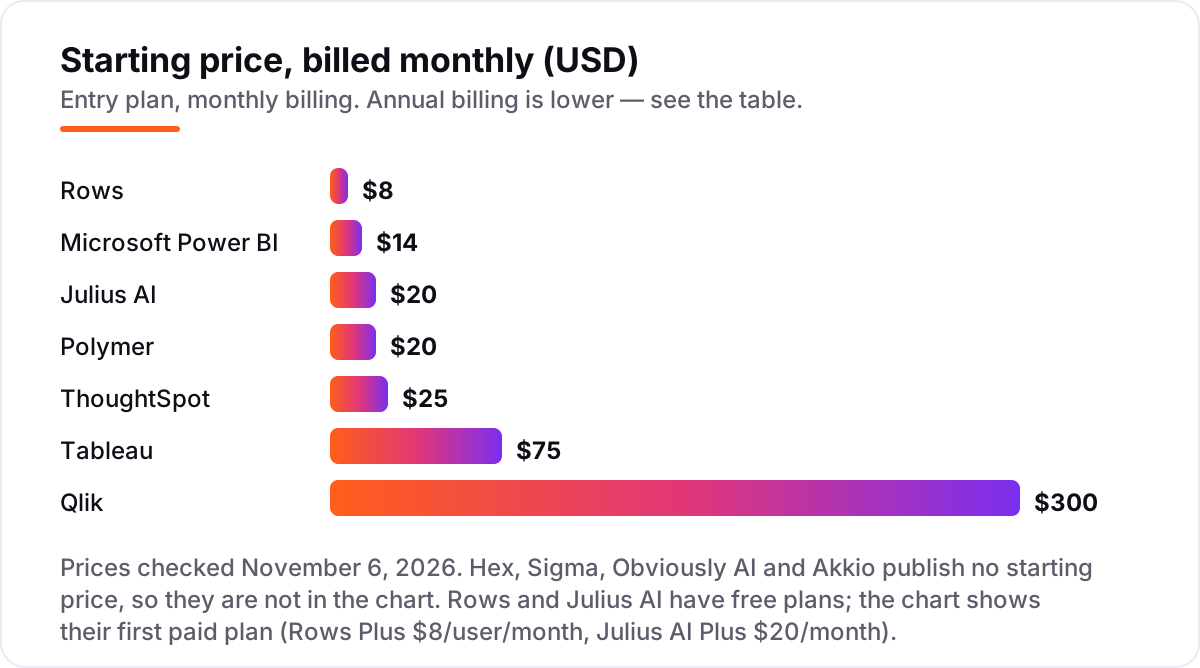
Take a five-person team that analyses data every week. On list prices, the monthly bill is $40 on Rows Plus (5 users at $8), $70 on Power BI Pro (5 at $14), $100 on Polymer Starter (5 at $20), $125 on ThoughtSpot Essentials (5 at $25), $135 on Tableau (1 Creator at $75 plus 4 Viewers at $15) and $300 on Qlik Starter, which is flat for the whole team. Julius AI is different: one Plus seat at $20 covers the analyst, and a second analyst means a second $20 seat or a step up to Pro at $45.
Over a year, that is $240 on Julius Plus, $360 on Rows Plus billed annually, $840 on Power BI Pro, $1,200 on Polymer Starter billed annually, $1,500 on ThoughtSpot Essentials, $1,620 on Tableau and $3,600 on Qlik Starter. The same five people cost $240 a year at the cheap end and $3,600 at the dear end — and the gap comes from the billing unit, not from features. Four tools sit outside this maths entirely: Hex, Sigma, Obviously AI and Akkio publish no price, so their cost is a sales conversation.
Three costs sit outside every number above. First, the credit and query caps: Julius credits, Rows AI tasks (200 a month on Plus) and ThoughtSpot's 25 Spotter queries per user a month on Pro all cost extra once exceeded. Second, the AI upgrades: Power BI Copilot needs Premium Per User at $24 a month, and Tableau Agent sits in the separately priced Tableau+ bundle. Third, the stale prices in directories: Power BI Pro is $14, not the $10 G2 still shows, and Polymer's own pricing page shows two conflicting plan sets, so confirm its price with the vendor.
Know the difference: AI analytics vs traditional BI
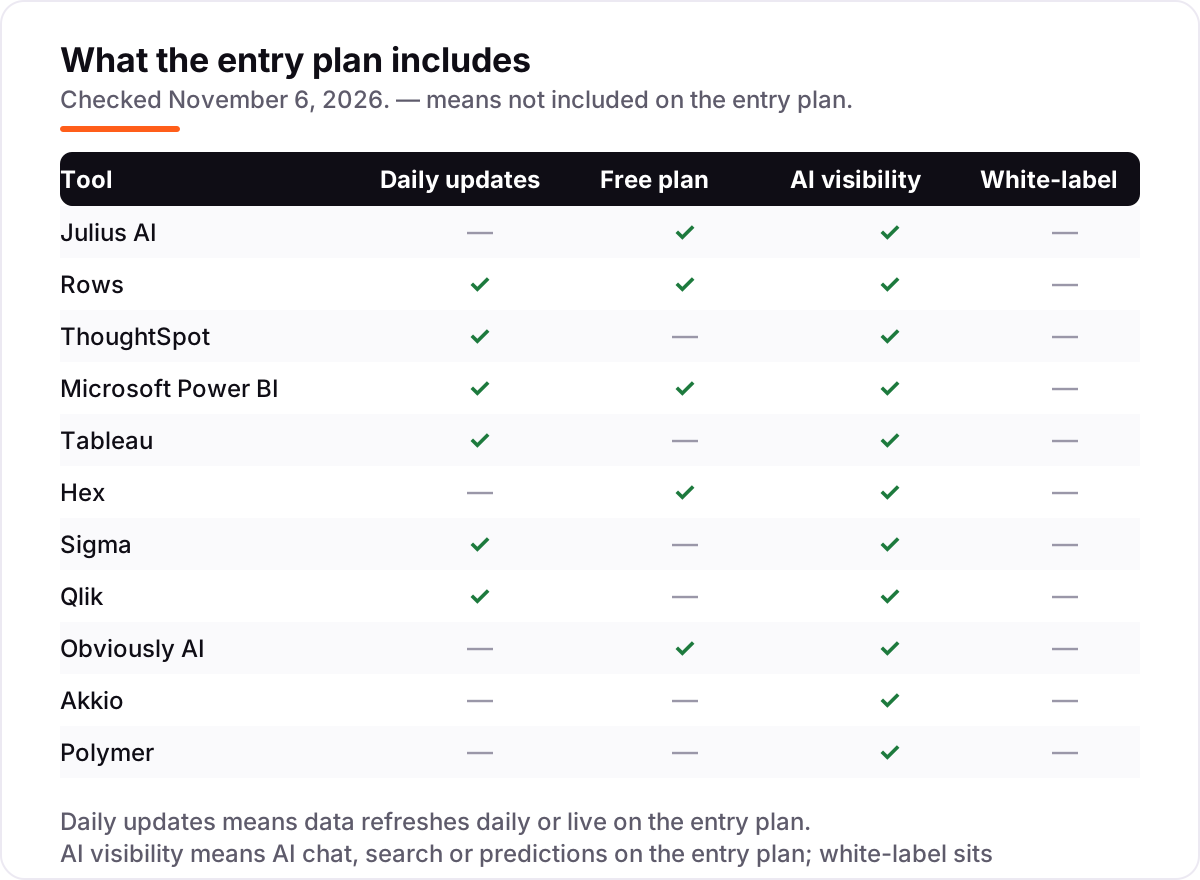
The confusion in this category is between a tool that describes the past and a tool that answers questions or predicts the future. Traditional BI is dashboards someone built in advance: useful, but every new question means a new ticket to the data team. AI analytics adds three distinct jobs on top, and tools specialize in different ones.
The first job is conversational analysis: ask a question in plain English, get a chart back. Julius AI, Rows and ThoughtSpot do this well, and quality depends on whether the AI shows its work — tools that reveal the underlying code or SQL earn more trust. The second job is prediction: which customers churn, what revenue looks like next quarter. Obviously AI and Akkio build real machine learning models for this, while most BI chatbots only describe the past. If you need forecasts, make sure the tool trains models rather than just extrapolating trend lines.
The third job is governed assistance: AI that answers questions constrained by approved metric definitions. Hex's context engine, ThoughtSpot's semantic layer and Sigma's warehouse governance do this. This is what separates enterprise AI analytics from a clever demo: the answers stay consistent because the AI cannot invent its own definitions.
Quick comparison: tool type by need
| Buyer | Best pick | Why |
|---|---|---|
| Solo user with a spreadsheet | Julius AI | Chat analysis from $20/month, with a free plan to start |
| Team living in spreadsheets | Rows | AI analyst in a spreadsheet, free plan, Plus is $8/user/month |
| Company asking questions of warehouse data | ThoughtSpot | Search-driven answers from $25/user/month, billed annually |
| Microsoft shop on a budget | Microsoft Power BI | Full BI from $14/user/month, Desktop app free |
| Data team needing governed AI | Hex | AI workspace on governed data, Community plan free, paid plans quoted |
| Product team embedding dashboards | Polymer | AI dashboards inside your own app from $20/month |
Mistakes to avoid
- Budgeting on credits as if they were seats. Julius AI sells credits, not users: a busy month can push a $20 plan to $45, and the credit limit, not the seat count, decides the bill.
- Buying on the free plan, then hitting the AI limit. Rows Free covers only 5 AI tasks a month — regular reporting needs Plus at $8 per user a month, so count it in the price from day one.
- Assuming the AI assistant is included. ThoughtSpot's Spotter starts on Pro, Power BI Copilot needs Premium, and Tableau Agent sits in the Tableau+ bundle — the headline AI feature is often one tier up.
- Paying a flat price for a tiny team. Qlik Starter is $300 a month whether the team is two people or ten. A two-person team gets a better deal from Power BI Pro at $28 a month.
- Trusting directory prices. Obviously AI's $75 a month Starter and Akkio's $49 a month plan appear in directories, but neither figure is on the vendor's own pricing page — both vendors now quote prices privately.
How we chose
We checked each vendor's own pricing page on November 6, 2026 and recorded the starting price exactly as shown. Julius AI, Rows and Polymer prices were read directly from their pricing pages; ThoughtSpot, Tableau, Qlik and Power BI prices come from fresh crawls of the vendors' own pricing pages. Hex, Sigma, Obviously AI and Akkio publish no prices — their pages list plans without dollar figures or ask you to contact sales — so they are listed as custom quote, and the directory figures for Obviously AI ($75/month) and Akkio ($49/month) are not used because they are not on the vendors' pages. Ratings come from fresh copies of the exact G2 pages, checked November 6, 2026; Julius AI, Obviously AI, Akkio and Polymer carry no rating because the G2 listing for Julius is a different product (an influencer marketing platform) and no verified G2 rating page was found for the other three. No vendor paid for a place in this list, and none of the links here are affiliate links.
What to do next
Start with the free plan or trial of your top pick and run one real question through it — your file, your warehouse, your customers — and check the answer against numbers you already trust. If the AI's limits (credits, AI tasks, query caps) fit a normal week, commit to a month, not a year. If the data is sorted but new customers are not finding you, our monthly SEO service handles the visibility side — or compare providers in our guide to BI software for small business. Once your tools are in place, find out what's holding your rankings back.
Your stack only works if people find you
SerpAstra fixes what keeps your site off page one and makes it easy for AI assistants to recommend.
Get a free audit→Sources we checked (18)
- Julius AI pricing — julius.ai/pricing (checked November 6, 2026)
- Rows pricing — rows.com/pricing (checked November 6, 2026)
- ThoughtSpot pricing — thoughtspot.com/pricing (checked November 6, 2026)
- Microsoft Power BI pricing — microsoft.com/en-us/power-platform/products/power-bi/pricing (checked November 6, 2026)
- Tableau pricing — tableau.com/pricing (checked November 6, 2026)
- Hex pricing — hex.tech/pricing (checked November 6, 2026)
- Sigma pricing — sigmacomputing.com/pricing (checked November 6, 2026)
- Qlik pricing — qlik.com/us/pricing (checked November 6, 2026)
- Obviously AI pricing — obviously.ai/pricing (checked November 6, 2026)
- Akkio pricing — akkio.com/pricing (checked November 6, 2026)
- Polymer pricing — polymersearch.com/pricing (checked November 6, 2026)
- Rows reviews — g2.com/products/rows/reviews (checked November 6, 2026)
- ThoughtSpot G2 rating — g2.com/compare/hex-tech-hex-vs-thoughtspot (checked November 6, 2026)
- Microsoft Power BI G2 rating — g2.com/compare/hex-tech-hex-vs-microsoft-microsoft-power-bi (checked November 6, 2026)
- Tableau G2 rating — g2.com/compare/hex-tech-hex-vs-tableau (checked November 6, 2026)
- Hex reviews — g2.com/products/hex-tech-hex/reviews (checked November 6, 2026)
- Sigma reviews — g2.com/products/sigma-computing-sigma/reviews (checked November 6, 2026)
- Qlik Sense reviews — g2.com/products/qlik-sense/reviews (checked November 6, 2026)
Shamim
Founder of SerpAstra
A full-stack SEO and digital marketer who spends most days on Local SEO for dental practices, AI search visibility and lead generation.
Frequently asked questions
What is the best AI data analytics tool for beginners?
Julius AI and Rows are the easiest starting points. Julius AI works like a chat with your spreadsheet — upload a file, ask a question, get a chart. Rows adds a full spreadsheet with an AI analyst and a generous free plan. Neither needs SQL, Python or a data team.
How much do AI data analytics tools cost?
Entry prices run from $0 to $300 a month. Rows and Julius AI both have free plans, and the first paid plans cost $8 to $25 a month. Four tools in this list — Hex, Sigma, Obviously AI and Akkio — publish no price at all, so their cost is a sales conversation.
Can AI analytics tools replace a data analyst?
They handle routine questions and first-draft analysis well, which frees analysts for harder work. They do not replace judgement about data quality, methodology or which question matters. Treat the AI as a fast junior analyst: useful, quick, and worth checking before the numbers go to the board.
What is the difference between AI analytics and traditional BI?
Traditional BI describes the past with dashboards someone built in advance. AI analytics adds three things: conversational questions in plain English, predictions about what will happen next, and governed answers that follow approved metric definitions. Most tools here do one of the three well, not all three.
Is there a free AI data analytics tool?
Yes. Rows has a free plan with 5 AI tasks a month, Julius AI has a free plan with a daily credit allowance, Hex has a free Community plan, and Obviously AI has a free plan for individuals and non-profits. Power BI Desktop is also free, though sharing reports needs a paid Pro licence.
Do I need a data warehouse to use these tools?
Not for the file-first tools: Julius AI, Rows and Polymer work from spreadsheets and connected apps. ThoughtSpot, Hex and Sigma are built on top of a cloud warehouse such as Snowflake, Databricks or BigQuery, so without one there is nothing for them to analyse. Pick the tool that matches where your data already lives.
Which tool is best for predictions rather than dashboards?
Obviously AI and Akkio are built for predictions: churn, forecasts and lead scores from uploaded data, with no code. Julius AI also runs forecasting and clustering on files. The dashboard tools — Power BI, Tableau, Qlik and ThoughtSpot — describe the past well but do not train predictive models on their entry plans.
Free SEO and AI visibility audit
Find out what is holding your rankings back
Send us your site. Within 2 business days you get a written audit, an AI visibility check and a short fix list ranked by impact. Free, with no contract attached.
Request my free audit→Related guides
 AI, Data & Analytics12 Best Analytics Software in 2026: Pricing, Features and Pros & ConsThe 12 best analytics software tools for 2026, compared on price, free plans and what each one measures, with every price checked on the pricing page.Read guide →
 AI, Data & Analytics9 Best BI Software for Small Business in 2026, Compared9 best bi software for small business compared on price, free plans and G2 ratings — find the cheapest dashboard, from free tools to quote-only platforms.Read guide →
 SEO & AI Search10 Best AI Search Optimization Tools in 2026 (Free and Paid, Compared)10 best AI search optimization tools compared on price, AI visibility coverage and content scoring, with real prices checked October 31, 2026.Read guide →