
11 Best AI Email Assistant Tools in 2026 (Free and Paid, Compared)
Compare the 11 best ai email assistant tools on price, AI drafting, triage and team inbox features, with every price checked November 5, 2026.
 Shamim Mia, Founder, SerpAstraLast verified November 5, 202613 min read
We compare pricing pages, documentation and public reviews. We never accept payment for rankings.

Key takeaways
- Shortwave is the best fit for most Gmail users at $18/month, with Superhuman at $30/month for high-volume professionals and Spark Mail at $10/month as the cheapest full AI client.
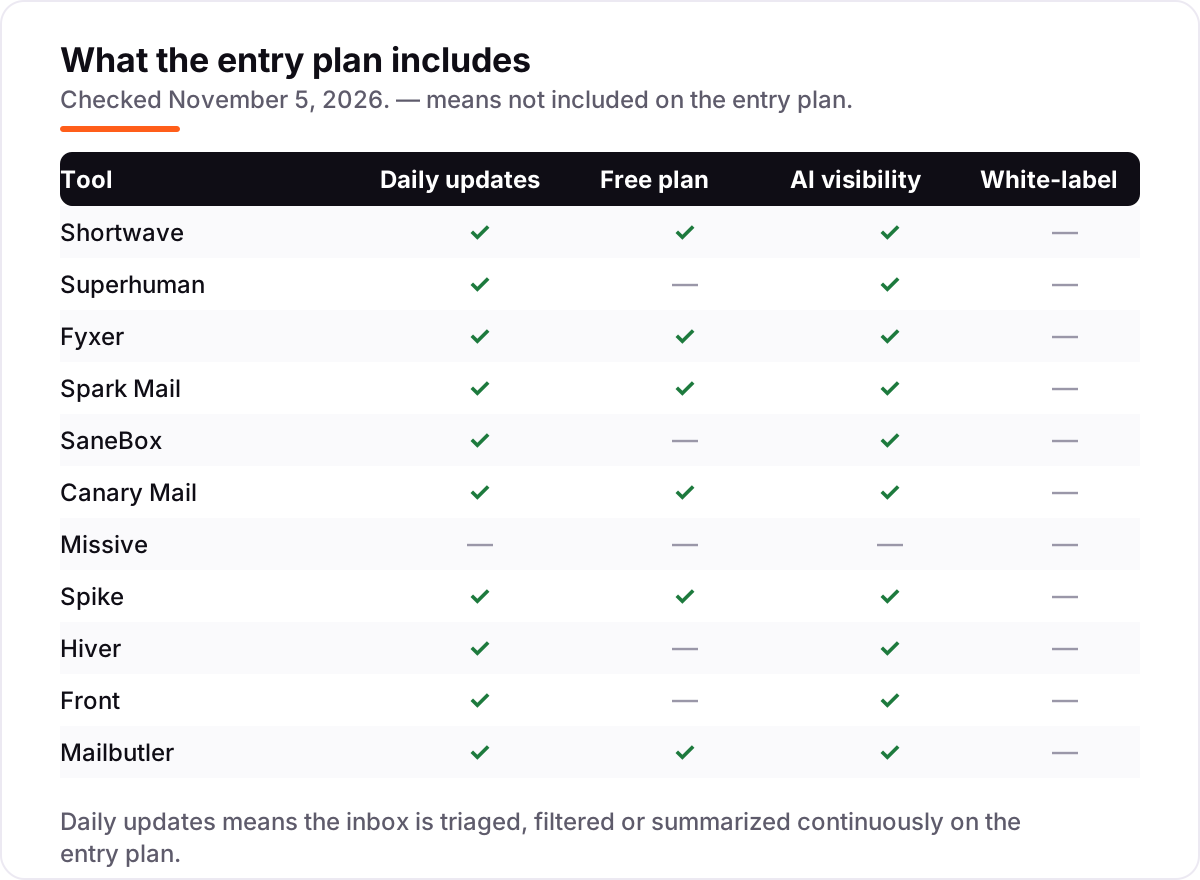
- Free plans exist on Shortwave, Spark Mail, Fyxer, Canary Mail and Mailbutler, but AI usage is capped on the free tiers — budget for the paid plan if you draft daily.
- The single most important buying factor is your mail provider: Shortwave is Gmail only, while Superhuman, Fyxer and Mailbutler cover Outlook too.
- Team inboxes charge per seat and AI often costs extra, so a ten-person team can pay $350 a month on Front Starter before AI add-ons.
On this page
Quick comparison
| Tool | Best for | Starting price | Free plan |
|---|---|---|---|
| Shortwave | Gmail users who want AI search across years of mail and drafts written in their own style | $18/mo | Yes (free plan) |
| Superhuman | High-volume professionals on Gmail or Outlook who want the fastest keyboard-first inbox | $30/mo | No |
| Fyxer | Gmail or Outlook users who want an AI layer that drafts and sorts inside their existing inbox | $49/mo | Yes (free plan) |
| Spark Mail | Individuals and small teams who want AI compose and a smart inbox at a low monthly price | $10/mo | Yes (free plan) |
| SaneBox | People who want to keep their current email app and let AI filtering do the sorting behind it | $9.49/mo | No (7-day trial) |
| Canary Mail | Privacy-minded Apple and Windows users who want an AI Copilot and encryption in one client | $36/yr | Yes (free plan) |
| Missive | Small teams of up to 5 who want a shared inbox with chat inside each conversation | $18/mo | No (30-day trial) |
| Spike | People who want email to feel like chat, with AI help and calls in the same app | $8/mo | Yes (free plan) |
| Hiver | Support and operations teams that run shared Gmail inboxes and want AI agents on every seat | $35/mo | No (7-day trial) |
| Front | Customer-facing teams of up to 10 that want a shared inbox with AI topics and automation rules | $35/mo | No (14-day trial) |
| Mailbutler | Apple Mail, Gmail and Outlook users who want an AI assistant layered onto the app they already use | $12.95/mo | Yes (free plan) |
Make one of these tools?
We re-check this list every quarter. Send a correction, request a review, or ask about a clearly labeled sponsored spot.
Request a listingThe best ai email assistant tools

Shortwave
Best for: Gmail users who want AI search across years of mail and drafts written in their own style
Shortwave is built for Gmail users who drown in old mail: instead of searching by keyword and hoping, you ask a plain question and its AI searches years of threads, then drafts a reply in a style learned from your own sent mail. Pro costs $18 a month and gives standard AI usage with three years of AI search history, which is enough for most individuals. The free plan keeps the same idea with basic AI and 90 days of history.
Watch the Gmail-only limit first. If anyone on your team uses Outlook, Shortwave cannot help them, and the top tiers escalate quickly to $45 and $120 a seat. Buy it when Gmail is your whole inbox and finding old decisions matters as much as writing new mail.
What we like
- AI search understands plain-language questions across your Gmail history
- Drafts learn your writing style instead of sounding like a template
- Free plan is genuinely usable for one person, not just a demo
- AI filters and summaries sort mail before you open it
Watch out for
- Gmail only, so Outlook and Microsoft 365 users cannot use it at all
- Free plan caps AI usage and search history at 90 days
- Top tiers climb fast: Premier is $45 and Max is $120 per seat a month

Superhuman
Best for: High-volume professionals on Gmail or Outlook who want the fastest keyboard-first inbox
Superhuman is the fastest way through a heavy inbox, because almost everything is a keyboard shortcut: triage, split inbox, snippets and follow-up reminders are built for people who process hundreds of messages a week. Starter costs $30 a month and now includes Superhuman AI, so triage, summaries and write-with-AI are not held for a higher tier. It sits on Gmail or Outlook, so your address and history stay put.
The price is the objection. There is no free plan, you still pay for your mail provider underneath, and Auto Drafts and Ask AI need Business at $40 a month. Buy Superhuman when inbox speed is billable time; buy Shortwave or Spark Mail when a lower monthly price matters more than raw speed.
What we like
- Keyboard-first triage, split inbox and snippets make high volume manageable
- AI triage, summaries and write-with-AI are included on Starter
- Works on top of Gmail and Outlook, so you keep your address and mail
- Read statuses and follow-up reminders stop threads from going quiet
Watch out for
- No free plan, and $30 a month is the most expensive solo pick here
- You still pay for Gmail, Google Workspace or Microsoft 365 on top
- Auto Drafts and Ask AI wait for Business at $40 a month

Fyxer
Best for: Gmail or Outlook users who want an AI layer that drafts and sorts inside their existing inbox
Fyxer is different from most tools here because it does not ask you to switch apps: it layers AI drafting and sorting onto the Gmail or Outlook inbox you already use. Pro costs $49 a month billed monthly, or $37 billed annually, and drafts replies in your voice while sorting incoming mail into labels automatically. Meeting notes and scheduling help sit in the same assistant, which suits founders and managers.
The trade-off is price and control. At $49 a month it is the dearest solo pick here, and every draft still needs your review before sending, so it saves drafting time rather than replacing judgment. Buy Fyxer when you refuse to learn a new client but still want AI to do the first draft.
What we like
- Drafts replies in your voice without forcing a new email app on you
- Sorts mail into labels automatically as it arrives
- Works with both Gmail and Outlook, unlike Gmail-only rivals
- Meeting notes and scheduling sit inside the same assistant
Watch out for
- No full client of its own: you keep working in Gmail or Outlook
- Pro at $49 a month is steep for one person
- Drafts are drafts: you still review and send every message yourself

Spark Mail
Best for: Individuals and small teams who want AI compose and a smart inbox at a low monthly price
Spark Mail is the low-price AI client in this list, and its new Plus tier is the one to compare: $10 a month billed monthly, or $99 a year, buys AI compose, AI summaries and AI templates alongside a smart inbox that bubbles mail from real people above newsletters. Gatekeeper and sender grouping cut the notification noise that makes inboxes feel endless. It runs on Mac, Windows, iOS and Android, with a free plan underneath.
Mind the tier history. Older guides still quote the retired $7.99 Premium plan, and team features such as shared inboxes wait for the Teams tier rather than Plus. Buy Spark Mail when you want a full AI client at roughly the price of a lunch, not a premium subscription.
What we like
- Plus includes AI compose, AI summaries and AI templates at $10 a month
- Smart inbox bubbles mail from real people above newsletters and alerts
- Gatekeeper and sender grouping cut notification noise
- Runs on Mac, Windows, iOS and Android with a free plan
Watch out for
- New paid tiers replaced the old $7.99 Premium plan, so older guides quote stale prices
- Team collaboration waits for the Teams tier, not Plus
- Free plan limits AI usage, so heavy drafters pay from the start

SaneBox
Best for: People who want to keep their current email app and let AI filtering do the sorting behind it
SaneBox is the quiet option: it works behind whatever email app you already use, filtering low-priority mail into SaneLater and sending a daily digest of what it moved. Snack costs $9.49 a month billed monthly, or $65 a year, and covers one account with two features of your choice. Nothing about your setup changes, which is exactly the point for people who like their current app.
The catch is the feature count. Snack only covers two features, so most people end up on Lunch, and there is no free plan beyond a 7-day trial. SaneBox also filters and files; it does not draft replies. Buy it when sorting, not writing, is the job you want AI to take.
What we like
- Works behind any email app, so nothing about your setup changes
- SaneLater and a daily digest move low-priority mail out of sight
- You pick which features run on each account
- Annual billing drops Snack to $65 a year
Watch out for
- No free plan, only a 7-day trial, so you pay before you know the payoff
- Snack covers one account and only two features; most people need Lunch
- It filters and files mail, it does not draft replies for you

Canary Mail
Best for: Privacy-minded Apple and Windows users who want an AI Copilot and encryption in one client
Canary Mail pairs an AI Copilot with encryption in a client that runs on Mac, Windows, iOS and Android. Growth on all platforms costs $36 a year and includes AI Copilot drafting, replies and summaries, plus read receipts, snooze, pin and an inbox cleaner for up to five devices. A free plan covers the core client first, so you can test the interface before paying anything at all.
Read the platform pricing carefully. Single-platform Growth is $20 a year, while the all-platform version is $36, and the security-heavy Pro+ tier is $100 a year. Buy Canary Mail when privacy and a low yearly price matter more than team inbox features, which are not its strength.
What we like
- AI Copilot drafts, replies and summarizes inside the client
- End-to-end encryption and read receipts are built in
- Unified inbox across Mac, Windows, iOS and Android
- Free plan covers the core client before you pay anything
Watch out for
- Priced per year, not per month, so the monthly comparison needs care
- Single-platform Growth is $20 a year; all-platform Growth is $36 a year
- Team and security extras climb to Pro+ at $100 a year

Missive
Best for: Small teams of up to 5 who want a shared inbox with chat inside each conversation
Missive is a shared inbox for small teams: email, SMS and social accounts sit in one workspace, with internal chat, assignments and tasks attached to each conversation. Starter costs $18 a month billed monthly, or $14 billed annually, for up to five users. It bills per active user, so a teammate who goes dormant stops costing you, which keeps small-team bills honest.
The AI warning matters here. The AI assistant starts on Productive at $30 a month, not on Starter, and AI usage is billed separately through credits or your own provider key. Starter also stops at five users. Buy Missive for team triage first; buy it for AI only if you budget for Productive.
What we like
- Shared inboxes with internal chat, assignments and tasks in one place
- Email, SMS and social accounts live in the same workspace
- Bills per active user, so dormant seats do not cost you
- Rules and integrations on Productive automate routine routing
Watch out for
- AI assistant starts on Productive at $30 a month, not on Starter
- Starter stops at 5 users and Productive at 50, so growth forces a tier jump
- AI usage is billed separately via credits or your own provider key

Spike
Best for: People who want email to feel like chat, with AI help and calls in the same app
Spike turns email threads into chat-style conversations, which suits people who think in people rather than in subject lines. Pro costs $8 a month billed monthly, or $6 billed annually, and covers a unified inbox for up to three addresses with unlimited search history and AI features. Calendar, calls and read indicators sit in the same app, so fewer tools are needed for daily communication.
The free plan is narrow: one address and 60 days of search history, and unlimited addresses need the top tier at $16 a month billed monthly. Older guides still quote $5 Pro pricing that no longer matches the current page. Buy Spike when the chat view genuinely fits how you work, not just because it looks different.
What we like
- Conversational view turns long threads into chat-style conversations
- Unified inbox, calendar, calls and AI features in one app
- Pro covers up to 3 addresses for $8 a month billed monthly
- Read indicators and snooze are included on every plan
Watch out for
- Free plan covers one address and 60 days of search history only
- A unified inbox needs Pro, and unlimited addresses need the top tier
- Older guides quote $5 Pro pricing that no longer matches the current page

Hiver
Best for: Support and operations teams that run shared Gmail inboxes and want AI agents on every seat
Hiver runs shared inboxes inside Gmail, so support and operations teams never leave the inbox they know. Growth costs $35 a month billed monthly, or $25 billed annually, and includes AI Agents, AI Copilot and AI Knowledge Builder on every paid seat, plus shared inboxes, assignments, automations and analytics. That all-in AI pricing is rare: rivals often charge extra for the same features.
Watch the seat rules. Growth stops at 10 users, seats are sold in steps so a six-person team pays for ten, and Pro jumps to $65 a month. There is no free plan, only a seven-day Elite trial. Buy Hiver when Gmail is your support desk and AI on every seat is non-negotiable.
What we like
- AI Agents, AI Copilot and AI Knowledge Builder are on every paid plan
- Shared inboxes, assignments and automations run inside Gmail
- Round-robin assignment and analytics come with Growth
- Voice and rule-based automation are included from Growth
Watch out for
- No free plan remains, and Growth stops at 10 users
- Seats are sold in steps, so a 6-person team pays for 10 seats
- Pro at $65 a month is a big jump from Growth at $35

Front
Best for: Customer-facing teams of up to 10 that want a shared inbox with AI topics and automation rules
Front is the established shared inbox for customer-facing teams: email and chat arrive in one workspace with ticketing, assignments and automation rules. Starter costs $35 a month per seat billed monthly, or $25 billed annually, for up to ten seats, and includes AI topics, up to ten automation rules, basic analytics and a no-code knowledge base. AI summarize and compose help agents answer faster without leaving the thread.
The add-on bill is the catch. Copilot, QA and CSAT AI features cost extra below Enterprise, and a ten-person team pays $350 a month on Starter before any add-on. Buy Front when a proven support workspace matters more than the lowest seat price.
What we like
- Shared inbox and ticketing across email and chat channels
- AI topics and up to 10 automation rules on Starter
- AI summarize and compose help agents answer faster
- Basic analytics and a no-code knowledge base are included
Watch out for
- Starter stops at 10 seats, so larger teams must move up
- Copilot, QA and CSAT AI add-ons cost extra below Enterprise
- At $35 a seat a month, a 10-person team pays $350 a month before add-ons

Mailbutler
Best for: Apple Mail, Gmail and Outlook users who want an AI assistant layered onto the app they already use
Mailbutler layers an AI assistant onto Apple Mail, Gmail or Outlook, so you keep the app you already know. Smart costs $12.95 a month and adds the AI assistant, recipient insights and automated tasks, alongside tracking, templates, snooze and follow-up reminders in the same sidebar. Per-recipient tracking is genuinely useful: on a group email you see exactly who opened it and who did not.
The tier to watch is Smart itself. Cheaper Tracking and Professional tiers do not include the AI assistant, and Business at $29.95 a month is steep for one person. A free Starter plan exists, but it is limited. Buy Mailbutler when you want AI inside your current app, not another inbox to learn.
What we like
- AI assistant, recipient insights and automated tasks on Smart
- Runs inside Apple Mail, Gmail and Outlook without a new client
- Per-recipient tracking shows exactly who opened a group email
- Templates, snooze and follow-up reminders sit in the same sidebar
Watch out for
- AI assistant starts on Smart at $12.95 a month, not on the cheaper tiers
- Tracking-only plans do not include the AI assistant at all
- Business at $29.95 a month is a steep step for single users
The best ai email assistant tools do one job well: they clear the inbox faster without letting a machine send mail in your name. We ranked the eleven tools below by fit for the most common buyer — one person or a small team on Gmail or Outlook — starting with the free-friendly clients and ending with the team inboxes, and every price was checked on November 5, 2026.
How to choose the best ai email assistant tools
- Start with your mail provider. Shortwave is Gmail only, while Superhuman, Fyxer and Mailbutler also cover Outlook. A tool that cannot connect to your mailbox is not a bargain at any price.
- Decide whether you want a new client or a layer. A new client redesigns the whole inbox; a layer such as Fyxer, SaneBox or Mailbutler adds AI to the app you already use.
- Check where the AI actually starts. Missive's AI starts on Productive, not Starter, and Mailbutler's AI starts on Smart, not on the cheaper tiers. The entry price is not always the AI price.
- Count seats before you count features. Team inboxes charge per seat, and seats are sometimes sold in steps — Hiver Growth stops at 10 users and sells seats in steps.
- Test drafting with your own mail. A free plan or trial with your real threads tells you more than any demo: does the draft sound like you, and does triage file the right mail?
If the inbox is only half the problem and visibility is the other half, our monthly SEO service covers the search side. And before you send a campaign from any of these tools, run your subject lines through the free SERP snippet preview tool — it shows exactly how a title will look in Google.
Whatever you shortlist, try it with real mail before you pay for a year. The free plans and trials in this list are long enough to run one genuine week — your threads, your senders, your volume — and that week tells you whether the AI drafts sound like you or like a template. Check two things in the trial: that drafts need only light edits, and that triage files mail you actually wanted filed.
AI email assistant tools pricing: what you will actually pay
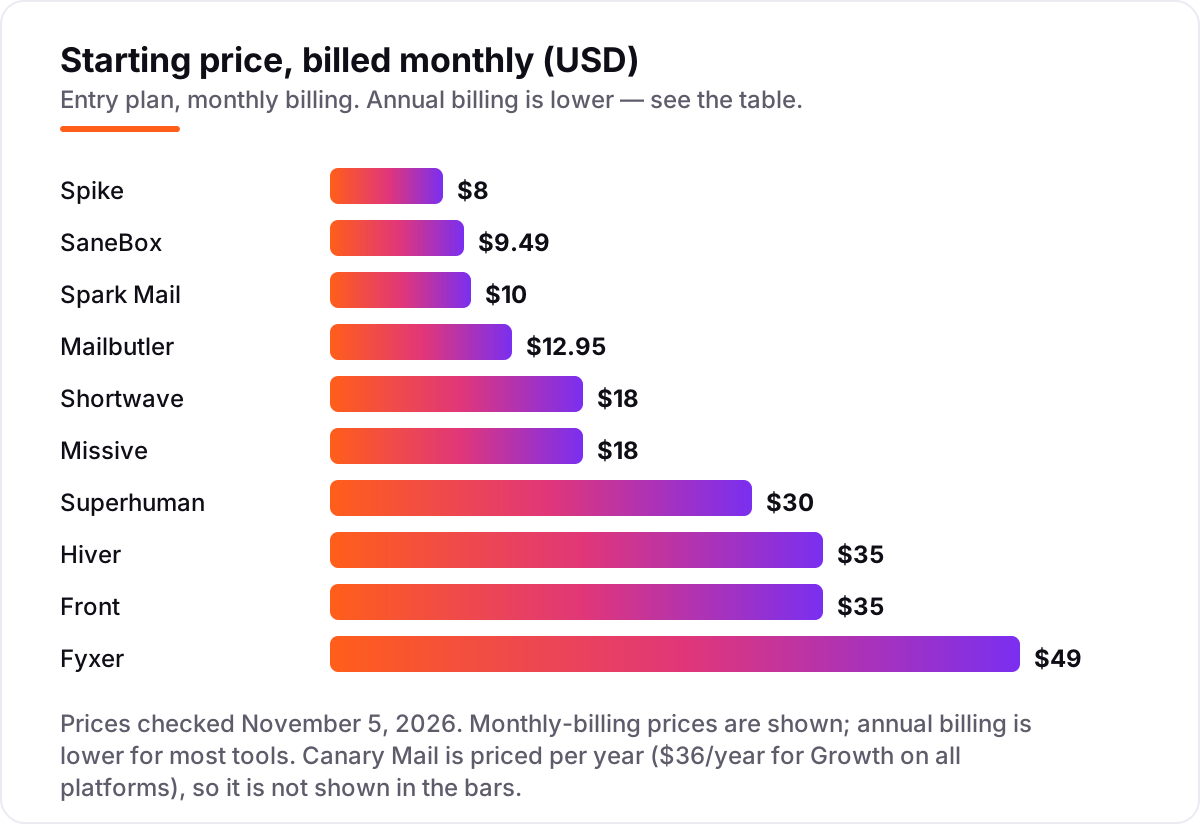
Take one person who drafts about twenty replies a day. On monthly list prices, the subscription costs $8 a month on Spike Pro, $9.49 on SaneBox Snack, $10 on Spark Mail Plus, $12.95 on Mailbutler Smart, $18 on Shortwave Pro or Missive Starter, $30 on Superhuman Starter, $35 on Hiver Growth or Front Starter, and $49 on Fyxer Pro. Canary Mail Growth sits outside that monthly list at $36 a year on all platforms.
Two of those numbers need adjusting before they are real. Missive Starter at $18 does not include the AI assistant — that starts on Productive at $30 a month — and Mailbutler's AI starts on Smart, so the cheaper Tracking tier is not a comparable price. Annual billing cuts most monthly figures: Superhuman Starter drops from $30 to $25 a month, Fyxer Pro from $49 to $37, and Front Starter from $35 to $25.
Over a year, one person pays $36 on Canary Mail Growth, $72 on Spike Pro billed annually, $99 on Spark Mail Plus billed annually, $155.40 on Mailbutler Smart billed monthly, $216 on Shortwave Pro, $300 on Superhuman Starter billed annually, $300 on Hiver Growth billed annually, $300 on Front Starter billed annually, and $444 on Fyxer Pro billed annually. The same one person and the same twenty replies a day cost $36 at the cheap end and $444 at the dear end — a gap that comes from the AI tier, not from the headline price alone.
Know the difference: an AI client vs an AI layer vs a team inbox
The confusion in this category is between three different products that all call themselves AI email assistants. An AI client replaces your email app: Shortwave, Superhuman, Spark Mail, Canary Mail and Spike are clients, and you read and write mail inside them. An AI layer leaves your app alone and adds drafting or filtering to it: Fyxer, SaneBox and Mailbutler are layers, and your mail stays in Gmail, Outlook or Apple Mail.
A team inbox is a third thing again: Missive, Hiver and Front share mail across a team, with assignments, internal chat and automation, and AI is one feature among many rather than the whole product. A solo buyer who picks a team inbox pays per-seat prices for collaboration they will never use, while a support team that picks a personal client gets fast drafting but no shared queue.
A second distinction is drafting versus sending. Every tool here drafts; none should send without your review, and any tool that promises fully automatic sending deserves a hard question about what happens when it replies to the wrong thread. Drafting saves time. Sending without review risks commitments you never made.
Quick comparison: tool type by need
| Buyer | Best pick | Why |
|---|---|---|
| Gmail user who wants AI search | Shortwave | Plain-language AI search, Pro is $18/month, free plan included |
| High-volume professional | Superhuman | Keyboard-first speed with AI triage, Starter is $30/month |
| Cheapest full AI client | Spark Mail | AI compose and summaries, Plus is $10/month |
| Keep your current app | Mailbutler | AI assistant inside Apple Mail, Gmail or Outlook, Smart is $12.95/month |
| Team on Gmail | Hiver | AI agents on every paid seat, Growth is $35/month |
| Privacy plus low yearly price | Canary Mail | AI Copilot with encryption, Growth is $36/year |
Mistakes to avoid
- Budgeting on the entry price when the AI lives a tier up. Missive's AI starts on Productive and Mailbutler's on Smart, so the cheapest plan is not the AI plan.
- Buying a Gmail-only tool for an Outlook team. Shortwave cannot help Outlook users at all, no matter how good its AI search is.
- Quoting stale prices from old guides. Spark Mail's old $7.99 Premium plan is retired, Spike's $5 Pro price is out of date, and Hiver's $19 Lite plan is gone.
- Paying per seat for a solo job. Team inboxes such as Front and Hiver charge per seat and sometimes sell seats in steps — a solo buyer wastes that money.
- Letting AI send without review. Drafts save time; unreviewed sending risks a wrong reply to a customer, a boss or a client.
How we chose
We checked each vendor's pricing page via fresh search-index copies of the vendor's own page and independent October 2026 reads, and recorded the starting price exactly as shown, including the annual-billing figure where the page lists one, and we ranked the tools by fit for the most common buyer — one person or a small team on Gmail or Outlook — not by brand size. Prices that could not be confirmed on the vendor's own page are disclosed here: Canary Mail's $36/year Growth price, Spike's $8/month Pro price and Spark Mail's new $10/month Plus tier rest on recent third-party reads of the vendor pages, not on a direct page load today, because direct page loads timed out. This list carries no review ratings because the G2 review pages were not opened on November 5, 2026, and we would rather show no rating than a stale or estimated one. No vendor paid for a place in this list, and none of the links here are affiliate links.
What to do next
Start with the free plan or trial of your top pick and run one real week of mail through it. Check that drafts sound like you after light edits and that triage files the mail you wanted filed before you commit to a year. If the inbox is sorted but new customers are not finding you, our monthly SEO service handles the visibility side — or compare options in our guide to email marketing platforms. Once your tools are in place, find out what's holding your rankings back.
Your stack only works if people find you
SerpAstra fixes what keeps your site off page one and makes it easy for AI assistants to recommend.
Get a free audit→Sources we checked (11)
- Shortwave pricing — shortwave.com/pricing (checked November 5, 2026)
- Superhuman pricing — superhuman.com/pricing (checked November 5, 2026)
- Fyxer pricing — fyxer.com/pricing (checked November 5, 2026)
- Spark Mail pricing — sparkmailapp.com/pricing (checked November 5, 2026)
- SaneBox pricing — sanebox.com/pricing (checked November 5, 2026)
- Canary Mail pricing — canarymail.io/pricing (checked November 5, 2026)
- Missive pricing — missiveapp.com/pricing (checked November 5, 2026)
- Spike pricing — spikenow.com/pricing (checked November 5, 2026)
- Hiver pricing — hiverhq.com/pricing (checked November 5, 2026)
- Front pricing — front.com/pricing (checked November 5, 2026)
- Mailbutler pricing — mailbutler.io/pricing (checked November 5, 2026)
Shamim
Founder of SerpAstra
A full-stack SEO and digital marketer who spends most days on Local SEO for dental practices, AI search visibility and lead generation.
Frequently asked questions
What is the best AI email assistant tool?
Shortwave is the best fit for most Gmail users: a free plan, AI search across years of mail, and Pro at $18 a month. Superhuman is better for high-volume professionals who live in the inbox, and Spark Mail is the cheapest full AI client at $10 a month. Pick by your mail provider first, then by price.
How much does an AI email assistant cost?
Entry prices run from $0 to $49 a month for one person. Canary Mail Growth is $36 a year, Spike Pro is $8 a month, and SaneBox Snack is $9.49 a month. Teams pay per seat, so a ten-person team on Front Starter pays $350 a month before AI add-ons, while Hiver Growth is $350 for ten seats.
Is there a free AI email assistant?
Yes, with limits. Shortwave, Spark Mail, Fyxer, Canary Mail and Mailbutler all offer free plans, but AI usage is capped or limited on most of them. Shortwave free covers basic AI and 90 days of search history, while Spark Mail free limits AI usage. A free plan is a good trial, not a full AI subscription.
Should I pick a new client or an assistant that layers onto Gmail or Outlook?
Pick a new client when you want the whole inbox redesigned around AI, as with Shortwave, Superhuman or Spark Mail. Pick a layer when you like your current app: Fyxer, SaneBox and Mailbutler add AI drafting or filtering to Gmail, Outlook or Apple Mail without forcing a switch. Layers are easier to adopt, clients go further.
Can an AI email assistant send mail on its own?
No tool in this list should send mail without your review, and none is presented here as doing so. Drafts, summaries and sorting are automatic, but sending stays with you. That is a safety feature, not a missing feature: an unreviewed AI reply can commit you to a price, a date or a promise you never meant.
What is the difference between a personal AI client and a team inbox?
A personal client, such as Superhuman or Spark Mail, speeds up one person's inbox with AI drafting and triage. A team inbox, such as Missive, Hiver or Front, shares mail across a team with assignments, internal chat and automation. Team tools charge per seat, so a solo buyer wastes money on them.
Can I switch AI email assistants later?
Yes, because most of these tools sit on top of Gmail, Outlook or Apple Mail rather than replacing your mailbox. Your mail stays with your provider, so switching usually means connecting a new client and rebuilding filters, snippets and templates. Export templates and rules first, and run both tools for a week before cancelling.
Free SEO and AI visibility audit
Find out what is holding your rankings back
Send us your site. Within 2 business days you get a written audit, an AI visibility check and a short fix list ranked by impact. Free, with no contract attached.
Request my free audit→Related guides
 Digital Marketing & Ads8 Best Email Marketing Platforms for 2026 (Pros, Cons and Pricing)8 best email marketing platforms compared on real starting prices, free plans and automation. Brevo $9/month, Mailchimp $13. Checked Nov 4, 2026.Read guide →
 Digital Marketing & Ads7 Best AI Tools for Email Marketing in 2026 (Free and Paid, Compared)7 best AI tools for email marketing compared on price, AI features and free plans, with real starting prices checked November 4, 2026 and sorted by use case.Read guide →
 Digital Marketing & AdsBest Email Client Software for 2026: 9 Options Compared by Use CaseCompare the 9 best email client software options for 2026 on price, free plans, AI features and privacy, with every price checked November 5, 2026.Read guide →