
10 Best AI Email Management Tools in 2026 (Free and Paid, Compared)
Compare the 10 best ai email management tools on price, AI triage, drafting and shared inboxes, with every starting price checked November 5, 2026.
 Shamim Mia, Founder, SerpAstraLast verified November 5, 202613 min read
We compare pricing pages, documentation and public reviews. We never accept payment for rankings.
Key takeaways
- Superhuman is the best fit for most heavy email users at $30/month, while Shortwave at $18/month is the strongest AI option for Gmail-only users.
- SaneBox at $9.49/month and Clean Email at $9.99/month are the cheapest ways to fix a messy inbox, but only SaneBox works without switching apps.
- Team tools price per seat, so a five-person team pays $150–$175 a month on Missive, Hiver or Front before any AI add-ons.
- The limit that decides your real price is rarely the headline figure: seat caps, credit quotas and yearly-only billing change the bill most.
On this page
Quick comparison
| Tool | Best for | Starting price | Free plan |
|---|---|---|---|
| Superhuman | Professionals who live in Gmail or Outlook and want the fastest keyboard-first inbox with AI drafting and follow-up | $30/mo | No (no free plan) |
| Shortwave | Gmail users who want AI search across years of mail plus drafting, without leaving the Gmail account behind | $18/mo | Yes (free plan) |
| SaneBox | People who want their existing inbox cleaned up automatically, without switching email apps at all | $9.49/mo | No (7-day trial) |
| Spark | Individuals and small teams who want a polished cross-platform client with AI writing on a free plan | $10/mo | Yes (free plan) |
| Canary Mail | Privacy-minded users who want AI writing plus encryption across Apple, Windows and Android devices | $36/yr | Yes (free plan) |
| Clean Email | People with years of inbox clutter who want bulk cleanup rules that keep working on new mail | $9.99/mo | No (1,000-email free account) |
| Fyxer | Consultants and client-facing professionals who want drafts in their own voice plus meeting follow-ups | $49/mo | Yes (free plan, no drafts) |
| Missive | Small teams that share inboxes and want internal chat, assignments and AI help in one app | $30/mo | No (30-day trial) |
| Hiver | Support and sales teams that run shared inboxes inside Gmail and want AI agents on every seat | $35/mo | No (7-day trial) |
| Front | Support teams that need a shared inbox with automation rules, analytics and AI add-ons at scale | $35/mo | No (14-day trial) |
Make one of these tools?
We re-check this list every quarter. Send a correction, request a review, or ask about a clearly labeled sponsored spot.
Request a listingThe best ai email management tools

Superhuman
Best for: Professionals who live in Gmail or Outlook and want the fastest keyboard-first inbox with AI drafting and follow-up
Superhuman is the email client for people who treat the inbox as a workbench. Split Inbox divides mail into useful piles, keyboard shortcuts move through messages without touching the mouse, and snippets turn repeated replies into a keystroke. Starter costs $30 a month per person, or $25 a month billed annually, and it already includes AI writing, summaries and reminders.
The catches are the price and the provider lock-in. There is no free plan and no trial on the pricing page, so $30 a month is a commitment before you know whether the workflow fits. It also works only with Gmail and Outlook, and the most capable AI features, Auto Drafts and Ask AI, wait for Business at $40 a month. Buy it when speed is the job; buy Shortwave when Gmail-only AI search matters more.
What we like
- The fastest triage here: Split Inbox, keyboard shortcuts and snippets clear a busy inbox quickly
- AI writing, summaries and reminders are included on the $30 Starter plan, not held for Business
- Read statuses and team comments help small teams coordinate without leaving the inbox
- Calendar and booking links are built in, so scheduling does not need a separate tool
Watch out for
- No free plan, and the pricing page lists no free trial, so the $30 a month entry is a blind buy
- Works only with Gmail and Outlook accounts, so iCloud, Yahoo and IMAP users cannot use it
- Business features such as Auto Drafts and Ask AI need the $40 a month Business plan

Shortwave
Best for: Gmail users who want AI search across years of mail plus drafting, without leaving the Gmail account behind
Shortwave is built for Gmail users who need to find old mail as much as handle new mail. Ask for a thread from months ago in plain language and its AI search returns it, even when you cannot remember the sender or the exact words. Pro costs $18 a seat a month, billed monthly, and includes personalized writing, instant replies, bundles and AI filters, with a free plan underneath it.
The limits are provider and metering. Shortwave requires Gmail or Google Workspace, so anyone on Outlook or iCloud needs a different client, and there is no annual billing discount on the pricing page. AI requests are metered daily, so a heavy AI day can run into the cap. Pick Shortwave when Gmail is home and search is the pain; pick Superhuman when Outlook support or raw speed matters more.
What we like
- AI search that finds threads by meaning, not just keywords, across years of Gmail history
- Personalized AI writing and instant replies are included on every paid plan
- Bundles, AI filters and scheduled send keep the inbox organized with little manual filing
- A real free plan lets Gmail users try the core AI before paying
Watch out for
- Gmail and Google Workspace only, so Outlook and iCloud users cannot use it as their only client
- Paid plans are billed monthly only, with no annual discount on the current pricing page
- AI usage is metered by daily requests, so heavy AI days can hit the plan quota

SaneBox
Best for: People who want their existing inbox cleaned up automatically, without switching email apps at all
SaneBox is the only tool here that fixes your inbox without asking you to change apps. It sits behind whatever client you already use, learns which mail you actually read, and files the rest into folders like SaneLater so the inbox shows only what needs attention. Snack costs $9.49 a month for one account and two features, or $65 a year, and Lunch at $15.99 a month covers two accounts and six features.
The trade-off is scope. SaneBox filters and files mail; it does not draft replies or summarize threads the way Shortwave and Superhuman do. Snack is also narrow, covering one account and two features, so households or freelancers with several addresses quickly need Lunch or Dinner at $42.99 a month. Choose SaneBox when you love your current app and just want the noise gone.
What we like
- Works with any email client and provider, so nothing migrates and no app switch is needed
- Learns from your habits and moves low-priority mail out of the inbox automatically
- SaneLater, reminders and snooze-style features cover the daily triage job well
- It analyzes headers rather than reading message bodies, a privacy-friendly design
Watch out for
- No free plan, only a 7-day trial, so there is no free way to keep using it
- Snack covers one account and two features, so multi-account users pay for Lunch or Dinner
- It filters and files mail rather than drafting replies, so it is not a writing assistant

Spark
Best for: Individuals and small teams who want a polished cross-platform client with AI writing on a free plan
Spark is the friendly default in this list: a polished client on every platform with a free plan that is actually usable day to day. Smart Inbox sorts mail into personal, newsletter and notification piles, and the calendar, snooze and scheduled send cover the basics without paying anything. Plus costs $10 a month, or $99 a year, and unlocks the full AI assistant, custom templates and 40 AI meeting notes a month.
The free plan's AI preview only looks back one month, so the full assistant is a paid feature in practice, and read statuses and shared inboxes wait for Pro at $20 a month. Spark also stores account tokens on its servers for cloud features, which is worth weighing against Canary's more privacy-first design. Pick Spark when you want one good client everywhere, free to start.
What we like
- A genuinely useful free plan with Smart Inbox, unlimited accounts and a calendar
- Plus adds the full AI assistant, 40 AI meeting notes a month and custom templates
- Runs on Mac, Windows, iOS and Android, so one client covers every device
- Priority tools and smart folders sort the inbox without manual rules
Watch out for
- Full AI assistant needs Plus at $10 a month; the free plan only previews it for one month of history
- Read statuses and shared inboxes wait for Pro at $20 a month
- Cloud features store account tokens on Readdle servers, which privacy-minded buyers should weigh

Canary Mail
Best for: Privacy-minded users who want AI writing plus encryption across Apple, Windows and Android devices
Canary Mail is the privacy-first pick that still gives you real AI help. Growth costs $36 a year, with no monthly billing option, and adds the AI Copilot for writing, rewriting and summarizing threads, plus full read receipts, Send Later and a calendar across five devices. The free plan covers unlimited accounts on two devices, which is enough to test it properly before paying.
The yearly-only billing cuts both ways: $36 a year is cheap, but there is no month-to-month option if you change your mind, and the encryption features that set Canary apart, PGP and SecureSend, wait for Pro+ at $100 a year. A third device also forces a paid plan. Choose Canary when privacy and cross-platform coverage matter more than a monthly bill.
What we like
- AI Copilot writes, rewrites and summarizes threads on the $36 a year Growth plan
- Covers Gmail, Outlook, Exchange, iCloud, Yahoo and IMAP in one unified inbox
- Pro+ adds PGP and SecureSend encryption without plugins or extra software
- One Growth licence covers five devices across all platforms
Watch out for
- No monthly billing at all, so the $36 a year Growth plan is the smallest commitment available
- PGP encryption and phishing protection wait for Pro+ at $100 a year
- The free plan covers only two devices, so a third device forces a paid plan

Clean Email
Best for: People with years of inbox clutter who want bulk cleanup rules that keep working on new mail
Clean Email is for inboxes that need a clear-out, not a new client. It groups messages by sender and type, so years of newsletters, notifications and old promotions can be archived or deleted in bulk, and Auto Clean rules then apply the same decisions to new mail automatically. One account costs $9.99 a month, or $29.99 a year, and the free account covers the first 1,000 emails.
It is not a writing assistant: nothing here drafts replies or summarizes threads, so pair it with a drafting tool if that is the gap. Per-account pricing also adds up, since five accounts cost $19.99 a month and ten cost $29.99. Pick Clean Email when the problem is volume and clutter, and pick SaneBox when you want the filtering to happen quietly in the background.
What we like
- Auto Clean rules apply to new mail automatically, so the inbox stays clean after the first cleanup
- Groups mail by sender and type, so thousands of messages can be archived or deleted at once
- Works with Gmail, Outlook, Yahoo, AOL and IMAP accounts in one place
- Screener holds mail from new senders until approved, cutting newsletter noise
Watch out for
- Not an AI drafting tool: it cleans and organizes mail, but does not write replies
- The free account stops at 1,000 emails, so a large backlog needs a paid plan quickly
- Per-account pricing means five accounts cost $19.99 a month, not $9.99

Fyxer
Best for: Consultants and client-facing professionals who want drafts in their own voice plus meeting follow-ups
Fyxer is the assistant for people whose inbox is also their to-do list. It learns your writing style from sent mail, drafts replies that sound like you, sorts incoming mail into action-based categories, and sends a notetaker into meetings to capture notes and follow-ups. Pro costs $49 a month per person, or $37 a month billed annually, with 3,000 credits a month and one inbox.
The free plan is a taster only: 400 credits a month with no drafting or sorting, so the real product starts at Pro. Credits are the other watch item, since meeting recording and sorting draw on the same allowance, and heavy users can burn through 3,000 credits. Older Starter and Professional plans are closed to new customers, so ignore any review quoting $30 or $50. Choose Fyxer when voice-matched drafts and follow-ups are the job.
What we like
- Drafts replies in your own writing style after learning from your sent mail
- Sorts incoming mail into action-based categories and tracks meeting follow-ups
- A meeting notetaker records calls and turns them into notes and actions
- Nothing is sent automatically: you review and send every draft yourself
Watch out for
- The free plan has no drafting or inbox sorting, so the real assistant starts at $49 a month
- Pro is metered in credits, so heavy meeting recording can burn the 3,000-credit allowance
- Starter and Professional plans from older reviews are closed to new customers

Missive
Best for: Small teams that share inboxes and want internal chat, assignments and AI help in one app
Missive turns a shared inbox into a team workspace. Support, sales or operations mail lands in one place, teammates discuss it in internal chat on the thread itself, and assignments and tasks make sure nothing sits unanswered. The AI assistant, rules and integrations all start on Productive at $30 a user a month billed monthly, or $24 a month billed annually, with a 30-day trial of Productive features.
Starter at $18 a month looks cheaper but buys no AI, no rules and no integrations, so most teams should price from Productive. User caps matter too: Starter stops at 5 users and Productive at 50, and AI usage is billed on top through credits or your own provider key. Pick Missive when a small team shares inboxes and wants AI help without Front's price.
What we like
- Shared inboxes with internal chat, assignments and tasks keep team email in one place
- Rules, integrations and the AI assistant all live on the Productive plan
- Covers email, SMS and social accounts, so one app handles most team messages
- Per-active-user billing means dormant seats do not cost money
Watch out for
- AI assistant starts on Productive, so the $18 Starter plan buys no AI at all
- Starter stops at 5 users and Productive at 50, so growth forces a tier jump
- AI usage is billed through credits or your own provider key, on top of the seat price

Hiver
Best for: Support and sales teams that run shared inboxes inside Gmail and want AI agents on every seat
Hiver is the shared inbox for teams that refuse to leave Gmail. It layers assignments, automations, SLAs and analytics on top of the Gmail interface, so support and sales teams work shared addresses like support@ without learning a new app. Growth costs $35 a user a month billed monthly, or $25 a month billed annually, and AI Agents, AI Copilot and a knowledge builder are included on every paid plan.
Seat rules are the catch. Every plan has a 2-seat minimum, seats sell in blocks past five users, and Growth stops at 10 users, so an 11th teammate moves the whole team to Pro at $55 a user. The deeper AI features, QA and customer intelligence, also wait for Elite at $85. Pick Hiver when the team lives in Gmail and wants AI on every seat from day one.
What we like
- AI Agents, AI Copilot and a knowledge builder are included on every paid plan from Growth
- Runs inside Gmail, so the team keeps the inbox it already knows
- Assignments, automations, SLAs and analytics turn a shared inbox into a help desk
- Hiver Omni adds a web platform for Outlook and other providers beyond Gmail
Watch out for
- No single-seat purchase: every plan has a 2-seat minimum and seats sell in blocks past five
- Growth stops at 10 users, so an 11th teammate forces Pro at $55 a user
- AI QA, insights and customer intelligence wait for Elite at $85 a user

Front
Best for: Support teams that need a shared inbox with automation rules, analytics and AI add-ons at scale
Front is the most established shared inbox here, built for support teams that need structure as they grow. Conversations from email and other channels land in one place, teammates comment internally on threads, and automation rules route, tag and assign mail without anyone acting as a human switchboard. Starter costs $35 a seat a month billed monthly, or $25 a month billed annually, for up to 10 seats.
The two costs to model are the seat cap and the AI add-ons. An 11th hire leaves Starter behind for a far more expensive tier, and AI Copilot and other advanced AI features are paid add-ons below Enterprise, so the AI bill sits on top of the seat bill. Pick Front when the team is growing past a simple shared inbox and needs analytics, rules and a knowledge base in one system.
What we like
- Shared inboxes with internal comments keep customer conversations in one place
- Automation rules route, tag and assign mail without manual triage
- AI Topics and analytics show what customers are actually asking about
- A public knowledge base and omnichannel support grow with the team
Watch out for
- AI Copilot and other advanced AI features are paid add-ons below the Enterprise tier
- Starter stops at 10 seats, so an 11th hire forces a much more expensive plan
- No free plan, only a 14-day trial, and per-seat pricing adds up fast as teams grow
The best ai email management tools do one job well: they cut the hours spent triaging, filing and answering mail, without forcing you to become a full-time inbox manager. We ranked the ten tools below by fit for the most common buyer — a professional drowning in mail, or a small team sharing inboxes — starting with the fastest personal clients and ending with the team platforms, and every starting price was checked November 5, 2026.
How to choose the best ai email management tools
- Start with your provider, not the features. Shortwave works with Gmail only, Superhuman with Gmail and Outlook, and Hiver lives inside Gmail. If your mail is on iCloud or a private IMAP server, SaneBox, Spark or Canary Mail are the safer shortlist.
- Decide whether you want a new app or a layer. Superhuman, Shortwave, Spark and Canary replace your email app. SaneBox, Clean Email and Fyxer layer onto the mailbox you already use, which means no migration and no new habits.
- Check what the entry price actually buys. Missive's $18 Starter plan includes no AI at all, Fyxer's free plan includes no drafting, and Front's advanced AI is an add-on. Price the tier that includes the AI feature you want, not the cheapest tier.
- Count seats before you compare team tools. Missive, Hiver and Front all price per user, and seat caps at 5, 10 or 50 users can force a tier jump that dwarfs the headline price.
- Weigh the privacy trade. AI drafting and search need message content, while SaneBox and Clean Email work from headers and metadata. Pick the trade you are comfortable with before connecting a mailbox.
Choosing an inbox tool is one part of getting found and answered online. If the business also needs visibility, our guide to marketing platforms for small business SEO covers that side, and before you publish new pages, run your titles through the free SERP snippet preview tool — it shows exactly how the title and description will look in Google.
Whatever you shortlist, trial it with your real mailbox before you pay. A week of your own mail tells you more than any feature list: whether the AI drafts sound like you, whether the filters file the right things, and whether the team actually answers faster. Check two things in the trial: that nothing important gets buried by an automatic filter, and that the pricing tier you tested is the tier you would actually buy.
AI email management pricing: what you will actually pay
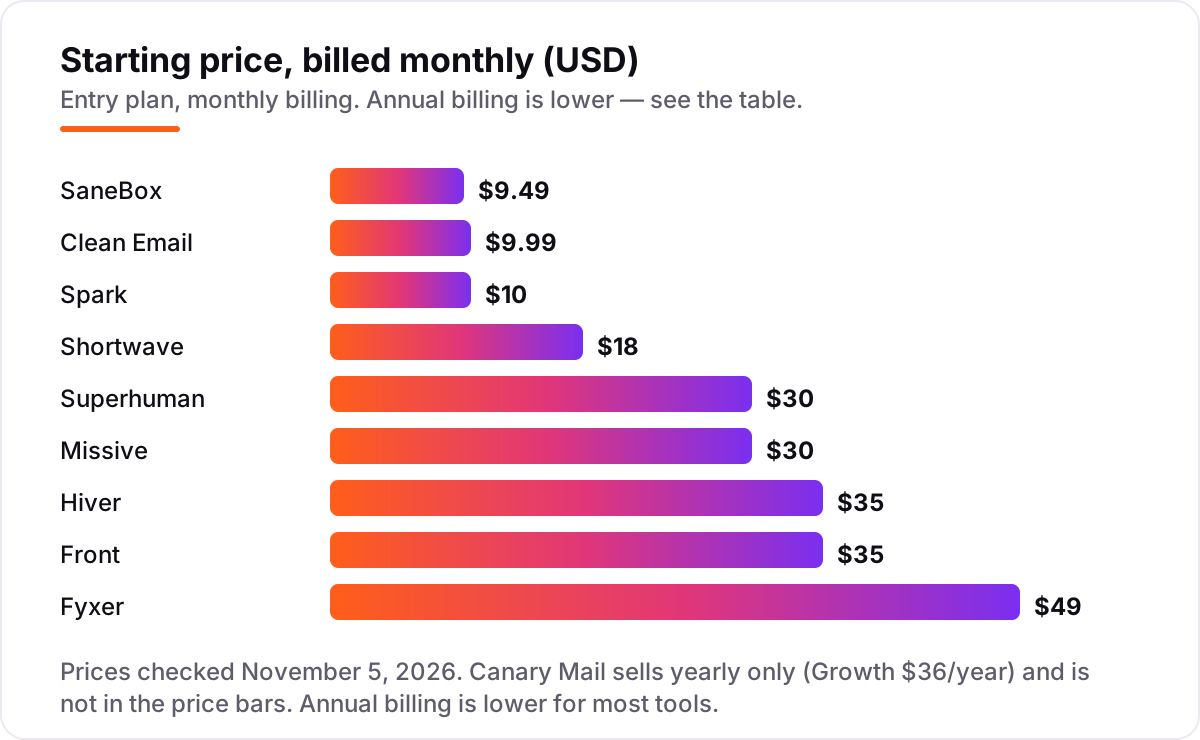
Take a solo professional who sends and receives about 100 emails a day. On list prices, the subscription costs $9.49 a month on SaneBox Snack, $9.99 on Clean Email for one account, $10 on Spark Plus, $18 on Shortwave Pro, $30 on Superhuman Starter, $49 on Fyxer Pro, and $36 a year on Canary Growth. Two of those numbers need adjusting before they are real: SaneBox Snack covers one account and two features, so a second mailbox moves you to Lunch at $15.99, and Fyxer Pro's 3,000-credit allowance can run short for heavy meeting users, pushing some buyers toward Team at $99 a month.
Now take a five-person support team sharing inboxes. On monthly billing, Missive Productive costs $150 a month, Hiver Growth $175 and Front Starter $175, before any AI add-ons — Front's AI Copilot sits on top, and Missive's AI usage is billed through credits or a provider key. On annual billing those same five seats cost $120 on Missive, $125 on Hiver and $125 on Front. Over a year, that is $1,440–$2,100 for the team seats alone, against $114–$588 for a solo user on the personal tools, which is why the buyer type matters more than the headline price.
One more cost to check before you commit: the underlying mailbox. Superhuman, Shortwave and Hiver sit on top of Gmail or Outlook accounts you already pay for, so their price is on top of Google Workspace or Microsoft 365. SaneBox, Clean Email and Fyxer also need an existing mailbox, while Spark and Canary are clients for accounts you already own. If you are comparing email tools for a business rather than a personal inbox, see our guide to AI tools for email marketing.
Know the difference: an AI email client vs an AI email assistant vs a team inbox
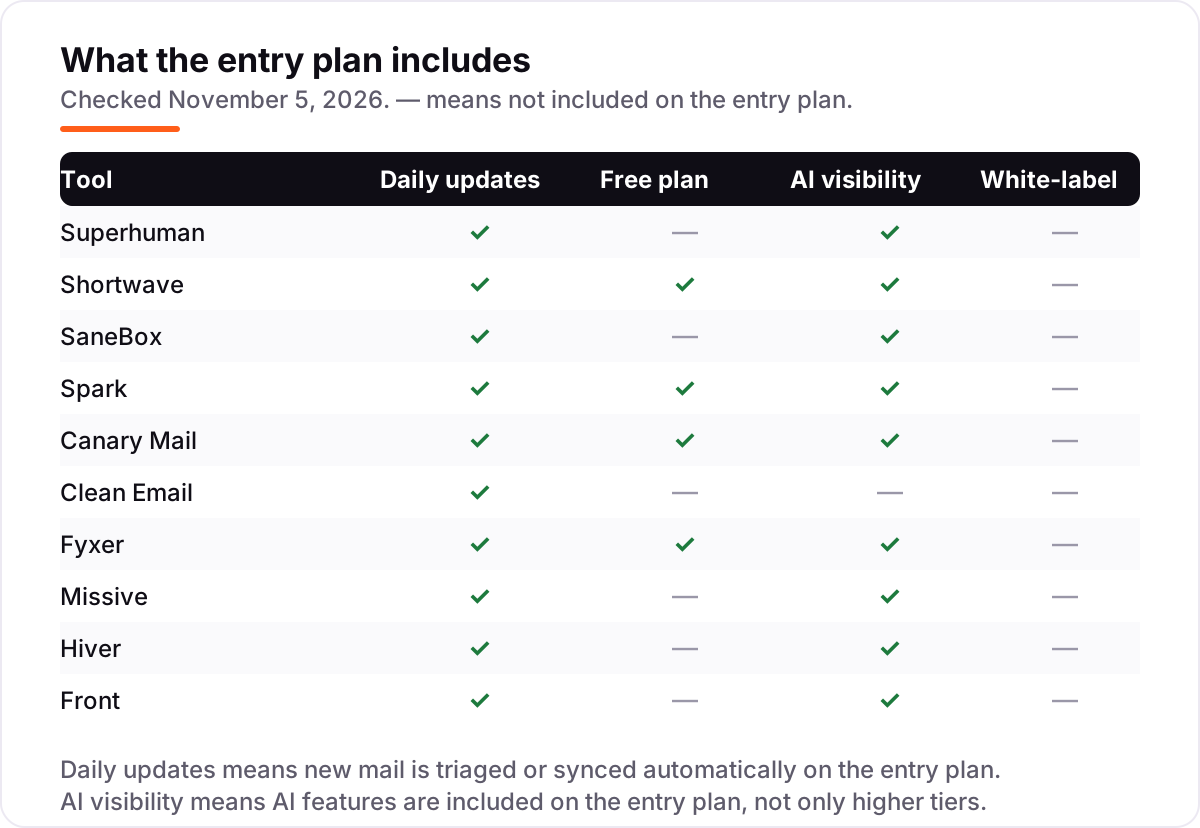
The confusion in this category is between three kinds of tool that all claim to manage email. An AI email client replaces the app you read mail in: Superhuman, Shortwave, Spark and Canary Mail are clients, and switching to one means learning a new interface and, in Shortwave's case, staying on Gmail. An AI email assistant layers onto your existing mailbox: SaneBox filters, Clean Email cleans and Fyxer drafts, all without replacing your app, which makes adoption far easier.
The third kind is the team inbox, built for shared addresses rather than personal mail. Missive, Hiver and Front turn support@ or sales@ into a workspace with assignments, internal comments and automation, and they price per seat with caps that decide the real bill. A team inbox is the wrong buy for a solo user, just as a personal client is the wrong buy for a support team: the tool must match who owns the mailbox, not just which AI features sound best.
A second distinction worth knowing is filtering versus drafting. SaneBox and Clean Email reduce what reaches you, but neither writes a reply. Superhuman, Shortwave and Fyxer write drafts in your voice, which saves a different kind of time. Most buyers need one of the two first; buying a drafting tool when the problem is volume, or a filtering tool when the problem is reply time, is the most common expensive mistake in this category.
Quick comparison: tool type by need
| Buyer | Best pick | Why |
|---|---|---|
| Heavy email user who wants speed | Superhuman | Keyboard-first triage with AI drafting included, from $30/month |
| Gmail user who wants AI search | Shortwave | AI search across years of Gmail, from $18/month, free plan available |
| Keep your current app, kill the noise | SaneBox | Automatic filtering on any client, from $9.49/month |
| Cheapest good client everywhere | Spark | Strong free plan, Plus with full AI is $10/month |
| Privacy-first with encryption | Canary Mail | AI Copilot plus optional PGP, from $36/year |
| Small team sharing inboxes | Missive | Shared inboxes with AI on Productive, from $30/user/month |
Mistakes to avoid
- Pricing the wrong tier. Missive Starter, Fyxer free and Front Starter all lack the AI feature most buyers want. Price the tier that includes it, or the first bill will surprise you.
- Buying a client when you need a layer. If you love your current app, a client switch is friction you do not need: SaneBox or Clean Email fix the inbox without migration.
- Ignoring seat caps and blocks. Growth stops at 10 users on Hiver and Front Starter, and Missive Productive at 50. One extra hire can reprice every seat, not just the new one.
- Forgetting the mailbox underneath. Superhuman, Shortwave and Hiver need a Gmail or Outlook account you already pay for, so their price stacks on Workspace or Microsoft 365.
- Letting an automatic filter bury important mail. Trial any filtering tool with real mail first, and check the filtered folders daily for the first two weeks before trusting it fully.
How we chose
We checked each vendor's own pricing page as reflected in fresh November 2026 reads and recorded the starting price exactly as shown, including the annual-billing figure where the page lists one, and we ranked the tools by fit for the most common buyer — a professional drowning in mail or a small team sharing inboxes — not by brand size. Prices for SaneBox, Shortwave, Fyxer, Spark, Canary Mail, Clean Email, Missive, Hiver and Front were verified from fresh search-index copies of the vendors' own pricing pages crawled within the last few days, since direct vendor-page fetches timed out today; Superhuman's price is corroborated by multiple October 2026 reads of its pricing page. Ratings appear only where a fresh G2 copy showed both score and review count — Superhuman, Missive, Hiver and Front — and the other six tools carry no rating rather than a stale or estimated one. No vendor paid for a place in this list, and none of the links here are affiliate links.
What to do next
Start with the free plan or trial of your top pick and run one real week of your own mail through it. Check that the AI drafts sound like you, that no important mail gets buried by a filter, and that the tier you tested is the tier you would actually buy. If the inbox is sorted but new customers are not finding you, our monthly SEO service handles the visibility side — or compare providers in our guide to SEO companies for small business. Once your tools are in place, find out what's holding your rankings back.
Your stack only works if people find you
SerpAstra fixes what keeps your site off page one and makes it easy for AI assistants to recommend.
Get a free audit→Sources we checked (14)
- Superhuman pricing — superhuman.com/pricing (checked November 5, 2026)
- Shortwave pricing — shortwave.com/pricing (checked November 5, 2026)
- SaneBox pricing — sanebox.com/pricing (checked November 5, 2026)
- Spark pricing — sparkmailapp.com/pricing (checked November 5, 2026)
- Canary Mail pricing — canarymail.io/pricing (checked November 5, 2026)
- Clean Email pricing — clean.email/pricing (checked November 5, 2026)
- Fyxer pricing — fyxer.com/pricing (checked November 5, 2026)
- Missive pricing — missiveapp.com/pricing (checked November 5, 2026)
- Hiver pricing — hiverhq.com/pricing (checked November 5, 2026)
- Front pricing — front.com/pricing (checked November 5, 2026)
- Superhuman Mail reviews — G2 (checked November 5, 2026)
- Missive reviews — G2 (checked November 5, 2026)
- Hiver in Gmail reviews — G2 (checked November 5, 2026)
- Front reviews — G2 (checked November 5, 2026)
Shamim
Founder of SerpAstra
A full-stack SEO and digital marketer who spends most days on Local SEO for dental practices, AI search visibility and lead generation.
Frequently asked questions
What is the best ai email management tool?
Superhuman is the best fit for most heavy email users, at $30 a month, because its keyboard-first triage and included AI drafting clear inboxes fastest. Gmail-only users should look at Shortwave at $18 a month instead, since its AI search across years of mail is stronger. Teams sharing inboxes should price Missive Productive at $30 a user a month.
How much do ai email management tools cost?
Entry prices run from $0 to $49 a month for individuals. SaneBox starts at $9.49 a month, Clean Email at $9.99, Spark Plus at $10 and Shortwave Pro at $18, while Superhuman Starter is $30 and Fyxer Pro is $49. Team tools price per seat: Missive, Hiver and Front all start at $30–$35 a user a month on monthly billing.
Is there a free ai email management tool?
Yes, with limits. Shortwave, Spark and Canary Mail all offer free plans, and Fyxer has a free plan with 400 credits a month. The catch is that the free tiers limit AI: Spark previews its assistant for one month of history, and Fyxer free includes no drafting or sorting at all. The full AI assistant always sits on a paid plan.
Do ai email tools read my email?
Most AI email tools process message content to draft, summarize or search it, which means your mail passes through their systems. SaneBox is the exception here: it analyzes headers rather than reading message bodies. Clean Email likewise works from headers and metadata. If privacy is the priority, check each vendor's data policy before connecting a mailbox.
Can I keep my current email app with an ai email tool?
Yes, with SaneBox, Clean Email and Fyxer, which layer onto your existing mailbox and client. Superhuman, Shortwave, Spark and Canary Mail replace your email app, so you read and write mail in their client instead. Missive, Hiver and Front are team inboxes, so the team works inside them rather than in personal mail apps.
What is the difference between an ai email client and an ai email assistant?
An AI email client replaces the app you read mail in, like Superhuman or Spark, while an assistant layers onto your existing mailbox, like Fyxer or SaneBox. Clients control the whole experience and usually cost more, while assistants are easier to adopt but cannot change how the inbox itself looks. Team inboxes like Missive and Front are a third kind, built for shared addresses.
Free SEO and AI visibility audit
Find out what is holding your rankings back
Send us your site. Within 2 business days you get a written audit, an AI visibility check and a short fix list ranked by impact. Free, with no contract attached.
Request my free audit→Related guides
 Digital Marketing & Ads7 Best AI Tools for Email Marketing in 2026 (Free and Paid, Compared)7 best AI tools for email marketing compared on price, AI features and free plans, with real starting prices checked November 4, 2026 and sorted by use case.Read guide →
 Digital Marketing & Ads10 Best Email Automation Tools in 2026 (Free and Paid, Compared)Compare the 10 best email automation tools on price, free plans and automation depth, with every starting price checked on November 5, 2026.Read guide →
 Digital Marketing & AdsBest Email Client Software for 2026: 9 Options Compared by Use CaseCompare the 9 best email client software options for 2026 on price, free plans, AI features and privacy, with every price checked November 5, 2026.Read guide →