
8 Best AI Headshot App Free Picks for 2026, Tested on Features and Price
8 best ai headshot app free picks for 2026, compared on free limits, likeness and price, with real prices checked on the vendors' own pages.
 Shamim Mia, Founder, SerpAstraLast verified November 2, 202612 min read
We compare pricing pages, documentation and public reviews. We never accept payment for rankings.
Key takeaways
- Gemini is the best free starting point: one selfie, a plain prompt, and a usable LinkedIn headshot at $0, with Google AI Pro at $199.99 a year if you hit the free limits.
- Canva is the best free all-rounder: 2 free AI headshot credits plus templates to finish your profile, with Pro at $144 a year.
- Dedicated headshot tools are not really free: BetterPic's 10 free 4K headshots take 60–90 days in a queue, and HeadshotPro's free tool gives just one HD headshot.
- The single most important buying factor is likeness: a free tool that changes your face is worse than no headshot, so compare the result against a real photo before you publish it.
- Every price below was checked on November 2, 2026; a few paid-step prices come from third-party trackers and are flagged in 'How we chose'.
On this page
Quick comparison
| Tool | Best for | Starting price | Free plan |
|---|---|---|---|
| Gemini app | Job seekers who want one free LinkedIn headshot in minutes without installing anything | Free (Pro $199.99/yr) | Yes (daily limits) |
| Canva | Job seekers and creators who want a free headshot plus a finished LinkedIn banner and CV layout | $144/yr (Pro) | Yes (2 credits) |
| ChatGPT | Anyone who already uses ChatGPT and wants a headshot by describing the look in plain words | $20/mo (no annual) | Yes (limited images) |
| Pixelbin | People who need a few polished headshots a month with no account and no watermark | Free ($19 PAYG) | Yes (3 a month) |
| PFPMaker | Social media users who want a free profile-picture editor and low-cost AI headshot packs | Free (packs from $9) | Yes (editor free) |
| BetterPic | Patient job seekers who want 10 free 4K headshots and can wait 60–90 days | $35 one-time | Yes (10 in 4K) |
| HeadshotPro | Small teams that need matching headshots for everyone, plus one free test headshot | $29 one-time | Yes (1 HD headshot) |
| Fotor | Casual users who want to try many portrait styles free before paying anything | $39.99/yr (Pro) | Yes (8 credits) |
Make one of these tools?
We re-check this list every quarter. Send a correction, request a review, or ask about a clearly labeled sponsored spot.
Request a listingThe best free AI headshot apps
Gemini app
Best for: Job seekers who want one free LinkedIn headshot in minutes without installing anything
The Gemini app is the fastest free route to a professional-looking headshot because it works from a single selfie and a plain written prompt. Upload a photo, ask for a plain grey backdrop, a navy blazer and soft studio light, and the Nano Banana image model returns a polished portrait in seconds, with no app to install and no watermark on the result.
The catch is consistency. One photo gives the model little to work with, so faces can drift after several rounds of edits, and free accounts hit daily limits that Google does not publish. The first paid step is Google AI Pro at $19.99 a month, or $199.99 a year, which raises the limits fourfold and adds 5 TB of storage. For one LinkedIn photo the free tier is enough. Pay only if you generate headshots often.
What we like
- Turns one selfie into a polished headshot in seconds with a plain written prompt
- Free tier includes the Nano Banana image model with no watermark on results
- No app install and no credit card, just a free Google account
- Paid Pro plan quadruples usage limits and adds 5 TB of storage
Watch out for
- One selfie gives the model little to work with, so faces can drift after several rounds of edits
- Free accounts hit unpublished daily limits that Google says may change
- No trained model of your face, so every new style starts from scratch

Canva
Best for: Job seekers and creators who want a free headshot plus a finished LinkedIn banner and CV layout
Canva is the only tool in this list where the headshot is the start of the job rather than the whole job. The free plan includes the AI headshot app, which gives 2 free credits before a 24-hour wait, plus the background remover and thousands of templates, so the same headshot can become a LinkedIn banner, a CV header or a social post without leaving the editor.
The limits are the thing to plan around. Free AI use is capped at 20 uses a month across every AI tool in Canva, not just headshots, and the best templates carry a Pro mark. Pro costs $144 a year and gives 10 times more AI use plus the Brand Kit and Magic Resize. If you only need one headshot, stay free; pay when the whole profile needs finishing.
What we like
- Free plan includes the AI headshot app plus background remover and templates
- Turn a headshot into a full LinkedIn banner, CV or post in the same editor
- Pro gives 10x more AI use than the free plan for $120 a year
- Huge template library means no design skill is needed to finish the profile
Watch out for
- Only 2 free AI headshot credits, then a 24-hour wait before more
- Free plan caps AI use at 20 uses a month across all of Canva's AI tools
- Many of the best templates and elements need a Pro subscription

ChatGPT
Best for: Anyone who already uses ChatGPT and wants a headshot by describing the look in plain words
ChatGPT turns headshot-making into a conversation. Upload a selfie, describe the look you want in plain words — grey backdrop, navy blazer, soft window light — and ask for changes in the next message instead of starting over. The free plan covers everyday text chats without limit, with image generation capped at a number OpenAI does not publish.
The trade-off is the same as with Gemini: no trained model of your face, so likeness drifts between generations and you may need several tries for one keeper. Plus costs $20 a month and raises the image limits, but it is billed monthly only, with no annual discount. If you already live in ChatGPT, start here; if you want a trained model, look at BetterPic or HeadshotPro.
What we like
- Describe the backdrop, outfit and lighting in plain words and iterate in conversation
- Free plan includes unlimited everyday text chats plus limited image generation
- Refine the same image across turns instead of starting over each time
- Plus raises image limits and adds advanced reasoning for $20 a month
Watch out for
- Free plan caps image generation at an unpublished number of images
- No trained face model, so likeness varies from one generation to the next
- Plus is billed monthly only, so there is no annual discount to take

Pixelbin
Best for: People who need a few polished headshots a month with no account and no watermark
Pixelbin has the most generous no-sign-up free tier in this list: 3 HD headshots every month, no account, no watermark, and no credit card. Upload a photo or paste an image URL, pick a professional style — corporate, personal branding or lifestyle — and download the result in HD in seconds. Signing up adds 10 free credits for extra tries.
The free styles are strictly professional, so there are no playful or artistic looks, and 3 a month is a hard ceiling once the styles are used up. The paid step is pay-as-you-go credit, from $19 for 50 credits, which suits occasional use but costs more than a flat plan for heavy users. For a steady trickle of profile photos, the free tier alone may be enough.
What we like
- 3 free HD headshots every month with no account and no watermark
- Upload a photo or paste an image URL and download in HD in seconds
- Sign-up adds 10 free credits for more generations
- Pay-as-you-go credits mean no monthly subscription to cancel
Watch out for
- Only 3 free headshots a month, and the free styles are strictly professional
- Paid pricing is credit-based, so heavy use adds up faster than a flat plan
- No face training, so results depend heavily on the quality of the uploaded photo

PFPMaker
Best for: Social media users who want a free profile-picture editor and low-cost AI headshot packs
PFPMaker is two tools in one, and the split matters. The classic profile-picture editor is free forever: upload a photo, remove or replace the background, add a frame, and export for any platform, all in the browser with nothing uploaded to a server. The AI headshot generator is a separate paid workflow that builds new portraits from one selfie in more than 400 styles.
That split is also the catch. The free tier polishes a photo you already like; it does not create a new headshot, so anyone who dislikes their selfie still has to pay. Paid packs start at $9, the cheapest dedicated step here, though the price is not published on the vendor's own pricing page. Use the free editor first, and buy credits only if a fresh portrait is truly needed.
What we like
- Classic editor is free forever with background removal, frames and platform presets
- Everything in the free editor runs in the browser, so no photo is uploaded to a server
- 400+ headshot styles with outfit, backdrop and pose presets on the paid side
- Paid packs start at $9, the cheapest dedicated headshot step in this list
Watch out for
- The free classic editor polishes an existing photo but does not generate new headshots
- AI headshots are a separate paid workflow, so the free tier stops at basic edits
- Paid pack pricing is not published on the vendor's own pricing page

BetterPic
Best for: Patient job seekers who want 10 free 4K headshots and can wait 60–90 days
BetterPic offers the only free 4K tier in this list: 10 headshots at full 4K resolution, with a commercial licence and no watermark, for no money at all. Upload about 8 casual photos, pick up to 5 outfits and backgrounds, and the free tier returns the same quality as the paid packs, which start at $35 for 20 headshots and arrive in 1 to 2 hours.
The price is time. Free generations sit in a shared queue behind paid orders and take 60 to 90 days, and free users grant BetterPic permission to use their results in its marketing. Input photos may also be stored for up to a year. If your LinkedIn photo can wait three months, start free; if you need it this week, the $35 Basic pack is the honest buy.
What we like
- 10 free headshots in 4K with a full commercial licence and no watermark
- Paid packs deliver the same 4K quality in 1 to 2 hours from $35
- Up to 5 outfits and backgrounds on the free tier, 150+ on paid plans
- Human editors refine results on the Expert plan for print-ready output
Watch out for
- Free generations wait 60 to 90 days in a shared queue behind paid orders
- Free users grant BetterPic permission to use their results in its marketing
- Input photos may be stored for up to a year under the vendor's terms

HeadshotPro
Best for: Small teams that need matching headshots for everyone, plus one free test headshot
HeadshotPro is the team pick in this list. Its free tool turns one selfie into a single HD headshot at 1024 by 1024 with no sign-up and no credit card, which is a fair test of the likeness before any money moves. The paid packs start at $29 one-time for 30 headshots, and the Team Edition lets an admin lock one style so every employee's photo matches.
One free headshot is a taste, not a wardrobe: the rest of the generated styles stay locked as previews until you unlock a pack, and every refresh costs a full new pack because pricing is one-time, not a subscription. Inputs are deleted 30 days after generation and never used to train models. Try the free headshot first, then buy a pack only if the likeness holds.
What we like
- Free tool returns 1 HD headshot at 1024x1024 from one selfie with no sign-up
- Team Edition locks one style across the whole company for consistent team pages
- Basic pack gives 30 headshots for $29 one-time with a money-back guarantee
- Inputs are deleted 30 days after generation and never used to train models
Watch out for
- The free tool gives just 1 HD headshot, with the rest locked as previews
- Paid packs are one-time purchases, so every refresh costs the full pack price
- Needs several selfies per person, more effort than single-selfie tools
Fotor
Best for: Casual users who want to try many portrait styles free before paying anything
Fotor is the style sampler of this list. The free Basic plan starts with 8 credits for AI portraits, and the style menu runs from professional headshots through realistic, black and white, fantasy and comic looks, with each style returning a batch of at least 5 portraits per generation. Rewards can raise the free credit count to 30, and the same editor holds one-click retouching and background tools.
Free results are previews in practice: exports carry a watermark and come in normal quality rather than HD, and 8 credits disappear after one or two styles. Pro costs $39.99 a year, billed annually, and removes the watermark with HD exports and 100 AI credits a month. Try the styles free, but expect to pay Pro prices for a headshot you would actually publish.
What we like
- Long style menu from professional headshots to black and white and fantasy portraits
- Each style returns a batch of at least 5 portraits per generation
- Pro removes the watermark and unlocks HD exports for $39.99 a year
- One-click editing, background tools and retouching sit in the same editor
Watch out for
- Free exports carry a watermark and come in normal quality, not HD
- Free credits run out fast, with only 8 to start and a 24-hour wait for more
- Likeness is weaker than the trained-model tools, so results need checking
The best ai headshot app free for most people is one that asks for nothing: no payment, no watermark, and no long wait. This list ranks 8 free AI headshot apps by how far the free tier actually goes, from Gemini's one-prompt headshot to BetterPic's slow but generous 4K queue, with real prices for the first paid step on every card.
How to choose the best AI headshot app free
- Likeness first. A headshot that does not look like you is worse than a plain photo. Generate, then compare the result against a real photo side by side before you publish it.
- Count the free images. Free tiers range from 1 headshot (HeadshotPro) to 10 (BetterPic), and some cap daily use without publishing the number. Pick a tier that covers a few tries, not just one.
- Check the watermark and licence. Fotor watermarks free exports, while Gemini, Pixelbin and BetterPic do not. BetterPic's free tier includes a commercial licence; Canva's free designs follow Canva's content licence.
- Read the photo terms. Your face is biometric data. HeadshotPro deletes inputs after 30 days, PFPMaker's free editor never uploads your photo, and BetterPic's free tier may use your results in marketing.
- Mind the wait. Some free tiers are instant and some are queued. BetterPic's free headshots take 60 to 90 days, so a deadline means paying for a pack or picking an instant tool.
- Think about the next step. If the free tier disappoints, the first paid step ranges from $9 at PFPMaker to $35 at BetterPic, so a bad free result does not have to mean a big bill.
- Check the export size. A LinkedIn photo needs at least 400 by 400 pixels to look sharp, and a print bio needs far more. BetterPic's free tier exports in 4K, HeadshotPro's free headshot is 1024 by 1024, and Fotor's free exports are normal quality, so check the pixel count before you pick a winner.
Free AI headshot apps pricing: what you will actually pay
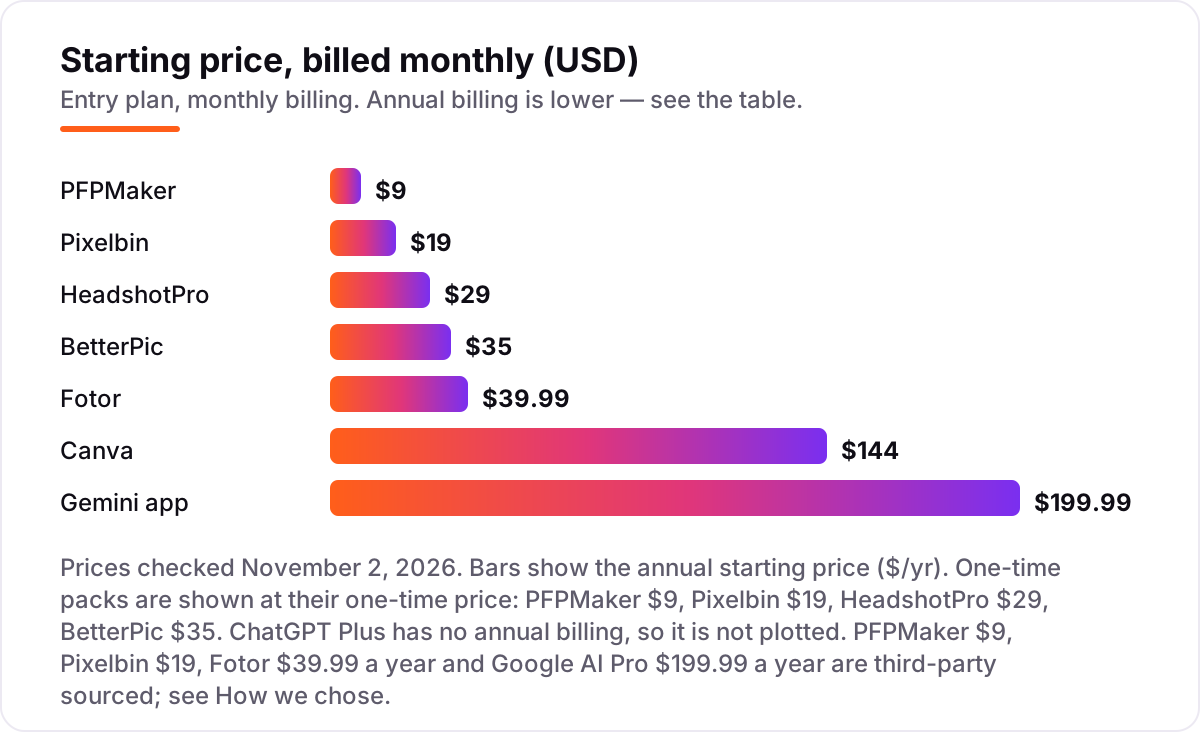
The free tier covers the first headshot on every tool in this list, and the first paid step is small. Start with Gemini at $0 and Canva at $0 for a one-off LinkedIn photo: between them you get a prompt-based portrait plus 2 AI headshot credits and a finished banner, all free. If you want a trained model, BetterPic's free tier gives 10 headshots in 4K for $0, but the 60 to 90 day queue means it is not a plan for a deadline this week.
The first paid step depends on what you need next. A single pack is cheapest at PFPMaker from $9, then HeadshotPro at $29 for 30 headshots and BetterPic at $35 for 20 in 4K. Subscriptions are the dearer route: Fotor Pro is $39.99 a year, Canva Pro is $144 a year, and Google AI Pro is $199.99 a year, while ChatGPT Plus is $20 a month with no annual option, which is $240 over a year. A job seeker who needs one photo this week can stay at $0 with Gemini or Pixelbin; a team that needs matching photos for five people pays $29 once at HeadshotPro instead of five separate subscriptions.
Think of the cost over a year, not just today. A free tier that covers one photo costs $0 once and $0 again next year, while a $20-a-month plan costs $240 for the same twelve months even if you only use it twice. The one-time packs are the middle ground: $29 or $35 buys a batch you keep forever, with no renewal to forget. The only recurring cost that makes sense for headshots alone is a plan you already pay for, such as Canva Pro for design work or Google AI Pro for storage, where the headshot is a bonus rather than the reason for the bill.
Free headshot app vs paid studio headshot: know the difference
A free AI headshot app and a paid studio session solve different problems. The app takes a selfie you already have and edits or regenerates it in minutes, with no appointment, no lighting setup and no photographer. A studio session puts you in front of a photographer with real lights, a real backdrop and a retoucher, and typically costs $150 to $450 for a handful of finished photos. The app wins on speed and price; the studio wins on likeness, because a real camera captures your actual face instead of a model's guess at it.
Dedicated AI packs sit between the two. HeadshotPro at $29 and BetterPic at $35 train a model on your face from several selfies, so the likeness holds across outfits and backgrounds better than a single-selfie prompt tool. They still cannot match a studio for print work or a press bio, and they still need good source photos. Use a free app for LinkedIn and a CV, a dedicated pack when the photo will be seen for years, and a studio when the photo has to be perfect.
One more difference is what happens when the result is wrong. A studio reshoots on the spot until the photo is right, while a free app asks you to try again with a better selfie or a clearer prompt. That is why the free tools reward good source photos so much: a sharp, well-lit selfie with a plain background gives every tool in this list a better starting point, and it costs nothing to take three or four versions before you upload. If two free tools both miss the likeness, the problem is usually the source photo, not the app.
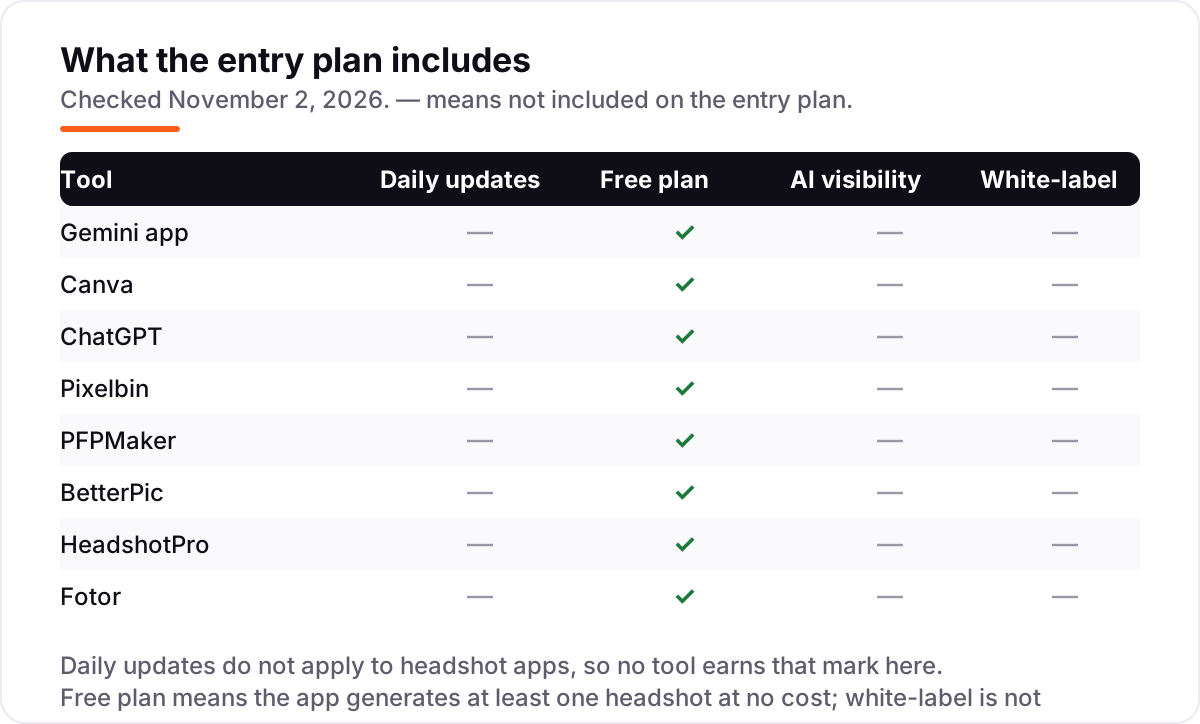
Quick comparison: tool type by need
| Buyer | Best pick | Why |
|---|---|---|
| One free LinkedIn photo, today | Gemini app | $0, one selfie and a prompt, no watermark |
| Headshot plus a finished profile | Canva | Free headshot credits plus banners and CV templates |
| A few free headshots every month | Pixelbin | 3 free HD headshots a month, no account |
| Free 4K headshots, no deadline | BetterPic | 10 free headshots in 4K, 60–90 day queue |
| Matching headshots for a team | HeadshotPro | One locked style, $29 one-time, 1 free test headshot |
| Trying many portrait styles free | Fotor | 8 free credits across a long style menu |
How we chose
We checked each vendor's own pricing or product page on November 2, 2026 and recorded the free tier exactly as shown, including what it covers and where it stops. Four paid-step prices could not be read on the vendor's own page today, so they are third-party sourced and flagged here: PFPMaker packs from $9, Pixelbin pay-as-you-go from $19 for 50 credits, Fotor Pro at $39.99 a year, and Google AI Pro at $199.99 a year. The Canva rating is G2, checked November 2, 2026; no other tool in this list has a G2 rating we could open today, so the other cards show no rating rather than an unverified one. We ranked by fit for the most common buyer — someone who needs one good LinkedIn headshot at no cost — not by brand size, and no vendor paid for a place in this list. We did not test the apps by uploading photos, so nothing here claims hands-on test results; features and prices come from vendor pages and public reviews only. For a wider look at free AI tools, see our guide to the best AI tools for SEO optimization.
What to do next
Start with Gemini: upload your best selfie, ask for a plain backdrop and soft studio light, and compare the result against a real photo. If the likeness holds, finish the profile in Canva with a matching banner, and check how the page title will look in search with the free title tag checker. If the likeness drifts, try Pixelbin's 3 free monthly headshots or queue BetterPic's free 4K tier while you keep the Gemini result live. Before the photo goes on a site that needs to be found, make sure the page itself is visible: our monthly SEO service covers the rankings side once the headshot is in place. Once your tools are in place, find out what's holding your rankings back.
Your stack only works if people find you
SerpAstra fixes what keeps your site off page one and makes it easy for AI assistants to recommend.
Get a free audit→Sources we checked (13)
- Gemini plans and pricing — gemini.google/subscriptions (checked November 2, 2026)
- Canva pricing — canva.com/pricing (checked November 2, 2026)
- Canva on G2 — 4.7/5, 7,811 reviews (checked November 2, 2026)
- ChatGPT pricing — chatgpt.com/pricing (checked November 2, 2026)
- Pixelbin professional headshots — pixelbin.io (checked November 2, 2026)
- PFPMaker — pfpmaker.com (checked November 2, 2026)
- BetterPic free AI headshot generator — betterpic.io (checked November 2, 2026)
- HeadshotPro free AI headshot generator — headshotpro.com (checked November 2, 2026)
- Fotor — fotor.com (checked November 2, 2026)
- Google AI Pro annual price $199.99 — Activepieces (third-party, checked November 2, 2026)
- Pixelbin pay-as-you-go $19 for 50 credits — Creati.ai comparison (third-party, checked November 2, 2026)
- PFPMaker packs from $9 — Toolify (third-party, checked November 2, 2026)
- Fotor Pro $39.99/year — ToolJunction (third-party, checked November 2, 2026)
Shamim
Founder of SerpAstra
A full-stack SEO and digital marketer who spends most days on Local SEO for dental practices, AI search visibility and lead generation.
Frequently asked questions
What is the best free AI headshot app?
The Gemini app is the best free starting point: one selfie, a plain prompt, and a usable headshot in seconds at $0 with no watermark. Canva is the better all-rounder if you also need a banner and CV layout, and Pixelbin gives 3 free HD headshots a month with no account at all.
Are free AI headshots really free?
The eight tools in this list all generate at least one headshot at no cost, but every free tier has a limit: a credit count, a daily cap, a watermark, or a long queue. BetterPic's 10 free 4K headshots take 60 to 90 days, and Fotor's free exports carry a watermark. Read the free tier's limit before uploading photos.
Can I use a free AI headshot on LinkedIn?
Yes, if the result still looks like you and the licence allows it. BetterPic's free tier includes a full commercial licence, and Gemini, Canva and ChatGPT put no watermark on free results. Fotor's free exports are watermarked, so they are better as previews. Always compare the headshot against a real photo first.
What is the difference between a free headshot app and a paid studio headshot?
A free app edits or generates from a selfie in minutes, while a studio session uses a photographer, real lighting and retouching, and typically costs $150 to $450. Dedicated AI packs such as HeadshotPro at $29 or BetterPic at $35 sit between the two: trained on your face, but still generated. For most LinkedIn profiles, a good free result is enough.
Do free AI headshot apps keep my photos private?
It depends on the tool, so read the terms before uploading. HeadshotPro deletes inputs after 30 days and never trains on them, and PFPMaker's free editor runs in your browser without uploading. BetterPic's free tier asks permission to use your results in its marketing, and may store inputs for up to a year.
How many free headshots can I get?
It varies widely. Pixelbin gives 3 free HD headshots a month, Canva gives 2 AI headshot credits, HeadshotPro's free tool gives 1 HD headshot, and BetterPic gives 10 free 4K headshots in a 60 to 90 day queue. Gemini and ChatGPT cap free image generation at unpublished daily limits, so the count changes.
Which free app gives the most realistic headshot?
For a single free image, Gemini gives the most realistic result because its Nano Banana model preserves facial identity well from one good selfie. For the most realistic paid result, BetterPic's trained model in 4K is stronger, and HeadshotPro's team packs are the most consistent. No free tool matches a trained model for likeness across many styles.
Free SEO and AI visibility audit
Find out what is holding your rankings back
Send us your site. Within 2 business days you get a written audit, an AI visibility check and a short fix list ranked by impact. Free, with no contract attached.
Request my free audit→Related guides
 SEO & AI Search11 Best AI Tools for SEO Optimization in 2026, Compared11 best ai tools for seo optimization compared on price, content scoring and AI visibility, with prices verified November 1, 2026, sorted by use case.Read guide →
 SEO & AI Search11 Best Free SEO Keyword Research Tools in 2026, Compared11 best free SEO keyword research tools compared with real prices and free limits — Google Keyword Planner, Ahrefs, Semrush, Moz and more, sorted by need.Read guide →
 SEO & AI Search12 Best Marketing Platforms for Small Business SEO in 2026, ComparedThe 12 best marketing platforms for small business SEO, compared on real prices, SEO tools and AI visibility. Every price checked November 1, 2026.Read guide →