
12 Best AI Landscape Design Software in 2026, Compared
Compare the 12 best ai landscape design software tools on price, free plans, AR previews and AI restyles, with every price checked November 7, 2026.
 Shamim Mia, Founder, SerpAstraLast verified November 7, 202614 min read
We compare pricing pages, documentation and public reviews. We never accept payment for rankings.
Key takeaways
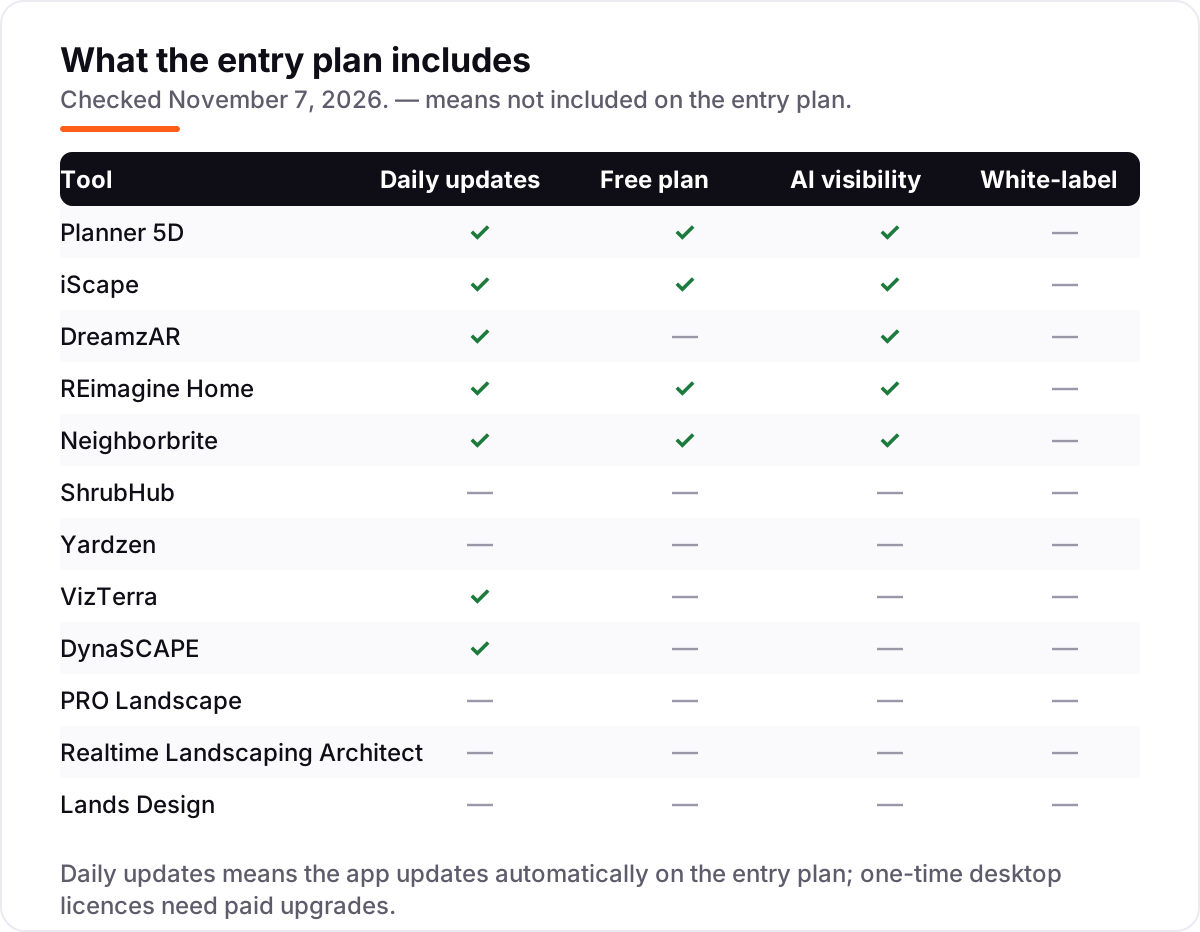
- Planner 5D is the best fit for most homeowners at $19.99/month, iScape follows at $29.99/month for contractors showing AR designs on site, and DreamzAR at $19.99/month adds an AR walkthrough.
- Five tools here are one-time purchases, not subscriptions: ShrubHub from $297, Realtime Landscaping Architect at $599, Lands Design at $795, Yardzen from $995 and PRO Landscape at $1,495.
- The single most important buying factor is what the output is good for: an AI restyle is inspiration, while a measured CAD plan is what a contractor can actually build from.
- Free plans are real but narrow: Planner 5D, iScape, REimagine Home and Neighborbrite all let you start free, while the pro CAD tools offer trials instead.
On this page
Quick comparison
| Tool | Best for | Starting price | Free plan |
|---|---|---|---|
| Planner 5D | Homeowners who want the cheapest full-featured way to model a yard in 2D and 3D, with a free plan to start | $19.99/mo | Yes (free Basic) |
| iScape | Landscapers and contractors who show clients AR designs on site, on the client's actual yard | $29.99/mo | Yes (limited) |
| DreamzAR | Homeowners who want fast AI yard restyles plus an AR walkthrough on a phone | $19.99/mo | No |
| REimagine Home | Homeowners and realtors who want instant AI restyles of a yard photo in seconds | $19/mo | Yes (5 free designs) |
| Neighborbrite | Homeowners who want AI yard concepts with a priced plant list, starting free | $24.99/mo | Yes (4 designs/day) |
| ShrubHub | Homeowners who want a human-designed 3D yard plan at the lowest done-for-you price | $297 one-time | No |
| Yardzen | Busy homeowners who want a professional designer to deliver a finished, buildable plan | $995 one-time | No |
| VizTerra | Design-build firms that present interactive 3D landscape and hardscape designs to clients | $97/mo | No (free trial) |
| DynaSCAPE | Landscape design firms that sell measured CAD plans, planting plans and costed proposals | $119/mo | No (free trial) |
| PRO Landscape | Contractors who win jobs with photo-based before-and-after proposals | $1,495 one-time | No |
| Realtime Landscaping Architect | Patient DIYers who want detailed 3D plans and walkthroughs for a serious renovation | $599 one-time | No (free trial) |
| Lands Design | Landscape architects who need BIM-grade plans, 2D layouts and 3D models in Rhino or AutoCAD | $795 one-time | No (90-day trial) |
Make one of these tools?
We re-check this list every quarter. Send a correction, request a review, or ask about a clearly labeled sponsored spot.
Request a listingThe best ai landscape design software

Planner 5D
Best for: Homeowners who want the cheapest full-featured way to model a yard in 2D and 3D, with a free plan to start
Planner 5D is a general home design app with solid outdoor tools, which makes it the easy pick for someone designing a yard as part of a larger home project. Drag-and-drop 2D plans convert to 3D views, the catalog covers plants, furniture and structures, and the free Basic plan is generous enough for a simple project: unlimited projects and half the catalog at $0.
Premium costs $19.99 a month or $59.99 a year, and adds the full 10,000-plus item catalog, AI Studio credits, AI floor-plan recognition and standard renders. It will not match DynaSCAPE for measured construction drawings or iScape for on-site AR, but for laying out a new patio or garden beds it is more than enough, and it is the highest-rated tool here at 4.7 out of 5 on G2.
What we like
- Free Basic plan covers unlimited projects and half the catalog, so a simple yard costs nothing
- Cheapest paid plan here at $19.99 a month, or $59.99 a year
- AI Studio credits and AI floor-plan recognition come with Premium
- Drag-and-drop 2D plans convert to 3D views, and the same tool covers interiors too
Watch out for
- Monthly billing costs $19.99, so the $59.99 annual plan is the only cheap route
- Yard-specific content is thinner than the specialist landscape apps
- Best renders and the full catalog sit behind the paywall

iScape
Best for: Landscapers and contractors who show clients AR designs on site, on the client's actual yard
iScape is the app contractors pull out during a client visit. Point the phone camera at the yard, drop in plants, patios, turf and edging from the catalog, and the client sees the proposed design sitting on their actual property. That on-the-spot visual closes jobs faster than a paper sketch ever could, and the plant database uses real species with growing-zone data.
Plans run $29.99 a month or $299.99 a year, with a limited free tier for trying the basics. Pro adds the full database and a proposal tool that turns a design into a document a client can sign. It is built for Apple devices first, and the 2D and 3D design modes are iOS only, which is worth knowing if your crew runs Android.
What we like
- AR overlays drop plants, patios and turf onto the client's real yard on site
- Plant database uses real species with growing-zone data, so designs stay plantable
- Proposal tool included on Pro turns a design into a client-ready document
- Long-running app with nearly 4 million downloads, per the vendor
Watch out for
- Pro is $29.99 a month, steep for a homeowner with one yard
- 2D and 3D design modes are iOS only, and the app is Apple-first
- The free tier is limited to 2 saved designs and a reduced plant database

DreamzAR
Best for: Homeowners who want fast AI yard restyles plus an AR walkthrough on a phone
DreamzAR combines three things most rivals split apart: a photo redesign where you upload a picture of your yard and get a redesigned version back, a 2D editor where you drag plants and features onto the photo yourself, and a 3D AR walkthrough where you see the design in your actual yard through the camera.
It costs $19.99 a month or $199 a year, with no free tier listed on the site, so it is a paid experiment from the start. The catalog covers 2,000-plus plants and garden features with care information and regional compatibility, per the vendor. Treat it as a fast way to test ideas before committing to a plan, not as a construction document.
What we like
- Photo redesign, a 2D editor and a 3D AR walkthrough in one app
- Catalog of 2,000+ plants and garden features with care and growth data, per the vendor
- Works on iOS, Android and the web, unlike the iOS-only rivals
- Annual plan at $199 works out to $16.60 a month
Watch out for
- No free tier: the site lists only the $19.99 monthly and $199 annual plans
- Subscriptions are platform-specific, so an iOS purchase does not carry to the web
- Monthly generation limits reset each cycle and do not roll over

REimagine Home
Best for: Homeowners and realtors who want instant AI restyles of a yard photo in seconds
REimagine Home is the fastest tool here. Upload a photo of the yard, pick a style, and the AI generates redesigned versions in seconds: modern patio, cottage garden, desert planting and more. For a homeowner gathering inspiration or a realtor staging an outdoor photo, that speed is the entire value proposition.
Plans start at $19 a month for the Essential plan with 30 credits, and every new user gets 5 free designs with no card required. The AI sometimes suggests plants or structures that would not survive the local climate or fit the budget, so treat outputs as inspiration rather than a buildable plan, and pair it with a real design for anything you intend to construct.
What we like
- Generates redesigned yard photos in seconds, with multiple styles per photo
- Covers virtual staging, renovation previews and exterior refreshes on one subscription
- New users get 5 free designs with no card required
- One credit per standard design keeps the cost of each idea easy to count
Watch out for
- Entry Essential plan uses older AI models, per the vendor's own page
- Credits do not roll over month to month
- No free plan beyond 5 free designs for new users

Neighborbrite
Best for: Homeowners who want AI yard concepts with a priced plant list, starting free
Neighborbrite is a photo-redesign tool for yards, sold as a monthly subscription with a limited free tier. Upload a yard photo, pick a style, and get concept images back, each with a plant list showing varieties, quantities and prices ordered through a nursery partner. The emphasis on drought-tolerant native plants suits dry climates well.
The free tier allows four watermarked designs a day, which is enough for a first look. Pro costs $24.99 a month and lifts the cap, but the watermark stays until Business at $49.99 a month, which also adds a commercial licence and high-resolution downloads. A homeowner who only wants ideas can stay free; a realtor who publishes the images needs Business.
What we like
- Free tier gives 4 watermarked designs a day, enough to test it on your own yard
- Generated designs come with a plant list showing quantities and prices
- Emphasis on drought-tolerant native plants suits dry climates
- Pro at $24.99 a month lifts the design cap and adds unlimited plant lists
Watch out for
- Pro keeps the watermark: removing it needs Business at $49.99 a month
- Free tier caps at 4 watermarked designs a day
- No plant-by-plant editing or spacing data on the generated lists

ShrubHub
Best for: Homeowners who want a human-designed 3D yard plan at the lowest done-for-you price
ShrubHub is the budget end of done-for-you design. You answer questions about your yard, talk to a designer in a virtual consultation, and get back a custom 3D landscape and hardscape plan with a product legend and a shopping list of plants and materials. Packages start at $197 for a front yard and $297 for front and back together.
The catch is the square-footage limit: larger lots cost extra, and some buyers report the price climbing once the consultation reveals the property exceeds the base package. Revisions and irrigation plans are paid add-ons too. Even so, it is the cheapest way to get a human-designed plan, and the 3D visuals are far more buildable than an AI restyle.
What we like
- Cheapest done-for-you design here: packages from $197 for a front yard
- Every package includes a 3D landscape and hardscape plan plus a shopping list
- One-on-one virtual consultation with a designer is included
- Nationwide service tailored to local climate and style
Watch out for
- Larger lots cost extra: the base package covers a limited square footage
- Revisions, irrigation plans and detailed plans are paid add-ons
- Turnaround runs about 15 business days, not instant

Yardzen
Best for: Busy homeowners who want a professional designer to deliver a finished, buildable plan
Yardzen is not software you operate. It is a design service: you answer questions about your yard, upload photos and measurements, and a professional designer produces a finished plan with CAD drawings, plant and material lists and a project manager. For a busy homeowner who wants a real plan without learning a tool, that handoff is the whole point.
Backyard packages start at $995 for Essential, $1,395 for Classic with photoreal 3D renders, and $1,995 for Signature with day-and-night renders and a cost advisor. The design fee does not include plants, materials or installation, which cost many times more. If you want to tinker yourself, the DIY tools here fit better.
What we like
- A professional designer produces the plan, with 3D renderings from the $1,395 Classic tier
- Packages cover the whole yard, with CAD plans, plant lists and a project manager
- Vetted contractor matching is available to build the design
- Works in every US state, with plant picks matched to the local climate
Watch out for
- Entry price is $995, and the build itself costs many times the design fee
- Turnaround runs a few weeks, not days
- The Essential package has no photoreal renders and no revisions

VizTerra
Best for: Design-build firms that present interactive 3D landscape and hardscape designs to clients
VizTerra is landscape design software from Structure Studios, built for firms that sell outdoor living: landscapes, hardscapes, outdoor kitchens, decks and pergolas. You sketch in 2D, evolve the concept into 3D, and produce a dynamic 3D presentation the client can explore, which is the part that wins the job.
It costs $97 per user a month, or $84 a month on an annual membership at $997 a year, plus a one-time $95 setup fee. The membership covers all three of the vendor's design programs, with unlimited updates and support included. For a homeowner it is far more tool than the job needs; for a firm presenting to clients every week, the presentation quality is the point.
What we like
- Draw in 2D, then turn the plan into an interactive 3D client presentation
- Extensive 3D library covers landscapes, hardscapes, outdoor kitchens, decks and pergolas
- Annual membership drops the price to $84 a user a month ($997 a year)
- Unlimited updates and support are included in the membership, per the vendor
Watch out for
- $97 per user a month plus a one-time $95 setup fee adds up for a team
- No free plan; only a free trial
- Built for professionals, so casual homeowners pay for depth they will not use

DynaSCAPE
Best for: Landscape design firms that sell measured CAD plans, planting plans and costed proposals
DynaSCAPE is the working tool of professional outdoor design firms. It produces measured CAD drawings, planting plans and costed proposals, the kind of documents a contractor hands a client alongside a contract. Creator is the browser-based entry tier, while the full Design suite adds the CAD drafting depth firms bill for.
Creator costs $119 a month and Design runs $158 a month or $1,599 a year, with a free trial to test the workflow before committing. This is business software with business pricing, and it expects you to already understand design basics. For a company that sells yard designs, one project pays for months of it; for everyone else, it is far more tool than the job needs.
What we like
- CAD-grade measured drawings, planting plans and material takeoffs in one suite
- Creator runs in the browser, so it works on Mac and PC with no install
- Design connects to estimating, so a plan can become a priced proposal
- The working tool of professional outdoor design firms, with a 2-week trial
Watch out for
- Entry Creator price is $119 a month, and the full Design suite is $158 a month
- Business software with a real learning curve, not a casual DIY app
- Manage360 estimating and Color rendering are separate paid add-ons

PRO Landscape
Best for: Contractors who win jobs with photo-based before-and-after proposals
PRO Landscape from Drafix takes a different route to the same sale: photograph the client's property, then drop plants, hardscapes and lighting into the photo to build a before-and-after proposal. The suite bundles that imaging tool with CAD planning and a proposal builder, so a contractor can go from photo to priced bid in one program.
The $1,495 one-time price stings next to subscriptions, but there is no monthly bill afterward, which many small firms prefer, and the licence covers two computers and a tablet. The catch is that it is Windows only and the interface shows its age. Still, contractors who have used it for years tend to stay, because the photo-proposal workflow wins work.
What we like
- One-time purchase with no monthly bill afterward, plus lifetime free support per the vendor
- Photo imaging, CAD planning and a proposal builder in one suite
- Companion tablet app lets you design and bid on site with the client
- Optional yearly upgrades, so you pay for new versions only when you want them
Watch out for
- $1,495 one-time is a steep upfront cost for a small firm
- Windows only, and the interface shows its age
- No free plan and no free trial listed

Realtime Landscaping Architect
Best for: Patient DIYers who want detailed 3D plans and walkthroughs for a serious renovation
Idea Spectrum's Realtime Landscaping Architect is the enthusiast's power tool. It ships with thousands of plants, trees and hardscape objects, lets you model terrain and elevation, and renders 3D walkthroughs you can tour like a video game. A homeowner planning a serious renovation can produce something close to a professional plan.
The 2026 editions are one-time purchases: Plus at $149, Pro at $279 and Architect at $599, with a watermarked free trial to test the depth before buying. The trade-off is complexity: the full feature set takes real learning, and it runs on Windows only. Patient DIYers get pro-level output; impatient ones should pick a simpler app.
What we like
- Thousands of plants, trees and hardscape objects, with terrain and elevation modeling
- 3D walkthroughs you can tour, plus irrigation and CAD tools in the top edition
- One-time purchase with no subscription, and a watermarked trial to test it
- Cheaper editions exist: Plus at $149 and Pro at $279 one-time
Watch out for
- Windows only: it runs on Windows 10 and 11, with no Mac version
- The full feature set takes real learning before the output looks professional
- Architect at $599 costs more than twice the Pro edition at $279

Lands Design
Best for: Landscape architects who need BIM-grade plans, 2D layouts and 3D models in Rhino or AutoCAD
Lands Design is an advanced BIM tool for landscape design projects at different scales and in different sectors, sold as a plugin for Rhino or AutoCAD. One model generates 2D layouts, 3D models and realistic images and videos, so the design, the documentation and the presentation all stay in step.
The commercial licence costs $795 one-time and is perpetual, with no subscription fee, and a 90-day free trial lets a firm test it properly before buying. The catch is the host software: you still need Rhino or AutoCAD underneath, which is a separate purchase. For a landscape architect already working in one of those, it is the natural fit; for anyone else, it is the wrong starting point.
What we like
- BIM tool for landscape projects at any scale, as a plugin for Rhino or AutoCAD
- Generates 2D layouts, 3D models and realistic images and videos from one model
- Perpetual licence with no subscription fee, plus a 90-day free trial
- Plant database with botanical data keeps planting plans honest
Watch out for
- Perpetual licence is $795 one-time, and you still need Rhino or AutoCAD underneath
- Built for professionals, so a homeowner gets depth they will never use
- No free plan; only a 90-day trial
The best ai landscape design software for most buyers is the tool that matches the job: a homeowner sketching one backyard needs a cheap, easy visualizer, while a contractor selling a job needs AR on site or a measured plan a crew can build from. We ranked the 12 tools below by fit for that most common buyer, from free and cheap DIY apps through done-for-you design services to pro CAD, and every price was checked on November 7, 2026.
How to choose the best ai landscape design software
- Start with who will use it. A contractor showing designs on client visits needs AR and a presentable mobile app, which points to iScape. A homeowner playing with ideas needs low cost and zero learning curve, which points to Planner 5D or DreamzAR.
- Check the plant data for your region. A catalog of 5,000 plants is useless if none of them grow in your zone, and AI restylers are the worst offenders for suggesting tropical planting in a temperate yard. iScape and the pro CAD tools handle zones properly.
- Decide whether you need a plan or a picture. An AI restyle is inspiration; a measured CAD plan is a document a contractor can price and build from. If the design will actually be constructed, you need the CAD tier or a professional designer.
- Count the real cost, not the headline. A $19-a-month subscription costs $228 a year, a $1,495 one-time purchase costs nothing after year one, and a $995 design package excludes plants, materials and installation entirely.
- Check the platform before you pay. iScape's 2D and 3D modes are iOS only, PRO Landscape and Realtime Landscaping Architect are Windows only, and Lands Design needs Rhino or AutoCAD underneath.
If the design is for a business property rather than your own yard, the visibility side matters too: our guide to marketing software for contractors covers how local firms get found. And before you publish new pages for the services you sell, run your titles through the free SERP snippet preview tool — it shows exactly how the title and description will look in Google.
Whatever you shortlist, try it with real photos of your own yard before you pay. The free plans and trials in this list are long enough to run one genuine project — your photos, your plants, your climate — and that project tells you more than any review can. Check two things in the trial: that the plants it suggests actually grow in your zone, and that you can export something your contractor can use. Every tool here either has a free tier or a trial, so there is no reason to buy before you have tested it on your own property.
AI landscape design software pricing: what you will actually pay
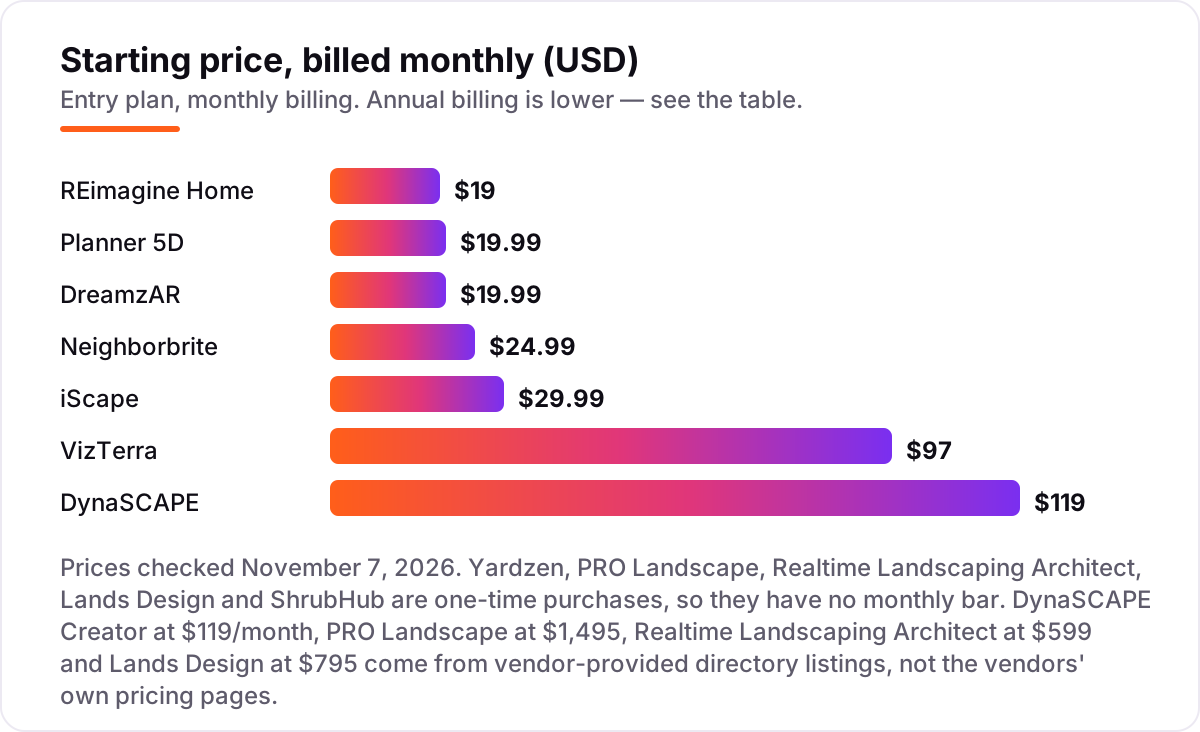
Take a homeowner redesigning one backyard. On the DIY route, Planner 5D Premium costs $59.99 for the year, DreamzAR costs $199 for the year, REimagine Home costs $228 for a year at $19 a month, Neighborbrite Pro costs $299.88 for a year at $24.99 a month, and iScape Pro costs $299.99 for the year. The cheapest full-featured year is Planner 5D at $59.99, and the dearest subscription year is iScape at $299.99 — a $240 gap for tools that all produce a picture of the same yard.
The one-time route changes the math. Realtime Landscaping Pro costs $279 once and never bills again, so it beats every subscription by year two. Lands Design at $795 and PRO Landscape at $1,495 only make sense if you design yards every month; for a single backyard they are the most expensive options here, not the cheapest. The done-for-you route is dearer still: ShrubHub's front-and-back package is $297 once, while Yardzen's Essential package is $995 once — and neither includes a single plant, material or hour of installation, which is where the real money goes.
Three costs sit outside every number above. First, the platform trap: DreamzAR subscriptions are platform-specific, so a subscription bought on iOS does not carry to the web, and iScape's 2D and 3D modes need an iPhone or iPad. Second, the add-ons: ShrubHub charges extra for revisions and irrigation plans, and DynaSCAPE charges extra for Manage360 estimating and Color rendering. Third, the watermark: Neighborbrite Pro at $24.99 a month still watermarks your images, and removing it needs Business at $49.99 a month. If you run a landscaping business rather than a single yard, the visibility tools differ too — see our local SEO service for how firms get found on Google Maps.
Know the difference: AI restyle vs measured plan
The confusion in this category is between a picture and a plan. An AI restyle — REimagine Home, Neighborbrite, DreamzAR's photo mode — generates a pretty image of your yard in a new style. It is inspiration: it shows what a modern patio or cottage garden could look like, but it has no measurements, no plant spacing and no material list, and nobody should hand it to a contractor and expect a matching build.
A measured plan — DynaSCAPE, Lands Design, VizTerra, PRO Landscape, Realtime Landscaping Architect — is a document: dimensions, elevations, plant schedules and material takeoffs a crew can price and build from. It costs more and takes longer to learn, but it is the only output that survives contact with a real build. The AR tools sit in between: iScape places real plants with zone data onto your actual yard, which is closer to a plan than a restyle, but still not a construction document.
There is a third category worth knowing: done-for-you services. ShrubHub and Yardzen are not software you operate at all — a human designer produces the plan. They cost $297 to $995 for the design alone, and the build is priced separately. If you want to tinker yourself, buy software; if you want a finished plan without learning a tool, buy a service; and never confuse one for the other when comparing prices.
Quick comparison: tool type by need
| Buyer | Best pick | Why |
|---|---|---|
| Homeowner on a budget | Planner 5D | Free Basic plan, Premium is $19.99/month or $59.99/year |
| Contractor selling on site | iScape | AR designs on the real yard, Pro is $29.99/month |
| Fast AI ideas with AR | DreamzAR | Photo restyles plus an AR walkthrough, $19.99/month |
| Instant photo restyles | REimagine Home | Designs in seconds, 5 free, then $19/month |
| Cheapest done-for-you plan | ShrubHub | Human-designed 3D plan from $297 one-time |
| Premium done-for-you plan | Yardzen | Designer-made plan with CAD drawings, from $995 one-time |
| Design firm selling plans | DynaSCAPE | Measured CAD plans and takeoffs, Creator is $119/month |
Mistakes to avoid
- Buying on the monthly price and forgetting the year. A $19-a-month subscription is $228 a year, and a $29.99-a-month subscription is $359.88 a year. Compare the annual figure, or the one-time price, before you commit.
- Trusting an AI restyle as a buildable plan. AI restylers suggest plants that would not survive your climate and structures that would not fit your budget. Treat them as inspiration, and get a measured plan before anyone digs.
- Ignoring the platform limit. iScape's 2D and 3D modes are iOS only, PRO Landscape and Realtime Landscaping Architect are Windows only, and Lands Design needs Rhino or AutoCAD. Check your devices before you pay.
- Paying for a pro tool for one yard. DynaSCAPE at $119 a month and VizTerra at $97 a month are priced for firms that bill clients for plans. A homeowner with one backyard gets the same picture cheaper from Planner 5D or DreamzAR.
- Forgetting the square-footage limit on design services. ShrubHub's base package covers a limited area, and larger lots cost extra. Measure your yard and confirm the price covers it before you order.
How we chose
We checked each vendor's own pricing page on November 7, 2026 and recorded the starting price exactly as shown, including the annual-billing figure where the page lists one, and we ranked the tools by fit for the most common buyer — a homeowner designing one yard — not by brand size. Four prices come from vendor-provided directory listings rather than the vendor's own pricing page: DynaSCAPE Creator at $119 a month, PRO Landscape at $1,495 one-time, Realtime Landscaping Architect at $599 one-time and Lands Design at $795 one-time. Two prices carry a note: REimagine Home's own pricing page lists Essential at $19 a month while its page title still says plans start at $14, and Neighborbrite's $24.99 Pro price comes from the vendor's in-app billing page captured in October 2026, while some roundups quote about $15 a month. Only Planner 5D carries a review rating, because it is the only tool here with a current G2 listing we could verify on November 7, 2026; the other tools either have no G2 listing or only stale, thin ones, and we would rather show no rating than a stale one. No vendor paid for a place in this list, and none of the links here are affiliate links.
What to do next
Start with the free plan or trial of your top pick and run it on photos of your own yard. Check that the plants it suggests grow in your zone and that you can export something useful before you pay for a year. If the design is sorted but new customers are not finding your business, our local SEO service handles the visibility side — or compare providers in our guide to marketing software for contractors. Once your tools are in place, find out what's holding your rankings back.
Your stack only works if people find you
SerpAstra fixes what keeps your site off page one and makes it easy for AI assistants to recommend.
Get a free audit→Sources we checked (13)
- Planner 5D pricing — planner5d.com/pricing (checked November 7, 2026)
- Planner 5D reviews — g2.com/products/planner-5d/reviews (checked November 7, 2026)
- iScape pricing — iscapeit.com/faqs (checked November 7, 2026)
- DreamzAR pricing — dreamzar.app/faq (checked November 7, 2026)
- REimagine Home pricing — reimaginehome.ai/pricing (checked November 7, 2026)
- Neighborbrite pricing — neighborbrite.com (in-app billing page, checked October 13, 2026)
- ShrubHub pricing — shrubhub.com (checked November 7, 2026)
- Yardzen pricing — yardzen.com (checked November 7, 2026)
- VizTerra pricing — structurestudios.com/blog/vizterra-vs-pro-landscape (checked November 7, 2026)
- DynaSCAPE pricing — softwarefinder.com/field-service/dynascape (checked November 7, 2026)
- PRO Landscape pricing — softwareworld.co/software/pro-landscape-reviews (checked November 7, 2026)
- Realtime Landscaping Architect pricing — archivinci.com/blogs/top-landscape-design-software (checked November 7, 2026)
- Lands Design pricing — sourceforge.net/software/compare/Lands-Design-vs-PRO-Landscape (checked November 7, 2026)
Shamim
Founder of SerpAstra
A full-stack SEO and digital marketer who spends most days on Local SEO for dental practices, AI search visibility and lead generation.
Frequently asked questions
What is the best ai landscape design software?
Planner 5D is the best fit for most homeowners: a free plan, Premium at $19.99 a month, and easy 2D-to-3D modeling. iScape is the better pick for contractors who show AR designs on site, and Yardzen suits buyers who want a professional designer to do the whole job.
How much does AI landscape design software cost?
Subscriptions run $19 to $119 a month, and one-time purchases run $149 to $1,495. A homeowner can start free on Planner 5D, iScape, REimagine Home or Neighborbrite, then pay $19 to $30 a month. Done-for-you design packages start at $197 at ShrubHub and $995 at Yardzen.
Can AI really design my yard, or is it just filters?
It depends on the tool. AI photo restylers like REimagine Home generate inspiration images, not buildable plans. AR apps like iScape place real plants with growing-zone data onto your actual yard, which is closer to real design. Pro CAD tools still need a human making the decisions.
Is there a free AI landscape design software?
Yes, with limits. Planner 5D has a free Basic plan with unlimited projects and half the catalog. iScape has a limited free tier with 2 saved designs, REimagine Home gives 5 free designs, and Neighborbrite allows 4 watermarked designs a day. The pro CAD tools offer trials instead of free plans.
Which tool is best for a landscape design business?
For client presentations on site, iScape's AR is hard to beat. For measured plans and proposals, DynaSCAPE is the industry-standard CAD choice, while PRO Landscape's photo-based proposals win over clients who need to see the before-and-after. Many firms use one of each.
Are the plant suggestions accurate for my climate?
The pro tools and iScape use growing-zone data and do reasonably well. AI restylers prioritize pretty pictures over horticultural sense and may suggest plants that would die in your yard within a season. Always cross-check suggestions against your local extension service or nursery.
Free SEO and AI visibility audit
Find out what is holding your rankings back
Send us your site. Within 2 business days you get a written audit, an AI visibility check and a short fix list ranked by impact. Free, with no contract attached.
Request my free audit→Related guides
 Design, Video & Creative10 Best Free CAD Software for Home Design in 2026, ComparedCompare the 10 best free cad software for home design options on price, free plans, 3D views and rendering, with every price checked November 4, 2026.Read guide →
 Design, Video & Creative9 Best CAD Software for Architecture in 2026, ComparedCompare the 9 best cad software for architecture in 2026 on price, BIM, drafting and free plans, with prices checked November 4, 2026 for US firms.Read guide →
 Digital Marketing & Ads7 Best Marketing Software for Contractors in 2026, ComparedCompare the 7 best marketing software for contractors on price, reviews and trade-specific features, with every price checked November 5, 2026.Read guide →