
10 Best AI-Powered Video Ad Editing Software in 2026, Compared
The 10 best AI-powered video ad editing software tools compared with real prices, free plans and AI features, ranked for small teams making video ads in 2026.
 Shamim Mia, Founder, SerpAstraLast verified November 4, 202610 min read
We compare pricing pages, documentation and public reviews. We never accept payment for rankings.

Key takeaways
- Descript is the best all-round pick for talking-head ads at $24/month billed monthly ($16 billed annually); CapCut is the cheapest full editor at $19.99/month, and Animoto is the cheapest paid entry at $9/month billed annually.
- The single most important buying factor is the meter: credit allowances, export caps and watermark rules decide the real cost, not the sticker price.
- Every price below was checked on the vendor's own pricing page on November 4, 2026, except VEED, Lumen5 and Animoto, whose pages render prices client-side — those three figures come from recent third-party reads of the vendor pages.
- Free plans exist — CapCut, VEED, Runway, OpusClip, Lumen5 and Animoto all have one — but watermark-free 1080p exports start at $9–$19 a month.
On this page
Quick comparison
| Tool | Best for | Starting price | Free plan |
|---|---|---|---|
| Descript | Solo creators and small marketing teams who edit talking-head ads and want to cut video by editing a transcript | $16/mo (annual) | Yes (1 hr/mo) |
| CapCut | Social-first creators and small teams making vertical video ads for TikTok, Reels and Shorts on a tight budget | $19.99/mo | Yes (free) |
| VEED | Small marketing teams that want a browser-based editor with auto-captions, templates and brand kits for ad variants | $12/mo (annual) | Yes (watermarked) |
| Adobe Premiere Pro | In-house video editors and agencies that need full timeline control, color and audio for polished campaign ads | $22.99/mo (annual) | No (7-day trial) |
| Runway | Creative teams that need AI-generated b-roll and generative edits for ads when there is no shoot footage | $12/mo (annual) | Yes (125 credits) |
| InVideo | Small teams that want to turn a prompt or script into a finished video ad without touching a timeline | $10/mo (annual) | No |
| Pictory | Content marketers turning blog posts, articles and scripts into short captioned video ads | $25/mo (annual) | No (14-day trial) |
| OpusClip | Podcasters and creators repurposing long recordings into short vertical ad clips for social feeds | $15/mo | Yes (60 credits) |
| Lumen5 | Marketing teams turning written content into branded slideshow-style video ads without filming anything | $19/mo (annual) | Yes (5 videos) |
| Animoto | Small businesses and nonprofits that need quick slideshow-style video ads from photos and clips | $9/mo (annual) | Yes (720p) |
Make one of these tools?
We re-check this list every quarter. Send a correction, request a review, or ask about a clearly labeled sponsored spot.
Request a listingThe best video ad editing software

Descript
Best for: Solo creators and small marketing teams who edit talking-head ads and want to cut video by editing a transcript
Descript is the fastest way to cut a talking-head ad because the transcript is the timeline. Delete a sentence and the clip is gone; drag a paragraph and the scene moves with it. Studio Sound cleans up noisy audio in one click, filler words disappear automatically, and the AI eye contact tool fixes wandering gazes from a webcam recording.
The catch is the meters. Hobbyist gives you 10 media hours and 400 AI credits a month, and you cannot buy top-ups on that plan, so a heavy month forces an upgrade to Creator at $24 a month billed annually. There is also no true timeline for frame-level work. Buy Descript when the ad is mostly a person talking to camera; pair it with a timeline editor when it is not.
What we like
- Edit video by editing the transcript — deleting a sentence cuts the clip, which makes ad rough cuts very fast
- Studio Sound, filler-word removal and AI eye contact are included from Hobbyist, with 4K export from Creator
- Underlord AI assistant drafts scripts, suggests cuts and generates B-roll without leaving the editor
Watch out for
- Hobbyist caps at 10 media hours and 400 AI credits a month, with no top-ups — heavy months force an upgrade to Creator
- No true timeline editor: frame-level cuts and complex motion graphics still need a traditional editor

CapCut
Best for: Social-first creators and small teams making vertical video ads for TikTok, Reels and Shorts on a tight budget
CapCut is the cheapest route to a finished social ad, and the free tier does most of the work: a full multi-track timeline, keyframes, chroma key and 1080p export with no watermark on basic edits. Pro adds auto captions, background removal, camera tracking, 1,200 AI credits a month and a library of more than 12 million royalty-free assets, all for $19.99 a month.
Two honest caveats. CapCut moved several AI tools behind Pro during 2025 and 2026, so the free tier keeps shrinking, and the web pricing page calls its prices reference only — the final figure appears after sign-in. US creators should also know the app has faced availability disruptions under the ByteDance regulations. For vertical social ads on a budget, nothing else here matches it.
What we like
- The most generous free editor here: multi-track timeline, keyframes, chroma key and 1080p export at $0
- Auto captions, background remover, camera tracking and a huge template and stock library on Pro
- Desktop, mobile and web apps share projects, and TikTok publishing is built in
Watch out for
- Auto captions, background removal and other AI tools moved behind Pro — the free tier shrank in 2025 and 2026
- CapCut labels its web prices as reference only; the final price, taxes and offers appear after sign-in

VEED
Best for: Small marketing teams that want a browser-based editor with auto-captions, templates and brand kits for ad variants
VEED is the browser editor for teams that ship ad variants all week. Auto-subtitles are among the most accurate in this list, caption styles save to a brand kit, and platform presets resize one edit to every social format without rebuilding the timeline. Text-based editing, AI avatars, voice cloning and translation cover the whole workflow in a single tab.
The trade-off is the browser. Long or high-resolution projects can slow down, and a stable connection is essential because nothing runs locally. Lite also caps exports at 1080p and limits monthly export minutes, so teams publishing daily will need Pro. If your ads are short, captioned and platform-specific, VEED is the quickest path from script to published post.
What we like
- Auto-subtitles are among the most accurate here, with one-click caption styles saved to a brand kit
- Text-based editing, AI avatars, voice cloning and translation cover the whole ad workflow in one tab
- Platform presets resize one edit to every social format without rebuilding the timeline
Watch out for
- Browser-based, so long or high-resolution projects can slow down and need a stable connection
- Lite caps exports at 1080p and limits monthly export minutes — heavy ad volume needs Pro

Adobe Premiere Pro
Best for: In-house video editors and agencies that need full timeline control, color and audio for polished campaign ads
Premiere Pro is the deepest editor in this list, and it shows in the finished ad: frame-accurate cuts, color grading, audio mixing and masking in one app, plus AI tools like text-based editing, Generative Extend, speech enhancement and auto captions. The single-app plan also bundles Adobe Express Premium, Frame.io and 100 GB of cloud storage.
It is also the hardest to learn and the most demanding on hardware. Panels, proxies and sequence settings take weeks to master, and 4K timelines lag on laptops without a dedicated GPU. The 25 generative credits a month run out fast on AI-heavy work. Buy Premiere when ads are a core output and you have an editor on staff; for quick social cuts, the browser editors are faster.
What we like
- The deepest editor in this list: frame-accurate timeline, color, audio mixing and masking in one app
- AI features include text-based editing, Generative Extend, speech enhancement and auto captions
- Bundles Adobe Express Premium, Frame.io and 100 GB of cloud storage, and syncs with After Effects and Photoshop
Watch out for
- The steepest learning curve here — panels, proxies and sequence settings take weeks to learn
- Subscription only, with no perpetual licence; the 25 generative credits a month run out fast on AI-heavy work

Runway
Best for: Creative teams that need AI-generated b-roll and generative edits for ads when there is no shoot footage
Runway is the tool for ads that need footage you never shot. Gen-4.5 turns a text prompt or a still image into a cinematic clip, and Aleph edits existing footage with prompts — remove an object, restyle a scene, extend a shot — without a reshoot. Standard includes every AI model, 4K upscaling and watermark-free exports for $15 a month.
The credit meter is the whole story. Standard's 625 credits buy about 52 seconds of flagship Gen-4.5 video a month, and failed generations cost credits too, so a few rounds of iteration can eat the allowance. Output is also inconsistent on hands and multi-person scenes. Use Runway for b-roll and hero shots, not as your only editor.
What we like
- Gen-4.5 text-to-video and image-to-video create cinematic b-roll no stock library can match
- Aleph edits existing footage with prompts — remove objects, restyle scenes, extend shots
- 4K upscaling, no watermark and all AI image and video models included from Standard
Watch out for
- Credit meter: Standard's 625 credits buy about 52 seconds of flagship Gen-4.5 video a month, and retries cost credits too
- Generative output is inconsistent — complex hands, multi-person scenes and exact product text often need several attempts

InVideo
Best for: Small teams that want to turn a prompt or script into a finished video ad without touching a timeline
InVideo is the prompt-first option: describe the ad, and its agents script it, generate the footage and assemble the edit. Starter costs $20 a month and includes 400 credits, every generation model — Seedance, Veo and Kling — plus 100 iStock assets a month and watermark-free exports. No timeline skills are needed at any point.
The credit math needs attention. A minute of Pro-mode AI video costs about 80 credits, so one complex ad can consume a large share of the monthly allowance, and credits do not roll over. InVideo also rebuilt its plans in October 2026, so older reviews quote prices that no longer exist. It is the right pick when speed matters more than frame-level control.
What we like
- Prompt-to-video with agents that script, generate and edit the ad from a single brief
- Access to Seedance, Veo and Kling models plus a large stock library and 100 iStock assets a month on Starter
- Watermark-free exports and unlimited video creation on every paid plan
Watch out for
- Credit meter: a minute of Pro-mode AI video costs about 80 credits, so one complex ad can eat a big share of the monthly allowance
- Credits do not roll over, and InVideo can change model credit costs without notice

Pictory
Best for: Content marketers turning blog posts, articles and scripts into short captioned video ads
Pictory turns written content into video faster than any timeline editor in this list. Paste a script, article URL or slides and it builds scenes with Getty and Storyblocks visuals, captions and an ElevenLabs voice in minutes. Starter costs $29 a month billed monthly and includes 200 video minutes a month at 1080p.
The stock footage is matched by keyword rather than understood from the script, so the visuals can feel generic and miss the point of a scene — plan on swapping a few clips by hand. There are also two meters to track: video minutes and AI credits. For marketers repurposing articles into short captioned ads, it is the fastest tool here.
What we like
- Paste a script, article URL or slides and Pictory builds scenes with visuals, captions and an AI voice in minutes
- Getty and Storyblocks footage plus ElevenLabs voices keep the output looking and sounding professional
- AI credits roll over month to month and never expire while the subscription is active
Watch out for
- Stock footage is matched by keyword, so the visuals can feel generic and miss the script's intent
- Two separate meters — video minutes and AI credits — make the real cost harder to predict than a flat plan

OpusClip
Best for: Podcasters and creators repurposing long recordings into short vertical ad clips for social feeds
OpusClip does one job and does it well: it watches a long recording, finds the strongest moments, scores them for virality and rebuilds them as captioned vertical clips for Shorts, TikTok and Reels. One credit equals one minute of source video, so the $15 Starter plan processes 150 minutes a month and auto-posts the finished clips.
Starter is thin in two ways: it is monthly-only with no annual discount, and it exports 9:16 clips only — no square or landscape. The social scheduler and Premiere and DaVinci exports need Pro at $29 a month. If your ads start as a podcast, webinar or long video, OpusClip turns one recording into a week of social clips.
What we like
- AI finds the strongest moments in a long video, scores them for virality and rebuilds them as captioned vertical clips
- One credit equals one minute of source video, so the $15 Starter plan covers 150 minutes a month
- Auto-posts clips to Shorts, TikTok and Reels, with a virality score to triage what to publish first
Watch out for
- Starter is monthly-only with no annual discount, and exports 9:16 clips only — no square or landscape
- No social scheduler on Starter; scheduling and Premiere/DaVinci export need Pro at $29 a month

Lumen5
Best for: Marketing teams turning written content into branded slideshow-style video ads without filming anything
Lumen5 is the blog-to-video tool for teams that never film anything. Paste an article and it composes scenes from stock visuals and music, adds an AI voiceover and applies your brand kit automatically. Basic costs $29 a month billed monthly and includes unlimited videos with no Lumen5 branding, though exports cap at 720p.
The 720p ceiling is the catch: 1080p needs Starter at $59 a month billed annually. AI voiceover is also metered tightly at 20 minutes a month on Basic, and unused minutes do not roll over. And when the AI picks the wrong visual for a scene, overriding it takes manual work. For written-content teams, it is the simplest route to a branded ad.
What we like
- Blog-to-video in one click: paste text and Lumen5 composes scenes, stock visuals and music automatically
- Unlimited videos on every paid plan, with brand kits, custom colors and fonts from Starter
- Talking-head videos from a transcript, plus 1,000+ AI voices on the entry plan
Watch out for
- Basic caps exports at 720p — 1080p needs Starter at $59 a month billed annually
- AI voiceover is metered tightly: 20 minutes a month on Basic, and unused minutes do not roll over

Animoto
Best for: Small businesses and nonprofits that need quick slideshow-style video ads from photos and clips
Animoto is the simplest tool in this list: drag photos and clips into a template, pick music from a large royalty-free library, and get a finished slideshow-style ad in minutes. The free plan is genuinely usable for testing, and Basic removes the watermark and unlocks 1080p downloads for $9 a month billed annually — the cheapest paid entry here.
Simplicity is also the limit. Editing is block-based, with no frame-level cuts and no real timeline, and templates are only lightly editable. Basic is thin too: three fonts and 50 music tracks, with branding tools held for Professional. Buy Animoto when the ad is photos, text and music; buy a timeline editor when the ad needs precise cuts.
What we like
- The simplest tool here: drag photos and clips into a template and get a finished ad in minutes
- Large royalty-free music library and Getty stock access, with unlimited video creation on every plan
- Watermark-free 1080p downloads from the $9-a-month annual Basic plan — the cheapest paid entry in this list
Watch out for
- Block-based editing only — no frame-level cuts, no real timeline, and templates are only lightly editable
- The cheapest plan is thin: 3 fonts and 50 music tracks on Basic, with branding tools held for Professional
The best AI-powered video ad editing software turns a script, a long recording or a rough clip into a finished ad without a full editing suite. This list ranks 10 tools by fit for the most common buyer — a small marketing team or solo creator shipping video ads every week — with every starting price checked on the vendor's pricing page on November 4, 2026.
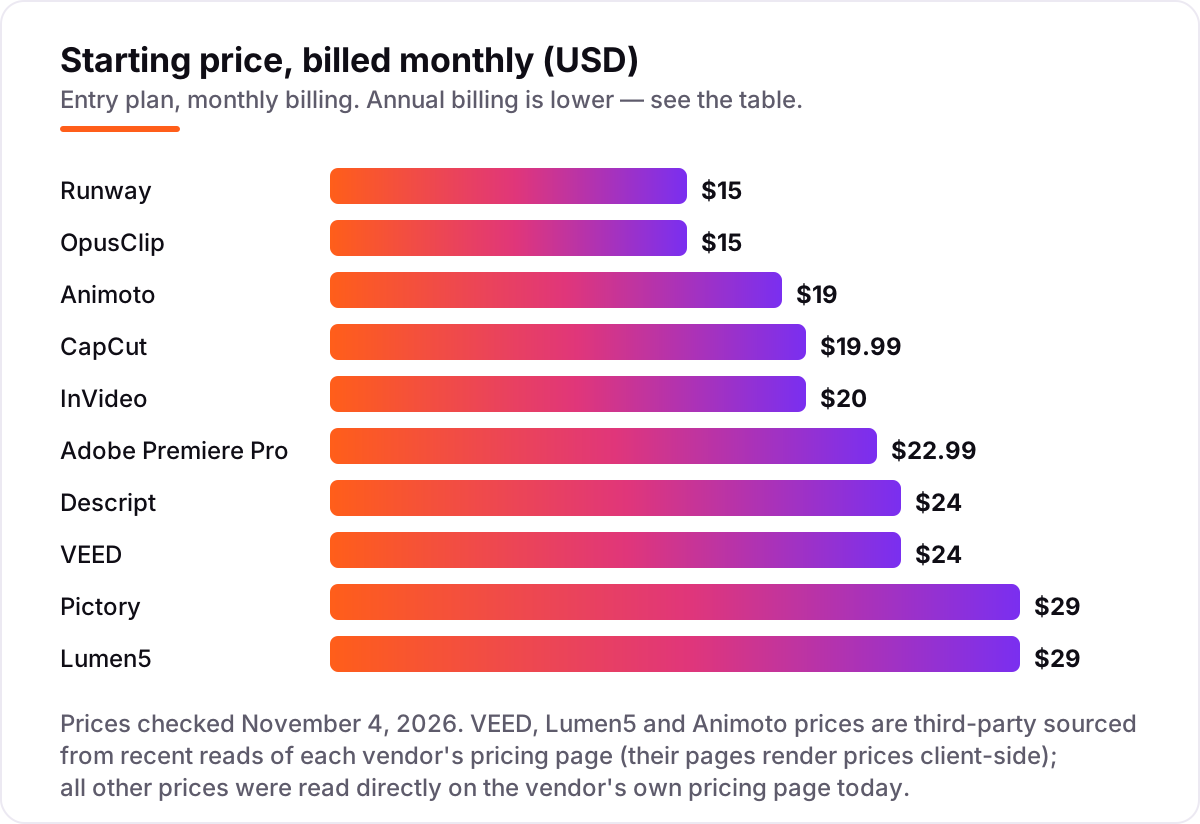
Prices run from $9 a month billed annually to $29 a month billed monthly at the entry level, and the cheapest tool is not always the cheapest ad: credit meters, export caps and watermark rules decide the real cost. The cards below show the starting price, the free plan and the catch for each tool.
How to choose the best AI-powered video ad editing software
- Start from the footage you have. If you already shoot talking-head video, pick a transcript or timeline editor like Descript or Premiere Pro. If you have no footage, pick a generator like Runway or InVideo, or a repurposer like Pictory or Lumen5.
- Check the meter before the price. Credits, media hours, video minutes and export minutes all cap what you can make. A $15 plan that covers 52 seconds of generated video is not cheaper than a $24 plan with unlimited exports.
- Check export quality on the entry plan. Several tools cap the cheapest plan at 720p or watermark the output. Watermark-free 1080p is the minimum for a paid ad.
- Check where the AI actually lives. Auto captions may be free while background removal, voice cloning or 4K export sit on a higher plan. Match the plan to the features, not the headline.
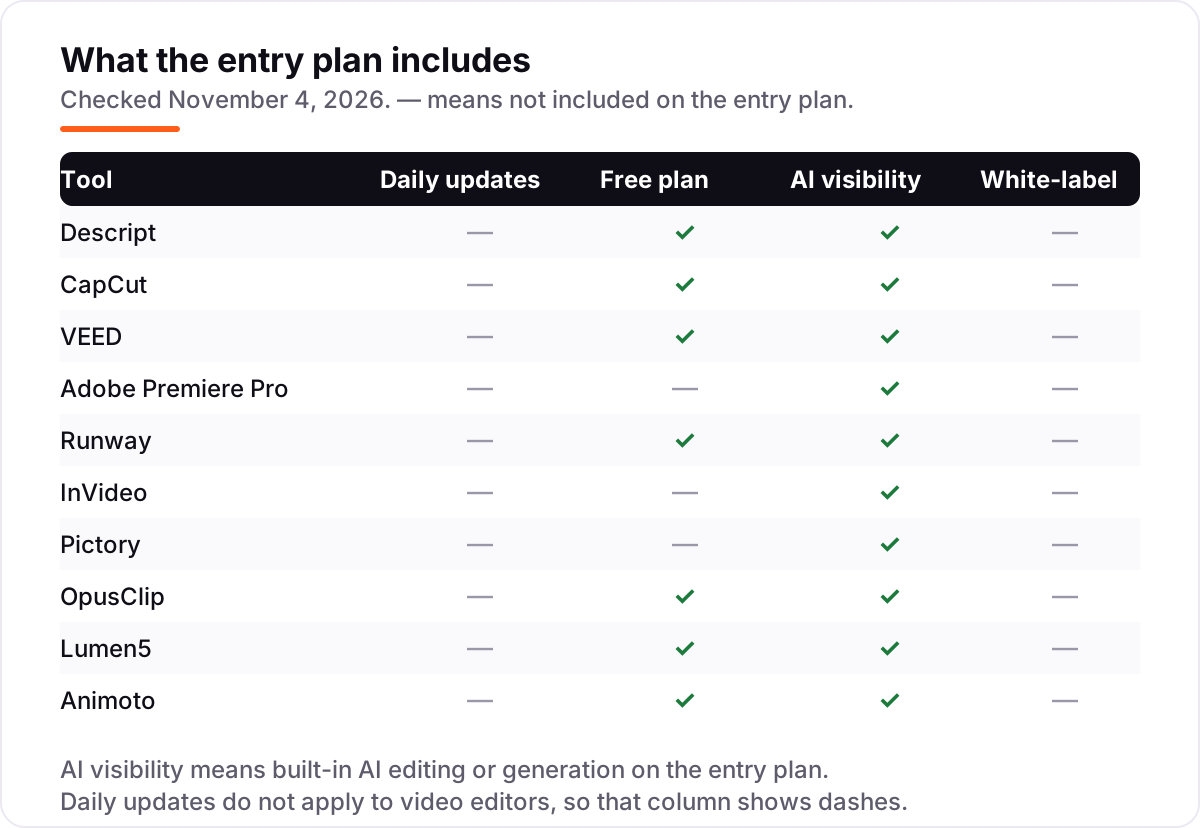
- Try the free plan with a real ad. Every tool here except InVideo and Pictory has a free plan or a free trial. Run one real ad through it before paying, and check the export against the landing page it will point to.
Before you publish the landing page your ad points to, run its title through the free SERP snippet preview tool — it shows exactly how the page will look in Google.
Video ad editing software pricing: what you will actually pay
Take a solo creator making four short ads a month. Descript Hobbyist on annual billing costs $16 a month, or $192 a year, and covers 10 media hours and 400 AI credits a month — enough for four talking-head ads with room to spare. CapCut Pro costs $179.99 a year and adds 1,200 AI credits a month plus 4K export. VEED Lite on annual billing is $12 a month, or $144 a year, the cheapest of the three for captioned social ads.
The meter changes the math on the generative tools. Runway Standard at $12 a month billed annually gives 625 credits, about 52 seconds of flagship Gen-4.5 video — so four 15-second AI b-roll clips would use the whole month. OpusClip Starter at $15 a month processes 150 minutes of source video, which is roughly ten podcast episodes turned into clips. The worked example is simple: pay for the meter you will actually use, not the cheapest sticker price.
Know the difference: AI video editors vs AI video generators
The label "AI-powered" hides three different jobs. Editors work with footage you already have: Descript, CapCut, VEED and Premiere Pro cut, caption and enhance real recordings. Generators create footage from nothing: Runway turns a prompt into b-roll, and InVideo turns a brief into a finished video. Repurposers sit between the two: Pictory and Lumen5 assemble ads from text and stock, OpusClip cuts long recordings into shorts, and Animoto builds slideshow ads from photos.
The confusion costs money. A generator's monthly price buys a small pool of credits, not unlimited editing — Runway's Standard plan covers about 52 seconds of flagship video a month. An editor's price buys the timeline, and the AI is mostly a time-saver on top. Before you buy, decide which job you are paying for: cutting footage you shot, generating footage you do not have, or repurposing content you already own.
Quick comparison: tool type by need
| Buyer | Best pick | Why |
|---|---|---|
| Solo creator, talking-head ads | Descript | Edit the transcript, $16/month billed annually |
| Social-first, tight budget | CapCut | Free tier plus Pro at $19.99/month |
| Browser-based ad variants | VEED | Captions and brand kits, $12/month billed annually |
| Polished campaign ads | Adobe Premiere Pro | Deepest timeline, $22.99/month annual plan |
| AI-generated b-roll | Runway | Gen-4.5 footage, $12/month billed annually |
| Prompt-to-video ads | InVideo | No timeline needed, $10/month billed annually |
| Script-to-video repurposing | Pictory | Article to captioned video, $25/month billed annually |
| Long video to short clips | OpusClip | Virality-scored clips, $15/month |
| Blog-to-video, no filming | Lumen5 | One-click scenes, $19/month billed annually |
| Simplest slideshow ads | Animoto | Photos plus template, $9/month billed annually |
How we chose
We checked each vendor's own pricing page on November 4, 2026 and recorded the starting price exactly as shown, including the annual-billing figure where the page lists one. Three prices are third-party sourced rather than read directly: VEED, Lumen5 and Animoto render their prices client-side, so their figures come from recent third-party reads of each vendor's pricing page, and we have marked them as such here rather than presenting them as directly verified. Ratings come from G2, checked today; CapCut has no G2 product page, so it carries no rating. We ranked the tools by fit for the most common buyer — a small team or solo creator making video ads every week — not by brand size. No vendor paid for a place in this list, and none of the links here are affiliate links.
What to do next
Start with the footage you have: talking-head video points to Descript, no footage points to Runway or InVideo, and written content points to Pictory or Lumen5. Then run one real ad through the free plan or trial of your top pick and check the export quality, the captions and the credit cost before you pay. If the ad points to a page that does not rank, our monthly SEO service fixes that side of the funnel. Once your tools are in place, find out what's holding your rankings back.
Your stack only works if people find you
SerpAstra fixes what keeps your site off page one and makes it easy for AI assistants to recommend.
Get a free audit→Sources we checked (19)
- Descript pricing — descript.com/pricing (checked November 4, 2026)
- Descript on G2 — 4.6/5, 934 reviews (checked November 4, 2026)
- CapCut pricing — capcut.com/pricing (checked November 4, 2026)
- VEED pricing — veed.io/pricing (checked November 4, 2026)
- VEED on G2 — 4.6/5, 2,192 reviews (checked November 4, 2026)
- Adobe Premiere Pro pricing — adobe.com (checked November 4, 2026)
- Adobe Premiere Pro on G2 — 4.5/5, 1,697 reviews (checked November 4, 2026)
- Runway pricing — runway.com/pricing (checked November 4, 2026)
- Runway on G2 — 4.1/5, 106 reviews (checked November 4, 2026)
- InVideo pricing — invideo.io/pricing (checked November 4, 2026)
- InVideo on G2 — 4.2/5, 184 reviews (checked November 4, 2026)
- Pictory pricing — pictory.ai/pricing (checked November 4, 2026)
- Pictory on G2 — 4.6/5, 82 reviews (checked November 4, 2026)
- OpusClip pricing — opus.pro/pricing (checked November 4, 2026)
- OpusClip on G2 — 4.6/5, 124 reviews (checked November 4, 2026)
- Lumen5 pricing — lumen5.com/pricing (checked November 4, 2026)
- Lumen5 on G2 — 4.5/5, 69 reviews (checked November 4, 2026)
- Animoto pricing — animoto.com/pricing (checked November 4, 2026)
- Animoto on G2 — 4.3/5, 94 reviews (checked November 4, 2026)
Shamim
Founder of SerpAstra
A full-stack SEO and digital marketer who spends most days on Local SEO for dental practices, AI search visibility and lead generation.
Frequently asked questions
What is the best AI-powered video ad editing software in 2026?
Descript is the best all-round pick for talking-head ads: transcript editing, Studio Sound and AI eye contact from $16/month billed annually. CapCut is the cheapest full editor at $19.99/month, and VEED is the best browser option at $12/month billed annually. For polished campaign ads, Adobe Premiere Pro is still the deepest editor.
How much does AI video ad editing software cost?
Entry plans run from $9 to $29 a month billed annually. Animoto Basic is $9, Runway Standard and VEED Lite are $12, Descript Hobbyist is $16, and Pictory Starter and Lumen5 Basic are $25 and $19. The sticker price is only part of it: credit meters, export caps and watermark rules decide what one finished ad actually costs.
Is there a free AI video ad editor?
Yes, with limits. CapCut, VEED, Runway, OpusClip, Lumen5 and Animoto all have free plans, and Descript has a free tier too. Most free plans watermark exports or cap resolution at 720p. CapCut's free tier is the most generous — full basic editing and 1080p export — but several AI tools moved behind Pro during 2025 and 2026.
Can AI video editors make ads without filming anything?
Yes. Runway generates b-roll from a text prompt, InVideo builds a whole ad from a brief, and Pictory and Lumen5 turn articles into captioned videos. OpusClip and Animoto still need your footage or photos. Generative tools are best for b-roll and hero shots; for product shots and exact branding, real footage still wins.
What is the difference between an AI video editor and an AI video generator?
An editor works with footage you already have — cutting, captioning and enhancing it — while a generator creates new footage from a text prompt or image. Descript, CapCut, VEED and Premiere Pro are editors; Runway and InVideo are generators. Pictory, Lumen5, OpusClip and Animoto sit between the two, assembling ads from text, stock or your recordings.
Do I need Premiere Pro to make professional video ads?
No, not for most social ads. Descript, VEED and CapCut produce clean, captioned, on-brand ads without a timeline expert, and they are faster for short formats. Premiere Pro earns its place when ads need frame-accurate cuts, color grading, audio mixing or After Effects work — the kind of polish a campaign, not a single social post, demands.
What should I check before paying for an AI video editor?
Four things: what the meter counts — credits, minutes or exports — and whether it rolls over; whether watermark-free 1080p export is included on the entry plan; whether the AI features you need sit on that plan or a higher one; and whether the price is monthly or annual billing. All four vary widely across the tools in this list.
Free SEO and AI visibility audit
Find out what is holding your rankings back
Send us your site. Within 2 business days you get a written audit, an AI visibility check and a short fix list ranked by impact. Free, with no contract attached.
Request my free audit→Related guides
 Digital Marketing & Ads10 Best AI Video Ad Creation Software in 2026, ComparedThe 10 best ai video ad creation software tools compared on price, credits, avatars and free plans, with every price checked November 4, 2026.Read guide →
 AI, Data & Analytics12 Best AI Tools for Video Content Creation in 2026, Compared12 best AI tools for video content creation compared with real prices, free plans and G2 ratings, so you can pick the right video maker without overpaying.Read guide →
 AI, Data & Analytics8 Best AI Tools for Content Creators in 2026 (Free and Paid, Compared)The 8 best ai tools for content creators, compared on price, free plans and strengths — writing, design, video. Prices checked on vendor sites, Nov 2, 2026.Read guide →