
10 Best AI Tools for Social Media Content Creation in 2026, Compared
Compare the 10 best ai tools for social media content creation on price, free plans and AI features, with every price checked November 5, 2026.
 Shamim Mia, Founder, SerpAstraLast verified November 5, 202613 min read
We compare pricing pages, documentation and public reviews. We never accept payment for rankings.

Key takeaways
- Canva is the best fit for most creators at $18/month; Predis.ai follows at $32/month for AI-first ad and post creation, and Buffer at $6 a channel for simple scheduling.
- Buffer, Canva and InVideo all offer genuinely free plans — Buffer's covers 3 channels, Canva's covers design, and InVideo's covers watermarked video.
- The single most important buying factor is the limit that forces your next upgrade: credit caps, post caps and per-seat or per-channel billing decide what you actually pay, not the headline price.
On this page
Quick comparison
| Tool | Best for | Starting price | Free plan |
|---|---|---|---|
| Canva | Solo creators and small teams that want AI design, templates and scheduling in one place | $18/mo | Yes (free plan) |
| Predis.ai | Small brands that want AI to turn one idea into a finished ad, carousel or video | $32/mo | No (3-day trial) |
| Buffer | Solo creators and small teams that want simple, cheap scheduling across a few channels | $6/mo per channel | Yes (free plan) |
| Later | Instagram- and TikTok-first creators who plan their feed visually before posting | $25/mo | Yes (free plan) |
| Jasper | Marketing teams that need on-brand captions, ads and campaign copy at volume | $69/mo per seat | No (7-day trial) |
| Copy.ai | Small teams that want shared AI chat across OpenAI, Anthropic and Gemini models | $29/mo | No |
| Pictory | Bloggers and marketers who turn articles and scripts into captioned short videos | $29/mo | No (free trial) |
| InVideo | Creators who want AI to generate and edit short-form video from a prompt | $20/mo per seat | Yes (free plan) |
| Hootsuite | Established teams that want scheduling, listening and analytics in one enterprise platform | $99/mo per user | No (14-day trial) |
| Sprout Social | Larger teams that run social customer care and reporting from one inbox | $99/mo per seat | No (30-day trial) |
Make one of these tools?
We re-check this list every quarter. Send a correction, request a review, or ask about a clearly labeled sponsored spot.
Request a listingThe best AI tools for social media content creation

Canva
Best for: Solo creators and small teams that want AI design, templates and scheduling in one place
Canva is the design half of social content creation, and its AI tools now cover the rest too. Pro costs $18 a month, or $144 a year, for one person, and it unlocks premium templates, stock assets, Brand Kits, Magic Resize and the Magic Studio AI toolkit. The free plan is a real option for casual posting: it covers templates, basic AI tools and 5GB of storage.
The catch is the one-person limit. Pro covers a single user, so a second person means Business at $25 a month per person, and the AI credit caps mean heavy image and video generation needs the $100 a month AI add-on. Canva also schedules posts, but its calendar is thinner than Buffer or Later. Pick Canva when design is the bottleneck; pair it with Buffer when scheduling is.
What we like
- The largest template library here: thousands of social-sized templates for every network
- Magic Studio AI writes, resizes and removes backgrounds, and Magic Resize reflows one design to every format
- Brand Kits keep logos, fonts and colors consistent across every post
- A genuinely useful free plan covers casual posting with no time limit
Watch out for
- Pro covers one person only — a second person means Business at $25 a month per person
- AI image and video credits are capped each month, and heavy use needs the $100 a month AI add-on
- No native multi-channel scheduling calendar as deep as Buffer or Later

Predis.ai
Best for: Small brands that want AI to turn one idea into a finished ad, carousel or video
Predis.ai is the most AI-first tool in this list: type one idea and it returns a finished image, carousel, video or ad, complete with caption and hashtags. Core costs $32 a month, or $19 a month billed annually, and includes 1,300 credits a month — about 325 images or 33 videos — plus publishing to 10 channels and 60 competitor analysis runs a month.
Watch the credits. Video generation burns them 3 to 5 times faster than images, so a video-heavy month costs far more than the sticker price suggests, and auto-posting is not included on Core — it starts on Rise at $79 a month. The 3-day trial also needs a card and converts automatically. Pick Predis.ai when you want finished ads from a prompt; pick Canva when you want to design them yourself.
What we like
- Generates images, carousels, videos and ads from a single text prompt, with captions and hashtags included
- Competitor analysis shows what rivals in your niche are posting, included on the entry plan
- Publish to 10 channels from the Core plan, with brand styling applied automatically
- One credit system covers every image and video model, so you can switch formats without re-buying
Watch out for
- Credit-based billing: video generation burns credits 3–5x faster than images, so heavy video use gets pricey
- No auto-posting on the entry Core plan — scheduling automation starts on Rise at $79 a month
- The 3-day trial needs a card and converts automatically if you forget to cancel

Buffer
Best for: Solo creators and small teams that want simple, cheap scheduling across a few channels
Buffer is the simplest scheduler in this list, and its pricing is the most honest about what you pay for: channels, not seats. The free plan covers 3 channels with 10 scheduled posts each, and Essentials costs $6 a channel a month, or $5 billed annually, with unlimited scheduled posts, an AI assistant, a hashtag manager and first-comment scheduling.
The catch is the channel count. Three channels cost $18 a month on Essentials, five cost $30, and Essentials covers one user — a second person means Team at $12 a channel a month. Analytics are also thinner than Hootsuite or Sprout Social, with no listening or competitor benchmarks. Pick Buffer when you post to a few channels and want the cheapest reliable queue.
What we like
- The cheapest paid start here: $6 a channel a month, with a free plan for 3 channels
- Unlimited scheduled posts on paid plans, with an AI assistant that drafts and refines captions
- Per-channel pricing is transparent — you pay for the accounts you connect, not for seats
- Volume discounts cut the per-channel rate past 10 channels, down to $1 a channel past 50
Watch out for
- The bill grows with every channel: 5 channels cost $30 a month on Essentials, not $6
- Essentials covers one user — a second person means Team at $12 a channel a month
- Analytics are thinner than Hootsuite or Sprout Social, with no listening or competitor benchmarks

Later
Best for: Instagram- and TikTok-first creators who plan their feed visually before posting
Later grew up as an Instagram planner, and it still shows: the drag-and-drop grid preview lets you see how the feed will look before anything goes live, which no other tool here does as well. Starter costs $25 a month, or $18.75 billed annually, for one user, one social set of 8 profiles, 30 posts per profile a month, 5 AI credits and a Link in Bio page.
The limits are tight. Thirty posts per profile a month is about one a day, and Starter cannot buy extra social sets or users, so growth means jumping to Growth at $50 a month. Later also dropped X scheduling and never added Bluesky. Pick Later when the visual feed matters most; pick Buffer when you post across more networks.
What we like
- The best visual planner here: a drag-and-drop grid preview shows how the Instagram feed will look before you post
- One social set covers 8 profiles, so Instagram, TikTok, Facebook and more sit in a single plan
- Link in Bio landing page is bundled on every plan, with best-time-to-post suggestions
- AI captions and hashtag suggestions are built into the composer
Watch out for
- Starter caps at 30 posts per profile a month and 5 AI credits — a busy account outgrows it fast
- No X scheduling, and no Bluesky support, so those networks need another tool
- Starter cannot buy extra social sets or users, so growth means jumping to Growth at $50 a month

Jasper
Best for: Marketing teams that need on-brand captions, ads and campaign copy at volume
Jasper is the copywriter in this list, built for teams that need every caption, ad and post to sound like the same brand. Pro costs $69 a month per seat, or $59 billed annually, and includes the Canvas editor, 100-plus marketing agents, 2 Brand Voices, 5 Knowledge assets, 3 Audiences, AI image generation and editing, and unlimited words.
The catch is the per-seat math: three people cost $207 a month, not $69, and the Brand Voice and Knowledge caps mean a team with many brands hits the Business tier quickly. Jasper also does not schedule or publish anything — the copy still has to move into Buffer, Later or Hootsuite. Pick Jasper when brand consistency at volume is the job.
What we like
- Brand Voice keeps every caption, ad and post sounding like the same company
- Canvas editor and 100+ marketing agents cover social posts, ads, email and long-form in one workspace
- AI image generation and editing are included on Pro, so visuals and copy come from one seat
- Unlimited words on Pro — no word-count meter to watch while drafting
Watch out for
- Pro is priced per seat, so a 3-person team pays $207 a month, not $69
- Only 2 Brand Voices, 5 Knowledge assets and 3 Audiences on Pro — more needs custom-priced Business
- No scheduling or publishing: Jasper writes the copy, and another tool has to post it

Copy.ai
Best for: Small teams that want shared AI chat across OpenAI, Anthropic and Gemini models
Copy.ai rebuilt itself in 2026 as a go-to-market platform, and the self-serve entry is now a single Chat plan: $29 a month, or $24 billed annually, for five seats with unlimited words and unlimited chat projects. The draw is the model choice — OpenAI, Anthropic and Gemini inside one chat — plus prebuilt short-form frameworks that speed up ad variations and caption tests.
The gap is the jump after Chat. Workflow automation starts at $1,000 a month on Growth, so there is no mid-market plan, and there is no free plan or free trial listed on the pricing page — you pay $29 to try it. Copy.ai also does not schedule or publish. Pick it when five people need shared AI chat cheaply.
What we like
- Five seats included at $29 a month — most AI writers charge per seat, Copy.ai does not
- Switch between OpenAI, Anthropic and Gemini models inside one chat, so you are not locked to one model
- Unlimited words and unlimited chat projects on the Chat plan
- Prebuilt short-form copy frameworks speed up ad variations and caption testing
Watch out for
- Chat is only a chat interface with templates — no workflow automation until the $1,000 a month Growth tier
- No free plan and no free trial listed on the pricing page, so you pay $29 to try it
- No scheduling or publishing: copy still has to move into a scheduler by hand

Pictory
Best for: Bloggers and marketers who turn articles and scripts into captioned short videos
Pictory turns writing into video: paste a script, article or URL and it returns a captioned short built from licensed stock footage, with AI voiceover included. Starter costs $29 a month, or $25 billed annually, and includes 200 video minutes a month, 100 AI credits, 5 million Getty and Storyblocks clips, 1 brand kit and no watermark on exports.
The catches are in the fine print. Starter includes zero premium ElevenLabs voice minutes, so the best voices wait for Professional at $59 a month, and all fees are non-refundable — projects are deleted when you cancel unless you download them first. Pick Pictory when you have scripts and articles to repurpose into video.
What we like
- Turns a script, article or URL into a captioned video in minutes, with no editing skill needed
- Bundles up to 18 million licensed Getty and Storyblocks clips, 5 million on Starter
- AI voiceover and auto-captions are included on every plan, with no watermark on exports
- Edit video by editing the text transcript — cut a sentence and the clip goes with it
Watch out for
- Starter gives zero premium ElevenLabs voice minutes — voiceover quality is limited until Professional
- All fees are non-refundable, and projects are deleted when you cancel unless downloaded first
- Credit allowances changed during 2026, so the minute counts on the pricing page are estimates, not guarantees

InVideo
Best for: Creators who want AI to generate and edit short-form video from a prompt
InVideo rebuilt its plans in October 2026 around prompt-to-video agents: describe the video and an agent builds it, then you fix it in a timeline editor. Starter costs $20 a month per seat, or $10 billed annually, and includes 400 credits a month, the Seedance 2.0 Fast and Mini models, 100 premium stock clips and 200GB of storage.
Everything is metered in credits, and credits do not roll over — an unused month is wasted money — and Starter only gets the fast models and Lite agents. The free plan is genuinely free, with limited weekly credits and watermarked exports, so you can test the workflow before paying. Pick InVideo when AI-generated short video is the goal.
What we like
- Prompt-to-video agents build a full short video from one idea, with a timeline editor for fixes
- A genuinely free plan lets you generate and export before paying anything
- Annual billing halves the price: Starter drops from $20 to $10 a seat a month
- 4,000+ templates and a large stock library cover Reels, Shorts and TikTok formats
Watch out for
- Everything is metered in credits, and credits do not roll over — an unused month is wasted money
- Starter only gets the fast Seedance 2.0 models and Lite agents, not the full model lineup
- Free exports carry an InVideo watermark, and paid plans export without it only after you subscribe

Hootsuite
Best for: Established teams that want scheduling, listening and analytics in one enterprise platform
Hootsuite is the veteran of this list and still the deepest all-in-one platform: scheduling, a shared inbox, social listening, analytics and ads in one login. Professional costs $99 a user a month on annual billing and includes 1 user, 10 social accounts, unlimited scheduling, OwlyWriter AI, basic analytics and one monitoring stream.
The price is the problem. Ninety-nine dollars a user is the highest entry in this list, every extra seat costs the same again, and monthly billing costs more than the published annual rate — the figure only appears at checkout. Approvals and advanced analytics also wait for higher tiers. Pick Hootsuite when one team runs many profiles and needs listening.
What we like
- The deepest all-in-one platform here: scheduling, inbox, listening, analytics and ads in one login
- OwlyWriter AI drafts captions and suggests the best time to post, included on Professional
- G2's number one best software product for 2026, with the largest review base in this list
- Unlimited scheduling on every plan, with streams that watch keywords and mentions in real time
Watch out for
- $99 a user a month is the highest entry price here, and every extra seat costs the same again
- No free plan since March 2023 — only a 14-day trial, and monthly billing costs more than the published rate
- Approvals, advanced analytics and listening sit on higher tiers, so the entry plan is thinner than it looks

Sprout Social
Best for: Larger teams that run social customer care and reporting from one inbox
Sprout Social is the customer-care end of this list: its Smart Inbox pulls comments, mentions, reviews and DMs — including WhatsApp and Messenger — into one queue, and its reporting is the strongest here. Essentials costs $99 a seat a month, or $79 billed annually, for 1 seat, 5 social profiles, the publishing calendar and standard reports.
Essentials is a publishing-only tier, so the inbox and review management that make Sprout special wait for Standard at $199 a seat a month, and listening and Premium Analytics are paid add-ons on top. Three seats on Standard cost $597 a month billed annually. Pick Sprout when replies and reports matter as much as posting.
What we like
- The Smart Inbox merges comments, mentions, reviews and DMs, including WhatsApp and Messenger, into one queue
- The strongest reporting here: cross-network, competitor and paid-performance reports on every plan
- Salesforce and helpdesk integrations connect social care to the rest of the business
- Sentiment scoring and message spike alerts flag problems before they spread
Watch out for
- Per-seat pricing multiplies fast: 3 seats on Standard cost $597 a month billed annually
- Social listening and Premium Analytics are paid add-ons on top of the per-seat fee
- Essentials is a publishing-only tier, so the inbox and review management wait for Standard at $199 a seat
The best ai tools for social media content creation do two different jobs: they make the post, and they get it published. The ten tools below cover both — AI design, copy and video on one side, scheduling and management on the other — ranked by fit for the most common buyer, a solo creator or small team posting to several networks. Every price was checked on the vendor's own pricing page on November 5, 2026.
How to choose the best ai tools for social media content creation
- Start with the job that hurts most. If design is the bottleneck, buy Canva or Predis.ai; if posting every day is the bottleneck, buy Buffer or Later; if captions are the bottleneck, buy Jasper or Copy.ai.
- Count the real billing unit. Buffer charges per channel, Jasper and Sprout Social per seat, Predis.ai and Pictory per credit — the headline price is never the whole bill.
- Check the free plan before you pay. Canva, Buffer and InVideo all have genuinely free plans that cover a light posting schedule, so try those before spending anything.
- Check whether the entry plan actually publishes. Jasper and Copy.ai only write copy, and Predis.ai gates auto-posting to its $79 a month Rise plan — the tool that makes the post is not always the tool that posts it.
- Watch the cap that bites first. Credit caps, post caps and seat caps decide your real price: Predis.ai video burns credits 3–5x faster than images, and Later Starter stops at 30 posts per profile a month.
Posting is one system in your stack, not the whole stack. If the business also needs to be found on Google, our monthly SEO service covers the visibility side. And before you publish the landing pages those posts link to, run your titles through the free SERP snippet preview tool — it shows exactly how the title and description will look in Google.
Whatever you shortlist, try it with real posts before you pay. The free plans and trials in this list are long enough to run one genuine week — your captions, your images, your channels — and that week tells you more than any review can. Check two things in the trial: that the AI output sounds like your brand without heavy editing, and that the scheduler actually publishes on time without failed posts.
Social media content creation pricing: what you will actually pay
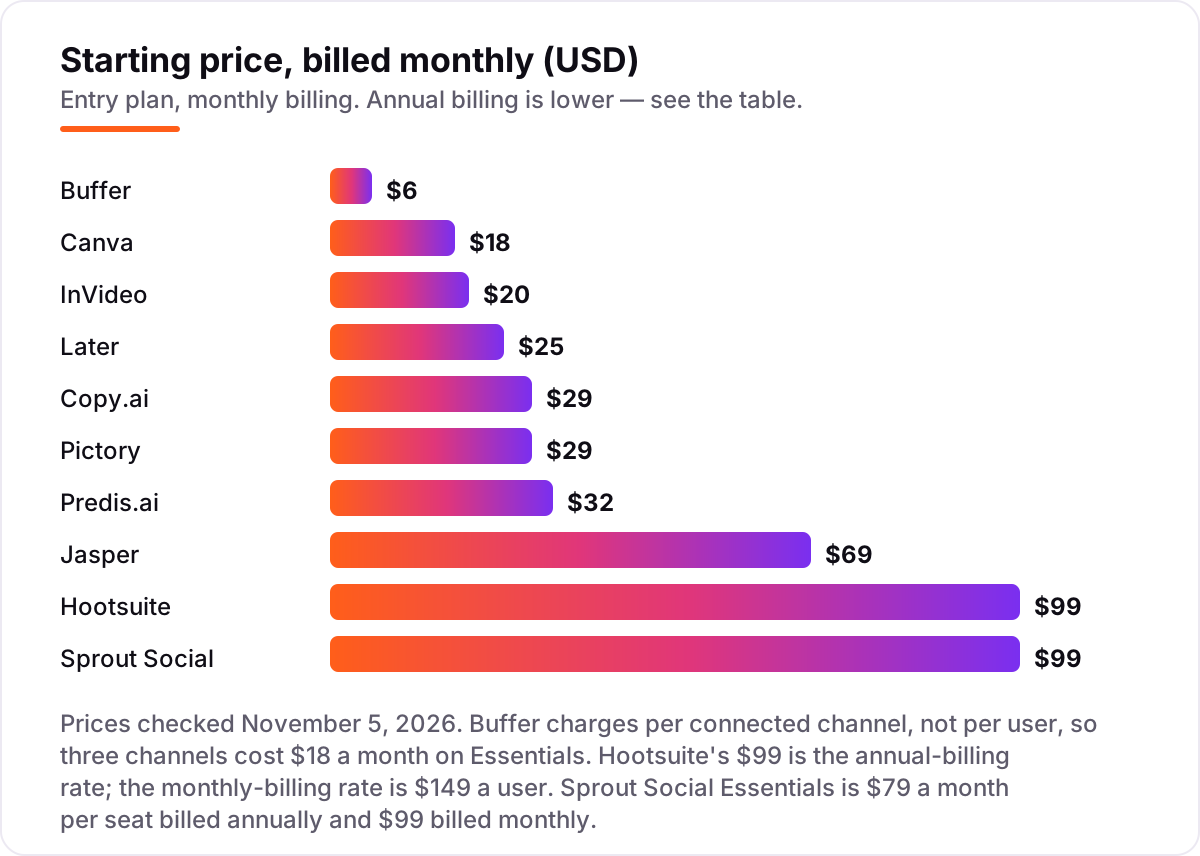
Take a solo creator posting to 4 channels — Instagram, TikTok, Facebook and LinkedIn — with about 5 short videos a month. On list prices, the monthly bill is $24 on Buffer Essentials for 4 channels, $18 on Canva Pro, $20 on InVideo Starter, $25 on Later Starter, $29 on Copy.ai Chat or Pictory Starter, $32 on Predis.ai Core, $69 on Jasper Pro and $99 on Hootsuite Professional or Sprout Social Essentials. Two of those numbers need adjusting before they are real: Buffer's $6 is per channel, so 4 channels cost $24, and Predis.ai's 5 videos a month burn roughly 500 of its 1,300 monthly credits, leaving room for about 10 more videos before the plan runs dry.
Over a year, that is $120 on InVideo Starter billed annually, $144 on Canva Pro, $225 on Later Starter, $240 on Buffer Essentials for 4 channels billed annually, $288 on Copy.ai Chat billed annually, $228 on Predis.ai Core billed annually, $300 on Pictory Starter, $708 on Jasper Pro and $948 on Sprout Social Essentials or $1,188 on Hootsuite Professional. The same creator and the same 4 channels cost $120 a year at the cheap end and $1,188 at the dear end — a $1,068 gap that comes entirely from per-seat pricing and credit caps, not from features.
Three costs sit outside every number above. First, the credit meters: Predis.ai, Pictory and InVideo all charge by the credit, and a video-heavy month can push you to the next tier. Second, the second person: Jasper, Hootsuite and Sprout Social charge per seat, so a 3-person team pays $207, $297 and $297 a month on their entry plans. Third, the scheduling gap: Jasper, Copy.ai and Pictory do not publish, so most buyers need a second subscription — Buffer Essentials at $6 a channel — on top of the creation tool. If you run a marketing agency rather than a single brand, the tools differ too — see our guide to the best AI tools for content marketing automation.
Annual billing cuts the bill on most tools here: InVideo Starter halves from $20 to $10 a month, Later Starter drops from $25 to $18.75, Canva Pro from $18 to $12, and Buffer Essentials from $6 to $5 a channel. Hootsuite's monthly-billing rate is $149 a user, so the $99 figure is the annual-billing price and monthly billing costs more. One more cost to check before you commit: a second brand is a second subscription on most tools here. Predis.ai charges per brand, Later charges per social set, and Jasper charges per seat — so a creator running two brands pays more than the chart shows on every tool in this list.
Know the difference: AI content creation vs social media management
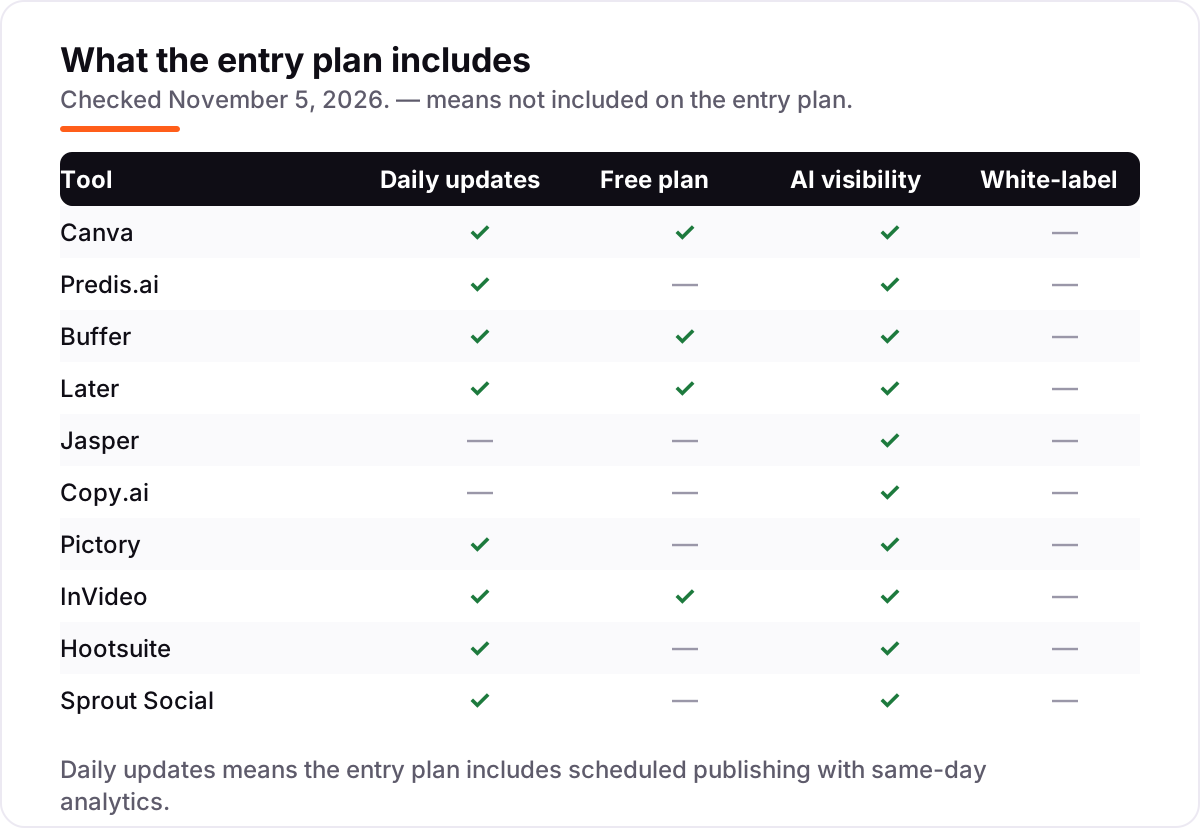
The confusion in this category is between making the post and managing the account. AI content creation tools — Canva, Predis.ai, Jasper, Copy.ai, Pictory and InVideo — make the thing: the image, the caption, the video. Social media management tools — Buffer, Later, Hootsuite and Sprout Social — publish it, schedule it, answer the replies and report on it. Most buyers need one of each, not one or the other, and the cheapest workable stack in this list is Canva Pro at $18 a month plus Buffer Essentials at $6 a channel.
There is a second, quieter confusion: AI writing is not AI publishing. Jasper and Copy.ai write excellent captions, but neither one posts anything — the copy still has to move into a scheduler by hand, and Predis.ai's entry plan does not auto-post either. If a tool's page says "AI social media tool," check which half of the job it actually does before you buy.
A third distinction worth knowing is credits versus seats versus channels. Predis.ai, Pictory and InVideo sell credits, and the meter runs fastest on video; Jasper, Hootsuite and Sprout Social sell seats, and every extra person multiplies the bill; Buffer sells channels, and every extra account adds $6. The billing unit is the real price, and it is different on every tool in this list.
Quick comparison: tool type by need
| Buyer | Best pick | Why |
|---|---|---|
| Most creators, design first | Canva | AI design, templates and a free plan, Pro is $18/month |
| AI-generated ads and videos | Predis.ai | Prompt-to-post creation with competitor ideas, Core is $32/month |
| Cheapest reliable scheduling | Buffer | Free for 3 channels, Essentials is $6/month per channel |
| Instagram-first visual planning | Later | Grid preview and Link in Bio, Starter is $25/month |
| On-brand copy at volume | Jasper | Brand Voice and unlimited words, Pro is $69/month per seat |
| Video from scripts and articles | Pictory | Text-to-video with stock footage, Starter is $29/month |
Mistakes to avoid
- Budgeting on the headline price. Buffer's $6 is per channel, Jasper's $69 is per seat and Predis.ai's $32 buys credits, not unlimited posts. Multiply before you compare.
- Buying a creation tool and expecting it to publish. Jasper, Copy.ai and Pictory do not schedule anything, and Predis.ai gates auto-posting to Rise. Budget for a scheduler on top.
- Ignoring the credit meter. Video burns Predis.ai credits 3–5x faster than images, and Pictory and InVideo credits do not roll over. A video-heavy month can force an upgrade mid-month.
- Paying for seats you do not need. Hootsuite, Sprout Social and Jasper charge per person, so a 3-person team pays $207–$297 a month on entry plans. Buy the seats you actually use.
- Forgetting the second brand. Predis.ai charges per brand and Later per social set, so a creator running two brands pays twice. Price the second brand before you commit to a tool for the first.
How we chose
We checked each vendor's own pricing page on November 5, 2026 and recorded the starting price exactly as shown, including the annual-billing figure where the page lists one, and we ranked the tools by fit for the most common buyer — a solo creator or small team posting to several networks — not by brand size. Two ratings are missing because no fresh G2 or Capterra page could be verified for them on November 5, 2026: Predis.ai and InVideo carry no rating here, and we would rather show no rating than a stale or estimated one. Hootsuite's monthly-billing rate is $149 a user, so its $99 figure is the annual-billing rate. No vendor paid for a place in this list, and none of the links here are affiliate links.
What to do next
Start with the free plan or trial of your top pick and run one real week of posts through it. Check that the AI output sounds like your brand, that the scheduler publishes on time, and that the credit or post caps do not bite before the week is out. If the content is sorted but new customers are not finding you, our monthly SEO service handles the visibility side — or compare creators' tools in our guide to the best AI tools for content creators. Once your tools are in place, find out what's holding your rankings back.
Your stack only works if people find you
SerpAstra fixes what keeps your site off page one and makes it easy for AI assistants to recommend.
Get a free audit→Sources we checked (17)
- Canva pricing — canva.com/pricing (checked November 5, 2026)
- Predis.ai pricing — predis.ai/pricing (checked November 5, 2026)
- Buffer pricing — buffer.com/pricing (checked November 5, 2026)
- Later pricing — later.com/pricing (checked November 5, 2026)
- Jasper pricing — jasper.ai/pricing (checked November 5, 2026)
- Copy.ai pricing — copy.ai/pricing (checked November 5, 2026)
- Pictory pricing — pictory.ai/pricing (checked November 5, 2026)
- InVideo pricing — invideo.io/pricing (checked November 5, 2026)
- Hootsuite pricing — hootsuite.com/plans (checked November 5, 2026)
- Sprout Social pricing — sproutsocial.com/pricing (checked November 5, 2026)
- Canva G2 rating — g2.com (checked November 5, 2026)
- Buffer and Hootsuite G2 ratings — g2.com (checked November 5, 2026)
- Later G2 rating — g2.com (checked November 5, 2026)
- Jasper G2 rating — g2.com (checked November 5, 2026)
- Copy.ai G2 rating — g2.com (checked November 5, 2026)
- Pictory G2 rating — g2.com (checked November 5, 2026)
- Sprout Social G2 rating — g2.com (checked November 5, 2026)
Shamim
Founder of SerpAstra
A full-stack SEO and digital marketer who spends most days on Local SEO for dental practices, AI search visibility and lead generation.
Frequently asked questions
What is the best AI tool for social media content creation?
Canva is the best fit for most creators: AI design, templates, Brand Kits and a free plan, from $18/month. Predis.ai is the better pick when you want AI to generate finished ads and videos from a prompt, from $32/month. Buffer is the best cheap scheduler, from $6 a channel a month.
How much do AI tools for social media content creation cost?
Entry prices run from $0 to $99 a month. Buffer starts at $6 a channel, Canva at $18, InVideo at $20 and Later at $25, while Hootsuite and Sprout Social both start at $99 a seat. A solo creator with 4 channels typically pays $18–$42 a month for one creation tool plus one scheduler.
Is there a free AI tool for social media content creation?
Yes, with limits. Canva Free covers design and basic AI tools at $0, Buffer's free plan covers 3 channels with 10 scheduled posts each, and InVideo's free plan covers limited weekly credits with watermarked exports. None of the three is a full replacement for a paid plan once you post daily.
Can AI tools schedule posts for me?
Yes — Buffer, Later, Hootsuite, Sprout Social and Predis.ai all schedule and publish posts, and Canva schedules too. Jasper, Copy.ai and Pictory do not publish: they create the copy or video, and you still need a scheduler to post it. Check whether auto-posting is on the entry plan, since Predis.ai gates it to Rise.
What is the difference between Canva and Predis.ai?
Canva is a design tool with AI help: you build the post from templates, with Magic Studio suggesting copy, images and layouts. Predis.ai is a generation tool: you type one idea and it returns a finished image, carousel, video or ad with caption and hashtags. Canva gives you control; Predis.ai gives you speed.
Do I still need a human editor if I use AI tools?
Yes. AI drafts captions, designs and videos fast, but it still gets facts, brand voice and platform norms wrong, and credit-based tools can burn a month's allowance on unusable output. Treat AI output as a first draft: a human should check every post before it goes live, especially anything with prices or claims.
Can I switch AI social media tools later?
Yes, but plan the move around your content library. Export your scheduled posts, templates, brand assets and analytics before cancelling, because Pictory deletes projects on cancellation and most tools do not export scheduled queues cleanly. Run the new tool alongside the old one for two weeks before switching over.
Free SEO and AI visibility audit
Find out what is holding your rankings back
Send us your site. Within 2 business days you get a written audit, an AI visibility check and a short fix list ranked by impact. Free, with no contract attached.
Request my free audit→Related guides
 AI, Data & Analytics8 Best AI Tools for Content Creators in 2026 (Free and Paid, Compared)The 8 best ai tools for content creators, compared on price, free plans and strengths — writing, design, video. Prices checked on vendor sites, Nov 2, 2026.Read guide →
 AI, Data & Analytics12 Best AI Tools for Video Content Creation in 2026, Compared12 best AI tools for video content creation compared with real prices, free plans and G2 ratings, so you can pick the right video maker without overpaying.Read guide →
 Digital Marketing & Ads8 Best AI Tools for Content Marketing Automation in 2026, Compared8 best AI tools for content marketing automation compared with real 2026 prices, free plans and AI visibility. Find the right fit for your team.Read guide →