
9 Best AI Workspace Tools for Documents in 2026, Compared
The 9 best ai workspace tool for documents, compared with real 2026 prices, free plans and AI limits — from Notion and Google Workspace to Coda and ClickUp.
 Shamim Mia, Founder, SerpAstraLast verified November 10, 202611 min read
We compare pricing pages, documentation and public reviews. We never accept payment for rankings.

Key takeaways
- Notion Business is the short-list pick for most teams: full AI, docs, wikis and tasks from $20 per member a month billed annually.
- Google Workspace is the cheapest way in at $7 a user a month, but Gemini in Docs starts at Business Standard ($14).
- Copilot is an add-on, not a plan: $21 a user a month for Business, on top of a Microsoft 365 subscription.
- The single most important buying factor is where the AI actually works — in your documents, or only in email and chat.
- Every price below was checked on November 10, 2026, and every rating is from G2 with its review count shown.
On this page
Quick comparison
| Tool | Best for | Starting price | Free plan |
|---|---|---|---|
| Notion | Small teams that want docs, wikis and tasks in one workspace with full AI search and drafting | $20/mo (annual) | Yes (AI trial only) |
| Google Workspace | Small teams already living in Gmail and Google Docs who want Gemini built into email and documents | $7/mo (annual) | No (14-day trial) |
| Microsoft 365 Copilot | Microsoft shops that want Copilot drafting and summarizing inside Word, Outlook and Teams | $21/mo (annual) | No |
| ClickUp | Small teams that want docs, tasks and AI in one workspace at the lowest paid entry price | $9/mo (annual) | Yes (Free Forever) |
| Coda | Teams with a few doc builders and many readers who want documents that act like apps | $10/mo (annual) | Yes |
| monday.com | Visual teams that run docs and boards side by side and want AI credits included in the seat price | $9/mo (annual) | Yes (up to 2 seats) |
| Asana | Cross-functional teams that want AI teammates and workflows wrapped around shared documents | $10.99/mo (annual) | Yes (Personal) |
| Confluence | Software and product teams that keep specs and decision records next to Jira | $7.15/mo | Yes (up to 10 users) |
| Evernote | Solo researchers who capture, clip and search documents rather than co-edit them | $14.99/mo | Yes (50 notes) |
Make one of these tools?
We re-check this list every quarter. Send a correction, request a review, or ask about a clearly labeled sponsored spot.
Request a listingThe best AI workspace tools for documents

Notion
Best for: Small teams that want docs, wikis and tasks in one workspace with full AI search and drafting
Notion Business is the pick for most teams because it is the first plan where the AI is included: drafting, summaries, meeting notes, workspace search and AI agents come with the $20-a-member-a-month annual price. Plus costs half as much at $10, but it only offers an AI trial, so buyers of Notion AI should budget for Business. Docs, wikis, databases and tasks live in the same workspace, which keeps notes from scattering across apps.
The trade-off is complexity. Reviewers praise the flexibility but warn that a workspace with hundreds of linked pages needs real setup and can feel slow, and AI credits meter heavy use since October 2026. If your team wants one place for documents and is willing to learn it, start here; if you only need AI inside email, Google Workspace costs less.
What we like
- Full Notion AI is bundled into Business: drafting, summaries, meeting notes, search across the workspace and AI agents
- One workspace holds docs, wikis, databases and tasks, so meeting notes can become tracked work without a second tool
- Templates and databases let a small team build a shared knowledge base without hiring a wiki administrator
Watch out for
- Plus costs $10 a member a month but only includes an AI trial — full AI needs Business at $20, double the headline price
- Reviewers report a steep learning curve and occasional slow performance in large, heavily linked workspaces
- AI moved to a credit system in October 2026, so heavy AI use can cost extra on top of the seat price

Google Workspace
Best for: Small teams already living in Gmail and Google Docs who want Gemini built into email and documents
Google Workspace starts at $7 a user a month on an annual commitment, and Gemini comes with the seat instead of as a paid add-on. That suits teams already in Gmail and Docs. The catch is scope: on Business Starter, Gemini works in Gmail and the Gemini app, but it does not draft inside Docs, Sheets or Meet. AI in documents needs Business Standard at $14 a user a month.
It is the most familiar document workflow here: real-time co-editing, comments, suggested edits and version history most people already know. Storage is the limit to watch — 30 GB pooled per user on Starter fills up fast with video. Choose Workspace when your documents already live in Google Docs; choose Notion when you need a wiki and databases too.
What we like
- Gemini is bundled into the seat price — there is no separate AI add-on to buy, unlike Microsoft 365 Copilot
- Real-time co-editing in Docs is still the smoothest in this list, with comments, suggestions and version history built in
- One login covers email, calendar, Drive, Meet and Docs, so a small team can run on a single subscription
Watch out for
- Business Starter only puts Gemini in Gmail and the Gemini app — Gemini in Docs, Sheets and Meet needs Standard at $14 a user a month
- 30 GB of pooled storage per user on Starter is thin for teams that store large files or video in Drive
- Admin controls are light on Starter, and there is no free plan, only a 14-day trial

Microsoft 365 Copilot
Best for: Microsoft shops that want Copilot drafting and summarizing inside Word, Outlook and Teams
Microsoft 365 Copilot is the AI for teams that already live in Word, Outlook and Teams. It drafts documents, summarizes email and meetings, and answers questions from your own files through Microsoft Graph — something no other tool here does inside Office. The Business add-on costs $21 a user a month billed annually, with an $18 first-year promotion through December 31, 2026. Enterprise Copilot is $30.
The honest cost is higher: every seat also needs a qualifying Microsoft 365 plan, and agent use beyond the seat is billed by consumption. There is also no free trial for the paid add-on, though Copilot Chat is free in the tenant. Buy Copilot when your documents are Office files and your team will not switch editors; otherwise the bundled AI in Google Workspace or Notion costs less.
What we like
- Copilot works inside the Office apps your team already uses, drafting in Word and summarizing in Outlook and Teams from your own files
- Grounded in Microsoft Graph, so it can pull from your mail, meetings and documents instead of only the open web
- Business plans up to 300 users get the lower $21 rate, with an $18 first-year promotion on annual plans bought by December 31, 2026
Watch out for
- It is an add-on on top of a qualifying Microsoft 365 plan, so the real cost is $21 plus the base subscription per user
- Enterprise Copilot costs $30 a user a month, and heavy agent and Copilot Cowork use is billed separately by consumption
- No free trial for the paid add-on, so a team cannot test Copilot inside its own documents before paying

ClickUp
Best for: Small teams that want docs, tasks and AI in one workspace at the lowest paid entry price
ClickUp is the value pick for a team that wants documents and project work in one place. Core costs $9 a user a month billed annually and bundles docs, tasks, whiteboards, goals, Gantt charts and 1,000 AI credits per seat a month — the most workspace per dollar here. The free plan lets a small team try the docs before paying. The credits cover everyday drafting and summaries.
The catch is that the full Brain AI experience starts on Business at $17 a user a month, so Core buyers get credits and a trial rather than the complete AI layer. Reviewers also warn that ClickUp takes time to configure and can feel cluttered until views are tuned. Pick ClickUp when one subscription must cover docs and tasks; pick Notion when the wiki matters more than the task list.
What we like
- Core at $9 a user a month is the cheapest paid plan in this list, and it includes 1,000 AI credits per seat a month
- Docs sit next to tasks, whiteboards, goals and chat, so a document can turn into assigned work without leaving the workspace
- The Free Forever plan is genuinely usable for a solo user or a tiny team testing the workspace before paying
Watch out for
- Full ClickUp Brain AI is included only from Business at $17 a user a month; Core gets an extended trial and credits, not the full Brain
- Reviewers say the interface is powerful but cluttered, with a steep learning curve and occasional slow loading in large workspaces
- ClickUp changed its plan lineup in October 2026, and older workspaces keep old plans until ClickUp moves them, so prices can differ by workspace age

Coda
Best for: Teams with a few doc builders and many readers who want documents that act like apps
Coda is the cheapest option for a reader-heavy team because it charges per Doc Maker, not per seat. Pro costs $10 a Doc Maker a month billed annually, and editors and viewers are free — so a team of twenty-five with five builders pays for five seats, not twenty-five. The docs themselves are the draw: tables, buttons, automations and AI columns make a document behave like a small app, with AI writing and natural-language queries built in.
The model flips when everyone builds. If all twenty-five people create docs, the bill is twenty-five Doc Makers, and the per-seat advantage disappears. Coda also has a real learning curve around formulas and packs, and AI credits sit on top of the plan. Choose Coda when a few people publish and many people read; choose Notion when everyone edits equally.
What we like
- Doc Maker billing means only the people who build docs pay — editors and viewers are unlimited and free on every plan
- AI columns, a writing assistant and natural-language table queries turn a document into a working app, not just a page
- Pro at $10 a Doc Maker a month is cheap for a team where five builders serve twenty-five readers
Watch out for
- A team where everyone builds docs pays per builder, so the bill grows fast once more people start creating
- Reviewers report a steep learning curve for formulas, automations and packs, and slow performance in very large docs
- AI runs on credits on top of the plan, so heavy AI use needs a usage budget as well as the seat price

monday.com
Best for: Visual teams that run docs and boards side by side and want AI credits included in the seat price
monday.com puts documents next to the boards that track the work, for teams that think in columns and status labels. Basic costs $9 a seat a month billed annually and includes 1,000 AI credits a month, the Sidekick assistant and an AI agent workforce — AI is part of the seat, not an add-on. Unlimited free viewers mean clients and stakeholders can read docs and boards without a paid seat.
The limits are the seat floor and the missing views: paid plans start at three seats, and Basic has no timeline, Gantt view or automations, so most teams step up to Standard at $12. AI credits beyond the allowance cost extra too. Pick monday.com when your documents live beside project boards; pick ClickUp when you want the same breadth for the same $9 without the seat minimum.
What we like
- AI is included from Basic: 1,000 credits a month, the Sidekick assistant and an AI agent workforce, with no separate AI purchase
- Boards, docs and dashboards share one visual workspace, so status and documents stay in the same place
- Unlimited free viewers on paid plans let stakeholders read documents and boards without consuming a paid seat
Watch out for
- Paid plans start at a 3-seat minimum, so a solo user or a pair pays for a third seat they cannot use
- Basic has no timeline, Gantt view or automations — the views most teams need start on Standard at $12 a seat a month
- AI beyond the included credits costs $10 per 1,000 extra credits, so heavy AI use adds a metered line to the bill

Asana
Best for: Cross-functional teams that want AI teammates and workflows wrapped around shared documents
Asana is the pick when documents are the starting point for work that other teams must finish. Starter costs $10.99 a user a month billed annually and includes AI Teammates, Asana Dash and AI Studio with 50,000 credits per billing account a month — the AI triages, drafts and routes work rather than only writing text. Documents attach to tasks and projects, so a brief keeps its owner, deadline and status in one place.
The pricing quirks matter. Seats come in bands, so the headcount you buy may not match the headcount you have, and AI Studio credits are shared across the whole account, so one heavy workflow can eat the pool. Goals and portfolios need Advanced at $24.99. Choose Asana when cross-team handoffs are the pain; choose monday.com when a visual board is the whole job.
What we like
- AI Teammates and AI Studio are included from Starter, with 50,000 AI Studio credits per billing account a month
- Docs attach to tasks, projects and portfolios, so a brief, its owner and its deadline stay linked in one place
- Unlimited free guests on paid plans let outside collaborators work in shared projects without a seat
Watch out for
- Seats are sold in bands, so a small team may pay for seats it does not use, and the per-seat price hides that
- AI Studio credits are pooled per billing account, not per seat, so a busy team can exhaust the allowance fast
- Goals, portfolios and native time tracking sit on Advanced at $24.99 a user a month, more than double Starter

Confluence
Best for: Software and product teams that keep specs and decision records next to Jira
Confluence is the wiki for teams whose work already runs through Jira. Standard costs $7.15 a user a month for a team of up to 100 users, and it includes Rovo search, chat and agents — the AI layer that searches and summarizes your whole knowledge base. Spaces, page trees, templates and version history handle thousands of pages, and every spec can link to the Jira ticket that implements it.
It is also the lowest-rated tool here at 4.1 out of 5 on G2, with reviewers calling the editor dated and the product heavy for simple notes. The Rovo allowance is small at 25 credits a user a month, with overages billed from December 3, 2026. Pick Confluence when your knowledge lives next to Jira; pick Notion when the wiki must also be a pleasant daily writing surface.
What we like
- Rovo search, chat and agents are included on every paid plan, so AI search across your wiki needs no separate purchase
- Built for structured knowledge: spaces, page trees, templates and version history that scale to thousands of pages
- Deep Jira integration links specs, decisions and release notes to the tickets that implement them
Watch out for
- At 4.1 out of 5 on G2 it is the lowest-rated tool in this list, with reviewers citing a dated editor and a heavy feel
- Only 25 Rovo credits a user a month on Standard, and use past the allowance is billed at $0.01 a credit from December 3, 2026
- Atlassian raised Standard from $6.70 to $7.15 in October 2026, and the headline $5.78 figure is a 300-user average, not a small-team price

Evernote
Best for: Solo researchers who capture, clip and search documents rather than co-edit them
Evernote is the odd one out here, and deliberately so: it is a personal capture and archive tool, not a team workspace. Starter costs $14.99 a month billed monthly, or $99 a year, and includes the AI Assistant, semantic search, AI Edit and AI cleanup. Its strength is finding things years later — the web clipper, OCR on scanned PDFs and handwritten notes, and search by meaning rather than exact keywords.
The limits are team-shaped. Co-editing exists, but Evernote is built for one person's archive, and Starter caps at 1,000 notes and 3 devices, with unlimited notes reserved for Advanced at $24.99 a month. Choose Evernote when your job is capturing and retrieving research alone; choose any other tool here when a team must write together.
What we like
- The web clipper is still the best here, capturing full articles, screenshots and PDFs with high fidelity
- AI Assistant, semantic search and AI Edit search across notes, scanned PDFs and handwritten text by meaning, not just keywords
- Offline notebooks, document scanning and tasks make it a personal archive that works without a connection
Watch out for
- Starter caps at 1,000 notes, 20 notebooks and 3 devices — unlimited notes need Advanced at $24.99 a month or $249.99 a year
- Built for one person, not a team: real-time co-editing exists but Evernote is not a shared workspace like the rest of this list
- The free plan allows only 50 notes on one device, and reviewers cite frustration with repeated price increases
This guide compares the best ai workspace tool for documents for a small team that writes, stores and searches its work in one place. We ranked nine tools by fit for that buyer — a team of roughly five to twenty people who need shared documents with AI drafting, search and summaries built in — not by brand size. Prices are the entry paid plan for each tool, checked November 10, 2026.
How to choose the best AI workspace tool for documents
- Where the AI works. Some tools put AI in the document itself, others only in email or chat. Check the plan you would actually buy, not the marketing page.
- Who pays, and for whom. Per-seat pricing charges every reader; Doc Maker pricing charges only builders. Count your readers before you compare prices.
- Real-time editing. Shared documents should update as people type, with comments and version history. Every tool here does this, but the feel differs.
- Search across the workspace. The value of an AI workspace is finding a decision from six months ago by asking in plain language, not by remembering a file name.
- Metered AI. Most tools now sell AI by credits, requests or seats on top of the plan. Ask what the included allowance covers before you sign.
- Exit cost. Your documents should export cleanly. Check export formats before you move a whole knowledge base into one vendor. Before you publish documents from your new workspace, run your titles through the free SERP snippet preview tool to see how they will look in Google.
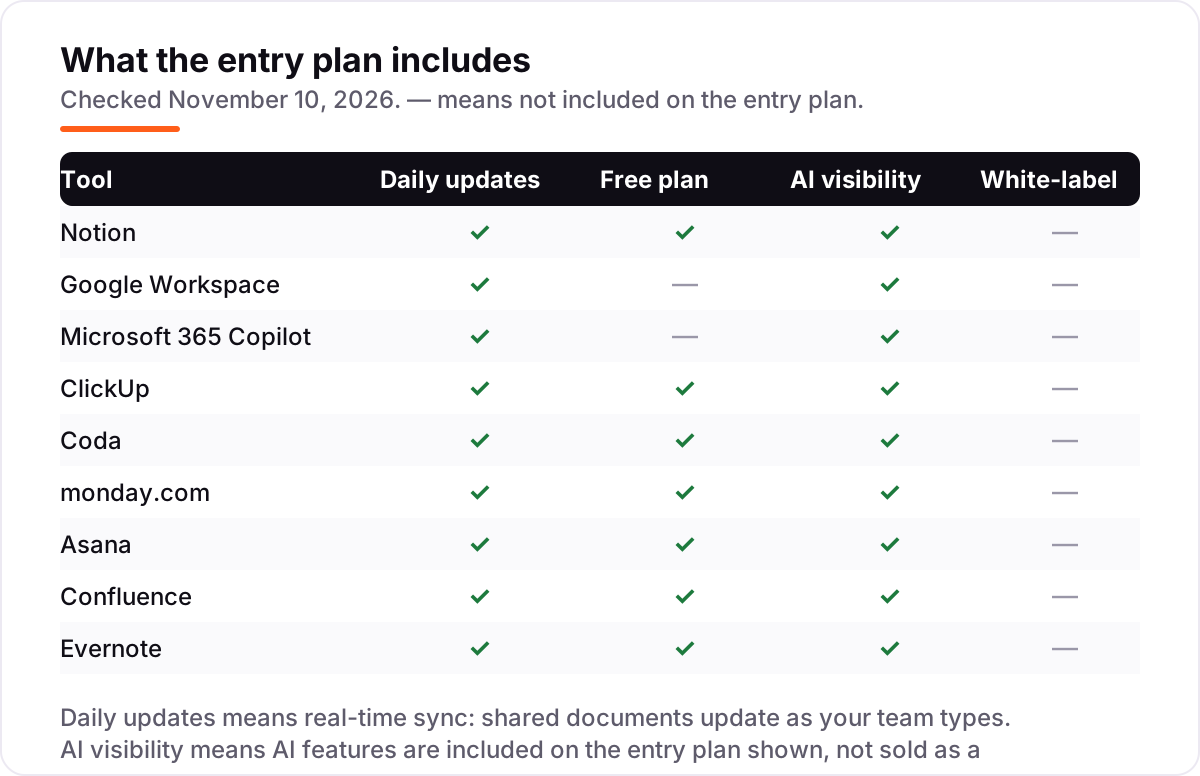
Quick comparison: tool type by need
| Buyer | Best pick | Why |
|---|---|---|
| Small team that wants one workspace for everything | Notion | Docs, wikis, databases and full AI from $20 a member a month |
| Team already in Gmail and Google Docs | Google Workspace | Gemini bundled from $7 a user a month; Docs AI from $14 |
| Microsoft shop writing in Word and Outlook | Microsoft 365 Copilot | Copilot inside Office apps, grounded in your files, from $21 a seat a month plus the base plan |
| Lowest paid entry for docs plus tasks | ClickUp | Core at $9 a user a month with AI credits included |
| Many readers, few builders | Coda | Pay per Doc Maker only; editors and viewers are free |
| Visual team running boards and docs together | monday.com | Basic at $9 a seat a month with 1,000 AI credits |
| Cross-team work with AI routing | Asana | AI Teammates and AI Studio from $10.99 a user a month |
| Software team keeping specs next to Jira | Confluence | Rovo AI search included from $7.15 a user a month |
| Solo researcher capturing and retrieving notes | Evernote | Best clipper and AI search here, from $14.99 a month |
AI workspace tool pricing: what you will actually pay
Take a 10-person team on annual billing. Notion Business costs $200 a month (10 × $20). Google Workspace Standard, the tier with Gemini in Docs, costs $140 a month (10 × $14); Starter would be $70 but has no Docs AI. Microsoft 365 Copilot Business costs $210 a month (10 × $21) plus the Microsoft 365 plan underneath every seat. ClickUp Core costs $90 a month (10 × $9), though full Brain AI needs Business at $170. Asana Starter costs $109.90 a month, monday.com Basic costs $90, and Confluence Standard costs $71.50. Coda is different: with three Doc Makers and seven free readers, Pro costs $30 a month. Evernote Starter, at $99 a year per person, works out to $82.50 a month for ten.
The pattern is clear: the cheapest headline price is rarely the cheapest AI price. Check which tier actually includes the AI you want, then multiply that tier by your headcount.
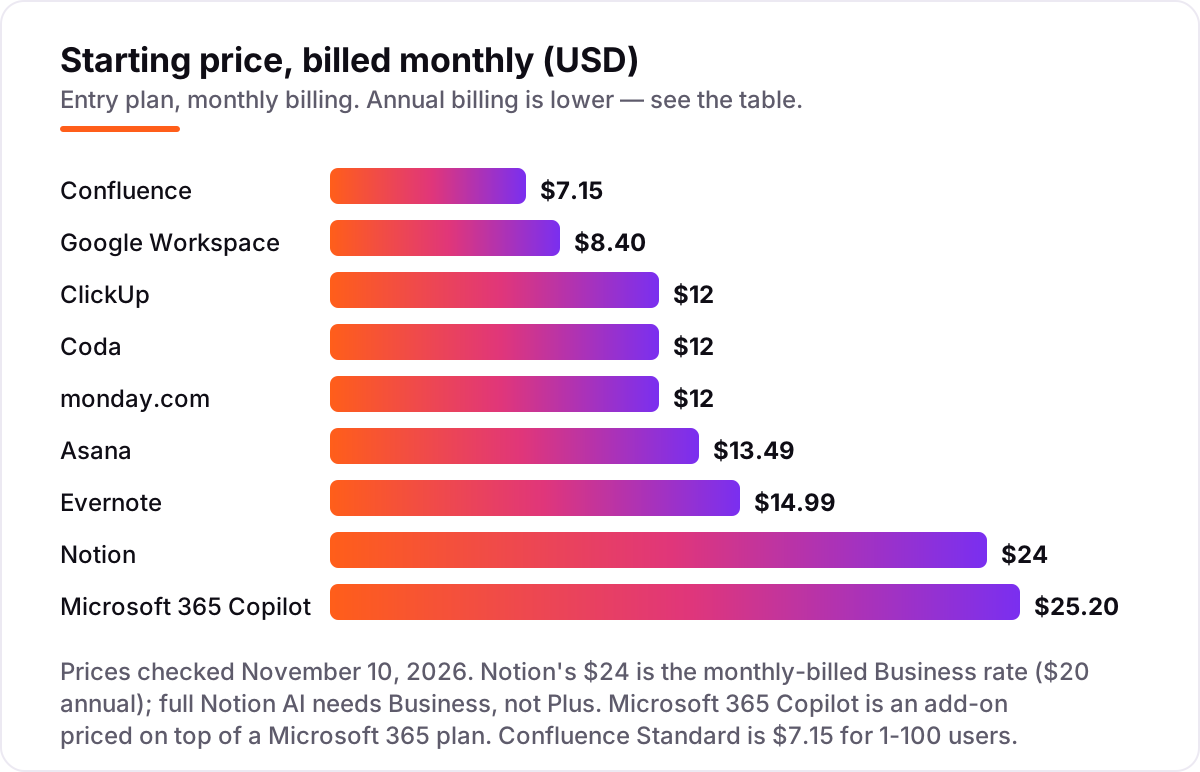
Know the difference: an AI writing tool is not an AI workspace
An AI writing tool helps one person draft a single document. An AI workspace keeps every document a team has written, lets the AI search across all of them, and connects the document to the work around it — tasks, decisions, meetings and owners. That is the difference that decides the price: a writing tool charges for words, a workspace charges for shared knowledge. If you only need better drafts, a writing assistant costs less than any tool in this list. If you need to find a decision from March, summarize a project from its documents, and hand work to a teammate without a meeting, you need the workspace. Buy the writing tool for drafts; buy the workspace for memory.
How we chose
We checked each vendor's own pricing page for November 10, 2026 through fresh search-index copies of the vendor pages and independent October and November 2026 reads, because the vendor pages would not open directly in our browser that day; the Confluence $7.15 figure is the 1–100 user rate, and the headline $5.78 is a 300-user average. Ratings come from G2, with review counts shown, except Microsoft 365 Copilot, which has no standalone G2 rating — the suite rating was not used for the add-on. We ranked by fit for the most common buyer, a small team that writes and searches documents together, not by brand size. No vendor paid for a place in this list, and none of the links here are affiliate links. If you want the wider picture, our all-in-one AI workspace guide covers the same tools as whole platforms, and our AI writing tools guide covers the drafting-only side. Once the documents are organized, our AI search optimization service can make sure AI assistants actually find and cite them.
What to do next
Start with the short list: Notion if you want one workspace for everything, Google Workspace if your documents already live in Docs, or ClickUp if budget is the deciding factor. Take the free plan or trial of your top pick, import ten real documents, and ask the AI to summarize a project and find a decision from last month. If the answers are right and the reports make sense to a teammate, you have your tool. Once your tools are in place, find out what's holding your rankings back.
Your stack only works if people find you
SerpAstra fixes what keeps your site off page one and makes it easy for AI assistants to recommend.
Get a free audit→Sources we checked (17)
- Notion pricing — https://www.notion.com/pricing (checked November 10, 2026)
- Notion on G2 — 4.6/5, 13,769 reviews (checked November 10, 2026)
- Google Workspace pricing — https://workspace.google.com/pricing (checked November 10, 2026)
- Google Workspace on G2 — 4.6/5, 48,171 reviews (checked November 10, 2026)
- Microsoft 365 Copilot pricing — https://www.microsoft.com/en-us/microsoft-365/copilot/pricing (checked November 10, 2026)
- ClickUp pricing — https://clickup.com/pricing (checked November 10, 2026)
- ClickUp on G2 — 4.7/5, 11,557 reviews (checked November 10, 2026)
- Coda pricing — https://coda.io/pricing (checked November 10, 2026)
- Coda on G2 — 4.6/5, 493 reviews (checked November 10, 2026)
- monday.com pricing — https://monday.com/pricing (checked November 10, 2026)
- monday.com on G2 — 4.7/5, 17,144 reviews (checked November 10, 2026)
- Asana pricing — https://asana.com/pricing (checked November 10, 2026)
- Asana on G2 — 4.4/5, 14,164 reviews (checked November 10, 2026)
- Confluence pricing — https://www.atlassian.com/software/confluence/pricing (checked November 10, 2026)
- Confluence on G2 — 4.1/5, 4,372 reviews (checked November 10, 2026)
- Evernote pricing — https://evernote.com/compare-plans (checked November 10, 2026)
- Evernote on G2 — 4.3/5, 2,046 reviews (checked November 10, 2026)
Shamim
Founder of SerpAstra
A full-stack SEO and digital marketer who spends most days on Local SEO for dental practices, AI search visibility and lead generation.
Frequently asked questions
What is the best AI workspace tool for documents in 2026?
Notion Business is the best fit for most small teams: docs, wikis, databases and full AI from $20 a member a month billed annually. Google Workspace is the cheapest way in at $7, and ClickUp is the cheapest paid plan with docs and tasks together at $9. Pick by where your documents already live.
How much does an AI workspace tool for documents cost?
Entry paid plans run from $7 to $21 a user a month on annual billing. Google Workspace Starter is $7, ClickUp Core and monday.com Basic are $9, Coda Pro is $10 a Doc Maker, Asana Starter is $10.99, and Microsoft 365 Copilot Business is $21 plus the base plan. The AI tier is often one step above the cheapest plan.
Is there a free AI workspace tool for documents?
Yes, with limits. Notion, Coda, ClickUp, monday.com, Asana, Confluence and Evernote all have free plans, but full AI usually needs a paid plan. Google Workspace has no free plan, only a 14-day trial. Free plans work for a solo user or a trial; a team that needs AI search should budget for a paid tier.
Does Notion AI come with the $10 Plus plan?
No. Plus at $10 a member a month includes only an AI trial. Full Notion AI — the agent, meeting notes, workspace search and AI agents — needs the Business plan at $20 a member a month billed annually. Teams that buy Notion for its AI should budget for Business, not Plus.
Is Gemini included in Google Workspace?
Yes, in every Business plan, but not equally. Business Starter at $7 a user a month includes Gemini in Gmail and the Gemini app. Gemini in Docs, Sheets, Slides, Meet and Drive starts at Business Standard at $14 a user a month. If AI in documents is the goal, Starter is not enough.
What is the difference between an AI writing tool and an AI workspace?
A writing tool helps one person draft a single document. A workspace keeps every document a team has written, lets AI search across all of them, and links documents to tasks, decisions and owners. Buy a writing tool for better drafts; buy a workspace when finding past decisions and handing off work without meetings is the job.
Can I switch AI workspace tools later?
Yes, but budget a day for it. Export your documents first and check what survives the move — formatting and links usually do, databases and automations often do not. Run the new tool alongside the old one for a week, test AI search on real documents, and only cancel the old subscription once the team is working in the new one.
Free SEO and AI visibility audit
Find out what is holding your rankings back
Send us your site. Within 2 business days you get a written audit, an AI visibility check and a short fix list ranked by impact. Free, with no contract attached.
Request my free audit→Related guides
 AI, Data & Analytics9 Best All-In-One AI Workspace Tools in 2026 (Free and Paid, Compared)The 9 best all-in-one ai workspace tools for 2026, compared on price, AI features and free plans — every price checked on the vendor's pricing page.Read guide →
 SEO & AI SearchBest AI Writing Tools for SEO in 2026: 7 Picks Ranked by What You Need7 best ai writing tools for seo compared on price, live scoring, and drafting power. Prices checked on each vendor pricing page, November 1, 2026.Read guide →
 Digital Marketing & Ads10 Best Marketing Project Management Tools in 2026, ComparedCompare the 10 best marketing project management tools on price, free plans, proofing and AI features, with every price checked November 5, 2026.Read guide →