
10 Best Alternatives to Facebook Groups in 2026
Compare the 10 best alternatives to Facebook Groups by starting price, free plans and community features, with every price checked November 5, 2026.
 Shamim Mia, Founder, SerpAstraLast verified November 5, 202614 min read
We compare pricing pages, documentation and public reviews. We never accept payment for rankings.

Key takeaways
- Circle is the best direct replacement for a Facebook Group at $89/month, Mighty Networks follows at $79/month for courses plus community, and Skool starts at $9/month for gamified paid groups.
- Five of the ten tools are free to run — Discord, Telegram, WhatsApp, Reddit and Geneva — so the real cost is the features you give up, not the subscription.
- The single most important buying factor is whether you need to charge members: only Circle, Mighty Networks and Skool sell paid memberships natively.
- Moving means rebuilding the audience: none of these tools imports your Facebook Group members, so plan an invite campaign before you switch.
On this page
Quick comparison
| Tool | Best for | Starting price | Free plan |
|---|---|---|---|
| Circle | Creators and brands that want a dedicated, branded community with courses and paid memberships in one place | $89/mo | No (14-day trial) |
| Mighty Networks | Hosts who sell courses and memberships together and want livestreaming built in | $79/mo | No (14-day trial) |
| Skool | Coaches and creators who run one paid group and want gamification to keep members showing up | $9/mo | No (14-day trial) |
| Discord | Communities that live in chat and voice rooms and want the biggest free tier in this list | Free; Nitro $2.99/mo | Yes (free) |
| Slack | Professional and member communities that already live in Slack and want searchable, organized channels | $7.25/user/mo | Yes (free) |
| Telegram | Large public groups and broadcast channels that need huge member caps and fast file sharing | Free; Premium $4.99/mo | Yes (free) |
| Small, private groups whose members already use WhatsApp every day | Free | Yes (free) | |
| Public communities that want to be discovered by people searching for the topic | Free | Yes (free) | |
| Discourse | Brands that want a searchable, long-lived forum they fully own and control | Free; Pro $100/mo | Yes (free) |
| Geneva | Small clubs and hobby groups that want chat, forums, video and events in one free app | Free | Yes (free) |
Make one of these tools?
We re-check this list every quarter. Send a correction, request a review, or ask about a clearly labeled sponsored spot.
Request a listingThe best alternatives to Facebook Groups

Circle
Best for: Creators and brands that want a dedicated, branded community with courses and paid memberships in one place
Circle is the closest thing to a Facebook Group with your name on it. Professional costs $89 a month billed annually, or $129 billed monthly, and it covers the whole job: discussion spaces, courses, live events, a website and paid memberships, with unlimited members and a custom domain included. Members use Circle's apps instead of Facebook, and your community is searchable, organized and free of the algorithm deciding who sees what.
The costs to watch are the ones beyond the subscription. Circle takes 2% of every payment on Professional, on top of Stripe's processing fee, and the features that make a community run itself — workflows, the API and removing Circle branding — wait for Business at $199 a month. Pick Circle when the community is the business and you want one platform for discussion, courses and payments.
What we like
- Unlimited members on every plan, so growth never forces an upgrade
- Community, courses, events and paid memberships in one subscription
- Custom domain included from the entry plan
- 14-day free trial with no credit card required
Watch out for
- No free plan — a 14-day trial is the only no-cost path
- A 2% transaction fee on Professional sits on top of Stripe processing
- Workflows, the API and removing Circle branding wait for Business at $199/month

Mighty Networks
Best for: Hosts who sell courses and memberships together and want livestreaming built in
Mighty Networks is the pick when the community exists to sell a course or a membership, not just to chat. Launch costs $79 a month billed annually, or $95 billed monthly, and it includes unlimited members and spaces, courses, events, livestreaming and the AI Cohost assistant. Members get one app for discussion, lessons and live sessions — the bundle most Facebook Groups assemble from three different tools.
The trade-offs are price and fees. There is no free plan, only a 14-day trial on the Growth plan, and Launch takes 2% of every sale on top of Stripe. The old $49-a-month Community plan is gone, so the cheapest way in is now $79. Choose Mighty Networks when courses and live teaching are the point; choose Circle when you want a cleaner community-first design.
What we like
- Unlimited members and spaces on every plan
- Livestreaming and courses included from Launch, not held for a higher tier
- AI Cohost helps plan and run the community
- Annual billing gives two months free
Watch out for
- No free plan — a 14-day trial is the only no-cost path
- A 2% transaction fee on Launch sits on top of Stripe processing
- The old $49/month Community plan was removed, so entry now starts at $79/month
Skool
Best for: Coaches and creators who run one paid group and want gamification to keep members showing up
Skool is the simplest paid community on this list, and the cheapest to start: Hobby costs $9 a month, Pro costs $99, and both include unlimited members, courses, videos and live calls. The price is flat per group, so 5,000 members cost the same as 50. Gamification is the draw: points, levels and leaderboards push members to post, finish lessons and join live calls.
The catch is the transaction fee, and it is a big one. Hobby keeps 10% plus 30 cents of every sale, so a group collecting $1,000 a month hands Skool about $109. Pro drops the fee to 2.9% plus 30 cents. There is no custom domain: every group lives at skool.com. Pick Skool for a small paid group; run the fee math before the group gets big.
What we like
- Flat price per group, not per member — 50 members cost the same as 5,000
- Gamification (points, levels, leaderboards) built in
- Unlimited members, courses, videos and live calls on both plans
- 14-day free trial with no credit card required
Watch out for
- No free plan — a 14-day trial is the only no-cost path
- Hobby takes 10% + 30¢ of every sale, which gets expensive fast
- No custom domain — every group lives at skool.com/your-path

Discord
Best for: Communities that live in chat and voice rooms and want the biggest free tier in this list
Discord is the free pick: unlimited servers, unlimited message history, text, voice and video chat, roles, moderation tools and bots, all at $0 with no member cap. Members split into channels by topic, drop into voice rooms without a meeting link, and join stage events for announcements. Nitro is optional: Basic costs $2.99 a month and full Nitro $9.99, buying bigger uploads, HD streaming and cosmetic perks, not community features.
What Discord does not do is sell: no native paid memberships, courses or checkout, so charging members needs a bot or a third-party tool, with their own fees. Fast-moving chat buries good answers within days, and the gaming reputation can make a professional audience hesitate. Pick Discord when the community is free and lives in chat; pick Circle or Skool when it needs to charge.
What we like
- Core community features are free with no member cap
- Voice rooms and stage channels with no meeting links
- Huge bot ecosystem for moderation and automation
- Most members already have the app installed
Watch out for
- No built-in paid memberships or courses — monetization needs bots or third-party tools
- Free uploads are capped at 10 MB and streaming quality is limited
- The gaming reputation can put off a professional audience

Slack
Best for: Professional and member communities that already live in Slack and want searchable, organized channels
Slack is the work-ready option for professional communities that already live in it. The free plan covers small groups with 90 days of message history and up to 10 apps. Pro costs $7.25 per user a month billed annually, or $8.75 billed monthly, and it removes the history limit, unlocks unlimited apps, group huddles and Slack Connect. Channels, threads and search keep long discussions findable in a way a Facebook Group feed never does.
The catch is the pricing model. Slack charges per user, so a 50-member community pays about $363 a month on Pro, while Circle charges $89 for unlimited members. There are also no native paid memberships or courses. Pick Slack when the audience is a professional network or a customer community that already uses it; avoid it for large open communities, where per-seat pricing gets painful.
What we like
- Unlimited message history on Pro, fully searchable
- More than 2,600 integrations in the Slack App Directory
- Channels, threads and search keep long discussions usable
- Free plan covers small groups at no cost
Watch out for
- Per-user pricing — a 50-member workspace pays per member, unlike the flat-rate platforms
- The free plan keeps only 90 days of message history
- No native paid memberships or courses

Telegram
Best for: Large public groups and broadcast channels that need huge member caps and fast file sharing
Telegram is the big-room option. Groups hold up to 200,000 members, channels broadcast to unlimited subscribers, and everything is free: messaging, file sharing up to 2 GB, voice and video chat, polls and bots. Bots handle welcome messages, moderation and payments, and the app syncs instantly across phone, desktop and web. For a public community that needs reach over structure, nothing else here scales this far at $0.
Premium is the only paid piece, about $4.99 a month in the US: a per-user upgrade with faster downloads, 4 GB uploads, voice-to-text and business tools, not a community plan. Telegram publishes no price list, so the price varies by country and store. There are no native paid memberships, and moderation is thinner than Circle's or Discourse's. Pick Telegram for a large free audience; pick a dedicated platform to charge.
What we like
- Groups hold up to 200,000 members
- Channels broadcast to unlimited subscribers
- Bots automate welcome messages, moderation and payments
- Works on every device with instant sync
Watch out for
- Premium price varies by country and store — Telegram publishes no price list
- No built-in paid memberships
- Weaker moderation tools than the dedicated platforms

Best for: Small, private groups whose members already use WhatsApp every day
WhatsApp is the zero-friction move: your members are already there. Communities organize up to 50 groups under one umbrella with an announcement channel; group chats hold up to 1,024 members, with polls and voice and video calls built in. Messages are end-to-end encrypted, with nothing to install, learn or pay. For a small private group, it is the fastest way to leave Facebook Groups behind.
The limits are discovery and depth. Nobody finds a WhatsApp Community by searching; people join only through an invite link, so growth depends on you sharing it. There are no courses, paid memberships or analytics, and the 1,024-member group cap is far below Telegram's. Pick WhatsApp for a small private group that values simplicity; pick Reddit or Discord when the group needs to be found.
What we like
- No new app to install — members already use it daily
- End-to-end encryption on messages
- Communities organize up to 50 groups under one umbrella
- Voice and video calls built in
Watch out for
- No discovery — people can only join by invite link
- No courses, paid memberships or analytics
- Business messaging beyond the app needs the paid Business Platform API

Best for: Public communities that want to be discovered by people searching for the topic
Reddit is the only free option here that brings its own audience. A subreddit costs nothing, has no member cap, and sits where millions already search for answers — a post that ranks can bring in members while you sleep. Moderation is strong: rules, flairs and AutoModerator keep discussion on track, and threaded posts stay searchable for years, which a Facebook Group feed fails to do.
The trade-off is control. You do not own the audience, the branding or the rules — Reddit does, and it can change any of them. Ads and promoted posts appear next to your content, and the public, blunt tone suits some brands poorly. There is no way to charge members inside Reddit itself. Pick Reddit when discovery matters more than ownership; pick Discourse for the same format on your own domain.
What we like
- Built-in discovery — millions search Reddit every day
- Free to start with no member caps
- Strong moderation tools: rules, AutoModerator, flairs
- Threaded discussions stay searchable for years
Watch out for
- You do not own the audience — Reddit sets the rules and can change them
- Ads and promoted posts sit next to your content
- The tone is public and blunt, which suits some brands poorly

Discourse
Best for: Brands that want a searchable, long-lived forum they fully own and control
Discourse is the own-your-data option. Its hosted Free plan covers unlimited members, 500,000 page views a month, 5 GB of storage and 20,000 emails a month — enough for most small communities. Pro costs $100 a month and adds a custom domain, unlimited categories, API and webhook access, and more staff seats. Every discussion is a threaded topic with a permanent URL, so answers stay findable for years and show up in Google, which a Facebook Group never does.
The format is the trade-off. Discourse is a forum, not a chat app: conversations move slowly, suiting Q&A and support better than live hanging out. The free plan runs on a discourse.group subdomain, and setup and theming take more effort than Circle. Pick Discourse when the knowledge base matters as much as the conversation; pick Discord for real-time talk.
What we like
- Open source — self-host free or pay for managed hosting
- Discussions stay searchable for years
- Unlimited members even on the free plan
- Plugins and API on paid plans
Watch out for
- Forum format, not chat — slow back-and-forth suits Q&A better than live conversation
- Custom domain and API need Pro at $100/month
- Setup and theming take more work than a hosted community app

Geneva
Best for: Small clubs and hobby groups that want chat, forums, video and events in one free app
Geneva is the small-group all-rounder: chat rooms, discussion boards, video hangouts, events, polls and member profiles in one free app, on web and mobile. It was built for groups, not adapted from a workplace tool, so the pieces fit together — a forum post, a room for the live call, an event on the calendar — without the setup work a forum or chat server needs.
The risks are size and pricing. Geneva is small, so there are fewer tutorials, fewer integrations and fewer people to ask for help. It publishes no paid price, so the cost of scaling past the free plan is unclear until you ask. Pick Geneva for a small club or hobby group that wants everything in one free place; pick Discord or Telegram for a bigger ecosystem.
What we like
- Chat, forums, video and events in one app at no cost
- Clean, simple interface with little to learn
- No member caps published for the free plan
- Works on web and mobile
Watch out for
- Geneva publishes no paid price, so scaling costs are unclear
- Small user base means fewer tutorials and integrations
- No native courses or paid memberships
The best alternatives to Facebook Groups split into two camps: dedicated community platforms you own and run, and free chat apps your members already use. The paid platforms — Circle, Mighty Networks and Skool — give you your brand, your member list and a way to charge. The free apps — Discord, Telegram, WhatsApp, Reddit and Geneva — cost nothing but give you less control. We ranked the ten below by fit for the most common buyer, a creator or small business moving a Facebook Group, and every price was checked on the vendor's own pricing page on November 5, 2026.
How to choose the best alternatives to Facebook Groups
- Decide whether the group charges money. Only Circle, Mighty Networks and Skool sell paid memberships natively. If the group is free, Discord or Telegram does the job at $0.
- Count the real cost, not the headline price. Circle and Mighty Networks add a 2% transaction fee, Skool Hobby takes 10% of sales, and Slack charges per user — the worked example below shows what each one costs at 500 members.
- Check where your members already are. A WhatsApp group needs no new app; a Discord server needs an install. The platform your members already open daily wins on participation.
- Pick the format that fits the conversation. Fast chat suits Discord, Telegram and Slack; slow, searchable discussion suits Discourse and Reddit; Circle and Mighty Networks cover both.
- Think about who owns the audience. On Reddit, Discord and Telegram, the platform owns the relationship. On Circle, Mighty Networks and Discourse, you own the member list and the domain.
A community is only half the job — people still have to find it. If the group supports a business, our guide to marketing platforms for small business SEO covers the visibility side. And before you announce the move, run the announcement post through the free SERP snippet preview tool so the landing page title reads well in Google.
Whatever you shortlist, try it with your real members before you pay. The free plans and trials in this list are long enough to run one genuine week — your posts, your events, your members — and that week tells you more than any review can. Check two things in the trial: that members actually show up without being chased, and that the moderation tools handle the worst member you have. Every tool here lets you start free or on a trial, so there is no reason to commit before your members have tried it.
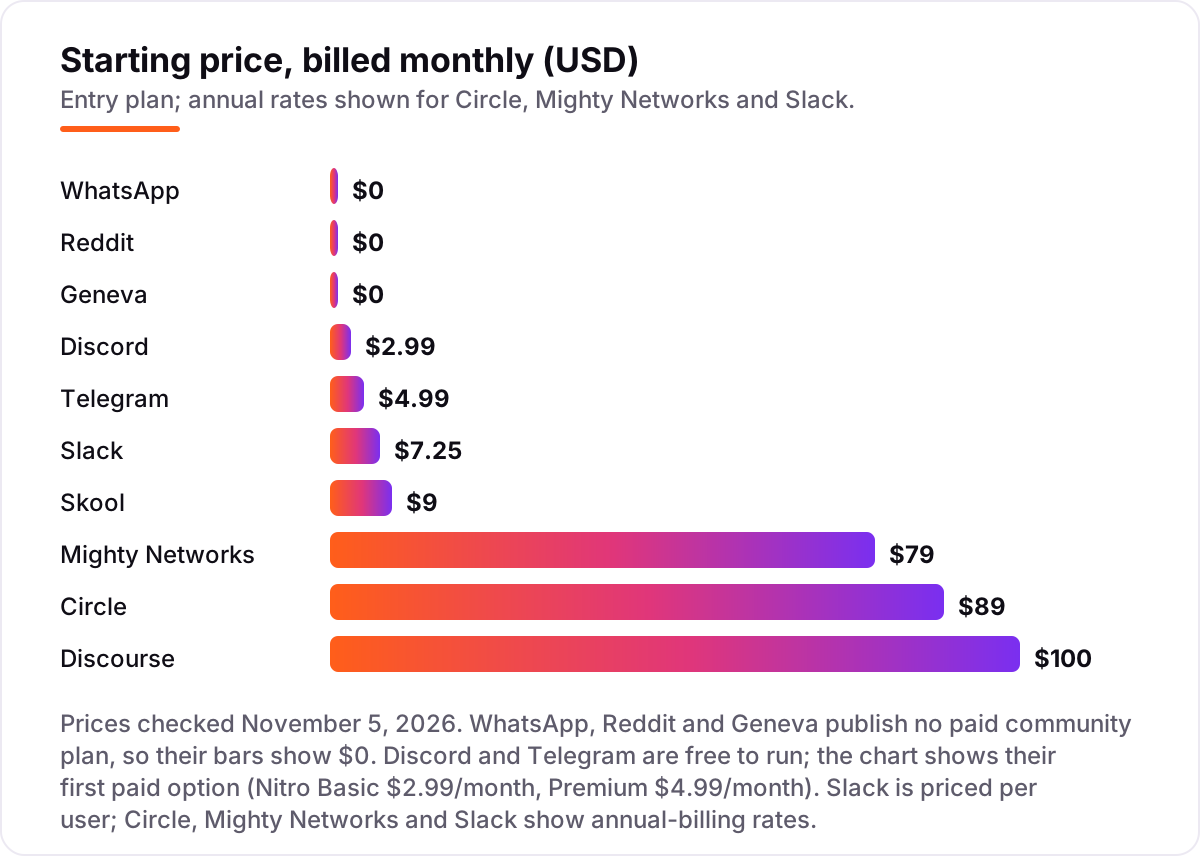
Alternatives to Facebook Groups pricing: what you will actually pay
Take a paid community with 500 members paying $10 a month — $5,000 a month in revenue. On Circle Professional at $89 a month billed annually, the 2% transaction fee adds $100, so the real bill is $189 a month, or $2,268 a year. On Mighty Networks Launch at $79 a month, the same 2% fee makes it $179 a month, or $2,148 a year. Skool Hobby looks cheapest at $9 a month, but its 10% fee takes $500 of the $5,000 — a $509 monthly bill. Skool Pro at $99 a month with a 2.9% fee costs $244 a month, or $2,928 a year.
The free tools change the math completely. Discord, Telegram, WhatsApp, Reddit and Geneva cost $0 to run the community itself, and Discourse's free hosted plan covers 500,000 page views a month — enough for most 500-member forums — with Pro at $100 a month only if you need a custom domain and API access. Slack is the outlier in the other direction: Pro at $7.25 per user a month means 500 members cost $3,625 a month, or $43,500 a year, which is why Slack suits small professional networks and not large open communities.
Three costs sit outside every number above. First, the transaction fees: on Circle and Mighty Networks the 2% fee grows with revenue, so a community collecting $20,000 a month pays $400 in fees alone. Second, payment processing: Skool's fees include card processing, but Circle and Mighty Networks charge their fee on top of Stripe's. Third, the move itself: none of these tools imports Facebook Group members, so budget time — not money — for the invite campaign that brings people across. If the community supports a local business rather than a creator audience, the visibility tools differ too — see our guide to the best social media advertising software.
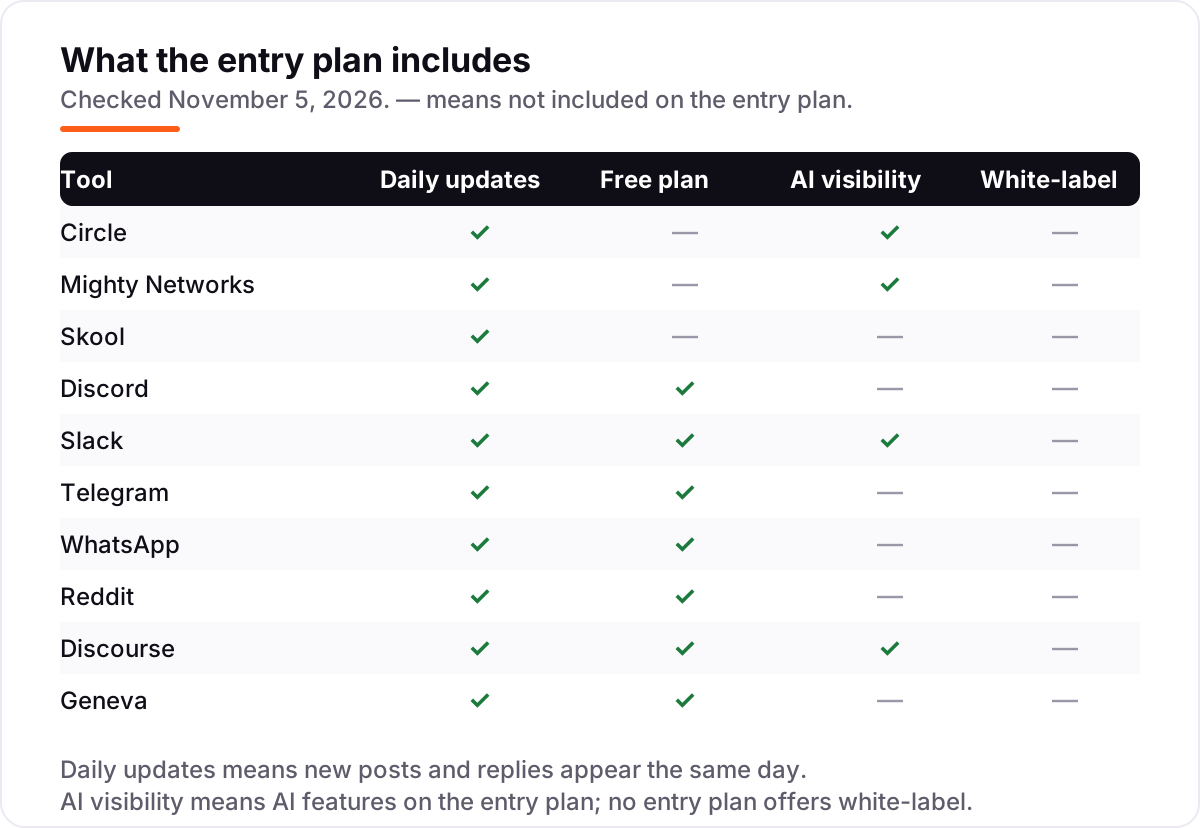
Know the difference: a rented group vs a community you own
The confusion in this category is between a group you rent and a community you own. A Facebook Group, a subreddit, a Discord server and a Telegram group are all rented: the platform owns the member list, sets the rules, shows its own ads and can change any of it overnight. A Circle community on your own domain, a Mighty Networks space or a Discourse forum is owned: you hold the member list, you set the rules, you choose whether ads appear, and you can export the data and leave.
There is a second distinction worth knowing: chat versus forum. Chat apps — Discord, Telegram, Slack and WhatsApp — are built for the moment: messages fly past and disappear down the feed within days. Forums — Discourse and Reddit — are built for the archive: every discussion is a threaded topic with a permanent link that Google can index and members can find months later. Facebook Groups are chat in forum clothing: they look permanent but bury old posts just as fast as a chat feed. If your group's value is the answers it has already produced, a forum preserves it; if the value is the live conversation, a chat app does.
A third distinction is free versus paid, and it cuts across both of the others. The free tools in this list cost nothing because you are not the customer — advertisers are, or the platform is betting on scale. The paid tools cost money because you are the customer, and the platform answers to you. That is the real price of leaving Facebook Groups: not the subscription, but the decision to pay for a community instead of renting an audience from an ad platform.
Quick comparison: tool type by need
| Buyer | Best pick | Why |
|---|---|---|
| Creator moving a paid group | Circle | Own brand, courses and memberships in one place, from $89/month |
| Coach selling courses + community | Mighty Networks | Livestreaming and courses built in, from $79/month |
| Small paid group on a budget | Skool | Flat $9/month per group, gamification included |
| Free chat-first community | Discord | Unlimited servers, voice and video at $0 |
| Professional member network | Slack | Searchable channels and 2,600+ integrations, Pro from $7.25/user/month |
| Public audience you want found | Free subreddit with built-in discovery |
Mistakes to avoid
- Budgeting on the subscription alone. Skool Hobby at $9 a month costs $509 a month once its 10% fee is counted on $5,000 of revenue. Circle and Mighty Networks add 2% on top of Stripe. Always run the fee math at your real revenue.
- Assuming members will follow you. No tool imports Facebook Group members, and only a fraction of a group ever moves. Announce the move inside the group, email your list, and keep the old group open as a signpost for a month.
- Paying per user for a large community. Slack Pro at $7.25 per user a month is $363 a month for 50 members and $3,625 for 500. Flat-rate platforms charge the same whether the group has 50 members or 5,000.
- Picking a chat app when you need an archive. Discord and Telegram bury good answers within days. If the group's value is the knowledge it has built, a forum like Discourse or Reddit preserves it — and Google can find it.
- Choosing on brand, not on ownership. Reddit, Discord and Telegram are free because the platform owns the audience. If the community is the business, pay for a platform where you own the member list and the domain.
How we chose
We checked each vendor's own pricing page on November 5, 2026 and recorded the starting price exactly as shown, and we ranked the tools by fit for the most common buyer — a creator or small business moving a Facebook Group — not by brand size. Two figures need a note: Circle and Mighty Networks show annual-billing prices on their pages ($89 and $79 a month), and their monthly-billing figures ($129 and $95) come from November 2026 reads of those same pricing pages. Telegram publishes no price list, so the $4.99 Premium figure is the US app-store price reported by multiple sources in October 2026, and Geneva publishes no paid price at all. This list carries review ratings for four tools; the other six have none because Skool is not listed on G2 or Capterra, the G2 listings for Reddit and WhatsApp cover their ads and API products rather than communities, the G2 listing for Geneva is a finance product, and no fresh G2 or Capterra listing could be verified for Telegram or Discord. No vendor paid for a place in this list, and none of the links here are affiliate links.
What to do next
Start with the free plan or trial of your top pick and invite a dozen of your most active members to try it for a week. Check that they show up without being chased and that the moderation tools handle your worst member before you commit to a year. If the community supports a business, our monthly SEO service handles the visibility side — or compare tools in our guide to social media advertising software. Once your tools are in place, find out what's holding your rankings back.
Your stack only works if people find you
SerpAstra fixes what keeps your site off page one and makes it easy for AI assistants to recommend.
Get a free audit→Sources we checked (14)
- Circle pricing — circle.so/pricing (checked November 5, 2026)
- Mighty Networks pricing — mightynetworks.com/pricing (checked November 5, 2026)
- Skool pricing — skool.com/pricing (checked November 5, 2026)
- Discord Nitro pricing — discord.com/nitro (checked November 5, 2026)
- Slack pricing — slack.com/pricing (checked November 5, 2026)
- Telegram Premium FAQ — telegram.org/faq_premium (checked November 5, 2026)
- WhatsApp — whatsapp.com (checked November 5, 2026)
- Reddit — reddit.com (checked November 5, 2026)
- Discourse pricing — discourse.org/pricing (checked November 5, 2026)
- Geneva — geneva.com (checked November 5, 2026)
- Circle reviews — g2.com/products/circle-so-circle/reviews (checked November 5, 2026)
- Mighty Networks reviews — g2.com/products/mighty-networks/reviews (checked November 5, 2026)
- Slack reviews — g2.com/products/slack/reviews (checked November 5, 2026)
- Discourse reviews — g2.com/products/discourse/reviews (checked November 5, 2026)
Shamim
Founder of SerpAstra
A full-stack SEO and digital marketer who spends most days on Local SEO for dental practices, AI search visibility and lead generation.
Frequently asked questions
What is the best alternative to Facebook Groups?
Circle is the best direct replacement for most creators: it combines discussion, courses, events and paid memberships under your own brand from $89/month. If the group is free, Discord is the best pick at $0. If courses are the point, Mighty Networks at $79/month fits better.
Is there a free alternative to Facebook Groups?
Yes — five in this list are free to run. Discord, Telegram, WhatsApp, Reddit and Geneva all cost $0 for the community itself. Discord is the most capable free option, Telegram fits the largest groups, WhatsApp suits small private circles, and Reddit adds discovery.
Can I move my Facebook Group members to another platform?
No platform imports Facebook Group members automatically, and Facebook does not export a member list. You have to invite people: post the new link in the group, email your list, and pin an announcement. Expect a fraction to move — plan the invite campaign before you switch.
Which alternative to Facebook Groups can charge members?
Circle, Mighty Networks and Skool sell paid memberships natively, each with a transaction fee on top of the subscription. Discord, Slack, Telegram, WhatsApp, Reddit, Discourse and Geneva have no native paid memberships, so charging needs a third-party tool or a separate checkout.
Is Discord or Circle better than Facebook Groups?
Discord is better for free, fast-moving chat: unlimited servers, voice rooms and bots at $0, with no algorithm deciding what members see. Circle is better for a paid community: your own brand, courses, events and member data, from $89/month. Both beat Facebook on control; neither brings Facebook's built-in audience.
What is the cheapest paid alternative to Facebook Groups?
Skool Hobby at $9/month is the cheapest paid plan, but it takes 10% plus 30 cents of every sale, so it gets expensive as revenue grows. For a group collecting $1,000 a month, Circle at $89/month plus a 2% fee costs about $109 in total — less than Skool Hobby's $109 in fees alone.
Should I pick a forum or a chat app to replace my Facebook Group?
Pick a forum — Discourse or Reddit — when answers need to stay findable for months and show up in Google. Pick a chat app — Discord, Telegram or Slack — when the group wants live conversation and quick replies. Circle and Mighty Networks sit in between, with both discussion threads and live events.
Free SEO and AI visibility audit
Find out what is holding your rankings back
Send us your site. Within 2 business days you get a written audit, an AI visibility check and a short fix list ranked by impact. Free, with no contract attached.
Request my free audit→Related guides
 Digital Marketing & Ads10 Best Social Media Advertising Software in 2026, ComparedCompare the 10 best social media advertising software options on price, free plans and ad tools, with every price checked on November 5, 2026.Read guide →
 SEO & AI Search12 Best Marketing Platforms for Small Business SEO in 2026, ComparedThe 12 best marketing platforms for small business SEO, compared on real prices, SEO tools and AI visibility. Every price checked November 1, 2026.Read guide →
 ContentDoes social media help SEO? The honest answerDoes social media help SEO? The honest answer: likes are not a ranking factor, but social can earn links, traffic and brand searches. Here is how it helps.Read guide →