
10 Best Apps to Read Books for Free in 2026
Compare the 10 best app to read books for free options: library loans, 70,000+ free classics, free audiobooks and no-cost stores, checked November 4, 2026.
 Shamim Mia, Founder, SerpAstraLast verified November 4, 202615 min read
We compare pricing pages, documentation and public reviews. We never accept payment for rankings.
Key takeaways
- Libby leads for most readers and costs nothing with a library card; Hoopla follows with no waitlists, and Project Gutenberg offers nearly 79,000 free classics with no card at all.
- All ten apps are free to download and use. The only money in this list is optional: Kindle+ at $11.99/month, Kobo Plus Read at $7.99/month and Wattpad Premium at $5.99/month.
- The single most important buying factor is where the free books come from: a library loan, a public-domain catalog, or a store's free section — each has different limits.
- Borrowed books expire and return themselves; public-domain books are yours to keep forever. Check the loan rules before you start a long book.
On this page
Quick comparison
| Tool | Best for | Starting price | Free plan |
|---|---|---|---|
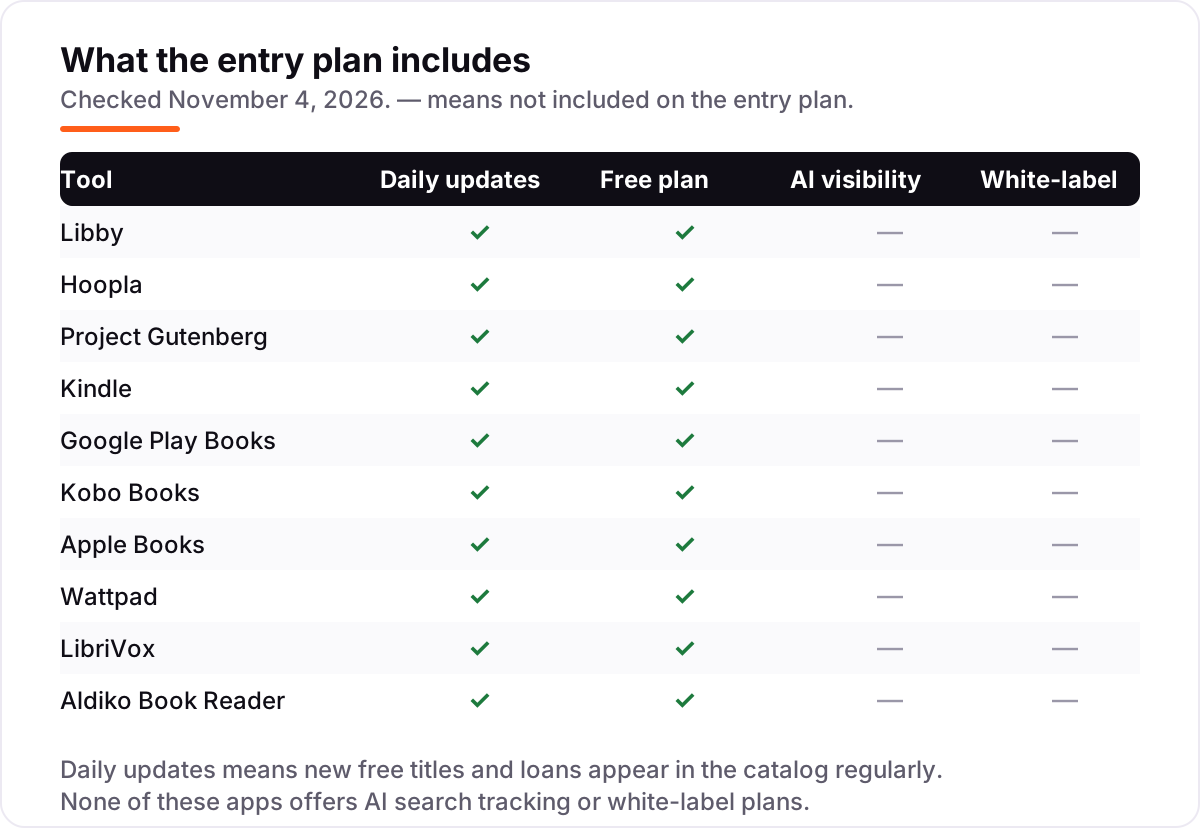
| Libby | Readers with a public library card who want new bestsellers and audiobooks free | Free | Yes (free) |
| Hoopla | Library members who hate waiting and want ebooks, audiobooks and comics with no holds | Free | Yes (free) |
| Project Gutenberg | Classic-literature readers who want 70,000+ public-domain books with no account at all | Free | Yes (free) |
| Kindle | Readers who want the biggest store plus a free app that also reads library books | Free; Kindle+ $11.99/mo | Yes (free app) |
| Google Play Books | Android readers who want to buy books once and keep them, with no subscription | Free | Yes (free app) |
| Kobo Books | Readers who want an open ebook store and an optional subscription cheaper than Kindle+ | Free; Plus $7.99/mo | Yes (free app) |
| Apple Books | iPhone, iPad and Mac owners who want a built-in reader with a free section | Free | Yes (free app) |
| Wattpad | Readers who want free original fiction and fan stories written by other readers | Free; Premium $5.99/mo | Yes (free, ads) |
| LibriVox | Listeners who want free audiobooks of classics, read by volunteers | Free | Yes (free) |
| Aldiko Book Reader | Android readers who want a free reader for their own ePub files and public-domain books | Free | Yes (free, ads) |
Make one of these tools?
We re-check this list every quarter. Send a correction, request a review, or ask about a clearly labeled sponsored spot.
Request a listingThe best app to read books for free
Libby
Best for: Readers with a public library card who want new bestsellers and audiobooks free
Libby is the first app to install if you want to read books for free and still read what everyone is talking about. Built by OverDrive, it links your library card to your library's digital collection, so you borrow ebooks, audiobooks and magazines free, with a due date. The app costs nothing, has no subscription and no in-app purchases, and borrowed books return themselves when the loan ends.
The catch is the queue. Popular titles have hold lists, so the new bestseller everyone wants may take weeks to reach you, and loan periods of one to three weeks are set by your library. What you can borrow depends on your library's budget. Pick Libby when you have a library card and want new books free; pick Project Gutenberg when you want classics with no card and no waiting.
What we like
- Completely free — no subscription, no in-app purchases and no late fees; books return themselves
- Borrow current bestsellers and new releases, not just public-domain classics
- Send borrowed ebooks to a Kindle (US libraries) or read and listen offline in the app
- Works with over 90% of public libraries in North America, per OverDrive
Watch out for
- Popular titles have hold queues, so a new bestseller can take weeks to reach you
- Loan periods run one to three weeks, set by your library, and you cannot keep a book
- The catalog depends on your library, so two readers see different shelves

Hoopla
Best for: Library members who hate waiting and want ebooks, audiobooks and comics with no holds
Hoopla is the library app for impatient readers. Like Libby it is free with a library card, but it works differently: there are no holds and no waitlists, so every title in your library's Hoopla collection is ready to borrow the moment you tap it. The same app also lends comics, manga, music, movies and TV, all with no ads, no subscription and nothing to buy inside the app.
The limit is your library's monthly borrow allowance. Libraries pay per borrow, so most set a monthly cap — often around 8 titles — and a heavy reader can use it up before the month ends. Availability also varies: some libraries do not offer Hoopla at all. Pick Hoopla when you want a book now, not in three weeks; pick Libby when your library's Hoopla catalog is thin.
What we like
- No holds and no waitlists — every title is available the moment you open the app
- One app covers ebooks, audiobooks, comics, manga, music, movies and TV
- No ads, no subscription and no in-app purchases of any kind
- Offline downloads, a sleep timer and Android Auto support for listening on the move
Watch out for
- Your library sets a monthly borrow limit, so heavy readers can run out of borrows
- Catalog and limits vary by library, and some libraries do not offer Hoopla at all
- Loans last 21 days for ebooks and audiobooks, then return automatically

Project Gutenberg
Best for: Classic-literature readers who want 70,000+ public-domain books with no account at all
Project Gutenberg is the deepest free shelf on the internet: nearly 79,000 public-domain ebooks, from Pride and Prejudice to Sherlock Holmes, available to download with no account, no library card and no limit on how many you take. Founded in 1971, it is the oldest digital library, and every book is free because its copyright has expired or the author gave permission.
The trade-off is the catalog's age. You will not find anything published in the last 95 years, and there is no official Gutenberg reading app — you download ePub or Kindle files from the site and open them in another reader, or use one of the free third-party Gutenberg apps. Formatting also varies, since volunteers transcribe the books. Pick Gutenberg for classics with zero friction; pick Libby for new releases.
What we like
- Nearly 79,000 free ebooks with no account, no library card and no download limits
- Every book comes in ePub, Kindle and plain-text formats, so any reader app can open them
- New titles are added daily by volunteer transcribers
- The oldest digital library, running since 1971, with every title legally free to share
Watch out for
- Public-domain only, so nothing published in the last 95 years is in the catalog
- No official reading app of its own — you read through the site or a third-party reader
- Formatting varies by title, since books are transcribed by volunteers

Kindle
Best for: Readers who want the biggest store plus a free app that also reads library books
The Kindle app is the free front door to the biggest ebook store there is. The app itself costs nothing and runs on any phone, tablet or computer — no Kindle device needed — and the store's free section holds thousands of public-domain classics plus free samples of almost every paid book. Your place, notes and highlights sync across every device.
The free shelf has limits: new releases cost money, and the store pushes paid books hard, so free titles take some digging. Kindle+, Amazon's subscription renamed from Kindle Unlimited in October 2026, costs $11.99 a month and borrows up to 20 titles at once, including audiobooks — but those titles are borrowed, not owned. Pick Kindle when you want the widest store and the best syncing; pick Libby when you want new books free.
What we like
- The free app reads on any phone, tablet or computer — no Kindle device needed
- Thousands of free classics in the Kindle Store, plus free samples of paid books
- Kindle+ ($11.99/month) borrows up to 20 ebooks, audiobooks or comics at once
- Syncs your place, notes and highlights across every device you own
Watch out for
- Most new books cost money — the free shelf is classics, samples and promos only
- Kindle+ titles are borrowed, not owned, and leave your library when you cancel
- The store pushes paid books hard, so free titles take some digging to find

Google Play Books
Best for: Android readers who want to buy books once and keep them, with no subscription
Google Play Books is the honest store: the app is free, there is no subscription, and you buy a book once and keep it. The store holds over 5 million titles, including a free section of public-domain classics, and free samples let you preview most paid books before spending anything. The same app reads ebooks and plays audiobooks, with offline downloads and a night mode.
The catch is the per-book price. A reader who finishes four books a month pays for four books, where a library app would charge nothing — so Play Books suits the reader who buys selectively and wants to own what they buy. Sales and discounts soften the bill, but there is no unlimited plan. Pick Play Books when you want to own your books; pick Libby when you want to borrow them free.
What we like
- No subscription at all — you buy a book once and keep it in your library permanently
- Free public-domain classics and free samples of most paid titles
- Reads ebooks and plays audiobooks in one app, with offline downloads and night mode
- Over 5 million titles, with frequent sales and discounts on bestsellers
Watch out for
- Most new books are paid, so a heavy reader spends more here than on a library app
- No unlimited reading plan — every title is a separate purchase
- Purchased books cannot be lent or transferred outside your Google account

Kobo Books
Best for: Readers who want an open ebook store and an optional subscription cheaper than Kindle+
Kobo Books is the open alternative to Kindle: a free app that reads ebooks you already own as well as store purchases, with a free section of public-domain titles. The optional Kobo Plus Read subscription costs $7.99 a month and opens over 1.5 million ebooks — $4 a month less than Kindle+ — and a combined Read & Listen plan is $9.99.
The limits are the ecosystem. Kobo Plus titles work only in Kobo apps and on Kobo eReaders, never on a Kindle, and borrowed titles leave your library when you cancel. The store is also smaller than Amazon's, so some titles never appear. Pick Kobo when you want an open reader and a cheaper subscription; pick Kindle when you want the widest store.
What we like
- Free app that reads ePub files you already own, not just store purchases
- Kobo Plus Read costs $7.99 a month — $4 less than Kindle+ — with over 1.5 million ebooks
- Works with Libby, so library loans can land on Kobo eReaders
- Free ebooks in the store, plus reading stats that track your time and pace
Watch out for
- Most new titles are paid, and Kobo Plus titles are borrowed, not owned
- Kobo Plus books only work in Kobo apps and on Kobo eReaders — no Kindle support
- Smaller store than Amazon, so some titles never appear here

Apple Books
Best for: iPhone, iPad and Mac owners who want a built-in reader with a free section
Apple Books is the reader already on your iPhone, iPad or Mac: free, built in, and with no subscription. The store's Top Free chart and a free-audiobooks collection hold thousands of titles at no cost, and the rest are bought one at a time — no monthly bill. Reading goals, themes and Family Sharing, which lets five family members share eligible purchases, come built in.
The catch is the walled garden. Apple Books runs only on Apple devices, so an Android phone or Windows PC cannot open your library, and the catalog is smaller than Kindle's. Free titles also sit in a chart you have to hunt for rather than a front-page shelf. Pick Apple Books when you live on Apple devices; pick Google Play Books when you switch between Android and the web.
What we like
- Built into every iPhone, iPad and Mac — nothing to install and no account beyond Apple ID
- No subscription: thousands of free ebooks and audiobooks, the rest bought one at a time
- Family Sharing lets up to five family members share eligible purchases
- Reading goals, themes and audiobook playback built in, with sync across Apple devices
Watch out for
- Apple devices only — there is no Apple Books app for Android or Windows
- Most new books are paid, and free titles sit in a Top Free chart you have to hunt for
- Smaller catalog than Kindle, and you cannot import books from other stores easily

Wattpad
Best for: Readers who want free original fiction and fan stories written by other readers
Wattpad is the only app here that is a library and a writing community at once: millions of original stories, free to read with ads, written by readers themselves. Romance, fantasy, fan fiction and teen fiction dominate, and you can comment paragraph by paragraph and talk to the writer as the story unfolds. Anyone can publish, so new stories appear every day.
The trade-off is quality. These are unedited stories by amateur writers, not published books, so the writing varies widely — and the free version shows ads after chapters, while some popular stories are paywalled as Paid Stories that cost Coins or Premium+. Pick Wattpad when you want free originals and a community; pick Gutenberg when you want edited classics.
What we like
- Millions of original stories free to read, across romance, fantasy, fan fiction and more
- Readers can comment paragraph by paragraph and talk directly to the writers
- Anyone can publish, so new stories appear every day from writers worldwide
- Offline reading and early access to new chapters come with Premium
Watch out for
- Ads appear after chapters in the free version, and some stories are paywalled as Paid Stories
- Quality varies widely — these are unedited stories by amateur writers, not published books
- Premium is $5.99 a month and some popular stories still cost Coins to unlock

LibriVox
Best for: Listeners who want free audiobooks of classics, read by volunteers
LibriVox is the audiobook twin of Project Gutenberg: over 45,000 public-domain audiobooks, all free, all narrated by volunteers, with no account and no library card needed. You can stream or download, listen offline, and pick from more than 30 languages — from Jane Austen and Dickens to poetry, history and science.
The catch is the narration. Volunteers record chapter by chapter, so quality and voice change from one chapter to the next, and the catalog stops at the public domain — nothing published after the 1920s. The mobile app is also made by a third-party developer, not by LibriVox itself, and carries ads with optional in-app purchases. Pick LibriVox when you listen more than you read; pick Hoopla for professionally narrated audiobooks.
What we like
- Over 45,000 free audiobooks — the whole public-domain catalog, narrated by volunteers
- No account, no subscription and no library card needed to listen
- Stream or download for offline listening, with sleep timers and playback speed controls
- Audiobooks in more than 30 languages, from classics to poetry and history
Watch out for
- Public-domain only, so no modern bestsellers and nothing published after the 1920s
- Volunteer narration quality varies from chapter to chapter and book to book
- The mobile app is made by a third party, with ads and optional in-app purchases

Aldiko Book Reader
Best for: Android readers who want a free reader for their own ePub files and public-domain books
Aldiko Book Reader is the app for readers who already have books. The free Android app opens ePub and PDF files from your own collection, and its built-in catalogs from Feedbooks and Project Gutenberg put thousands of free public-domain classics a tap away — no subscription, no account, no store lock-in. It even supports Adobe DRM, so it can open books borrowed from a public library.
The trade-off is that Aldiko is a reader, not a bookstore. New bestsellers must be bought elsewhere and imported, the free version shows ads, and there is no iPhone or iPad app at all. Pick Aldiko when your free books live as files — Gutenberg downloads, library loans, your own collection; pick Kindle when you want the store built in.
What we like
- Free reader for ePub and PDF files you already own, with no store lock-in
- Built-in catalogs from Feedbooks and Project Gutenberg put thousands of free classics a tap away
- Supports Adobe DRM, so it can open books borrowed from public libraries
- Custom fonts, margins, brightness and night mode, with bookmarks and highlights
Watch out for
- Android only — there is no Aldiko app for iPhone or iPad
- The free version shows ads, and new bestsellers must be bought elsewhere
- It is a reader, not a store: you supply most of the books yourself
The best app to read books for free is the one that matches how you read: a library app if you want new releases, a public-domain library if you want classics, or a store app if you want to own a few favorites. The ten apps below are ranked by fit for the most common reader — someone who wants to read every day without paying for every book — and every app here is free to download and use, checked on November 4, 2026.
Most of these apps cost nothing because the books are already paid for by someone else: your library, a public-domain collection, or a publisher running a promotion. That is also why the limits differ so much. A library loan expires, a public-domain book is yours forever, and a store's free section is mostly classics and samples. The cards below show the real price of each app, what the free access actually covers, and where the paid extras hide.
How to choose the best app to read books for free
- Start with where the free books come from. Library apps (Libby, Hoopla) lend new releases you return; public-domain libraries (Project Gutenberg, LibriVox) give you classics to keep; store apps (Kindle, Kobo, Apple Books, Google Play Books) give away classics and samples and sell the rest.
- Check whether you need a library card. Libby and Hoopla are useless without one, while Gutenberg and LibriVox need no account at all. If your library does not take part, the store apps and public-domain libraries are your route.
- Decide whether you read or listen. LibriVox, Libby and Hoopla all carry audiobooks; Gutenberg, Aldiko and Wattpad are text only. A reader who commutes needs an app with a good audiobook player and offline downloads.
- Match the app to your device. Apple Books runs only on Apple devices and Aldiko only on Android, while Kindle, Kobo and Google Play Books work almost everywhere. A book you cannot open on your phone is not free — it is stranded.
- Look at what happens when a book ends. Borrowed books return themselves on a due date, public-domain books stay yours forever, and subscription titles vanish when you cancel. If you re-read favorites, ownership matters more than a big catalog.
Reading is one habit in your stack, not the whole of it. If the kids are learning to read too, our guide to the best learn-to-read apps for kids covers the younger end, and if you write as well as read, our guide to the best book review writing service covers the writing side. Before you publish anything you write, run your titles through the free SERP snippet preview tool — it shows exactly how the title and description will look in Google.
Whatever you shortlist, install two apps, not one. Put Libby and one other on your phone, borrow the same book from both if you can, and read a chapter in each. That week tells you more than any review can: which reader feels better in your hand, which catalog has the books you actually want, and whether the hold queue or the borrow limit bites first.
Book app pricing: what you will actually pay
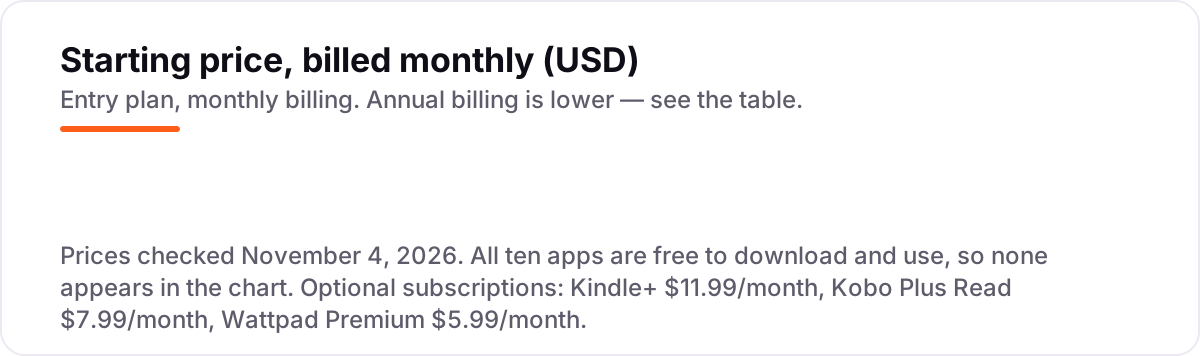
The honest answer is $0 for the apps and $0 for the books, if you stick to library loans and public-domain titles. Libby, Hoopla, Project Gutenberg, LibriVox and Aldiko cost nothing at all, and the store apps — Kindle, Kobo, Apple Books and Google Play Books — charge nothing for the app itself or for the free titles in their stores. A reader who borrows from the library and reads classics can read a book a day for a year and pay nothing.
The money only starts when you want more than the free shelf. Take a reader who finishes four books a month and wants current titles: on Kindle+, that costs $11.99 a month, or $143.88 a year. On Kobo Plus Read it costs $7.99 a month, or $95.88 a year. On Wattpad Premium it costs $5.99 a month, or $71.88 a year. All three subscriptions together cost $25.97 a month, or $311.64 a year — and even then, the titles are borrowed, not owned, so they leave your library when you cancel.
Two other costs sit outside every number above. First, the per-book purchase: on Google Play Books, Apple Books, Kindle and Kobo, a new release typically costs $9.99–$14.99 as a one-time purchase, so four new books a month bought outright runs about $40–$60 a month — far more than any subscription here. Second, the paid-story unlock: on Wattpad, popular Paid Stories cost Coins on top of Premium, so a heavy Wattpad reader can pay for the subscription and still pay per story. For a full picture of what reading costs, compare the subscription math above with the library route: four library loans a month cost $0, and the only price is the wait in the hold queue. If you also want to learn a new language between books, our guide to the best AI Spanish learning app covers that.
Know the difference: borrowing, owning and free catalogs
The confusion in this category is between three ways a book can be free, and they are not the same deal. Borrowing means the book is lent to you for a set time: Libby and Hoopla work this way, and the book returns itself when the loan ends. Owning means you buy the book once and keep it: Google Play Books, Apple Books, Kindle and Kobo sell books this way, and the free titles in their stores are yours to keep too. A free catalog means the book itself costs nothing for anyone: Project Gutenberg and LibriVox host public-domain works, so you download them and they never expire.
That distinction decides what happens to your library over time. A borrowed book disappears on its due date, so notes and highlights go with it; a public-domain download stays on your device forever and works in any reader app. A subscription sits in between: Kindle+, Kobo Plus and Wattpad Premium rent you access to a catalog, and the books leave when you cancel — which is why the $143.88 a year for Kindle+ buys reading time, not a shelf of books.
There is a second, quieter confusion: a free app is not the same as free books. Every app in this list is free to install, but only the library apps and the public-domain libraries give you current or classic books free with no further payment. The store apps are free to install and then sell you most of their catalog one book at a time. And a third distinction worth knowing is that a library card is not a purchase: it is free from your public library, and it is the key that turns Libby and Hoopla from empty apps into full libraries.
Quick comparison: tool type by need
| Buyer | Best pick | Why |
|---|---|---|
| Most readers | Libby | Free with a library card, new bestsellers, ebooks and audiobooks |
| Impatient readers | Hoopla | No holds or waitlists, everything ready to borrow now |
| Classic-literature lovers | Project Gutenberg | Nearly 79,000 free ebooks, no account and no waiting |
| Biggest store, free app | Kindle | Free app, free classics, Kindle+ at $11.99/month if you want more |
| Buy once, own it | Google Play Books | No subscription, over 5 million titles, free classics |
| Open reader, cheaper subscription | Kobo Books | Free app, Kobo Plus Read $7.99/month, works with Libby |
| Apple-only readers | Apple Books | Built into every iPhone and iPad, no subscription |
| Free original stories | Wattpad | Millions of stories free with ads, Premium $5.99/month |
| Free audiobook listeners | LibriVox | Over 45,000 free audiobooks, no account needed |
| Readers with their own files | Aldiko Book Reader | Free Android reader for ePub and PDF files you own |
Mistakes to avoid
- Installing a library app without a library card. Libby and Hoopla show you nothing until you sign in with a card from a participating library. Check that your library takes part before you download, or start with Gutenberg and LibriVox, which need nothing.
- Paying for a subscription before trying the free shelf. Kindle+, Kobo Plus and Wattpad Premium all cost money every month, and the library apps and public-domain libraries cover most reading for $0. Try the free route for a month first and count how many books you actually could not get free.
- Treating a subscription like ownership. Kindle+ and Kobo Plus titles are borrowed, not owned: they leave your library the day you cancel. If you re-read favorites, buy the books you love outright instead of renting them.
- Starting a long book on a short loan. Libby loans run one to three weeks and Hoopla loans last 21 days, so a 900-page novel can expire mid-chapter. Check the loan period before you start, and renew or re-borrow early if your library allows it.
- Assuming every free book app is legal. An app that offers this year's bestsellers free, with no library and no store behind it, is almost certainly piracy. Stick to library lending, public-domain catalogs and official store free sections.
How we chose
We checked each app's own pages and app-store listings on November 4, 2026 and recorded the starting price exactly as shown: every app in this list is free to download and use, with no subscription or paid tier required to read, so there is no monthly price to chart. Three prices needed a note: Kindle+ at $11.99 a month comes from Amazon's own announcement of the October 2026 rename from Kindle Unlimited; Kobo Plus Read at $7.99 and Read & Listen at $9.99 a month were confirmed from several sources quoting Kobo's own pricing, including a comparison updated in August 2026; Wattpad Premium at $5.99 a month comes from its App Store in-app purchase listing, since Wattpad sells Premium only through the app stores. We ranked the apps by fit for the most common reader — someone who wants to read every day without paying for every book — not by brand size. This list carries no review ratings: these consumer reading apps have no G2, Capterra or Trustpilot listings, only app-store ratings, which are not the review sources this list uses. No vendor paid for a place in this list, and none of the links here are affiliate links.
What to do next
Install Libby and one other app from this list — Hoopla if you hate waiting, Project Gutenberg if you love classics, or your phone's built-in store app if you buy selectively. Borrow or download one book and read a chapter in each app, then keep the one whose reader feels best in your hand. If the book is sorted but new customers are not finding your business, our monthly SEO service handles the visibility side. Once your tools are in place, find out what's holding your rankings back.
Your stack only works if people find you
SerpAstra fixes what keeps your site off page one and makes it easy for AI assistants to recommend.
Get a free audit→Sources we checked (10)
- Libby — overdrive.com/apps/libby (checked November 4, 2026)
- Hoopla — hoopladigital.com (checked November 4, 2026)
- Project Gutenberg — gutenberg.org (checked November 4, 2026)
- Kindle+ — aboutamazon.com/news/devices/what-is-kindle-plus (checked November 4, 2026)
- Google Play Books — play.google.com (checked November 4, 2026)
- Kobo Plus — kobo.com/us/en/p/kobo-plus (checked November 4, 2026)
- Apple Books — apple.com/apple-books (checked November 4, 2026)
- Wattpad — App Store in-app purchases (checked November 4, 2026)
- LibriVox — librivox.org (checked November 4, 2026)
- Aldiko — aldiko.com (checked November 4, 2026)
Shamim
Founder of SerpAstra
A full-stack SEO and digital marketer who spends most days on Local SEO for dental practices, AI search visibility and lead generation.
Frequently asked questions
What is the best app to read books for free?
Libby is the best app to read books for free for most readers: it is completely free with a library card and lends current bestsellers, ebooks and audiobooks. Hoopla is better when you hate waiting, since it has no hold queues. Project Gutenberg is best for classics with no card and no account.
Are there really free apps to read books?
Yes, and they are legal. Libby and Hoopla lend books through your public library, Project Gutenberg and LibriVox offer public-domain titles whose copyright has expired, and the Kindle, Kobo, Apple Books and Google Play Books apps all have free sections. None of the ten apps in this list charges to download or use.
Do I need a library card to read books for free?
Only for the library apps. Libby and Hoopla both need a card from a participating public library, and what you can borrow depends on that library. Project Gutenberg, LibriVox and Aldiko need no card at all, and the store apps — Kindle, Kobo, Apple Books and Google Play Books — offer free titles to anyone with an account.
Can I read books for free on Kindle?
Yes. The Kindle app is free and the Kindle Store has thousands of free classics, plus free samples of most paid books. You can also read library books on a Kindle by sending Libby loans to it, where your library supports that. Kindle+ is the optional subscription at $11.99 a month; it is not needed for the free books.
What is the difference between Libby and Hoopla?
Libby lends one copy at a time, so popular titles have hold queues, but its catalog of new releases is usually deeper. Hoopla has no holds or waitlists — every title is ready now — but your library sets a monthly borrow limit, often around 8 titles. Many readers install both and use Hoopla for instant picks and Libby for new releases.
Are free book apps legal?
Yes, when they use the right sources. Library apps lend books your library already paid for, exactly like a physical checkout. Project Gutenberg and LibriVox only host works whose copyright has expired or was waived. The store apps list only titles the publisher made free. Avoid any app that offers new bestsellers free with no library or store behind it.
Can I listen to audiobooks for free too?
Yes. LibriVox offers over 45,000 free public-domain audiobooks with no account, and Libby and Hoopla lend professionally narrated audiobooks free with a library card. Apple Books and Google Play Books also have free audiobook sections. The free audiobooks are mostly classics on LibriVox, while the library apps carry current titles.
Free SEO and AI visibility audit
Find out what is holding your rankings back
Send us your site. Within 2 business days you get a written audit, an AI visibility check and a short fix list ranked by impact. Free, with no contract attached.
Request my free audit→Related guides
 Consumer Apps10 Best Learn to Read Apps for Kids in 2026: Free and Paid Apps RankedCompare the 10 best learn to read apps for kids for ages 2 to 8 on price, free plans and phonics teaching, with every price checked November 4, 2026.Read guide →
 Companies & Services10 Best Book Review Writing Services in 2026Compare the 10 best book review writing service picks for indie authors, with one-time prices from $59 to $579 and turnaround times, checked November 4, 2026.Read guide →
 AI, Data & Analytics7 Best AI Spanish Learning Apps in 2026: Free and Paid Apps RankedThe 7 best ai spanish learning apps of 2026, ranked with real prices, free plans and AI conversation features — pick the app that fits how you actually study.Read guide →