
8 Best Asset Tracking Software for Small Business in 2026, Compared
Compare the 8 best asset tracking software for small business options on price, free plans and check-out features, with prices checked November 10, 2026.
 Shamim Mia, Founder, SerpAstraLast verified November 10, 202613 min read
We compare pricing pages, documentation and public reviews. We never accept payment for rankings.
Key takeaways
- Sortly is the best fit for most small businesses at $49/month; AssetTiger is the cheapest dedicated tracker at $20/month, and Shelf's Team plan is $67/month with unlimited users.
- Free plans exist — Sortly covers 100 items, Shelf covers unlimited assets for 1 user, MaintainX and Limble have free Basic plans, and Snipe-IT is free to self-host.
- The single most important buying factor is the pricing unit: per asset, per user, per admin or flat per workspace. The unit, not the headline price, decides what a 5-person team actually pays.
- Every price below was checked on the vendor's own pricing page on November 10, 2026, except EZOfficeInventory, whose $44.75/month rate comes from a November 3, 2026 check of its pricing page.
On this page
Quick comparison
| Tool | Best for | Starting price | Free plan |
|---|---|---|---|
| Sortly | Small businesses that want the simplest photo-first way to track tools, stock and equipment | $49/mo | Yes (100 items) |
| AssetTiger | Small businesses and nonprofits that want the cheapest dedicated asset register | $20/mo | No (30-day trial) |
| Shelf | Schools, media teams and tool rooms that share gear and need bookings | $34/mo | Yes (1 user) |
| EZOfficeInventory | Small businesses that track assets by item count and want unlimited users | $44.75/mo | No (14-day trial) |
| MaintainX | Frontline teams that run maintenance from phones and want a free start | $20/user/mo | Yes (free Basic) |
| UpKeep | Maintenance teams that live on mobile and want work orders plus asset history | $24/user/mo | No (7-day trial) |
| Limble | Small maintenance teams that want the easiest CMMS to set up | $28/user/mo | Yes (free Basic) |
| Snipe-IT | Small IT teams that want free, open-source tracking for laptops, licenses and accessories | $39.99/mo | Yes (self-hosted) |
Make one of these tools?
We re-check this list every quarter. Send a correction, request a review, or ask about a clearly labeled sponsored spot.
Request a listingThe best asset tracking software

Sortly
Best for: Small businesses that want the simplest photo-first way to track tools, stock and equipment
Sortly is the best fit for most small businesses because it is the fastest to start using. Photograph an item, put it in a folder, print a QR label and scan it when it moves — that is the whole workflow, and the mobile app works offline. Advanced costs $49 a month for 500 items and 2 users, and the free plan covers 100 items for 1 user, enough to test it.
The catch is the user cap. A team of five needs Ultra at $149 a month, which also adds barcode labels, purchase orders and stock counts. The $24 a month annual figure on the pricing page is a first-year promotion for new customers; after year one the standard annual discount is 20%. Buy Sortly when simplicity matters most; buy AssetTiger when the budget is tighter.
What we like
- Easiest tool here to learn: photograph an item, add a QR code and it is tracked
- Free plan covers 100 items for 1 user, with offline mobile access on every plan
- Ultra adds barcode labels, purchase orders and stock counts for $149/month
Watch out for
- Advanced covers only 2 users and 500 items, so a 5-person team needs Ultra at $149/month
- No bookings or kit management, and reporting and custom fields sit on the higher tiers

AssetTiger
Best for: Small businesses and nonprofits that want the cheapest dedicated asset register
AssetTiger is the cheapest dedicated asset tracker in this list, and its pricing model is the reason: $20 a month covers 500 assets, and every paid plan includes unlimited users. A school with 60 staff and 500 assets pays the same $20 as a 5-person shop, because the bill follows the asset count, not the headcount. Depreciation tracking, maintenance alerts, contracts and more than 80 built-in report types come with the plan.
The trade-off is that the free plan is gone. AssetTiger dropped it in 2026, so the only free route now is a 30-day trial for up to 250 assets and 2 users, with no credit card required. There are also no third-party integrations, and some Capterra reviewers call the mobile app slow. Pick AssetTiger when the register itself is the job and the budget is small.
What we like
- Cheapest paid plan here: $20/month covers 500 assets with unlimited users
- Pricing scales only by asset count, so adding staff never raises the bill
- Depreciation, maintenance alerts, contracts and 80-plus built-in report types included
Watch out for
- No free plan since 2026 — only a 30-day trial for up to 250 assets
- No third-party integrations, and reviewers report the mobile app can feel slow

Shelf
Best for: Schools, media teams and tool rooms that share gear and need bookings
Shelf is built for gear that gets shared: cameras, laptops, tools and lab equipment that go out and come back. The Team plan costs $67 a month, or $370 a year, with unlimited users and unlimited assets, and it adds bookings with conflict checks so two people cannot reserve the same camera for the same day. Kits bundle items that travel together, and the free plan covers unlimited assets for one user.
The first paid plan, Plus at $34 a month, is for one user only, so a team that shares gear needs Team. Shelf also tracks how equipment is used, not its book value, so there is no depreciation, and there are no help-desk connectors. Choose Shelf when bookings and check-outs are the daily job.
What we like
- Only flat-priced tool here with bookings that block double-bookings
- Free plan covers unlimited assets for 1 user, and kits work on every plan
- Open source (AGPL-3.0), so a team can self-host it instead of paying
Watch out for
- Bookings and multi-user access need Team at $67/month; Plus at $34/month is 1 user only
- No depreciation or fixed-asset accounting, and no help-desk connectors

EZOfficeInventory
Best for: Small businesses that track assets by item count and want unlimited users
EZOfficeInventory, now branded EZO, is the lifecycle tool in this list: it follows an asset from purchase through reservations, service records and retirement, with barcode, QR and RFID support. Essential starts at $44.75 a month billed annually for 100 items, and every plan includes unlimited users, so the whole team can scan and check items out without buying more seats.
Watch the item count, because the price rises with it: 500 items costs $81.41 a month billed annually, and 1,500 items costs $156.68. Full preventive maintenance and work orders also need the CMMS add-on or the Enterprise plan. Pick EZO when the asset lifecycle matters more than the booking calendar.
What we like
- Unlimited users on every plan, so the whole team can scan and check items out
- Full asset lifecycle: reservations, service records, RFID and barcode support
- Zendesk and Jira integrations connect asset records to the help desk
Watch out for
- The $44.75 rate covers only 100 items; 500 items costs $81.41/month billed annually
- Preventive maintenance and work orders need the CMMS add-on or Enterprise plan

MaintainX
Best for: Frontline teams that run maintenance from phones and want a free start
MaintainX is the best-reviewed tool in this list, at 4.8 out of 5 on G2, and it earns that score on the shop floor: technicians complete work orders, capture photos and message each other from their phones. The free Basic plan covers unlimited work orders and unlimited requester users, which is enough for a small facility to leave paper behind. Essential costs $20 per user per month billed annually and adds unlimited repeating work orders.
The per-user model is the thing to price carefully. Ten technicians on Essential cost $200 a month billed annually, and meter-based maintenance, parts inventory and the API need Premium at $65 per user per month. MaintainX joined Autodesk in 2026, and its published pricing is unchanged. Choose it when technicians live on their phones.
What we like
- Highest G2 score in this list at 4.8 out of 5, with the strongest mobile app here
- Free Basic plan covers unlimited work orders and unlimited requester users
- Essential adds unlimited repeating work orders and preventive maintenance for $20/user/month billed annually
Watch out for
- Essential is $20 per user per month, so a 10-person crew pays $200/month billed annually
- Meter-based maintenance, parts inventory and the API need Premium at $65/user/month

UpKeep
Best for: Maintenance teams that live on mobile and want work orders plus asset history
UpKeep is the mobile-first maintenance option: a technician gets the work order, sees the asset's history, logs time and parts, and closes the job from the phone. Essential costs $24 per user per month and covers unlimited work orders and locations, asset management and barcode scanning, plus the Nova AI assistant with 250 credits a month. Requester, viewer and vendor users are free and unlimited.
There is no free plan, only a 7-day trial, and the features most teams actually want — preventive maintenance scheduling, custom checklists and parts inventory — start on Premium at $55 per user per month. Implementation packages are also sold separately, from $500 to $5,000. Pick UpKeep when the mobile experience decides adoption.
What we like
- Nova AI assistant included on every plan, with 250 AI credits a month on Essential
- Unlimited work orders and locations on Essential, with barcode scanning built in
- Requester, viewer and vendor users are free and unlimited, so only technicians need paid seats
Watch out for
- No free plan, and PM scheduling, checklists and inventory start on Premium at $55/user/month
- Professional and Enterprise are quote-only, and implementation packages cost $500 to $5,000 extra

Limble
Best for: Small maintenance teams that want the easiest CMMS to set up
Limble is the easiest CMMS in this list to set up, and the review record backs it: 4.8 out of 5 on G2, with support the most praised feature. Standard costs $28 per user per month and covers work orders, preventive maintenance scheduling, asset tracking and the mobile app, and a free Basic plan is available for trialling. The preventive maintenance scheduling is flexible enough for most small teams.
The ceiling arrives at Premium+, $69 per user per month, where parts inventory, time tracking and the API live. Reporting customization is also limited, and some reviewers report the mobile app crashing. Choose Limble when fast setup and good support matter more than deep reporting.
What we like
- Joint-highest G2 score here at 4.8 out of 5, with reviewers praising support most
- Free Basic plan for trialling, and Standard covers work orders, PM and asset tracking
- Flexible preventive maintenance scheduling with a mobile app technicians adopt fast
Watch out for
- Parts inventory, time tracking and the API need Premium+ at $69/user/month
- Reporting customization is limited, and reviewers note the mobile app can crash

Snipe-IT
Best for: Small IT teams that want free, open-source tracking for laptops, licenses and accessories
Snipe-IT is the open-source option: a free IT asset management system that tracks hardware, software licenses, accessories, consumables and the people they are assigned to, with no cap on assets or users. Self-hosting costs nothing in licence fees — a small server is usually enough — and managed hosting starts at $39.99 a month, or $399.99 a year, with backups and upgrades handled for you.
The cost of free is the work that comes with it: your team owns installation, updates, backups and security patching, and the official mobile app is still in beta. There are also no built-in bookings for shared gear. Pick Snipe-IT when the assets are IT equipment and someone on the team can run a server.
What we like
- Free and open source: self-host with unlimited assets and users at no licence cost
- Tracks hardware, software licenses, accessories and consumables in one register
- Managed hosting starts at $39.99/month with backups, upgrades and email support included
Watch out for
- Self-hosting means your team owns setup, updates, backups and security patching
- No built-in bookings, and the official mobile app is still in beta
The best asset tracking software for small business use does one job well: it tells you what you own, where it is and who has it, without a spreadsheet that only one person understands. We ranked the eight tools below by fit for the most common buyer — a small business with a few dozen to a few hundred items and a small team — starting with the simplest options and ending with the open-source one, and every price was checked on the vendor's own pricing page on November 10, 2026.
How to choose the best asset tracking software for small business
- Work out the pricing unit first. AssetTiger and EZOfficeInventory charge by asset count, MaintainX, UpKeep and Limble charge per user, Sortly charges by item and user caps, and Shelf charges a flat fee per workspace. The unit decides the real bill.
- Count the assets and the people on the plan you would actually buy. A 5-person team tracking 500 assets pays $20 a month on AssetTiger, $67 on Shelf Team and $149 on Sortly Ultra — three very different bills for the same team.
- Check whether the free plan fits your count. Sortly's free plan stops at 100 items, Shelf's covers unlimited assets for 1 user, and Snipe-IT is free to self-host with no caps at all.
- Decide whether maintenance is part of the job. If you only need to know where things are, a register like AssetTiger or Sortly is enough. If you schedule servicing and repairs, a CMMS like MaintainX, UpKeep or Limble does that work too.
- Test scanning on your own phones. Scan a barcode, check an item out, hand it to a colleague and check it back in. If that loop feels clumsy in the trial, it will feel worse at scale.
A business that tracks assets also needs to be found online, not just organized. Our local SEO service covers the visibility side, and before you publish new service pages, run your titles through the free SERP snippet preview tool — it shows exactly how the title and description will look in Google.
Whatever you shortlist, try it with real assets before you pay. The trials in this list run 7 to 30 days, which is long enough to load your actual register — your tools, your laptops, your people — and that week tells you more than any review can. Check two things in the trial: that scanning works offline on the phones your team actually uses, and that the data exports cleanly as a CSV file.
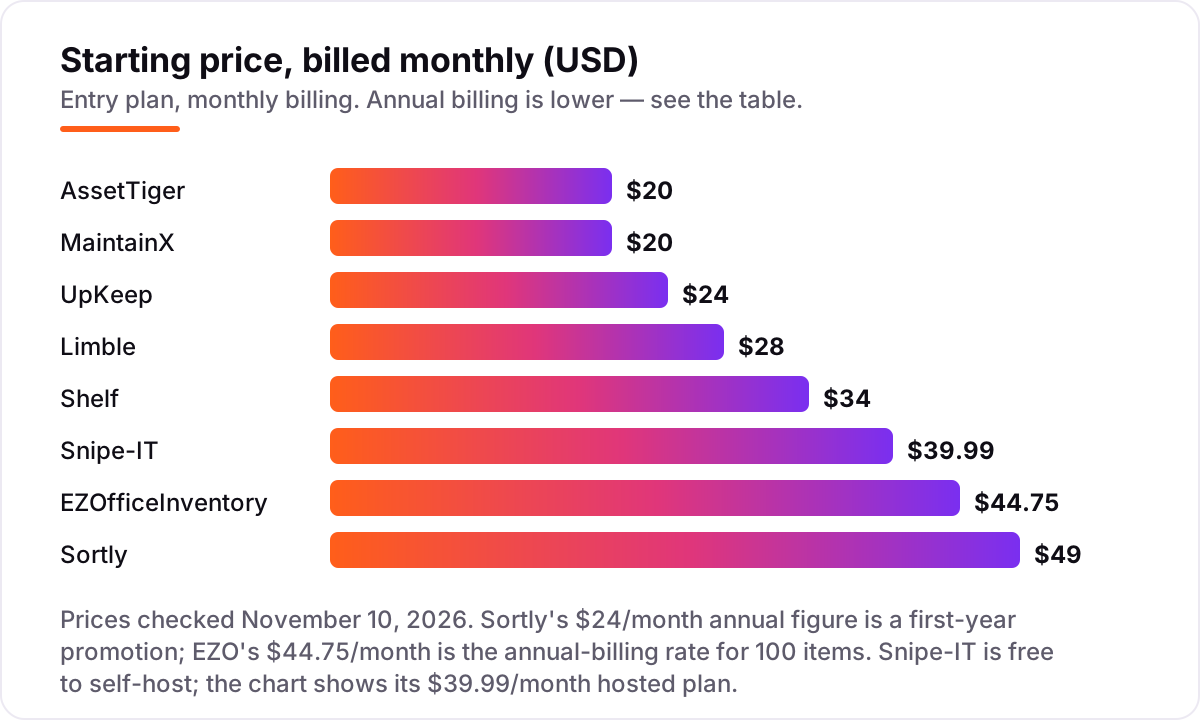
Asset tracking software pricing: what you will actually pay
Take a 5-person team tracking 500 assets at one location. On list prices, the subscription costs $20 a month on AssetTiger Basic, $39.99 on Snipe-IT Basic Hosting, $67 on Shelf Team, $81.41 on EZOfficeInventory Essential for 500 items billed annually, $100 on MaintainX Essential billed annually, $120 on UpKeep Essential, $140 on Limble Standard and $149 on Sortly Ultra — Sortly Advanced only covers 2 users, so a 5-person team needs Ultra.
Over a year, that is $240 on AssetTiger, $370 on Shelf Team billed annually, $399.99 on Snipe-IT Basic Hosting billed annually, $976.92 on EZOfficeInventory Essential, $1,200 on MaintainX Essential billed annually, $1,440 on UpKeep Essential, $1,680 on Limble Standard and $1,788 on Sortly Ultra. The same five people and the same 500 assets cost $240 a year at the cheap end and $1,788 at the dear end — a $1,548 gap that comes entirely from the pricing unit, not from features.
Three costs sit outside every number above. First, labels and tags: barcode and QR labels are cheap, but RFID tags cost more per item and only make sense for large, high-value fleets. Second, the add-ons: Shelf's Audits add-on, EZO's CMMS module and UpKeep's implementation packages are all priced separately. Third, the step-up: the features most teams actually want — purchase orders on Sortly, inventory on UpKeep, parts on MaintainX — sit one tier above the entry plan, so price the tier you will actually use. For the maintenance-led side of this comparison, see our guide to construction inventory software.
Annual billing cuts the bill on most tools here: Shelf Team drops from $804 a year paid monthly to $370 billed annually, Snipe-IT Basic Hosting from $479.88 to $399.99, and MaintainX Essential from $1,500 to $1,200. AssetTiger gives one month free on annual billing, so Basic costs $220 a year instead of $240. UpKeep and Limble publish no annual discount, so the monthly figure is the whole story.
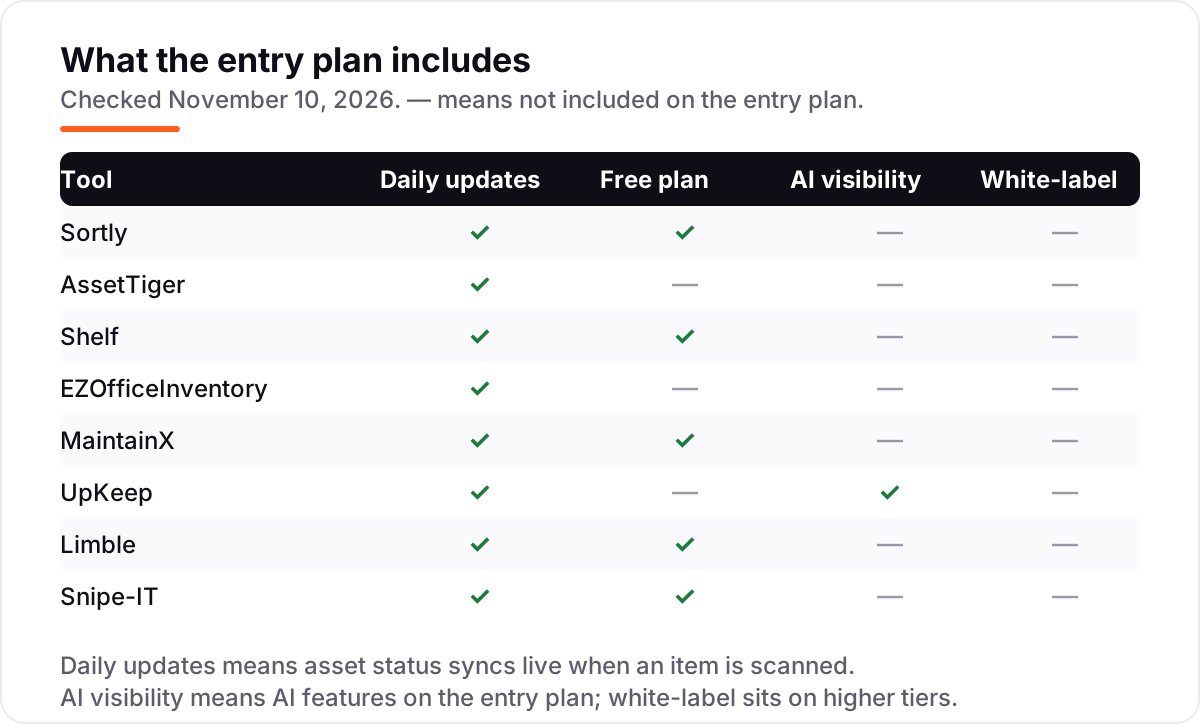
Know the difference: asset tracking vs inventory management vs CMMS
The confusion in this category is between three tools that look alike. Asset tracking follows durable items you keep and reuse — laptops, tools, vehicles — recording who has each one, where it is and its service history. Inventory management tracks stock you sell or consume, like parts and products on a shelf. A CMMS schedules maintenance and repairs for the assets you track. Sortly does the first two; Snipe-IT and AssetTiger are asset-first; MaintainX, UpKeep and Limble are CMMS tools with asset tracking built in.
There is a second, quieter confusion: registers and checkout systems. A register like AssetTiger or EZO records what you own and its lifecycle. A checkout system like Shelf records who has it right now, when it is due back and what is booked next week. A small business that lends gear out needs the second; one that only needs an audit trail needs the first. Neither model is better in itself; the question is whether the daily job is lending or accounting.
A third distinction worth knowing is the pricing unit. Two tools can both advertise about $20 a month and cost very different amounts for the same team: AssetTiger at $20 covers 500 assets with unlimited users, while MaintainX at $20 covers one user, so the same five people pay $100. Always price the tool for your actual team size, at your actual asset count, before comparing headline prices.
Quick comparison: tool type by need
| Buyer | Best pick | Why |
|---|---|---|
| Most small businesses | Sortly | Simplest photo-first tracker, Advanced is $49/month |
| Tightest budget | AssetTiger | Cheapest dedicated register at $20/month for 500 assets |
| Shared gear and bookings | Shelf | Bookings with conflict checks, Team is $67/month flat |
| Full asset lifecycle | EZOfficeInventory | Reservations and service history, from $44.75/month |
| Maintenance from phones | MaintainX | Best-reviewed mobile CMMS, free Basic, Essential $20/user/month |
| Mobile-first work orders | UpKeep | Unlimited work orders and AI assistant, from $24/user/month |
| Easiest CMMS setup | Limble | 4.8 out of 5 on G2, Standard is $28/user/month |
| IT assets, open source | Snipe-IT | Free to self-host, hosted from $39.99/month |
Mistakes to avoid
- Budgeting on the headline price alone. A $20 tool can cost $20 or $100 a month once the team is counted. Price the tool for your actual headcount and asset count, not for one person.
- Buying on the annual price, then paying monthly. Shelf Team is $370 a year billed annually but $67 a month, and MaintainX Essential is $20 a user billed annually but $25 month to month. Compare tools on the billing cycle you will actually use.
- Calling AssetTiger free. AssetTiger dropped its free plan in 2026. The only free route now is a 30-day trial for up to 250 assets, and older articles that call it free are out of date.
- Ignoring the item cap. Sortly Advanced stops at 500 items and 2 users, and EZO Essential at $44.75 covers only 100 items. Count your assets before you count the price.
- Forgetting the export test. Before you commit, export the register as a CSV and check that assets, locations, custom fields and check-out history all leave cleanly. Switching is straightforward when the data leaves; it is painful when it does not.
How we chose
We checked each vendor's own pricing page on November 10, 2026 and recorded the starting price exactly as shown, including the annual-billing figure where the page lists one, and we ranked the tools by fit for the most common buyer — a small business tracking a few dozen to a few hundred items — not by brand size. One price is third-party-sourced: EZOfficeInventory's $44.75/month rate comes from a November 3, 2026 check of its own pricing page by Shelf, because the vendor page did not return a readable copy on November 10, and older $35 and $40 figures for EZO are stale. Ratings are shown only where a fresh G2 or Capterra page gave a clear score and review count on November 10, 2026: Sortly, AssetTiger, MaintainX, UpKeep, Limble and Snipe-IT. Shelf and EZOfficeInventory carry no rating here because their review pages gave conflicting or stale counts, and we would rather show no rating than a stale one. No vendor paid for a place in this list, and none of the links here are affiliate links.
What to do next
Start with the free plan or trial of your top pick and load your real register into it — your tools, your laptops, your people — for one genuine week. Check that scanning works offline on the phones your team actually uses, that check-outs and returns record cleanly, and that the data exports as a CSV before you commit to a year. If the tracking is sorted but new customers are not finding you, our local SEO service handles the visibility side — or compare options in our guide to fleet management apps for contractors. Once your tools are in place, find out what's holding your rankings back.
Your stack only works if people find you
SerpAstra fixes what keeps your site off page one and makes it easy for AI assistants to recommend.
Get a free audit→Sources we checked (14)
- Sortly pricing — sortly.com/pricing (checked November 10, 2026)
- Sortly on G2 — 4.3/5, 27 reviews (checked November 10, 2026)
- AssetTiger pricing — assettiger.com/pricing (checked November 10, 2026)
- AssetTiger on Capterra — 4.6/5, 272 reviews (checked November 10, 2026)
- Shelf pricing — shelf.nu/pricing (checked November 10, 2026)
- EZOfficeInventory pricing — ezofficeinventory.com/pricing (checked November 3, 2026 via Shelf's vendor-page check)
- MaintainX pricing — getmaintainx.com/pricing (checked November 10, 2026)
- MaintainX on G2 — 4.8/5, 1,600 reviews (checked November 10, 2026)
- UpKeep pricing — upkeep.com/pricing (checked November 10, 2026)
- UpKeep on G2 — 4.5/5, 1,106 reviews (checked November 10, 2026)
- Limble pricing — limblecmms.com/pricing (checked November 10, 2026)
- Limble on G2 — 4.8/5, 701 reviews (checked November 10, 2026)
- Snipe-IT pricing — snipeitapp.com/pricing (checked November 10, 2026)
- Snipe-IT on G2 — 4.6/5, 27 reviews (checked November 10, 2026)
Shamim
Founder of SerpAstra
A full-stack SEO and digital marketer who spends most days on Local SEO for dental practices, AI search visibility and lead generation.
Frequently asked questions
What is the best asset tracking software for small business?
Sortly is the best fit for most small businesses: the simplest photo-first tracker at $49/month, with a free plan for 100 items. AssetTiger is the cheapest dedicated option at $20/month, and Shelf is the best pick when gear is shared and booked.
How much does asset tracking software cost for a small business?
Entry prices run from $0 to $49 a month. AssetTiger starts at $20/month, MaintainX at $20 per user per month billed annually, and Sortly at $49/month. A 5-person team pays $20 to $149 a month depending on the pricing unit, before any add-ons.
Is there free asset tracking software for small business?
Yes, with limits. Snipe-IT is free to self-host with unlimited assets, Shelf's free plan covers unlimited assets for 1 user, and Sortly's free plan covers 100 items. MaintainX and Limble also have free Basic plans for maintenance-led teams, so a tiny team can start at no cost at all.
What is the difference between asset tracking and inventory management?
Inventory management tracks stock you sell or consume, like parts and products. Asset tracking follows durable items you keep and reuse, like laptops, tools and vehicles, recording who has each one, where it is and its service history. Sortly does both; Snipe-IT and AssetTiger are asset-first.
Do I need barcode or QR code scanning?
Yes, if you track more than about 50 items. Scanning removes the typing errors that make a register untrustworthy, and every tool in this list supports QR codes, with barcode support on most. RFID costs more per item and only makes sense for large, high-value fleets.
Can I switch asset tracking software later?
Yes, but export first. Before you commit, check that the tool exports assets, locations, custom fields and check-out history as CSV, and test the export on the trial. Switching is straightforward when the data leaves cleanly; it is painful when it does not.
What should a small business check before paying for asset tracking?
Four things: what the price is charged on — assets, users or a flat fee — and what the entry plan actually covers; whether the free plan or trial fits your asset count; whether scanning works offline on your phones; and whether the data exports cleanly as CSV.
Free SEO and AI visibility audit
Find out what is holding your rankings back
Send us your site. Within 2 business days you get a written audit, an AI visibility check and a short fix list ranked by impact. Free, with no contract attached.
Request my free audit→Related guides
 Local Business & Vertical Software12 Best Construction Inventory Software Reviews in 2026, ComparedCompare the 12 best construction inventory software reviews on price, free plans, barcode tracking and QuickBooks sync, with prices checked November 7, 2026.Read guide →
 SEO & AI Search10 Best Accounting Software for Small Business with Inventory in 2026, Compared10 best accounting software for small business with inventory, compared on price, stock depth and free plans. Prices checked November 2, 2026.Read guide →
 Local Business & Vertical Software12 Best Fleet Management Apps for Contractors in 2026Compare the 12 best fleet management app for contractors on price, GPS tracking, dashcams and maintenance, with every price checked November 7, 2026.Read guide →