
12 Best Construction Inventory Software Reviews in 2026, Compared
Compare the 12 best construction inventory software reviews on price, free plans, barcode tracking and QuickBooks sync, with prices checked November 7, 2026.
 Shamim Mia, Founder, SerpAstraLast verified November 7, 202615 min read
We compare pricing pages, documentation and public reviews. We never accept payment for rankings.

Key takeaways
- Knowify is the best fit for most trade contractors at $149/month, JobTread follows at $199/month with every feature in one plan, and Contractor Foreman is the cheapest all-in-one at $49/month.
- Sortly and Zoho Inventory both offer genuinely free plans — Sortly for simple barcode tracking, Zoho Inventory for up to 50 orders a month.
- The single most important buying factor is the limit that forces your next upgrade: user caps, order caps and location caps decide what you actually pay, not the headline price.
- Procore and Buildertrend publish no prices at all, so budget for a sales conversation and an implementation fee before you shortlist either one.
On this page
Quick comparison
| Tool | Best for | Starting price | Free plan |
|---|---|---|---|
| Knowify | Trade contractors who need job costing, purchase orders and material tracking tied to QuickBooks | $149/mo | No (14-day trial) |
| JobTread | Small general contractors and remodelers who want one flat company-wide price instead of per-seat billing | $199/mo | No (30-day guarantee) |
| Contractor Foreman | Small to mid-sized contractors who want the cheapest all-in-one platform with unlimited projects | $49/mo (annual) | No (30-day trial) |
| Buildxact | Small residential builders who want takeoff quantities to flow into estimates with live dealer prices | $199/mo | Yes (Go plan) |
| Sortly | Small contractors who want fast barcode and QR tracking of materials, tools and equipment on a phone | $49/mo | Yes (free) |
| Zoho Inventory | Small contractors already in Zoho who need cheap order and stock management across locations | $39/mo | Yes (free plan) |
| inFlow Inventory | Wholesale and B2B suppliers who sell materials to contractors and need a customer portal | $129/mo | No (14-day trial) |
| Fishbowl | QuickBooks-based manufacturers and wholesalers who need warehouse control with barcode scanning | $229/mo (annual) | No (demo only) |
| Cin7 Core | Growing product businesses selling across several channels that need orders and stock in one place | $349/mo | No (14-day trial) |
| Fieldwire | Field-first trade contractors who need current plans, tasks and punch lists on a phone, offline | $39/user/mo | Yes (Basic free) |
| Buildertrend | Established residential builders and remodelers who want one platform for the whole job | Custom quote | No (demo only) |
| Procore | Mid-sized and large general contractors running complex projects with many subcontractors | Custom quote | No (demo only) |
Make one of these tools?
We re-check this list every quarter. Send a correction, request a review, or ask about a clearly labeled sponsored spot.
Request a listingThe best construction inventory software

Knowify
Best for: Trade contractors who need job costing, purchase orders and material tracking tied to QuickBooks
Knowify is built for trade contractors who run projects and service calls out of QuickBooks: it is the official QuickBooks Online construction partner, and the two-way sync is the deepest here, covering QuickBooks Online and Desktop, payments, time and payroll. Core costs $149 a month billed monthly, or $99 billed annually, for one user, with extra users at $29 a month each.
The catch is what Core leaves out. Job costing, project planning and real-time work-in-progress reporting wait for Advanced at $329 a month billed annually, and service dispatch is a $99-a-month add-on. Buy Knowify when the books live in QuickBooks and you want materials, purchase orders and job costs in the same system; buy JobTread when you want one flat price with everything included.
What we like
- Deepest native QuickBooks sync in this list — real-time, two-way, across QuickBooks Online and Desktop
- Published per-user pricing with no contract and no implementation fee
- Estimating, budgets, purchase orders and change orders in one plan from $99 a month billed annually
- Advanced adds job costing, project planning and real-time WIP reporting for $329 a month billed annually
Watch out for
- Core covers one user only — a second user costs $29 a month on top
- Job costing, project planning and real-time WIP wait for Advanced at $329 a month billed annually
- Service dispatch is a separate $99-a-month add-on, not part of the base plans

JobTread
Best for: Small general contractors and remodelers who want one flat company-wide price instead of per-seat billing
JobTread takes the opposite approach to most construction software: one plan, one price, every feature. It costs $199 a month billed monthly, or $159 billed annually, for the first internal user, with extra internal users at $20 a month each. Estimating, takeoffs, budgets, scheduling, change orders and job costing are all in that single price, and the price never changes with company revenue.
The trade-off is the lack of a free trial — the 30-day money-back guarantee is the try-before-you-buy. Subcontractors, vendors and customers use the portals free and unlimited, so the bill only grows with office staff. Pick JobTread when you want predictable, budget-first pricing; pick Knowify when QuickBooks depth matters more than a flat price.
What we like
- One plan with every feature included — no tiers to compare and no feature locked behind an upgrade
- Budget-first workflow: estimating, takeoffs, change orders and job financials in the same place
- Subcontractors, vendors and customers use the portals free and unlimited — only internal users are billed
- Price does not change with company revenue, and the monthly plan needs no long-term contract
Watch out for
- No free trial — the safety net is a 30-day money-back guarantee instead
- A five-person office pays $279 a month, since each extra internal user costs $20 a month
- No inventory-only plan, so a business that only needs stock tracking pays for the full platform

Contractor Foreman
Best for: Small to mid-sized contractors who want the cheapest all-in-one platform with unlimited projects
Contractor Foreman is the cheapest way into a full construction platform: Basic costs $49 a month billed annually, or $588 a year, for one user, with unlimited projects on every plan. Standard is $105 a month, Plus is $166 for up to 8 users, and Unlimited is $332 — all billed annually, all with the same 35-plus features, from scheduling and daily logs to time cards, GPS tracking and change orders.
The limits are the user cap and the accounting link. Basic covers one user, so a team needs Plus, and the QuickBooks Online integration runs through Zapier starting on Plus. There is no free plan, only a 30-day trial. Pick Contractor Foreman when budget decides and you want everything in one login; pick JobTread when you want the same all-in-one shape with a published monthly price.
What we like
- Cheapest all-in-one here: Basic is $49 a month billed annually, or $588 a year
- Flat company-wide pricing — unlimited projects on every plan, with no per-project fees
- 35-plus features in one login: scheduling, daily logs, time cards, GPS tracking, estimates and change orders
- 30-day free trial on every tier, and a 100-day money-back guarantee on Plus and above
Watch out for
- Basic covers one user — a team needs Plus at $166 a month billed annually for up to 8 users
- QuickBooks Online integration runs through Zapier and starts on the Plus plan
- The interface covers 35-plus features, so the first week takes real setup time

Buildxact
Best for: Small residential builders who want takeoff quantities to flow into estimates with live dealer prices
Buildxact is the estimating-first pick: digital takeoffs flow into the estimate, the quote and job costing, with live dealer pricing — including The Home Depot — keeping material prices current instead of guessed. Foundation costs $199 a month billed monthly, or $169 billed annually, and every paid plan includes unlimited users, so the bill never grows with headcount.
The catch is scope. Project management and scheduling wait for Pro at $399 a month, and the platform is built for residential builders — commercial and heavy-civil work will feel thin. There is a free Go plan for trying the workflow. Pick Buildxact when estimating accuracy is the job; pick JobTread when you need project management and job financials from day one.
What we like
- Live dealer pricing feeds, including The Home Depot, keep material prices current in every estimate
- Unlimited users on every paid plan, so the price never grows with headcount
- Digital takeoffs flow straight into the estimate, the quote and job costing without retyping
- A free Go plan lets a builder try the workflow before paying anything
Watch out for
- Project management and scheduling wait for Pro at $399 a month
- Built for residential work — commercial and heavy-civil contractors will find it thin
- Annual plans need a 12-month commitment to get the 15% discount

Sortly
Best for: Small contractors who want fast barcode and QR tracking of materials, tools and equipment on a phone
Sortly is the simplest inventory tool in this list, and the fastest to start: a crew can be scanning barcodes and QR labels within minutes, with low-stock alerts and custom tags covering a yard, a warehouse or a truck. The free plan handles basic tracking, and Advanced costs $49 a month billed monthly, or $24 a month billed annually in the first year under a 50% new-customer promotion.
The promotion is the thing to budget around — the regular annual rate after year one is higher — and Advanced leaves out stock counts, pick lists and purchase orders, which wait for Ultra. Reviewers also flag slow loading on large inventories. Pick Sortly when you need tracking today, not a platform; pick Zoho Inventory when you need orders and purchasing too.
What we like
- The fastest to start here — a team can be scanning barcodes within minutes, not weeks
- A real free plan covers basic tracking, and Advanced starts at $49 a month billed monthly
- Low-stock alerts, custom tags and QR labels fit a yard, a warehouse or a truck
- Mobile-first design means the crew updates stock on site instead of back at the office
Watch out for
- The $24-a-month annual rate is a first-year promotion — the regular annual rate is higher
- Stock counts, pick lists and purchase orders are not on the entry Advanced plan
- Reviewers flag slow loading with large inventories and weak multi-location quantity tracking

Zoho Inventory
Best for: Small contractors already in Zoho who need cheap order and stock management across locations
Zoho Inventory is the cheapest real inventory system here: the free plan covers 50 orders a month, and Standard costs $39 a month billed monthly, or $29 billed annually, for 500 orders, 3 users and 2 locations. Pricing is per organization, not per user, and the higher plans climb by order volume — Premium at $79 a month billed annually, Plus at $129, Enterprise at $249.
The catch is the order-volume meter: a busy month can push you into the next tier, and batch and serial-number tracking wait for higher plans. The native sync with Zoho Books and Zoho CRM is the reason to pick it over a standalone tracker. Choose Zoho Inventory when the business already lives in Zoho; choose Sortly when you only need fast barcode tracking.
What we like
- A real free plan covers 50 orders a month, and Standard is $29 a month billed annually
- Per-organization pricing, not per user — 3 users and 2 locations on Standard
- Native sync with Zoho Books, Zoho CRM and marketplaces such as Shopify and Amazon
- Composite items, dropshipping and backordering are included from the free plan up
Watch out for
- Paid plans are priced by monthly order volume, so a busy month can push you into the next tier
- Batch and serial-number tracking and advanced warehousing wait for higher plans
- The free plan stops at 50 orders a month with one user

inFlow Inventory
Best for: Wholesale and B2B suppliers who sell materials to contractors and need a customer portal
inFlow Inventory is built for product businesses that sell to other businesses: wholesalers, distributors and suppliers who also manufacture. Lite costs $129 a month billed monthly, or $99 billed annually, for 2 team members and 1 location, with unlimited sales orders, purchase orders and integrations, multi-level bills of materials and a dedicated customer success manager from day one.
The costs to watch are the step-ups. Core is $299 a month billed annually for 5 team members and 5 locations, Core and above need a one-time $499 onboarding package, and the B2B Showroom portal is a $39-a-month add-on on Lite and Core. Pick inFlow when you sell materials to trade customers; pick Zoho Inventory when you only need to track your own stock.
What we like
- Unlimited sales orders, purchase orders and integrations on every plan
- Multi-level bills of materials and manufacturing workflows suit suppliers who also build
- A dedicated customer success manager is included from day one
- The B2B Showroom portal lets trade customers order at their own prices
Watch out for
- Core and above need a one-time $499 onboarding package
- Lite covers 2 team members and 1 location — a bigger team moves to Core at $299 a month billed annually
- The B2B Showroom portal is a $39-a-month add-on on Lite and Core

Fishbowl
Best for: QuickBooks-based manufacturers and wholesalers who need warehouse control with barcode scanning
Fishbowl is the warehouse pick for QuickBooks shops: barcode-driven receiving, picking and cycle counts, with two-way QuickBooks Online and Xero sync keeping stock and accounting in step. Essentials costs $229 a month billed annually for 2 users, Growth is $429 for automated reordering and multichannel selling, and Scale is $729 for lot-tracked, audit-ready operations.
The pricing has sharp edges. Essentials bills annually only, Growth is needed for the full two-way QuickBooks sync, and Advanced Warehouse and Advanced Manufacturing are separate add-ons from $595 and $675 a month. There is no free trial — only a demo. Pick Fishbowl when the warehouse is the business; pick inFlow when you sell to trade customers and need a portal.
What we like
- Two-way QuickBooks Online and Xero sync keeps stock and accounting in step
- Barcode-driven receiving, picking and cycle counts replace spreadsheet stock checks
- An AI operations specialist is included on every plan, drafting routine work for approval
- Runs in the cloud or on-premises, which suits shops with strict data rules
Watch out for
- Essentials is billed annually only — there is no monthly billing option
- Growth at $429 a month is needed for two-way QuickBooks sync and automated reordering
- Advanced Warehouse and Advanced Manufacturing are separate add-ons from $595 and $675 a month

Cin7 Core
Best for: Growing product businesses selling across several channels that need orders and stock in one place
Cin7 Core is the multichannel pick: it keeps stock in step across Shopify, Amazon, Walmart and WooCommerce, with automated reordering, purchase orders and manufacturing in the same system. Standard costs $349 a month for 5 users, 2 integrations and 6,000 sales orders a year, with Pro at $599 and Advanced at $1,199, and more than 700 integrations cover QuickBooks, Xero and the big sales channels.
The add-ons are the thing to price. ForesightAI forecasting, the B2B portal, POS and API access all cost extra, and Standard's order and integration caps push a growing business to Pro quickly. Pick Cin7 Core when you sell the same stock on several channels; pick Fishbowl when the warehouse and QuickBooks sync matter more than the channels.
What we like
- Automated reordering, purchase orders and multichannel stock sync in one system
- Flat monthly pricing for a block of users — 5 users on Standard, 10 on Pro
- More than 700 integrations cover QuickBooks, Xero, Shopify, Amazon and WooCommerce
- Material requirements planning is included on Pro for businesses that also manufacture
Watch out for
- ForesightAI forecasting, the B2B portal, POS and API access are all paid add-ons
- Standard caps at 6,000 sales orders a year and 2 integrations — volume growth forces Pro
- Setup is heavier than the simpler tools here, with a learning curve reviewers mention

Fieldwire
Best for: Field-first trade contractors who need current plans, tasks and punch lists on a phone, offline
Fieldwire is the field pick: a mobile-first jobsite platform built for foremen and crews, with full offline access so work continues without a signal. The Basic plan is free for 5 users, 3 projects and 100 sheets, and Pro costs $39 a user a month billed annually, or $54 billed monthly, for unlimited projects and sheets, reporting, sheet compare and custom task statuses.
The catch is the per-user meter. Ten users on Pro cost $390 a month billed annually, and RFIs, submittals, change orders and budget tracking wait for Business Plus at $89 a user a month. There is no accounting or estimating depth. Pick Fieldwire when the crew works from phones on site; pick Knowify when the office needs job costing first.
What we like
- A genuinely useful free Basic plan covers 5 users, 3 projects and 100 sheets
- Full offline access on mobile, so crews keep working without a signal
- Plan viewing, task management, punch lists and inspections in one field app
- Transparent per-user pricing with no sales call needed to see the numbers
Watch out for
- Per-user pricing adds up fast — 10 users on Pro cost $390 a month billed annually
- RFIs, submittals, change orders and budget tracking wait for Business Plus at $89 a user a month
- No accounting or estimating depth — most teams pair it with a separate financial system

Buildertrend
Best for: Established residential builders and remodelers who want one platform for the whole job
Buildertrend is the residential-builder suite: project management, financials and client communication in one platform, with every plan including the full feature set and unlimited users. Pricing is personalized for each business — it is based on builder type, annual revenue and project volume — and annual subscriptions get 10% off, so there is no published starting price to compare.
That is also the weakness: you cannot budget Buildertrend without a sales conversation, and there is no free trial, only a demo. The unlimited-users model is the saving grace — the quote never grows with headcount. Pick Buildertrend when the company is established and wants one platform; pick JobTread when you want the same shape with a price you can see today.
What we like
- Every plan includes the full platform — no feature is held back for a higher tier
- Unlimited users are included, so adding the team costs nothing extra
- Project management, financials and client communication in one login
- Daily training sessions and a 24/7 help center come with the subscription
Watch out for
- No published pricing — every quote needs a sales conversation
- No free trial, so you commit before seeing the full platform in daily use
- Priced for established builders; a one-person shop will find cheaper fits here

Procore
Best for: Mid-sized and large general contractors running complex projects with many subcontractors
Procore is the enterprise pick and the highest-rated platform in this list, at 4.6 out of 5 from more than 4,600 G2 reviews. It covers project management, cost management, documents, RFIs and field collaboration in one system, with the deepest subcontractor and document workflows here — which is why mid-sized and large general contractors standardize on it.
Pricing follows annual construction volume rather than per-seat licensing, so there is no published starting price and no free trial — only a demo and a sales conversation. Implementation also takes longer than the simpler tools here. Pick Procore when the project portfolio is large and complex; pick Buildertrend or JobTread when the company is smaller and the budget needs a visible number.
What we like
- The most widely reviewed construction platform here — 4.6 out of 5 from more than 4,600 G2 reviews
- Project management, cost management, documents and field collaboration in one system
- Pricing follows annual construction volume, so it scales with the size of the work
- Deepest subcontractor and document workflows of any tool in this list
Watch out for
- No published pricing — quotes are based on annual construction volume, not per-seat licensing
- No free trial, and implementation takes longer than the simpler tools here
- The depth that suits large GCs is more than a small contractor needs or will use
The best construction inventory software reviews all point to the same problem: materials go missing, purchase orders live in email, and nobody knows what is actually in the yard until a job stops. We ranked the 12 tools below by fit for the most common buyer — a small to mid-sized US contractor who needs to track materials, tools and purchase orders without hiring someone to run the system — starting with the trade-focused platforms and ending with the enterprise suites, and every price was checked on the vendor's own pricing page on November 7, 2026.
How to choose from the best construction inventory software reviews
- Count your users first. Knowify Core covers one user, Fishbowl Essentials covers two, and Fieldwire charges per user — while JobTread, Contractor Foreman Plus and Buildxact cover a whole team for one flat price.
- Count your orders and locations. Zoho Inventory Standard stops at 500 orders a month, inFlow Lite at one location, and Cin7 Core at 6,000 orders a year. The cap you hit first is your real starting price.
- Check the QuickBooks link. Knowify syncs two-way in real time, Fishbowl syncs two-way on Growth, and Contractor Foreman connects through Zapier on Plus — ask whether the sync is one-way or two-way before you buy.
- Decide whether you need the job, not just the stock. Sortly and Zoho Inventory track materials; Knowify, JobTread and Buildertrend also run estimating, budgets and change orders.
- Test it with a real count. Run one genuine stock count in the trial — your SKUs, your yard, your purchase orders — and check that the count in the app matches the count on the shelf.
Construction software is only half the job: the other half is being found by the customers who need the work. Our guide to marketing software for contractors covers the visibility side, and before you publish new pages for the services you sell, run your titles through the free SERP snippet preview tool — it shows exactly how the title and description will look in Google.
Whatever you shortlist, try it with real stock before you pay. The free plans and trials in this list are long enough to run one genuine count — your materials, your tools, your purchase orders — and that count tells you more than any review can. Check two things in the trial: that a barcode scan updates the stock level on the spot, and that the purchase order you raise matches what the supplier actually delivers.
Construction inventory software pricing: what you will actually pay
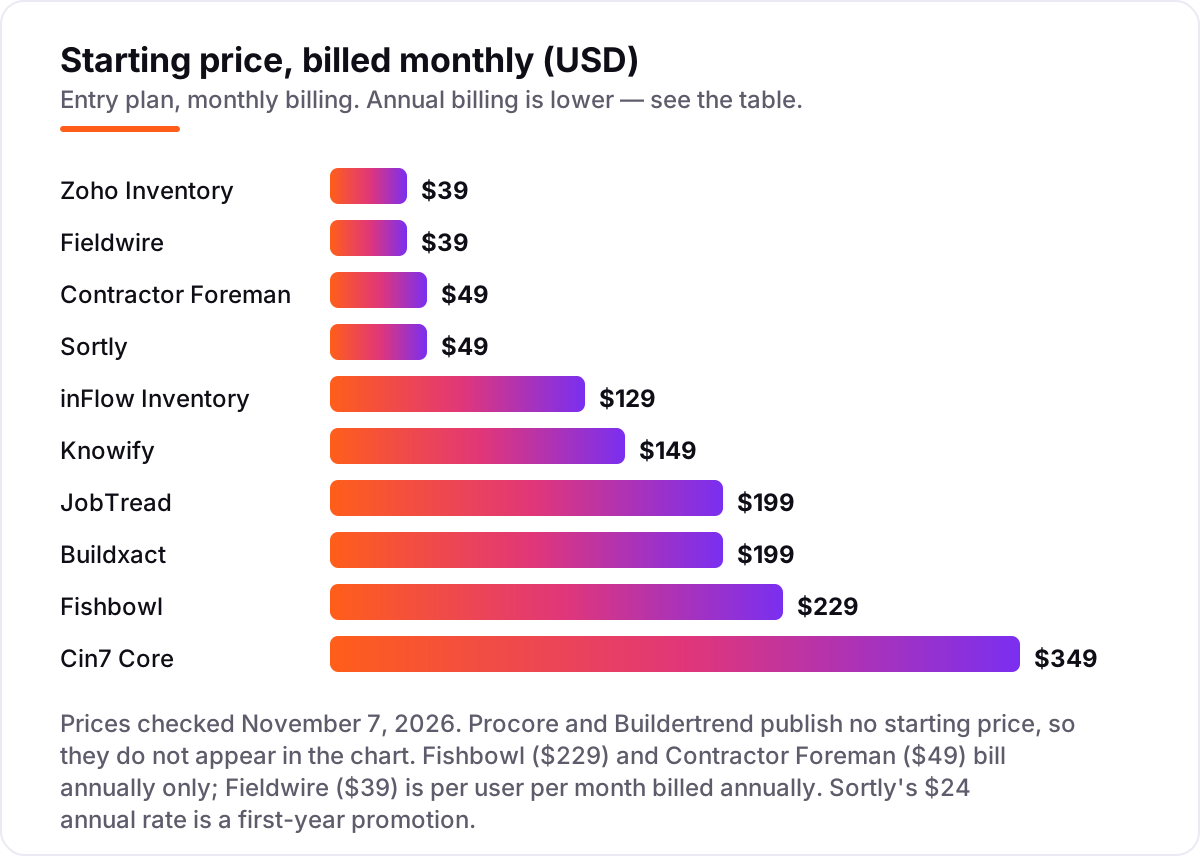
Take a five-person residential builder with one yard and about 200 SKUs. On list prices billed annually, the subscription costs $348 a year on Zoho Inventory Standard, $1,992 on Contractor Foreman Plus, $2,028 on Buildxact Foundation, $2,340 on Fieldwire Pro, $2,580 on Knowify Core, $2,676 on JobTread, $3,588 on inFlow Core, $4,188 on Cin7 Core Standard and $5,148 on Fishbowl Growth. Sortly Advanced is $288 in the first year on the annual promotion, then $588 a year billed monthly. Procore and Buildertrend need a custom quote, so they have no number in this comparison.
Three of those numbers need adjusting before they are real. First, the per-user tools: Knowify Core covers one user, so four extra users at $29 a month bring it to $2,580 a year, and Fieldwire Pro at $39 a user a month is $2,340 for five users. Second, the caps: inFlow Lite only covers 2 team members, so a five-person team needs Core, and Fishbowl Essentials only covers 2 users, so the same team needs Growth. Third, onboarding: inFlow Core adds a one-time $499 onboarding package.
Over a year, the same five people and the same 200 SKUs cost $348 at the cheap end and $5,148 at the dear end — a $4,800 gap that comes entirely from user caps, order caps and billing choices, not from features. The flat-price tools win this comparison: Contractor Foreman Plus covers 8 users for $1,992 a year, and Buildxact Foundation covers unlimited users for $2,028. If the business also needs its books in order, our guide to accounting software with inventory covers the ledger side.
Annual billing cuts the bill on most tools here: Knowify Core drops from $1,788 to $1,188 a year for one user, JobTread from $2,388 to $1,908, Buildxact Foundation from $2,388 to $2,028, and Zoho Inventory Standard from $468 to $348. Sortly's annual promotion is the exception to watch — the $24-a-month rate is a first-year price, so budget on the $49-a-month monthly rate from year two. One more cost to check before you commit: a second yard or warehouse is a second location on Zoho Inventory, inFlow and Cin7 Core, and each extra location can push you into the next tier.
Know the difference: inventory software vs construction management software
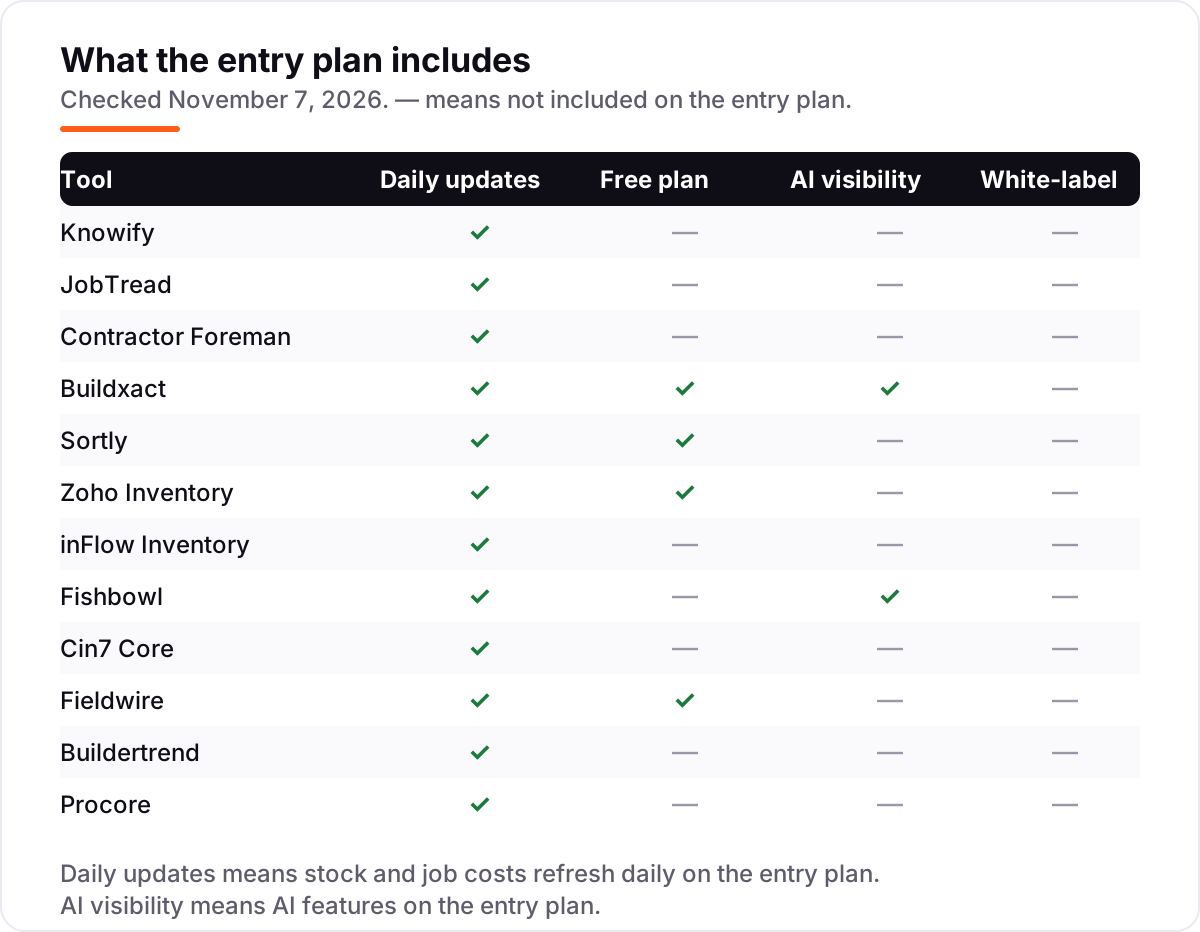
The confusion in this category is between tracking stock and running the job. Inventory software answers one question — what do we own, where is it, and what do we need to order — with stock levels, locations, purchase orders and reorder points. Construction management software answers a different question — what is happening on this job — with schedules, budgets, change orders, documents and client communication. A tool can do one without the other, and most of the cheap tools here only do the first.
There is a second, quieter confusion: a barcode app is not a warehouse system. Sortly tracks items with QR labels and low-stock alerts, which is enough for a yard or a truck, but it has no purchase-order workflow on the entry plan and no multi-location stock control. Fishbowl and Cin7 Core, at the other end, run receiving, picking, cycle counts and lot tracking — the machinery a real warehouse needs. If your stock lives in one place and moves by hand, the app is enough; if it moves through a warehouse, it is not.
A third distinction worth knowing is the accounting link versus accounting itself. None of these tools is an accounting system — they track materials, and the accounting happens in QuickBooks or Zoho Books. What differs is how the two connect: Knowify and Fishbowl sync two-way, so a purchase order in one system is a bill in the other, while a Zapier link only moves data when the trigger fires. If the books must always match the stock, the two-way sync is worth paying for.
Quick comparison: tool type by need
| Buyer | Best pick | Why |
|---|---|---|
| Trade contractor on QuickBooks | Knowify | Deepest QuickBooks sync, job costing and purchase orders from $149/month |
| Small GC that wants one flat price | JobTread | Every feature in one $199/month plan, unlimited external portal users |
| Cheapest all-in-one | Contractor Foreman | Full platform from $49/month billed annually, unlimited projects |
| Residential builder who estimates | Buildxact | Takeoffs with live dealer pricing, unlimited users, from $199/month |
| Fast barcode tracking only | Sortly | Free plan, scanning in minutes, Advanced is $49/month |
| Cheapest real inventory system | Zoho Inventory | Free for 50 orders a month, Standard is $39/month |
| Field crew on phones | Fieldwire | Free Basic plan, offline access, Pro is $39/user/month |
| Large GC, complex projects | Procore | Highest-rated platform here, priced on annual construction volume |
Mistakes to avoid
- Budgeting on the promo price. Sortly's $24-a-month annual rate is a first-year promotion, and Knowify's $99-a-month Core is the annual rate, not the monthly one. The list price is what you pay later, so compare tools on that number.
- Buying on the free plan, then finding purchase orders cost extra. Sortly's free plan and Advanced plan do not include purchase orders, and Zoho Inventory's free plan stops at 50 orders a month. If you raise purchase orders every week, count the paid plan in the price from day one.
- Ignoring the cap that bites first. A tool can be cheap and still be the wrong buy: inFlow Lite at $129 is no bargain once you pass 2 team members, and Fishbowl Essentials at $229 is no bargain once you pass 2 users.
- Paying per user when the whole crew needs in. Fieldwire Pro at $39 a user a month is $390 a month for ten users, while Buildxact Foundation covers unlimited users for $199. Count heads before you compare prices.
- Forgetting the second location. A second yard is a second location on Zoho Inventory, inFlow and Cin7 Core, and it can push you into the next tier. Price the second site before you commit to a tool for the first.
How we chose
We checked each vendor's own pricing page on November 7, 2026 and recorded the starting price exactly as shown, including the annual-billing figure where the page lists one, and we ranked the tools by fit for the most common buyer — a small to mid-sized US contractor tracking materials, tools and purchase orders — not by brand size. Ratings come from fresh search-index copies of each tool's G2 reviews page, crawled within the last few days, with the score and review count as shown there. Two figures need a note: Zoho Inventory's $39-a-month monthly rate is corroborated by third-party reads of Zoho's own pricing page, which shows the $29-a-month annual rate, and Sortly's $24-a-month annual rate is a first-year promotion on its pricing page. Procore and Buildertrend publish no starting price, so they are listed as custom quote. No vendor paid for a place in this list, and none of the links here are affiliate links.
What to do next
Start with the free plan or trial of your top pick and run one real stock count through it. Check that a barcode scan updates the level on the spot, that the purchase order matches what the supplier delivers, and that your accountant can see the numbers without a second system. If the stock is sorted but new customers are not finding you, our local SEO service handles the visibility side — or compare providers in our guide to project management software for marketing teams. Once your tools are in place, find out what's holding your rankings back.
Your stack only works if people find you
SerpAstra fixes what keeps your site off page one and makes it easy for AI assistants to recommend.
Get a free audit→Sources we checked (24)
- Knowify pricing — knowify.com/pricing (checked November 7, 2026)
- JobTread pricing — jobtread.com/pricing (checked November 7, 2026)
- Contractor Foreman pricing — contractorforeman.com/pricing (checked November 7, 2026)
- Buildxact pricing — buildxact.com/pricing (checked November 7, 2026)
- Sortly pricing — sortly.com/pricing (checked November 7, 2026)
- Zoho Inventory pricing — zoho.com/us/inventory/pricing (checked November 7, 2026)
- inFlow Inventory pricing — inflowinventory.com/pricing (checked November 7, 2026)
- Fishbowl pricing — fishbowlinventory.com/pricing (checked November 7, 2026)
- Cin7 Core pricing — cin7.com/pricing (checked November 7, 2026)
- Fieldwire pricing — fieldwire.com/pricing (checked November 7, 2026)
- Buildertrend pricing — buildertrend.com/pricing (checked November 7, 2026)
- Procore pricing — procore.com/pricing (checked November 7, 2026)
- Knowify G2 reviews — g2.com/products/knowify/reviews (checked November 7, 2026)
- JobTread G2 reviews — g2.com/products/jobtread/reviews (checked November 7, 2026)
- Contractor Foreman G2 reviews — g2.com/products/contractor-foreman/reviews (checked November 7, 2026)
- Buildxact G2 reviews — g2.com/products/buildxact/reviews (checked November 7, 2026)
- Sortly G2 reviews — g2.com/products/sortly/reviews (checked November 7, 2026)
- Zoho Inventory G2 reviews — g2.com/products/zoho-inventory/reviews (checked November 7, 2026)
- inFlow Inventory G2 reviews — g2.com/products/inflow-inventory/reviews (checked November 7, 2026)
- Fishbowl G2 reviews — g2.com/products/fishbowl-inventory-fishbowl/reviews (checked November 7, 2026)
- Cin7 Core G2 reviews — g2.com/products/cin7-core/reviews (checked November 7, 2026)
- Fieldwire G2 reviews — g2.com/products/fieldwire-by-hilti/reviews (checked November 7, 2026)
- Buildertrend G2 reviews — g2.com/products/buildertrend/reviews (checked November 7, 2026)
- Procore G2 reviews — g2.com/products/procore/reviews (checked November 7, 2026)
Shamim
Founder of SerpAstra
A full-stack SEO and digital marketer who spends most days on Local SEO for dental practices, AI search visibility and lead generation.
Frequently asked questions
What is the best construction inventory software?
Knowify is the best fit for most trade contractors, at $149 a month, because it ties job costing, purchase orders and material tracking to QuickBooks. JobTread at $199 a month is the better pick for general contractors who want one flat price, and Sortly is the best free starting point for simple barcode tracking.
How much does construction inventory software cost?
Entry prices run from $0 to $349 a month. Sortly and Zoho Inventory have free plans, and the first paid plans cost $39 to $49 a month. A five-person contractor typically pays $348 to $5,148 a year for the subscription alone, depending on user caps, order volume and whether billing is annual.
Is there free construction inventory software?
Yes, with limits. Sortly has a free plan for basic barcode tracking, Zoho Inventory is free for up to 50 orders a month, Fieldwire Basic is free for 5 users and 3 projects, and Buildxact has a free Go plan. Each one covers real tracking, but stock counts, purchase orders and multi-location features need a paid plan.
What is the difference between inventory software and construction management software?
Inventory software tracks what you own: stock levels, locations, purchase orders and reorder points. Construction management software runs the job: schedules, budgets, change orders and client communication. Tools like Knowify and JobTread do both, while Sortly and Zoho Inventory only track stock.
Does construction inventory software work with QuickBooks?
Most tools here connect to QuickBooks. Knowify has the deepest native two-way sync, Fishbowl syncs two-way with QuickBooks Online and Xero, and Cin7 Core integrates with both. Contractor Foreman connects through Zapier on its Plus plan. Check whether the sync is one-way or two-way before you buy.
Can I track tools and equipment as well as materials?
Yes, on the right tool. Sortly is built for tracking tools and equipment with QR labels alongside materials, and Fieldwire tracks equipment through tasks and inspections. Pure stock systems like Zoho Inventory and inFlow track materials and finished goods, not the tools themselves.
Can I switch construction inventory software later?
Yes, but plan the move between jobs. Export your item list, stock counts by location, open purchase orders and supplier prices from the old tool, then import them into the new one and run a physical count before going live. Switching mid-project means two systems tracking the same materials.
Free SEO and AI visibility audit
Find out what is holding your rankings back
Send us your site. Within 2 business days you get a written audit, an AI visibility check and a short fix list ranked by impact. Free, with no contract attached.
Request my free audit→Related guides
 Digital Marketing & Ads7 Best Marketing Software for Contractors in 2026, ComparedCompare the 7 best marketing software for contractors on price, reviews and trade-specific features, with every price checked November 5, 2026.Read guide →
 SEO & AI Search10 Best Accounting Software for Small Business with Inventory in 2026, Compared10 best accounting software for small business with inventory, compared on price, stock depth and free plans. Prices checked November 2, 2026.Read guide →
 Digital Marketing & Ads10 Best Marketing Project Management Tools in 2026, ComparedCompare the 10 best marketing project management tools on price, free plans, proofing and AI features, with every price checked November 5, 2026.Read guide →