
Best Audio Cleaning Software for 2026: 8 Options Compared by Use Case
Compare the 8 best audio cleaning software tools on price, free plans and AI cleanup, with every price checked November 7, 2026, for podcasters.
 Shamim Mia, Founder, SerpAstraLast verified November 7, 202612 min read
We compare pricing pages, documentation and public reviews. We never accept payment for rankings.
Key takeaways
- Adobe Podcast Premium is the best fit for most podcasters at $9.99/month; Audacity is free, and iZotope RX Elements costs $99 once for deeper repair.
- Decide first whether you need live cleanup or file repair: Krisp and NVIDIA Broadcast clean audio as it happens, while RX, Acon and Audacity fix recordings afterwards.
- The single most important buying factor is how much control you want: one-click AI tools are fast but can over-process a voice, while manual tools take longer and keep it natural.
- Two tools here are genuinely free with no subscription: Audacity for recorded files and NVIDIA Broadcast for live calls on an RTX graphics card.
On this page
Quick comparison
| Tool | Best for | Starting price | Free plan |
|---|---|---|---|
| Adobe Podcast | Podcasters and creators who want one-click cleanup of a noisy voice recording in the browser | $9.99/mo | Yes (free tier) |
| Audacity | Beginners and budget-conscious creators who want free, hands-on noise removal and editing | Free | Yes (free) |
| iZotope RX | Post-production engineers and professionals who repair audio for a living | $99 one-time | No (trial) |
| Acon Digital Restoration Suite | DAW users who want strong noise reduction as a perpetual licence, with no subscription | $99 one-time | No (30-day trial) |
| Krisp | Remote workers who need quiet calls on Zoom, Teams and every other meeting app | $16/mo | No (7-day trial) |
| NVIDIA Broadcast | Gamers, streamers and remote workers who already own an NVIDIA RTX graphics card | Free | Yes (free) |
| Waves Clarity Vx | Voiceover artists and podcasters who want one-knob AI cleanup inside their DAW | $34.99 one-time | No (trial) |
| Adobe Audition | Video editors and podcasters already inside Adobe Creative Cloud who need manual repair | $22.99/mo | No (7-day trial) |
Make one of these tools?
We re-check this list every quarter. Send a correction, request a review, or ask about a clearly labeled sponsored spot.
Request a listingThe best audio cleaning software

Adobe Podcast
Best for: Podcasters and creators who want one-click cleanup of a noisy voice recording in the browser
Adobe Podcast is the fastest way to rescue a noisy voice recording. Upload a file to Enhance Speech in your browser and the AI strips out background noise and room echo, returning audio that sounds close to a studio recording. The free tier handles audio files up to 30 minutes, with an hour of enhancement a day, which covers most episodes one at a time.
Premium costs $9.99 a month and lifts the caps: video files, bulk uploads, files up to two hours, four hours of enhancement a day, and a strength slider so you can pull back when voices sound too polished. The trade-off is control — push the slider too far and voices turn robotic. Buy it for the quickest fix for spoken audio; pair it with an editor for cutting and mixing.
What we like
- One-click Enhance Speech turns laptop-mic recordings into near-studio audio
- Runs entirely in the browser — nothing to install
- Free tier is genuinely usable for short files, with no watermark on output
- Premium adds video files, bulk uploads and an adjustable strength slider
Watch out for
- Free tier caps files at 30 minutes and 1 hour of enhancement a day
- Heavy enhancement can make a voice sound processed or robotic
- Speech only — it will not clean up music or sound design

Audacity
Best for: Beginners and budget-conscious creators who want free, hands-on noise removal and editing
Audacity is the classic free workflow for cleaning a recording by hand. Capture a noise profile from a quiet stretch of the track, then let Noise Reduction subtract that exact noise signature from the whole recording. Add the spectrogram view, which shows individual noises as shapes you can select and silence, and a free editor handles an impressive amount of cleanup for zero dollars.
The price is time and practice. Results depend on the profile you capture and the settings you pick, and it is easy to over-process a track until the voice sounds hollow. Recent versions add AI plug-ins through MuseHub for extra help. Start here when you are learning audio repair or the budget is zero; move to a one-click tool when the manual work starts costing you evenings.
What we like
- Completely free and open source, with no paid plan at all
- Noise Reduction works from a noise profile you capture from the recording itself
- Spectrogram view lets you find and fix individual noises by sight
- Runs on Windows, macOS and Linux, with a huge free plugin ecosystem
Watch out for
- Manual and slow next to AI tools — you set the noise profile yourself
- Dated interface that takes a while to learn
- Easy to over-process a track and leave audible artifacts

iZotope RX
Best for: Post-production engineers and professionals who repair audio for a living
RX is the tool post-production engineers reach for when audio has to be saved. Hiss, hum, clicks, clipping, reverb, sibilance — and with the spectral editor, even a single cough in the middle of a sentence. The AI Repair Assistant analyzes a file and suggests fixes, while Dialogue Isolate pulls a voice out of a noisy background and Music Rebalance adjusts individual instruments inside a finished mix.
RX 12 comes in three editions. Elements costs $99 and gives you six repair plug-ins to use inside a DAW, but no RX Audio Editor. Standard costs $399 and adds the editor, RX Connect and the full module set; Advanced costs $1,399 and adds multichannel editing and the hardest dialogue tools. For podcasters who only need hum removed, it is overkill; for anyone who repairs audio for a living, it is the standard.
What we like
- The professional standard for deep repair: hiss, hum, clicks, clipping, reverb
- Spectral editor lets you see a noise and remove it surgically
- Repair Assistant analyzes a file and suggests fixes automatically
- Dialogue Isolate and Music Rebalance handle the hardest separation jobs
Watch out for
- Elements is plug-ins only — the RX Audio Editor starts at Standard ($399)
- Steep learning curve; the spectral editor rewards practice
- Overkill and overpriced for a podcaster who only needs hum removed

Acon Digital Restoration Suite
Best for: DAW users who want strong noise reduction as a perpetual licence, with no subscription
Acon Digital's Restoration Suite is four plug-ins that each do one job well: DeNoise for hiss and wind noise, DeHum for electrical hum, DeClick for clicks and crackle, and DeClip for restoring clipped recordings. Each has a resizable interface with visual feedback, and copy protection is a simple serial number, which working engineers appreciate. The new Restoration Suite 3 adds a plug-in that listens to a recording and builds its own repair chain.
At $99 for a perpetual licence it is a fraction of what the big suites cost, and an introductory $69 price runs until November 18, 2026. The free 30-day trial is fully functional, so you can test it on your worst recording before buying. If you work inside a DAW and want strong noise reduction without a subscription, this is the value pick of the category.
What we like
- Four focused plug-ins that each do one job well: DeNoise, DeHum, DeClick, DeClip
- One-time price with a simple serial-number licence — no subscription
- Restoration Suite 3 adds a plug-in that listens and builds its own repair chain
- Fully functional 30-day trial, so you can test it on your worst recording first
Watch out for
- Narrower than RX — focused plug-ins, not a full editor
- No standalone editor included; you need a DAW to host the plug-ins
- Fewer AI features than the newest one-click tools

Krisp
Best for: Remote workers who need quiet calls on Zoom, Teams and every other meeting app
Krisp sits between your microphone and your apps as a virtual device, removing background noise, other voices and echo from both sides of a call in real time. Processing happens on your device, and it works with Zoom, Teams, Slack, Discord and anything else that accepts an audio input, so one install covers every meeting app you use.
Krisp renamed its plans on November 1, 2026: the entry plan is now Core, at $8 per user a month billed annually or $16 billed monthly, and the old Pro and Business plans are gone. There is no permanent free plan any more — only a 7-day free trial. Buy Krisp when your problem is live calls; it cannot fix a file you already recorded, so pair it with an offline tool for that job.
What we like
- Works with any conferencing app through a virtual microphone and speaker
- Removes noise, background voices and echo from both sides of a call
- Processing happens on your device, not in the cloud
- Adds bot-free transcription and AI meeting notes on the paid plans
Watch out for
- Core costs $16/month billed monthly — twice the $8 annual rate
- A live-call tool only: it cannot fix a file you already recorded
- Meeting notes and transcription are bundled in, which is more than some buyers want

NVIDIA Broadcast
Best for: Gamers, streamers and remote workers who already own an NVIDIA RTX graphics card
If your PC has an NVIDIA RTX graphics card, Broadcast gives you some of the best real-time noise removal available, free. Noise Removal kills keyboard typing and fan noise, Room Echo Removal tames bad acoustics, and Studio Voice uses AI to make a cheap microphone sound like a studio chain. Virtual background, eye contact and auto frame come in the same app.
The catch is hardware: you need a GeForce RTX 2060 or newer, and Studio Voice needs an RTX 3060 or better. There is no macOS or Linux version, and Broadcast cannot fix a recording you already made. But for gamers, streamers and remote workers who already own the card, it is an unbeatable free option — install it and compare the before and after on your next call.
What we like
- Free, with excellent real-time noise and echo removal
- Studio Voice makes a cheap microphone sound like a studio chain
- Virtual background, eye contact and auto frame included in the same app
- Runs on the GPU's Tensor Cores, so it barely touches the CPU
Watch out for
- Requires a GeForce RTX 2060 or newer — no RTX card, no app
- Windows only; there is no macOS or Linux version
- Not for fixing recorded files — it only cleans audio as it happens
Waves Clarity Vx
Best for: Voiceover artists and podcasters who want one-knob AI cleanup inside their DAW
Clarity Vx uses neural networks trained on hundreds of thousands of vocal recordings to separate voice from background noise, with a single knob doing most of the work. Drop it on a vocal track in your DAW and a noisy take turns clean in seconds, with two networks to choose from: one that preserves secondary voices and one that attacks severe noise.
The list price is $199, but Waves sells it at $34.99 so often that the sale price is effectively the price — check the store before you buy, since Waves runs near-constant promotions. It is built for voice, so dialogue editors and voiceover artists get the most from it, while music repair needs a different tool. Clarity Vx Pro adds multiband control for heavier post-production work.
What we like
- One main knob separates voice from background noise in real time
- Two neural networks: one that preserves secondary voices, one for severe noise
- Fully automatable inside a DAW, with near-zero learning curve
- Perpetual licence — buy it once and keep it
Watch out for
- Voice only — it will not repair music or general audio
- List price is $199; the $34.99 figure is the usual sale price
- Heavy CPU use, and latency makes it a post-production tool, not a live one
Adobe Audition
Best for: Video editors and podcasters already inside Adobe Creative Cloud who need manual repair
Audition is Adobe's professional audio editor, with noise reduction, click removal, diagnostics and a spectral display for manual repair work. If you edit podcasts or video audio in Premiere Pro, Audition is the natural companion for deeper cleanup and multitrack mixing, with round-trip workflows between the two apps.
It is a manual tool in an AI era: powerful, but you do the work that the one-click tools automate. Audition costs $22.99 a month as a single app on an annual plan billed monthly, with a 7-day free trial, and there is no perpetual licence. Creative Cloud subscribers may already have it as part of their plan; everyone else pays a subscription for repair power that AI tools now offer with less effort.
What we like
- Deep manual repair: noise reduction, click removal, diagnostics, spectral display
- Multitrack recording, editing and mixing in one editor
- Round-trips audio with Premiere Pro for video workflows
- Part of Creative Cloud, so subscribers may already have it
Watch out for
- Subscription only — $22.99 a month adds up fast for occasional use
- Manual tools in an AI era: you do the work the one-click tools automate
- Learning curve for beginners, and no perpetual licence exists
The best audio cleaning software depends on the job in front of you: a noisy podcast recording, a live call full of keyboard clatter, or a damaged archive tape. We ranked the eight tools below by fit for the most common buyer — a podcaster or creator cleaning up spoken audio — starting with the one-click fixes and ending with the manual editors, and every price was checked on November 7, 2026.
How to choose the best audio cleaning software
- Live or recorded first. Krisp and NVIDIA Broadcast clean audio as it happens on calls and streams; RX, Acon, Audacity and Audition fix files you already recorded. Buy the wrong family and the tool cannot do your job at all.
- One-click or manual. Adobe Podcast and Clarity Vx do the work for you; Audacity, Audition and RX reward learning with finer control. Buy automation when you have no time, buy control when the voice must sound exactly natural.
- Check the free tier's caps, not just its existence. Adobe Podcast limits free files to 30 minutes and an hour a day, and Krisp has no free plan at all — only a 7-day trial.
- Count the hardware and host requirements. NVIDIA Broadcast needs an RTX graphics card, and Acon and Waves are plug-ins that need a DAW to run in.
- Watch the billing basis. Krisp Core is $8 a month billed annually but $16 billed monthly, and Audition is $22.99 a month only on an annual plan.
Audio is one system in your stack, not the whole stack. If the business also needs to be found online, our monthly SEO service handles the visibility side. And before you publish new pages for the services you sell, run your titles through the free SERP snippet preview tool — it shows exactly how the title and description will look in Google.
Whatever you shortlist, try it on your worst recording before you pay. The free tiers and trials in this list are long enough to run one genuine test — your microphone, your room, your noise — and that test tells you more than any review can. Check two things: that the cleaned voice still sounds like you, and that the tool fits where you actually work, whether that is a browser, a DAW or a live call.
Audio cleaning software pricing: what you will actually pay
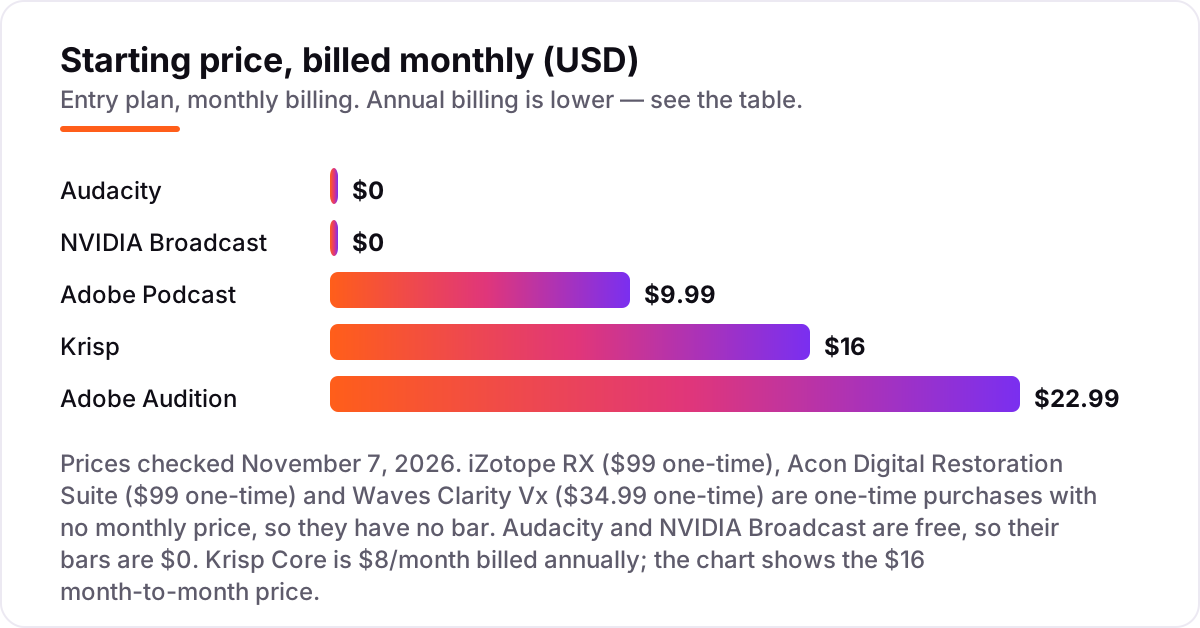
Take a podcaster who publishes one episode a week and a remote worker who takes calls all day. On list prices, a year of Adobe Podcast Premium costs $119.88, Audacity costs $0, and Adobe Audition costs $275.88. Krisp Core costs $96 a year billed annually, or $192 billed month to month — the billing choice alone is worth $96. The one-time tools sit outside that math: iZotope RX Elements is $99 once, Acon is $99 once ($69 while the introductory price lasts), and Waves Clarity Vx is $34.99 once.
Add it up for three realistic stacks. A one-click stack — Adobe Podcast Premium plus Audacity — costs $119.88 in the first year and $119.88 every year after. A repair stack — RX Elements plus Acon at the introductory price — costs $168 once and nothing per year. A live-call stack — Krisp Core billed annually — costs $96 a year. The repair stack is the cheapest way to own serious cleanup outright, but it only fixes files you already recorded; the live-call stack is the only one that quiets a meeting while it happens.
Two costs sit outside every number above. First, NVIDIA Broadcast is free but needs an RTX graphics card, so a buyer without one faces a hardware purchase, not a subscription. Second, the sale prices move: Waves lists Clarity Vx at $199 and sells it at $34.99, and Acon's $69 introductory price ends on November 18, 2026 — so check the store on the day you buy. If your audio lives inside video, see our guide to the best video editing software for YouTube beginners.
Know the difference: live cleanup vs file repair
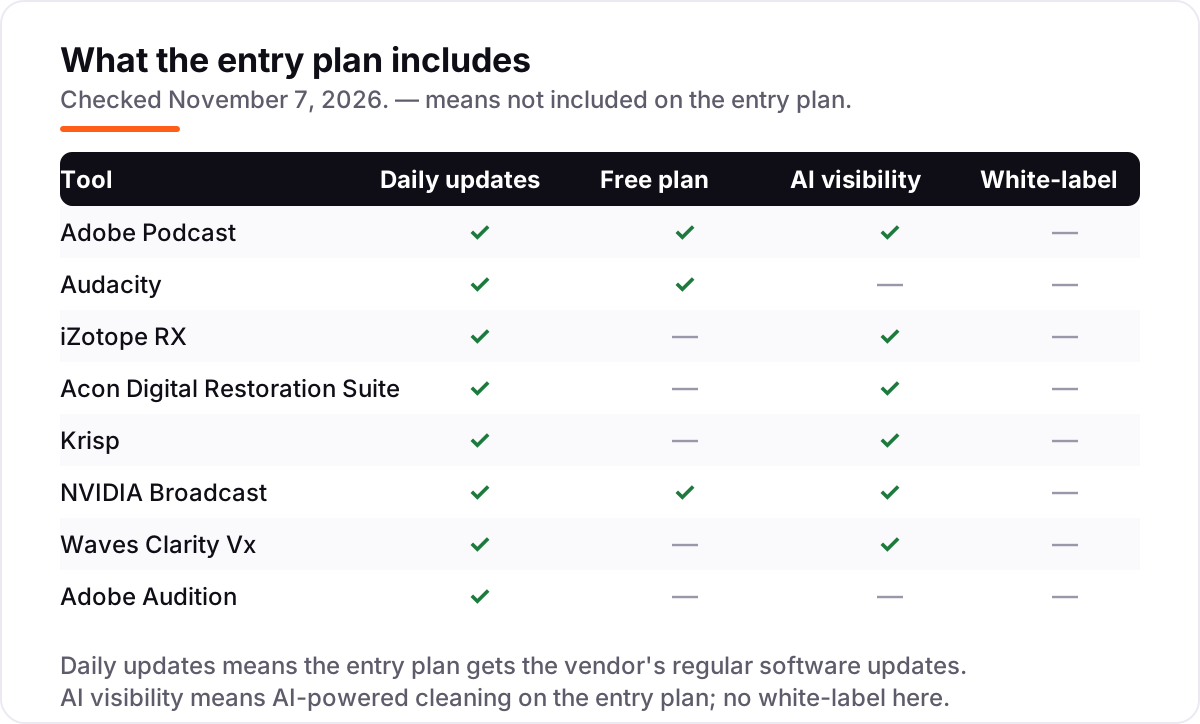
The confusion in this category is between two jobs that look alike. Live cleanup tools — Krisp and NVIDIA Broadcast — sit between your microphone and your apps and clean the audio as it happens, on calls and streams. File repair tools — RX, Acon, Audacity, Audition and Adobe Podcast — take a recording you already made and fix it afterwards. A live tool cannot rescue last week's podcast, and a file repair tool cannot quiet the call you are on right now.
There is a second, quieter confusion: one-click AI versus manual control. AI tools like Adobe Podcast and Clarity Vx decide what is noise and remove it for you, which is fast but can flatten a voice or leave it sounding processed. Manual tools like Audacity, Audition and RX let you choose exactly what to remove, which takes longer but keeps the voice natural. Neither approach is better in general — the right one depends on whether you have more time or more tolerance for artifacts.
A third distinction worth knowing is noise reduction versus restoration. Noise reduction targets one problem, usually background hiss or hum. Restoration covers the full toolkit: hum, clicks, clipping, reverb and de-essing. iZotope RX and Acon's suite are restoration tools; Clarity Vx and Adobe Podcast are noise reduction tools with a narrower job.
Quick comparison: tool type by need
| Buyer | Best pick | Why |
|---|---|---|
| Podcaster with a noisy recording | Adobe Podcast | One-click AI cleanup in the browser, Premium is $9.99/month |
| Creator on a $0 budget | Audacity | Free manual noise removal and editing, no paid plan |
| Professional repairing audio for clients | iZotope RX | The deepest repair available, Elements is $99 one-time |
| DAW user who hates subscriptions | Acon Digital Restoration Suite | Four focused repair plug-ins, $99 one-time |
| Remote worker on live calls | Krisp | Quiet calls on any app, Core is $16/month |
| RTX owner who streams or meets online | NVIDIA Broadcast | Free real-time cleanup, needs an RTX graphics card |
Mistakes to avoid
- Buying a live tool to fix recorded files. Krisp and NVIDIA Broadcast only clean audio as it happens. If the recording already exists, you need Adobe Podcast, Audacity, RX, Acon or Audition instead.
- Budgeting on the sale price. Waves lists Clarity Vx at $199 and usually sells it at $34.99, and Acon's $69 introductory price ends on November 18, 2026. The list price is what you pay if the sale ends before you buy.
- Pushing AI enhancement too far. Heavy processing makes voices sound robotic. Keep the strength around 80 to 85 percent, keep the original file, and compare the two before you publish.
- Paying for the top edition when the entry one fixes your problem. RX Elements at $99 covers hum, clicks and clipping inside a DAW; Standard at $399 only earns its price when you need the spectral editor or Dialogue Isolate.
- Ignoring the hardware or host requirement. NVIDIA Broadcast refuses to run without an RTX graphics card, and Acon and Waves are plug-ins that need a DAW. Check the requirement before you pay, not after.
How we chose
We checked each vendor's pricing page and review pages on November 7, 2026, using fresh search-index copies of the vendors' own pages where the live pages would not load, and we ranked the tools by fit for the most common buyer — a podcaster or creator cleaning up spoken audio — not by brand size. Waves Clarity Vx at $34.99 comes from a crawl of Waves' own specials page, which lists the $199 list price beside the $34.99 sale price; iZotope's RX prices come from dated October 20, 2026 reads of its own store, and Krisp's Core plan is the November 1, 2026 rename of its old Pro plan. This list shows a G2 rating only where the G2 page belongs to the tool itself: iZotope RX has no rating here because G2's 4.6/5 (19 reviews) belongs to the RX Post Production Suite bundle, not to RX, and Acon, Waves and NVIDIA Broadcast have no G2 listing. No vendor paid for a place in this list, and none of the links here are affiliate links.
What to do next
Start with the free option that matches your job: Adobe Podcast for a noisy recording, Audacity if you want to learn manual repair, or NVIDIA Broadcast if you own an RTX card and live on calls. Run your worst recording through it and listen to the result on headphones before you spend anything. If the cleanup works but new customers are not finding you, our monthly SEO service handles the visibility side. Once your tools are in place, find out what's holding your rankings back.
Your stack only works if people find you
SerpAstra fixes what keeps your site off page one and makes it easy for AI assistants to recommend.
Get a free audit→Sources we checked (12)
- Adobe Podcast pricing — podcast.adobe.com/pricing (checked November 7, 2026)
- Audacity — audacityteam.org (free, open source; checked November 7, 2026)
- iZotope RX — izotope.com/en/products/rx.html (checked November 7, 2026)
- Acon Digital Restoration Suite — acondigital.com (checked November 7, 2026)
- Krisp pricing — krisp.ai/pricing (checked November 7, 2026)
- NVIDIA Broadcast — nvidia.com/en-us/geforce/broadcasting/broadcast-app (checked November 7, 2026)
- Waves Clarity Vx — waves.com/plugins/clarity-vx (checked November 7, 2026)
- Adobe Audition — adobe.com/products/audition.html (checked November 7, 2026)
- Adobe Podcast reviews — g2.com/products/adobe-podcast/reviews (checked November 7, 2026)
- Audacity reviews — g2.com/products/audacity/reviews (checked November 7, 2026)
- Krisp reviews — g2.com/products/krisp/reviews (checked November 7, 2026)
- Adobe Audition reviews — g2.com/products/adobe-audition/reviews (checked November 7, 2026)
Shamim
Founder of SerpAstra
A full-stack SEO and digital marketer who spends most days on Local SEO for dental practices, AI search visibility and lead generation.
Frequently asked questions
What is the best audio cleaning software?
Adobe Podcast is the best fit for most people: upload a noisy voice recording and Enhance Speech cleans it in one click, from $9.99/month with a usable free tier. Audacity is the best free option for hands-on work, and iZotope RX is the best choice when you repair audio professionally.
What is the best free audio cleaning software?
Audacity for fixing recorded files, NVIDIA Broadcast for live calls if you own an RTX graphics card, and Adobe Podcast Enhance Speech for one-click browser cleanup. All three are genuinely free, though Adobe Podcast caps free files at 30 minutes and one hour of enhancement a day.
Can audio cleaning software fix a recording with heavy background noise?
AI tools like Adobe Podcast Enhance and Waves Clarity Vx can rescue surprisingly bad recordings, but nothing recovers a voice that is buried under noise. Prevention still beats repair: a decent microphone, a quiet room and the mic close to the speaker save more time than any cleanup tool.
Is Krisp or NVIDIA Broadcast better for calls?
NVIDIA Broadcast is free and excellent if you own an RTX graphics card, but it only runs on Windows with that hardware. Krisp works on any machine and adds meeting notes and transcription, at $8 per user a month billed annually, or $16 billed monthly.
Is iZotope RX Elements worth $99?
Yes, if you clean voice inside a DAW and only need the six repair plug-ins. Elements has no RX Audio Editor, so buy Standard at $399 when you need the spectral editor, RX Connect or Dialogue Isolate. For a podcaster who only removes hum, Audacity or Adobe Podcast costs less and is enough.
Do I need a DAW to use these tools?
No for the browser and standalone tools: Adobe Podcast runs in the browser, Audacity and Audition are full editors, and Krisp and NVIDIA Broadcast sit between your mic and your apps. Acon Digital Restoration Suite and Waves Clarity Vx are plug-ins, so they need a DAW or host to run in.
Will AI cleanup make my voice sound robotic?
It can, if you push the processing too far. Adobe Podcast reviewers find the sweet spot around 80 to 85 percent strength, where noise is gone but the voice still sounds human. Keep a copy of the original recording, process at a moderate setting, and compare the two before you publish.
Free SEO and AI visibility audit
Find out what is holding your rankings back
Send us your site. Within 2 business days you get a written audit, an AI visibility check and a short fix list ranked by impact. Free, with no contract attached.
Request my free audit→Related guides
 Email, SMS & Social Media10 Best Video Editing Software for YouTube Beginners in 2026, ComparedCompare the 10 best video editing software for youtube beginners on price, free plans, 4K export and AI tools, with every price checked November 6, 2026.Read guide →
 Digital Marketing & Ads12 Best Podcast Advertising Platforms in 2026, ComparedCompare the 12 best podcast advertising platforms on minimum budgets, CPMs and free plans, with every price checked on the vendor's page on November 5, 2026.Read guide →
 Design, Video & Creative10 Best Video Content Creation Software in 2026, ComparedCompare the 10 best video content creation software tools of 2026 on price, free plans and AI features, with every price checked November 4, 2026.Read guide →