
10 Best Video Content Creation Software in 2026, Compared
Compare the 10 best video content creation software tools of 2026 on price, free plans and AI features, with every price checked November 4, 2026.
 Shamim Mia, Founder, SerpAstraLast verified November 4, 202614 min read
We compare pricing pages, documentation and public reviews. We never accept payment for rankings.

Key takeaways
- Canva Pro leads for most small businesses at $18/month, CapCut Pro follows at $19.99/month for short-form video, and Descript Hobbyist is $16/month billed annually for transcript editing.
- DaVinci Resolve and Final Cut Pro are the only one-time purchases here — $295 and $299.99 — while every other tool is a subscription.
- The single most important buying factor is the limit that caps your output: monthly video minutes, AI credits and export resolution decide what you actually pay, not the headline price.
- Free plans are real on Canva, CapCut, Descript, Filmora, DaVinci Resolve, Synthesia and InVideo — start free and pay only when the watermark or the minute cap gets in the way.
On this page
Quick comparison
| Tool | Best for | Starting price | Free plan |
|---|---|---|---|
| Canva | Small businesses that need social posts, ads and presentations designed fast, without hiring a designer | $18/mo | Yes (free plan) |
| CapCut | Creators and small teams making short vertical video for TikTok, Reels and Shorts | $19.99/mo | Yes (free plan) |
| Adobe Premiere Pro | Editors who want the professional standard for polished marketing and YouTube video | $34.49/mo | No (7-day trial) |
| Descript | Talking-head creators and podcasters who want to edit video by editing a transcript | $24/mo | Yes (free plan) |
| Wondershare Filmora | Beginners and small businesses that want an easy desktop editor for under $50 a year | $19.99/mo | Yes (free plan) |
| DaVinci Resolve | Editors who want professional color grading and editing with no monthly bill | $295 once | Yes (free) |
| Final Cut Pro | Mac owners who want a fast professional editor they buy once and keep | $299.99 once | No (90-day trial) |
| Pictory | Marketers turning blog posts, scripts and long videos into short captioned clips | $29/mo | No (14-day trial) |
| Synthesia | Teams that need presenter-led training and explainer videos without filming anyone | $29/mo | Yes (free plan) |
| InVideo | Marketers who want AI to draft a finished ad or promo video from a prompt | $20/mo | Yes (free plan) |
Make one of these tools?
We re-check this list every quarter. Send a correction, request a review, or ask about a clearly labeled sponsored spot.
Request a listingThe best video content creation software

Canva
Best for: Small businesses that need social posts, ads and presentations designed fast, without hiring a designer
Canva is the fastest way for a business to publish video without hiring an editor. Start from a template sized for TikTok, Reels, Shorts or YouTube, drop in clips and logo, and Magic Studio handles the details: background removal and resizing for each format. Pro costs $18 a month, or $144 a year, and that seat covers 100 GB of storage, the Brand Kit and AI tools.
The trade-off is depth. Canva edits video on a template timeline, not a professional one, so there is no multicam, no color grading and no audio mixing. The free plan is useful — 250,000 templates and 5 GB of storage — but the best templates and the Brand Kit sit behind Pro. Pick Canva when speed matters more than control; pick Premiere Pro or DaVinci Resolve when the edit is the work.
What we like
- The fastest route from idea to finished video: thousands of video templates sized for every social format
- Magic Studio AI tools — background remover, Magic Resize, text-to-video — are included on Pro
- Brand Kit keeps logos, colors and fonts consistent across every video
- 100 GB of storage and a content scheduler come with the single Pro price
Watch out for
- Video editing is template-led, not timeline-deep: no multicam, no advanced color grading
- Pro is one seat only — a second person needs the Business plan
- Most premium templates and stock assets sit behind the Pro paywall

CapCut
Best for: Creators and small teams making short vertical video for TikTok, Reels and Shorts
CapCut is the editor for short vertical video, and its free plan is the most generous in this list: an editing toolkit with no watermark on exports. Templates, auto-captions, background removal and trending effects are built for TikTok, Reels and Shorts, and new trends show up as templates within days. Pro costs $19.99 a month, or $179.99 a year, and adds 4K export, the AI toolkit and about 1 TB of cloud storage.
The catch is the 2026 restructure. CapCut split its paid offering in two: the old Pro plan became the Standard plan at $9.99 a month, and the new Pro launched at $19.99. Features that were free now sit behind the paywall, and long videos get unstable past about fifteen minutes. Pick CapCut when short-form is the job; pick a desktop editor when you cut long-form video.
What we like
- The best free plan here for short-form: full editing toolkit with no watermark on exports
- Auto-captions, background removal and trending templates arrive within days of a trend
- 4K/60fps/HDR export and the full AI toolkit come with Pro
- About 100 GB of cloud storage keeps phone and desktop projects in sync
Watch out for
- Built for short-form: long videos get unstable past about 15 minutes
- The 2026 restructure moved features that were free behind the Pro paywall
- ByteDance ownership brings data-privacy questions for some businesses

Adobe Premiere Pro
Best for: Editors who want the professional standard for polished marketing and YouTube video
Premiere Pro is the professional standard for a reason: no other editor here matches its depth. The timeline gives precise control over cuts, color, audio and motion graphics, and text-based editing lets you cut a talking-head video by deleting words from the transcript. The single-app plan costs $22.99 a month on the annual plan billed monthly, or $34.49 month to month, and includes 25 generative credits a month.
The costs are the subscription and the learning curve. There is no way to buy Premiere Pro outright, so the bill never stops, and the interface takes weeks to learn. It is also heavy on system resources — 4K timelines lag on laptops without a dedicated GPU. Buy Premiere Pro when video is a core part of the business; buy Canva or Filmora when it is an occasional task.
What we like
- The deepest editor here: precise timeline control, multicam, color grading and audio mixing
- Text-based editing and AI object masks cut routine editing time on talking-head video
- Moves footage, graphics and audio between After Effects, Photoshop and Audition without rebuilding
- 25 generative credits a month are included on the single-app plan
Watch out for
- Subscription only — there is no way to buy Premiere Pro outright
- Heavy on system resources: 4K timelines lag on laptops without a dedicated GPU
- The interface takes weeks to learn; beginners pay for depth they will not use at first

Descript
Best for: Talking-head creators and podcasters who want to edit video by editing a transcript
Descript changes how talking-head video gets edited: the transcript is the timeline. Delete a sentence and the video is cut, remove the filler words in one click, and Studio Sound cleans up the audio without a separate app. Hobbyist costs $24 a month billed monthly, or $16 a month billed annually, and covers 10 media hours a month, 400 AI credits and watermark-free 1080p export.
The limits are the hours and the monthly price, which Descript does not show clearly — its page advertises up to 35% off annual billing and leaves the monthly figure to third-party reads. Ten media hours a month is enough for a weekly show, but heavy uploaders need Creator at $24 a month billed annually. Pick Descript when you talk to camera; pick a timeline editor when the video is mostly B-roll.
What we like
- Edit video by editing the transcript: delete a word and the clip is cut
- Studio Sound, filler-word removal and captions are built in, not add-ons
- Underlord, the AI co-editor, drafts clips and social posts from your footage
- Screen recording and remote recording sit in the same app as the editor
Watch out for
- Monthly prices are confusing: the vendor page advertises up to 35% off annual billing without showing the monthly figure
- Hobbyist caps at 10 media hours a month — heavy uploaders need Creator at $24/month billed annually
- No direct upload to a YouTube brand account, which slows the last step of publishing

Wondershare Filmora
Best for: Beginners and small businesses that want an easy desktop editor for under $50 a year
Filmora is the budget desktop editor in this list, and the price is honest: Basic costs $49.99 a year, with watermark-free 4K export and version upgrades included. The drag-and-drop workflow, ready-made transitions and effects panels need no training, and it runs well on mid-range laptops where Premiere Pro stutters. A month plan at $19.99 exists, but the annual plan is the one that makes sense.
The catches are the extras. AI tools on Basic run on credits you buy separately, so the plan itself includes none, and the full stock library is a $19.99-a-month add-on — the same price as the editor. Advanced color grading and multicam are thinner than in Premiere Pro or DaVinci Resolve. Pick Filmora when the budget is tight and the edits are simple; pick DaVinci Resolve when color is the job.
What we like
- The cheapest paid desktop editor here: Basic is $49.99 a year with watermark-free 4K export
- Drag-and-drop workflow with ready-made transitions, titles and effects needs no training
- Runs well on mid-range laptops where Premiere Pro stutters
- One licence covers Windows and Mac, and the mobile apps are included in the same account
Watch out for
- AI tools on Basic run on credits you buy separately — the plan itself includes none
- The full stock library is a separate add-on at $19.99 a month
- Advanced color grading and multicam are thinner than in Premiere Pro or DaVinci Resolve

DaVinci Resolve
Best for: Editors who want professional color grading and editing with no monthly bill
DaVinci Resolve is the only tool here that is both free and professional. The free version is a full editor — editing, color grading, effects and audio in one app — with no watermark and no time limit, and its color tools are the best in this list. Studio costs $295 once, currently $236 on Blackmagic's 20% sale until November 20, 2026, and adds the AI tools, 10-bit formats and resolutions up to 32K.
The price is the learning curve. The color and Fusion pages overwhelm first-time editors, and most AI tools — Magic Mask, voice isolation, Smart Reframe — need the Studio licence. There is also no subscription, which is a strength until you want support: help comes from the community, not a support desk. Pick DaVinci Resolve when you want professional depth with no monthly bill.
What we like
- The free version is a full professional editor: editing, color, effects and audio in one app
- The best color grading in this list, used on commercial and film work
- One $295 payment buys Studio forever — no subscription, no renewal
- Free updates have historically covered major versions at no extra cost
Watch out for
- The learning curve is steep: the color and Fusion pages overwhelm first-time editors
- Most AI tools — Magic Mask, voice isolation, Smart Reframe — need the $295 Studio licence
- Studio is on sale at $236 until November 20, 2026, so the $295 list price is not what you pay today

Final Cut Pro
Best for: Mac owners who want a fast professional editor they buy once and keep
Final Cut Pro is the professional editor you buy once and own. It costs $299.99 on the Mac App Store, with free updates — a record that goes back to 2011 — and a 90-day free trial, the longest in this list. On Apple silicon it is the fastest editor here, with smooth 4K playback where other editors lag, and the Magnetic Timeline, Magnetic Mask and automatic captions are included.
The limit is the platform: Final Cut Pro is Mac only, so Windows users cannot run it and mixed-platform teams cannot share projects. The one-time price buys the Mac app only — the iPad app needs the Apple Creator Studio subscription at $12.99 a month. Pick Final Cut Pro when you edit on a Mac and want to stop paying monthly; pick DaVinci Resolve when the team mixes platforms.
What we like
- The fastest editor here on Apple silicon: smooth 4K playback where other editors lag
- Magnetic Timeline, Magnetic Mask and automatic captions are included in the one price
- Major version upgrades have been free for existing owners since 2011
- A 90-day free trial is the longest in this list
Watch out for
- Mac only — there is no Windows version, so mixed-platform teams cannot share projects
- The one-time price buys the Mac app only; the iPad app needs the Creator Studio subscription
- Some premium content is reserved for Apple Creator Studio subscribers

Pictory
Best for: Marketers turning blog posts, scripts and long videos into short captioned clips
Pictory is built for one job: turning text into video. Paste a blog post, script or URL and it returns a captioned video with stock footage, music and narration in minutes, with no editing skill needed. Starter costs $29 a month billed monthly, or $25 billed annually, and covers 360 video minutes a year with Getty and Storyblocks footage and ElevenLabs voices bundled in.
The honest limit is the footage. The AI matches keywords to clips rather than understanding the script, so the video is topically right but can miss the intent, and standard voices sound robotic. Starter's 360 minutes are a yearly allowance, so heavy repurposing needs Professional at $35 a month billed annually. Pick Pictory when you have text and need video; pick an editor when you have footage.
What we like
- Paste a script, article or URL and get a captioned video in minutes — no editing skill needed
- Getty Images and Storyblocks footage plus ElevenLabs voices are bundled in every plan
- Automatic subtitles export as .srt, .vtt or text for accessibility and SEO
- The AI video agent and scene editor let you revise a video with a text prompt
Watch out for
- The AI matches keywords to stock clips rather than understanding the script, so footage can miss the intent
- Standard AI voices sound robotic next to ElevenLabs' premium voices
- Starter caps at 360 video minutes a year — heavy repurposing needs Professional at $35/month billed annually

Synthesia
Best for: Teams that need presenter-led training and explainer videos without filming anyone
Synthesia makes presenter-led video without a presenter. Type a script, pick an avatar from more than 125 stock options or create a personal one from a photo, and the video renders in minutes — no camera, studio or reshoots. Starter costs $29 a month billed monthly, or $18 billed annually, and covers 10 video minutes a month plus 1,250 extra credits, with logo removal included.
The limit is the allowance. Starter converts to roughly 20 finished minutes a month, which is light for a team publishing weekly, and interactive quizzes and hotspots need the Enterprise plan. Updating a video is the strength: edit the text and the video updates, instead of re-filming the lesson. Pick Synthesia for training and explainers; pick a camera when the presenter needs to feel human.
What we like
- Type a script and a realistic avatar presents it — no camera, studio or reshoots
- Update a training video by editing text, instead of re-filming the whole lesson
- 140+ languages with AI dubbing, so one script becomes a multilingual course
- 125+ stock avatars and 3 personal avatars come with the Starter plan
Watch out for
- Starter's allowance converts to roughly 20 finished minutes a month — light for regular publishing
- Interactive quizzes and hotspots need the Enterprise plan
- Avatar accents sometimes switch to the wrong one in less common languages

InVideo
Best for: Marketers who want AI to draft a finished ad or promo video from a prompt
InVideo is the AI-draft tool in this list: describe the video you want and it returns a finished ad or promo with voiceover, music and stock footage, using current generative models like Sora 2 and Veo 3.1. Starter costs $20 a month billed monthly, or $10 billed annually, and covers 400 credits a month with watermark-free exports. Voice cloning and UGC-style ad templates are built for product marketing.
The catch is the credits. Every generation and every fix costs credits, so a video that needs three revisions costs more than the subscription suggests, and the true cost per video is hard to predict before you start. InVideo also rebuilt its plans in October 2026, so older reviews quoting Plus at $28 a month are stale. Pick InVideo when the bottleneck is making the video at all.
What we like
- A text prompt becomes a finished marketing video, with voiceover, music and stock footage included
- Access to current generative models — Sora 2 and Veo 3.1 — is bundled into the subscription
- Voice cloning and UGC-style ad templates are built for product marketing
- Web-based, so nothing to install and projects open on any computer
Watch out for
- Credits are the real price: fixing a bad generation costs more credits, so a finished video can cost more than the subscription suggests
- InVideo rebuilt its plans in October 2026 — older reviews quoting Plus at $28 a month are stale
- The credit system makes the true cost per video hard to predict before you start
The best video content creation software for a small business is the one that turns an idea into a finished video before the moment passes. Some tools in this list are full editors, some are template studios, and some generate the video from a prompt — and the right pick depends on whether you film, write, or generate. We ranked the ten tools below by fit for the most common buyer, a small business or creator making marketing and social video, and every price was checked on the vendor's own pricing page on November 4, 2026.
How to choose the best video content creation software
- Decide how the video starts. If you film, you need an editor (Premiere Pro, DaVinci Resolve, Final Cut Pro, Filmora). If you write, you need a generator (Pictory, Synthesia, InVideo). If you design, you need templates (Canva, CapCut).
- Count your minutes and credits. Pictory Starter caps at 360 video minutes a year, Synthesia Starter at roughly 20 finished minutes a month, and InVideo Starter at 400 credits a month. The cap you hit first is your real price.
- Check the export. CapCut Pro exports 4K, Descript Hobbyist stops at 1080p, and Filmora's free plan watermarks every export. A cheap plan that exports the wrong resolution is not cheap.
- Watch the billing model. Eight tools here are subscriptions; DaVinci Resolve and Final Cut Pro are one-time purchases. A $295 licence beats a $23 monthly subscription in about thirteen months.
- Try the free plan with real footage. Every free plan here is long enough to cut one genuine video. If the export looks right and the workflow feels fast, the paid plan is worth it.
Video is one system in your stack, not the whole stack. If the videos are made but nobody finds them, our guide to AI tools for video content creation covers the discovery side, and our monthly SEO service handles the visibility work. Before you publish a video page, run its title through the free SERP snippet preview tool — it shows exactly how the title and description will look in Google.
Whatever you shortlist, test it on a real project before you pay. The free plans and trials in this list cover a full video — your footage, your script, your brand — and that one video tells you more than any review can. Check two things: that the export resolution matches where the video will play, and that the minute or credit cap covers a normal month of output.
Video content creation software pricing: what you will actually pay
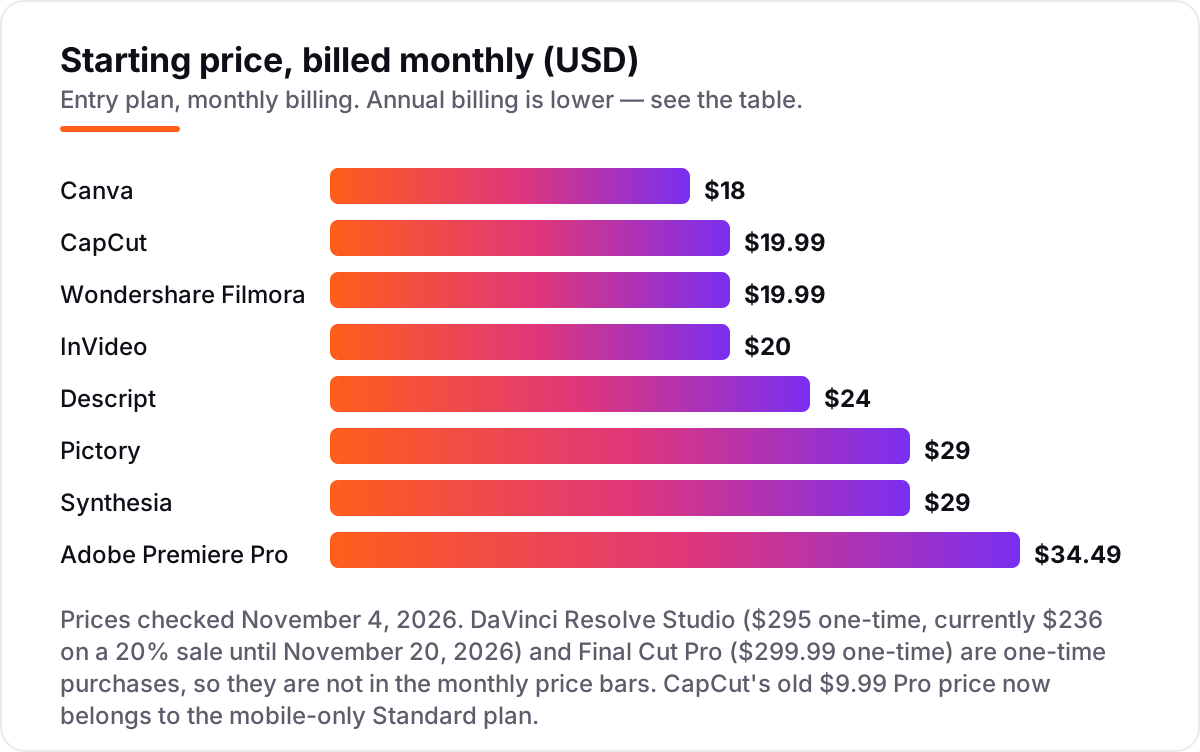
Take a solo creator publishing four videos a month. On list prices, the subscription costs $10 a month on InVideo Starter billed annually, $16 on Descript Hobbyist billed annually, $18 on Canva Pro billed monthly, $18 on Synthesia Starter billed annually, $19.99 on CapCut Pro billed monthly, $25 on Pictory Starter billed annually, and $22.99 on Premiere Pro on the annual plan billed monthly. Two of those numbers need adjusting before they are real: InVideo's 400 monthly credits are the allowance for the whole month, so how many finished videos that covers depends on how long and how AI-heavy each one is, and Pictory's 360 minutes are a yearly allowance, so a busy month draws on the whole year's balance.
Over a year, that is $120 on InVideo Starter billed annually, $144 on Canva Pro billed annually, $192 on Descript Hobbyist billed annually, $179.99 on CapCut Pro billed annually, $216 on Synthesia Starter billed annually, $275.88 on Premiere Pro on the annual plan, and $300 on Pictory Starter billed annually. Filmora Basic is $49.99 a year, the cheapest paid plan here, but its AI tools run on credits bought separately. DaVinci Resolve Studio is $295 once — currently $236 on sale — and Final Cut Pro is $299.99 once, so either one costs less than a year of Premiere Pro and nothing at all after that.
Three costs sit outside every number above. First, the credits: Synthesia, Pictory and InVideo all meter output, so the subscription is a starting allowance, not unlimited video. Second, the stock library: Filmora's full library is a $19.99-a-month add-on. Third, the hardware: Premiere Pro and DaVinci Resolve want a fast computer with a dedicated GPU, and a slow machine costs more in lost time than the subscription saves. If the videos are for YouTube, the visibility tools matter too — see our guide to YouTube SEO tools.
Know the difference: subscription vs one-time purchase
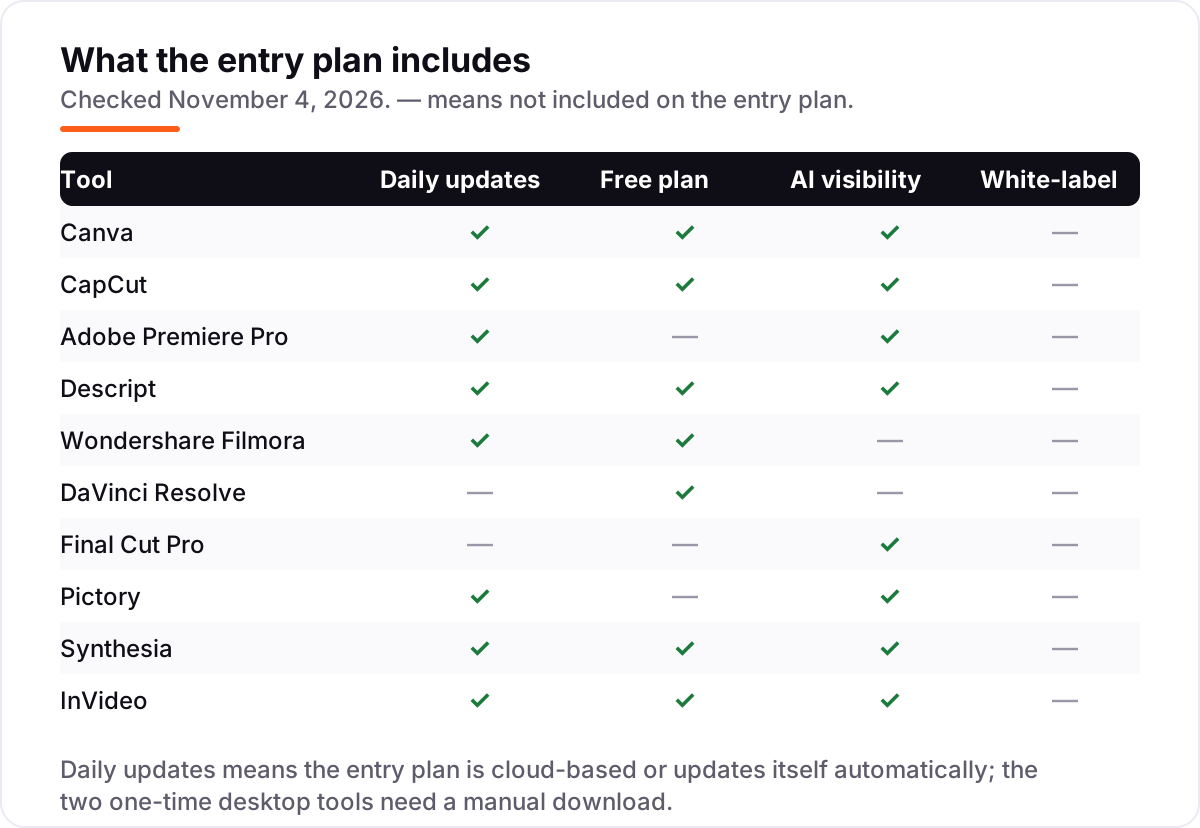
The confusion in this category is between renting and owning. Eight tools here are subscriptions: stop paying and the software stops. Two are one-time purchases: DaVinci Resolve Studio at $295 and Final Cut Pro at $299.99, both of which keep working with free major updates. The subscription tools look cheaper month to month — $10 to $35 — but Premiere Pro at $22.99 a month costs $275.88 a year, every year, while Final Cut Pro costs $299.99 once.
There is a second, quieter confusion: credits are not minutes. Synthesia, Pictory and InVideo sell allowances measured in credits or minutes, and the subscription buys a fixed amount of finished video, not unlimited output. A plan that looks cheap at $10 a month is not cheap if it only covers two videos and every extra video costs more credits.
A third distinction is the free plan versus the free trial. Canva, CapCut, Descript, Filmora, DaVinci Resolve, Synthesia and InVideo all have free plans you can use indefinitely, with limits. Premiere Pro, Final Cut Pro and Pictory have trials instead — 7 days, 90 days and 14 days — after which you pay or lose access. A free plan suits a slow start; a trial suits a decision made this week.
Quick comparison: tool type by need
| Buyer | Best pick | Why |
|---|---|---|
| Most small businesses | Canva | Templates and AI for every format, from $18/month |
| Short vertical video | CapCut | Fastest route to polished TikTok and Reels, Pro $19.99/month |
| Professional editing | Adobe Premiere Pro | The deepest editor, $22.99/month on the annual plan |
| Talking-head and podcast video | Descript | Edit by transcript, Hobbyist $16/month billed annually |
| Tightest budget | Wondershare Filmora | Full desktop editor, Basic $49.99 a year |
| No monthly bill | DaVinci Resolve | Free version, Studio $295 once |
| Mac owners | Final Cut Pro | Buy once for $299.99, no subscription |
| Turning text into video | Pictory | Script in, captioned video out, Starter $25/month billed annually |
| Avatar presenters | Synthesia | No camera needed, Starter $18/month billed annually |
| AI-drafted ads | InVideo | Prompt in, finished video out, Starter $10/month billed annually |
Mistakes to avoid
- Budgeting on the annual price while paying monthly. The $16 Descript and $10 InVideo figures need a yearly payment; month to month they are $24 and $20. Compare tools on the billing you will actually use.
- Buying on the free plan, then finding the export is watermarked. Filmora and InVideo watermark free exports, and Descript's free plan caps transcription at one hour a month. Check the export before you build a workflow around a free plan.
- Ignoring the credit cap. Synthesia, Pictory and InVideo meter finished video. A subscription that covers two videos a month is the wrong buy for a channel publishing weekly.
- Paying for a subscription when a one-time purchase fits. If you edit on a Mac and publish twice a month, Final Cut Pro at $299.99 once costs less than fourteen months of Premiere Pro.
- Choosing an editor for a generator's job. Premiere Pro will not write your script or present it for you. If the bottleneck is making the video at all, Pictory, Synthesia or InVideo solves it; an editor only polishes what already exists.
How we chose
We checked each vendor's own pricing page on November 4, 2026 and recorded the starting price exactly as shown, including the annual-billing figure where the page lists one. Two pages did not cooperate: Adobe's pricing page blocked our reader, so the $22.99 figure comes from Adobe's published price as quoted in independent reads dated September and October 2026, and Descript's pricing page now lists Hobbyist at $24 a month billed monthly and $16 billed annually; the $19/$12 figures quoted in older reads are stale. CapCut's $19.99 Pro price, Synthesia's $29 and $18 figures, DaVinci Resolve Studio's $295 list price and Final Cut Pro's $299.99 price come from the vendors' own pages as quoted in reads dated August to October 2026. InVideo rebuilt its plans in October 2026, so we used the current Starter, Plus and Max ladder read from its pricing page on October 24, 2026, and older reviews quoting Plus at $28 a month are stale. Ratings come from G2 pages opened on November 4, 2026, except CapCut, which has no G2 product page — its rating is omitted rather than estimated. No vendor paid for a place in this list, and none of the links here are affiliate links.
What to do next
Start with the free plan or trial of your top pick and cut one real video through it — your footage, your script, your brand. Check that the export resolution matches where the video will play and that the minute or credit cap covers a normal month before you commit to a year. If the videos are made but new customers are not finding them, our monthly SEO service handles the visibility side — or compare the discovery tools in our guide to video analytics software. Once your tools are in place, find out what's holding your rankings back.
Your stack only works if people find you
SerpAstra fixes what keeps your site off page one and makes it easy for AI assistants to recommend.
Get a free audit→Sources we checked (19)
- Adobe Premiere Pro pricing — adobe.com/products/premierepro/plans.html (checked November 4, 2026)
- Canva pricing — canva.com/pricing (checked November 4, 2026)
- CapCut pricing — capcut.com/pricing (checked November 4, 2026)
- Descript pricing — descript.com/pricing (checked November 4, 2026)
- Wondershare Filmora shop — filmora.wondershare.com/shop/buy/buy-video-editor.html (checked November 4, 2026)
- DaVinci Resolve Studio — blackmagicdesign.com/products/davinciresolve/studio (checked November 4, 2026)
- Final Cut Pro — apple.com/final-cut-pro (checked November 4, 2026)
- Pictory pricing — pictory.ai/pricing (checked November 4, 2026)
- Synthesia pricing — synthesia.io/pricing (checked November 4, 2026)
- InVideo pricing — invideo.io/pricing (checked November 4, 2026)
- Adobe Premiere Pro reviews — g2.com/products/adobe-premiere-pro/reviews (checked November 4, 2026)
- Canva reviews — g2.com/products/canva/reviews (checked November 4, 2026)
- Descript reviews — g2.com/products/descript/reviews (checked November 4, 2026)
- Wondershare Filmora reviews — g2.com/products/wondershare-filmora/reviews (checked November 4, 2026)
- Synthesia reviews — g2.com/products/synthesia/reviews (checked November 4, 2026)
- Pictory AI reviews — g2.com/products/pictory-ai/reviews (checked November 4, 2026)
- invideo reviews — g2.com/products/invideo/reviews (checked November 4, 2026)
- DaVinci Resolve reviews — g2.com/products/davinci-resolve/reviews (checked November 4, 2026)
- Final Cut Pro X reviews — g2.com/products/final-cut-pro-x/reviews (checked November 4, 2026)
Shamim
Founder of SerpAstra
A full-stack SEO and digital marketer who spends most days on Local SEO for dental practices, AI search visibility and lead generation.
Frequently asked questions
What is the best video content creation software?
Canva Pro is the best fit for most small businesses: templates and AI for every format at $18/month, with a genuinely useful free plan. CapCut Pro is better for short vertical video, and Adobe Premiere Pro is the better pick when the edit itself needs professional depth. DaVinci Resolve is the best free option, and Final Cut Pro is the best buy for Mac owners.
How much does video content creation software cost?
Entry prices run from $0 to $34.49 a month. Seven tools here have free plans, and the first paid plans cost $10–$20 a month on annual billing. A solo creator typically pays $120–$300 a year for one subscription, while a professional editor on Premiere Pro pays about $276 a year.
Is there really free video content creation software?
Yes, with limits. DaVinci Resolve is a full professional editor free, with no watermark and no time limit. Canva, CapCut, Descript, Filmora, Synthesia and InVideo all have free plans, but exports may carry a watermark or cap at 1080p, and AI credits run out fast.
What is the difference between CapCut and Adobe Premiere Pro?
CapCut is built for fast short-form video on phone and desktop, with templates and auto-captions, at $19.99 a month. Premiere Pro is a professional timeline editor with multicam, advanced color and audio mixing, at $22.99 a month on the annual plan. CapCut is quicker; Premiere Pro goes deeper.
Can I make professional videos without filming anything?
Yes. Pictory turns a script or article into a captioned video with stock footage, Synthesia has an AI avatar present your script, and InVideo drafts a finished ad from a prompt. The results suit training, explainers and social ads, though the footage can look generic next to filmed video.
Do I need a Mac for Final Cut Pro or DaVinci Resolve?
Final Cut Pro is Mac only, so Windows users cannot run it at all. DaVinci Resolve runs on Windows, Mac and Linux, and its free version covers most editing work. If your team mixes Mac and Windows, DaVinci Resolve or Premiere Pro is the safer pick.
Free SEO and AI visibility audit
Find out what is holding your rankings back
Send us your site. Within 2 business days you get a written audit, an AI visibility check and a short fix list ranked by impact. Free, with no contract attached.
Request my free audit→Related guides
 AI, Data & Analytics12 Best AI Tools for Video Content Creation in 2026, Compared12 best AI tools for video content creation compared with real prices, free plans and G2 ratings, so you can pick the right video maker without overpaying.Read guide →
 SEO & AI SearchBest Video Analytics Software for 2026: 9 Options Compared by Use Case9 best video analytics software tools compared on price, engagement analytics and free plans. Prices checked on the vendor pricing page, November 2, 2026.Read guide →
 SEO & AI Search7 Best YouTube SEO Tools in 2026 (Free and Paid, Compared)7 best YouTube SEO tools compared on price, keyword research and rank tracking, from free to $29 per month. Prices checked November 2, 2026.Read guide →