
10 Best Automation Apps for Small Business in 2026
10 best automation apps for small business compared on price, free plans and billing units, with starting prices checked on vendor pages, November 2, 2026.
 Shamim Mia, Founder, SerpAstraLast verified November 2, 202612 min read
We compare pricing pages, documentation and public reviews. We never accept payment for rankings.

Key takeaways
- Zapier ($19.99/month), Make ($9/month) and ActiveCampaign ($15/month) are the short list: widest catalog, lowest cost per action, and deepest email automation respectively.
- The single most important buying factor is the billing unit: Zapier charges per task, Make per credit and n8n per execution, so the same workflow can cost $9 or $70 depending on the tool.
- Free plans are real here: IFTTT gives 1,000 credits a month free, Make gives 1,000 credits, and Zapier gives 100 tasks, so a solo owner can automate for $0.
- Every price below was checked on the vendor's own pricing page on November 2, 2026, except Make, whose $9 Core price is third-party sourced; ratings are G2 with review counts shown.
On this page
Quick comparison
| Tool | Best for | Starting price | Free plan |
|---|---|---|---|
| Zapier | Non-technical small business owners who want the widest app library and the fastest setup | $19.99/mo (annual) | Yes (100 tasks/mo) |
| Make | Small businesses that run branching, multi-step workflows and want the lowest cost per action | $9/mo (annual) | Yes (1,000 credits/mo) |
| ActiveCampaign | Small businesses that live on email and want deep lifecycle automation with a built-in CRM | $15/mo (annual) | No (14-day trial) |
| HubSpot | Small businesses already running HubSpot CRM that need clean data and automated workflows in one place | $20/mo (per seat) | Yes (free CRM) |
| n8n | Technical small teams that want per-run pricing and the option to self-host for free | €20/mo (annual) | No (self-host free) |
| Microsoft Power Automate | Small businesses already on Microsoft 365 that need desktop and cloud automation in one license | $15/mo (per user) | Yes (free license) |
| Integrately | Small teams that want one-click automations and the most responsive support in this list | $19.99/mo | Yes (free plan) |
| IFTTT | Solo owners who need a few simple automations for almost nothing, including smart-home and social tasks | $2.09/mo (annual) | Yes (1,000 credits/mo) |
| Pabbly Connect | Budget-focused solopreneurs who want flat pricing and unlimited workflows for simple linear automations | $19/mo | Yes (100 tasks/mo) |
| Zoho Flow | Small businesses already on Zoho apps that want their CRM, forms and books to talk to each other | $29/mo | Yes (100 tasks/mo) |
Make one of these tools?
We re-check this list every quarter. Send a correction, request a review, or ask about a clearly labeled sponsored spot.
Request a listingThe best automation apps for small business

Zapier
Best for: Non-technical small business owners who want the widest app library and the fastest setup
Zapier is the default first automation app for a small business because it connects more tools than anything else here: over 9,000 apps, from Gmail and Slack to Shopify and QuickBooks, with a guided editor that builds a working Zap in minutes. The Professional plan starts at $19.99 a month billed annually and adds multi-step Zaps, unlimited premium apps and webhooks, plus a 14-day free trial and a free plan with 100 tasks a month.
The catch is the billing unit. Every action step counts as a task, so a three-step workflow running 1,000 times a month costs 3,000 tasks, well above the 750-task entry tier, and the bill climbs from there. Buy Zapier when app coverage and speed of setup matter most, and count your steps before you count your workflows.
What we like
- Connects 9,000+ apps, the largest catalog in this list, with a guided editor that builds a working Zap in minutes
- Multi-step Zaps, unlimited premium apps, webhooks and AI fields on Professional, with 2-minute polling
- Tables and Forms are included in every plan, so small data jobs do not need a second tool
Watch out for
- Task-based billing gets expensive fast: every action step in a Zap counts as a task, so multi-step workflows burn the allowance quickly
- Professional is a single-user plan; shared connections and collaboration need Team from $69/month

Make
Best for: Small businesses that run branching, multi-step workflows and want the lowest cost per action
Make is the value pick in this list. Core costs $9 a month billed annually for 10,000 credits, and because most module actions cost one credit, that allowance covers far more real work than Zapier's 750 tasks at twice the price. The visual canvas handles branching, loops and error routes that simpler tools cannot, with unlimited active scenarios and scheduling down to one minute.
The trade-off is the learning curve. A first scenario takes longer to build than a first Zap, and a ten-module scenario costs ten credits per run, so heavy workflows still need counting. For a small business running real multi-step processes every day, Make is the cheapest serious option here.
What we like
- Core costs $9/month billed annually for 10,000 credits — roughly 13 times the included volume of Zapier Professional for under half the price
- Visual canvas shows routers, iterators, aggregators and error routes, so complex logic is easy to follow
- Unlimited active scenarios and scheduling down to one minute on Core, with API access included
Watch out for
- Visual canvas has a real learning curve; a first scenario takes longer to build than a first Zap
- Credits burn per module run, so a scenario with ten modules costs ten credits per run, not one

ActiveCampaign
Best for: Small businesses that live on email and want deep lifecycle automation with a built-in CRM
ActiveCampaign is the email automation specialist in this list. The Starter plan costs $15 a month billed annually at 1,000 contacts and includes multi-step automation with branching, 135+ triggers and actions, a standard CRM and AI campaign builders. For a small business whose sales run on email — welcome series, abandoned carts, win-back campaigns — no general connector matches its depth.
Two honest limits. There is no free plan, only a 14-day trial, and the price climbs steeply with list size: $149 a month at 10,000 contacts. Starter also caps each automation at five actions and one user. Buy it for email-led growth; buy a connector like Zapier or Make if your automations live outside the inbox.
What we like
- Multi-step automation with branching and 135+ triggers and actions on every plan, plus 500+ pre-built recipes
- Email, automation and a standard CRM in one subscription, with AI automation and campaign builders on Starter
- Strong deliverability and segmentation for a list under 1,000 contacts at a $15/month entry price
Watch out for
- No free plan at any price, only a 14-day trial, and the price rises steeply with contact count — $149/month at 10,000 contacts
- Starter caps automations at 5 actions each and 1 user, so a welcome series with waits and tags hits the limit fast

HubSpot
Best for: Small businesses already running HubSpot CRM that need clean data and automated workflows in one place
HubSpot is the CRM-native pick. Data Hub, formerly Operations Hub, syncs data between HubSpot and the tools around it, cleans duplicates and runs workflows that keep every record current. The Starter plan costs $20 a month per seat and includes 400 workflows, custom field mapping and 1,000 custom properties, and the free CRM tier covers contacts, deals and pipelines before you pay anything.
The pricing cliff is the honest catch. Professional jumps to $800 a month, so data quality automation and scheduled triggers stay out of reach for small budgets, and per-seat pricing adds up as the team grows. Choose HubSpot when your business already runs on its CRM; otherwise a standalone connector is cheaper.
What we like
- Two-way data sync keeps the CRM, marketing and sales tools on the same clean record, with 400 workflows on Starter
- Custom field mapping, 1,000 custom properties and list segmentation included from the $20/month Starter plan
- Free CRM tier lets a small business start with contacts, deals and pipelines before paying anything
Watch out for
- The jump to Professional is steep at $800/month, so data quality automation and scheduled triggers stay out of reach for small budgets
- Priced per seat, so every teammate who builds or manages workflows adds $20/month

n8n
Best for: Technical small teams that want per-run pricing and the option to self-host for free
n8n is the technical pick in this list, and its billing model is the reason. It charges per workflow execution, not per step, so a 28-node workflow costs the same as a two-node one, and the Starter plan covers 2,500 executions a month for 20 euros billed annually. Code steps in JavaScript or Python, first-class AI agents and a free self-hosted Community Edition make it the most flexible tool here.
The cost is complexity. Debugging a large node graph is harder than in Zapier or Make, Starter caps at five active workflows, and the fair-code license bars hosting n8n for clients. Pick n8n when someone technical owns the automations; otherwise the no-code tools will ship faster.
What we like
- Bills per workflow execution, not per step, so a 28-node workflow costs the same as a 2-node one
- JavaScript or Python code in any step, plus first-class AI agents and 400+ integrations
- Free self-hosted Community Edition with no execution cap, for teams happy to run their own server
Watch out for
- Steep learning curve once workflows grow; debugging large node graphs is harder than in Zapier or Make
- Starter caps at 5 active workflows and 2,500 executions a month, so busy shops outgrow it fast

Microsoft Power Automate
Best for: Small businesses already on Microsoft 365 that need desktop and cloud automation in one license
Microsoft Power Automate is the obvious pick for a business that already lives in Microsoft 365. The Premium plan costs $15 per user per month paid yearly and covers cloud flows, premium connectors, attended desktop RPA and 40,000 actions a day, so Outlook, Excel, SharePoint and Teams automate without extra connectors. A free license with standard connectors is included with work or school accounts.
The per-user model is the thing to price carefully. A workflow that touches 20 staff needs 20 licenses, and unattended desktop bots need a separate $150-per-bot Process license. For a Microsoft shop it is the cheapest capable option; outside that ecosystem, a general connector fits better.
What we like
- Deep Microsoft 365 integration: Outlook, Excel, SharePoint, Teams and Dynamics 365 work without extra connectors
- Premium includes attended desktop RPA, so legacy Windows apps can be automated alongside cloud flows
- 40,000 actions per user per day and AI Builder credits on Premium, with process mining included
Watch out for
- Priced per user, so a workflow that touches 20 staff needs 20 Premium licenses at $15 each
- Unattended desktop bots need a separate Process license at $150 per bot per month

Integrately
Best for: Small teams that want one-click automations and the most responsive support in this list
Integrately is the simplest start in this list. Pick two apps and it suggests the automation in one click, with no canvas to learn and no branching to design. The Starter plan is a flat $19.99 a month for 2,000 tasks, and G2 reviewers praise its support more than any other tool here, with live chat on every plan.
The ceiling is low. Two thousand tasks a month covers a quiet shop but not a busy one, the catalog is smaller than Zapier's, and there is no annual billing discount. Choose Integrately when you want your first automation live today; graduate to Make or Zapier when the task count grows.
What we like
- One-click automations: pick two apps and Integrately suggests the workflow, with no canvas to learn
- Flat $19.99/month Starter price that does not rise per seat, and G2 reviewers praise the support most
- 1,000+ apps with webhooks and filters on Starter, plus live chat support on every plan
Watch out for
- Starter covers 2,000 tasks a month, so busy automations outgrow it quickly and the next tiers climb fast
- Smaller integration catalog than Zapier, and some niche apps are missing or need webhooks

IFTTT
Best for: Solo owners who need a few simple automations for almost nothing, including smart-home and social tasks
IFTTT is the budget pick, and its new credit-based pricing makes the free plan genuinely useful: 1,000 credits a month, unlimited Applets and all 1,000+ services at no cost. The Starter plan costs $2.09 a month billed annually for 5,000 credits, and every plan now includes AI-generated Applets and an MCP connection for Claude, ChatGPT and Cursor.
The honest limit is ambition. IFTTT was built for personal and smart-home automations first, so multi-step business workflows are weaker here than in Make or n8n, and a busy Applet can drain the credit allowance and pause. Use it for simple connections; use a business connector for processes that must not stop.
What we like
- Cheapest paid entry here: Starter at $2.09/month billed annually, with the free plan covering 1,000 credits a month
- 1,000+ services including phones, smart-home devices and social apps that business tools rarely cover
- AI-generated Applets and an MCP connection for Claude, ChatGPT and Cursor on every plan
Watch out for
- Built for personal and smart-home use first; it is the weakest tool here for multi-step business workflows
- Credits are the new billing unit, so a busy Applet can drain the monthly allowance and pause until next month

Pabbly Connect
Best for: Budget-focused solopreneurs who want flat pricing and unlimited workflows for simple linear automations
Pabbly Connect is the flat-fee pick for a solopreneur on a budget. The Standard plan costs $19 a month billed monthly for 10,000 tasks, with unlimited workflows on every paid plan and all features included on the cheapest tier. Internal steps like filters, routers and formatters do not consume tasks, and a one-time lifetime deal exists for buyers who would rather pay once than subscribe.
The limits are real. Workflows are mostly linear, so branching and complex logic are weaker than in Make or n8n, and the G2 review base is the thinnest in this list at 30 reviews. For simple, high-volume automations on a fixed budget, it is hard to beat; for complex processes, spend the same money on Make.
What we like
- Flat pricing with unlimited workflows on every paid plan, and internal steps like filters and routers do not consume tasks
- Standard covers 10,000 tasks a month for $19, with all features included on the cheapest tier
- One-time lifetime deals exist for buyers who would rather pay once than subscribe
Watch out for
- G2 lists it under the suite name Pabbly with only 30 reviews, so the review base is the thinnest here
- Linear workflows only: branching and complex logic are weaker than in Make or n8n

Zoho Flow
Best for: Small businesses already on Zoho apps that want their CRM, forms and books to talk to each other
Zoho Flow is the pick for a business that already runs on Zoho. The Standard plan costs $29 a month billed monthly for 5,000 tasks and unlimited flows, and Zoho CRM, Books, Forms and Desk connect with almost no setup. The visual builder includes custom functions, outgoing webhooks and Zia AI features, with a 15-day free trial and a free plan covering 100 tasks a month.
Outside the Zoho ecosystem the case weakens: the catalog is thinner, niche apps often need the API, and the G2 review base is the smallest here at 20 reviews. At $29 it is also the priciest entry in this list. Choose it when Zoho is already your stack; otherwise Make does the same job for a third of the price.
What we like
- Deep Zoho integration: Zoho CRM, Books, Forms and Desk connect with almost no setup
- Visual drag-and-drop builder with custom functions, outgoing webhooks and Zia AI features on Standard
- Unlimited flows on Standard, with subflows, versions and automatic rerun on Professional
Watch out for
- Only 20 G2 reviews, the smallest base in this list, so the 4.1 rating is a weak signal
- Integration catalog is thinnest outside the Zoho ecosystem, and niche apps often need the API
The best automation apps for small business take the repetitive work off your plate: copying orders into a spreadsheet, chasing leads, updating the CRM, posting the same update in three places. This list ranks 10 tools by fit for a typical small business owner, with real starting prices and the billing catch for each one.
How to choose the best automation apps for small business
- Count the billing unit first. Zapier charges per task, Make per credit and n8n per execution, so the same workflow can cost $9 or $70 depending on the tool. Count steps, not workflows.
- Check the app list before the price. A cheap tool that lacks your invoicing or booking app is useless. Confirm your three most-used apps are covered natively.
- Match the tool to the job. General connectors (Zapier, Make) move data between apps; email automation (ActiveCampaign) and CRM automation (HubSpot) do one job deeply. Buy the specialist when the job is the business.
- Start on the free plan. IFTTT, Make and Zapier all give real free allowances, so run your first workflow for two weeks before paying. A free plan also shows you the real billing unit in practice: watch the usage meter for a week and you will know whether the paid allowance fits before you spend anything.
- Price the next tier, not just the entry tier. A tool that is cheap at 750 tasks can be the most expensive at 5,000. Check what the plan above costs before you commit, and check whether the price rises with users, contacts or tasks, because each tool scales on a different axis.
- Ask who will maintain it. A no-code tool anyone on the team can fix beats a clever n8n setup that only one person understands. If the automations touch your website content, run titles through the free SERP snippet preview tool before they go live.
Quick comparison: tool type by need
| Buyer | Best pick | Why |
|---|---|---|
| Non-technical owner, widest app choice | Zapier | 9,000+ apps, guided setup, from $19.99/month |
| Multi-step workflows on a budget | Make | 10,000 credits for $9/month, visual branching |
| Email-led sales and follow-up | ActiveCampaign | Branching email automation plus CRM from $15/month |
| Already running HubSpot CRM | HubSpot | Data sync and 400 workflows from $20/month per seat |
| Technical team, heavy volume | n8n | Per-execution billing and free self-hosting, from €20/month |
| Microsoft 365 shop | Microsoft Power Automate | Cloud flows plus desktop RPA at $15 per user per month |
| Almost no budget | IFTTT | Free plan with 1,000 credits, Starter at $2.09/month |
Pricing: what you will actually pay
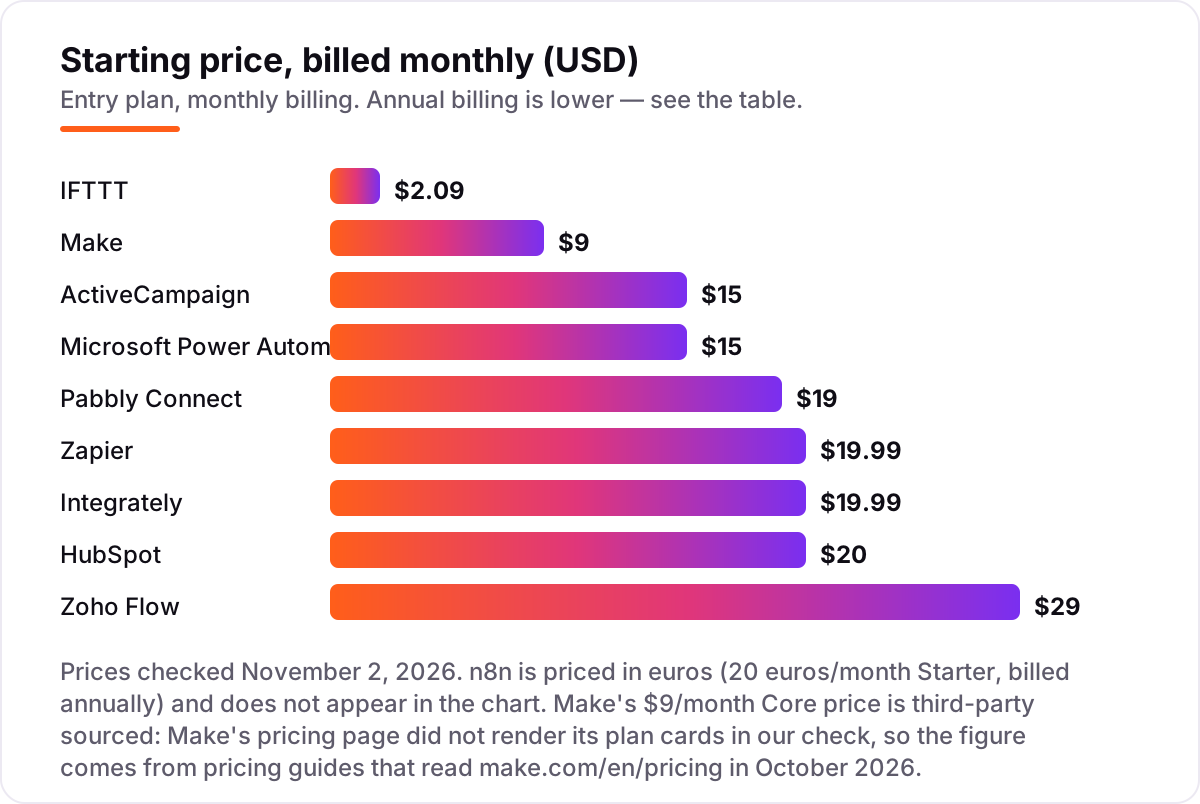
Automation apps for small business pricing is decided by the billing unit, not the headline price, so here is one worked example. Take a shop that runs 1,000 order-to-spreadsheet automations a month, and each automation has three steps: read the order, write the row, send a confirmation. On Zapier that is 3,000 tasks, which is four times the 750 tasks in the $19.99 Professional entry tier, so the bill climbs past $19.99 into a higher task tier. On Make the same work is 3,000 credits against Core's 10,000, so the $9/month plan covers it with room to spare. On n8n it is 1,000 executions against Starter's 2,500, so the €20/month plan covers it too.
The same math explains the rest of the list. IFTTT Starter at $2.09 a month covers 5,000 credits, Pabbly Connect Standard at $19 covers 10,000 tasks, and Integrately Starter at $19.99 covers 2,000 tasks, so a 3,000-task workload would already outgrow Integrately. The per-user tools need different math: Power Automate Premium at $15 per user per month means five staff cost $75 a month, and HubSpot Data Hub Starter at $20 per seat means five seats cost $100. Add the people before you add the workflows, and the cheapest sticker price is rarely the cheapest bill.
Annual billing changes the numbers further, and not evenly. Zapier's $19.99 is the annual rate, with monthly billing at $29.99, while Make's $9 is annual against $10.59 monthly, so paying yearly saves about a third on Zapier and about 15% on Make. n8n saves 17% on annual billing, IFTTT saves 30% and Zoho Flow saves about 15%. Integrately lists no annual option at all, so its $19.99 is the price every month. Always read the billing toggle before you budget, because the same plan can show two different monthly figures.
Know the difference: tasks, credits and executions
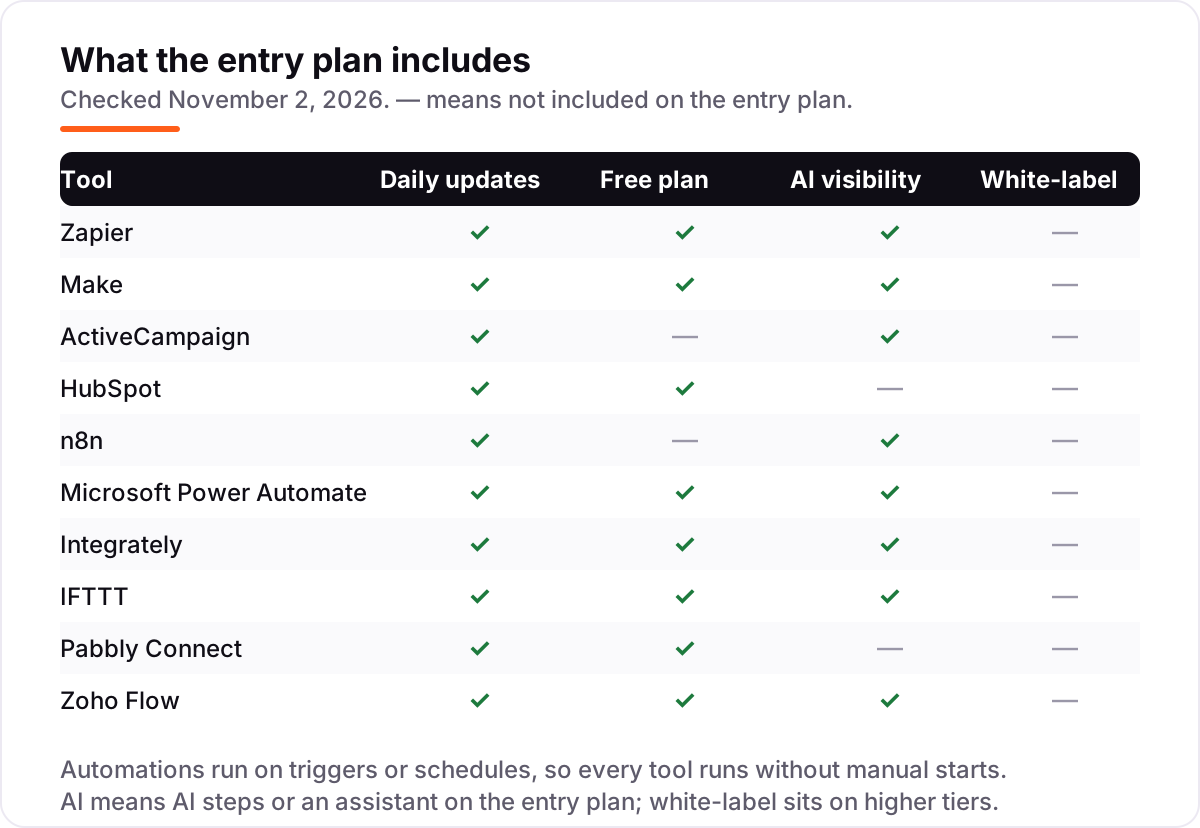
The biggest buyer confusion in this category is that every tool counts usage differently, and the names sound alike. A Zapier task is one successful action step: a three-step Zap that runs once uses three tasks. A Make credit is one module run, including the trigger in most cases, so a ten-module scenario costs ten credits per run. An n8n execution is one full workflow run, no matter how many steps it has, so a 28-node workflow costs one execution. IFTTT now sells credits too: Applet runs, MCP usage and AI features all draw from the same monthly allowance.
That difference is why the prices in this list are not directly comparable. Zapier looks close to Make at $19.99 against $9, but the allowances are 750 tasks against 10,000 credits, and the Zapier number shrinks further on multi-step workflows. Before you buy, take your busiest workflow, count its steps, multiply by how often it runs, and check the result against the plan's allowance. The tool with the lowest sticker price usually wins that test, but only the test tells you for sure.
There is one more unit to watch: per-user and per-contact pricing. Power Automate and HubSpot charge per person, so the bill grows with the team, while ActiveCampaign charges by contact count, so the bill grows with the mailing list. A five-person team with a 10,000-contact list would pay $75 a month for Power Automate, $100 for HubSpot and $149 for ActiveCampaign Starter, before any of them runs a single automation. Count people and contacts the same way you count steps. For a deeper look at marketing-side automation, see our guide to marketing automation for small business and the best SEO automation tools.
How we chose
We checked each vendor's own pricing page on November 2, 2026 and recorded the starting price exactly as shown, including the annual-billing figure where the page lists one. One exception: Make's pricing page did not render its plan cards in our check, so its $9/month Core price is third-party sourced from pricing guides that read make.com/en/pricing in October 2026, and it should be confirmed on the live page before buying. IFTTT's pricing changed in October 2026 to credit-based plans, and the figures here are the new ones from its live plans page. HubSpot's Operations Hub is now called Data Hub, and n8n prices in euros on the page we read. Ratings come from G2, with review counts shown, and we ranked the tools by fit for the most common buyer — a non-technical small business owner automating everyday work — not by brand size. No vendor paid for a place in this list, and none of the links here are affiliate links.
What to do next
Start with your three most-repeated tasks and build them on the free plan of your top pick: Zapier for the widest app choice, Make for the lowest cost per action, ActiveCampaign if the work is email. Run them for two weeks, count what they actually use, and only then pay. If the numbers match the plan's allowance and the reports make sense, you have your tool. Once your tools are in place, find out what's holding your rankings back. If you want help turning the time automation saves into more search traffic, see our local SEO service.
Your stack only works if people find you
SerpAstra fixes what keeps your site off page one and makes it easy for AI assistants to recommend.
Get a free audit→Sources we checked (20)
- Zapier pricing — zapier.com/pricing (checked November 2, 2026)
- Zapier on G2 — 4.5/5, 2,088 reviews (checked November 2, 2026)
- Make pricing — make.com/en/pricing (plan cards did not render in our check; $9 Core price third-party sourced, checked November 2, 2026)
- Make on G2 — 4.6/5, 454 reviews (checked November 2, 2026)
- ActiveCampaign pricing — activecampaign.com/pricing (checked November 2, 2026)
- ActiveCampaign on G2 — 4.4/5, 14,697 reviews (checked November 2, 2026)
- HubSpot pricing — hubspot.com/pricing (checked November 2, 2026)
- HubSpot Data Hub on G2 — 4.5/5, 644 reviews (checked November 2, 2026)
- n8n pricing — n8n.io/pricing (checked November 2, 2026)
- n8n on G2 — 4.7/5, 323 reviews (checked November 2, 2026)
- Microsoft Power Automate pricing — microsoft.com Power Automate pricing (checked November 2, 2026)
- Microsoft Power Automate on G2 — 4.4/5, 1,096 reviews (checked November 2, 2026)
- Integrately pricing — integrately.com/pricing (checked November 2, 2026)
- Integrately on G2 — 4.7/5, 713 reviews (checked November 2, 2026)
- IFTTT pricing — ifttt.com/plans (checked November 2, 2026)
- IFTTT on G2 — 4.5/5, 117 reviews (checked November 2, 2026)
- Pabbly Connect pricing — pabbly.com/connect (checked November 2, 2026)
- Pabbly on G2 — 4.1/5, 30 reviews (checked November 2, 2026)
- Zoho Flow pricing — zoho.com/flow/pricing.html (checked November 2, 2026)
- Zoho Flow on G2 — 4.1/5, 20 reviews (checked November 2, 2026)
Shamim
Founder of SerpAstra
A full-stack SEO and digital marketer who spends most days on Local SEO for dental practices, AI search visibility and lead generation.
Frequently asked questions
What is the best automation app for a small business?
Zapier is the best starting point for most small businesses: 9,000+ apps, the easiest setup and a free plan, from $19.99/month billed annually. If you run multi-step workflows every day, Make is cheaper at $9/month for 10,000 credits. Email-led businesses should look at ActiveCampaign instead.
How much does business automation software cost?
Between $2.09 and $29 a month at the entry level. IFTTT Starter costs $2.09/month billed annually, Make Core $9, ActiveCampaign Starter $15, Zapier Professional $19.99 and Zoho Flow Standard $29. The sticker price is only half the story: the billing unit decides the real bill.
Is there a free automation app for small business?
Yes, with limits. IFTTT gives 1,000 credits a month free, Make gives 1,000 credits, Zapier gives 100 tasks and Zoho Flow and Pabbly Connect give 100 tasks each. Free plans cover a handful of simple automations; once a workflow runs daily, a paid plan is cheaper than the time you lose doing it by hand.
Zapier vs Make: which is cheaper?
Make, for most real workloads. Zapier Professional costs $19.99/month billed annually for 750 tasks, and every action step counts as a task. Make Core costs $9/month billed annually for 10,000 credits, and most module actions cost one credit. A three-step workflow running 1,000 times costs 3,000 units on either tool, but Make's allowance is far larger.
Do I need a technical person to set up automation?
No, for the no-code tools. Zapier, Integrately and IFTTT are built for non-technical owners, with guided editors and one-click automations. Make takes a little longer to learn but stays no-code. Only n8n really benefits from someone technical, because its power comes from code steps and self-hosting.
Can automation apps replace hiring?
No, but they can delay it. Automation removes repetitive work — copying orders into a spreadsheet, sending follow-up emails, updating the CRM — so a small team handles more volume. The work that still needs a person is judgment: customer conversations, pricing decisions and anything a template cannot cover.
Free SEO and AI visibility audit
Find out what is holding your rankings back
Send us your site. Within 2 business days you get a written audit, an AI visibility check and a short fix list ranked by impact. Free, with no contract attached.
Request my free audit→Related guides
 SEO & AI Search8 Best SEO Automation Tools in 2026 (Free and Paid, Compared)8 best SEO automation tools compared on price, automation depth and free plans, with every price checked on the vendor's own pricing page, November 1, 2026.Read guide →
 MarketingMarketing automation for small businesses: what to automate (and what not to)Marketing automation for small businesses, explained: what to automate first, what to keep human, and the tools that save hours without losing customers.Read guide →
 MarketingEmail marketing for local businesses (that customers actually open)Email marketing for local businesses: build a list the right way, send emails customers open, and turn past customers into repeat bookings without spam.Read guide →