
10 Best Budgeting Software for Small Business in 2026, Compared
Compare the 10 best budgeting software for small business options on price, budgeting depth and bank sync, with real prices checked November 2, 2026.
 Shamim Mia, Founder, SerpAstraLast verified November 2, 202612 min read
We compare pricing pages, documentation and public reviews. We never accept payment for rankings.

Key takeaways
- QuickBooks Online is the default pick for most small businesses at $38/month, but real budgeting starts on Plus at $140/month; Xero ($27/month) and FreshBooks ($23/month) cost less to start.
- PlanGuru ($99/month) is the only dedicated budgeting tool in this list built for small businesses; LivePlan ($20/month) and Fathom ($67/month) cover planning and reporting.
- The single most important buying factor is whether the budget updates from live bank data or from manual entry — a budget you have to type in by hand is a budget you will stop keeping.
- Free plans exist — Zoho Books is free under $50,000 of revenue and Wave's Starter plan is free — but automatic bank feeds and forecasting start on the paid plans.
- Every price below was checked on November 2, 2026; PlanGuru, LivePlan and Fathom prices are vendor-supplied via G2, and ratings are G2 with review counts shown.
On this page
Quick comparison
| Tool | Best for | Starting price | Free plan |
|---|---|---|---|
| QuickBooks Online | Small business owners who want the most widely used accounting suite and will budget on the Plus plan | $38/mo | Yes (2 invoices/mo) |
| Xero | Small businesses that want flat pricing with unlimited users and built-in cash-flow forecasts | $27/mo | No (30-day trial) |
| FreshBooks | Service businesses and freelancers who bill clients and want invoicing plus time tracking in one place | $23/mo | No (30-day trial) |
| Zoho Books | Micro-businesses under $50,000 of revenue that want a real double-entry ledger for free | Free plan | Yes (under $50K revenue) |
| Wave | Freelancers and micro-businesses that want free invoicing and bookkeeping with no monthly bill | Free plan | Yes (Starter plan) |
| PlanGuru | Small businesses and nonprofits that want dedicated budgeting and forecasting instead of spreadsheet models | $99/mo | No (free trial) |
| LivePlan | Owners writing a business plan for a loan or planning the year ahead with lender-ready financials | $20/mo | No |
| Fathom | Small businesses and their accountants who want visual reports, budgets and forecasts from live accounting data | $67/mo | No (free trial) |
| Float | Businesses on Xero or QuickBooks that want a rolling 13-week cash-flow forecast they can act on | $130/mo | No (14-day trial) |
| YNAB | Sole proprietors who want strict zero-based discipline for the money they pay themselves | $14.99/mo | No (34-day trial) |
Make one of these tools?
We re-check this list every quarter. Send a correction, request a review, or ask about a clearly labeled sponsored spot.
Request a listingThe best budgeting software for small business

QuickBooks Online
Best for: Small business owners who want the most widely used accounting suite and will budget on the Plus plan
QuickBooks Online is the default accounting system for American small businesses, and that ubiquity is the real selling point. Your bookkeeper knows it, your bank exports to it, and every add-on in this list plugs into it first. Simple Start at $38 a month covers invoicing, expense tracking and automatic bank feeds, with Intuit Intelligence categorizing transactions for you.
The catch is that budgeting is not a Simple Start feature. Budgets, inventory tracking and project profitability arrive on Plus at $140 a month, so a business that buys QuickBooks Online for its budgets pays $140, not $38. If you already run your books here, that jump is worth it. If you do not, Xero or Zoho Books may be the cheaper route to the same numbers.
What we like
- The default choice: accountants, bookkeepers and banks all know it, so help is easy to find
- Automatic bank feeds with AI categorization (Intuit Intelligence) on every plan including Simple Start
- Plus adds budgeting, inventory and project profitability, and Advanced adds workflow automation for 25 users
Watch out for
- Budgeting is not in Simple Start — it starts on Plus at $140/month, so the budgeting price is not the $38 entry price
- Prices rose again in August 2026 (Plus went from $115 to $140) and G2 reviewers complain about frequent increases
- Support quality is the most common G2 complaint, with slow responses and repeated handoffs reported
Xero
Best for: Small businesses that want flat pricing with unlimited users and built-in cash-flow forecasts
Xero is the strongest rival to QuickBooks Online for a small business that wants flat, predictable pricing. Every plan includes unlimited users, so the monthly bill does not rise when you hire — a real advantage over QuickBooks Online, where each extra user on the cheaper plans costs money. Bank feeds reconcile automatically, and Hubdoc captures receipts.
The budgeting angle is the built-in cash-flow forecast: 30 days on Early, 60 days on Growing and 180 days on Established. That is a forecast, not a budget you set category by category, so Xero suits owners who watch cash rather than owners who set spending limits. Multi-currency and project tracking wait for Established at $97 a month.
What we like
- Unlimited users on every plan — the price does not move when you hire
- 60-day cash-flow forecast on Growing and 180-day forecast on Established, plus Hubdoc receipt capture
- Rated 4.4/5 on G2 with reviewers praising the interface and time-saving automation most
Watch out for
- Early caps at 20 invoices and 5 bills a month, so most active businesses land on Growing at $59/month
- Multi-currency, projects and expense claims need Established at $97/month
- US prices rose on October 1, 2026 (Early from $25 to $27) and Xero raises prices most years

FreshBooks
Best for: Service businesses and freelancers who bill clients and want invoicing plus time tracking in one place
FreshBooks is built for service businesses that bill by the hour or the project, and it shows in every screen. Invoicing is the fastest in this list, time tracking sits on every plan, and expenses are captured by photo. For a consultant, designer or trades business, the daily workflow is smoother than QuickBooks Online or Xero.
Budgeting enters on Premium at $70 a month, which adds project budgeting and profitability reporting — the feature that lets a service firm check whether a client job is actually making money. Lite's cap of five billable clients pushes most growing firms to Plus at $43. The 10 percent annual discount helps, but this is a service-business tool first and a budgeting tool second.
What we like
- The easiest invoicing in this list, with time tracking and expense capture on every plan
- Premium adds project budgeting and profitability reporting, which is the budgeting feature service firms actually use
- Rated 4.5/5 on G2 — the joint-highest score here — with ease of use mentioned most by reviewers
Watch out for
- Lite caps at 5 billable clients and Plus at 50, so the real price for a growing client list is $43 or $70/month
- Extra team members cost $11/month each on every plan, and payroll is a $40/month add-on
- No inventory tracking, so product-based businesses need another tool for stock

Zoho Books
Best for: Micro-businesses under $50,000 of revenue that want a real double-entry ledger for free
Zoho Books is the only tool here that gives a trading business a real double-entry ledger for free. Under $50,000 of annual revenue, the free plan covers 1,000 invoices a year, which is enough for most micro-businesses to run properly. Standard at $20 a month adds automated bank feeds and recurring invoices for less than rivals charge.
The trade-off is that dedicated budgeting is thin. Cash-flow forecasting waits for Premium at $70 a month, and there is no payroll module on any plan. But for a micro-business that wants a free, proper set of books and is happy to plan in a spreadsheet, Zoho Books is the cheapest honest start — and the free plan costs nothing to try.
What we like
- The only genuine free plan here for a trading business: 1,000 invoices a year under $50,000 of revenue
- Standard at $20/month adds automated bank feeds, recurring invoices and 3 users for less than most rivals charge
- Deep native links to the rest of Zoho, including CRM and Expense, for businesses already in that ecosystem
Watch out for
- The free plan ends once revenue passes $50,000 a year, so growing businesses move to paid plans
- Cash-flow forecasting waits for Premium at $70/month, and multi-currency for Professional at $50/month
- No payroll module on any plan — payroll is a separate Zoho product

Wave
Best for: Freelancers and micro-businesses that want free invoicing and bookkeeping with no monthly bill
Wave is the cheapest real accounting in this list: the Starter plan charges nothing for unlimited invoices, estimates and bookkeeping records. It is a genuine product, not a trial, and for a freelancer who mostly needs to send invoices and track income, it does the job without a monthly bill.
Pro at $19 a month adds what matters for budgeting: automatic bank imports, receipt scanning and multi-user roles. But note the limits — there is no inventory tracking and no built-in budgeting or forecasting tool. Wave records what happened; the planning still happens in a spreadsheet or a dedicated tool like PlanGuru. Support is the weakest part of the package, per G2 reviewers.
What we like
- The free Starter plan covers unlimited invoices, estimates and bookkeeping records at $0
- Pro at $19/month adds automatic bank imports, receipt scanning, multi-user roles and live support
- Clean, non-accountant-friendly interface that G2 reviewers call easy to learn
Watch out for
- Automatic bank imports need Pro at $19/month — the free Starter plan is manual entry only
- No inventory tracking and no built-in budgeting or forecasting; you track actuals, then plan elsewhere
- G2 reviewers report slow support and slow payment payouts, and some industries cannot use Wave at all

PlanGuru
Best for: Small businesses and nonprofits that want dedicated budgeting and forecasting instead of spreadsheet models
PlanGuru is the only dedicated budgeting tool in this list, and it is built for businesses rather than households. It produces 10-year budgets and three-way forecasts — profit and loss, balance sheet and cash flow — with more than 20 forecasting methods and unlimited scenarios. It is the tool an accountant would pick for a client that has outgrown spreadsheet budgets.
The price is $99 a month for one entity, and it does no bookkeeping at all — you still need QuickBooks Online or Xero, and imports from them run manually rather than syncing automatically. For a business that already keeps books elsewhere and wants serious budgets, that is a fair deal. For a business that wants one tool to do everything, it is the wrong pick.
What we like
- The only dedicated budgeting tool in this list: 10-year budgets, 20-plus forecasting methods and unlimited scenarios
- Three-way forecasts (profit and loss, balance sheet, cash flow) with KPIs, ratios and workforce planning
- Rated 4.5/5 on G2, with reviewers praising the support team and the price against larger FP&A tools
Watch out for
- At $99/month it costs more than the accounting suites, and it does no bookkeeping — you still need QuickBooks or Xero
- Imports from QuickBooks and Xero run manually rather than syncing automatically
- G2 reviewers note a learning curve for owners new to budgeting, and consolidation needs the $399 plan

LivePlan
Best for: Owners writing a business plan for a loan or planning the year ahead with lender-ready financials
LivePlan is the planning tool in this list. Its step-by-step business plan builder, with more than 500 sample plans, is designed for owners who need lender-ready financials — a loan application, a grant, or a new year plan they can actually show a bank. The financial statements are generated automatically from the plan.
Budgeting is part of the package: full cash forecasting on Standard, with scenarios and QuickBooks or Xero sync on Premium at $40 a month. The catch is that Standard has no accounting sync at all, so you type numbers in by hand, and there is no free trial — only a 35-day money-back guarantee. It is a planning tool, not a daily bookkeeping system.
What we like
- Step-by-step business planning with 500-plus sample plans and lender-ready financial statements
- Premium adds QuickBooks and Xero sync, up to 10 forecast scenarios and industry benchmarking
- Performance dashboards compare actuals against the plan, which is the budget check most owners skip
Watch out for
- No free plan and no free trial — only a 35-day money-back guarantee
- Standard has no QuickBooks or Xero sync and no scenarios; those need Premium at $40/month
- Forecasting is simpler than PlanGuru or Fathom, and G2 reviewers call the pricing model hard to justify long-term

Fathom
Best for: Small businesses and their accountants who want visual reports, budgets and forecasts from live accounting data
Fathom turns the numbers in QuickBooks Online or Xero into visual reports, budgets and forecasts that an owner can actually read. KPI dashboards, cash-flow forecasting, scenario planning and white-label client reports come on the Portfolio plan, and every plan allows unlimited users — a combination no other tool here offers.
The price is $67 a month per company, so a business with several entities pays per entity. The budgeting is strong for reporting and monthly reviews, but it is simpler than PlanGuru for deep planning, and non-financial metrics need a separate Target feature. For an owner or accountant who wants the monthly numbers to look clear and professional, Fathom is the best pick in this list.
What we like
- The highest G2 score in this list at 4.6/5, with reviewers praising the Xero and QuickBooks sync
- Visual KPI dashboards, cash-flow forecasting, scenario planning and white-label client reports
- Unlimited users on every plan, so the whole team and the accountant can work in the same numbers
Watch out for
- Priced per company at $67/month each, so multi-entity businesses pay per entity
- Forecasting is simpler than PlanGuru — G2 reviewers call it better for reporting than for deep planning
- Budget covers financial data only; non-financial metrics need the separate Target feature

Float
Best for: Businesses on Xero or QuickBooks that want a rolling 13-week cash-flow forecast they can act on
Float does one thing: it builds a live, visual cash-flow forecast from the numbers already in Xero or QuickBooks Online. Because it reads reconciled bank data, due dates land on real days rather than guesses, and the 13-week cash view shows exactly when money runs short. Scenario layers let you test a new hire or a late-paying client before committing.
The Small Business plan costs $130 a month, billed monthly, or $105 billed annually — more than the accounting software it plugs into, which surprises some buyers. It also does no invoicing, payments or bookkeeping of its own. But for a business whose main budgeting worry is cash timing rather than spending categories, Float is the clearest answer in this list.
What we like
- Builds a visual rolling forecast directly from live Xero or QuickBooks data, so due dates land on real days
- 13-week cash view plus 12-month forecasts, with scenario layers for hires, clients and other what-ifs
- Rated 4.4/5 on G2, with reviewers calling the Xero integration seamless and the scenarios a time-saver
Watch out for
- At $130/month it costs more than the accounting software it plugs into, which surprises some buyers
- It does no invoicing, payments or general ledger work — it only forecasts on top of Xero or QuickBooks
- Only 8 scenarios on the Small Business plan, and forecasts need reconciled books to be accurate

YNAB
Best for: Sole proprietors who want strict zero-based discipline for the money they pay themselves
YNAB, short for You Need a Budget, is the strictest budgeting method in this list. Its zero-based system gives every dollar a job before it is spent, which is exactly the discipline most sole proprietors need for the money they pay themselves. Bank sync is included in the single $14.99 a month plan, and one subscription covers up to six people.
The limit is that YNAB is built for personal budgets, not business books. There is no invoicing, payroll or tax reporting, and the method demands weekly hands-on work — it is a habit, not a dashboard you glance at monthly. Use it for the owner's own money alongside a proper accounting tool, not as a replacement for one.
What we like
- The strictest budgeting method here: every dollar gets a job before it is spent
- Bank sync included in the single $14.99/month plan, with targets, loan payoff planning and sharing for up to six people
- Rated 4.5/5 on G2, with reviewers calling it the most user-friendly budgeting tool they have used
Watch out for
- Built for personal budgets, not business books — no invoicing, payroll or tax reporting
- The zero-based method demands weekly hands-on work, and G2 reviewers flag the learning curve
- Bank connections can break and need fixing, and there is no free plan after the 34-day trial
The best budgeting software for small business is not the one with the longest feature list — it is the one whose budget updates itself from your bank feed, because a budget you have to type in by hand is a budget you will stop keeping. Most guides to the best budgeting software for small businesses mix full accounting suites with dedicated budgeting apps, so we ranked all ten by fit for a typical owner who wants a budget they will actually keep, with prices checked on November 2, 2026.
How to choose the best budgeting software for small business
Start with the job, not the brand. A tool that tracks expenses well is not automatically a budgeting tool, and the cheapest entry price in a list is often a tier below the plan that includes budgets. These five checks sort that out before you pay.
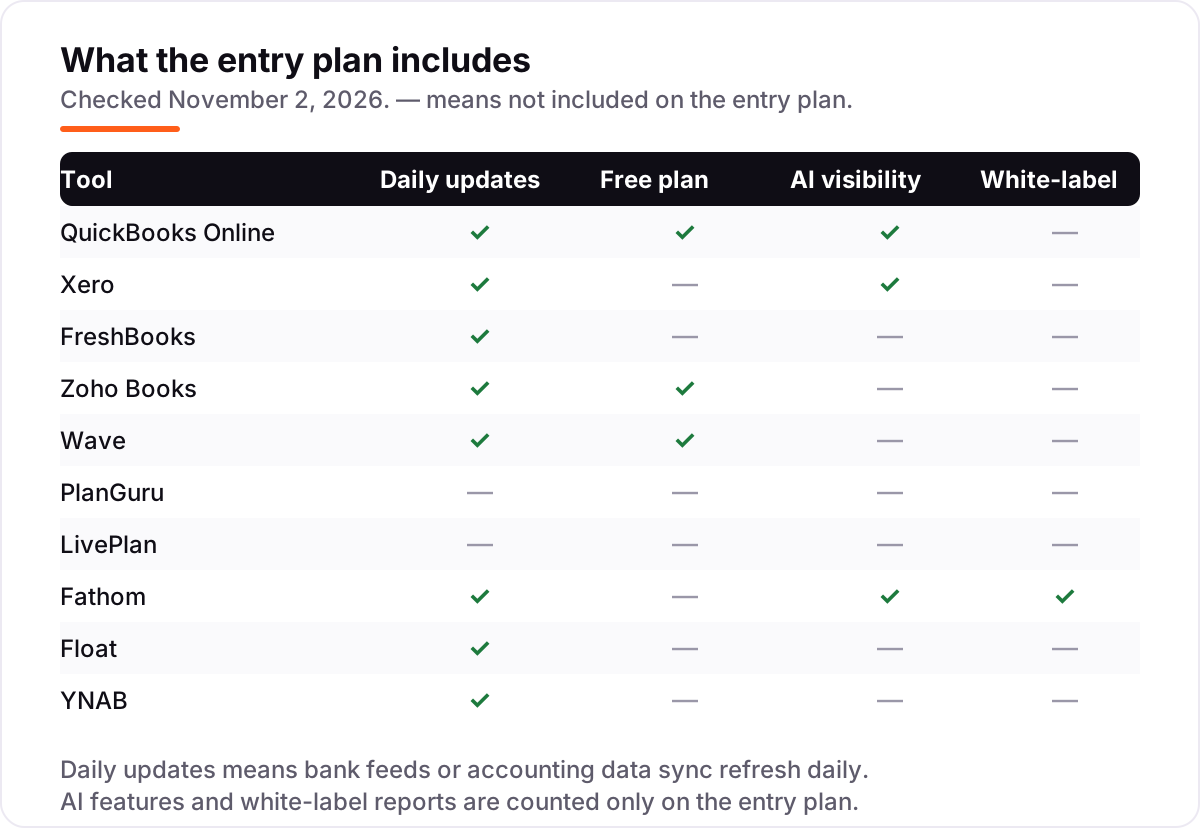
- Live bank data or manual entry. A budget that updates itself from your bank feed gets checked every week. A budget you type in by hand gets abandoned by February. This is the single most important factor, and it is why the matrix below tracks daily updates.
- Budgeting depth. Ask whether the plan you are buying actually includes budgets. QuickBooks Online reserves budgeting for Plus, FreshBooks for Premium, and Zoho Books for its forecasting tier — the entry price is not the budgeting price.
- Who else pays. Some tools charge per user, so the bill grows with the team. Xero and Fathom include unlimited users, which keeps the price flat when you hire.
- Monthly or annual billing. Annual billing saves roughly 10 to 25 percent on the tools that offer it — FreshBooks 10 percent, Float about 19 percent, LivePlan 25 percent — but only if you will still be using the tool in a year. Start monthly, then switch.
- Try it on real data. Every tool here has a free plan or a free trial. Connect your real bank account for two weeks and see whether the numbers match your books before you pay.
For the marketing side of the budget, our best marketing platforms for small business SEO comparison covers the platforms most owners end up paying for, and our marketing automation for small business guide covers what the cheaper automation tools actually do.
Budgeting software for small business pricing: what you will actually pay
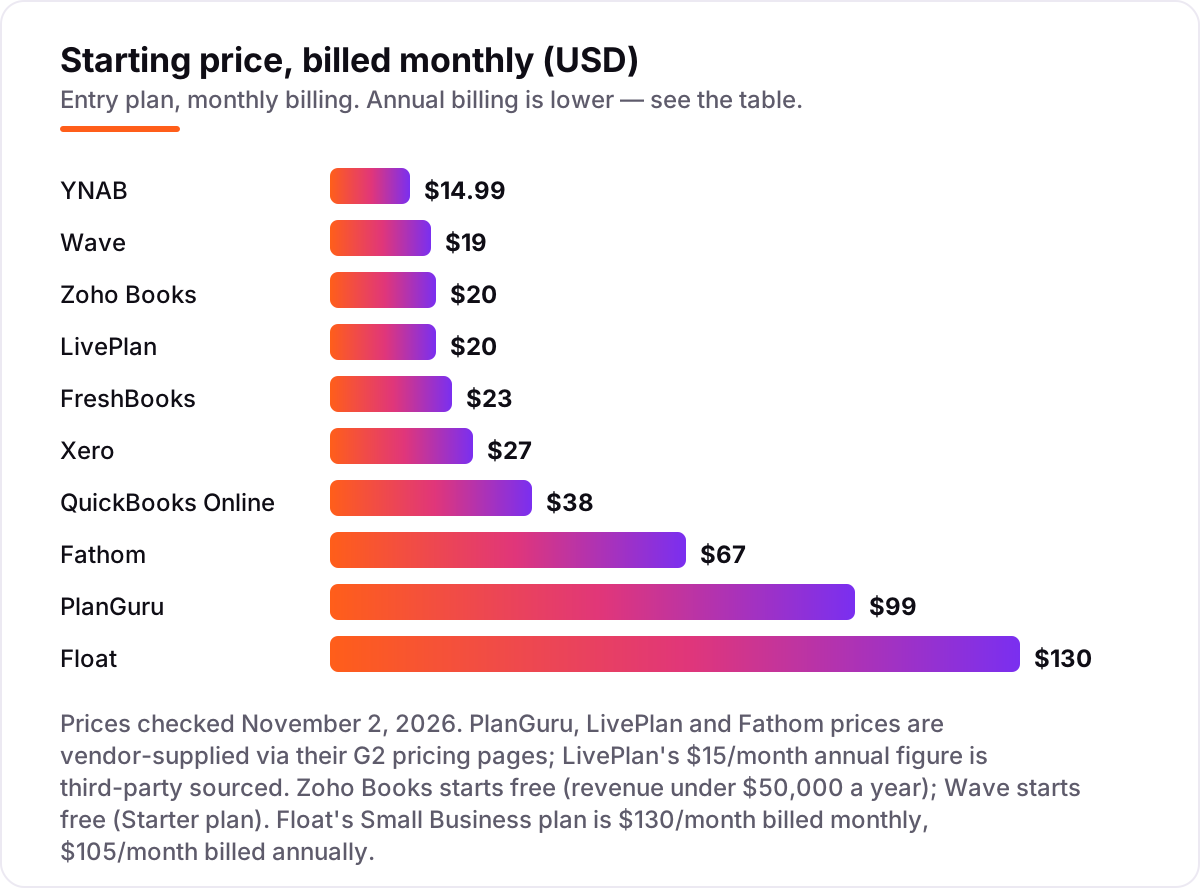
Start with a solo owner. Wave Pro costs $19 a month, which is $228 a year, and QuickBooks Online Simple Start costs $38 a month, or $456 a year. The difference is $228 a year, and for that money QuickBooks Online adds automatic bank categorization, a larger support team and the option to step up to Plus later.
A five-person team that needs real budgets changes the maths. QuickBooks Online Plus costs $140 a month, or $1,680 a year, and it includes budgeting, inventory and project profitability. Xero Growing costs $59 a month, or $708 a year, with unlimited users and a 60-day cash-flow forecast — $972 a year less than QuickBooks Online Plus, though Xero's budgeting is a forecast rather than a category budget.
The third option is to keep the accounting suite and add a forecaster on top. Float costs $130 a month on top of QuickBooks Online Simple Start at $38, so the pair costs $168 a month, or $2,016 a year — more than QuickBooks Online Plus alone, but with a live 13-week cash view that Plus does not offer. A budget usually shows two things: what you spend and what you need to earn. If the second number is the problem, our monthly SEO service is the usual next step. If the budget has to cover marketing too, how much SEO costs is the usual benchmark before you set the line.
Free options first
If the business is small enough, the budget tool can cost nothing. Zoho Books is free while revenue stays under $50,000 a year, and Wave's Starter plan is free with no revenue cap — both cover invoicing and a proper set of books. QuickBooks Online also has a free plan, though it caps at two invoices a month, so it suits a side business rather than a trading one.
The free tiers are honest products, not demos, but they stop short of the two features that make budgeting work: automatic bank feeds and forecasting. Wave's free plan is manual entry only, and Zoho's cash-flow forecasting starts on Premium at $70 a month. So start free, and upgrade the month the manual entry starts eating your evenings — that is the moment the $19 or $20 a month pays for itself.
Budgeting vs forecasting vs expense tracking: know the difference
These three jobs get mixed up in almost every product page, and the mix-up is how owners buy the wrong tool. Expense tracking records what you already spent: receipts, bank transactions, bills. Every tool in this list does it, and it is the only job a free plan reliably covers.
Budgeting sets a limit before the money moves: $400 a month for software, $1,200 for marketing, a wage bill that must not pass a set figure. Only some tools here do it properly — PlanGuru, LivePlan, Fathom, Float and YNAB — while the accounting suites mostly reserve it for higher plans, like QuickBooks Online Plus or FreshBooks Premium.
Forecasting predicts what will happen next: cash in the bank in 13 weeks, the month a late-paying client pushes you overdrawn. Xero's 60-day and 180-day forecasts, Fathom's cash-flow view and Float's rolling 13-week forecast do this job. A tool can forecast without budgeting, and it can budget without forecasting — check which one you actually need before you pay.
Most owners end up needing two of the three jobs, not one. The usual pairing is an accounting suite for expense tracking plus a forecaster — QuickBooks Online with Float, or Xero with Fathom — which is why the prices in the worked example above stack. Buy the tracker first, then add the forecaster when the cash question, not the spending question, is the one keeping you up at night.
Quick comparison: tool type by need
| Buyer | Best pick | Why |
|---|---|---|
| Solo owner who wants to spend nothing | Wave or Zoho Books | Free plans cover invoicing and basic books; Wave Pro adds bank feeds at $19/month |
| Small business that needs a full ledger | QuickBooks Online | The most widely used suite; budgeting arrives on Plus at $140/month |
| Team that hates per-user pricing | Xero | Unlimited users on every plan from $27/month |
| Service business that bills clients | FreshBooks | Invoicing and time tracking lead; project budgets on Premium at $70/month |
| Owner who wants real budgets, not just reports | PlanGuru | Dedicated budgeting and forecasting from $99/month |
| Business planning a loan or a new year | LivePlan or Fathom | Plans, scenarios and lender-ready forecasts from $20 and $67/month |
How we chose
We checked each vendor's own pricing page on November 2, 2026 and recorded the starting price exactly as shown, including the annual-billing figure where the page lists one. Three prices — PlanGuru, LivePlan and Fathom — are vendor-supplied through those companies' G2 pricing pages rather than their own sites, and LivePlan's $15 a month annual figure comes from third-party sources. Ratings are G2, with review counts shown. We ranked by fit for the most common buyer — a small business owner who wants a budget they will actually keep — not by brand size, and we left out tools that publish no starting price, including Jirav, Cube and Mosaic, and Sage Accounting, whose US prices conflict across sources. No vendor paid for a place in this list, and none of the links here are affiliate links.
What to do next
Pick the one tool that matches the job you actually need: an accounting suite if you need books, a dedicated planner if you need budgets, or a forecaster if cash timing is the worry. Run its free plan or trial on your real bank data for two weeks and check whether the budget updates itself — if it does not, you will stop using it within a month. Before you publish the pages that bring in the revenue, check how they look in search with the free SERP snippet preview tool. Once your tools are in place, find out what's holding your rankings back.
Your stack only works if people find you
SerpAstra fixes what keeps your site off page one and makes it easy for AI assistants to recommend.
Get a free audit→Sources we checked (20)
- QuickBooks Online pricing — quickbooks.intuit.com/pricing (checked November 2, 2026)
- QuickBooks Online on G2 — 4.0/5, 3,901 reviews (checked November 2, 2026)
- Xero pricing — xero.com/us/pricing-plans (checked November 2, 2026)
- Xero on G2 — 4.4/5, 1,849 reviews (checked November 2, 2026)
- FreshBooks pricing — freshbooks.com/pricing (checked November 2, 2026)
- FreshBooks on G2 — 4.5/5, 981 reviews (checked November 2, 2026)
- Zoho Books pricing — zoho.com/us/books/pricing (checked November 2, 2026)
- Zoho Books on G2 — 4.4/5, 330 reviews (checked November 2, 2026)
- Wave Pro pricing — waveapps.com/pro (checked November 2, 2026)
- Wave on G2 — 4.3/5, 327 reviews (checked November 2, 2026)
- PlanGuru pricing on G2 (vendor-supplied) — g2.com/products/planguru/pricing (checked November 2, 2026)
- PlanGuru on G2 — 4.5/5, 37 reviews (checked November 2, 2026)
- LivePlan pricing on G2 (vendor-supplied) — g2.com/products/liveplan/pricing (checked November 2, 2026)
- LivePlan on G2 — 4.3/5, 51 reviews (checked November 2, 2026)
- Fathom pricing on G2 (vendor-supplied) — Portfolio $67/month (checked November 2, 2026)
- Fathom on G2 — 4.6/5, 164 reviews (checked November 2, 2026)
- Float pricing for small businesses — floatapp.com/pricing-for-small-businesses (checked November 2, 2026)
- Float on G2 — 4.4/5, 45 reviews (checked November 2, 2026)
- YNAB pricing — ynab.com/pricing (checked November 2, 2026)
- YNAB on G2 — 4.5/5, 30 reviews (checked November 2, 2026)
Shamim
Founder of SerpAstra
A full-stack SEO and digital marketer who spends most days on Local SEO for dental practices, AI search visibility and lead generation.
Frequently asked questions
What is the best budgeting software for small business?
QuickBooks Online is the default for most owners at $38 a month, but real budgeting starts on Plus at $140. For dedicated budgeting, PlanGuru at $99 a month is the strongest pick, and for a free start Zoho Books is free under $50,000 of revenue. The right answer depends on whether you need books, budgets or cash-flow forecasts — they are different jobs.
How much does budgeting software for a small business cost?
Between $0 and $130 a month. Free plans from Zoho Books and Wave cover basic books at no cost, the accounting suites run $19 to $38 a month to start, and dedicated budgeting tools cost $20 to $130 a month. The figure that matters is the plan that includes the budgeting feature, which is often a tier above the entry price.
Is there free budgeting software for a small business?
Yes, with limits. Zoho Books is free for revenue under $50,000 a year and Wave's Starter plan is free with no revenue cap, but neither includes automatic bank feeds or dedicated budgeting on the free tier. For a true budget at no cost, YNAB's 34-day trial is the only free route, and it is built for personal money, not business books.
What is the difference between budgeting and forecasting?
Budgeting sets a spending limit before money moves — $400 a month for software, for example. Forecasting predicts what will happen next, like cash in the bank in 13 weeks. Expense tracking records what you already spent. Most accounting tools track expenses well, some forecast, and only a few budget properly, so check which job you need before paying.
Does QuickBooks Online include budgeting?
Yes, but not on the cheapest plan. Budgeting is included on Plus at $140 a month and Advanced at $340, along with inventory tracking and project profitability. Simple Start at $38 a month covers invoicing, expense tracking and bank feeds, but no budgets. If budgets are the reason you are buying, price Plus, not Simple Start.
Can I budget in a spreadsheet instead of buying software?
Yes, and many small businesses do. A spreadsheet costs nothing and fits any method, but every number is typed by hand, so it goes stale the moment you stop updating it. Software wins when the budget updates itself from live bank data — that is the feature worth paying for, and it is what separates the tools in this list from a spreadsheet.
What should I check before paying for budgeting software?
Four things: whether bank feeds update automatically or need manual entry, whether the budgeting feature is on the plan you are buying or a higher tier, whether the price is per user or flat, and whether annual billing saves money. Run the free plan or trial on your real bank data for two weeks — a budget that needs typing in by hand is one you will stop keeping.
Free SEO and AI visibility audit
Find out what is holding your rankings back
Send us your site. Within 2 business days you get a written audit, an AI visibility check and a short fix list ranked by impact. Free, with no contract attached.
Request my free audit→Related guides
 Pricing & HiringHow much does SEO cost in 2026? A plain pricing guideWhat SEO costs in 2026, how hourly, project, retainer and performance pricing work, what drives the price up or down, and how to set a budget that holds up.Read guide →
 SEO & AI Search12 Best Marketing Platforms for Small Business SEO in 2026, ComparedThe 12 best marketing platforms for small business SEO, compared on real prices, SEO tools and AI visibility. Every price checked November 1, 2026.Read guide →
 MarketingMarketing automation for small businesses: what to automate (and what not to)Marketing automation for small businesses, explained: what to automate first, what to keep human, and the tools that save hours without losing customers.Read guide →