
Best CAD PLM Software for 2026: 10 Options Compared by Use Case
Compare the 10 best cad plm software options for manufacturers on price, free plans and CAD integration, with every price checked November 4, 2026.
 Shamim Mia, Founder, SerpAstraLast verified November 4, 202614 min read
We compare pricing pages, documentation and public reviews. We never accept payment for rankings.
Key takeaways
- Teamcenter, Windchill and ENOVIA lead this list, but all three are custom quote — the only published monthly price here is OpenBOM at $30/seat/month, and the only free full PLM is Aras Innovator's Community Edition.
- The single most important buying factor is CAD fit: a PLM that shares your CAD vendor's data model costs far less to run than one that needs connectors and file translation.
- Six of the ten tools publish no price at all, so budget on a quote — and expect implementation to cost as much as the first year of licences.
- Annual billing is the norm here: Fusion Manage and Onshape are annual-only, Arena quotes are annual agreements, and only OpenBOM quotes a monthly rate.
On this page
Quick comparison
| Tool | Best for | Starting price | Free plan |
|---|---|---|---|
| Siemens Teamcenter | Large manufacturers that need one system of record for CAD, BOMs, change and compliance across plants | Custom quote | No (30-day trial) |
| PTC Windchill | Engineering teams already running Creo or other PTC tools that want CAD-native PLM | Custom quote | No (no free trial) |
| Dassault ENOVIA | CATIA and SOLIDWORKS shops that want PLM inside the 3DEXPERIENCE platform | Custom quote | No (no free trial) |
| PTC Arena | Electronics and medical-device teams that need cloud PLM plus quality management | Custom quote | No (10-day trial) |
| Autodesk Fusion Manage | Fusion shops that want configurable PLM without leaving the Autodesk cloud | $1,115/yr | No (no free trial) |
| OpenBOM | Small manufacturers that want BOM and PLM started this week for $30 a seat | $30/mo | Yes (free read-only) |
| Propel PLM | Salesforce-based product teams that want PLM, QMS and PIM on one platform | Custom quote | No (free trial) |
| Aras Innovator | Engineering teams that want a full PLM platform free to start and to customize | Free; Subscription custom | Yes (free Community) |
| Onshape | Small design teams that want CAD with built-in version control and data management | $1,500/yr | Yes (free plan) |
| SOLIDWORKS Manage | SOLIDWORKS shops that want project, process and item management on top of PDM | Custom quote | No (no free trial) |
Make one of these tools?
We re-check this list every quarter. Send a correction, request a review, or ask about a clearly labeled sponsored spot.
Request a listingThe best CAD PLM software

Siemens Teamcenter
Best for: Large manufacturers that need one system of record for CAD, BOMs, change and compliance across plants
Siemens Teamcenter is the PLM most large manufacturers run, and its breadth is the reason: requirements, CAD data, BOMs, change, quality and manufacturing planning live in one system of record, so a part changed in engineering updates purchasing, production and service without a spreadsheet. Teamcenter X, the SaaS version, removes the server install and patching that kept smaller firms away, and it comes in four tiers — Essentials, Standard, Advanced and Premium — so a team can start narrow and add modules.
The catch is the price. Siemens quotes every deployment, and the only published figure is the AWS Marketplace entry point of $70,000 a year for 20 users, implementation included. Buy it when the company is big enough to need one system of record; buy OpenBOM or Arena when it is not.
What we like
- The most widely deployed PLM in this list, with the broadest module set — requirements, BOM, change, quality and manufacturing planning in one system
- Teamcenter X runs as Siemens-operated SaaS, so there is no server to install or patch
- Built-in AI assistance in Teamcenter X speeds up search and routine data work
- Deep CAD integration across Siemens NX, Solid Edge and third-party CAD, plus ERP and MES connectors
Watch out for
- No published price: every deployment is a quote, and implementation is a separate project
- The AWS Marketplace entry point is $70,000 a year for 20 users, which prices out small teams
- Implementation and training take months, and the interface has a steep learning curve for occasional users

PTC Windchill
Best for: Engineering teams already running Creo or other PTC tools that want CAD-native PLM
PTC Windchill is the PLM for teams that live in Creo. Because Windchill manages CAD data natively, a model revision, a BOM change and the drawing update move together, and engineers see the same part data that manufacturing and purchasing see. The Base, Advanced and Premium tiers step from core PDM — visualization, design collaboration, change and document management — up to BOM transformation, parts classification and supplier management, and Windchill+ adds a SaaS deployment for teams that want to skip the server.
The buying friction is real: PTC publishes no price and offers no free trial, so the first step is always a sales call, and reviewers warn that maintenance costs run high. Pick Windchill when the CAD is Creo and the PLM must match it; pick Arena or Teamcenter X when the shop is multi-CAD.
What we like
- Tightest integration with Creo of any PLM here — CAD data, BOMs and change stay in sync automatically
- Windchill+ offers a SaaS option, so smaller PTC shops can skip the server install
- Variant and configuration management handles product families without duplicate parts
- Visualization and AR through Vuforia let non-CAD staff review 3D designs in the browser
Watch out for
- No published price and no free trial — every deal starts with a sales conversation
- Reviewers flag high ongoing maintenance costs on top of the subscription
- The interface feels dated and takes training before occasional users are productive

Dassault ENOVIA
Best for: CATIA and SOLIDWORKS shops that want PLM inside the 3DEXPERIENCE platform
Dassault ENOVIA is the PLM side of the 3DEXPERIENCE platform, and its strength is the shared data model: CATIA, SOLIDWORKS and DELMIA all work on the same engineering definition, so a design change flows to manufacturing planning without re-entering data or translating files. Cloud roles add browser-based collaboration for suppliers and remote teams, and the governance model suits regulated industries — aerospace, automotive and medical devices are its home turf.
The price is the hard part. Dassault publishes no list price and asks buyers to contact a client executive or reseller, and third-party estimates run high. Choose ENOVIA when the CAD is already Dassault and the company needs one platform from design to service; choose a cloud PLM when the budget needs a published number.
What we like
- Shares one data model with CATIA, SOLIDWORKS and DELMIA, so design and manufacturing data never diverge
- Cloud roles on the 3DEXPERIENCE platform add collaboration without a server room
- Strong governance for regulated industries — aerospace, automotive and medical device teams rely on it
- Scales from a single workgroup to a global enterprise on the same platform
Watch out for
- No published price; quotes come from Dassault or a reseller and implementation is a separate engagement
- Third-party estimates put entry costs high, and the platform takes months to deploy
- The role-based licensing is hard to compare without a guided quote

PTC Arena
Best for: Electronics and medical-device teams that need cloud PLM plus quality management
PTC Arena is the cloud PLM for hardware teams that ship regulated products. It is pure SaaS — nothing to install, suppliers log in through the browser — and it pairs the PLM core (BOMs, revisions, change orders, documents) with a quality system covering CAPA, nonconformance and complaints, which is why electronics and medical-device teams pick it. Arena Exchange gives outside partners controlled access to BOMs and documents with chat built in, and fixed-fee QuickStart implementations shorten the time to go live.
The trade-off is pricing transparency: every plan on the vendor's page says 'Request Pricing', agreements are annual, and licence types multiply across full, read-only, supplier and training seats. Buy Arena when compliance and supply-chain collaboration matter more than a published price.
What we like
- Pure cloud PLM — nothing to install, and suppliers get controlled access without a VPN
- Built-in QMS (CAPA, nonconformance, complaints) suits medical-device and electronics compliance
- Arena Exchange opens BOMs and documents to outside partners with chat built in
- Fixed-fee QuickStart implementations get small teams live faster than on-premises PLM
Watch out for
- No published price — every plan says 'Request Pricing' and quotes are annual
- Licence types multiply (full, read-only, supplier, training), so the quote needs careful reading
- Renewal pricing can rise with 30 days' notice and no contractual cap

Autodesk Fusion Manage
Best for: Fusion shops that want configurable PLM without leaving the Autodesk cloud
Autodesk Fusion Manage is the PLM extension for teams already designing in Fusion. It adds configurable workflows, BOMs, and change and release management to the same cloud where the CAD lives, so a model update and its approval trail stay in one place. The price is refreshingly public for this category: $1,115 per user per year as an extension, or bundled into Fusion for Design at $2,190 per user per year for teams that also want simulation.
The catch is the prerequisite — Fusion Manage needs a Fusion subscription first, so a new buyer pays for Fusion ($680 a year per user) plus the extension, or $1,795 a year per seat before volume discounts. Pick it when the shop is already Autodesk; pick OpenBOM when the CAD mix is broader.
What we like
- Sold as a $1,115-a-year extension, so the price is published — rare in this list
- Configurable workflows, BOMs and change processes without code
- Lives in the same cloud as Fusion, so CAD data flows straight into PLM
- Bundled into Fusion for Design ($2,190/user/year) for teams that also need simulation
Watch out for
- Requires a Fusion subscription first, so the real starting cost is Fusion plus the extension
- A single-user extension price — team pricing comes through Autodesk sales
- Less deep than Teamcenter or Windchill for enterprise-wide, multi-CAD deployments

OpenBOM
Best for: Small manufacturers that want BOM and PLM started this week for $30 a seat
OpenBOM is the fastest, cheapest way into real BOM and PLM work. The Professional Team plan costs $30 a seat a month billed annually and covers BOM management, a part catalog, inventory control and purchase orders, with no minimum seat count — and only editors pay, so suppliers and shop-floor staff read BOMs free. CAD add-ins for SOLIDWORKS, Inventor, Fusion and Onshape cost $25 a seat a month per CAD system, and the first 2,000 data records are free.
The step up is the Company plan at $90 a seat a month, which adds CAD file management, revision control and change management — the actual PLM. Data-record tiers then add $100 a month per 5,000 records. Start here when the budget is small and the pain is BOM chaos; move to Arena or Teamcenter when compliance workflows take over.
What we like
- The cheapest real starting price here — $30 a seat a month, with no minimum seat count
- Only editors need paid seats; read-only users are free and unlimited, including suppliers
- CAD add-ins for SOLIDWORKS, Inventor, Fusion and Onshape cost $25 a seat a month per CAD system
- Pricing scales on data records, not activity, and the first 2,000 records are free
Watch out for
- Real PDM and PLM (revisions, change management) need the Company plan at $90 a seat a month
- Data-record tiers add $100 a month per 5,000 records past the free 2,000
- Directory listings still show the old $100/$150 Team and Company prices — the vendor page is the current source

Propel PLM
Best for: Salesforce-based product teams that want PLM, QMS and PIM on one platform
Propel PLM is built natively on Salesforce, and that is the whole pitch: CRM, PLM, quality and product information share one platform, so a customer complaint, a change order and a catalog update all reference the same product record. The platform combines PLM, QMS and PIM in the cloud, with enterprise-ready AI features included, and a free trial lets a team test the fit before talking to sales.
The price is the problem. Propel publishes no price, and the directories disagree — Capterra lists $73 per user per month while SelectHub lists $35 a month — so no number here is safe to budget on. It also assumes a Salesforce org, which is an extra cost for companies that do not run one. Pick Propel when the company already lives in Salesforce; pick Arena when it does not.
What we like
- Built natively on Salesforce, so CRM, PLM and quality data share one platform
- Combines PLM, QMS and PIM, so product, quality and catalog data stay connected
- Enterprise-ready AI features are built into the platform, not bolted on
- Cloud delivery with no servers to run and a free trial to test the fit
Watch out for
- No published price, and third-party directories disagree — Capterra lists $73/user/month while SelectHub lists $35 a month
- Requires a Salesforce org, which adds cost and admin if the company does not already run one
- Reviewers note a high total cost of ownership once implementation and maintenance are counted

Aras Innovator
Best for: Engineering teams that want a full PLM platform free to start and to customize
Aras Innovator is the only full PLM platform in this list that starts free. The Community Edition costs $0 for up to 50 named users and includes the product data platform, so a small engineering team can run real PLM — items, BOMs, documents, change — without a purchase order. The platform is built to be customized: teams model their own processes instead of adapting to fixed workflows, which is why aerospace, automotive and medical-device companies use it.
The paid Subscription, sold as SaaS or standard deployment, adds quarterly releases, supplier management, component engineering and industry solutions — but its price is a custom quote, and implementation can be costly. Choose Aras when the team has the skills to shape the tool; choose OpenBOM when it wants something that works on day one.
What we like
- Community Edition is genuinely free for up to 50 named users — the only free full PLM here
- Open platform built for customization, so teams can model their own processes instead of adapting to the tool
- Paid Subscription unlocks quarterly releases, supplier management and industry solutions
- Used across aerospace, automotive, medical device and high-tech electronics
Watch out for
- Paid Subscription pricing is custom quote, and implementation costs can be high
- Community Edition gets yearly releases only, while subscribers get quarterly ones
- Customization freedom means the platform needs skilled admins to run well

Onshape
Best for: Small design teams that want CAD with built-in version control and data management
Onshape is the CAD tool with PLM built in, not bolted on. Because it is cloud-native, every edit is versioned, branched and reversible, and several engineers can work in the same document at the same time — the data management that other tools sell separately is part of the product. Pricing is published and simple: Standard costs $1,500 per user per year for commercial use with built-in data management, Professional costs $2,500 and adds release management and advanced PDM, and a free plan covers non-commercial projects.
The limits are scope and billing: Standard suits individuals more than teams, every commercial plan is paid annually up front, and browser CAD needs a solid connection. Pick Onshape when the team is small and cloud-first; pick Teamcenter when the deployment is enterprise-wide.
What we like
- Cloud-native CAD with built-in version control — every edit is tracked, branched and reversible
- Published annual pricing ($1,500 Standard, $2,500 Professional) with no quote needed to start
- Free plan for non-commercial projects, and a free education plan for students and teachers
- Real-time collaboration: several engineers can work in the same document at once
Watch out for
- Standard is aimed at individuals; teams that need release management and advanced PDM need Professional at $2,500
- No monthly billing — every commercial plan is paid annually up front
- Browser-based CAD needs a solid internet connection, and large assemblies can feel slower than desktop CAD

SOLIDWORKS Manage
Best for: SOLIDWORKS shops that want project, process and item management on top of PDM
SOLIDWORKS Manage is the PLM layer for shops that already run SOLIDWORKS PDM Professional. It adds project management, process management and item management to the PDM vault, with BOM variants, part reuse, dashboards and reporting for managers — the workflow-driven operations that PDM alone does not cover. Because it sits on the same vault, CAD files and PLM data stay in one place, and the SOLIDWORKS interface means CAD users need little extra training.
The buying route is the catch: Manage is sold through authorized resellers with no published price, it requires PDM Professional underneath, and it has a separate interface to learn with no public API for custom extensions. Buy it when the vault is already SOLIDWORKS PDM and the gap is process control; buy a standalone cloud PLM when the CAD mix is wider.
What we like
- Adds project, process and item management to the PDM vault SOLIDWORKS teams already use
- BOM variants, reuse and dashboards give managers one view of project status and part data
- Familiar SOLIDWORKS interface, so CAD users need little extra training
- Scales from a single workgroup to 100+ users on the same platform
Watch out for
- No published price — licences and implementation come through a reseller quote
- Requires SOLIDWORKS PDM Professional underneath, so it is an add-on cost, not a standalone buy
- A separate interface to learn, and no public API for custom extensions
The best cad plm software connects your CAD files to everything downstream — bills of materials, change orders, suppliers and quality — so engineering, manufacturing and purchasing work from one set of product data. We ranked the ten tools below by fit for the most common buyer — a manufacturer replacing spreadsheets and shared drives with controlled product data — and every price was checked on the vendor's own pricing page on November 4, 2026.
How to choose the best cad plm software
- Start from the CAD you already run. Teamcenter fits NX and Solid Edge, Windchill fits Creo, ENOVIA fits CATIA and SOLIDWORKS, Fusion Manage fits Fusion, and SOLIDWORKS Manage fits a PDM Professional vault. A PLM that shares the CAD vendor's data model avoids connectors and file translation.
- Count who edits and who only reads. OpenBOM charges editors only, with read-only seats free; Aras Community Edition is free for up to 50 named users; enterprise PLM usually charges per named user, so ask for the viewer price before you sign.
- Decide cloud or on-premises. Cloud tools (Arena, Propel, OpenBOM, Onshape, Teamcenter X) remove the servers; on-premises tools (Teamcenter, Windchill, ENOVIA, SOLIDWORKS Manage) suit strict data rules but need IT to run them.
- Check what "PLM" actually includes. Some tools cover BOM and change only; quality management, product information and supplier management may be separate modules or separate prices.
- Budget implementation separately. Enterprise PLM deployments take months, and the services quote can match the first year of licences; cloud tools go live in days or weeks.
PLM is one system in the stack, not the whole stack. If the business also needs to be found online, manufacturers should see our guide to the best tools for SEO for manufacturing, and our monthly SEO service handles the visibility side. And before you publish new pages for the products you sell, run your titles through the free SERP snippet preview tool — it shows exactly how the title and description will look in Google. If you have not picked the CAD side yet, our guide to the best CAD software for architecture covers the design tools themselves.
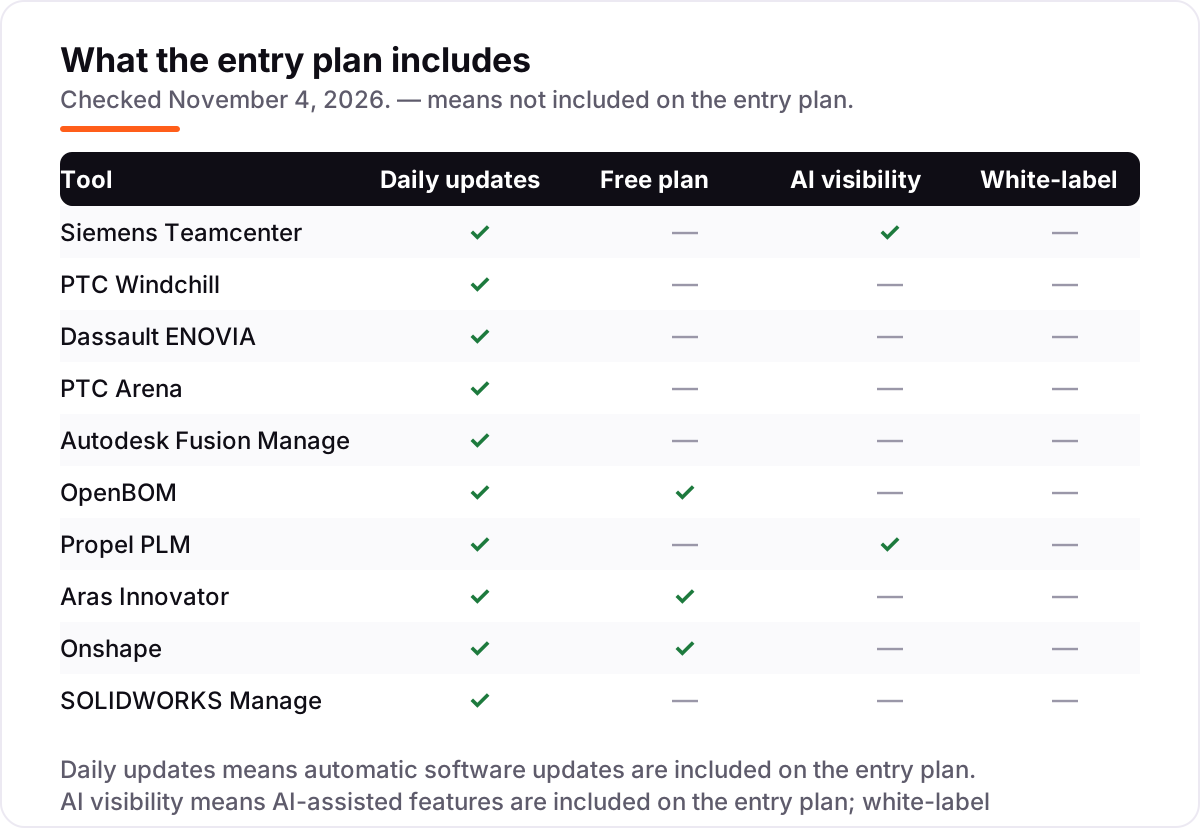
Whatever you shortlist, try it with real data before you pay. The free plans and trials in this list — Aras Community Edition, the Onshape free plan, OpenBOM's 14-day trial and Arena's 10-day trial — are long enough to run one genuine product through: a BOM, a change order, a supplier share. Check two things in the trial: that your CAD files arrive intact, and that the people who only read the data can get in without a paid seat. For the quote-only tools, ask for the price of viewers, implementation and the second year before you compare anything.
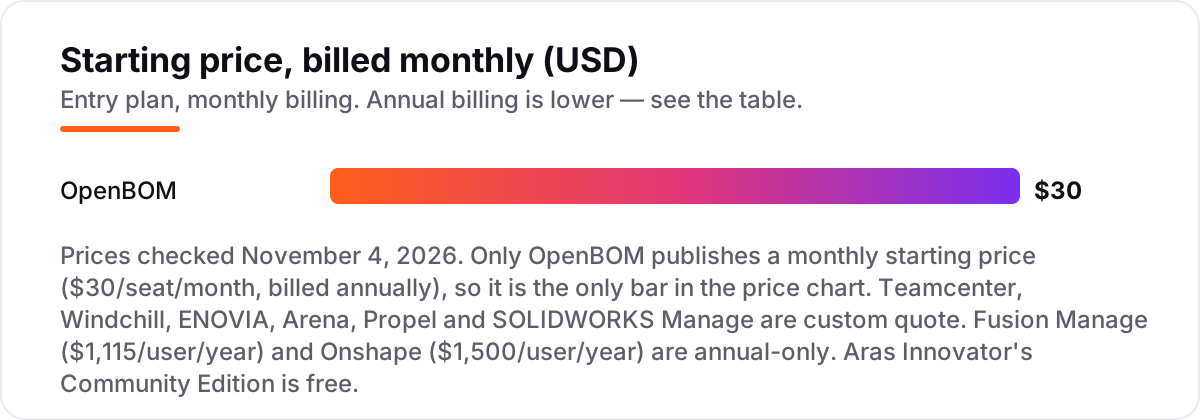
CAD PLM software pricing: what you will actually pay
Take a 10-person team with 4 editors and 2 CAD users. On OpenBOM that is 4 Team seats at $30 a seat a month ($120) plus 2 CAD add-ins at $25 ($50), for $170 a month before data-record tiers — $2,040 a year. The same 10 people on Onshape Standard pay $1,500 per user per year, or $15,000 a year for all ten seats; five seats cost $7,500 a year. A Fusion shop pays $680 a year per user for Fusion plus $1,115 a year for the Manage extension, or $1,795 a year per seat before volume discounts.
The enterprise tools do not work that way. Teamcenter X's only published figure is $70,000 a year for a minimum of 20 users on AWS Marketplace — $3,500 per user for the first year, implementation included — and the other five quote-only tools (Windchill, ENOVIA, Arena, Propel, SOLIDWORKS Manage) give no number at all until you talk to sales. Implementation sits on top of every enterprise quote: scoping, configuration, data migration and training routinely match the first year of licences, while cloud tools include onboarding in the subscription.
Do not fill the gap with directory prices. Third-party listings quote Teamcenter from $7,000 a user a year and Windchill from $1,000 a user a month, Propel at $35 a month on one directory and $73 a user a month on another, and OpenBOM's old $100/$150 Team and Company prices still circulate on G2 — none of those figures came from the vendor's own page, and they disagree with each other. The numbers in this list are the vendor's own, checked November 4, 2026, or the honest label "Custom quote".
Know the difference: PLM vs PDM
The confusion in this category is between two letters that sound alike. PDM — product data management — manages CAD files: versions, vaults, check-in and check-out, and who can edit a drawing. PLM — product lifecycle management — manages the whole product life: BOMs, change orders, suppliers, quality records and service data. PDM is the vault; PLM is everything that happens to the product after the file is drawn.
SOLIDWORKS shows the split clearly: SOLIDWORKS PDM is PDM, and SOLIDWORKS Manage is the PLM layer that sits on top of the PDM vault, adding project, process and item management. Buying Manage without PDM Professional underneath is not an option, and buying PDM alone leaves change requests and BOM variants in spreadsheets. Onshape blurs the line from the other direction: version control and branching are built into the CAD itself, so a small team gets PDM-like control without a vault at all — but it still lacks the quality and supplier workflows that full PLM adds.
A third distinction worth knowing is CAD PLM versus general PLM. The tools in this list are CAD PLM: they start from the CAD model and manage the data that hangs off it. General PLM suites built for retail, fashion or food (Centric, for example) manage product lines without a CAD model at the center. If your product is engineered in CAD, buy CAD PLM; if it is specified in spreadsheets and samples, a general PLM fits better.
Quick comparison: tool type by need
| Buyer | Best pick | Why |
|---|---|---|
| Large enterprise manufacturer | Siemens Teamcenter | The deepest PLM here, custom quote, SaaS or on-premises |
| PTC / Creo shop | PTC Windchill | CAD-native PLM, custom quote, SaaS option with Windchill+ |
| CATIA / SOLIDWORKS shop | Dassault ENOVIA | Shared data model with Dassault CAD, custom quote |
| Regulated hardware team | PTC Arena | Cloud PLM plus QMS, custom quote, 10-day trial |
| Fusion shop on a budget | Autodesk Fusion Manage | $1,115/user/year extension on top of Fusion |
| Small manufacturer | OpenBOM | $30/seat/month, free read-only seats, no minimums |
| Salesforce-based team | Propel PLM | PLM, QMS and PIM on Salesforce, custom quote |
| Team that wants free PLM | Aras Innovator | Community Edition free for up to 50 named users |
| Small cloud-first design team | Onshape | CAD with built-in data management, $1,500/user/year |
| SOLIDWORKS PDM shop | SOLIDWORKS Manage | Adds process management to the PDM vault, custom quote |
Mistakes to avoid
- Budgeting on a directory price. SelectHub and Capterra list starting prices for tools that publish none — Teamcenter at $7,000 a user a year, Windchill at $1,000 a user a month, Propel at $35 or $73 a month depending on the directory. None of those numbers came from the vendor, so get the quote.
- Buying PLM before settling the CAD. The PLM follows the CAD vendor. Switching CAD later means re-implementing PLM, so decide the design tool first.
- Forgetting the implementation quote. Enterprise PLM services can match the first year of licences. Ask for implementation, training and the second-year price in the same quote, not after signing.
- Paying for viewers. Some enterprise PLM charges every named user. OpenBOM's free read-only seats and Aras's free Community Edition show the alternative — ask for the viewer price before you sign.
- Judging a tool by its entry plan. OpenBOM Team at $30 a seat lacks revision control; the PLM features cost $90 a seat on Company. Check which tier holds the feature you actually need before you compare prices.
How we chose
We checked each vendor's own pricing page on November 4, 2026 and recorded the starting price exactly as shown, or "Custom quote" where the vendor publishes no price. Six tools in this list publish no price, so their cards say so instead of repeating a directory figure. This list carries no review ratings because the G2 review pages returned rate-limit errors when we tried to open them on November 4, 2026, and we would rather show no rating than a stale or estimated one. No vendor paid for a place in this list, and none of the links here are affiliate links.
What to do next
Start with the free or trial option that matches your CAD: Aras Community Edition, the Onshape free plan, OpenBOM's 14-day trial or Arena's 10-day trial. Run one real product through it — a BOM, a change order, a supplier share — and check that the CAD data arrives intact. For the quote-only tools, ask for the price of viewers, implementation and the second year before you compare. If the product data is sorted but new customers are not finding you, our monthly SEO service handles the visibility side — or compare providers in our guide to SEO companies for small business. Once your tools are in place, find out what's holding your rankings back.
Your stack only works if people find you
SerpAstra fixes what keeps your site off page one and makes it easy for AI assistants to recommend.
Get a free audit→Sources we checked (11)
- Siemens Teamcenter — plm.automation.siemens.com/global/en/products/teamcenter/ (checked November 4, 2026)
- Teamcenter X on AWS Marketplace — aws.amazon.com/marketplace/pp/prodview-gw4wphdnm6ig6 (checked November 4, 2026)
- PTC Windchill — ptc.com/en/products/windchill (checked November 4, 2026)
- Dassault ENOVIA — 3ds.com/products/enovia (checked November 4, 2026)
- Arena pricing — arenasolutions.com/pricing/ (checked November 4, 2026)
- Autodesk Fusion plans and pricing — autodesk.com/campaigns/fusion-360/offerings (checked November 4, 2026)
- OpenBOM pricing — openbom.com/pricing (checked November 4, 2026)
- Propel PLM — propelplm.com (checked November 4, 2026)
- Aras Innovator — aras.com (checked November 4, 2026)
- Onshape pricing — onshape.com/en/pricing (checked November 4, 2026)
- SOLIDWORKS Manage — solidworks.com/product/solidworks-manage (checked November 4, 2026)
Shamim
Founder of SerpAstra
A full-stack SEO and digital marketer who spends most days on Local SEO for dental practices, AI search visibility and lead generation.
Frequently asked questions
What is the best CAD PLM software?
Siemens Teamcenter is the best fit for most large manufacturers: the deepest PLM in this list, with CAD, BOM, change, quality and manufacturing planning in one system of record. PTC Windchill is the better pick for Creo shops, ENOVIA for CATIA and SOLIDWORKS shops, and OpenBOM for small teams that want a published price.
How much does CAD PLM software cost?
It ranges from free to a six-figure quote. Aras Innovator's Community Edition is free for up to 50 users, OpenBOM starts at $30 a seat a month, Onshape at $1,500 a user a year, and Fusion Manage at $1,115 a user a year. Teamcenter, Windchill, ENOVIA, Arena, Propel and SOLIDWORKS Manage are all custom quote, with implementation on top.
Is there free CAD PLM software?
Yes, with limits. Aras Innovator's Community Edition is a full PLM platform free for up to 50 named users. Onshape has a free plan for non-commercial projects, and OpenBOM gives unlimited free read-only seats plus free plans for education and non-commercial use. The paid tiers add support, releases and compliance features.
What is the difference between PLM and PDM?
PDM manages CAD files: versions, vaults and who can edit a drawing. PLM manages the whole product life: BOMs, change orders, suppliers, quality and service data. SOLIDWORKS PDM is PDM; SOLIDWORKS Manage adds the PLM layer on top of it. Onshape blurs the line by building version control into the CAD itself.
Can a small manufacturer afford PLM?
Yes, if you pick a cloud tool. OpenBOM starts at $30 a seat a month with free read-only seats, Onshape Standard costs $1,500 a user a year, and Aras Community Edition is free for up to 50 users. The enterprise tools — Teamcenter, Windchill, ENOVIA — are quote-only and usually need an implementation project, which prices most small teams out.
Do I need PLM if I already use SOLIDWORKS PDM?
PDM alone covers CAD files and versions, which is enough while the team is small. You need PLM when change requests, BOM variants, project tracking and supplier data start living in spreadsheets. SOLIDWORKS Manage adds exactly that layer to the PDM vault you already have, without moving the CAD data.
How long does PLM implementation take?
Cloud tools go live in days or weeks: OpenBOM and Onshape need no install, and Arena offers fixed-fee QuickStart implementations. Enterprise PLM takes months — Teamcenter, Windchill and ENOVIA need scoping, configuration, data migration and training, and the services quote can match the first year of licences.
Free SEO and AI visibility audit
Find out what is holding your rankings back
Send us your site. Within 2 business days you get a written audit, an AI visibility check and a short fix list ranked by impact. Free, with no contract attached.
Request my free audit→Related guides
 Design, Video & Creative9 Best CAD Software for Architecture in 2026, ComparedCompare the 9 best cad software for architecture in 2026 on price, BIM, drafting and free plans, with prices checked November 4, 2026 for US firms.Read guide →
 Design, Video & Creative11 Best CAD Software for Automotive Design in 2026, ComparedCompare the 11 best cad software for automotive design on price, Class A surfacing and assembly size, with every price checked November 4, 2026.Read guide →
 SEO & AI Search10 Best Tools for SEO for Manufacturing in 2026, Compared10 best tools for seo for manufacturing compared on price, catalog audits, local SEO and AI visibility, with real starting prices checked November 2, 2026.Read guide →