
11 Best CAD Software for Automotive Design in 2026, Compared
Compare the 11 best cad software for automotive design on price, Class A surfacing and assembly size, with every price checked November 4, 2026.
 Shamim Mia, Founder, SerpAstraLast verified November 4, 202613 min read
We compare pricing pages, documentation and public reviews. We never accept payment for rankings.

Key takeaways
- CATIA leads for carmakers at $7,229 a year, Siemens NX and Autodesk Alias follow on custom quotes, and Autodesk Fusion is the affordable all-rounder at $85 a month.
- FreeCAD is the only free tool here — real parametric CAD at $0 — while Rhino is the only perpetual license at $995 once, with no subscription.
- The single most important buying factor is the surface class you need: Class A exterior panels demand CATIA or Alias, while brackets and interiors run fine on SOLIDWORKS or Fusion.
- Four of the eleven tools publish no starting price at all, so budget from a written quote, not a directory figure.
On this page
Quick comparison
| Tool | Best for | Starting price | Free plan |
|---|---|---|---|
| CATIA | Automotive OEMs and suppliers that need Class A surfacing and very large assemblies on one platform | $602/mo (annual) | No (30-day trial) |
| Siemens NX | Large automotive engineering teams that need CAD, simulation and manufacturing in one integrated system | Custom quote | No (30-day trial) |
| Autodesk Alias | Automotive styling studios that sculpt exterior Class A surfaces by hand | Custom quote | No (30-day trial) |
| SOLIDWORKS | Suppliers and small engineering teams that want the most widely used mechanical CAD seat in the industry | $235/mo (annual) | No (trial via reseller) |
| PTC Creo | Engineering teams that need parametric CAD with strong simulation and model-based definition | Custom quote | No (no free trial) |
| Autodesk Fusion | Small teams and startups that need CAD, CAM and simulation in one affordable subscription | $85/mo | Yes (personal use) |
| Onshape | Distributed teams that want CAD in the browser with built-in version control | $125/mo (annual) | Yes (Free plan) |
| Autodesk AutoCAD | Teams that need precise 2D drafting and documentation alongside 3D automotive parts | $260/mo | No (30-day trial) |
| Rhino | Designers who sculpt free-form surfaces and need a perpetual license with no subscription | $995 one-time | No (90-day evaluation) |
| Solid Edge | Mid-size suppliers that want Siemens CAD at a lower entry price than NX | Custom quote | No (30-day trial) |
| FreeCAD | Students, hobbyists and small shops that need real parametric CAD at $0 | Free | Yes (free) |
Make one of these tools?
We re-check this list every quarter. Send a correction, request a review, or ask about a clearly labeled sponsored spot.
Request a listingThe best CAD software for automotive design

CATIA
Best for: Automotive OEMs and suppliers that need Class A surfacing and very large assemblies on one platform
CATIA is the tool carmakers design whole vehicles in, and the price reflects that job: Essential costs $7,229 a year, or $602 a month when billed annually, and the Master and Elite bundles climb to $9,230 and $14,926 a year. What the money buys is Class A surfacing built for exterior body panels, plus the ability to hold assemblies of thousands of parts without falling over — the two things a vehicle program cannot compromise on.
The trade-off is the learning curve. CATIA is sold through Dassault Systèmes partners, so every purchase starts with a conversation, and new users usually need formal training first. Buy CATIA when a client or an OEM requires it, or when the program involves Class A surfaces and very large assemblies; buy SOLIDWORKS or Fusion for parts and brackets, not whole vehicles.
What we like
- The industry standard for Class A surfaces at carmakers, with surfacing tools built for exterior body panels
- Handles assemblies of thousands of parts, which is what a full vehicle program needs
- AI-powered knowledge assistance is included in the Essential bundle, not held for the top tier
- Runs on the 3DEXPERIENCE platform, so design, simulation and data management share one data model
Watch out for
- The highest starting price here — Essential is $7,229 a year before any add-on modules
- Steep learning curve; teams usually need formal training before they are productive
- Sold through Dassault Systèmes partners, so quotes and onboarding vary by region

Siemens NX
Best for: Large automotive engineering teams that need CAD, simulation and manufacturing in one integrated system
Siemens NX is the integrated alternative to CATIA: CAD, simulation and manufacturing in one system, built around a digital twin of the vehicle. A part moves from design to analysis to toolpath without file conversion, and synchronous modeling lets engineers edit imported geometry directly instead of rebuilding the feature tree. It scales from a single seat to global engineering teams on the same data model.
The catch is the buying process. Siemens publishes no price for NX, so every purchase starts with a sales conversation and a custom quote, and the system needs serious hardware and IT support to run well. Buy NX when the program needs CAD, simulation and manufacturing in one place; buy Solid Edge when the team is smaller and the budget is tighter, or Fusion when the work is mostly parts.
What we like
- One integrated system for CAD, CAE and CAM, so a part moves from design to toolpath without file conversion
- Strong synchronous modeling lets engineers edit imported geometry without rebuilding the feature tree
- Deep digital-twin and simulation links suit vehicle programs that validate designs virtually
- Scales from a single seat to global engineering teams on the same data model
Watch out for
- No published price — every purchase starts with a sales conversation and a custom quote
- Heavyweight system that needs serious hardware and IT support to run well
- Overkill for a small studio that only models parts and never touches simulation or tooling

Autodesk Alias
Best for: Automotive styling studios that sculpt exterior Class A surfaces by hand
Autodesk Alias is the styling studio's tool: it takes a sketch to a Class A surface, with the continuity analysis carmakers expect for exterior panels built in. It is the long-standing standard in car design studios, which means hiring experienced Alias modelers is straightforward, and it works directly with Autodesk's visualization tools, so a clay-model look can be reviewed digitally before anything is milled.
The limits are scope and price transparency. Alias is a surfacing specialist, not a full engineering CAD tool, so detailed part design needs a companion such as CATIA or SOLIDWORKS. Autodesk's own buy page lists no price, so budgeting means getting a reseller quote. Buy Alias for exterior styling; buy something else for the engineering that follows the styling.
What we like
- Built for automotive styling: sketch-to-surface workflows and Class A surfacing in one tool
- The surface quality carmakers expect for exterior panels, with continuity analysis built in
- Works directly with Autodesk's visualization tools, so a clay-model look can be reviewed digitally
- Long-standing standard in car design studios, so hiring experienced Alias modelers is straightforward
Watch out for
- No published price — Autodesk's own buy page lists no figure, so budgeting needs a reseller quote
- A surfacing specialist, not a full engineering CAD tool; it needs a companion for detailed part design
- Windows-only and aimed at specialists, so generalist engineers face a learning curve

SOLIDWORKS
Best for: Suppliers and small engineering teams that want the most widely used mechanical CAD seat in the industry
SOLIDWORKS is the CAD seat most automotive suppliers already run, and that familiarity is its main strength: clients, suppliers and new hires usually already know it. Standard with Cloud Services costs $2,820 a year through authorized reseller GoEngineer, and covers parametric modeling, sheet-metal and weldment tools, a huge standard-parts library and 3DEXPERIENCE Cloud PDM, so a small team gets version control without buying a separate server.
The limits are surfacing and price transparency. Class A surfacing is weaker than CATIA or Alias, so exterior body work needs a companion tool, and Dassault Systèmes publishes no price on its own site — the $2,820 figure comes from a reseller and quotes vary. Buy SOLIDWORKS for parts, brackets and supplier work; buy CATIA when the client demands it or the surfaces are Class A.
What we like
- The most widely used mechanical CAD seat, so suppliers, clients and new hires usually already know it
- Parametric modeling with a huge standard-parts library and strong sheet-metal and weldment tools
- 3DEXPERIENCE Cloud PDM is included, so a small team gets version control without a separate server
- Simulation and rendering are available in the higher tiers without leaving the package
Watch out for
- No price on Dassault Systèmes' own site — the $2,820 figure comes from authorized reseller GoEngineer, and quotes vary
- Class A surfacing is weaker than CATIA or Alias, so exterior body work needs a companion tool
- Perpetual licenses are being phased out, so most new buyers are on term subscriptions

PTC Creo
Best for: Engineering teams that need parametric CAD with strong simulation and model-based definition
PTC Creo is the parametric CAD choice for powertrain and chassis engineering, with a long track record in automotive programs. Its model-based definition tools let teams send drawings-free data to manufacturing, and the same family covers structural and thermal simulation, so analysis stays close to the model. It scales from a single design package to a full enterprise PLM setup with Windchill.
The buying experience is the weak point. PTC publishes no price, and directory figures conflict — one lists $200 a month, another $3,190 a year — so the only number worth budgeting from is a written quote. The interface is also denser than Fusion or Onshape, and key features sit in add-on modules. Buy Creo for serious parametric engineering; buy Fusion when the team is small and the budget is fixed.
What we like
- Parametric modeling with a long track record in automotive powertrain and chassis engineering
- Model-based definition tools let teams send drawings-free data to manufacturing
- Strong simulation options, including structural and thermal analysis, inside the same family
- Scales from a single design package to a full enterprise PLM setup with Windchill
Watch out for
- No published price — PTC sells Creo through quotes, and directory figures conflict, so budget from a written quote
- The interface is dense and takes longer to learn than Fusion or Onshape
- Key assembly and simulation features sit in add-on modules, so the entry package is not the whole story

Autodesk Fusion
Best for: Small teams and startups that need CAD, CAM and simulation in one affordable subscription
Autodesk Fusion is the value pick in this list because one subscription covers the whole job: CAD, basic CAM, basic simulation, electronics and data management for $85 a month, or $680 a year billed annually. Cloud collaboration means the whole team opens the same model from any machine, and the free personal-use version lets a solo designer learn the tool before paying anything.
The catches are the cloud and the ceiling. File storage is central, so offline work is limited and large assemblies can feel slow, and advanced simulation and manufacturing features need paid extensions on top of the base price. It is also not a Class A surfacing tool. Buy Fusion for parts, prototypes and small-team engineering; buy CATIA or Alias when the exterior surface is the product.
What we like
- One subscription covers CAD, basic CAM, basic simulation, electronics and data management
- Cloud collaboration means the whole team opens the same model from any machine
- The free personal-use version lets a solo designer learn the tool before paying
- Annual billing at $680 saves $340 over paying monthly for a year
Watch out for
- Cloud file storage is central, so offline work is limited and large assemblies can feel slow
- Advanced simulation and manufacturing features need paid extensions on top of the base price
- Not a Class A surfacing tool — exterior body panels still need CATIA or Alias

Onshape
Best for: Distributed teams that want CAD in the browser with built-in version control
Onshape is the cloud-native pick: full CAD in the browser with nothing to install, and every edit versioned automatically. Standard costs $1,500 a year per user, and Professional costs $2,500 a year with release management and company-level controls. Real-time collaboration lets several engineers work on the same model at once, and built-in data management means no separate PDM server to buy or maintain.
The price of that convenience is dependence on the connection. Onshape runs entirely in the browser, so a weak connection slows the whole design session, and there is no offline mode and no desktop fallback. Surface modeling is also thinner than CATIA or Alias. Buy Onshape for a distributed team that lives in the browser; buy a desktop tool when the workshop connection cannot be trusted.
What we like
- Runs in the browser with nothing to install, and every edit is versioned automatically
- Real-time collaboration lets several engineers work on the same model at once
- The free plan is genuinely usable for learning, with public documents and full CAD tools
- Built-in data management means no separate PDM server to buy or maintain
Watch out for
- Runs entirely in the browser, so a weak connection slows the whole design session
- No offline mode — there is no desktop fallback when the internet drops
- Surface modeling is thinner than CATIA or Alias, so Class A body work needs another tool

Autodesk AutoCAD
Best for: Teams that need precise 2D drafting and documentation alongside 3D automotive parts
AutoCAD is the drafting standard: it costs $260 a month, or $2,095 a year billed annually, and every supplier, client and shop floor can open a DWG. The 2026 version adds Autodesk AI features for automated drafting and smart block recognition, seven specialized toolsets including Mechanical come in the same subscription, and web and mobile apps let you review and mark up drawings away from the desk.
The honest place for AutoCAD in an automotive stack is drawings, not design. It is a 2D-first tool at heart, and its full 3D solid and surface modeling is thinner than the dedicated 3D tools in this list. The $260 monthly price is also high for a tool many teams use mainly for drawings. Buy AutoCAD for documentation and DWG compatibility; buy a 3D modeler for the parts themselves.
What we like
- The DWG standard: every supplier, client and shop floor can open your drawings
- Autodesk AI features in the 2026 version help with automated drafting and smart block recognition
- Seven specialized toolsets, including Mechanical, come in the same subscription
- Web and mobile apps let you review and mark up drawings away from the desk
Watch out for
- A 2D-first tool at heart — full 3D solid and surface modeling is thinner than the dedicated 3D tools here
- The $260 monthly price is high for a tool many teams use mainly for drawings
- Seven specialized toolsets are included, but most automotive teams only use one or two

Rhino
Best for: Designers who sculpt free-form surfaces and need a perpetual license with no subscription
Rhino is the only pay-once tool in this list: a commercial license costs $995 once, with no annual bill and no maintenance fees, and one license covers Windows and Mac. It is the most versatile NURBS modeler here, strong for free-form concept surfaces and trim work, and Grasshopper visual programming is built in, so parametric ideas can be explored without writing code.
The trade-off is that Rhino is a modeling tool, not a parametric engineering CAD system: there is no feature tree, so design changes mean remodeling rather than editing a parameter. There is also no built-in PDM, simulation or CAM, so larger workflows need add-ons or companion tools. Buy Rhino for concept surfaces and a perpetual license; buy a parametric tool for production engineering.
What we like
- A perpetual license: $995 once, with no annual bill and no maintenance fees
- The most versatile NURBS modeler here, strong for free-form concept surfaces and trim work
- Grasshopper visual programming is built in, so parametric ideas can be explored without code
- One license covers Windows and Mac, and upgrades to the next version cost $595
Watch out for
- A modeling tool, not a parametric engineering CAD system — no feature tree for design changes
- No built-in PDM, simulation or CAM, so larger workflows need add-ons or companion tools
- The interface rewards practice; first-time users take a while to model cleanly

Solid Edge
Best for: Mid-size suppliers that want Siemens CAD at a lower entry price than NX
Solid Edge is Siemens' answer for mid-size suppliers: the same synchronous technology as NX, which lets you edit imported models directly without the original feature tree, at a lower entry point with a clear upgrade path to NX when the team grows. The portfolio covers design, simulation, manufacturing and data management, and it is free for students and educators through the Siemens academic program.
The buying experience needs care. Siemens publishes no price on its own site, and directory figures conflict — one lists $75 a month, another $110 — so the only number worth budgeting from is a written quote. It is also lighter than NX on simulation and large assemblies, and the community is smaller than SOLIDWORKS. Buy Solid Edge for supplier work with a Siemens future; buy NX when the program is already large.
What we like
- Synchronous technology lets you edit imported models directly, without the original feature tree
- A Siemens tool at a lower entry point than NX, with a clear upgrade path when the team grows
- Covers design, simulation, manufacturing and data management in one portfolio
- Free for students and educators through the Siemens academic program
Watch out for
- No published price on Siemens' own site — directory figures conflict, so budget from a written quote
- Lighter simulation and large-assembly tools than NX, so big vehicle programs outgrow it
- Smaller community than SOLIDWORKS, so finding trained users and answers takes more effort

FreeCAD
Best for: Students, hobbyists and small shops that need real parametric CAD at $0
FreeCAD is the only free tool in this list, and it is a real parametric modeler, not a viewer: change a sketch dimension and the whole part updates. It costs $0 under the LGPL license for personal and commercial work, on any number of machines, and workbenches cover part design, assemblies, CAM, BIM and finite-element analysis on Windows, macOS and Linux.
The price is paid in patience rather than money. The interface and workflow feel rougher than the commercial tools, there is no official support — help comes from community forums and documentation — and large assemblies and complex surfacing run slower than on CATIA, NX or SOLIDWORKS. Start on FreeCAD to learn or to prototype; move to a commercial seat when the work pays for it.
What we like
- Completely free under the LGPL license, for personal and commercial work, on any number of machines
- Real parametric modeling: change a sketch dimension and the whole part updates
- Workbenches cover part design, assemblies, CAM, BIM and finite-element analysis
- Runs on Windows, macOS and Linux with no account, no subscription and no trial timer
Watch out for
- The interface and workflow feel rougher than the commercial tools, and learning takes patience
- No official support — help comes from community forums and documentation
- Large assemblies and complex surfacing run slower than on CATIA, NX or SOLIDWORKS
The best cad software for automotive design is not one tool but a stack: a surfacing tool for the exterior, a solid modeler for parts, and a drafting tool for drawings. We ranked the eleven tools below by fit for the most common buyer — an automotive engineering team choosing its core CAD seat — starting with the carmaker standards and ending with the free option, and every price was checked on the vendor's own pricing page, or a named reseller where the vendor publishes none, on November 4, 2026.
How to choose the best cad software for automotive design
- Start with the surface class. If you shape exterior body panels, you need Class A surfacing — CATIA or Alias. If you design brackets, interiors or tooling, a solid modeler such as SOLIDWORKS, Fusion or Creo is enough.
- Count the assembly size. A full vehicle program means assemblies of thousands of parts, which is CATIA and NX territory. A supplier making brackets and fixtures can run on SOLIDWORKS, Fusion or Onshape.
- Check who else touches the file. If the client or OEM requires CATIA or NX, that requirement decides the purchase — no other tool will do. Ask before you buy.
- Price the whole stack, not one seat. Styling, engineering and drafting are often three different tools. A team can run Alias for styling, SOLIDWORKS for parts and AutoCAD for drawings, and the combined bill is what matters.
- Test with a real part. Run one genuine component — your bracket, your panel, your fixture — through the trial or free plan before you pay. The trial tells you more than any review can.
A CAD choice is one system in your stack, not the whole stack. If the business also needs to be found online, our guide to SEO tools for manufacturing covers the visibility side. And if you are still learning the basics, our guide to the best beginner CAD software for 3D printing is a gentler starting point. Before you publish new pages for the services you sell, run your titles through the free SERP snippet preview tool — it shows exactly how the title and description will look in Google.
Whatever you shortlist, try it with real data before you pay. The free plans and trials in this list are long enough to model one genuine part — your bracket, your panel, your fixture — and that part tells you more than any review can. Check two things in the trial: that the surface quality holds up at the standard your client inspects to, and that your files open cleanly at the supplier or OEM who has to use them.
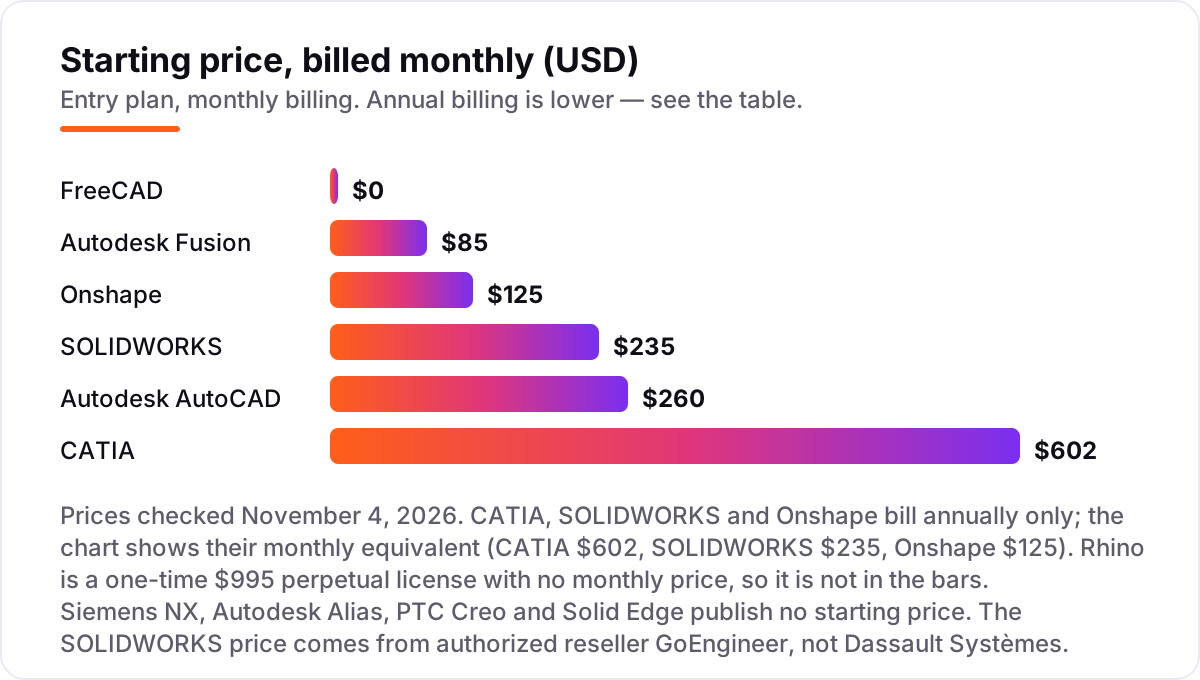
CAD software for automotive design pricing: what you will actually pay
Take a five-seat engineering team for one year. On list prices, the subscription costs $3,400 on Fusion at $680 a year per seat, $4,975 once on Rhino at $995 a license, $7,500 on Onshape Standard at $1,500 a year per seat, $10,475 on AutoCAD at $2,095 a year per seat, $14,100 on SOLIDWORKS Standard at $2,820 a year per seat, and $36,145 on CATIA Essential at $7,229 a year per seat. FreeCAD costs $0 for all five seats. The four custom-quote tools — Siemens NX, Autodesk Alias, PTC Creo and Solid Edge — cannot be priced from a page at all.
Over three years the picture changes. Fusion costs $10,200 for five seats, Onshape $22,500, AutoCAD $31,425, SOLIDWORKS $42,300 and CATIA $108,435, all before any add-on modules. Rhino still costs $4,975, because the license is perpetual — the only extra cost is the $595 upgrade when the next version ships. That is why the cheapest tool over three years is not always the cheapest tool in year one.
Three costs sit outside every number above. First, the add-on modules: advanced simulation, CAM and Class A surfacing packages are usually licensed separately on CATIA, NX, Creo and SOLIDWORKS, and they can cost as much as the base seat. Second, training: CATIA and NX teams usually need formal courses before they are productive, while Fusion and Onshape teams mostly learn on the job. Third, hardware: the heavyweight tools need workstation-class machines, and that cost lands on the IT budget, not the software budget.
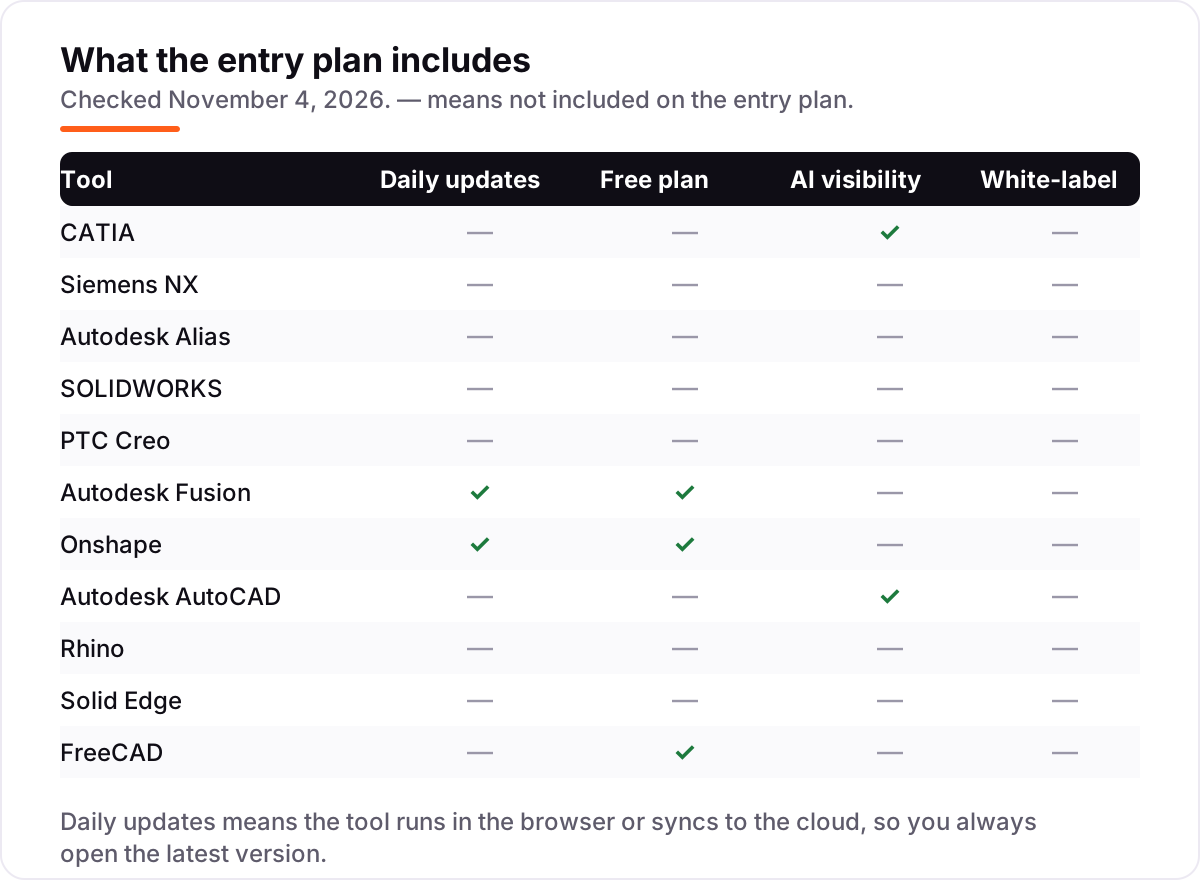
Know the difference: Class A surfacing vs solid modeling
The confusion in this category is between two kinds of geometry. Solid modeling builds parts with volume — brackets, housings, fixtures — and it is what most engineers do all day. Class A surfacing builds the visible skin of the car: exterior panels where reflections must flow without a ripple and panel gaps must read as a single line. The two jobs need different tools, and a solid modeler cannot fake a Class A surface.
There is a second, quieter confusion: a pretty render is not a Class A surface. A render shows what the panel looks like; a Class A surface proves the geometry is continuous to the standard the tooling shop and the quality team inspect to. CATIA and Alias carry continuity analysis tools that measure that standard, which is why carmakers require them for exterior work and accept nothing else.
A third distinction worth knowing is concept surfacing versus production surfacing. Rhino and Alias Concept are strong for the first — sculpting a shape quickly to see it — but the production surface that goes to tooling is usually rebuilt in CATIA or Alias AutoStudio, where the continuity is controlled precisely. Budget for both steps if the team does its own styling.
Quick comparison: tool type by need
| Buyer | Best pick | Why |
|---|---|---|
| Carmaker or OEM program | CATIA | Class A surfacing and huge assemblies, from $7,229/year |
| Large engineering team | Siemens NX | CAD, simulation and manufacturing in one system, custom quote |
| Exterior styling studio | Autodesk Alias | Class A surfacing built for car exteriors, custom quote |
| Supplier or small team | SOLIDWORKS | The seat most suppliers already run, from $2,820/year |
| Small team on a budget | Autodesk Fusion | CAD, CAM and simulation in one subscription, $85/month |
| Distributed team | Onshape | Full CAD in the browser, from $1,500/year |
| Free or learning | FreeCAD | Real parametric CAD at $0, open source |
Mistakes to avoid
- Budgeting on a directory price for a quote-only tool. Siemens NX, Alias, Creo and Solid Edge publish no price, and directory figures for them conflict — Solid Edge alone is listed at $75, $99.74 and $110 a month by different directories. Get a written quote.
- Buying a solid modeler for Class A work. SOLIDWORKS, Fusion and Onshape are strong for parts, but exterior body panels need CATIA or Alias. The rework costs more than the right tool would have.
- Ignoring the add-on modules. Advanced simulation, CAM and surfacing packages are usually licensed separately on the heavyweight tools. Price the modules with the seat, not after it.
- Paying for a second tool you already own. Fusion covers basic CAM and simulation, and AutoCAD includes seven toolsets — check what the current subscription already includes before buying an add-on.
- Forgetting the file requirement. If the OEM or client requires CATIA or NX files, no other tool will do. Confirm the required file format before you commit to a cheaper seat.
How we chose
We checked each vendor's own pricing page on November 4, 2026 and recorded the starting price exactly as shown, including the annual-billing figure where the page lists one, and we ranked the tools by fit for the most common buyer — an automotive engineering team choosing its core CAD seat — not by brand size. Four tools publish no starting price, so they are listed as custom quote: Siemens NX, Autodesk Alias, PTC Creo and Solid Edge. The SOLIDWORKS price of $2,820 a year comes from authorized reseller GoEngineer, not from Dassault Systèmes' own site, because Dassault Systèmes publishes no price there; reseller quotes vary. This list carries no review ratings because the G2 review pages could not be opened on November 4, 2026, and we would rather show no rating than a stale or estimated one. No vendor paid for a place in this list, and none of the links here are affiliate links.
What to do next
Start with the free plan or trial of your top pick and model one real part through it — your bracket, your panel, your fixture. Check that the surface quality holds up at the standard your client inspects to, and that the files open cleanly at the supplier or OEM who has to use them. If the tools are sorted but new customers are not finding you, our monthly SEO service handles the visibility side. Once your tools are in place, find out what's holding your rankings back.
Your stack only works if people find you
SerpAstra fixes what keeps your site off page one and makes it easy for AI assistants to recommend.
Get a free audit→Sources we checked (11)
- CATIA pricing — 3ds.com/store/what-price-catia (checked November 4, 2026)
- Siemens NX — siemens.com/en-us/products/designcenter/nx-cad-software (checked November 4, 2026)
- Autodesk Alias buy — autodesk.com/products/alias-products/buy (checked November 4, 2026)
- SOLIDWORKS pricing — goengineer.com/choose-a-solidworks-package (checked November 4, 2026)
- PTC Creo — ptc.com/en/products/creo (checked November 4, 2026)
- Autodesk Fusion subscription types — autodesk.com/products/fusion-360/blog/fusion-subscription-types (checked November 4, 2026)
- Onshape pricing — onshape.com/en/pricing (checked November 4, 2026)
- AutoCAD buy — autodesk.com/products/autocad/buy (checked November 4, 2026)
- Rhino buy — rhino3d.com/buy (checked November 4, 2026)
- Solid Edge — solidedge.siemens.com/en (checked November 4, 2026)
- FreeCAD downloads — freecad.org/downloads.php (checked November 4, 2026)
Shamim
Founder of SerpAstra
A full-stack SEO and digital marketer who spends most days on Local SEO for dental practices, AI search visibility and lead generation.
Frequently asked questions
What is the best CAD software for automotive design?
CATIA is the best fit for most automotive design work: it is the carmaker standard for Class A surfaces and very large assemblies, from $7,229 a year. Autodesk Alias is the better pick for pure exterior styling, and Autodesk Fusion is the best affordable all-rounder at $85 a month.
How much does CAD software for automotive design cost?
Entry prices run from $0 to $7,229 a year. FreeCAD is free, Rhino costs $995 once, and the first subscriptions cost $85 a month for Fusion and $1,500 a year for Onshape. CATIA starts at $7,229 a year, and four tools here publish no price at all.
Is there free CAD software for automotive design?
Yes. FreeCAD is free and open source with real parametric modeling, and it suits learning, prototypes and small parts. Onshape has a free plan for non-commercial use with public documents, and Fusion has a free personal-use version for hobbyists. None of them replaces CATIA for Class A work.
What is the difference between CATIA and SOLIDWORKS for cars?
CATIA is built for whole vehicles: Class A surfacing and assemblies of thousands of parts, from $7,229 a year. SOLIDWORKS is built for parts and supplier work, from $2,820 a year, and its Class A surfacing is weaker. Carmakers usually require CATIA; suppliers usually run SOLIDWORKS.
Do I need Class A surfacing software?
Only if you shape exterior body panels. Class A surfacing controls reflections and panel gaps to the standard car buyers see, and it needs CATIA or Alias. If you design brackets, interiors, jigs or tooling, a solid modeler such as SOLIDWORKS, Fusion or Creo is enough.
Can I switch CAD software later?
Yes, but plan the move between programs, not mid-program. Export parts as STEP or IGES files, rebuild the feature history in the new tool, and re-check drawings and tolerances before going live. Surface quality rarely survives the transfer, so Class A work usually has to be rebuilt by hand.
Does automotive CAD software include simulation?
Sometimes. Fusion includes basic simulation, CATIA and NX cover simulation deeply, and Creo offers it through add-on modules. Rhino and FreeCAD need separate tools — FreeCAD has a finite-element workbench, but it is not a replacement for a dedicated simulation package on a vehicle program.
Free SEO and AI visibility audit
Find out what is holding your rankings back
Send us your site. Within 2 business days you get a written audit, an AI visibility check and a short fix list ranked by impact. Free, with no contract attached.
Request my free audit→Related guides
 Design, Video & Creative8 Best Beginner CAD Software for 3D Printing in 2026, ComparedCompare the 8 best beginner cad software for 3d printing on price, free plans and learning curve, with every price checked November 4, 2026.Read guide →
 AI, Data & Analytics12 Best AI Tools for Video Content Creation in 2026, Compared12 best AI tools for video content creation compared with real prices, free plans and G2 ratings, so you can pick the right video maker without overpaying.Read guide →
 SEO & AI Search10 Best Tools for SEO for Manufacturing in 2026, Compared10 best tools for seo for manufacturing compared on price, catalog audits, local SEO and AI visibility, with real starting prices checked November 2, 2026.Read guide →