
10 Best CAD Software for Hobbyist in 2026, Compared
Compare the 10 best cad software for hobbyist projects on price, free plans and 3D-printing exports, with every price checked November 4, 2026.
 Shamim Mia, Founder, SerpAstraLast verified November 4, 202614 min read
We compare pricing pages, documentation and public reviews. We never accept payment for rankings.
Key takeaways
- Autodesk Fusion is the best overall pick, free for personal use ($680/year paid); FreeCAD and Tinkercad cost $0, and SOLIDWORKS for Makers is $48/year.
- The single most important buying factor is the catch on the free plan: revenue caps, non-commercial use and public files decide what a 'free' tool really costs.
- Five of the ten tools are completely free with no paid plan, and the dearest first paid plan here is Onshape Standard at $1,500 a year.
- Rhino 3D is the only one-time purchase at $995; every other paid tool here is a yearly subscription.
On this page
Quick comparison
| Tool | Best for | Starting price | Free plan |
|---|---|---|---|
| Autodesk Fusion | Hobbyists who want the closest thing to professional CAD, free for personal use | $680/yr | Yes (personal use) |
| FreeCAD | Hobbyists who want a full parametric modeler and will never pay a subscription | Free | Yes (free) |
| Tinkercad | Complete beginners and kids making their first 3D-printable model | Free | Yes (free) |
| SketchUp | Hobbyists designing rooms, furniture and woodwork who want the fastest learning curve | $129/yr (Go) | Yes (free plan) |
| Onshape | Hobbyists who want professional parametric CAD in a browser, with nothing to install | $1,500/yr (Standard) | Yes (free plan) |
| Shapr3D | Hobbyists who sketch with an Apple Pencil on iPad and print what they draw | $299/yr (Pro) | Yes (Basic) |
| SOLIDWORKS for Makers | Hobbyists who want real SOLIDWORKS for personal projects at a hobbyist price | $48/yr | No |
| Rhino 3D | Hobbyists sculpting organic, freeform shapes and jewelry who hate subscriptions | $995 once | No (90-day trial) |
| LibreCAD | Hobbyists who need precise 2D drawings, floor plans and laser-cutting files | Free | Yes (free) |
| OpenSCAD | Hobbyists who would rather write code than drag a mouse, and print parametric parts | Free | Yes (free) |
Make one of these tools?
We re-check this list every quarter. Send a correction, request a review, or ask about a clearly labeled sponsored spot.
Request a listingThe best CAD software for hobbyists

Autodesk Fusion
Best for: Hobbyists who want the closest thing to professional CAD, free for personal use
Autodesk Fusion is the strongest all-rounder a hobbyist can use, and the personal-use license makes it free. It is a full parametric modeler with a timeline, so changing one dimension updates the whole part, and the same subscription adds CAM, simulation and PCB layout — the tools that turn a design into a finished object. Cloud files keep every version, so a failed print never means a lost design.
Personal use is free only for home-based, non-commercial projects by people earning under $1,000 a year from their Fusion work, and some advanced CAM and simulation features are limited. The paid subscription is $680 a year, or $85 a month. Choose Fusion when you want one tool that covers design, machining and electronics — and stay on the personal plan while your projects stay personal.
What we like
- Free for personal use: qualifying hobbyists get core CAD, CAM, CAE and PCB tools at $0
- Parametric modeling with a timeline, so a dimension change updates the whole part
- Built-in CAM, simulation and electronics in one subscription, not separate purchases
- Cloud files and version history, so a design is safe if a laptop dies
Watch out for
- Personal use is limited to non-commercial projects under $1,000 a year in revenue
- Needs an internet connection for sign-in and cloud saves; offline work is limited
- The paid subscription is $680 a year once you outgrow the personal-use limits

FreeCAD
Best for: Hobbyists who want a full parametric modeler and will never pay a subscription
FreeCAD is the only tool here that is both a full parametric modeler and completely free, with no account, no revenue cap and no feature locks. Sketches, constraints and a feature tree work the way they do in the paid tools, and workbenches add assemblies, technical drawings, CAM and rendering to the same install. Python scripting means repetitive parts can be generated, not drawn one by one.
The price for free is polish. The interface is harder to learn than Fusion or SketchUp, large assemblies can run slowly, and a few operations — fillets on complex shapes, for example — fail where a paid tool would succeed. Files live on your own computer, with no cloud sync. Pick FreeCAD when you refuse to rent software and you are willing to learn a rougher tool to keep that freedom.
What we like
- Completely free and open source, with no account, no revenue cap and no feature locks
- True parametric modeling: sketches, constraints and a feature tree, like the paid tools
- Workbenches cover parts, assemblies, drawings, CAM and rendering in one install
- Python scripting and macros automate repetitive parts and custom tools
Watch out for
- The interface is less polished than Fusion or Onshape, and the learning curve is steeper
- Large assemblies can run slowly, and some tools (fillets on complex shapes) fail
- No cloud sync or built-in collaboration — files live on your own computer
Tinkercad
Best for: Complete beginners and kids making their first 3D-printable model
Tinkercad is the fastest way from an idea to a printed part. It runs in a browser, so there is nothing to install, and modeling is drag-and-drop: place a box, a cylinder or a hole, resize it, group it, and export an STL ready for the slicer. A first bracket takes an afternoon, and the same account adds a circuit simulator and block-based coding for electronics projects.
The simplicity has a ceiling. There is no parametric history, so changing a dimension means rebuilding the shape, and there are no precision drafting tools for parts that must fit a rail or a bearing exactly. Designs live in Autodesk's cloud under an Autodesk account. Start here if you have never touched CAD; move to FreeCAD or Fusion when the parts get precise.
What we like
- The fastest first model here: drag shapes, combine them, export an STL in minutes
- Runs entirely in a browser, so it works on a Chromebook or an old laptop
- Circuits and Codeblocks are included, so one account covers 3D, electronics and coding
Watch out for
- No parametric history: a dimension change means rebuilding the shape by hand
- No precision drafting tools, so accurate mechanical parts are hard to make
- Designs are tied to an Autodesk account and stored in Autodesk's cloud

SketchUp
Best for: Hobbyists designing rooms, furniture and woodwork who want the fastest learning curve
SketchUp is the quickest way to draw a room, a bookshelf or a garden shed. Push-pull modeling turns a flat rectangle into a wall in one drag, and the 3D Warehouse holds millions of free models — doors, chairs, screws — to drop straight into a design. The free web version runs in a browser, so a Chromebook is enough to design a whole workshop layout.
The free plan is deliberately limited: web-only, personal and non-commercial, with no desktop app, no LayOut and no extensions. Go costs $129 a year and adds iPad modeling, unlimited cloud storage and monthly AI Render credits; Pro costs $399 and adds the desktop app, LayOut and extensions. Pick SketchUp when the project is a space, not a machine part — and budget for Go once the free plan feels small.
What we like
- Push-pull modeling is the easiest way to draw a room, a shelf or a house
- 3D Warehouse holds millions of free ready-made models to drop into a design
- The free web version runs in a browser with nothing to install
- Go adds iPad modeling, unlimited cloud storage and monthly AI Render credits
Watch out for
- The free plan is web-only and for personal, non-commercial use
- No desktop app, LayOut or extensions until Pro at $399 a year
- Weak at organic shapes and precise mechanical parts without paid plugins

Onshape
Best for: Hobbyists who want professional parametric CAD in a browser, with nothing to install
Onshape is the only professional parametric CAD in this list that runs entirely in a browser, and its free plan is the real thing: full modeling, version control with branching, real-time collaboration and mobile apps, with nothing to install or update. A design opens on any computer, and every change can be rolled back, which is the kind of safety net a hobbyist rarely gets for free.
The free plan has one big condition: every document is public and for non-commercial use only. Private documents need Standard at $1,500 a year, the dearest first paid plan in this list, and the browser workflow needs a steady connection. Choose Onshape when you want professional tools and version control without installing anything — and keep your secret projects somewhere else.
What we like
- Full professional parametric CAD in a browser — nothing to install or update
- Built-in version control and branching, so every design change can be undone
- Real-time collaboration: several people can edit the same document at once
- AI-powered customization is included on the Free plan
Watch out for
- Free-plan documents are public and for non-commercial use only
- Private documents need Standard at $1,500 a year — the dearest first paid plan here
- Runs in a browser, so a slow connection slows the modeling

Shapr3D
Best for: Hobbyists who sketch with an Apple Pencil on iPad and print what they draw
Shapr3D is the CAD tool for people who think with a pen. Sketching with an Apple Pencil on an iPad feels direct in a way a mouse never does, and the model follows the stroke — extrude, fillet, shell — with the full modeling toolset included even on the free Basic plan. Designs sync across iPad, Mac, Windows and Vision Pro, and real-time visualization shows the finished part without exporting anything.
Basic is genuinely useful but capped: two projects, and exports limited to low-resolution STL and 3MF, which is fine for a first print but not for a machine shop. Pro costs $299 a year and unlocks unlimited projects plus STEP, IGES and X_T export, drawings and support. Pick Shapr3D if the iPad is where you design — and accept that the subscription is the price of the pen workflow.
What we like
- The best tablet CAD here: sketch with Apple Pencil and the model follows the pen
- The free Basic plan includes the full modeling toolset, not a cut-down version
- Syncs across iPad, Mac, Windows and Vision Pro, with real-time visualization
- Exports STEP, IGES and X_T on Pro, so files move to any desktop CAD tool
Watch out for
- Basic is capped at 2 projects and exports only low-resolution STL and 3MF
- Pro costs $299 a year, a lot for a hobbyist who designs a few parts a month
- No free desktop-only path: the workflow is built around touch and pen input

SOLIDWORKS for Makers
Best for: Hobbyists who want real SOLIDWORKS for personal projects at a hobbyist price
SOLIDWORKS for Makers is the cheapest legitimate way into the CAD software most engineers use at work. For $48 a year you get 3DEXPERIENCE SOLIDWORKS Professional: the same sketches, features, assemblies and drawings, stored on Dassault's cloud platform, with a Maker community sharing designs and help. It is the tool to learn if the hobby might one day become a job.
The low price has hard edges. Files are watermarked and cannot be opened in commercial or student SOLIDWORKS, the license is for personal use only with a $2,000-a-year earnings limit, and the desktop version needs Windows — Mac and Chromebook users get the cloud xDesign package instead. Buy it when you want the real tool and you can live with the watermark and the Windows requirement.
What we like
- Real SOLIDWORKS Professional, the industry-standard parametric modeler, for $48 a year
- The same sketch, feature and assembly tools engineers use at work
- The Maker community and Made in 3D community share designs and help
Watch out for
- Files are watermarked and cannot be opened in commercial or student SOLIDWORKS
- Personal use only: you may not earn more than $2,000 a year from your projects
- The desktop version needs Windows; Mac and Chromebook users get the cloud xDesign package instead

Rhino 3D
Best for: Hobbyists sculpting organic, freeform shapes and jewelry who hate subscriptions
Rhino 3D is the only paid tool here you buy once and keep forever: $995 for a perpetual commercial license, with support and service releases included and no renewal ever. It is the strongest freeform modeler in this list — NURBS curves and surfaces, SubD organic shapes and Grasshopper for parametric design — which is why jewelry makers and product designers reach for it when a shape curves in every direction.
The trade-off is the modeling style. Rhino has no parametric history tree, so edits are direct rather than feature-based, its 2D drafting is thinner than a dedicated drafting tool, and there is no built-in CAM. A 90-day trial lets you test the full tool first. Choose Rhino when the shapes are organic, the budget is one payment, and the idea of another subscription is the deal-breaker.
What we like
- One payment of $995 and the license is yours forever — no subscription, no renewal
- The strongest freeform NURBS modeling here, plus SubD and Grasshopper for parametric design
- One license runs on both Windows and Mac, and installs on as many of your computers as you like
Watch out for
- $995 up front is the biggest single payment in this list
- No parametric history tree like Fusion or SOLIDWORKS — edits are direct, not feature-based
- Weak 2D drafting compared with a dedicated drafting tool, and no built-in CAM

LibreCAD
Best for: Hobbyists who need precise 2D drawings, floor plans and laser-cutting files
LibreCAD is the quiet specialist of this list: a free, open-source 2D drafting application that does one job well. Layers, blocks, dimensioning and precise snapping produce the flat drawings a laser cutter, a CNC router or a building permit expects, and it reads and writes DXF, the format every shop understands. It is light enough to run happily on hardware that would choke on a 3D modeler.
There is no 3D here at all — no solids, no assemblies, no rendering — and DWG support depends on external libraries, so newer AutoCAD files can lose details. The interface looks dated and help comes from the community rather than a vendor. Pick LibreCAD when the deliverable is a drawing, not a model: floor plans, schematics, flat patterns and laser-cut parts.
What we like
- Completely free and open source, with no account and no feature restrictions
- Reads and writes DXF, the format laser cutters and CNC shops expect
- Lightweight: it runs well on old hardware that chokes on 3D CAD
Watch out for
- Strictly 2D — there is no 3D modeling at any price
- DWG support depends on external libraries and can miss details from newer files
- The interface looks dated next to modern CAD, and help comes from the community, not a vendor

OpenSCAD
Best for: Hobbyists who would rather write code than drag a mouse, and print parametric parts
OpenSCAD replaces the mouse with a script. You describe a part in code — a cylinder here, a difference there, a variable for the diameter — and the program renders the solid. Change one number and the whole part rebuilds, so a single file can print a bracket in every size your project needs. It is free and open source, with no account, no limits and no subscription.
The cost is the workflow itself. There is no click-and-drag modeling, no assemblies, no drawings and no CAM, so other tools handle those steps, and the last stable release dates to 2021, with new features arriving through nightly builds. Choose OpenSCAD when you think in parameters — a family of parts, a repeatable design, a script you can share — and accept that the screen will show code, not a sketch.
What we like
- Completely free and open source, with no account and no limits
- Parametric by design: change one number and the whole part rebuilds
- The same script prints a part at any size, so one file covers a whole family of parts
Watch out for
- There is no mouse-driven modeling — every shape is written as code
- No built-in assemblies, drawings or CAM; other tools handle those steps
- The last stable release is 2021.01, so new features arrive through nightly builds
The best cad software for hobbyist projects is the one that fits what you make and what you can spend — not the one with the longest feature list. A hobbyist printing brackets needs different tools than one designing a dollhouse, and the free plans in this list cover both. We ranked the ten tools below by fit for the most common buyer: a hobbyist designing at home, usually for 3D printing, woodwork or a personal project, who wants to pay as little as possible. Every price was checked on the vendor's own pricing page on November 4, 2026, and five of the ten tools cost nothing at all.
How to choose the best cad software for hobbyist
- Start with what you make. 3D-printed brackets need parametric solids (Fusion, FreeCAD); rooms and furniture need fast sketching (SketchUp); flat patterns need 2D drafting (LibreCAD).
- Read the free plan's fine print before you fall in love. Fusion personal use stops at $1,000 a year in revenue, SOLIDWORKS for Makers at $2,000, and Onshape Free makes your files public. Truly free tools — FreeCAD, LibreCAD, OpenSCAD, Tinkercad — have no such limits.
- Check the export formats. A 3D printer needs STL; a laser cutter needs DXF or SVG; a machine shop needs STEP. Shapr3D Basic only exports low-resolution STL and 3MF, so check the export list before you design.
- Decide how much learning curve you will pay. Tinkercad takes an afternoon; Fusion and FreeCAD take weeks. The harder tools repay the effort on the tenth part, not the first.
- Think about where the files live. Browser tools save to the cloud and work anywhere; desktop tools keep files on your computer and work offline. Onshape Free trades privacy for convenience — your documents are public.
Hobby CAD is one tool in a maker's stack, and the same question applies to the website that shows the work: if you sell what you make, buyers need to find you. Our monthly SEO service handles the visibility side for small shops. And before you publish a project page, run its title through the free SERP snippet preview tool to see exactly how it looks in Google. If you mostly print what you design, our guide to beginner CAD software for 3D printing goes deeper on the print-ready side.
Whatever you shortlist, design one real part in it before you pay. The free plans and trials in this list are long enough to model, export and print a genuine project — a bracket, a phone stand, a shelf — and that one part tells you more than any review can. Check two things: that the export file slices without errors, and that you can change a dimension without rebuilding the part from scratch.
Hobbyist CAD pricing: what you will actually pay
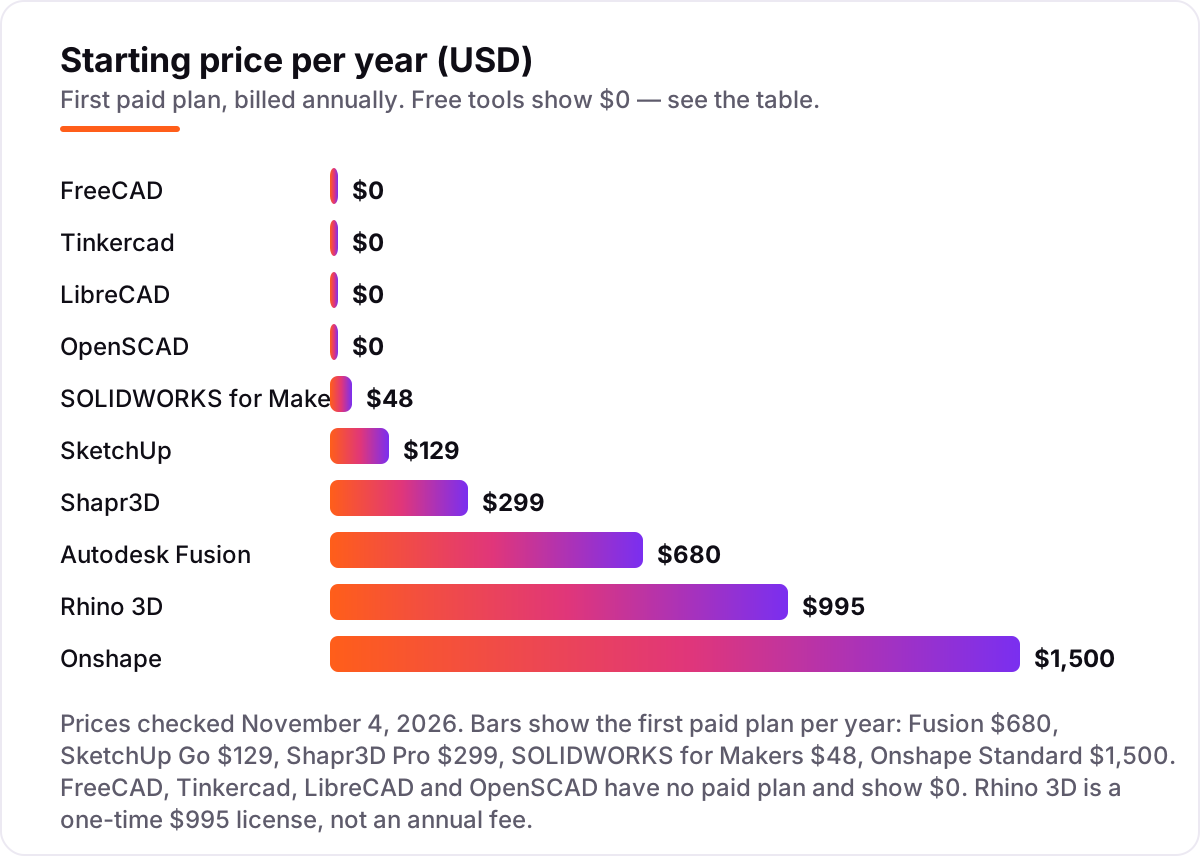
Take a hobbyist who designs 3D-printed parts most weekends and sketches furniture ideas on an iPad. In year one, the cheapest honest setup costs $0: Fusion for personal use for the parametric parts and Shapr3D Basic for the iPad sketching. The catch is the limits — Fusion personal use stops at $1,000 a year in revenue, and Shapr3D Basic caps you at two projects with low-resolution exports.
Add Shapr3D Pro at $299 a year and the year costs $299. Swap the iPad app for SketchUp Go at $129 a year and the year costs $129, with web and iPad modeling and unlimited cloud storage. The budget pro route is SOLIDWORKS for Makers at $48 a year plus SketchUp Go at $129, which comes to $177 for the year and covers both mechanical parts and room design.
The dear end is Onshape Standard at $1,500 a year plus Rhino 3D at $995 one-time, which is $2,495 in year one and $1,500 a year after, since the Rhino license never renews. The same hobbyist, the same weekends, costs $0 at the cheap end and $2,495 at the dear end — and the gap is the license model, not the number of parts designed.
Three costs sit outside every number above. First, the personal-use revenue caps: earn more than $1,000 a year with Fusion or $2,000 with SOLIDWORKS for Makers and you need a commercial license. Second, the printer itself — filament, resin and failed prints cost more in a year than most of these subscriptions. Third, a second computer is not a second license on most tools here, but Onshape Standard is priced per user, so a household of two designers pays $3,000 a year.
Know the difference: free CAD vs a free trial vs a personal-use license
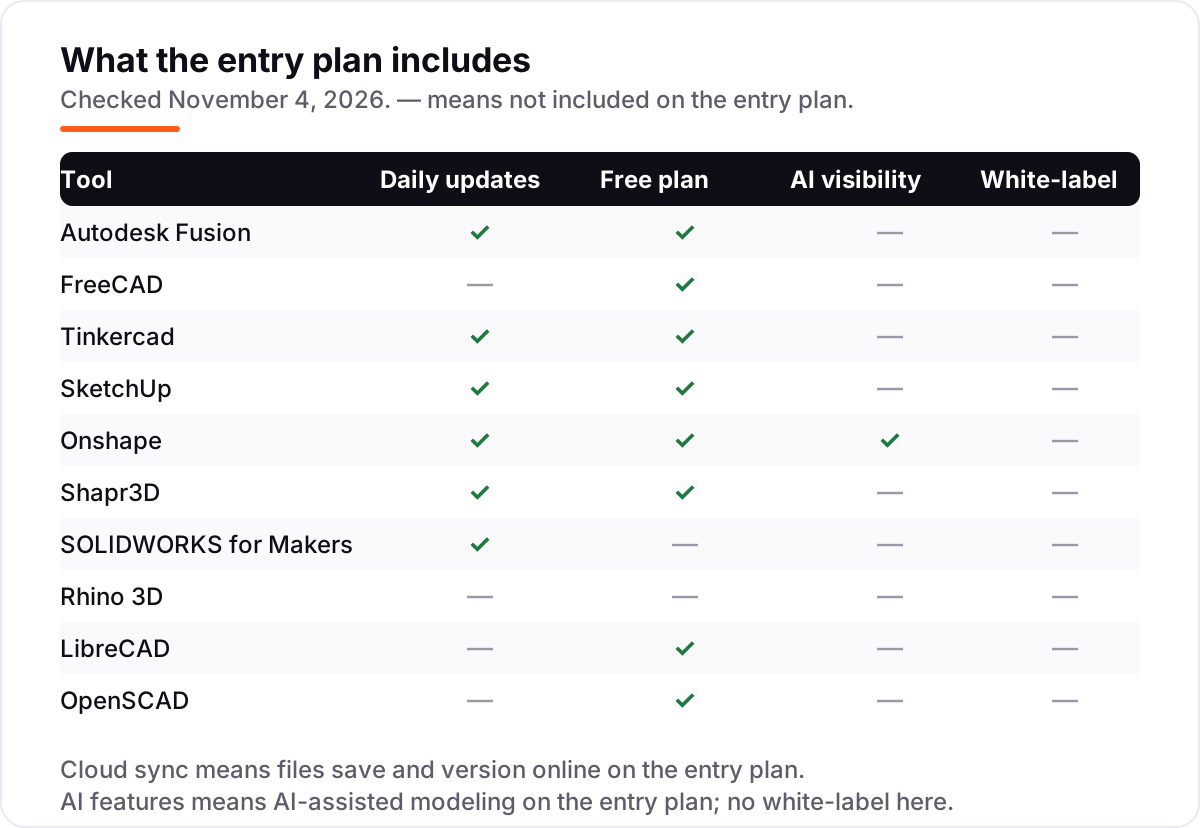
The confusion in this category is between three kinds of "free". Truly free software — FreeCAD, LibreCAD, OpenSCAD and Tinkercad — costs $0 with no account tricks, no revenue cap and no expiry. You can sell what you make with it, and nobody asks for a cut.
A free trial is different: full features for a fixed window, then the paywall. Rhino gives you 90 days, Shapr3D gives you 14, and then the software stops or drops to a limited plan. Trials are for testing, not for building a library of designs you depend on.
A personal-use license sits in between. Fusion for personal use and SOLIDWORKS for Makers are the full professional tools at $0 or $48 a year, but they come with conditions: non-commercial use, a revenue ceiling ($1,000 a year for Fusion, $2,000 for SOLIDWORKS for Makers), and in Onshape's case, public files. Break the conditions and you need the commercial license, which costs hundreds or thousands a year. If your hobby might become a side business, the truly free tools are the safer foundation — they never ask what you earned.
Quick comparison: tool type by need
| Buyer | Best pick | Why |
|---|---|---|
| First 3D printer, first model | Tinkercad | Free, browser-based, first print in an afternoon |
| Most hobbyists, most projects | Autodesk Fusion | Free for personal use, parametric CAD plus CAM |
| Never wants to pay anything | FreeCAD | Full parametric modeler, open source, no limits |
| Rooms, furniture and woodwork | SketchUp | Push-pull modeling and the 3D Warehouse library |
| Browser only, no installs | Onshape | Professional CAD with version control, free plan |
| Designs on an iPad | Shapr3D | Apple Pencil sketching, Basic plan free |
| Wants real SOLIDWORKS cheaply | SOLIDWORKS for Makers | The pro tool for $48 a year, personal use |
| Organic shapes, no subscription | Rhino 3D | $995 once, freeform NURBS modeling forever |
| Flat drawings and laser cutting | LibreCAD | Free 2D drafting with DXF export |
| Parts described in code | OpenSCAD | Parametric scripts, free, prints at any size |
Mistakes to avoid
- Paying before checking the revenue cap. Fusion personal use stops at $1,000 a year and SOLIDWORKS for Makers at $2,000. If your hobby shop earns more, the commercial license costs hundreds a year — check the cap first.
- Designing in a tool that makes your files public. Onshape Free stores every document in public. If the design is a gift, a product or a surprise, pay for private storage or pick a desktop tool.
- Buying a subscription for an export format that is free elsewhere. Shapr3D Pro's main hobbyist benefit is high-resolution STEP and IGES export — but FreeCAD exports STEP free. Check the free tools before paying for a format.
- Choosing a mesh modeler for parts that need exact dimensions. Tinkercad and other shape-based tools are fast, but a bracket that must fit a 20 mm rail needs parametric sketches and constraints, which Tinkercad does not have.
- Forgetting the second machine. A license that covers one computer at a time still lets you install it on several — Rhino and Fusion both allow that — but Onshape Standard is per user, so price the household, not the laptop.
How we chose
We checked each vendor's own pricing page on November 4, 2026 and recorded the starting price exactly as shown, including the annual figure where the page lists one, and we ranked the tools by fit for the most common buyer — a hobbyist designing at home, usually for 3D printing or woodwork — not by brand size. The price bars show the first paid plan per year, because five tools here are free and the paid ones sell by the year; Rhino 3D is the exception, a one-time $995 license shown in the bars for scale. One price needed a workaround: SketchUp's pricing page would not load directly, so the $129 Go figure comes from Trimble's published rates as read on the vendor's page in October 2026 and from the vendor-supplied pricing on SketchUp's G2 page, which also lists Go at $129 a year. Ratings come from the tools' G2 pages, opened on November 4, 2026. Three tools carry no rating: SOLIDWORKS for Makers has no G2 page of its own — the 4.5-star page covers commercial SOLIDWORKS — and LibreCAD and OpenSCAD have no G2 page at all, so we show no rating rather than a borrowed one. No vendor paid for a place in this list, and none of the links here are affiliate links.
What to do next
Start with the free plan or trial of your top pick and design one real part in it — a bracket, a hook, a shelf bracket — then export it and print it. Check that the export slices cleanly and that you can change a dimension without rebuilding the part. If the design side is sorted but nobody finds the things you sell, our monthly SEO service handles the visibility side — or compare providers in our guide to SEO companies for small business. Once your tools are in place, find out what's holding your rankings back.
Your stack only works if people find you
SerpAstra fixes what keeps your site off page one and makes it easy for AI assistants to recommend.
Get a free audit→Sources we checked (18)
- Autodesk Fusion pricing — autodesk.com/products/fusion-360/subscribe (checked November 4, 2026)
- Autodesk Fusion subscription types — autodesk.com/products/fusion-360/blog/fusion-subscription-types (checked November 4, 2026)
- FreeCAD — freecad.org (free, open source; checked November 4, 2026)
- Tinkercad — tinkercad.com (free; checked November 4, 2026)
- SketchUp pricing — sketchup.com/plans-and-pricing (checked November 4, 2026)
- Onshape pricing — onshape.com/en/pricing (checked November 4, 2026)
- Shapr3D pricing — shapr3d.com/pricing (checked November 4, 2026)
- SOLIDWORKS for Makers — solidworks.com/solution/solidworks-makers (checked November 4, 2026)
- Rhino 3D pricing — rhino3d.com/9 (checked November 4, 2026)
- LibreCAD — librecad.org (free, open source; checked November 4, 2026)
- OpenSCAD — openscad.org (free, open source; checked November 4, 2026)
- Autodesk Fusion reviews — g2.com/products/autodesk-fusion/reviews (checked November 4, 2026)
- FreeCAD reviews — g2.com/products/freecad/reviews (checked November 4, 2026)
- Tinkercad reviews — g2.com/products/tinkercad/reviews (checked November 4, 2026)
- SketchUp reviews — g2.com/products/sketchup/reviews (checked November 4, 2026)
- Onshape reviews — g2.com/products/onshape/reviews (checked November 4, 2026)
- Shapr3D reviews — g2.com/products/shapr3d/reviews (checked November 4, 2026)
- Rhinoceros reviews — g2.com/products/rhinoceros/reviews (checked November 4, 2026)
Shamim
Founder of SerpAstra
A full-stack SEO and digital marketer who spends most days on Local SEO for dental practices, AI search visibility and lead generation.
Frequently asked questions
What is the best CAD software for a hobbyist?
Autodesk Fusion is the best overall pick: professional parametric CAD, CAM and simulation, free for personal use if you earn under $1,000 a year from your projects. FreeCAD is the best pick if you never want to pay anything, and Tinkercad is the best first step for a complete beginner.
Is there really free CAD software for hobbyists?
Yes, with different catches. FreeCAD, LibreCAD, OpenSCAD and Tinkercad are completely free with no paid plan and no revenue limits. Fusion, SketchUp and Onshape also have free plans, but they limit commercial use, cap revenue or make your files public, so read the terms first.
Can I use Fusion 360 for free as a hobbyist?
Yes, through Fusion for personal use, a free 1-year subscription for home-based, non-commercial projects. You must earn less than $1,000 a year from your Fusion projects, and some advanced features — including full CAM and simulation — are limited. The paid subscription is $680 a year.
What is the cheapest way to get SOLIDWORKS as a hobbyist?
SOLIDWORKS for Makers costs $48 a year, or $15 a month, for personal use. It is the full 3DEXPERIENCE SOLIDWORKS Professional toolset, but your files are watermarked and cannot open in commercial SOLIDWORKS, and you may not earn more than $2,000 a year from your projects.
Which CAD software is best for 3D printing?
Tinkercad is the easiest way to a first print: drag shapes together and export an STL in minutes. FreeCAD and Fusion are better once parts need exact dimensions, because both are parametric and export STL and STEP. Onshape Free also works well, but your designs are public.
Is SketchUp Free enough for hobbyist projects?
For simple rooms, furniture and garden projects, yes. SketchUp Free runs in a browser, includes the 3D Warehouse and costs $0 for personal, non-commercial use. You need Go at $129 a year for iPad modeling and unlimited cloud storage, and Pro at $399 a year for the desktop app and LayOut.
Should I buy Rhino or subscribe to Fusion?
Buy Rhino if you model organic shapes and want to pay once: $995 covers the license forever, with no renewal. Subscribe to Fusion if you want parametric parts, CAM and simulation for $680 a year — or $0 on the personal-use plan. Over three years, Rhino costs $995 and Fusion costs $2,040.
Free SEO and AI visibility audit
Find out what is holding your rankings back
Send us your site. Within 2 business days you get a written audit, an AI visibility check and a short fix list ranked by impact. Free, with no contract attached.
Request my free audit→Related guides
 Design, Video & Creative8 Best Beginner CAD Software for 3D Printing in 2026, ComparedCompare the 8 best beginner cad software for 3d printing on price, free plans and learning curve, with every price checked November 4, 2026.Read guide →
 AI, Data & Analytics12 Best AI Tools for Video Content Creation in 2026, Compared12 best AI tools for video content creation compared with real prices, free plans and G2 ratings, so you can pick the right video maker without overpaying.Read guide →
 ContentVideo SEO: how to rank videos on Google and YouTubeVideo SEO explained: how to rank videos on Google and YouTube with titles, thumbnails, chapters, transcripts and the signals each platform actually rewards.Read guide →