
8 Best CAD Software for Jewelry Design in 2026, Compared
Compare the 8 best cad software for jewelry design on price, jewelry-specific tools and rendering, with every price checked November 4, 2026 for jewelers.
 Shamim Mia, Founder, SerpAstraLast verified November 4, 202612 min read
We compare pricing pages, documentation and public reviews. We never accept payment for rankings.

Key takeaways
- Rhino 3D is the best starting point for most jewelry designers at $995 one-time; MatrixGold follows at $5,995 for studios that want jewelry-only tools, and Autodesk Fusion at $680 a year for CAD plus CAM.
- Blender and FreeCAD are genuinely free — Blender for sculpting and rendering, FreeCAD for dimension-driven parts — and both export files a caster or 3D printer can use.
- The single most important buying factor is whether the tool models with NURBS precision or sculpted mesh: only NURBS tools hold the exact tolerances a caster and setter need.
- Jewelry-specific tools cost far more than general CAD, and two of them publish no price at all — budget on the bundle price, not the headline.
On this page
Quick comparison
| Tool | Best for | Starting price | Free plan |
|---|---|---|---|
| Rhino 3D | Independent jewelry designers and small studios that want the precision CAD engine most jewelry plug-ins are built on | $995 one-time | No (90-day evaluation) |
| MatrixGold | High-volume custom jewelry studios that want a jewelry-only tool with parametric history and built-in rendering | $5,995 one-time | No |
| 3Design | Jewelry designers who want a standalone jewelry CAD tool with true parametric modeling and no Rhino dependency | $4,400 one-time | No (30-day trial) |
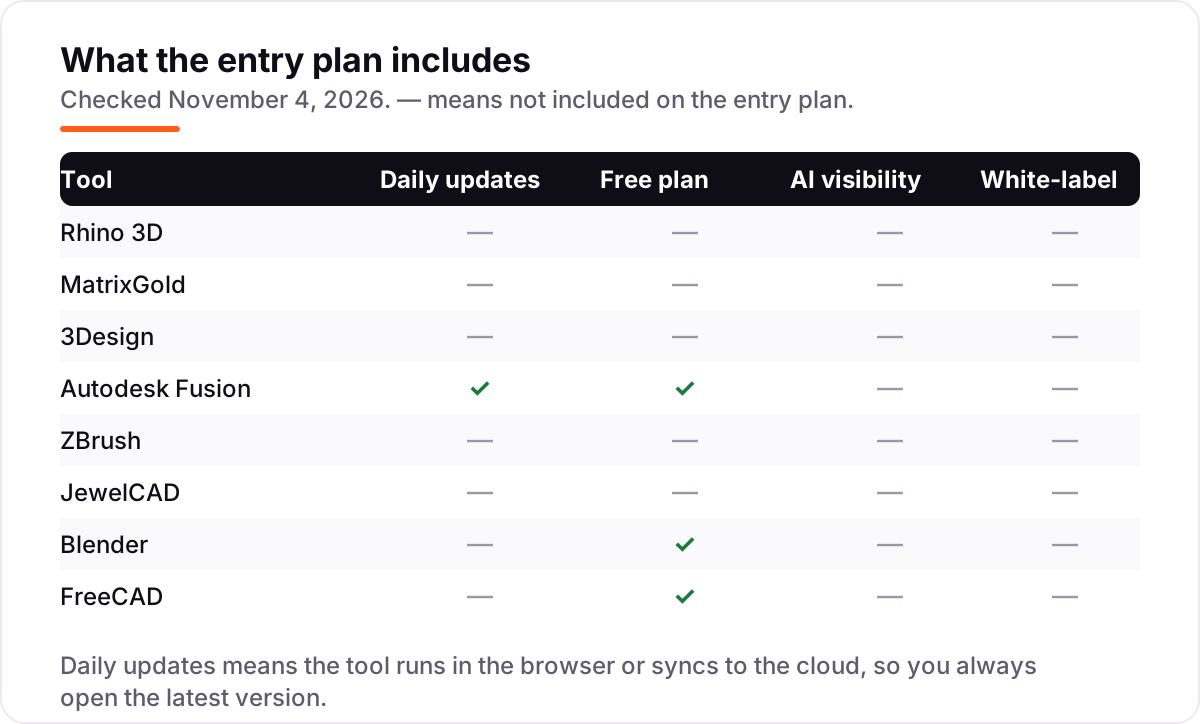
| Autodesk Fusion | Designers who also need CAM, simulation and cloud collaboration in the same subscription | $680/yr | Yes (personal use) |
| ZBrush | Designers sculpting organic, high-detail pieces — animals, flowers, faces and textured surfaces | $399/yr | No (14-day trial) |
| JewelCAD | Small jewelry manufacturers, especially in Asia, that want a lightweight jewelry-only tool at a low one-time cost | Custom quote | No |
| Blender | Designers on a zero budget who want a free, full-featured 3D tool for sculpting and rendering | Free | Yes (free) |
| FreeCAD | Makers and hobbyists who want free parametric CAD with precise dimensions for simple jewelry parts | Free | Yes (free) |
Make one of these tools?
We re-check this list every quarter. Send a correction, request a review, or ask about a clearly labeled sponsored spot.
Request a listingThe best CAD software for jewelry design

Rhino 3D
Best for: Independent jewelry designers and small studios that want the precision CAD engine most jewelry plug-ins are built on
Rhino 3D is the engine most professional jewelry design runs on. It models with NURBS — mathematical curves and surfaces — so a ring shank holds exact dimensions and a stone seat lands precisely where the setter expects it. The $995 license is a one-time purchase with no subscription and no maintenance fees, and it includes Grasshopper, a visual programming tool for building parametric variations of a design from one master file.
The catch is that jewelry work needs help. Ring builders, pavé layouts and stone libraries come from plug-ins such as MatrixGold or RhinoGold, which cost extra, and the native rendering is too plain for client presentations. Buy Rhino 3D when you want the precision foundation and the widest plug-in choice; buy MatrixGold or 3Design when you want the jewelry tools included from day one.
What we like
- NURBS precision built for the exact curves and tolerances jewelry manufacturing needs
- The largest jewelry plug-in ecosystem — MatrixGold, RhinoGold and dozens of smaller tools run on it
- One-time $995 license with no subscription and no maintenance fees
- Huge community, free tutorials and Grasshopper for parametric design variations
Watch out for
- No jewelry-specific tools included — rings, pavé and stone layouts need a plug-in or add-on
- Steep learning curve; the interface assumes CAD experience
- Native rendering is basic — photorealistic images need a separate render engine

MatrixGold
Best for: High-volume custom jewelry studios that want a jewelry-only tool with parametric history and built-in rendering
MatrixGold is the jewelry-only tool built on Rhino, and the standard in high-volume custom studios. It adds ring builders, pavé tools, stone layouts and metal weight estimates to Rhino's precision engine, and its parametric history means changing a stone size or shank width updates the whole piece. Render Studio is built in, so you can show a client a photorealistic image of their ring before anything is cast.
The price is the barrier: $5,995 buys MatrixGold 3 with a Rhino 8 license, six months of membership and support, and there is no cheaper tier. It runs on Windows only, and after six months the membership covering upgrades and the academy costs extra. Buy MatrixGold when custom work pays the bills and the parametric workflow saves hours every week; start with Rhino 3D alone when the budget is tight.
What we like
- Built only for jewelry: ring builders, pavé, stone layouts and metal weight estimates in one place
- Parametric history lets you change a stone size or shank width without rebuilding the piece
- Render Studio produces photorealistic images for client approval without extra software
- Backed by Stuller, with training through MatrixGold Academy and access to Stuller CAD/CAM services
Watch out for
- The $5,995 bundle price is the entry point — there is no cheaper standalone tier published
- Windows only, and it requires a Rhino license to run
- Membership and upgrades add ongoing cost after the first six months
3Design
Best for: Jewelry designers who want a standalone jewelry CAD tool with true parametric modeling and no Rhino dependency
3Design is the standalone alternative to the Rhino-based jewelry tools: a jewelry-only CAD program that runs on its own, with no Rhino license needed. Its parametric modeling is the headline — a design built years ago can still be edited, stone by stone, without rebuilding — and its ring builders and Advanced Pavé cover the most common custom jobs. It runs on Windows, Mac and Linux, which is rare in this category.
The awkward part is the price. Gravotech publishes no price on its site, so the $4,400 Atelier figure comes from Novedge, an authorized reseller, and the Pro edition costs more. User reviews rate its rendering below MatrixGold's, and support is a paid extra. Buy 3Design when you want true parametric jewelry CAD without joining the Rhino ecosystem; buy MatrixGold when rendering and the Stuller training network matter more.
What we like
- True parametric modeling: designs built years ago can still be edited without rebuilding
- Runs standalone on Windows, Mac and Linux — no Rhino license needed
- Ring builders and Advanced Pavé speed up the most common custom jobs
- 30-day trial lets you test it on a real commission before paying
Watch out for
- No price on the vendor's own site — the $4,400 figure comes from an authorized reseller
- Rendering quality lags behind MatrixGold's Render Studio, per user reviews
- Support is a paid extra unless you buy a support plan, per user reviews

Autodesk Fusion
Best for: Designers who also need CAM, simulation and cloud collaboration in the same subscription
Autodesk Fusion is the general-purpose CAD in this list, and it earns its place because jewelry designers rarely model in isolation: the same subscription covers parametric CAD, CAM toolpaths for milling wax or metal, basic simulation and cloud collaboration. The parametric timeline makes late changes cheap — resize a shank and every dependent feature updates — and cloud version history means a bad edit is one click from being undone.
It is subscription-only at $680 a year, or $85 a month, so the cost never stops, and there are no jewelry-specific tools: stone layouts and pavé are manual work. Heavy mesh and organic shapes can also slow the viewport. Buy Fusion when the studio also mills, prints and prototypes in-house and wants one tool for the whole chain; buy Rhino 3D when jewelry precision alone is the job.
What we like
- Parametric solid modeling plus CAM, simulation and PCB tools in one subscription
- Cloud version history saves every change, so a bad edit is easy to undo
- Free personal-use plan for hobbyists earning under $1,000 a year from their work
- Large community and Autodesk's own training library shorten the learning curve
Watch out for
- Subscription only — stop paying and the software stops working
- Heavy mesh and organic work can slow the viewport, per user reviews
- Needs a reliable internet connection for sign-in and cloud saves

ZBrush
Best for: Designers sculpting organic, high-detail pieces — animals, flowers, faces and textured surfaces
ZBrush is the sculpting tool for the organic side of jewelry: animals, flowers, faces, bark and wave textures no precision CAD tool can shape. It handles tens of millions of polygons in real time, and its 200-plus brushes let you push, pull and carve a surface the way you would work wax at the bench. The $399 annual subscription includes ZBrush for iPad, so ideas can start on a tablet and finish on the desktop.
It is not a CAD tool for manufacturing: no NURBS, no dimensions, no tolerances, so a ZBrush sculpt usually needs Rhino or Fusion to become a castable solid. The interface is famously idiosyncratic, and perpetual licenses ended in December 2023. Buy ZBrush when organic, high-detail work is the signature of the pieces you sell; skip it when every design starts from a dimensioned drawing.
What we like
- Handles tens of millions of polygons in real time for extreme surface detail
- More than 200 brushes for sculpting, texturing and painting directly on the model
- Includes ZBrush for iPad with premium features in the same subscription
- The industry standard for organic sculpting, with a large tutorial community
Watch out for
- Not a precision CAD tool — no NURBS, dimensions or manufacturing tolerances
- Outdated, idiosyncratic interface with a steep learning curve, per user reviews
- Subscription only since Maxon ended perpetual licenses in December 2023
JewelCAD
Best for: Small jewelry manufacturers, especially in Asia, that want a lightweight jewelry-only tool at a low one-time cost
JewelCAD is the quiet veteran of this list: a jewelry-only CAD program built for production manufacturing, with ring, stone and parts libraries ready from the first launch. It is lightweight and fast on modest hardware, and its perpetual licensing means you buy once instead of renting every year, with optional annual maintenance for updates. It has a long track record in production jewelry, particularly in Asia.
The vendor publishes no price and no free trial, so budgeting means asking a reseller for a quote before you can compare it with anything else here. The interface is dated, the English-speaking community is small, and there is no built-in rendering to show clients. Buy JewelCAD when a low one-time cost and production-ready files matter more than polish; buy Blender first when the budget is zero and you can live without jewelry tools.
What we like
- Built only for jewelry, with ring, stone and parts libraries ready to use
- Lightweight and fast on modest hardware — no workstation required
- Perpetual licensing with optional annual maintenance, not a subscription
- Long track record in production jewelry manufacturing, especially in Asia
Watch out for
- Vendor publishes no price — expect a quote from a reseller before you can budget
- Dated interface and a small English-speaking community
- No free trial published, so you buy on reputation and demos alone

Blender
Best for: Designers on a zero budget who want a free, full-featured 3D tool for sculpting and rendering
Blender is the free tool that embarrasses the paid ones on breadth: sculpting, modeling, texturing and two render engines in one program that costs nothing. For jewelry it shines at organic forms and presentation — sculpt a floral band, texture it, and render a photorealistic image for the client without spending a dollar. Add-ons such as JewelCraft add ring and stone helpers, and the tutorial library is the largest here.
The limit is precision. Blender is a mesh modeler, not a NURBS CAD tool, so dimensions and tolerances need checking before the file goes to the caster. There are no jewelry tools built in, and the interface takes weeks to feel natural. Start with Blender when the budget is zero and the work is organic or presentation-led; move to Rhino 3D when exact dimensions and stone settings become daily work.
What we like
- Completely free and open source — no license, subscription or feature paywall
- Strong sculpting, texturing and rendering (Cycles and Eevee) in one program
- Huge add-on ecosystem, including jewelry helpers such as the JewelCraft add-on
- Massive free tutorial library and community for every skill level
Watch out for
- No NURBS precision — it is a mesh modeler, so manufacturing tolerances need care
- Steep learning curve with an interface unlike any other CAD tool here
- No jewelry-specific tools; ring and stone work needs add-ons and manual setup

FreeCAD
Best for: Makers and hobbyists who want free parametric CAD with precise dimensions for simple jewelry parts
FreeCAD is the free parametric option: sketches and dimensions drive the model, so a ring band drawn at 2 millimeters stays 2 millimeters when the finger size changes. Python scripting and a workbench system let you extend it toward jewelry tasks, and it imports and exports STEP, IGES and STL, so files move cleanly to a caster or 3D printer. It runs on Windows, Mac and Linux with no license to manage.
It is also the roughest tool here. The interface feels unfinished next to paid CAD, there are no jewelry-specific tools and no rendering worth showing a client, and users report slow performance on large or complex models. Use FreeCAD for free, dimension-driven CAD for simple parts such as bands, pendants and findings; use Blender when the work is organic, and Rhino 3D when jewelry becomes the business.
What we like
- Free parametric CAD — sketches and dimensions drive the model, so edits stay precise
- Python scripting and a workbench system let you extend it for jewelry tasks
- Imports and exports STEP, IGES and STL for manufacturing and 3D printing
- Runs on Windows, Mac and Linux with no license to manage
Watch out for
- No jewelry-specific tools and no built-in rendering to speak of
- Interface and workflow feel rougher than paid tools, per user reviews
- Slow with large or complex models, per user reviews
The best cad software for jewelry design is the tool that gets a ring from sketch to a castable file without losing a tenth of a millimeter. We ranked the eight tools below by fit for the most common buyer — an independent designer or small studio selling custom pieces — starting with the precision CAD engine the industry runs on and ending with the two free tools, and every price was checked on the vendor's own pricing page on November 4, 2026.
How to choose the best cad software for jewelry design
- Start with NURBS or mesh. NURBS tools (Rhino 3D, MatrixGold, 3Design, Fusion, FreeCAD) hold exact dimensions and smooth curves; mesh tools (Blender, ZBrush) sculpt organic forms but need checking before casting.
- Decide whether you need jewelry-specific tools. Ring builders, pavé and stone libraries only come with MatrixGold, 3Design and JewelCAD — general CAD means building every setting by hand.
- Check the export before you buy. A castable file needs watertight STL for printing or STEP and IGES for machining; 3Design's entry Designer tier leaves out STL export.
- Count rendering as a tool, not a bonus. Client approval usually needs a photorealistic image, and only MatrixGold and Blender include a strong renderer in the price.
- Budget the whole cost, not the license. Plug-ins, memberships, support plans and training sit on top of the prices in this list, and two tools here publish no price at all.
Jewelry CAD is one system in a creative business, not the whole business. If the studio also needs to be found online, our guide to CAD software for 3D printing beginners covers the modeling side for makers, and the free SERP snippet preview tool shows exactly how a product page title and description will look in Google before you publish it.
Whatever you shortlist, try it on a real commission before you pay. The trials and free plans in this list are long enough to model one genuine piece — your ring, your stones, your caster's file requirements — and that piece tells you more than any review can. Check two things in the trial: that the exported file passes your caster's checks without repair, and that a stone seat placed in the software matches the stone in your hand.
CAD software for jewelry design pricing: what you will actually pay
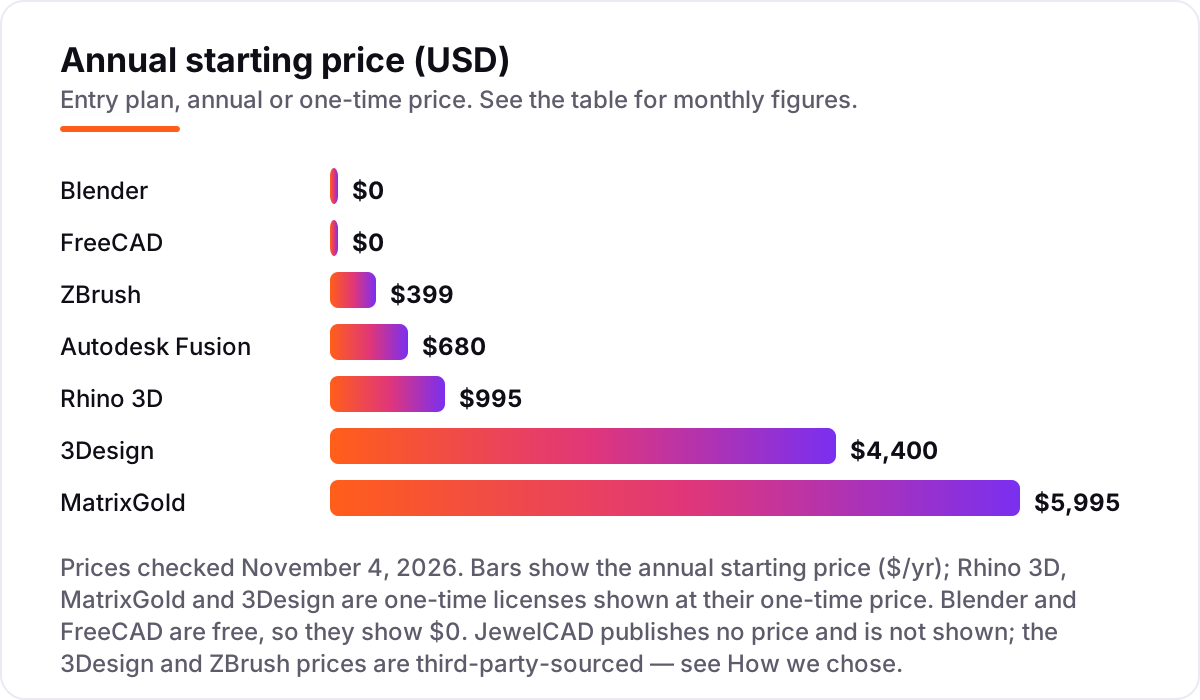
Take a solo designer starting from zero. The free route costs $0: Blender for sculpting and rendering plus FreeCAD for dimensioned parts. The precision route costs $995 once for Rhino 3D, and adding ZBrush for organic work brings the first year to $1,394 — $995 once plus $399 for the year. Over three years that pairing costs $2,192, because Rhino 3D is a one-time license and only ZBrush renews, at $399 a year. Autodesk Fusion, by comparison, costs $680 a year, or $2,040 over three years, with nothing to own at the end.
The jewelry-only tools sit far above that. MatrixGold costs $5,995 once, and the bundle includes the Rhino 8 license, so a designer who already owns Rhino 8 should ask Stuller for the MatrixGold-only price instead of paying for a second Rhino. 3Design Atelier costs $4,400 once through an authorized reseller, and the full Pro edition costs more. JewelCAD publishes no price, so its number is a quote, not a figure you can budget from this page.
Three costs sit outside every number above. First, the plug-ins: Rhino 3D's jewelry tools are extra, and a RhinoGold-style plug-in can add $1,500 or more to the $995 base. Second, the memberships: MatrixGold's membership covers upgrades and training after the included six months, and 3Design charges separately for support. Third, the learning time — a week of training, whether paid or self-taught, is part of the real cost of every tool here except the two free ones, which cost only your evenings.
Know the difference: jewelry CAD vs general 3D modeling
The confusion in this category is between software that models jewelry and software that models anything. General 3D tools — Blender, ZBrush, Fusion — can shape a ring, but they know nothing about rings: no shank sizes, no stone tables, no prong libraries, no metal weight. Jewelry CAD — MatrixGold, 3Design, JewelCAD — starts from jewelry: pick a ring size, pick a stone, and the software builds the setting, counts the stones and estimates the metal weight for you.
There is a second, quieter confusion: sculpting versus precision modeling. A ZBrush sculpt can look exactly like the finished piece and still fail at the caster, because a sculpt is a surface with no dimensions, no wall thickness and no tolerances. A NURBS model from Rhino 3D or MatrixGold carries exact measurements, so the caster can trust that a 2-millimeter shank is 2 millimeters everywhere. The two approaches are not rivals — most professional workflows sculpt the organic detail in ZBrush or Blender, then rebuild or finish the piece in Rhino 3D for manufacturing.
A third distinction worth knowing is rendering versus modeling. A beautiful render does not mean a castable model: several tools in this list render well and model loosely. Judge a tool by the file it exports — watertight, dimensioned, with stone seats that match real stones — and treat the render as the sales picture, not the proof.
Quick comparison: tool type by need
| Buyer | Best pick | Why |
|---|---|---|
| Most jewelry designers | Rhino 3D | NURBS precision and the widest plug-in choice, $995 one-time |
| High-volume custom studio | MatrixGold | Jewelry-only tools with parametric history, $5,995 with Rhino 8 |
| Standalone jewelry CAD, no Rhino | 3Design | Parametric jewelry modeling on its own, from $4,400 one-time |
| Design plus milling and prototyping | Autodesk Fusion | CAD, CAM and cloud in one subscription, $680/year |
| Organic, high-detail sculpting | ZBrush | Unmatched surface detail for figurative pieces, $399/year |
| Zero budget | Blender | Free sculpting, texturing and rendering, with jewelry add-ons |
Mistakes to avoid
- Buying a sculpting tool for precision work. ZBrush and Blender make beautiful organic forms, but a caster needs dimensions and tolerances. If the piece must fit a finger or a stone exactly, start with a NURBS tool.
- Budgeting on the license alone. Rhino 3D at $995 still needs a jewelry plug-in for ring builders and pavé, and MatrixGold's membership and 3Design's support are extra. Price the whole setup before you commit.
- Ignoring the export format. A model that cannot leave the program as a watertight STL or a STEP file is a picture, not a product. Check the export list — and the tier — before paying.
- Paying for jewelry tools you will not use. A designer who makes simple bands and pendants does not need MatrixGold's pavé engine. Start with Rhino 3D or a free tool, and upgrade when the commissions demand it.
- Skipping the caster check. Send a test file to your caster before you buy. If their software has to repair your export, the tool is costing you money on every piece.
How we chose
We checked each vendor's own pricing page on November 4, 2026 and recorded the starting price exactly as shown, including the one-time or annual figure where the page lists one, and we ranked the tools by fit for the most common buyer — an independent jewelry designer or small studio selling custom pieces — not by brand size. Two prices in this list are not from the vendor's own page and are disclosed as such: the 3Design price of $4,400 comes from Novedge, an authorized reseller, because Gravotech publishes no price; and the ZBrush price of $399 a year comes from Maxon's buy page as reported by two independent price trackers, because Maxon's buy page did not display prices during our check. JewelCAD publishes no price, so it is listed as a custom quote. Ratings appear only where we opened the G2 review page on November 4, 2026; MatrixGold, 3Design and JewelCAD carry no rating because no G2 or Capterra review page could be verified for them that day. No vendor paid for a place in this list, and none of the links here are affiliate links.
What to do next
Start with the free plan or trial of your top pick and model one real piece through it — your ring, your stones, your caster's file requirements. Check that the exported file passes your caster's checks and that the stone seats match the stones in your hand before you commit to a year or a one-time license. If the designs are sorted but new customers are not finding the studio, our monthly SEO service handles the visibility side — or compare video tools in our guide to AI tools for video content creation. Once your tools are in place, find out what's holding your rankings back.
Your stack only works if people find you
SerpAstra fixes what keeps your site off page one and makes it easy for AI assistants to recommend.
Get a free audit→Sources we checked (13)
- Rhino 3D buy page — rhino3d.com/buy (checked November 4, 2026)
- MatrixGold — stuller.com (checked November 4, 2026)
- 3Design Atelier — novedge.com (checked November 4, 2026)
- Autodesk Fusion subscribe — autodesk.com/products/fusion-360/subscribe (checked November 4, 2026)
- Maxon buy page — maxon.net/en/buy (checked November 4, 2026)
- JewelCAD — jcadcam.com (checked November 4, 2026)
- Blender download — blender.org/download (checked November 4, 2026)
- FreeCAD — freecad.org (checked November 4, 2026)
- Rhino 3D on G2 — g2.com/products/rhinoceros/reviews (checked November 4, 2026)
- Autodesk Fusion on G2 — g2.com/products/autodesk-fusion/reviews (checked November 4, 2026)
- ZBrush on G2 — g2.com/products/zbrush/reviews (checked November 4, 2026)
- Blender on G2 — g2.com/products/blender/reviews (checked November 4, 2026)
- FreeCAD on G2 — g2.com/products/freecad/reviews (checked November 4, 2026)
Shamim
Founder of SerpAstra
A full-stack SEO and digital marketer who spends most days on Local SEO for dental practices, AI search visibility and lead generation.
Frequently asked questions
What is the best CAD software for jewelry design?
Rhino 3D is the best fit for most jewelry designers: NURBS precision, the widest plug-in ecosystem and a $995 one-time license. MatrixGold is the better pick for high-volume custom studios that want jewelry-only tools and parametric history. Blender is the best free starting point for organic work.
How much does jewelry CAD software cost?
Entry prices run from $0 to $5,995. Blender and FreeCAD are free, ZBrush costs $399 a year, Fusion $680 a year, Rhino 3D $995 once, 3Design from $4,400 once, and MatrixGold $5,995 once with Rhino 8. JewelCAD publishes no price, so expect a reseller quote.
Can I design jewelry in Blender?
Yes, for organic and presentation work. Blender sculpts, textures and renders well, and the JewelCraft add-on helps with rings and stones. But it is a mesh modeler, not a NURBS CAD tool, so check dimensions and wall thickness carefully before sending a file to a caster.
Do I need Rhino to use MatrixGold?
Yes. MatrixGold runs as a toolset on top of Rhino, so a Rhino license is required. The $5,995 bundle from Stuller includes a Rhino 8 license with the MatrixGold 3 license, six months of membership and support. If you already own Rhino 8, ask Stuller about the MatrixGold-only price.
What is the difference between NURBS and mesh modeling for jewelry?
NURBS modeling uses exact mathematical curves, so dimensions, tolerances and smooth surfaces hold to the fraction of a millimeter a caster needs. Mesh modeling builds shapes from small flat faces, which suits organic sculpting but needs careful checking for wall thickness and watertight solids before manufacturing.
Is there free CAD software for jewelry design?
Yes. Blender is free and covers sculpting, texturing and rendering, while FreeCAD is free and covers dimension-driven parametric modeling. Both export STL files for 3D printing. Neither has jewelry-specific tools built in, so expect add-ons and manual setup for rings and stone layouts.
Can I 3D print a design made in these tools?
Yes, if the model exports as a watertight STL file. Every tool in this list exports STL, though 3Design's entry Designer tier does not include STL export, so check the tier before buying. Print a resin prototype first to check fit and stone seats before committing to metal.
Free SEO and AI visibility audit
Find out what is holding your rankings back
Send us your site. Within 2 business days you get a written audit, an AI visibility check and a short fix list ranked by impact. Free, with no contract attached.
Request my free audit→Related guides
 Design, Video & Creative8 Best Beginner CAD Software for 3D Printing in 2026, ComparedCompare the 8 best beginner cad software for 3d printing on price, free plans and learning curve, with every price checked November 4, 2026.Read guide →
 AI, Data & Analytics12 Best AI Tools for Video Content Creation in 2026, Compared12 best AI tools for video content creation compared with real prices, free plans and G2 ratings, so you can pick the right video maker without overpaying.Read guide →
 ContentVideo SEO: how to rank videos on Google and YouTubeVideo SEO explained: how to rank videos on Google and YouTube with titles, thumbnails, chapters, transcripts and the signals each platform actually rewards.Read guide →