
Best Chatbot Apps (2026): 8 Apps Worth Downloading
The 8 best chatbot apps compared on price, AI quality and free plans. Real starting prices checked November 2, 2026, sorted by who each app fits best.
 Shamim Mia, Founder, SerpAstraLast verified November 2, 202612 min read
We compare pricing pages, documentation and public reviews. We never accept payment for rankings.
Key takeaways
- Tidio leads for most small businesses at $24.17/month billed annually, Intercom has the strongest AI agent from $29/month per seat billed annually, and HubSpot's chatbot is free inside its CRM.
- Free plans are real here: Tidio, HubSpot, Freshchat, ManyChat and Crisp all let you start at $0, with different limits on conversations, contacts and seats.
- The single most important buying factor is where your customers already talk to you: website chat, Instagram DMs or WhatsApp decides the app before price does.
- Every price below was checked on the vendor's own pricing page on November 2, 2026. Ratings are G2, with review counts shown.
On this page
Quick comparison
| Tool | Best for | Starting price | Free plan |
|---|---|---|---|
| Tidio | Small businesses and online stores that want live chat, a help desk and an AI agent in one inbox | $24.17/mo (annual) | Yes (50 conversations) |
| Intercom | Growing SaaS and support teams that want the strongest AI agent (Fin) in front of a shared inbox | $29/mo per seat (annual) | No (14-day trial) |
| HubSpot | Small teams already running on HubSpot CRM that want chat tied to contact records | $20/mo per seat | Yes (free CRM) |
| ManyChat | Creators and small brands that sell through Instagram DMs, Facebook Messenger and WhatsApp | $29/mo (annual) | Yes (25 contacts) |
| Crisp | Small teams that want flat per-workspace pricing instead of per-agent billing | $45/mo per workspace | Yes (2 seats) |
| LiveChat | Solo operators and small teams that want a mature, reliable live chat widget | $19/mo per agent (annual) | No (14-day trial) |
| Freshchat | Small teams in the Freshworks ecosystem that want chat plus AI sessions on a free plan | $19/mo per agent (annual) | Yes (up to 10 agents) |
| Zendesk | Mid-size and larger support teams that need omnichannel ticketing plus AI agents | $55/mo per agent (annual) | No (14-day trial) |
Make one of these tools?
We re-check this list every quarter. Send a correction, request a review, or ask about a clearly labeled sponsored spot.
Request a listingThe best chatbot apps

Tidio
Best for: Small businesses and online stores that want live chat, a help desk and an AI agent in one inbox
Tidio is the easiest first chatbot for a small business because it bundles the three things that usually need three subscriptions: live chat, a help desk and an AI agent. The free plan covers 50 billable conversations a month with up to 10 seats, and Starter costs $24.17 a month billed annually for 100 conversations, so a small store can start free and pay only when chat volume grows.
The Lyro AI agent answers from your help center content, but it is a paid add-on from $32.50 a month billed annually, so budget for it separately. Shopify and WordPress integrations are deep, with order actions inside the chat, and the visual Flows builder needs no code. Watch the conversation caps: busy months push you to Growth, from $49.17 a month billed annually.
What we like
- Lyro AI agent answers from your help center content, with a paid add-on from $32.50/month billed annually
- Priced by conversations, not seats, with up to 10 seats on the free plan
- Deep Shopify and WordPress integrations with order actions inside the chat
- Free plan covers 50 billable conversations a month with live chat and ticketing
Watch out for
- Lyro AI costs extra, from $32.50/month billed annually for 50 AI conversations
- Starter caps at 100 billable conversations a month, so busy stores jump to Growth
- Advanced analytics and automatic assignment need Growth, from $49.17/month billed annually

Intercom
Best for: Growing SaaS and support teams that want the strongest AI agent (Fin) in front of a shared inbox
Intercom is the strongest AI-first option in this list, and its Fin agent is the reason to pay the premium. Fin answers from your help center and past conversations, resolving chats for $0.99 each, and you only pay when it actually resolves one. The Essential plan starts at $29 per seat a month billed annually and includes the Messenger, a shared inbox, ticketing and a public help center.
The catch is the two-part bill: seats plus resolutions, so a busy month costs more than the headline price. Copilot, the AI assistant for agents, is another $29 per agent a month, and the Advanced plan at $85 per seat adds the Workflows automation most growing teams need. Salesforce completed its acquisition of Intercom, now operating as Fin, in September 2026, so expect the roadmap to keep shifting toward AI-first support.
What we like
- Fin AI Agent resolves conversations at $0.99 per resolution, and you only pay when it resolves one
- Messenger, inbox, tickets and help center in one product, with 200+ integrations
- Advanced adds Workflows automation, multiple team inboxes and round-robin assignment
Watch out for
- No free plan, and Fin resolutions are billed on top of seat prices, so busy months cost more
- Copilot, the agent-side AI assistant, is a $29/agent/month add-on
- Essential showed a $19 annual rate on some page loads in September 2026, so confirm the price at checkout

HubSpot
Best for: Small teams already running on HubSpot CRM that want chat tied to contact records
HubSpot is the only chatbot in this list that is free forever with no conversation cap, because the bot lives inside the free CRM. Live chat and a basic chatbot builder come with the free plan for up to two users, and every conversation lands on the contact timeline, so sales sees the full history before replying. It is the obvious pick if your team already lives in HubSpot.
Paid plans start with Sales Hub Starter at $20 per seat a month, or $7 a month billed annually under the new-customer promotion. That buys 500 AI credits a month and the prospecting agent, but advanced bot branching and personalization wait for Professional at $90 per seat. Costs climb as seats and contacts grow, so price the team you will have in a year, not the team you have today.
What we like
- The only chatbot here that is free forever with no conversation cap on the free CRM
- Every chat lands in the CRM timeline, so sales sees the full history before replying
- Breeze AI Assistant is included on every plan, with 500 AI credits a month on Starter
Watch out for
- The $7 Starter rate is a limited-time offer for new customers; the list price is $20 per seat
- Advanced bot branching and personalization need Professional, from $90 per seat
- HubSpot gets expensive fast as seats and contacts grow, which reviewers cite most

ManyChat
Best for: Creators and small brands that sell through Instagram DMs, Facebook Messenger and WhatsApp
ManyChat is the chatbot for businesses that sell on social media rather than on their website. Its comment-to-DM triggers turn an Instagram comment into an automated conversation, and keyword triggers do the same on Messenger, WhatsApp and TikTok. The visual flow builder needs no code, and templates cover giveaways, launches and lead capture, so a creator can launch a first automation in an afternoon.
Pricing changed in March 2026, and the free plan now covers only 25 active contacts a month, down from 1,000, so most businesses need Pro at $29 a month billed annually. The bill also scales with active contacts, and anyone who messages you counts, even if no automation touches them. Older accounts may still see the legacy $15 Pro plan, and AI responses are a $29 a month add-on on Pro.
What we like
- Comment-to-DM and keyword triggers turn social comments into automated conversations
- Official Meta Business Partner, so Instagram and Messenger automations stay compliant
- Visual flow builder needs no code, with templates for giveaways, launches and lead capture
Watch out for
- The free plan dropped from 1,000 contacts to 25 active contacts a month in March 2026
- Pricing scales with active contacts, and anyone who messages you counts, even without an automation
- AI responses are a $29/month add-on on Pro, and older accounts may still see the legacy $15 Pro plan

Crisp
Best for: Small teams that want flat per-workspace pricing instead of per-agent billing
Crisp is the value pick for small teams that hate per-seat pricing, because it charges per workspace instead of per agent. Mini costs $45 a month per workspace and bundles live chat, a shared inbox and a small CRM, so one subscription covers the conversation workflow. The free Basic plan includes live chat with unlimited conversations for two seats on one website.
The free plan has no chatbot, triggers or knowledge base, and it shows Crisp branding on the widget, so most teams upgrade to Mini. Removing the branding and reaching the full chatbot builder need Essentials at $95 a month, and Crisp has renamed and reshuffled its plans during 2026, so confirm the Mini limits on the pricing page before you buy. For a team of three or four, $45 a month flat is hard to beat.
What we like
- Priced per workspace, not per agent, so small teams avoid per-seat bills
- Live chat, shared inbox and CRM in one workspace
- Free plan includes live chat with unlimited conversations for 2 seats
Watch out for
- The free plan has no chatbot, triggers or knowledge base, and shows Crisp branding
- Removing the branding and reaching the full chatbot builder need Essentials at $95 a month
- Crisp has renamed and reshuffled its plans during 2026, so confirm the current Mini limits before you buy

LiveChat
Best for: Solo operators and small teams that want a mature, reliable live chat widget
LiveChat is the veteran of this list, selling live chat since 2002, and it shows in the polish: a fast widget, mature routing and reporting, and more than 200 Marketplace integrations. AI assist is bundled on every plan, with reply suggestions, chat summaries and tagging that help agents without replacing them. The Starter plan costs $19 per agent a month billed annually, but it allows only one seat.
A second agent forces the jump to Team at $49 per agent billed annually, which is the pricing trap to plan around. A truly autonomous chatbot is not included at all: it needs the separate ChatBot subscription, listed from $52 a month. There is no free plan, only a 14-day trial, so LiveChat suits a solo operator or a team that values chat polish over built-in AI.
What we like
- AI assist (reply suggestions, summaries, tagging) is bundled on every plan at no extra cost
- 200+ Marketplace integrations, plus ticketing and knowledge base from the same parent company
- Mature reporting and chat routing, with a polished widget visitors recognize
Watch out for
- Starter allows only 1 seat, so a second agent forces Team at $49 per agent billed annually
- A truly autonomous chatbot needs the separate ChatBot subscription, from $52/month
- No free plan, only a 14-day trial

Freshchat
Best for: Small teams in the Freshworks ecosystem that want chat plus AI sessions on a free plan
Freshchat is the most generous free plan in this list: up to 10 agents can run website chat and email for free, which no other tool here matches. Growth costs $19 per agent a month billed annually and adds the Freddy AI Agent, which answers from your knowledge base, plus Facebook and Instagram messaging. It fits small teams already using Freshdesk or other Freshworks products, since the data is shared.
AI sessions are the cost to watch: the first 500 are free once per account, then sessions cost $49 per 100, so a bot adds up fast. WhatsApp and social channels need Growth, since the free plan covers website chat and email only. Freddy AI Copilot, the assistant for agents, is another $29 per agent a month on Pro and Enterprise, and Pro costs $49 per agent billed annually.
What we like
- Free plan covers up to 10 agents, the most generous free tier here
- Freddy AI Agent answers from your knowledge base, with 500 sessions free once per account
- Sits inside Freshworks, so it shares data with Freshdesk and the wider CRM
Watch out for
- AI sessions cost $49 per 100 after the free 500, so a busy bot adds up fast
- WhatsApp, Facebook and Instagram need Growth, since the free plan is website chat and email only
- Freddy AI Copilot is a $29/agent/month add-on on Pro and Enterprise

Zendesk
Best for: Mid-size and larger support teams that need omnichannel ticketing plus AI agents
Zendesk is the enterprise-grade pick for teams that need more than a chat widget: an omnichannel inbox covering email, chat, messaging, voice and social, plus a help center and deep reporting. AI agents are included on every Suite plan, with 5 automated resolutions per agent a month on Suite Team. The marketplace lists more than 1,500 integrations, so it connects to almost any stack a team already runs.
The price to plan around is Suite Team at $55 per agent a month billed annually, because the cheaper $19 Support Team plan has no live chat at all. AI resolutions beyond the allowance cost $1.50 each on a commitment or $2.00 pay-as-you-go, and Copilot is a $50 per agent a month add-on. Setup takes longer than the simpler tools here, and reviewers rate ease of setup lowest among its scores.
What we like
- AI agents are included on every Suite plan, with 5 automated resolutions per agent a month
- Omnichannel inbox covers email, chat, messaging, voice and social in one agent workspace
- 1,500+ marketplace integrations and deep reporting through Zendesk Explore
Watch out for
- The $19 Support Team plan has no live chat, so chatbot use starts at Suite Team ($55 per agent)
- AI resolutions beyond the allowance cost $1.50 each on a commitment or $2.00 pay-as-you-go
- Copilot, the agent-side AI assistant, is a $50/agent/month add-on
The best chatbot apps answer visitors the moment they arrive, whether that is on your website, in Instagram DMs or on WhatsApp, and they hand the conversation to a human when it matters. This list ranks 8 chatbot apps by fit for the most common buyer, a small business owner who wants real conversations without hiring a support team, with every starting price checked on the vendor's own pricing page on November 2, 2026.
How to choose the best chatbot apps
- Start with the channel. If your customers message you on Instagram, ManyChat is the only pick built for that. If they arrive on your website, Tidio, LiveChat or Crisp cover the widget. If they use email, chat and voice, Zendesk or Freshchat fit better.
- Decide how much AI you actually need. A rule-based bot that answers opening hours and order status is enough for many stores. A generative AI agent like Intercom's Fin or Zendesk's AI agents costs more per conversation but handles questions you never wrote a rule for.
- Count the billing unit before comparing prices. Intercom, Zendesk, LiveChat and Freshchat charge per seat, so the bill grows with every hire. Tidio charges per conversation and ManyChat per active contact, so the bill grows with volume instead. Crisp charges per workspace, which is the flattest model here.
- Check the handoff to humans. A bot that cannot pass the full chat history to an agent creates a second conversation, not a shorter one. Every tool in this list hands off with history, but test it on the free plan before you pay.
- Test the free plan with real traffic. Five tools here have a free plan, and a week of real chats tells you more than any demo. Watch the caps: Tidio counts conversations, ManyChat counts contacts, and Freshchat limits the free plan to website chat and email.
- Price the team you will have in a year. A solo owner can live on LiveChat Starter at $19 a month billed annually, but a second agent forces Team at $49. Pick the plan your team grows into, not the one that fits today.
Once you pick an app, check how the pages it lives on will look in search with the free SERP snippet preview tool — the chat widget sits on pages that still need to rank.
Quick comparison: tool type by need
| Buyer | Best pick | Why |
|---|---|---|
| Small business or online store | Tidio | $24.17/month billed annually, free plan, live chat plus AI in one inbox |
| Growing SaaS team that wants the best AI | Intercom | Fin resolves chats at $0.99 each, from $29/month per seat billed annually |
| Team already on HubSpot CRM | HubSpot | Chatbot free inside the CRM, no conversation cap for two users |
| Creator selling on Instagram or WhatsApp | ManyChat | Comment-to-DM automation from $29/month billed annually |
| Small team that hates per-seat billing | Crisp | $45/month per workspace, free plan for two seats |
| Solo operator who wants a polished widget | LiveChat | $19/month per agent billed annually, AI assist bundled on every plan |
| Team that wants the biggest free plan | Freshchat | Free for up to 10 agents, Growth from $19/month per agent billed annually |
| Larger team that needs omnichannel support | Zendesk | Suite Team from $55/month per agent billed annually, AI agents included |
Chatbot apps pricing: what you will actually pay
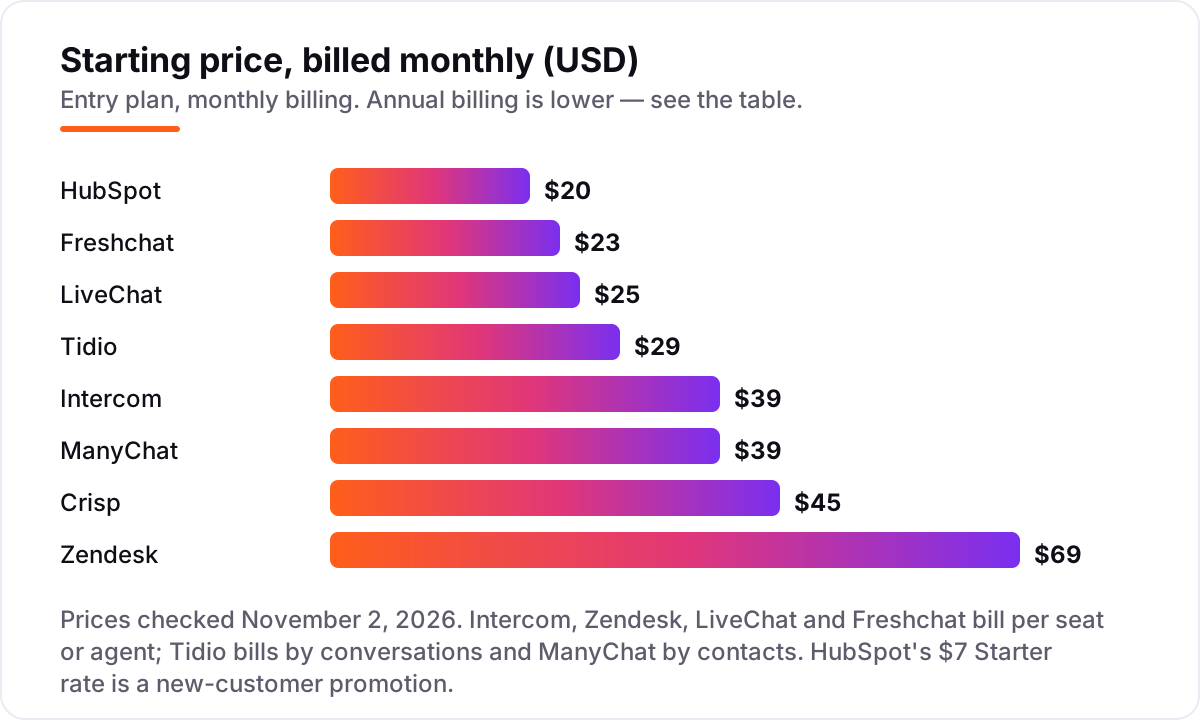
Take a three-person support team and price it on annual billing, because that is the number most vendors show first. On Intercom Essential, three seats cost $87 a month, and if Fin resolves 500 conversations that month, add $495 at $0.99 per resolution, for $582 a month in total. On Zendesk Suite Team, three agents cost $165 a month, and the plan includes 5 AI resolutions per agent, so the first 15 resolutions are covered and the rest cost $1.50 each on a commitment. On Freshchat Growth, three agents cost $57 a month, with the first 500 Freddy AI sessions free once per account and later sessions at $49 per 100.
The same team pays very different amounts on the flat-rate tools. Tidio Starter costs $24.17 a month billed annually for the whole team, not per seat, but it covers only 100 billable conversations a month, so a busy store needs Growth from $49.17 a month. Crisp Mini costs $45 a month per workspace. LiveChat is the trap to watch: Starter is $19 per agent billed annually but allows only one seat, so a three-person team must take Team at $49 per agent, which is $147 a month.
Two rules follow from the math. First, per-seat tools look cheap for one person and expensive for a team, while per-conversation tools look cheap until volume grows. Second, AI is never free: Fin, Freddy and Zendesk's agents all bill per resolution or per session on top of the seat price, so estimate your monthly chat volume before you compare the headline prices. A chatbot answers the visitors you already have, but it cannot bring new ones; our AI search optimization service covers the traffic side of that job.
Chatbot app vs live chat: know the difference
A chatbot and live chat are not the same product, and vendors blur the line on purpose. A chatbot answers automatically, using rules you write or an AI agent trained on your help center, and it works at 3 a.m. without anyone on shift. Live chat is a human replying in real time, which is slower out of hours but better for anything unusual, angry or expensive. Most tools in this list sell both in one subscription, and that is the setup most small businesses should buy: the bot handles the routine questions and hands the rest to a person with the full history attached.
The confusion costs real money in two places. First, some vendors split the bot from the chat. LiveChat sells live chat, and the autonomous ChatBot is a separate subscription listed from $52 a month, so a buyer who wants a bot and reads only the $19 Starter price will be surprised. Tidio does the same in a smaller way: the Lyro AI agent is a paid add-on from $32.50 a month billed annually, on top of the Starter plan. Second, the words "AI" on a pricing page can mean two different things: an AI assistant that helps your agents write replies, which LiveChat bundles on every plan, or an AI agent that answers customers on its own, which Intercom, Zendesk and Freshchat charge for by the resolution or session.
Before you buy, ask the vendor one question in writing: does this plan include an AI agent that answers customers without a human, and what does each answer cost? If the answer is a per-resolution or per-session rate, model it against your monthly chat volume using the worked example above. If the answer is no, you are buying live chat with an assistant, which is a fine product, but it will not answer anyone while your team sleeps.
How we chose
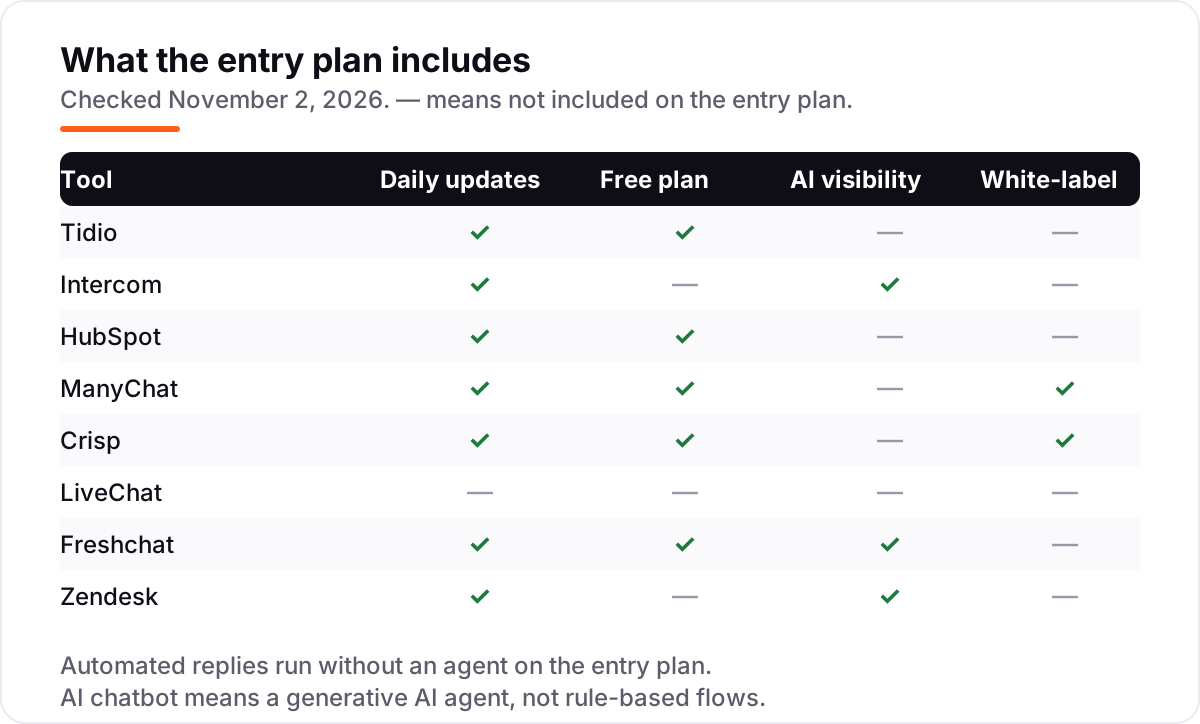
We checked each vendor's own pricing page on November 2, 2026 and recorded the starting price exactly as shown, including the annual-billing figure where the page lists one, and we read each tool's G2 page the same day for the score and review count shown on its card. We ranked the tools by fit for the most common buyer, a small business owner who needs a chatbot on a website or social channel, not by brand size. Three prices deserve a note: Intercom's Essential plan showed different rates on some page loads in September 2026, ManyChat replaced its pricing in March 2026 and older accounts may still see the legacy $15 Pro plan, and Crisp has renamed and reshuffled its plans during 2026. No vendor paid for a place in this list, and none of the links here are affiliate links.
What to do next
Start with the channel your customers already use, then take the free plan or trial of your top pick and run real conversations through it for a week. Count what the bot resolves on its own, what it hands to a human, and what the month would have cost at your real volume. If the numbers work and the handoff feels smooth, you have your app. Once your tools are in place, find out what's holding your rankings back.
Your stack only works if people find you
SerpAstra fixes what keeps your site off page one and makes it easy for AI assistants to recommend.
Get a free audit→Sources we checked (16)
- Tidio pricing — tidio.com/pricing (checked November 2, 2026)
- Tidio on G2 — 4.7/5, 1,855 reviews (checked November 2, 2026)
- Intercom pricing — intercom.com/pricing (checked November 2, 2026)
- Intercom (Fin) on G2 — 4.5/5, 3,952 reviews (checked November 2, 2026)
- HubSpot Sales Hub pricing — hubspot.com/pricing/sales (checked November 2, 2026)
- HubSpot Sales Hub on G2 — 4.4/5, 13,909 reviews (checked November 2, 2026)
- ManyChat pricing — manychat.com/pricing (checked November 2, 2026)
- ManyChat on G2 — 4.5/5, 165 reviews (checked November 2, 2026)
- Crisp pricing — crisp.chat/en/pricing (checked November 2, 2026)
- Crisp on G2 — 4.5/5, 201 reviews (checked November 2, 2026)
- LiveChat pricing — livechat.com/pricing (checked November 2, 2026)
- LiveChat on G2 — 4.5/5, 810 reviews (checked November 2, 2026)
- Freshchat pricing — freshworks.com/live-chat-software/pricing (checked November 2, 2026)
- Freshchat on G2 — 4.4/5, 500 reviews (checked November 2, 2026)
- Zendesk pricing — zendesk.com/pricing (checked November 2, 2026)
- Zendesk on G2 — 4.3/5, 7,035 reviews (checked November 2, 2026)
Shamim
Founder of SerpAstra
A full-stack SEO and digital marketer who spends most days on Local SEO for dental practices, AI search visibility and lead generation.
Frequently asked questions
What is the best chatbot app for a small business?
Tidio is the best fit for most small businesses: live chat, ticketing and an AI agent in one inbox from $24.17/month billed annually, with a free plan for 50 conversations a month. If you already use HubSpot, its free chatbot is the better buy. Teams that sell on Instagram should look at ManyChat first.
How much does a chatbot app cost?
Between $19 and $69 per agent a month at the entry level, billed annually, with free plans on Tidio, HubSpot, Freshchat, ManyChat and Crisp. The headline price is rarely the whole bill: Intercom and Zendesk add per-resolution AI charges, and Tidio and ManyChat bill by conversations or contacts instead of seats.
Is there a free chatbot app?
Yes, five of the eight tools here have a free plan. HubSpot's free chatbot has no conversation cap but covers only two users. Freshchat's free plan covers up to 10 agents. Tidio gives 50 conversations a month, ManyChat 25 active contacts, and Crisp live chat for two seats. All five free plans limit the AI features.
What is the difference between a chatbot and live chat?
A chatbot answers automatically, using rules or AI, with no human involved. Live chat is a real person replying in real time. Most tools in this list do both: the bot handles routine questions around the clock and hands tricky conversations to an agent. The confusion costs money, because some vendors sell the bot as a separate subscription.
Do chatbot apps work on Instagram and WhatsApp?
ManyChat is built for exactly that: Instagram DMs, Facebook Messenger, WhatsApp, TikTok and Telegram, with comment-to-DM triggers. Tidio, Freshchat and Zendesk also cover Facebook and Instagram messaging on paid plans, and Intercom covers WhatsApp and SMS. Check the channel you need is on the plan you are buying, not just in the product.
Can a chatbot replace my support team?
No, and the honest vendors do not claim it can. A good chatbot resolves routine questions like order status, pricing and opening hours, then hands the rest to a person with the full chat history attached. Buy the bot to cut the repetitive workload and answer after hours, not to remove humans from support entirely.
Free SEO and AI visibility audit
Find out what is holding your rankings back
Send us your site. Within 2 business days you get a written audit, an AI visibility check and a short fix list ranked by impact. Free, with no contract attached.
Request my free audit→Related guides
 MarketingMarketing automation for small businesses: what to automate (and what not to)Marketing automation for small businesses, explained: what to automate first, what to keep human, and the tools that save hours without losing customers.Read guide →
 SEO & AI Search8 Best SEO Automation Tools in 2026 (Free and Paid, Compared)8 best SEO automation tools compared on price, automation depth and free plans, with every price checked on the vendor's own pricing page, November 1, 2026.Read guide →
 SEO & AI Search11 Best AI Tools for SEO Optimization in 2026, Compared11 best ai tools for seo optimization compared on price, content scoring and AI visibility, with prices verified November 1, 2026, sorted by use case.Read guide →