
10 Best Cloud Workload Protection Platforms in 2026, Compared
Compare the 10 best cloud workload protection platforms on price, workload coverage and runtime protection, with every price checked November 10, 2026.
 Shamim Mia, Founder, SerpAstraLast verified November 10, 202613 min read
We compare pricing pages, documentation and public reviews. We never accept payment for rankings.

Key takeaways
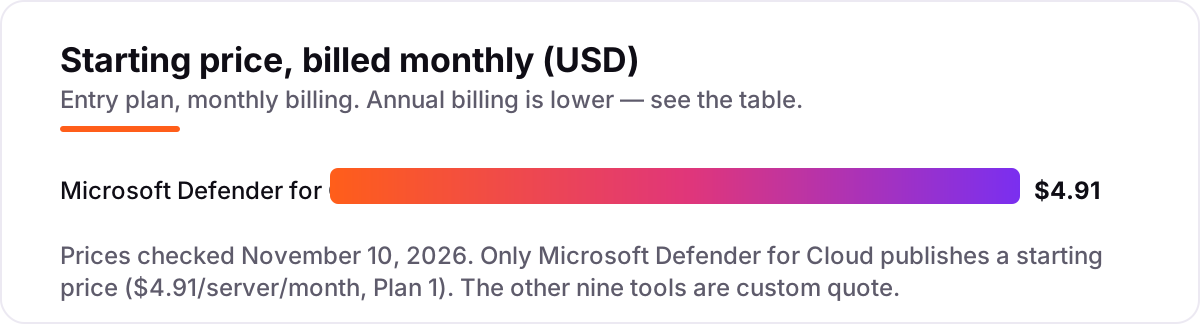
- Wiz leads for most teams, Orca Security follows for agentless coverage, and Microsoft Defender for Cloud is the only one with a published price, from $4.91 per server a month.
- The single most important buying factor is the pricing unit: per server, per workload, per credit or per resource — the same estate can cost five figures on one quote and six on another.
- Nine of the ten tools publish no price at all, so budget on written quotes for the same workload count, not on headline figures.
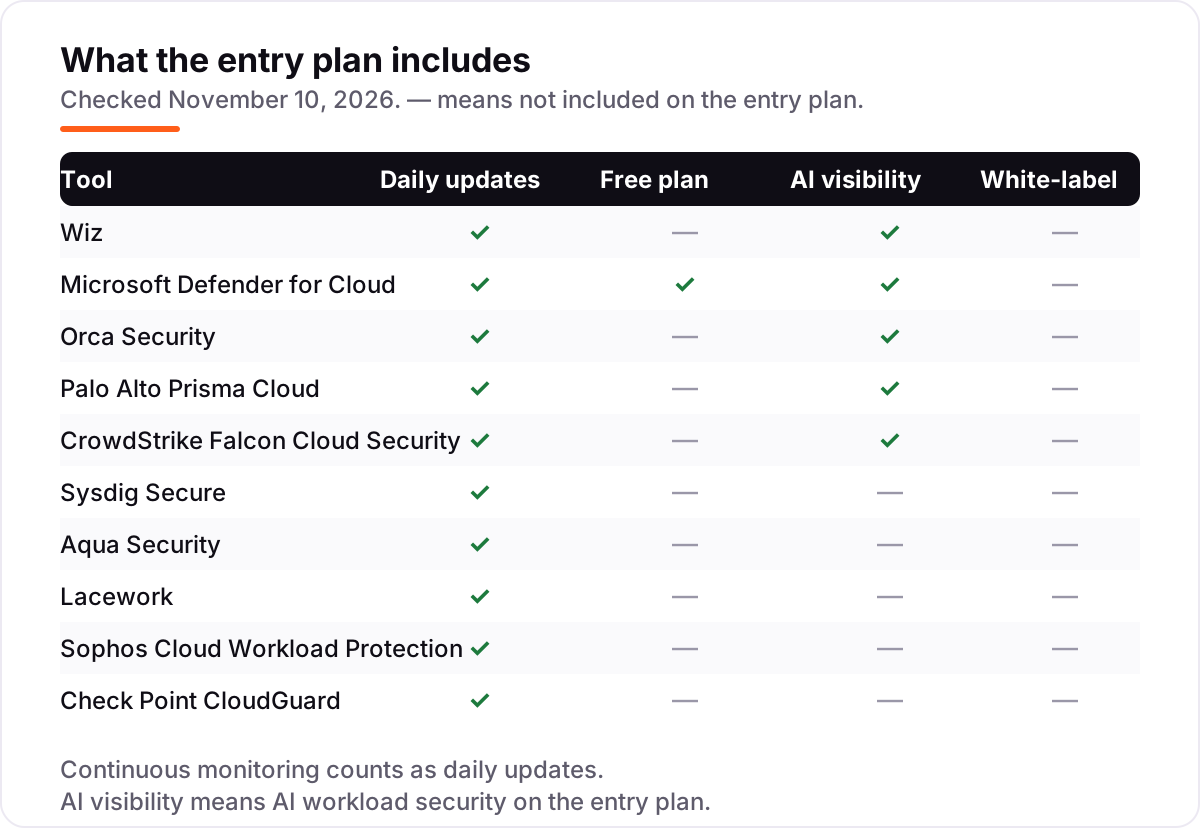
- Ratings are G2, checked November 10, 2026; only Microsoft Defender for Cloud publishes a starting price, and two tools carry no rating because no G2 page was opened for them.
On this page
Quick comparison
| Tool | Best for | Starting price | Free plan |
|---|---|---|---|
| Wiz | Enterprise and mid-market teams running multi-cloud workloads who want agentless coverage up and running in a day | Custom quote | No (demo only) |
| Microsoft Defender for Cloud | Azure-heavy teams that want workload protection billed per server with a free posture tier | $4.91/server/mo | Yes (free CSPM tier) |
| Orca Security | Multi-cloud teams that want full workload coverage without installing agents anywhere | Custom quote | No (demo only) |
| Palo Alto Prisma Cloud | Enterprises already running Palo Alto firewalls or Cortex XSIAM that want workload protection inside that stack | Custom quote | No (demo only) |
| CrowdStrike Falcon Cloud Security | Teams already running the Falcon agent that want cloud security in the same console as endpoint detection | Custom quote | No (15-day trial) |
| Sysdig Secure | Kubernetes-heavy teams that need real-time runtime threat detection on containers | Custom quote | No (free trial) |
| Aqua Security | Container-first teams that want runtime enforcement from code to production | Custom quote | No (free Trivy) |
| Lacework | Fortinet shops that want behaviour-based anomaly detection across AWS, Azure and GCP | Custom quote | No (demo only) |
| Sophos Cloud Workload Protection | Small and mid-size teams already on Sophos Central that want server and cloud workload cover in one console | Custom quote | No (30-day trial) |
| Check Point CloudGuard | Check Point customers that want workload, container and serverless protection under Infinity | Custom quote | No (demo only) |
Make one of these tools?
We re-check this list every quarter. Send a correction, request a review, or ask about a clearly labeled sponsored spot.
Request a listingThe best cloud workload protection platforms

Wiz
Best for: Enterprise and mid-market teams running multi-cloud workloads who want agentless coverage up and running in a day
Wiz leads this list because it removes the hardest part of cloud security: getting coverage. It connects to AWS, Azure and GCP through APIs, scans the whole estate without agents, and shows the result as an attack path — which misconfiguration, vulnerability and identity an attacker would actually chain together. That turns thousands of findings into a short list of risks that matter.
The catch is the price, or rather the lack of one. Wiz publishes no prices on its own pricing page, and the cost rises with every workload you add, so a growing estate means a growing bill. Agentless scanning also sees less of what happens inside a running process than an agent does. Buy Wiz when you want the fastest route to full multi-cloud coverage; add an agent-based tool when runtime blocking matters more than speed.
What we like
- Agentless deployment connects through cloud APIs, so coverage across AWS, Azure and GCP starts in minutes with no agents to roll out
- The Security Graph links misconfigurations, vulnerabilities, identities and exposed data into attack paths, so teams fix the risks that are actually reachable
- Highest review volume in this list at 4.7/5 from 932 G2 reviews, with reviewers praising ease of setup and prioritisation
Watch out for
- No published price: every contract is a custom quote, and costs rise with workload count, so budget only on a written quote
- Agentless snapshots give less real-time runtime depth than agent-based tools, so some teams pair Wiz with an EDR agent
- The volume of findings can overwhelm new teams until scope rules and tuning are in place

Microsoft Defender for Cloud
Best for: Azure-heavy teams that want workload protection billed per server with a free posture tier
Microsoft Defender for Cloud is the only tool here with a price you can budget from a web page: Defender for Servers Plan 1 costs $4.91 a server a month, Plan 2 costs $14.60. Foundational CSPM is free, so every account gets a security score before you spend anything. The paid plans add threat protection per resource type, and attack path analysis shows how an exposed VM reaches a database.
The trade-off is complexity: each resource type has its own Defender plan and meter, so a bill covering servers, containers, databases and storage needs the Azure calculator to forecast. Coverage on AWS and GCP is real but thinner than on Azure, and the recommendation list can overwhelm a small team. Pick Defender when Azure is your main cloud; pick Wiz or Orca when multi-cloud depth matters more.
What we like
- The only published per-server price in this list: Plan 1 at $4.91 a server a month and Plan 2 at $14.60, so the bill is predictable before you buy
- Foundational CSPM is free on every supported cloud, giving a security score and misconfiguration findings with no purchase
- Attack path analysis ties a misconfiguration to the database and identity behind it, and it works across Azure, AWS and GCP from one console
Watch out for
- The plan boundaries are confusing: each resource type has its own Defender plan and meter, so the bill is hard to forecast without the Azure calculator
- Workload protection depth on AWS and GCP lags what Azure-native workloads get
- Recommendation noise is a common complaint: many near-identical findings need triage before the important ones stand out

Orca Security
Best for: Multi-cloud teams that want full workload coverage without installing agents anywhere
Orca Security earns its place on speed: SideScanning reads cloud workloads out of band, so the platform maps VMs, containers and serverless functions across AWS, Azure and GCP within minutes of connecting an account. Its context engine then ranks the small share of alerts that are genuinely reachable, and shows the code that caused the risk, so developers can fix the source rather than the symptom.
The buying experience is the weak spot. There is no published price, no free trial and a single edition, so every deal is a custom annual quote based on the average number of workloads scanned. Reviewers flag false positives in anomaly detection and reporting that feels rigid. Choose Orca when you want agentless coverage fast; choose Sysdig when runtime depth on Kubernetes matters more.
What we like
- SideScanning reads workloads out of band through cloud APIs, so there are no agents to deploy, patch or roll back
- Full-stack coverage in minutes across VMs, containers and serverless, with attack paths that show which risks are actually reachable
- Rated 4.7/5 from 315 G2 reviews, with reviewers praising the fast onboarding and the depth of the asset inventory
Watch out for
- No published price and no free trial: every deal is a custom annual quote based on the average number of workloads scanned
- Reviewers report false positives in anomaly detection and alert volumes that need tuning
- Reporting and dashboard customisation lag the rest of the platform, per G2 reviewers

Palo Alto Prisma Cloud
Best for: Enterprises already running Palo Alto firewalls or Cortex XSIAM that want workload protection inside that stack
Palo Alto Prisma Cloud (now Cortex Cloud, renamed February 2025) is the platform play in this list. It combines posture, workload protection, code security and cloud detection and response, and its Compute Edition heritage gives it the deepest agent-based runtime protection here. Licensing runs on credits that draw down across modules and workload types, which suits a large estate buying one contract instead of several tools.
That credit model is also the hardest to budget: a credit buys different amounts of cover per module, and the quote is the only way to know the number. Older Prisma Cloud research can mislead, and G2 reviewers give it the lowest rating here at 4.1/5, citing cost and complexity. Buy it when your SOC already runs Palo Alto; otherwise Wiz or Orca give the same coverage with a simpler buying story.
What we like
- The deepest agent-based runtime protection here, built on the Prisma Cloud Compute heritage, with code-to-cloud coverage in one platform
- Credit-based licensing covers posture, workload protection, code security and cloud detection and response under one contract
- Integrates with Palo Alto firewalls, Cortex XDR and XSIAM, so alerts and response share one SOC workflow
Watch out for
- Credit-based pricing is the hardest in this list to estimate: a credit maps to different resource types depending on the module
- The February 2025 rename to Cortex Cloud means older Prisma Cloud research, quotes and documentation can be out of date
- Lowest G2 rating here at 4.1/5 from 128 reviews, with reviewers citing high and unclear costs

CrowdStrike Falcon Cloud Security
Best for: Teams already running the Falcon agent that want cloud security in the same console as endpoint detection
CrowdStrike Falcon Cloud Security puts cloud posture, identity entitlements and cloud detection and response into the same console as Falcon endpoint protection, on the same lightweight agent. Charlotte AI adds adversary context to cloud detections, so an alert arrives with the campaign behind it, and the Threat Graph links cloud findings to endpoint and identity telemetry in one place.
Read the pricing carefully. The published $59.99 per device per year figure is for Falcon endpoint bundles; Falcon Cloud Security itself is custom-quoted per environment, and the modular model gets expensive as you add modules. Reviewers praise the unified console but warn about quoting complexity and a steep learning curve. Pick it when Falcon is already your endpoint standard; pick Wiz when you want cloud-only cover without the endpoint bundle.
What we like
- One console and one lightweight agent cover endpoints and cloud workloads, with posture, CIEM and cloud detection and response together
- Charlotte AI triages cloud detections with adversary context, so analysts see the attack behind the alert
- Rated 4.5/5 from 252 G2 reviews, with reviewers praising the unified console and real-time visibility
Watch out for
- Cloud security itself is custom-quoted: the published $59.99/device/year figure covers Falcon endpoint bundles, not the cloud modules
- Modular pricing gets expensive at scale, and reviewers call the quoting and packaging complex
- The July 2024 outage still comes up in reviews, and the learning curve is steep for new teams

Sysdig Secure
Best for: Kubernetes-heavy teams that need real-time runtime threat detection on containers
Sysdig Secure is the runtime specialist in this list. Built on Falco, the open-source runtime instrumentation Sysdig created, it watches containers and Kubernetes workloads as they run, catching threats that a posture scan can only guess at. Impact analysis shows what a finding actually affects, and remediation guidance walks the team through the fix, which is why it holds the highest G2 rating here at 4.8/5.
The cost is the open question: Sysdig publishes no prices, and contracts are quoted per host, so the bill depends entirely on the negotiation. Setup is also demanding for teams new to Kubernetes, and agentless scanning does not cover Windows VMs. Choose Sysdig when Kubernetes is where your risk lives; choose Wiz or Orca when you need agentless breadth across every cloud service first.
What we like
- Highest G2 rating in this list at 4.8/5, built on Falco open-source runtime instrumentation for containers and Kubernetes
- Real-time runtime threat detection with impact analysis and step-by-step remediation guidance, not just posture scans
- Strong compliance coverage with continuous monitoring across multi-cloud and on-premises Kubernetes
Watch out for
- No published price: every contract is a custom per-host quote, so budget only on a written quote
- Setup is complex for teams new to Kubernetes, with a steep learning curve and documentation that lags new releases
- Agentless Windows VM scanning is not available, and agent-based scanning covers only Windows Server 2019 and 2022

Aqua Security
Best for: Container-first teams that want runtime enforcement from code to production
Aqua Security protects containers from code to runtime, and it is the most runtime-focused tool here: its agent enforces policy where the workload runs and blocks actions that break it, even in disconnected environments. Trivy, its open-source scanner, is free and widely used, so many teams arrive at Aqua having already scanned their images with it. SBOM generation and supply-chain controls round out the lifecycle story.
Aqua publishes no workload price on its own pricing page, so the only honest budget is a written quote, and the module-based UI takes time to learn. Reviewers also report mixed support, helpful when it answers but slow on ticket resolution. Pick Aqua when runtime enforcement on containers is the requirement; pick Sysdig when Kubernetes observability matters as much as blocking.
What we like
- Runtime-first: the agent enforces policy at the point of execution and blocks unauthorised actions, including in disconnected environments
- Trivy, Aqua's open-source scanner, is free and widely used, so teams can start scanning images before buying the platform
- Full lifecycle coverage from code and CI/CD to runtime, with SBOM generation and supply-chain controls
Watch out for
- No workload price is published on Aqua's own pricing page, so budget only on a written quote
- Reviewers say the module-based UI is hard to navigate and API documentation is thin
- Support is mixed: helpful when it responds, but slow ticket resolution is a recurring complaint

Lacework
Best for: Fortinet shops that want behaviour-based anomaly detection across AWS, Azure and GCP
Lacework, now Fortinet FortiCNAPP after Fortinet's 2024 acquisition, watches how your cloud normally behaves and flags what is unusual. Its Polygraph platform builds a baseline from cloud, identity and workload data, then correlates anomalies into a single risk view with one-click investigation. That behaviour-first approach catches misconfigurations and threats that signature-based tools miss, across AWS, Azure and GCP.
The buying story is opaque: no published prices, no free trial, and every deal is a custom quote through Fortinet sales. The acquisition is still settling, so the roadmap is less certain than in the standalone Lacework days, and reviewers cite difficult setup and thin documentation. Buy it when you are already a Fortinet shop; buy Orca or Wiz when you want the same anomaly-led view with a clearer path to a quote.
What we like
- Behavioural analytics build a baseline of normal cloud activity and flag anomalies, rather than relying on signatures alone
- The Polygraph data platform correlates cloud, identity and workload data into one risk view with one-click investigation
- Now part of Fortinet, so it plugs into the Fortinet Security Fabric alongside firewalls and FortiGate
Watch out for
- No published price and no free trial: pricing is entirely custom-quoted through Fortinet sales
- The Fortinet acquisition is still bedding in, so the long-term roadmap and how Lacework fits the portfolio are unsettled
- Reviewers cite difficult setup, poor documentation and a user interface that overwhelms new users

Sophos Cloud Workload Protection
Best for: Small and mid-size teams already on Sophos Central that want server and cloud workload cover in one console
Sophos Cloud Workload Protection is the simplest buy in this list for teams already on Sophos Central. One console covers servers, endpoints and cloud workloads, with deep-learning malware detection, CryptoGuard anti-ransomware and exploit prevention carried over from the endpoint product. Server protection spans Windows and Linux in AWS, Azure and GCP, plus containers, so a small team manages everything in one place.
The price is the problem: Sophos publishes nothing on its own site, and every quote comes through a partner, so the same estate can cost very different amounts depending on the partner and the bundle. The workload features are also thinner than the dedicated CNAPP tools here. Choose Sophos when the team already lives in Sophos Central; choose Defender when you want a published per-server price instead.
What we like
- One Sophos Central console manages servers, endpoints and cloud workloads, with deep-learning malware detection and CryptoGuard anti-ransomware
- Server protection covers Windows and Linux in AWS, Azure and GCP, plus containers, from the same agent family as the endpoint product
- A familiar buy for Sophos firewall and endpoint customers, with partner-led pricing and bundled discounts
Watch out for
- No published price anywhere on sophos.com: every quote comes through a partner, so two buyers can pay very different amounts
- Cloud workload features are less deep than the dedicated CNAPP tools here, and the platform leans on its endpoint heritage
- Partner-channel buying means no self-serve checkout and slower quotes for small teams

Check Point CloudGuard
Best for: Check Point customers that want workload, container and serverless protection under Infinity
Check Point CloudGuard brings workload, container, Kubernetes and serverless protection into one platform, with image assurance, ShiftLeft code scanning and runtime defence under the Infinity umbrella. Threat prevention draws on ThreatCloud, the same intelligence feed behind Check Point's firewalls, and the platform covers the build and runtime sides without a second purchase.
CloudGuard is priced for larger estates: there is no published workload price, and buyers report annual costs above $25,000. The pay-as-you-go figures you will find online are for CloudGuard network firewall gateways, not workload protection, so they do not help you budget. Pick CloudGuard when Check Point already secures your network; pick Defender or Sophos when you need a smaller, published starting point.
What we like
- Unified cloud-native security across VMs, containers, Kubernetes and serverless, with image assurance and runtime protection in one platform
- ShiftLeft code scanning and serverless protection cover the build and runtime sides without a second tool
- Threat prevention uses Check Point's ThreatCloud intelligence, the same feed behind its firewalls
Watch out for
- No published price for the workload product: the pay-as-you-go figures online are for CloudGuard network firewall gateways, not workload protection
- Priced for larger estates: buyers report annual costs above $25,000, with flexible licensing a common request
- Pricing complexity is a recurring complaint: it is hard to estimate costs before a quote, especially as the estate scales
Choosing the best cloud workload protection platforms is harder than it looks, because nine of the ten tools in this list publish no price at all. The ten below are ranked by fit for the most common buyer — a team running virtual machines, containers and serverless functions across AWS, Azure or GCP — and every price was checked against the vendor's own pricing page on November 10, 2026.
How to choose the best cloud workload protection platforms
- Agentless or agent-based first. Wiz and Orca scan through cloud APIs with nothing installed, so coverage starts in minutes. Prisma Cloud, Sysdig, CrowdStrike and Aqua install agents for deeper runtime visibility and blocking. Pick agentless for speed, agents for runtime depth.
- Count what counts as a workload. A VM, a container, a Kubernetes pod, a serverless function and a managed database are all priced differently, and the count decides the quote. Inventory the estate before asking for prices.
- Check whether it blocks or only detects. Agentless tools mostly detect and prioritise; agent-based tools can block a malicious process at runtime. If you need blocking, confirm it is in the quoted plan and not an add-on.
- Check multi-cloud depth, not just multi-cloud support. Every tool here claims AWS, Azure and GCP, but Defender is deepest on Azure and the specialists are more even across clouds. Test the cloud you actually run.
- Check who watches the alerts. None of these tools is set-and-forget: the first month is tuning, triage and suppression rules. Budget analyst time next to the licence, or the findings pile up unread.
- Check compliance coverage. If the business needs CIS, PCI DSS, HIPAA or SOC 2 evidence, confirm the frameworks are mapped in the plan you are quoted, not only in the top tier.
If the business also needs to show up when nearby customers search, our local SEO service covers that side. And if you publish guidance for customers alongside the rollout, the free SERP snippet preview tool shows how the page will look in Google.
Cloud workload protection platform pricing: what you will actually pay
Take a team with 50 cloud servers. On Defender for Servers Plan 1 at $4.91 a server a month, protection costs $245.50 a month, or $2,946 a year. Plan 2 at $14.60 a server a month costs $730 a month, or $8,760 a year — $5,814 a year more for the extra posture, monitoring and threat-detection features. The other nine tools publish no price, so the same 50 servers are a custom annual quote on each of them.
Third-party procurement data puts typical annual contracts around $95,600 to $100,000 for Orca and around $111,500 for Wiz, but those are buyer-reported medians for whole CNAPP contracts, not vendor prices for 50 servers, so treat them as a budgeting range rather than a quote. The only reliable number for the other nine is the one in the written quote — and that number depends on the workload count you declare, so count the estate first.
Three costs sit outside every number above. First, the onboarding work: connecting accounts, deploying agents where they are needed and tuning the first month of alerts takes real analyst time. Second, log ingestion: Defender Plan 2 includes a 500 MB per server per day benefit for eligible Log Analytics security data, while other tools meter ingestion separately. Third, the modules: runtime blocking, AI workload protection and managed detection are add-ons on several platforms, so confirm what the quoted plan actually includes.
Know the difference: CWPP vs CSPM — and why most tools do both now
The confusion in this category is the two acronyms. CWPP, cloud workload protection, guards the workloads themselves: the virtual machines, containers and serverless functions that run the business, against runtime threats, malware and vulnerabilities in the workload. CSPM, cloud security posture management, checks the cloud around them: storage left public, ports left open, identities with too much permission. One watches the house; the other watches the locks on the doors.
Most of the tools in this list are now CNAPPs that bundle both, which is why the distinction still matters at buying time: a posture-only tool will flag the open storage bucket but never see the malware running in the container, and a workload-only tool will catch the malware but never flag the bucket. Microsoft Defender for Cloud makes the split explicit — Foundational CSPM is free and the workload plans are paid per resource — while Wiz, Orca and Prisma Cloud sell the bundle as one contract. When you compare quotes, check which half you are actually buying: ask whether runtime protection and posture are both in the quoted plan, and what happens to each if you drop a module at renewal.
Quick comparison: tool type by need
| Buyer | Best pick | Why |
|---|---|---|
| Multi-cloud team, fastest coverage | Wiz | Agentless, live in minutes, 4.7/5 from 932 reviews |
| Azure shop on a budget | Microsoft Defender for Cloud | $4.91 per server a month, free CSPM tier |
| No agents anywhere | Orca Security | SideScanning, full coverage in minutes |
| Kubernetes runtime depth | Sysdig Secure | 4.8/5, Falco-based real-time detection |
| Palo Alto shop | Palo Alto Prisma Cloud | Deepest agent runtime, Cortex integration |
| Sophos shop | Sophos Cloud Workload Protection | One Sophos Central console, partner pricing |
Mistakes to avoid
- Comparing quotes on different workload counts. One vendor counts VMs, another counts containers and serverless functions too. Get every quote for the same inventory, or the cheapest quote is just the smallest count.
- Buying posture-only and calling it workload protection. A CSPM-only buy flags misconfigurations but never sees malware in a running container. Confirm runtime protection is in the quoted plan.
- Trusting a directory price. Aqua lists a $10,000 figure on G2, but the unit is per user per year and it is not a workload price; CrowdStrike's $59.99 per device per year is an endpoint bundle price, not a cloud security price. Only the vendor's own pricing page counts.
- Forgetting the tuning month. Every tool here arrives noisy. The first month is suppression rules and scope tuning — budget the analyst time, or the alerts pile up unread and the tool gets blamed.
- Ignoring what happens at renewal. Credits, workload counts and module bundles all reset at renewal, and growth in the estate raises the quote. Ask for the overage and growth price in writing before signing.
How we chose
We checked each vendor's own pricing page on November 10, 2026 and recorded the starting price exactly as shown — which, for nine of the ten tools, is no price at all, so their cards say Custom quote. Microsoft Defender for Cloud is the exception: its $4.91 and $14.60 per-server figures come from a fresh crawl of Microsoft's own pricing page dated November 6, 2026, because a direct page read was unavailable on November 10; the commonly quoted $5 and $15 are rounded versions of the same list prices. Ratings come from G2 pages opened on November 10, 2026; Sophos and Check Point carry no rating because no G2 page was opened for them. Aqua's G2 profile lists a $10,000 Basic figure, but the unit is per user per year and it does not describe a workload price, so it is not used as a starting price. CrowdStrike's published $59.99 per device per year is a Falcon endpoint bundle price, not a Falcon Cloud Security price. Trend Micro Cloud One Workload Security was considered and left out: Trend Micro says Cloud One has reached end of life and its capabilities now live in TrendAI Vision One. The buyer-reported medians for Wiz and Orca come from a third-party comparison, not the vendors, and are labelled as such. We ranked the tools by fit for the most common buyer — a team running VMs, containers and serverless across AWS, Azure or GCP — not by brand size. No vendor paid for a place in this list, and none of the links here are affiliate links.
What to do next
Start with the inventory: list every VM, container, serverless function and managed database you run, then get Wiz, Orca and Defender quoted against that same count. Run the free tier or trial of your top pick — Defender's free CSPM tier or a 30-day trial — and compare its findings against what you already know is exposed. If the findings match reality and the quote fits the budget, you have your platform. Once your tools are in place, find out what's holding your rankings back.
Your stack only works if people find you
SerpAstra fixes what keeps your site off page one and makes it easy for AI assistants to recommend.
Get a free audit→Sources we checked (19)
- Wiz pricing — wiz.io/pricing (checked November 10, 2026; no prices published)
- Wiz on G2 — 4.7/5, 932 reviews (checked November 10, 2026)
- Microsoft Defender for Cloud pricing — azure.microsoft.com (checked November 10, 2026; figures from a fresh crawl dated November 6, 2026)
- Microsoft Defender for Cloud on G2 — 4.4/5, 462 reviews (checked November 10, 2026)
- Orca Security pricing — orca.security (checked November 10, 2026; no prices published)
- Orca Security on G2 — 4.7/5, 315 reviews (checked November 10, 2026)
- Palo Alto Prisma Cloud Compute Edition licensing guide — paloaltonetworks.com (checked November 10, 2026; no prices published)
- Cortex Cloud (formerly Prisma Cloud) on G2 — 4.1/5, 128 reviews (checked November 10, 2026)
- CrowdStrike pricing — crowdstrike.com/en-us/pricing (checked November 10, 2026; cloud security quoted, endpoint bundles from $59.99/device/year)
- CrowdStrike Falcon Cloud Security on G2 — 4.5/5, 252 reviews (checked November 10, 2026)
- Sysdig Secure pricing — sysdig.com/products/secure (checked November 10, 2026; no prices published)
- Sysdig Secure on G2 — 4.8/5, 111 reviews (checked November 10, 2026)
- Aqua Security pricing — aquasec.com (checked November 10, 2026; no prices published)
- Aqua Security on G2 — 4.2/5, 57 reviews (checked November 10, 2026)
- Lacework (FortiCNAPP) on G2 — 4.4/5, 386 reviews (checked November 10, 2026)
- Sophos pricing — sophos.com (checked November 10, 2026; no prices published)
- Check Point CloudGuard pricing — checkpoint.com (checked November 10, 2026; no published workload prices)
- Check Point CloudGuard pricing reports — peerspot.com (checked November 10, 2026)
- Wiz vs Orca vs Prisma Cloud buyer-reported spend — tech-insider.org (checked November 10, 2026)
Shamim
Founder of SerpAstra
A full-stack SEO and digital marketer who spends most days on Local SEO for dental practices, AI search visibility and lead generation.
Frequently asked questions
What is the best cloud workload protection platform in 2026?
Wiz is the best fit for most teams: agentless coverage across AWS, Azure and GCP, attack-path prioritisation and the largest review base here at 4.7/5 from 932 G2 reviews. Microsoft Defender for Cloud is the best buy for Azure shops at $4.91 a server a month, and Orca Security is the best agentless alternative.
How much does a cloud workload protection platform cost?
Only Microsoft Defender for Cloud publishes a price: $4.91 a server a month for Plan 1 and $14.60 for Plan 2. The other nine tools are custom-quoted annual contracts, and buyer-reported medians run around $95,600 to $100,000 a year for Orca and around $111,500 for Wiz — benchmarks, not vendor prices.
What is the difference between CWPP and CSPM?
CWPP protects running workloads — virtual machines, containers and serverless functions — against runtime threats, malware and vulnerabilities. CSPM checks the cloud configuration itself: open storage, exposed ports and over-permissioned identities. Most tools here bundle both as a CNAPP, so buying one side alone leaves a gap.
Is there a free cloud workload protection platform?
No full platform in this list is free. Microsoft Defender for Cloud has a free Foundational CSPM tier, and Aqua's Trivy scanner is free and open source. The rest need a paid contract, though CrowdStrike, Sysdig and Sophos offer free trials. A free posture tier is useful, but it is not workload protection.
Do I need agents on every workload?
Not with Wiz or Orca: both scan agentlessly through cloud APIs, so coverage starts in minutes with nothing installed. Agent-based tools such as Prisma Cloud, Sysdig and CrowdStrike install an agent for deeper runtime visibility and blocking. Agentless is faster to deploy; agents see more of what happens inside a running process.
Can I switch cloud workload protection platforms later?
Yes, and the switch is easier than with endpoint tools because agentless platforms need no rollout. Connect the new platform, let it scan the estate, and run both in parallel for a month to compare findings. Keep the old contract until the new one proves it catches the same risks, then cancel — never cut over on a Friday.
What should I check before signing a CWPP contract?
Check what counts as a billable workload: VMs, containers, serverless functions and data services are priced differently, and the count decides the quote. Ask about overage charges, the contract term, data residency and whether runtime blocking is included or an add-on. Get all of it in writing before you sign.
Free SEO and AI visibility audit
Find out what is holding your rankings back
Send us your site. Within 2 business days you get a written audit, an AI visibility check and a short fix list ranked by impact. Free, with no contract attached.
Request my free audit→Related guides
 IT, Security & DevOps11 Best Cloud Infrastructure Services Reviews in 2026The 11 best cloud infrastructure services reviews compared on price, free tiers, egress and AI features, with every price checked November 6, 2026.Read guide →
 IT, Security & DevOps12 Best Security Software for Small Business in 2026, ComparedCompare the 12 best security software for small business options on price, endpoint protection and passwords, with prices checked November 7, 2026.Read guide →
 IT, Security & DevOps9 Best Security Compliance Tools for SAAS Companies in 2026, ComparedCompare the 9 best security compliance tools for saas companies on price, frameworks and evidence automation, with every price checked November 7, 2026.Read guide →