
11 Best Conference Room Booking Software in 2026, Compared
Compare the 11 best conference room booking software options with real prices checked November 10, 2026, from $4 a user to custom enterprise quotes.
 Shamim Mia, Founder, SerpAstraLast verified November 10, 202614 min read
We compare pricing pages, documentation and public reviews. We never accept payment for rankings.

Key takeaways
- Yarooms is the best fit for most offices at $99/month; Skedda follows at $249/month for US buyers, and Joan at $51/month plus displays for the door.
- Appspace is the only free plan here — $0 for 2 users and 1 device — while Envoy's Visitors Basic is free but its room booking starts at $5 per resource a month.
- The single most important buying factor is the pricing unit: per room, per user, per space or a flat monthly rate. The unit, not the headline price, decides what a 10-room office actually pays.
- Six of the eleven tools publish no starting price at all, so budget them by quote: Robin, Condeco, Teem, OfficeSpace, Appspace and Pronestor.
On this page
Quick comparison
| Tool | Best for | Starting price | Free plan |
|---|---|---|---|
| Yarooms | Mid-size offices that want desks, rooms, visitor management and AI in one flat-priced platform | $99/mo | No (free trial) |
| Skedda | Offices with far more people than rooms that want per-space pricing and the best-reviewed booking flow | $249/mo | No (free trial) |
| Joan | Offices that want a display on every meeting-room door plus booking in one subscription | $51/mo | No (30-day trial) |
| Envoy | Companies already using Envoy Visitors that want room booking as an add-on module | $5/resource/mo | No (free trial) |
| Kadence | Hybrid teams that want AI-assisted booking inside Teams and Slack | $4/user/mo | No (free trial) |
| Robin | Enterprises with 500+ employees that need room, desk and visitor management at scale | Custom quote | No (free trial) |
| Condeco | Large Microsoft-first enterprises that book rooms from Outlook and need multi-site control | Custom quote | No (demo only) |
| Teem | Eptura customers that want room booking with lobby check-in for guests | Custom quote | No (demo only) |
| OfficeSpace | Multi-location enterprises that want room booking inside a full workplace-management suite | Custom quote | No (demo only) |
| Appspace | Large employers that want room booking bundled with digital signage and an employee app | Free; paid custom | Yes (free tier) |
| Pronestor | Microsoft 365 offices that want room booking, desk booking and signage from one European vendor | Custom quote | No (demo only) |
Make one of these tools?
We re-check this list every quarter. Send a correction, request a review, or ask about a clearly labeled sponsored spot.
Request a listingThe best conference room booking software

Yarooms
Best for: Mid-size offices that want desks, rooms, visitor management and AI in one flat-priced platform
Yarooms is the best fit for most offices because it covers the whole job for one flat price. Starter costs $99 a month for 10 to 20 users at one location and includes desk and room booking, hybrid scheduling, room and lobby displays, an interactive floor map and video conferencing integrations. There is no per-user meter running in the background, so adding a booker costs nothing.
The catch is the user band. Starter tops out at 20 users, so a 150-person office needs Business at $399 a month, which adds the Yarvis AI assistant, the Microsoft Teams app and single sign-on. Visitor management is a separate $99 a month per location. Buy Yarooms when you want one platform, one price and no per-user arithmetic.
What we like
- Flat $99/month Starter covers desk and room booking, hybrid scheduling, room displays and floor maps
- Business at $399/month adds the Yarvis AI assistant, the Microsoft Teams app and SSO
- Published pricing with no annual commitment, and annual billing saves 20% on every plan
- Strong compliance stack: SOC 2 Type II, ISO 27001, ISO 27701 and GDPR, with an EU hosting option
Watch out for
- Starter covers only 10 to 20 users at 1 location, so a 150-person office needs Business at $399/month
- Visitor management is a separate $99/location/month add-on, not part of the room booking plans
- G2 reviewers note the mobile app can be hard to navigate once floor plans are involved

Skedda
Best for: Offices with far more people than rooms that want per-space pricing and the best-reviewed booking flow
Skedda is the best-reviewed tool in this list, at 4.8 out of 5 on G2, and it earns that score with a booking flow reviewers call intuitive. Pricing is per bookable space, not per user, so a 150-person office with 10 rooms pays for 10 rooms, not 150 people. Every plan includes unlimited users and unlimited bookings, plus interactive floor plans and a booking-rules engine.
The price to watch is the region. In the United States and Canada the entry point is Plus at $249 a month for 35 spaces, billed annually. The $99 Starter plan exists only in Europe, the Middle East, Africa and Asia Pacific. Visitor management is a $99 a month add-on. Pick Skedda when headcount is far larger than the room count.
What we like
- Highest G2 score in this list at 4.8 out of 5, with reviewers praising ease of use and support
- Priced per bookable space, not per user, with unlimited users and unlimited bookings on every plan
- Interactive floor plans and a granular booking-rules engine for complex sharing policies
- Plus includes 35 spaces, so a 10-room office has room to add desks without a plan change
Watch out for
- In the US and Canada the entry point is Plus at $249/month; the $99 Starter plan is EMEA and APAC only
- Visitor management costs $99/month extra as an add-on to an existing subscription
- Per-space costs climb as desks and rooms are added above the included allowance

Joan
Best for: Offices that want a display on every meeting-room door plus booking in one subscription
Joan is the pick when the display on the door matters as much as the booking itself. One plan from $51 a month, billed annually, includes every Joan solution: room booking, desk booking, visitor management, digital signage and parking. People who book from Outlook or Google Calendar are not billed at all, so only app users and devices count toward the price.
The hardware is the second bill. Each room needs its own e-paper display, bought separately from $399, so a 10-room office adds about $3,990 before the first booking. Extra app users cost $1.09 a month and extra devices $10.99 a month. Choose Joan when you want a display on every door and one subscription for the whole platform.
What we like
- One plan from $51/month includes every Joan solution: rooms, desks, visitors, signage and parking
- People who book from Outlook or Google Calendar are not billed, only app users and devices
- Purpose-built e-paper displays mount outside each room and run for months on battery
- 30-day free trial with no credit card required
Watch out for
- Displays are bought separately, from $399 each, so a 10-room office adds about $3,990 in hardware
- Extra app users cost $1.09/month and extra devices $10.99/month on top of the $51 base
- G2 reviewers cite complicated pricing and slow device connectivity on some displays

Envoy
Best for: Companies already using Envoy Visitors that want room booking as an add-on module
Envoy is the natural pick for a company that already runs Envoy Visitors, because room booking arrives as one more module on the same platform. Reservations costs $5 per bookable resource a month, billed annually, and covers desks, rooms and parking with maps, mobile booking and auto-release for no-shows. Visitors Basic is free for up to 100 entries a month.
The number to get in writing is the platform fee. Every Envoy module sits on top of a required platform layer for administration, identity and analytics, and its price is not published on the pricing page. Annual billing is the only option. Buy Envoy when the visitor system is already in place and rooms are the next module, not the first.
What we like
- Reservations costs $5 per bookable resource per month, covering desks, rooms and parking
- Modular pricing means you pay only for the modules you switch on
- Auto-release frees rooms when nobody checks in, and booking works from maps and mobile
- Visitors Basic is free for up to 100 entries a month, so the front desk can start at $0
Watch out for
- Every module sits on top of an unpublished platform fee, so $5 a resource is not the total bill
- All plans are billed annually, with no monthly-billing option on the pricing page
- No fresh G2 rating exists for the Rooms module itself; the 4.7 score belongs to Envoy Visitors

Kadence
Best for: Hybrid teams that want AI-assisted booking inside Teams and Slack
Kadence is the pick for hybrid teams that live in Teams and Slack. Its AI assistant books desks and rooms from chat, coordinates team in-office days and handles visitor management, all from the same platform. Standard is listed at $4 per user a month and includes unlimited desks and rooms, utilization analytics and single sign-on, with billing that charges only for users who actually book.
Treat the $4 figure with care. It comes from G2, supplied by Kadence, while Kadence's own site now shows quote-based WorkOps plans with no public prices. G2 reviewers also report glitches when cancelling individual hours and thin reporting. Pick Kadence for AI booking in chat, but get the current quote before budgeting on $4 a user.
What we like
- Lowest per-user figure in this list at $4 per user per month on the Standard plan
- Kadence AI books desks and rooms from Teams and Slack and coordinates team in-office days
- Active-user billing charges only for people who make a booking in a given month
- Standard includes unlimited desks and rooms, utilization analytics and SSO
Watch out for
- Kadence's own site now shows quote-based WorkOps plans, so the $4 rate may be a legacy plan
- G2 reviewers report booking glitches and difficulty cancelling individual hours
- Reporting is thin, with no report writer on the entry plan

Robin
Best for: Enterprises with 500+ employees that need room, desk and visitor management at scale
Robin is built for large hybrid workplaces, and its site says so plainly: the platform is designed for companies with 500 employees or more. Desk and room booking, visitor management and space analytics sit in one system, and booking works from Outlook, Google Calendar, Microsoft Teams and Slack. Abandoned-meeting protection releases rooms when nobody shows up.
The barrier is price transparency. Robin publishes no price at all, and G2 lists a $15,000 a year starting price for the One Workplace Platform. Contracts are annual only, and comparison guides warn that floor-plan edits can need vendor involvement. Choose Robin when the estate is large enough to justify an enterprise platform and a sales conversation.
What we like
- Built for large hybrid workplaces, with desk and room booking, visitor management and analytics in one platform
- Books from Outlook, Google Calendar, Microsoft Teams and Slack, where employees already work
- Abandoned-meeting protection releases rooms when nobody shows up
- Strong floor-plan analytics show how rooms are actually used, not just booked
Watch out for
- No published price: custom quote only, with G2 listing a $15,000 a year starting price
- Annual contracts only, and the site says it is designed for companies with 500 or more employees
- Floor-plan edits can need vendor involvement, per multiple comparison guides

Condeco
Best for: Large Microsoft-first enterprises that book rooms from Outlook and need multi-site control
Condeco, now Eptura Engage, is the enterprise pick for Microsoft-first offices. Its Outlook and Exchange integration runs deeper than any other tool here: staff book rooms from Outlook and Teams, and the platform covers desks, rooms, parking, lockers and catering across many locations. Copilot for Eptura Engage is in early access for booking by natural language inside Teams.
The price is a conversation, not a number. Eptura publishes no pricing for Engage, and industry estimates run about $10 to $14 per user a month for a 1,000-person deployment. Sales guidance suggests it is not a fit below about 500 people, and G2 reviewers note complex admin features. Pick Condeco when Outlook is the office and the estate spans many sites.
What we like
- The deepest Outlook and Exchange integration in this list, with booking from Outlook and Teams
- Covers desks, rooms, parking, lockers and catering across many locations in one system
- Copilot for Eptura Engage is in early access for booking by natural language inside Teams
- Advanced and Power tiers with workplace analytics and global support across 115 countries
Watch out for
- Quote-only pricing with no public numbers; industry estimates run about $10-$14 per user a month
- Built for large estates, and sales guidance suggests it is not a fit below about 500 people
- G2 reviewers note admin features can be complex and support can be slow to resolve panel issues

Teem
Best for: Eptura customers that want room booking with lobby check-in for guests
Teem is the room-booking original inside the Eptura suite, built first for meeting rooms and still strongest there. Staff book from Outlook and Google Calendar or a mobile app, a flightboard shows the day at a glance, and lobby check-in welcomes guests alongside the booking. Meeting analytics track how rooms are used, including no-shows and ghost meetings.
The weakness is the same as its sibling Condeco: Eptura publishes no price for Teem, and the per-room rates still circulating in directories may be stale. G2's standalone Teem listing holds only 3 reviews, so there is no solid current score. Pick Teem when the office already runs Eptura products and wants room booking with lobby check-in in the same family.
What we like
- Room booking with desk booking, visitor check-in and lobby displays in one Eptura product
- Books from Outlook and Google Calendar, with mobile booking and a flightboard view of the day
- Meeting analytics show how rooms are used, including no-shows and ghost meetings
- Sits inside the wider Eptura suite, so it pairs with Archibus and Eptura Engage
Watch out for
- Eptura publishes no price for Teem; directories still list old per-room rates that may be stale
- G2's standalone Teem listing holds only 3 reviews, so there is no solid current rating
- No free trial, and evaluation runs through the Eptura sales team

OfficeSpace
Best for: Multi-location enterprises that want room booking inside a full workplace-management suite
OfficeSpace is the full-suite pick for multi-location enterprises. Room booking sits inside a platform that also handles space planning, move management, visitor management, sensors and portfolio analytics, and Lite includes an AI assistant, desk booking, floor plans and a mobile app. It carries the second-highest G2 score in this list at 4.7 out of 5.
The trade-off is the sales process. OfficeSpace publishes no price, and the $500 a month figure in directories is third-party data, not a vendor rate. There is no free trial, so evaluation runs through a demo and a quote, and implementation typically takes about 35 days. Choose OfficeSpace when room booking is one part of managing a whole property portfolio.
What we like
- Second-highest G2 score here at 4.7 out of 5, with reviewers praising ease of use and support
- Lite includes an AI assistant, desk booking, floor plans and a mobile app
- Full suite: space planning, move management, visitor management, sensors and portfolio analytics
- Implementation and 24/7 support are included in the quote, not billed separately
Watch out for
- Quote-only pricing; directories list $500 a month, but OfficeSpace publishes no price
- No free trial, so evaluation runs through a demo and a sales quote
- Implementation is typically multi-week, with about 35 days quoted for a standard rollout

Appspace
Best for: Large employers that want room booking bundled with digital signage and an employee app
Appspace is the only tool in this list with a genuinely free plan, and the natural pick for a large employer that also needs signage. The free tier covers 2 premium users and 1 device, while the same platform combines room and desk booking with digital signage, an employee app and an intranet. It scores 4.7 out of 5 on G2, with reviewers praising the interface.
Paid plans are where the bill gets complicated. Express and Enterprise are priced on request, per user and per device, so both numbers grow the total, and Express caps at 25 premium users and 25 devices. Reviewers also note occasional inaccurate room availability. Start on Appspace when the free tier fits, and get the paid quote before rolling it out widely.
What we like
- The only free plan in this list: a free tier with 2 premium users and 1 device
- Combines room and desk booking with digital signage, an employee app and an intranet in one platform
- 4.7 out of 5 on G2, with reviewers praising the interface and Google Calendar integration
- Enterprise adds device tasks, advanced channels and premium support
Watch out for
- Paid plans are quote-only and priced per user and per device, so both numbers grow the bill
- Express caps at 25 premium users and 25 devices, so larger offices must step up to Enterprise
- G2 reviewers note occasional inaccurate room availability and a sluggish mobile experience

Pronestor
Best for: Microsoft 365 offices that want room booking, desk booking and signage from one European vendor
Pronestor is the Microsoft-native pick for offices that run on Outlook and Exchange. Room booking, desk booking, visitor management, parking and digital signage sit in one suite, and room display tablets show live availability and let staff book or release rooms at the door. It is a long-established European workspace vendor with deep calendar integration.
The problem is transparency. Pronestor publishes no price anywhere, every plan is price on request, and no G2 or Capterra rating page exists to check, so there is no independent review score at all. That makes it the hardest tool here to budget or compare. Pick Pronestor only when the Microsoft integration matters more than a published price and a public review record.
What we like
- Microsoft 365-native booking for rooms, desks, visitors and parking in one suite
- Room display tablets show live availability and let staff book or release rooms at the door
- Digital signage and visitor management are included rather than separate products
- Long-established workspace vendor with deep Outlook and Exchange integration
Watch out for
- No published price anywhere: every plan is price on request
- No G2 or Capterra rating page exists to check, so there is no independent review score
- The least transparent of the eleven on pricing, trial terms and plan limits
The best conference room booking software ends the daily hunt for a free room: staff see live availability, book from Outlook, Google Calendar, Teams or a phone, and the room releases itself when nobody shows up. We ranked the 11 tools below by fit for the most common buyer — a mid-size office with about 10 rooms and 100 to 150 people — starting with the flat-priced options and ending with the enterprise suites, and every price was checked on November 10, 2026.
How to choose the best conference room booking software
- Work out the pricing unit first. Yarooms charges a flat monthly rate, Skedda per space, Joan per user and device, Envoy per resource and Kadence per user. The unit decides the real bill for your room and headcount.
- Count the rooms and the people who book. A 10-room office with 150 staff pays $249 a month on Skedda Plus but $600 a month on Kadence at $4 a user, before any platform fee or hardware.
- Check whether displays are included or bought separately. Joan's e-paper displays cost from $399 each, while Yarooms, Skedda and Envoy work with third-party tablets you source yourself.
- Decide how deep the calendar integration must go. Condeco and Pronestor are built around Outlook and Exchange, while Yarooms and Joan also cover Google Workspace and Teams natively.
- Try the booking flow as an employee. Book a room, cancel it, and rebook it from a phone during the trial. If the flow feels clumsy to you, it will feel clumsy to 150 people.
Booking software solves the room, not the discovery. If clients and candidates cannot find the office online, the rooms stay empty whatever the booking tool, so pair the rollout with our local SEO service. Before you publish new location pages, run the title through the free SERP snippet preview tool to see how it looks in Google, and compare the wider booking world in our guide to salon booking software.
Whatever you shortlist, try it with real meetings before you pay. The trials in this list run up to 30 days, which is long enough to run one genuine week — your rooms, your staff, your recurring meetings — and that week tells you more than any review can. Check two things in the trial: that a room booked in Outlook shows as busy everywhere within seconds, and that a no-show meeting actually releases the room. Every tool here promises both, so there is no reason to buy before you have seen them happen.
Conference room booking software pricing: what you will actually pay
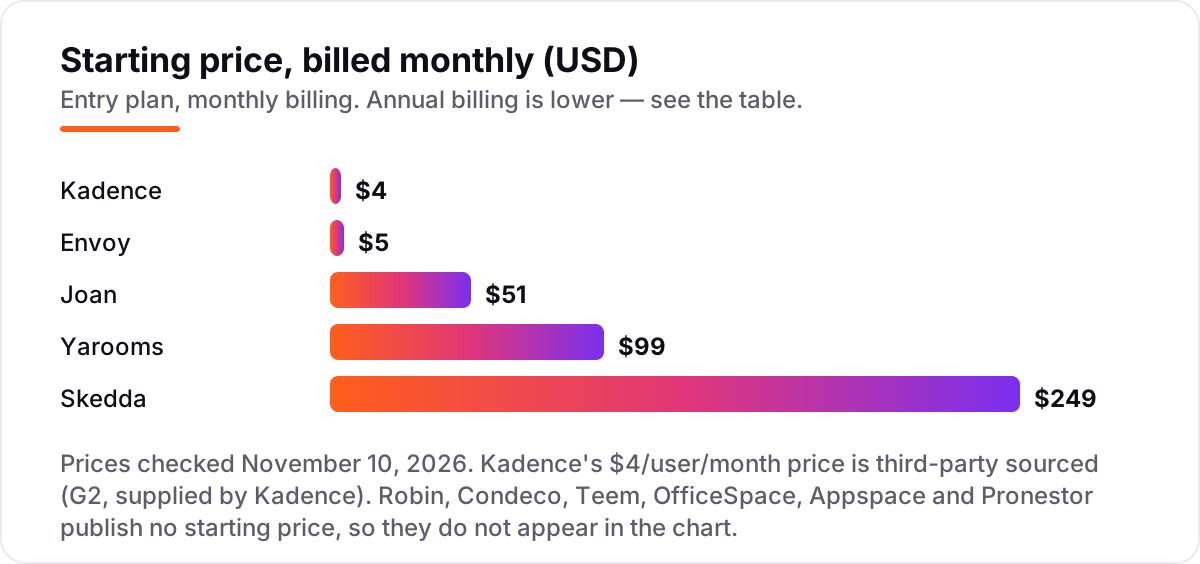
Take a 10-room office with 150 employees at one location, priced on list rates with annual billing where it is offered. Skedda Plus costs $249 a month, or $2,988 a year, and covers 35 spaces, so the 10 rooms fit with space to spare. Yarooms Starter is too small at 20 users, so the office needs Business at $399 a month, or $4,788 a year. Joan costs $51 a month, or $612 a year, plus about $3,990 for 10 displays at $399 each, before any extra device licences — $4,602 in the first year.
Envoy Reservations costs $50 a month for 10 rooms at $5 a resource, or $600 a year, plus the platform fee, which is not published, so the real total is higher by an unknown amount. Kadence costs $600 a month for 150 users at $4 each, or $7,200 a year, on the third-party rate — and the quote from Kadence itself may differ, since its site now shows quote-based plans. Robin, Condeco, Teem, OfficeSpace and Pronestor publish no price, so they can only be budgeted by quote, and Appspace's free tier covers just 2 users, so a 150-person office is on a paid quote there too.
The same 10 rooms and 150 people cost $2,988 a year at the cheap published end and $7,200 at the dear end — a $4,212 gap that comes entirely from the pricing unit, not from features. Three costs sit outside every number above. First, the hardware: Joan displays, and any tablets for the other tools. Second, the unpublished fees: Envoy's platform fee and the enterprise quotes. Third, the add-ons: visitor management on Skedda at $99 a month and on Yarooms at $99 a month per location. Price the tool for your actual rooms and headcount, on the billing cycle you will actually use, before comparing headline prices.
Know the difference: room booking software vs a full workplace platform
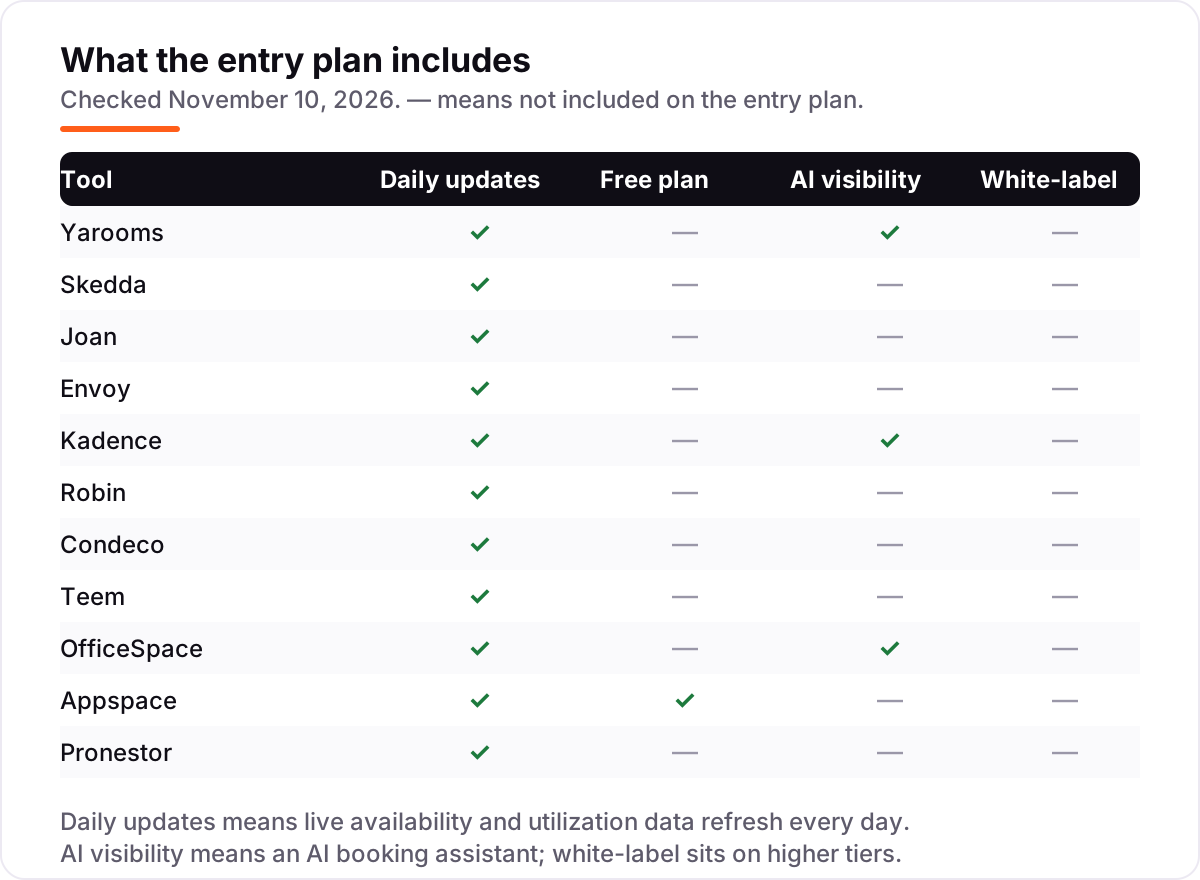
The confusion in this category is between a tool that books rooms and a platform that runs the whole workplace. A focused room booking tool fills the calendar and puts a display on the door; a workplace platform adds desk booking, visitor management, parking, digital signage and space analytics in the same subscription. All eleven tools here book rooms, but only some stop there — Joan, Yarooms, Robin, Condeco and OfficeSpace are platforms, while Skedda and Envoy Reservations stay closer to booking itself.
There is a second, quieter confusion: room booking and video conferencing are different jobs. Software such as Zoom Rooms runs the meeting inside the room once people are there; the tools in this list reserve the physical room, show live availability and release it when nobody arrives. Most offices need the booking layer first, then add video hardware to the rooms that need it, not the other way round.
A third distinction worth knowing is the pricing unit, which is the single biggest source of surprise bills in this category. Two tools can both advertise about $50 a month and cost very different amounts for the same office: Joan at $51 covers the whole platform before hardware, while Envoy at $5 a resource costs $50 a month for 10 rooms before its unpublished platform fee. Always price the tool for your actual room count and headcount before comparing headline prices.
Quick comparison: tool type by need
| Buyer | Best pick | Why |
|---|---|---|
| Small office, one location | Yarooms | Flat $99/month covers rooms, desks and displays |
| Many people, few rooms | Skedda | Per-space pricing with unlimited users, from $249/month in the US |
| A display on every door | Joan | E-paper displays plus full booking from $51/month |
| Already on Envoy | Envoy | Room booking from $5 per resource a month as an add-on |
| AI booking in chat | Kadence | Kadence AI in Teams and Slack, $4 per user a month (third-party sourced) |
| Enterprise, 500+ staff | Robin | Built for large hybrid workplaces, custom quote |
| Microsoft-first enterprise | Condeco | Deepest Outlook integration, custom quote |
| Free to start | Appspace | Free tier with 2 users and 1 device |
Mistakes to avoid
- Budgeting on the headline price alone. A $51 tool can cost $4,602 in year one once 10 displays are bought, and a $5 tool can cost far more once the platform fee lands. Price the tool for your actual rooms, headcount and hardware.
- Comparing a per-user price with a per-room price without multiplying. Kadence at $4 a user is $600 a month for 150 people, while Envoy at $5 a resource is $50 a month for 10 rooms. The units are not comparable until you do the maths.
- Forgetting the hardware bill. Joan displays cost from $399 each, and the other tools need tablets if you want a screen on the door. Hardware is a one-off cost, but it is often larger than the first year of software.
- Assuming a free tier covers room booking. Envoy's Visitors Basic is free, but it covers visitor check-in, not rooms — Reservations costs $5 per resource a month. Only Appspace's free tier includes room booking, and only for 2 users.
- Buying an enterprise suite for a 10-room office. Robin is designed for 500 or more employees and Condeco is not a fit below about 500 people. A small office pays enterprise prices for scale it will never use.
How we chose
We checked each vendor's own pricing page on November 10, 2026 and recorded the starting price exactly as shown, and we ranked the tools by fit for the most common buyer — a mid-size office with about 10 rooms and 100 to 150 people — not by brand size. Six tools publish no starting price, so they are listed as custom quote: Robin, Condeco, Teem, OfficeSpace, Appspace and Pronestor. Two prices are third-party sourced and disclosed as such: Kadence's $4 a user a month comes from G2, supplied by Kadence, while Kadence's own site now shows quote-based WorkOps plans; and the $500 a month figure sometimes quoted for OfficeSpace comes from directories, not the vendor. Skedda's $249 a month is the US and Canada entry price; the $99 Starter plan is sold in Europe, the Middle East, Africa and Asia Pacific only. Ratings are shown only where a fresh G2 page gave a clear score and review count on November 10, 2026: Yarooms, Skedda, Joan, Kadence, Robin, Condeco, OfficeSpace and Appspace. Envoy carries no rating because the only fresh G2 page is for Envoy Visitors, a different module from Rooms; Teem's standalone G2 listing holds only 3 reviews; and Pronestor has no G2 or Capterra rating page at all. No vendor paid for a place in this list, and none of the links here are affiliate links.
What to do next
Start with the free plan or trial of your top pick and run one real week of meetings through it. Check that a room booked in Outlook shows as busy everywhere within seconds, that a no-show meeting releases the room, and that the display outside the door matches the calendar before you commit to a year. If the rooms are sorted but the office itself is not being found online, our local SEO service handles the visibility side — or compare booking tools for other spaces in our guide to salon booking software. Once your tools are in place, find out what's holding your rankings back.
Your stack only works if people find you
SerpAstra fixes what keeps your site off page one and makes it easy for AI assistants to recommend.
Get a free audit→Sources we checked (21)
- Yarooms room booking — yarooms.com/product/room-booking (checked November 10, 2026)
- Skedda pricing — skedda.com/pricing (checked November 10, 2026)
- Joan room booking — getjoan.com/lg-room-booking/ (checked November 10, 2026)
- Envoy pricing — envoy.com/pricing (checked November 10, 2026)
- Kadence on G2 — g2.com/products/kadence-kadence/reviews (checked November 10, 2026)
- Robin pricing on G2 — g2.com/products/robin/pricing (checked November 10, 2026)
- Eptura Engage on G2 — g2.com/products/eptura-engage/reviews (checked November 10, 2026)
- OfficeSpace plans — officespacesoftware.com/plans/ (checked November 10, 2026)
- Appspace pricing — appspace.com/pricing/ (checked November 10, 2026)
- Yarooms vs Condeco comparison — yarooms.com/compare/condeco-alternative (checked November 10, 2026)
- Yarooms vs Envoy comparison — yarooms.com/compare/envoy-alternative (checked November 10, 2026)
- Skedda on G2 — g2.com/products/skedda/reviews (checked November 10, 2026)
- Yarooms on G2 — g2.com/products/yarooms-international-yarooms/reviews (checked November 10, 2026)
- Joan on G2 — g2.com/products/joan/reviews (checked November 10, 2026)
- Robin on G2 — g2.com/products/robin/reviews (checked November 10, 2026)
- OfficeSpace on G2 — g2.com/products/officespace-software/reviews (checked November 10, 2026)
- Appspace on G2 — g2.com/products/appspace/reviews (checked November 10, 2026)
- Teem on Capterra — capterra.com/p/148272/EventBoard/ (checked November 10, 2026)
- OfficeSpace vs Skedda — officespacesoftware.com/compare/officespace-vs-skedda/ (checked November 10, 2026)
- Pronestor pricing on TechJockey — techjockey.com/compare/pronestor-vs-troop-messenger (checked November 10, 2026)
- Yarooms vs Kadence comparison — yarooms.com/compare/kadence-alternatives (checked November 10, 2026)
Shamim
Founder of SerpAstra
A full-stack SEO and digital marketer who spends most days on Local SEO for dental practices, AI search visibility and lead generation.
Frequently asked questions
What is the best conference room booking software?
Yarooms is the best fit for most offices: desk and room booking, displays and hybrid scheduling for a flat $99 a month, with no per-user meter. Skedda is the best-reviewed tool at 4.8 out of 5 on G2, and Joan is the best pick when you want a display on every door from $51 a month.
How much does conference room booking software cost?
Published prices run from $4 a user a month on Kadence to $249 a month on Skedda Plus in the US, with Yarooms at $99 and Joan at $51 in between. Six tools publish no price at all, so budget them by quote, and remember the extras: Joan displays from $399 each and Envoy's unpublished platform fee.
Is there a free conference room booking software?
Appspace has the only genuinely free plan here, with 2 premium users and 1 device at $0, which suits a tiny team testing the idea. Envoy's Visitors Basic is also free, but it covers visitor check-in, not room booking — Reservations costs $5 per resource a month. The other nine tools offer trials or demos only.
What is the difference between room booking software and video conferencing?
Room booking software reserves the physical room: it shows live availability, books the space and releases it when nobody arrives. Video conferencing, such as Zoom Rooms, runs the meeting inside the room once people are there. The two solve different problems, and most offices need the booking layer first, then add video hardware to the rooms that need it.
Do I need a display outside every meeting room?
No, but it helps in a busy office. A display shows the room's status and the day's bookings at a glance, and lets staff book or release the room at the door. Joan builds its whole product around e-paper displays, while Yarooms, Skedda and Envoy work with third-party tablets. Small offices with few rooms can skip displays entirely and book from the calendar.
Can I switch conference room booking software later?
Yes, but plan the move for a quiet week. Export the room list, booking rules, user list and future reservations from the old tool, then import them and test booking from Outlook, Teams and a phone before going live. The painful part is the hardware: Joan displays and door tablets are tied to their own platform, so switching may mean replacing them.
Free SEO and AI visibility audit
Find out what is holding your rankings back
Send us your site. Within 2 business days you get a written audit, an AI visibility check and a short fix list ranked by impact. Free, with no contract attached.
Request my free audit→Related guides
 Local Business & Vertical Software11 Best Booking Software for Salons in 2026, ComparedCompare the 11 best booking software for salons on price, free plans, marketplace fees and no-show tools, with every price checked November 7, 2026.Read guide →
 Local Business & Vertical SoftwareBest Gym Scheduling Software for 2026: 9 Options Compared by Use CaseCompare the 9 best gym scheduling software options on price, class booking, member apps and free plans, with every price checked November 8, 2026.Read guide →
 Digital Marketing & AdsBest Spa Booking Software for 2026: 10 Options Compared by Use CaseCompare the 10 best spa booking software options on price, free plans, marketplace commissions and multi-location support, with prices checked November 5, 2026.Read guide →