
8 Best CRM Software for Commercial Real Estate in 2026, Compared
Compare the 8 best crm software for commercial real estate options on price, CRE features and reviews, with every price checked November 12, 2026.
 Shamim Mia, Founder, SerpAstraLast verified November 12, 202613 min read
We compare pricing pages, documentation and public reviews. We never accept payment for rankings.

Key takeaways
- ClientLook leads for most CRE brokerages at $129/user/month ($89 billed annually), with AscendixRE from $79/user/month and Apto at $129/user/month.
- The single most important buying factor is whether property, lease and deal data are native objects or custom fields you must build yourself.
- HubSpot is the only free start here — a free CRM for two users — while Salesforce Starter Suite is $25/user/month.
- Every price below was verified on November 12, 2026 against the vendor's pricing page or the freshest dated read of it; prices that needed a third-party read are disclosed in 'How we chose'.
On this page
Quick comparison
| Tool | Best for | Starting price | Free plan |
|---|---|---|---|
| ClientLook | Small commercial brokerages that want a CRE-specific CRM without Salesforce | $129/user/mo | No (10-day trial) |
| AscendixRE | CRE brokerages that want Salesforce power with CRE fields ready on day one | $79/user/mo | No (demo only) |
| Apto | Mid-size CRE brokerages that need deal management, comps and commissions in one place | $129/user/mo | No (free trial) |
| REthink | Investment sales and leasing teams that live in property data and send branded client reports | $129/mo | No (demo only) |
| Salesforce | Brokerages that want to build their own CRE setup on the platform the CRE tools run on | $25/user/mo | Yes (2 users) |
| HubSpot | Small brokerages that want a free CRM now and a gentle upgrade path later | Free; Starter $20/seat/mo | Yes (free CRM) |
| Follow Up Boss | Agent teams that live on lead follow-up and want the fastest speed-to-lead in this list | $69/user/mo | No (14-day trial) |
| Propertybase | Larger brokerages that need deep Salesforce customization plus websites and portals | $79/user/mo | No (demo only) |
Make one of these tools?
We re-check this list every quarter. Send a correction, request a review, or ask about a clearly labeled sponsored spot.
Request a listingThe best crm software for commercial real estate

ClientLook
Best for: Small commercial brokerages that want a CRE-specific CRM without Salesforce
ClientLook is the only standalone CRE CRM here built for commercial brokers from day one: properties, listings, availabilities and deals are native objects, so a broker tracks a building, its vacant suites and the deal on one of them without custom fields. The interface is deliberately simple — G2 reviewers rate its support 9.1 out of 10 — and LightBox ownership brings CRE data integrations a general CRM cannot match.
The price is the honest part: $129 a user a month, or $89 on annual billing, with a 10-day trial and no platform fee. The trade-off is depth: ClientLook will not bend the way Salesforce does, and the 3.6 out of 5 G2 score rests on only 12 reviews. Pick it for CRE tracking that works on day one; pick AscendixRE or Apto when it wants Salesforce underneath.
What we like
- Built for commercial real estate from the ground up — properties, listings, availabilities and deals are native objects, not custom fields
- G2 reviewers rate its quality of support 9.1/10, the highest support score in this list
- Annual billing cuts the price to $89/user/month ($1,068 a year) from $129 billed monthly
- Flat per-user pricing with no platform fee, unlike several Salesforce-based rivals
Watch out for
- No free plan — only a 10-day free trial before the subscription starts
- G2 score of 3.6/5 rests on only 12 reviews, and some reviewers call data entry slow
- Less customizable than the Salesforce-based CRE tools; heavy reporting needs may outgrow it

AscendixRE
Best for: CRE brokerages that want Salesforce power with CRE fields ready on day one
AscendixRE is the value pick among the Salesforce-based CRE tools: $79 a user a month on annual billing, with the Salesforce licence included, so there is no second bill. The CRE objects are ready on day one — leases, sales, properties, listings and availabilities — plus stacking plans, radius search and pre-built CRE reports. It is the only tool here that bundles the platform licence into a CRE price.
Two catches. Billing is annual only, so ten users cost $9,480 up front, and the 4.3 out of 5 G2 score rests on only 9 reviews. The AI Suite is a $39-a-month add-on per organisation, not per user, which is cheap at scale. Pick AscendixRE when the brokerage wants Salesforce with CRE fields ready; pick ClientLook when it wants to avoid Salesforce entirely.
What we like
- Salesforce licence included in the price — no separate Salesforce bill to pay
- Stacking plans, radius search and lease abstraction built for commercial property work
- Enterprise adds commission tracking, and the AI Suite add-on costs $39/month per organisation, not per user
- 4.3/5 on G2, the highest score among the CRE-native tools in this list
Watch out for
- Billed annually only — no monthly option, so the first bill is $948 per user
- G2 score of 4.3/5 rests on only 9 reviews, so the rating is a small sample
- Built on Salesforce, so brokers who dislike Salesforce's interface will not escape it here

Apto
Best for: Mid-size CRE brokerages that need deal management, comps and commissions in one place
Apto is the deal-management tool in this list: pipeline, comps and commissions are core features, not add-ons, and the Salesforce base means a larger brokerage can shape almost anything. It has the biggest G2 review base of the CRE-native tools here at 37 reviews, with a free trial before any sales conversation. For investment sales teams that live in comps, it is the most complete single system here.
The score is the warning: 3.3 out of 5 on G2, the lowest in this list, with reviewers calling the price high for the features. Apto publishes no price on its own site — the $129 a user a month figure is vendor-supplied through G2 — so expect a sales process and possible implementation fees. Pick Apto for deal depth; pick AscendixRE for the same Salesforce base at a lower price.
What we like
- Deal management with comps and commission tracking built in, not bolted on
- Deep Salesforce customization for larger brokerages that want the CRM shaped to their process
- Largest G2 review base among the CRE-native tools here (37 reviews)
- Free trial available before committing to a sales conversation
Watch out for
- Lowest G2 score in this list (3.3/5); reviewers call pricing high for the features
- No published price on its own site — expect a sales conversation and possible implementation fees
- Needs a Salesforce admin or consultant to get the most from it

REthink
Best for: Investment sales and leasing teams that live in property data and send branded client reports
REthink is the mobile-first CRE CRM in this list, built for brokers who work from properties rather than desks. Stacking plans, the property database and offering memoranda are built in, so an investment sales team can take a deal from first look to branded client report without leaving the app. Rethink+ adds Prospect, a built-in prospecting database with AI-powered ownership data, for $299 a month.
The evidence is thin: 4.0 out of 5 on G2, but from only 4 reviews, and Buildout's own page does not say whether the $129 a month figure is per user or what the billing term is — confirm both on a demo. There is no free trial, and reviewers note a steep learning curve. Pick REthink for mobile deal work; pick ClientLook for a simpler start.
What we like
- Stacking plans and offering memoranda built in — the investment-sales workflow, not a generic pipeline
- Mobile-first design for brokers working from properties rather than desks
- 4.0/5 on G2, the second-highest score among the CRE-native tools here
- Rethink+ adds Prospect, a built-in prospecting database with AI-powered ownership data
Watch out for
- Only 4 G2 reviews — the thinnest evidence in this list
- Buildout's page does not say whether $129 is per user or what the billing term is — confirm on a demo
- Steep learning curve and no free trial; evaluation runs through the sales team

Salesforce
Best for: Brokerages that want to build their own CRE setup on the platform the CRE tools run on
Salesforce is the platform three tools in this list are built on, and buying direct is the cheapest way into a serious CRM here: $25 a user a month on Starter Suite, with a free two-user suite. The ecosystem is unmatched — every CRE tool here either runs on Salesforce or connects to it — and 27,591 G2 reviews put its 4.4 out of 5 score on the widest base here.
What you do not get is CRE. Properties, leases and stacking plans are custom objects you build or buy as an add-on, and the price climbs fast: Pro Suite is $100 a user a month, and API access adds $25. Pick Salesforce when the brokerage has (or will hire) an admin and wants one platform for everything; pick a CRE-native tool when it wants property tracking on day one.
What we like
- Cheapest way into a serious CRM here at $25/user/month, with a free suite for two users
- The largest integration ecosystem — every CRE tool in this list either runs on it or connects to it
- 4.4/5 from 27,591 G2 reviews, the largest review base in this list by far
- Scales from a solo broker to an enterprise brokerage without switching platforms
Watch out for
- No CRE objects out of the box — properties, leases and stacking plans need custom objects or a CRE add-on
- Pro Suite at $100/user/month quadruples the entry price, and quoting and forecasting wait for that tier
- API access costs an extra $25/user/month on top of the licence

HubSpot
Best for: Small brokerages that want a free CRM now and a gentle upgrade path later

HubSpot is the only free start in this list: the free CRM covers two users and 1,000 contacts with no time limit, and Sales Hub Starter is $20 a seat a month at list. It is the easiest general CRM here to learn — G2 reviewers cite ease of use most — with sequences, email tracking and pipelines a small brokerage can run without an admin. View-only seats are free on paid plans.
The ceiling arrives quickly. There are no CRE objects, so properties and leases need custom objects or an add-on, and Professional jumps to $90 a seat a month plus a $1,500 onboarding fee, with forecasting waiting there too. The $7 Starter promo is for new customers on annual billing only. Pick HubSpot to start free and grow; pick Salesforce if the brokerage outgrows Starter within a year.
What we like
- Free CRM is genuinely free with no time limit — the only $0 start in this list
- Easiest to learn of the general CRMs here; G2 reviewers cite ease of use most
- Sequences and email tracking from Starter at $20/seat/month
- View-only seats are free on paid plans, so the back office can look without paying
Watch out for
- No CRE objects — properties and leases need custom objects or a third-party add-on
- Professional jumps to $90/seat/month plus a $1,500 onboarding fee, and forecasting waits for that tier
- The $7 Starter promo is for new customers on annual billing only — budget renewals at the $20 list price

Follow Up Boss
Best for: Agent teams that live on lead follow-up and want the fastest speed-to-lead in this list
Follow Up Boss is the lead-follow-up machine in this list: leads from more than 200 sources route automatically, and Action Plans chase every new lead until an agent responds. It holds the highest G2 score here at 4.6 out of 5, with the strongest ease-of-use and support marks, and the open platform connects to Zillow, which owns the company. Billing is month to month, no contract.
The catch is the dialer. Grow is $69 a user a month, or $58 billed annually, but built-in calling is a $39 add-on ($33 annual), so a team that dials pays $91 to $108 a user — at which point Pro at $499 a month for 10 users is the better buy. No transaction management or IDX website. Pick Follow Up Boss for lead speed; pick a CRE-native tool for property and deal depth.
What we like
- Highest G2 score in this list (4.6/5) with the strongest ease-of-use and support marks
- Leads from 200+ sources route automatically, with Action Plans that chase every new lead
- Open platform with deep integrations, including Zillow, which owns the company
- Month-to-month billing with no contract
Watch out for
- Built-in calling costs extra on Grow — $39/user/month ($33 annual) — so a team that dials pays $91–$108 a user
- No transaction management or IDX website; it is a CRM, not an all-in-one
- Pro at $499/month for 10 users is the better buy from five seats up, so small teams outgrow Grow fast

Propertybase
Best for: Larger brokerages that need deep Salesforce customization plus websites and portals
Propertybase is the enterprise option in this list: a full Salesforce CRM with listing management, workflow automation and syndication to more than 200 portals, plus back-office and website tools in the same Lone Wolf suite. It offers the deepest customization here, with full AppExchange access, and the Company plan starts at $79 a user a month. For a large brokerage that wants one system for CRM, listings and websites, it is the most complete.
The reviews are the problem: 2.7 out of 5 on G2, the lowest in this list, with reviewers citing high costs and frequent add-ons. A multi-user minimum applies — sources differ on 5 versus 10 users — and there is no free trial; G2 data puts implementation at about 4 months. Pick Propertybase for enterprise scale; pick AscendixRE for Salesforce-based CRE at a smaller size.
What we like
- Deepest customization here, with full Salesforce AppExchange access
- Listing management and syndication to 200+ portals in one system
- Back-office and website tools available in the same Lone Wolf suite
Watch out for
- Lowest G2 score in this list (2.7/5, 33 reviews); reviewers cite high costs and frequent add-ons
- A multi-user minimum applies (sources differ on 5 vs 10 users), so solo brokers pay for empty seats
- No free trial and a setup process reviewers describe as complex — expect months, not days
The best crm software for commercial real estate is the one that treats a building, a lease and a deal as first-class records — not as notes on a contact. The 8 tools below are ranked by fit for the most common buyer, a small to mid-size US commercial brokerage with 5 to 15 brokers, and every price is shown with its source in "How we chose".
How to choose the best crm software for commercial real estate
- Check whether property data is native. ClientLook, AscendixRE, Apto and REthink track properties, leases and stacking plans as built-in objects; Salesforce and HubSpot need custom objects or add-ons.
- Count the real per-user cost. Apto and ClientLook are $129 a user a month on monthly billing; AscendixRE is $79 but annual-only; Follow Up Boss Grow needs a $39 dialer add-on to call.
- Check the billing term. AscendixRE bills annually only; Salesforce Starter and Follow Up Boss can bill monthly. A $79 annual-only price is a $948 commitment per user.
- Check the review base. Scores here rest on 4 to 27,591 reviews — a 4.0 from 4 reviews (REthink) means far less than a 4.4 from 27,591 (Salesforce).
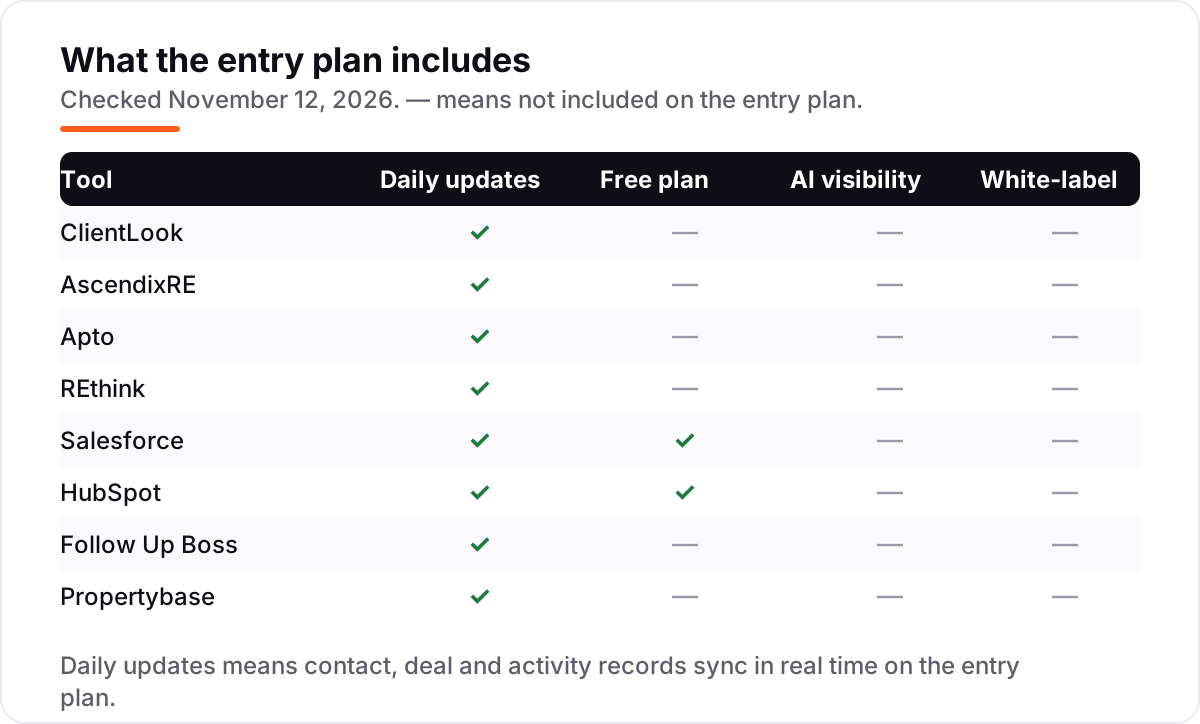
- Check what the entry plan excludes. Calling, forecasting, white-label reports and AI tools sit on higher tiers at Follow Up Boss, HubSpot and Salesforce — price the tier you will actually need.
- Try the mobile app at a property. CRE brokers work from buildings, not desks; REthink and ClientLook are built for that, and a trial at a live listing shows it fast.
A CRM organises the deals you already have; it does not bring in the next tenant or buyer. If the brokerage is not showing up when businesses nearby search for space, our local SEO service covers that side — and the free Google review link generator makes a one-tap review link for every closed deal.
Whatever you shortlist, try it with real listings before you pay. The trials in this list run 10 to 30 days, which is long enough to enter a real building, run a real deal through the pipeline and send a real report to a client. Check two things in the trial: that a property, its suites and its deal stay linked, and that the mobile app works at the building, not just at the desk.
CRM software for commercial real estate pricing: what you will actually pay
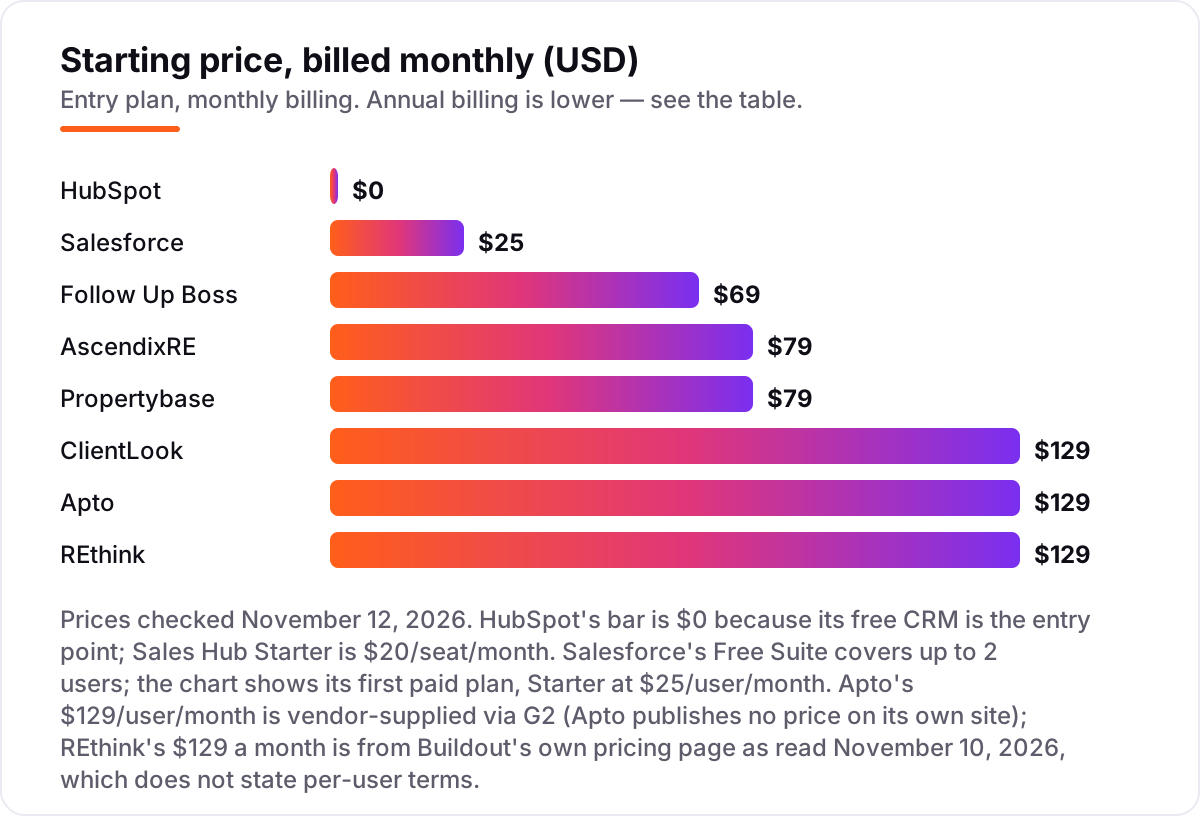
Take a 10-broker commercial team at one office. On list prices, the licences cost $200 a month on HubSpot Starter (ten seats at $20; the free CRM covers only two users), $250 on Salesforce Starter Suite, $499 on Follow Up Boss Pro for ten users, $690 on Follow Up Boss Grow, $790 on AscendixRE, $790 on Propertybase, $1,290 on ClientLook, $1,290 on Apto and $1,290 on REthink — if REthink's $129 is per user, which Buildout's page does not confirm.
Over a year on monthly billing, that is $2,400 on HubSpot Starter, $3,000 on Salesforce Starter, $5,988 on Follow Up Boss Pro, $8,280 on Follow Up Boss Grow, $9,480 on AscendixRE, $9,480 on Propertybase and $15,480 each on ClientLook, Apto and REthink. Annual billing cuts some of these: ClientLook drops to $10,680 a year ($89 a user a month), Follow Up Boss Grow to $6,960 ($58 a user) and Pro to $4,992 ($416 a month).
Three costs sit outside every number above. First, the dialer: a Follow Up Boss team that calls pays $33 to $39 a user a month extra on Grow. Second, implementation: the Salesforce-based tools need configuration, and G2 data puts Propertybase implementation at about 4 months. Third, the step-up: Salesforce Pro Suite quadruples Starter to $100 a user a month, and HubSpot Professional adds a $1,500 onboarding fee. Budget the tier you will need in year two, not the entry price.
Know the difference: a CRE-native CRM vs a general CRM with real estate added
The confusion in this category is not the feature list — it is whether the CRM understands commercial property at all. A CRE-native CRM — ClientLook, AscendixRE, Apto, REthink — treats a building, a suite, a lease and a deal as connected records: change the availability of a suite and the deal pipeline, the stacking plan and the client report all see it. A general CRM — Salesforce, HubSpot, Follow Up Boss — treats a deal as a generic opportunity until someone builds the property objects around it.
The native route costs more per user ($79 to $129 here) but works on day one; the general route starts at $0 to $25 but needs configuration, an admin, or a CRE add-on before it behaves like a brokerage tool. The deciding question is who does the building: if the brokerage has no admin, buy native; if it has Salesforce skills in-house, the general route plus CRE configuration can be cheaper over three years. Either way, do not compare a $25 Salesforce licence with a $129 ClientLook licence as if they were the same product — one is a platform, the other is a finished brokerage tool.
Quick comparison: tool type by need
| Buyer | Best pick | Why |
|---|---|---|
| Small CRE brokerage that wants it working on day one | ClientLook | CRE-native objects, $129/user/month ($89 annual) |
| Best value on Salesforce | AscendixRE | $79/user/month with the Salesforce licence included |
| Investment sales and leasing teams | REthink | Stacking plans and offering memoranda, $129/month |
| Brokerage with an admin that wants to build its own | Salesforce | $25/user/month, the platform the CRE tools run on |
| Smallest budget, free start | HubSpot | Free CRM for 2 users, Starter $20/seat/month |
| Team that lives on lead follow-up | Follow Up Boss | 4.6/5 on G2, Grow $69/user/month ($58 annual) |
Mistakes to avoid
- Ignoring the billing term. AscendixRE at $79 a user a month is annual-only, so ten users cost $9,480 up front. A monthly-billed tool costs more over the year but nothing up front — check the cash flow, not just the monthly figure.
- Budgeting on the licence alone. Follow Up Boss Grow needs a $39 dialer add-on to call; Salesforce needs API access at $25 a user; HubSpot Professional adds a $1,500 onboarding fee. Price the add-ons the team will actually use.
- Trusting a directory price. Apto's old $89 figure still circulates, and REthink is listed anywhere from $99 to $159 a user a month. The live vendor figures are $129 for both — always check the vendor's own page.
- Buying a general CRM and expecting CRE features. Salesforce and HubSpot have no property, lease or stacking-plan objects out of the box. If nobody on the team will build them, the $25 licence is the start of the cost, not the end.
- Ignoring the review base. REthink's 4.0 out of 5 comes from 4 reviews; ClientLook's 3.6 from 12. A score from a handful of reviewers is a hint, not a verdict — read the reviews, not just the stars.
How we chose
We verified every price below against the vendor's own pricing page, or the freshest dated copy of it we could read on November 12, 2026. ClientLook and AscendixRE come from fresh copies of the vendors' own pricing pages (crawled November 10–11, 2026); Salesforce, HubSpot, Follow Up Boss and Propertybase from dated reads of the vendors' pricing pages in October and early November 2026, cross-checked across at least three sources each, because the vendor pages would not load directly on November 12. Two prices needed extra care. Apto publishes no price on its own site, so its $129 a user a month is the vendor-supplied figure on its G2 listing, updated November 4, 2026. REthink's $129 a month comes from Buildout's own pricing page as read on November 10, 2026, which does not state whether the figure is per user or what the billing term is — directories disagree, listing $99 to $159 a user a month, so confirm both on a demo. Ratings come from G2 pages verified on November 12, 2026 via fresh search-index copies: ClientLook 3.6 from 12 reviews, AscendixRE 4.3 from 9, Apto 3.3 from 37, REthink 4.0 from 4, Salesforce 4.4 from 27,591, HubSpot 4.4 from 13,909, Follow Up Boss 4.6 from 117 and Propertybase 2.7 from 33. We ranked the tools by fit for the most common buyer — a small to mid-size US commercial brokerage with 5 to 15 brokers — not by brand size. No vendor paid for a place in this list, and none of the links here are affiliate links.
What to do next
Start with the shortlist above: pick the CRE-native tool that fits the team's size, then take its trial and run one real deal through it — property, suites, pipeline and client report. Check that the mobile app works at the building and that the price you were quoted matches the per-user figure in this guide. If the brokerage is sorted but new tenants and buyers are not finding it, our monthly SEO service handles the visibility side — or compare providers in our guide to SEO companies for small business. Software runs the business; search brings the customers. See where you rank locally, free.
Frequently asked questions
What is the best CRM software for commercial real estate?
ClientLook is the best fit for most CRE brokerages: purpose-built property and deal tracking from $129/user/month, or $89 billed annually. AscendixRE is the best value on Salesforce at $79/user/month with the licence included. Brokerages with an admin should also look at Salesforce Starter at $25/user/month, and small teams that want a free start should look at HubSpot.
How much does a CRM for commercial real estate cost?
Between $0 and $129 per user a month at the entry level. HubSpot's free CRM costs $0 for two users, Salesforce Starter is $25, AscendixRE is $79 and ClientLook, Apto and REthink are $129. A 10-broker team pays $200 to $1,290 a month for licences alone, before dialers, onboarding and implementation — see the worked example above for the full maths.
Is there a free CRM for commercial real estate?
Yes, with limits. HubSpot's free CRM covers two users and 1,000 contacts with no time limit, and Salesforce has a free suite for two users. Neither has CRE objects, so properties and leases need custom fields. The CRE-native tools — ClientLook, AscendixRE, Apto, REthink and Propertybase — have no free plan, only trials or demos.
What is the difference between a CRE CRM and a general CRM?
A CRE CRM treats buildings, suites, leases and deals as connected native records, so availability, stacking plans and client reports stay in sync. A general CRM like Salesforce or HubSpot treats a deal as a generic opportunity until someone builds the property objects around it. Buy native if the brokerage has no admin; buy general if it has Salesforce skills in-house.
Do I need Salesforce for commercial real estate?
Not necessarily. ClientLook runs without Salesforce and suits brokerages that want CRE tracking on day one. But three tools in this list — AscendixRE, Apto and Propertybase — are built on Salesforce, and buying Salesforce direct at $25/user/month is the cheapest route if the brokerage has an admin to shape it. Choose the workflow first, then the platform.
Can I switch CRM later if I pick the wrong one?
Yes, but move in a quiet week. Export contacts, properties, deals, leases and activity history, then import them into the new tool and test the property records before going live. The Salesforce-based tools share a data model, which makes switching between them easier; moving from a CRE-native tool to a general CRM means rebuilding the property objects.
Sources we checked (17)
- ClientLook pricing — clientlook.com/pricing (checked November 12, 2026)
- ClientLook on G2 — 3.6/5, 12 reviews (checked November 12, 2026)
- AscendixRE pricing — ascendix.com/ascendixre-commercial-real-estate-crm (checked November 12, 2026)
- AscendixRE on G2 — 4.3/5, 9 reviews (checked November 12, 2026)
- Apto pricing — vendor-supplied via G2, updated November 4, 2026 (checked November 12, 2026)
- Apto on G2 — 3.3/5, 37 reviews (checked November 12, 2026)
- REthink pricing — Buildout pricing page as read November 10, 2026 (per-user terms not stated)
- REthink by Buildout on G2 — 4.0/5, 4 reviews (checked November 12, 2026)
- Salesforce Sales Cloud pricing — salesforce.com/editions-pricing/sales-cloud (vendor page read October 2026, cross-checked November 12, 2026)
- Salesforce Sales Cloud on G2 — 4.4/5, 27,591 reviews (checked November 12, 2026)
- HubSpot Sales Hub pricing — hubspot.com/pricing/sales (vendor page read November 5, 2026, cross-checked November 12, 2026)
- HubSpot Sales Hub on G2 — 4.4/5, 13,909 reviews (checked November 12, 2026)
- Follow Up Boss pricing — followupboss.com/pricing (vendor page read October 2026, cross-checked November 12, 2026)
- Follow Up Boss on G2 — 4.6/5, 117 reviews (checked November 12, 2026)
- Propertybase pricing — propertybase.com/pricing (vendor page read October 2026, cross-checked November 12, 2026)
- Propertybase on G2 — 2.7/5, 33 reviews (checked November 12, 2026)
- REthink pricing read — SuiteCRE guide (Buildout page read November 10, 2026)
Make one of these tools?
We re-check this list every quarter. Send a correction, request a review, or ask about a clearly labeled sponsored spot.
Request a listingShamim
Founder of SerpAstra
A full-stack SEO and digital marketer who spends most days on Local SEO for dental practices, AI search visibility and lead generation.
Free SEO and AI visibility audit
Find out what is holding your rankings back
Send us your site. Within 2 business days you get a written audit, an AI visibility check and a short fix list ranked by impact. Free, with no contract attached.
Request my free audit→Related buying guides
 Real Estate & Property ManagementBest Real Estate Software for 2026: 11 Options Compared by Use CaseCompare the 11 best real estate software options for agents and teams on price, IDX websites, CRM and lead generation, with prices checked November 8, 2026.Read guide →
 Real Estate & Property Management9 Best Mapping Software for Commercial Real Estate in 2026, ComparedCompare the 9 best mapping software for commercial real estate on price, demographics, foot traffic and free plans, with every price checked November 8, 2026.Read guide →
 Sales & CRM12 Best CRM Email Marketing Software in 2026, Compared12 best crm email marketing software tools compared on price, CRM depth and automation, with real starting prices checked on November 4, 2026.Read guide →