
10 Best Cross-Platform Messaging Apps in 2026, Compared
The 10 best cross-platform messaging apps compared on price, encryption and device support. Six are free, with every price checked November 10, 2026.
 Shamim Mia, Founder, SerpAstraLast verified November 10, 202613 min read
We compare pricing pages, documentation and public reviews. We never accept payment for rankings.

Key takeaways
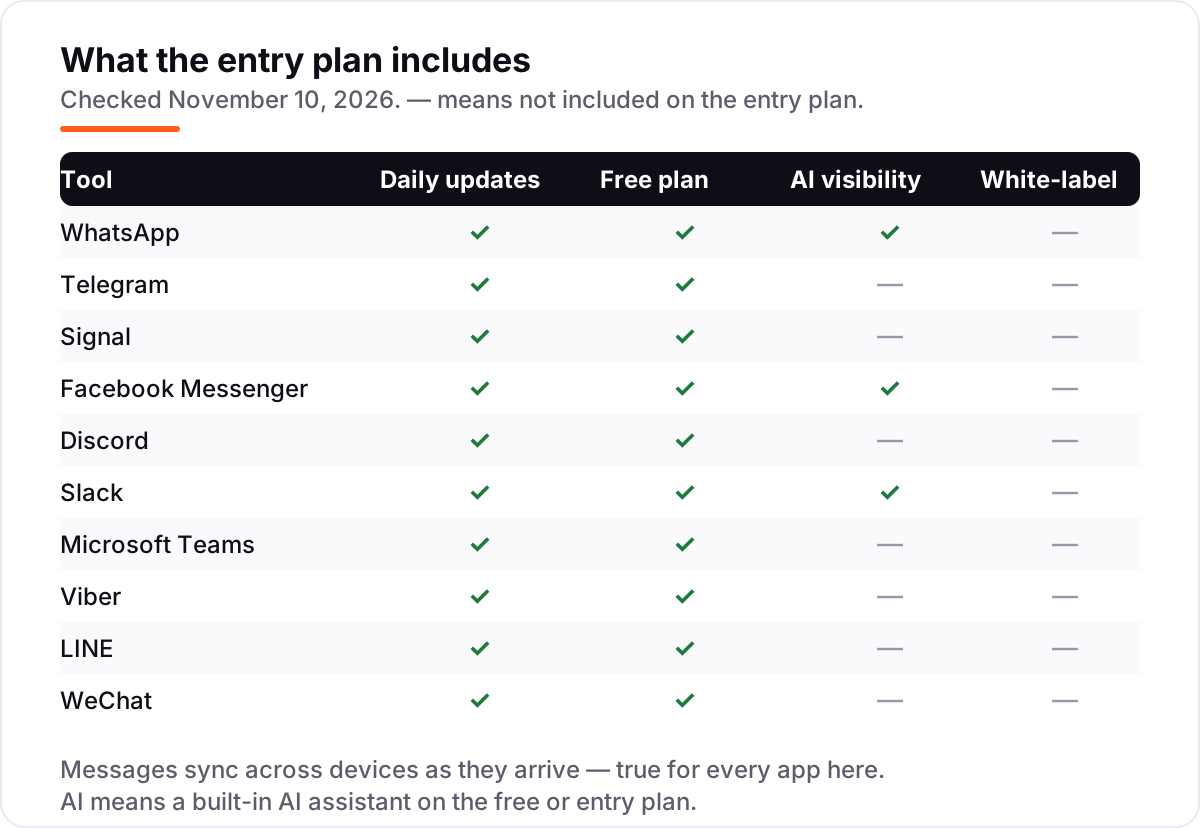
- WhatsApp leads for most people at $0, Telegram is the best free power-user pick at $0 (Premium $35.99/year), and Signal is the best private option, also $0.
- The single most important buying factor is where your contacts already are: the best app is the one your family, friends and team actually answer on.
- Six of the ten apps here are completely free, and the paid upgrades only matter for work teams — Slack Pro at $87 a year per user and Teams Essentials at $48 a year per user.
- Every price below was checked November 10, 2026. Ratings are G2 for Slack and Microsoft Teams only; the other apps have no usable G2 review page, so their ratings are omitted, not estimated.
On this page
Quick comparison
| Tool | Best for | Starting price | Free plan |
|---|---|---|---|
| Anyone who wants the app their contacts already use, on every device, for $0 | Free | Yes (free) | |
| Telegram | Power users and big communities that want huge groups, channels and cloud sync for $0 | $35.99/yr (Premium annual) | Yes (free) |
| Signal | Anyone who wants the strongest privacy by default and will trade a smaller network for it | Free | Yes (free) |
| Facebook Messenger | Facebook users who want to message friends without leaving the app they already open daily | Free | Yes (free) |
| Discord | Communities, gaming groups and hobby clubs that want voice channels and servers for $0 | $29.99/yr (Nitro Basic annual) | Yes (free) |
| Slack | Small work teams that want channels, search and app integrations in one place | $87/yr per user (Pro annual) | Yes (free, 90-day history) |
| Microsoft Teams | Teams already paying for Microsoft 365 that want chat, meetings and files in one app | $48/yr per user (Essentials annual) | Yes (free) |
| Viber | People with family abroad who want free international calls and chats in one app | Free | Yes (free) |
| LINE | People messaging contacts in Japan, Taiwan or Thailand who want stickers, calls and chat in one app | Free | Yes (free) |
| Anyone who needs to reach contacts in China, where WeChat is the default for everything | Free | Yes (free) |
Make one of these tools?
We re-check this list every quarter. Send a correction, request a review, or ask about a clearly labeled sponsored spot.
Request a listingThe best cross-platform messaging apps

Best for: Anyone who wants the app their contacts already use, on every device, for $0
WhatsApp is the default answer for most people because the network is the feature: the family group, the school parents, the plumber and the cousins are all already there, and the app itself costs nothing on iPhone, Android, Windows, Mac and the web. Messages, voice and video calls are end-to-end encrypted by default, and linked devices mean you can reply from your laptop while your phone charges in another room.
The trade is your phone number. There is no username, so anyone you message sees your number, and the app belongs to Meta, which is a deal-breaker for some privacy-minded users. Small businesses get a free Business app with catalogues and quick replies, but bulk messaging runs through the Business Platform, which charges per delivered message. If everyone you know is already here, nothing else comes close.
What we like
- Your contacts are almost certainly already on it, so nobody needs to install something new to reach you
- End-to-end encryption is on by default for personal messages and calls
- Linked devices keep working when your phone is off or offline
- Voice and video calls, group chats and Status cover family, friends and small teams in one app
Watch out for
- No username system — your phone number is your identity, and anyone you message sees it
- Chat backups are not end-to-end encrypted by default; the extra backup encryption has to be switched on
- Businesses that send bulk messages pay the Business Platform per delivered message, so business use can stop being free

Telegram
Best for: Power users and big communities that want huge groups, channels and cloud sync for $0
Telegram is the power user's messenger: the free app covers nearly everything — huge groups, channels, bots, scheduled messages and file sharing — and cloud sync means your chats are waiting on every device you own, phone or no phone. It runs on iPhone, Android, Windows, Mac, Linux and the web, and the interface is fast everywhere.
The catch is encryption. Ordinary Telegram chats live encrypted on Telegram's servers, not end-to-end encrypted, so only Secret Chats are truly private — and those stay on one device. Premium at $4.99 a month adds faster downloads, 4 GB uploads and voice-to-text, but the free tier is so complete that most people will never pay. Pick Telegram when your groups are big and your devices are many.
What we like
- Cloud chats sync across every device at once, with no phone connection needed
- Groups hold up to 200,000 members, the largest group size in this list
- Free file sharing up to 2 GB per file, with Premium raising it to 4 GB
- Bots, channels and scheduled messages make it a work tool as well as a chat app
Watch out for
- Default cloud chats are not end-to-end encrypted — only Secret Chats are, and they do not sync across devices
- Spam and scam groups are a real nuisance in large public groups
- Needs a phone number to sign up, like WhatsApp

Signal
Best for: Anyone who wants the strongest privacy by default and will trade a smaller network for it
Signal is the privacy pick, and it is free in the most complete sense: a nonprofit runs it on donations, there are no ads and no paid tier, and every message, call and group chat is end-to-end encrypted by default. It works on iPhone, Android, Windows, Mac and Linux, and the open-source code means anyone can check what the app actually does.
The price of that privacy is reach. Far fewer people use Signal than WhatsApp or Telegram, so the app is only as useful as the contacts you can persuade to join. There are no channels or bots, and the desktop app still leans on your phone. If private conversation matters more than a big network, Signal is the honest choice — and it costs nothing.
What we like
- End-to-end encryption is on by default for every message, call and group — there is nothing to switch on
- A nonprofit with open-source code and no ads, tracking or data selling
- You can now chat with a username instead of sharing your phone number
- Disappearing messages, sealed sender and no cloud backups of message content
Watch out for
- Far fewer contacts use it than WhatsApp or Telegram, so you may be messaging into an empty room
- No cloud backup or multi-device sync as smooth as Telegram's — desktop needs your phone linked
- Few extras: no channels, no bots and no business tools

Facebook Messenger
Best for: Facebook users who want to message friends without leaving the app they already open daily
Messenger is the path of least resistance for Facebook's users: the people are already there, the app is free, and messages, calls and group chats work on iPhone and Android and in a browser through Facebook. Meta AI sits inside the chat for quick questions, and you can now sign up with just a phone number if you would rather not use a Facebook account.
The desktop story is the weak spot. Meta discontinued the Windows and macOS apps in December 2025, and the standalone Messenger website was scheduled to close in April 2026 — it is still live, but desktop access now runs through facebook.com. Messenger is the right pick when your contacts live on Facebook; if you want a dedicated desktop app, WhatsApp or Telegram serve you better.
What we like
- Already installed for most Facebook users, with no separate sign-up for your existing contacts
- One-to-one chats are end-to-end encrypted by default
- Meta AI is built in, so you can ask questions without leaving the chat
- Works in a browser through Facebook, so there is always a desktop route even without an app
Watch out for
- Meta discontinued the Windows and macOS desktop apps in December 2025, so desktop use now means the Facebook website
- Needs a Facebook account or a phone number, and the app carries ads and Meta AI prompts
- The standalone Messenger website was itself scheduled to close in April 2026, though it remains live

Discord
Best for: Communities, gaming groups and hobby clubs that want voice channels and servers for $0
Discord is the community app in this list: free servers with text and voice channels, screen sharing and video, on iPhone, Android, Windows, Mac, Linux and the web. A gaming group, a study group or a hobby club can live there for $0, and the free tier is generous enough that most servers never pay anything.
The trade is privacy and focus. Messages are not end-to-end encrypted, and the interface is built around servers, so a quiet one-to-one chat feels like an afterthought. Nitro Basic at $2.99 a month adds custom emoji and 50 MB uploads, and full Nitro at $9.99 adds HD streaming and two Server Boosts — nice perks, but neither changes what Discord is for. Pick it for groups, not for private chats.
What we like
- Free servers with text channels, voice channels, screen sharing and video — no paid plan needed to run a community
- Works on iPhone, Android, Windows, Mac, Linux and the web, with the same account everywhere
- Nitro Basic at $2.99 a month is the cheapest paid step up in this list
- Two Server Boosts come with full Nitro, and members can join up to 200 servers
Watch out for
- Messages are not end-to-end encrypted, and server admins can read channel messages
- The interface is built for communities, so one-to-one chats feel buried next to servers and channels
- Full Nitro at $9.99 a month buys cosmetics and perks, not features most people need

Slack
Best for: Small work teams that want channels, search and app integrations in one place
Slack is the work chat in this list: channels for every project, threads that keep replies attached to their question, and search that actually finds last month's decision. The free plan covers a small team with 90 days of history and 10 app integrations, and Pro at $7.25 per user a month on annual billing adds unlimited history, unlimited apps and group huddles.
Slack's cost is per person, so a 10-person team pays $870 a year on Pro — and that is before Business+ at $15 a user. There is no end-to-end encryption, and busy channels can bury important messages under notifications, which is the complaint G2 reviewers raise most often. For a team that lives in channels, though, nothing else in this list is as organized.
What we like
- Channels, threads and search keep work conversations organized instead of scattered across email
- Over 2,600 app integrations, with 10 included on the free plan
- Basic AI summaries and Slackbot are included even on the free plan
- Fair billing only charges for members active in the last 28 days
Watch out for
- Free plan keeps only 90 days of message history, so older decisions vanish from search
- Pro costs $7.25 per user a month on annual billing, and the bill grows with every hire
- No end-to-end encryption, and notification overload is the complaint G2 reviewers raise most often

Microsoft Teams
Best for: Teams already paying for Microsoft 365 that want chat, meetings and files in one app
Microsoft Teams is the sensible pick for any team already inside Microsoft 365: chat, video meetings, calling and files in one app, with Outlook, OneDrive and SharePoint woven through it. The free plan covers unlimited one-to-one meetings and group meetings up to 60 minutes, and Essentials at $4 per user a month on annual billing extends meetings to 30 hours for up to 300 people.
Teams is not the lightest app here. G2 reviewers most often complain that it feels heavy and slow, especially during screen sharing, and finding older files takes more patience than it should. The free plan is really a personal plan — business controls wait for the paid tiers. If your team already pays for Microsoft 365, Teams costs nothing extra; as a standalone chat app, Slack is the smoother tool.
What we like
- Chat, video meetings, calling and file sharing live in one app, with OneDrive and SharePoint built in
- The free plan includes unlimited one-to-one meetings and group meetings up to 60 minutes
- Essentials at $4 a user a month is the cheapest paid team plan in this list
- Deep Outlook and Office integration: schedule meetings and co-edit documents without leaving the chat
Watch out for
- The desktop app is heavy on memory and can feel slow, the complaint G2 reviewers raise most often
- No end-to-end encryption for ordinary chats, and switching between accounts from different organizations is clumsy
- The free plan is positioned for personal use; business features start on the paid plans

Viber
Best for: People with family abroad who want free international calls and chats in one app
Viber is the international-calls pick: free messages, voice and video calls between Viber users, plus Viber Out, which calls regular mobiles and landlines at low rates for the contacts who never install the app. It runs on iPhone, Android, Windows, Mac and Linux, chats are end-to-end encrypted by default, and calls can move between your phone and your computer mid-conversation.
Viber's weakness is reach. In most English-speaking countries far fewer people use it than WhatsApp, so it works best as a second app for family abroad rather than your only messenger. The desktop app also needs the phone app set up first — it cannot stand alone. If your contacts are spread across countries, Viber earns its place; if they are all local, WhatsApp already has them.
What we like
- Free messaging, voice and video calls between Viber users, on iPhone, Android, Windows, Mac and Linux
- Viber Out calls regular mobiles and landlines at low rates, so one app covers contacts who never install it
- End-to-end encryption is on by default for one-to-one and group chats
- Desktop and tablet apps sync with the phone, and calls can move between phone and computer
Watch out for
- The desktop app cannot stand alone — it needs the phone app set up first
- Smaller user base than WhatsApp or Telegram in most English-speaking countries
- Paid extras add up: Viber Out credit and the optional Plus subscription
LINE
Best for: People messaging contacts in Japan, Taiwan or Thailand who want stickers, calls and chat in one app
LINE is the messaging app of Japan, Taiwan and Thailand, and it shows: free messages, voice and video calls, a sticker culture no rival matches, and a timeline for sharing moments with friends. It runs on iPhone, Android, Windows, Mac and Wear OS, chats are end-to-end encrypted with Letter Sealing, and the desktop app keeps your conversations in sync.
Outside its home region, LINE's network is thin — if your contacts are not in East Asia, you will be messaging an empty room. The desktop app needs the phone version and a registered email before it works, and stickers and themes cost extra. Pick LINE when your people are already on it, especially in Japan or Taiwan; otherwise WhatsApp covers the same ground with a bigger network.
What we like
- Free messages, voice and video calls, with the sticker culture that made LINE famous
- Runs on iPhone, Android, Windows, Mac and Wear OS, syncing phone and desktop
- Group chats, timeline posts and official accounts cover friends, family and small businesses
- Letter Sealing end-to-end encryption is on by default for chats
Watch out for
- Outside Japan, Taiwan and Thailand, few contacts use it — the network is regional, not global
- The desktop app needs the phone app and a registered email first
- Stickers, themes and extras are paid, and the app can feel cluttered with services you will never use

Best for: Anyone who needs to reach contacts in China, where WeChat is the default for everything
WeChat is a different kind of pick: for anyone with family, friends or business contacts in China, it is not one option among many — it is the app those contacts use for messaging, calls, payments and daily life. It is free, with no subscription, and it runs on iPhone, Android, Windows, Mac and the web, with group chats of up to 500 members.
The trade-offs are real. Chats are not end-to-end encrypted, registration outside China can be awkward, and the app is not available in India's app stores. Desktop and web access need the phone app to sign in with a QR code. If your world includes China, WeChat is essential; if it does not, the privacy trade is not worth making.
What we like
- The only app in this list that reliably reaches contacts inside mainland China
- Messages, voice and video calls, group chats of up to 500 members and Moments in one free app
- Runs on iPhone, Android, Windows, Mac and the web, with one account everywhere
Watch out for
- Chats are not end-to-end encrypted, and the app is closely tied to China's rules and data practices
- Registration can be awkward outside China, and the app is not in India's app stores
- Desktop and web versions need the phone app to sign in by QR code
The best cross-platform messaging app is the one that works on every device you own and reaches the people you actually talk to. This list compares ten apps that run on iPhone, Android and desktop, ranked by fit for the most common buyer — a person or small team that wants one app across all their devices. Six of the ten are completely free, and the paid upgrades only matter for work teams and power users.
How to choose the best cross-platform messaging app
- Start with your contacts, not the feature list. An app is only useful if the people you message answer there. Ask your five most-messaged contacts which app they check first, and shortlist from their answers.
- Check the encryption default. Signal and WhatsApp encrypt every personal chat end to end by default; Telegram only encrypts Secret Chats that way. If privacy matters, the default matters more than the promise.
- Count the devices. Every app here runs on iPhone and Android, but desktop quality varies: Telegram syncs everywhere without your phone, while Viber, LINE and WeChat desktop apps need the phone app first.
- Decide personal or work. Family and friends need a big network and free calls; a work team needs channels, search and admin controls, which is where Slack and Teams earn their price.
- Test the free tier first. Six apps here are free with no paid tier at all, and Slack and Teams both have free plans. Use the free version for a week with your real contacts before paying for anything.
- Watch the paid step. Telegram Premium, Discord Nitro and Slack Pro are per-person prices — a family pays once, a 10-person team pays ten times. Price the upgrade for everyone who will use it, not just yourself.
Messaging is only half the job — people still have to find you. Our local SEO service covers the search side, and if you share business links inside these chats, the free UTM builder tags them so you can see which app sent the traffic.
Cross-platform messaging app pricing: what you will actually pay
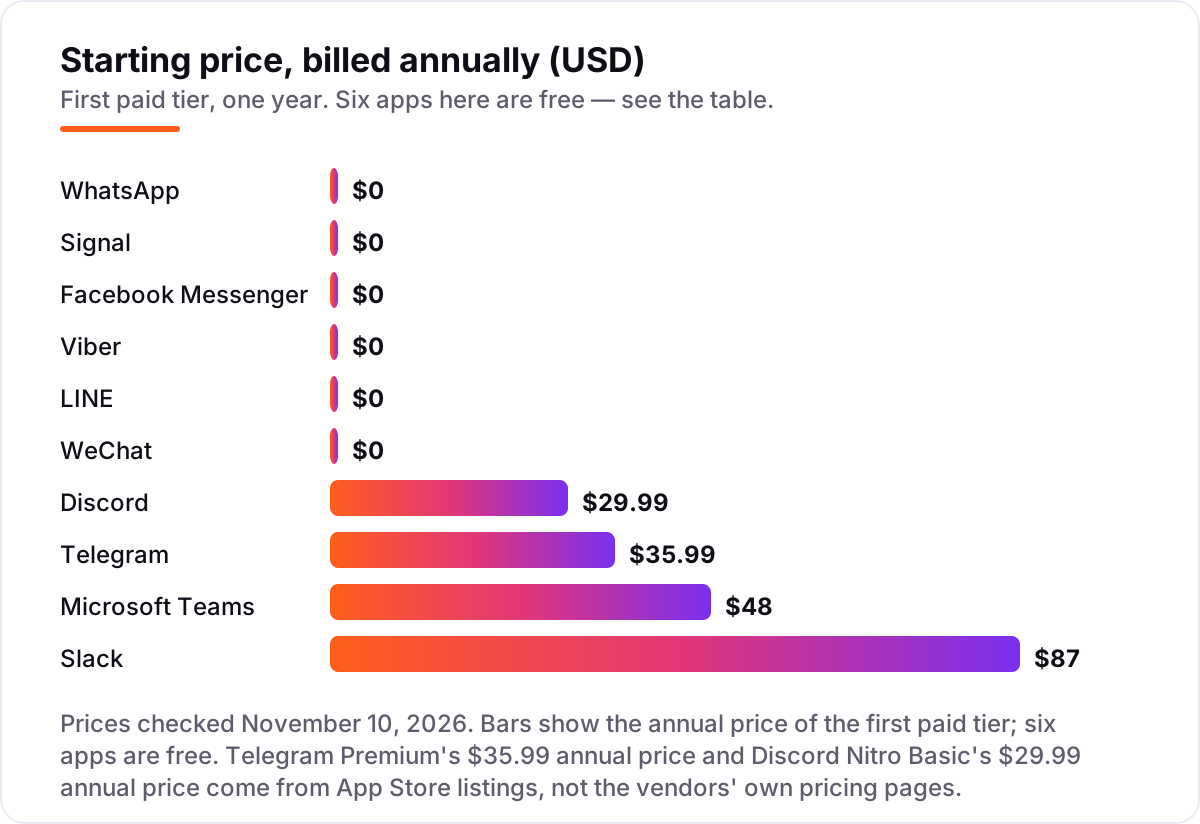
Start with the good news: a family of four pays $0 a year. WhatsApp, Signal, Messenger, Viber, LINE and WeChat are all free, and the free tiers of Telegram and Discord cover everything a family needs — group chats, calls, photos and video — without a subscription.
The money starts when one person wants the extras. Telegram Premium costs $35.99 a year, and Discord Nitro Basic costs $29.99 a year, so one power user who buys both pays $65.98 a year. Neither is needed to message anyone.
Work teams are where the bill grows, because Slack and Teams charge per person. A 10-person team on Slack Pro pays $87 per user a year on annual billing, or $870 for the team; the same team on Teams Essentials pays $48 per user a year, or $480. Paying monthly instead costs $1,050 on Slack Pro and $576 on Teams Essentials — $180 and $96 more per team per year for the same seats. The cheapest way to run a work team here is Teams Essentials at $480 a year; the dearest is Slack Pro on monthly billing at $1,050.
Three costs sit outside every number above. First, WhatsApp's Business Platform charges per delivered message for business-initiated templates, so a business that messages customers at scale pays by volume, not by month. Second, Viber Out credit for calling regular phone numbers, and LINE stickers and themes, are small extras that add up only if you buy them often. Third, the per-person trap: a 10-person Slack workspace costs ten times the headline price, and every hire after that adds $87 a year.
Know the difference: end-to-end encryption vs cloud chats
"Encrypted" on a messaging app can mean two very different things, and the difference decides who can read your messages.
- End-to-end encrypted chats are scrambled on your phone and unscrambled only on the recipient's phone. Nobody in the middle — not the company, not a hacker who breaks into its servers — can read them. Signal encrypts everything this way by default, WhatsApp encrypts personal chats and calls this way by default, and Viber and LINE do the same for their chats.
- Cloud chats are encrypted while they travel and while they sit on the company's servers, but the company holds the keys. Telegram's ordinary chats work this way: they sync beautifully across every device, but Telegram could read them. Only Telegram's Secret Chats are end-to-end encrypted, and they stay on one device.
- Work chats are a third case. Slack, Teams and Discord encrypt messages in transit and at rest, but the company — and, on paid plans, your workspace admin — can access them. That is by design: workplaces need search, compliance and exports.
So the question is not "is it encrypted" but "who holds the keys". For private conversations, pick an app where the default is end-to-end encryption. For big groups and many devices, cloud chats are the price of that convenience — and for work, assume anything you type can be read by an admin.
Quick comparison: tool type by need
| Buyer | Best pick | Why |
|---|---|---|
| Family and friends, biggest network | Free, and your contacts are already on it | |
| Big groups and many devices | Telegram | Free, with 200,000-member groups and cloud sync |
| Private conversations | Signal | Free, with end-to-end encryption on by default |
| Facebook friends | Facebook Messenger | Free, and no new account to set up |
| Communities and gaming groups | Discord | Free servers, Nitro Basic from $29.99 a year |
| Small work team | Slack | Free plan, Pro at $87 a year per user |
| Team already on Microsoft 365 | Microsoft Teams | Free plan, Essentials at $48 a year per user |
| Family abroad, cheap calls | Viber | Free, with Viber Out for regular numbers |
| Contacts in Japan or Taiwan | LINE | Free, with the sticker culture they expect |
| Contacts in China | Free, and the only app that reliably reaches them |
Mistakes to avoid
- Picking the clever app instead of the popular one. The best encryption and the best features mean nothing if your contacts never open it. Shortlist by who answers, then compare features.
- Assuming "encrypted" means end-to-end encrypted. Telegram's ordinary chats, Discord messages and Slack channels are encrypted in transit and at rest — but the company can read them. Only end-to-end encryption keeps the provider out.
- Paying per person without counting heads. Slack Pro and Teams Essentials are priced per user, so a 10-person team pays ten times the headline price. Multiply before you buy.
- Forgetting the desktop. Messenger's desktop apps are gone, and Viber, LINE and WeChat desktops all need your phone. If you type most messages on a computer, test the desktop app for a week before committing.
- Trusting a directory price. Telegram's Premium price is not on Telegram's own pricing page, and Microsoft's Business Basic is $7 a user a month after the July 2026 price rise while older guides still show $6. Check the vendor's own page before you pay.
How we chose
We checked each vendor's own pricing page on November 10, 2026 and recorded the starting price exactly as shown, including the annual-billing figure where the page lists one, and we ranked the tools by fit for the most common buyer — a person or small team that wants one messaging app across iPhone, Android and desktop — not by brand size. Slack's Pro price ($7.25 per user a month on annual billing) and Discord's Nitro prices ($2.99 and $9.99 a month) were verified on the vendors' own pricing pages; Microsoft Teams Essentials ($4.00 a user a month, paid yearly) was verified from a fresh crawl of Microsoft's own Teams business plans page dated November 9, 2026. The six free apps were verified as $0 from their official app-store listings and download pages.
Two prices are third-party-sourced and disclosed as such: Telegram Premium's $35.99 annual price and Discord Nitro Basic's $29.99 annual price come from App Store listings, because the vendors' own pages show only the monthly price or no price at all. Ratings come from G2 for Slack (4.5/5, 40,449 reviews) and Microsoft Teams (4.4/5, 19,437 reviews) only — the WhatsApp G2 page returned a 403, and the Telegram, Discord and Signal G2 pages loaded as category pages with no usable score, so those ratings are omitted rather than estimated. Google Messages was left out because it has no iOS app, and iMessage and Skype were excluded as Apple-only and shut down in May 2025 respectively. No vendor paid for a place in this list, and none of the links here are affiliate links.
What to do next
Pick the app your contacts already use, install it on your phone and your computer, and use it for a week before deciding. If your people are split across two apps, that is normal — run both, and let the one with more replies win. If the app is for work, start on the free plan of Slack or Teams and upgrade only when the 90-day history limit or the meeting cap starts to bite. Once your tools are in place, find out what's holding your rankings back.
Your stack only works if people find you
SerpAstra fixes what keeps your site off page one and makes it easy for AI assistants to recommend.
Get a free audit→Sources we checked (15)
- WhatsApp — whatsapp.com (checked November 10, 2026)
- Telegram pricing — telegram.org/pricing (checked November 10, 2026)
- Telegram Premium annual price ($35.99/year) — US App Store listing, via giftclub.app (checked October 28, 2026)
- Signal — signal.org (checked November 10, 2026)
- Facebook Messenger — messenger.com (checked November 10, 2026)
- Facebook Messenger desktop apps discontinued — gizmodo.com/download/messenger (checked November 10, 2026)
- Discord Nitro pricing — discord.com/nitro (checked November 10, 2026)
- Discord Nitro Basic annual price ($29.99/year) — third-party price guides (checked October 2026)
- Slack pricing — slack.com/pricing (checked November 10, 2026)
- Slack on G2 — 4.5/5, 40,449 reviews (checked November 10, 2026)
- Microsoft Teams pricing — microsoft.com Teams business plans page (checked November 10, 2026)
- Microsoft Teams on G2 — 4.4/5, 19,437 reviews (checked November 10, 2026)
- Viber — viber.com (checked November 10, 2026)
- LINE — line.me (checked November 10, 2026)
- WeChat — wechat.com (checked November 10, 2026)
Shamim
Founder of SerpAstra
A full-stack SEO and digital marketer who spends most days on Local SEO for dental practices, AI search visibility and lead generation.
Frequently asked questions
What is the best cross-platform messaging app in 2026?
WhatsApp is the best fit for most people: it is free, it runs on iPhone, Android, Windows, Mac and the web, and your contacts are almost certainly already on it. Telegram is the better pick for big groups and power users, and Signal is the best choice when privacy matters most. The right answer depends on who you message, not on the feature list.
Is there a completely free cross-platform messaging app?
Yes — six of the ten apps in this list are completely free. WhatsApp, Signal, Facebook Messenger, Viber, LINE and WeChat cost nothing to download or use for messaging and calls. Telegram and Discord are also free for everyday use, with optional paid upgrades. Only Slack and Microsoft Teams charge, and both have free plans for small teams.
Which messaging app is the most private?
Signal is the most private app in this list: every message, call and group chat is end-to-end encrypted by default, it is run by a nonprofit, and there are no ads or trackers. WhatsApp also encrypts personal chats by default. Telegram's ordinary chats are not end-to-end encrypted — only its Secret Chats are — so it is the wrong pick for private conversations.
What is the difference between WhatsApp and Telegram?
WhatsApp encrypts personal chats end to end by default and is built around your phone number, with the largest user base in this list. Telegram stores ordinary chats encrypted on its servers instead, which lets it sync across unlimited devices and run groups of up to 200,000 members. Choose WhatsApp for privacy and reach, Telegram for big groups and many devices.
Can I use these apps on my computer without my phone?
Telegram syncs across every device without your phone, and WhatsApp's linked devices keep working when your phone is off. Signal's desktop app still leans on your phone, and Viber, LINE and WeChat desktops need the phone app set up first. Facebook Messenger's desktop apps were discontinued in December 2025, so computer access now runs through the Facebook website.
Is Slack or Microsoft Teams better for work chat?
Slack is the smoother tool if you are buying chat on its own: channels, search and more than 2,600 integrations, with Pro at $87 per user a year. Teams wins if your organization already pays for Microsoft 365, since chat, meetings and files come bundled and Essentials costs $48 per user a year. Both have free plans, so try the one your team already lives in.
What about Google Messages and iMessage?
Neither makes this list. Google Messages has no iOS app — it runs on Android and the web — so it is not truly cross-platform. iMessage is Apple-only, so it cannot reach Android users at all. If everyone you message uses Apple devices, iMessage is fine; if your contacts mix iPhone and Android, pick WhatsApp or Telegram instead.
Free SEO and AI visibility audit
Find out what is holding your rankings back
Send us your site. Within 2 business days you get a written audit, an AI visibility check and a short fix list ranked by impact. Free, with no contract attached.
Request my free audit→Related guides
 AI, Data & Analytics8 Best AI Chatbot for Customer Service in 20268 best AI chatbot for customer service tools compared on price, AI resolution costs and free plans. Prices checked on vendor pricing pages, November 2, 2026.Read guide →
 Communication & Customer Support11 Best Contact Center Software for Small Business in 2026, ComparedCompare the 11 best contact center software for small business options on price, channels and AI features, with every price checked November 4, 2026.Read guide →
 Communication & Customer Support7 Best Communication Software for Small Business in 2026, ComparedCompare the 7 best communication software for small business on price, free plans, AI features and phone systems, with every price checked November 4, 2026.Read guide →