
10 Best Deck Design Software for Contractors in 2026, Compared
Compare the 10 best deck design software for contractors on price, 3D quality, materials lists and permit output, with every price checked November 7, 2026.
 Shamim Mia, Founder, SerpAstraLast verified November 7, 202613 min read
We compare pricing pages, documentation and public reviews. We never accept payment for rankings.

Key takeaways
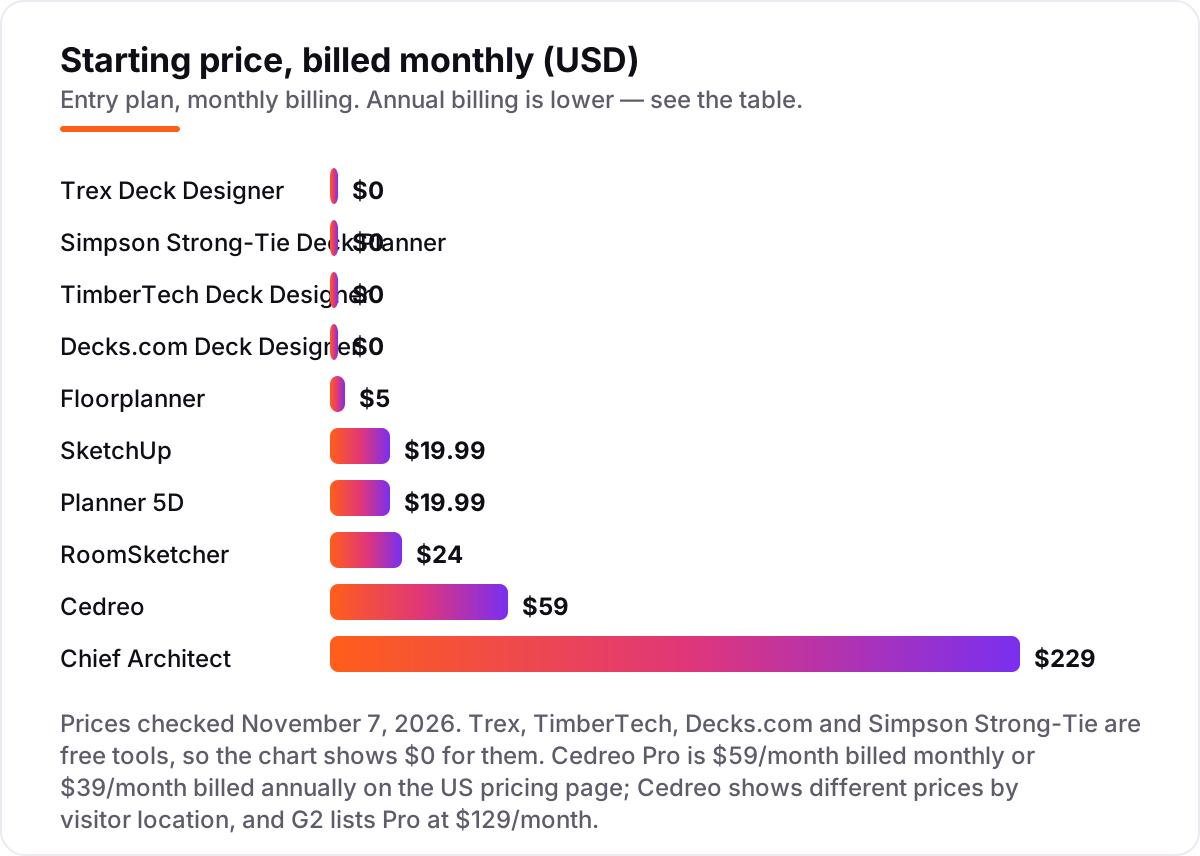
- Four of the ten tools are free: Trex, TimberTech, Decks.com and Simpson Strong-Tie cost $0, while the cheapest paid plan is Floorplanner Plus at $5/month and the dearest is Chief Architect Premier at $229/month.
- The single most important buying factor is what the software must produce: a sales rendering, a materials list, or a permit submittal page — each points to a different tool.
- Simpson Strong-Tie is the only free tool that generates permit submittal pages, and Cedreo is the sales-focused pick at $59/month with photorealistic renderings in minutes.
- Annual billing cuts the bill sharply on every paid tool here — SketchUp Go drops from $19.99 to $10.75 a month and RoomSketcher Pro from $24 to $12.
On this page
Quick comparison
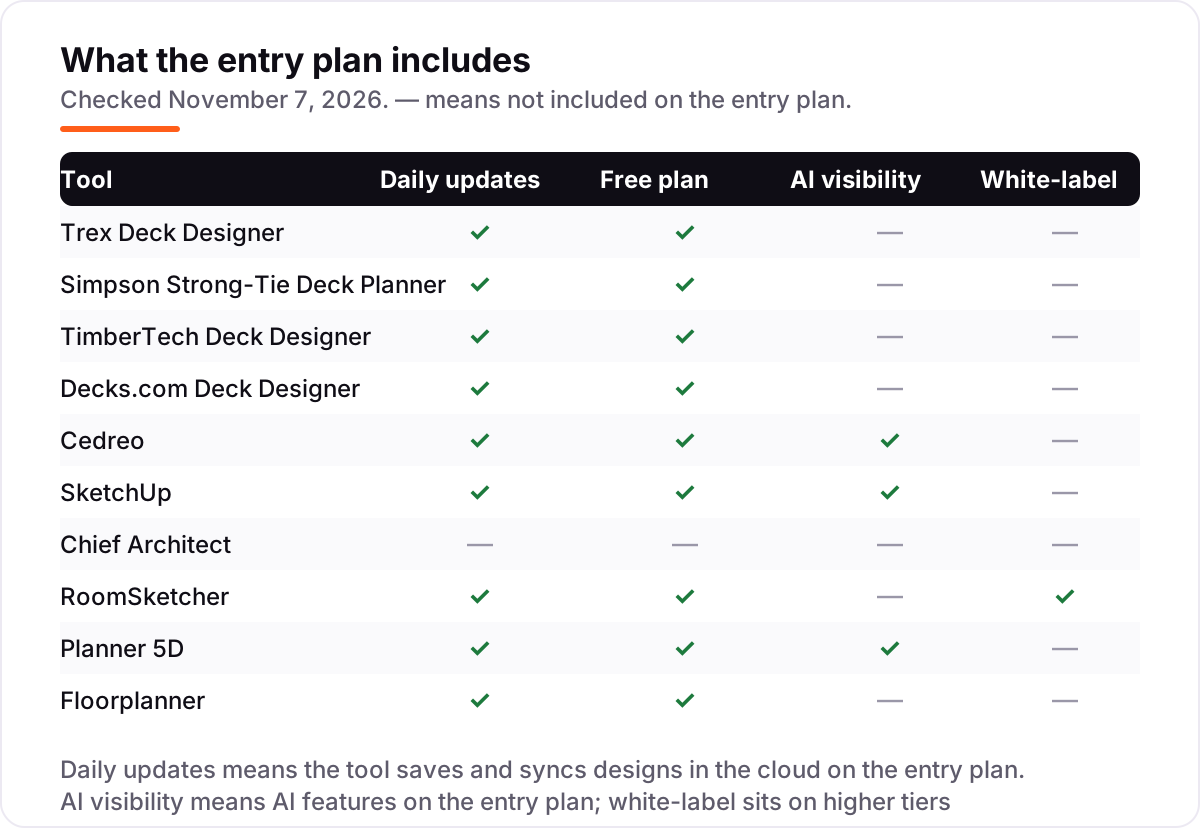
| Tool | Best for | Starting price | Free plan |
|---|---|---|---|
| Trex Deck Designer | Deck contractors who install Trex and want a free 3D designer that produces a materials list in front of the client | Free | Yes (free) |
| Simpson Strong-Tie Deck Planner | Contractors who need structurally sound deck plans and permit submittal pages, free | Free | Yes (free) |
| TimberTech Deck Designer | Contractors loyal to TimberTech composite decking who want free 3D design with real project cost data | Free | Yes (free) |
| Decks.com Deck Designer | Contractors who want a free designer plus a library of professional deck plans and estimators | Free | Yes (free) |
| Cedreo | Design-build contractors whose 3D rendering closes the sale at the first meeting | $59/mo | Yes (free plan) |
| SketchUp | Contractors comfortable with 3D modeling who need custom deck designs no template can cover | $19.99/mo | Yes (free web) |
| Chief Architect | Design-build firms that produce full residential construction documents, decks included | $229/mo | No (trial) |
| RoomSketcher | Contractors who need quick measured 2D/3D visuals with branding and print-to-scale output | $24/mo | Yes (free plan) |
| Planner 5D | Contractors who want quick client-ready 3D visuals on any device, including on site | $19.99/mo | Yes (free) |
| Floorplanner | Contractors who want the cheapest paid upgrade for quick browser-based 2D/3D deck layouts | $5/mo | Yes (free) |
Make one of these tools?
We re-check this list every quarter. Send a correction, request a review, or ask about a clearly labeled sponsored spot.
Request a listingThe best deck design software for contractors

Trex Deck Designer
Best for: Deck contractors who install Trex and want a free 3D designer that produces a materials list in front of the client
Trex Deck Designer is the obvious starting point for any contractor who installs Trex: it is free, it runs in the browser, and it turns a design into a materials list, a cost estimate and a printable 3D rendering in minutes. Multi-level layouts, stairs and railings are all covered, and the whole range of Trex boards and colours is built in, so the client sees exactly what they are buying.
The limitation is the brand lock-in. Every board in every design is Trex, which is a feature when you sell Trex and a deal-breaker when you quote several brands or custom lumber. It also produces no permit drawings and no structural calculations. Use it as your free sales tool on Trex jobs, and pair it with Simpson Strong-Tie when the job needs permit paperwork.
What we like
- Free 3D designer with multi-level layouts, stairs and railings, built on the Trex decking range
- Generates a materials list, a cost estimate and a printable rendering for every design
- Design it live with the client and hand over the materials list on the spot
- No subscription, no licence to manage, no per-project fee
Watch out for
- Every board is Trex — no good if you quote multiple brands or custom lumber
- Aimed partly at homeowners, so it lacks contractor workflow features like quoting or CRM
- No permit drawings or structural calculations

Simpson Strong-Tie Deck Planner
Best for: Contractors who need structurally sound deck plans and permit submittal pages, free
Simpson Strong-Tie Deck Planner is the most practical free tool here for contractors who care about passing inspection the first time. It is a free, web-based planner with 2D and 3D views and pre-built templates, and it is built around structure: it recommends the right connectors and hardware for the design, then generates a bill of materials covering lumber, decking, railing and hardware.
The standout feature is the permit submittal output — design the deck, print the submittal pages, and go. A dealer locator in the report lists nearby pro lumberyards. The trade-offs are a desktop-only tool with basic visuals and no cost estimating beyond the materials list. For the build and permit side of the job, nothing else free comes close.
What we like
- Free web-based planner with 2D and 3D views and pre-built deck templates
- Recommends the right connectors and hardware for the design and builds a full bill of materials
- Generates permit submittal pages — the only free tool here that does
- Dealer locator in the report points clients to nearby pro lumberyards
Watch out for
- Desktop browsers only — no mobile app for on-site design
- Focused on structure, not pretty visuals; renderings are basic next to Cedreo or SketchUp
- No cost estimating beyond the materials list

TimberTech Deck Designer
Best for: Contractors loyal to TimberTech composite decking who want free 3D design with real project cost data
TimberTech Deck Designer is the free tool for contractors who install TimberTech composite decking. It covers custom deck shapes and sizes with options for colours, materials, stairs, railings and lighting, plus 3D previews, and samples can be ordered right from the tool. The site around it adds something genuinely useful: real project cost data showing what homeowners near you actually paid.
That cost data helps set expectations early, before the quote lands and the client balks. Like Trex, the catch is the brand lock-in — every design sells TimberTech, so it suits loyal installers rather than multi-brand builders. It also offers no permit output or structural guidance, so pair it with Simpson Strong-Tie on jobs that need both.
What we like
- Free designer covering custom shapes, stairs, railings, lighting and colours with 3D previews
- Shows real project cost data from homeowners nearby, which helps set expectations early
- Samples can be ordered straight from the tool
Watch out for
- Tied to the TimberTech product line — every design sells TimberTech
- Depth of contractor features is limited beyond design and sampling
- No permit output or structural guidance

Decks.com Deck Designer
Best for: Contractors who want a free designer plus a library of professional deck plans and estimators
Decks.com pairs an easy online deck designer with a library of more than 80 professional deck plans, hundreds of articles and project estimators, all behind a free account. The designer uses a drag-and-drop interface with 2D and 3D views, and the designs it generates come with real build guidance rather than just a picture.
For contractors, the plans library and estimator content are as valuable as the designer itself: ready-made plans for common jobs and educational content to share with clients. The trade-off is a consumer-grade experience with commercial partnerships woven in, rather than a pro sales tool, and there is no permit output. Use it for quick plans and client education.
What we like
- Free drag-and-drop designer with 2D and 3D views
- Library of more than 80 professional deck plans included
- Hundreds of how-to articles and project estimators to share with clients
Watch out for
- Consumer-grade experience with commercial partnerships woven in
- Less polished than the paid design tools
- No permit submittal output or structural hardware guidance

Cedreo
Best for: Design-build contractors whose 3D rendering closes the sale at the first meeting
Cedreo is designed around the contractor's sales process: create conceptual 3D designs in under two hours, generate photorealistic renderings in minutes, and present floor plans, elevations and site plans in one platform. Pro costs $59 a month billed monthly, or $39 a month billed annually, and includes unlimited projects, 40 renderings a month and 10 AI renderings. A free plan covers one project with no renderings.
For deck contractors, that means walking into a consultation, designing the deck live, and leaving with a signed contract — Cedreo says its users close sales in half the time. Watch the price before you buy: Cedreo's own page shows different prices by visitor location, and G2 lists Pro at $129 a month. It is a sales tool, not a construction tool, so it pairs with Simpson Strong-Tie for the build.
What we like
- Conceptual 3D designs in under two hours, with photorealistic renderings in minutes
- Pro includes unlimited projects, 40 renderings a month and 10 AI renderings
- Floor plans, elevations and site plans in one platform
- Cedreo says contractors using it close sales in half the time
Watch out for
- Prices on Cedreo's own page vary by visitor location — G2 lists Pro at $129 a month, so confirm at checkout
- No downgrade path once you subscribe to a paid plan
- Built for sales visuals, not construction detail — no framing or structural output

SketchUp
Best for: Contractors comfortable with 3D modeling who need custom deck designs no template can cover
SketchUp's accessible 3D modeling has made it a favourite among contractors who need custom designs no template can cover. The 3D Warehouse offers millions of pre-built models and materials to jumpstart a deck design, and the Extension Warehouse adds specialised tools for estimating, rendering and documentation. Go costs $19.99 a month billed monthly, or $129 a year, and covers web and iPad modeling.
The free tier handles basic modeling for personal, non-commercial projects. The catch is that SketchUp is general-purpose: it will not generate a materials list the way manufacturer tools do, and professional documentation needs Pro at $399 a year, which adds the desktop modeler and LayOut. Pick SketchUp when the design is custom and the template tools cannot draw it.
What we like
- Intuitive 3D modeling with a free web tier for personal projects
- 3D Warehouse offers millions of pre-built models and materials
- Extension Warehouse adds estimating, rendering and documentation tools
- Go includes web and iPad modeling with unlimited cloud storage
Watch out for
- General-purpose, not deck-specific — no materials list or permit output out of the box
- Professional documentation needs Pro at $399 a year, which adds LayOut
- Monthly billing costs nearly double the annual rate on Go

Chief Architect
Best for: Design-build firms that produce full residential construction documents, decks included
Chief Architect is professional home design software for builders, remodelers and architects, and decks are a natural part of it. Smart building technology draws walls and generates the 3D model simultaneously, with automatic roofs, foundations, framing, dimensions and materials lists that update as the design changes. Premier costs $229 a month billed monthly, or $1,995 a year, with a free trial that disables saving, printing and exporting.
The 3D Viewer app lets clients explore the model, and the software produces construction drawings, elevations and site plans. It is overkill if you only build decks, but for design-build contractors who do additions, remodels and outdoor living, it is the professional standard. Do not budget on the $995 first-year figure — that applies only to legacy licence owners upgrading.
What we like
- Purpose-built for residential design with automatic roofs, framing and materials lists
- Produces construction drawings, elevations and site plans from the same model
- 3D Viewer app lets clients explore the model on their own device
- Support & Software Assurance included with every subscription
Watch out for
- The most expensive tool here by a wide margin — $1,995 a year
- Overkill if you only build decks; it is a full house-design program
- The $995 first-year price applies only to legacy licence owners upgrading, not new customers

RoomSketcher
Best for: Contractors who need quick measured 2D/3D visuals with branding and print-to-scale output
RoomSketcher is an easy floor plan and visualisation tool with a free tier that needs no credit card. Draw walls, add doors and furniture, and generate 2D and 3D floor plans, 3D photos and 360 views, all without CAD training. Pro costs $24 a month billed monthly, or $144 a year, and adds the full furniture library, your own branding, measurements and print-to-scale output.
AI Convert turns blueprints into editable plans, which saves hours on remodels where the deck ties into the existing house. The catch is the credit system: Pro includes only 5 credits a month, and 3D floor plans, photos and 360 views each cost credits, so busy months cost extra. It is built more for interiors than decks, so use it for quick client visuals.
What we like
- Draw measured plans fast with no CAD training, and print to scale
- Pro adds the full furniture library, your own branding and measurements
- AI Convert turns a blueprint into an editable plan
- Free plan needs no credit card
Watch out for
- Credits meter premium output — Pro includes only 5 a month, so heavy months cost extra
- Interior-focused rather than deck-specific; no materials list or structural tools
- Monthly billing doubles the price versus the annual rate

Planner 5D
Best for: Contractors who want quick client-ready 3D visuals on any device, including on site
Planner 5D is a home design app that runs on web, iOS, Android, Windows and macOS, so it works on site as well as in the office. The free Basic plan includes unlimited projects and core 2D/3D design with half the furniture catalog. Premium costs $19.99 a month billed monthly, or $59.99 a year, and unlocks the full 10,000-plus item catalog, AI floor-plan recognition, standard renders and AI Studio credits.
The annual price is the story here: $59.99 a year works out to about $5 a month, a 75% saving on monthly billing. The limits are scope, not price — it is interior-focused, with no deck-specific materials lists or structural guidance, and watermark-free 4K renders and CAD export need Professional at $49.99 a month. Pick it for fast client visuals anywhere.
What we like
- Free plan includes unlimited projects and core 2D/3D design
- Premium unlocks the full 10,000-plus item catalog and AI floor-plan recognition
- Runs on web, iOS, Android, Windows and macOS, so it works on site
- Annual billing cuts Premium from $19.99 to about $5 a month
Watch out for
- Interior-focused — no deck-specific materials lists or structural guidance
- Watermark-free 4K renders and CAD export need Professional at $49.99 a month
- Prices vary by platform and region, so the checkout figure can differ

Floorplanner
Best for: Contractors who want the cheapest paid upgrade for quick browser-based 2D/3D deck layouts
Floorplanner is the cheapest paid step in this list: Basic is free for up to 5 projects, and Plus costs $5 a month with 4 credits a month. It runs entirely in the browser with 2D and 3D views and a furniture library, so there is nothing to install and nothing to learn beyond drag and drop. Credit packs, from 5 credits at $8.15, let you pay per project instead of subscribing.
The credit maths is the thing to watch: Plus supplies 4 credits a month, but a single HD project upgrade costs 5, so one polished export can eat more than a month's allowance. It is also built for floor plans and interiors, not decks, with no materials list or permit output, and free exports carry a watermark. Use it for quick layouts on a tight budget.
What we like
- Cheapest paid plan here — Plus is $5 a month with 4 credits
- Free Basic plan keeps up to 5 projects with 2D and 3D views
- Runs entirely in the browser with a furniture library — nothing to install
- Credit packs let you pay per project instead of subscribing
Watch out for
- Plus supplies only 4 credits a month, and a single HD project upgrade costs 5
- Built for floor plans and interiors, not decks — no materials list or permit output
- Free exports carry a watermark and are standard definition
The best deck design software for contractors turns a sales conversation into a signed job: the client sees their future deck in 3D, the materials list is already priced, and the permit paperwork is half done before you leave the driveway. We ranked the ten tools below by fit for the most common buyer — a deck contractor who sells the job and then builds it — starting with the four free manufacturer tools and ending with the professional suites, and every price was checked on November 7, 2026.
How to choose the best deck design software for contractors
- Decide what the software must produce. A sales rendering points to Cedreo or Trex; a materials list points to Trex or Simpson Strong-Tie; a permit submittal points to Simpson Strong-Tie or Chief Architect.
- Check the brand lock-in. Trex and TimberTech are free, but every design uses their boards. If you quote multiple brands or custom lumber, you need a brand-neutral tool like SketchUp, Cedreo or Chief Architect.
- Match the tool to the user. Free manufacturer tools take minutes to learn; SketchUp and Chief Architect reward training. Your salespeople need speed, your designers can handle depth.
- Count the real monthly cost. Credits meter output on RoomSketcher and Floorplanner, and monthly billing nearly doubles the price on SketchUp Go, RoomSketcher Pro and Planner 5D Premium versus annual billing.
- Check what leaves the tool. A rendering closes the sale, a materials list controls costs, and a permit page gets the job approved — confirm the software generates the documents you produce on every deck job.
Deck design is one part of running a contracting business — being found online is the other half. Our guide to marketing software for contractors covers the visibility side, and our local SEO service handles it for you. Before you publish new service pages for the decks you build, run your titles through the free local business schema generator so Google understands exactly what your business offers.
Whatever you shortlist, try it on a real job before you pay. The free tools in this list cost nothing to test, and the paid ones all have a free plan or trial — run one genuine deck through it, from first sketch to materials list, and check the output against what your client and your inspector actually want. That one job tells you more than any review can.
Deck design software for contractors pricing: what you will actually pay
Take a one-person deck contracting business doing about four decks a month, buying one seat of one tool. On annual billing, the subscription costs $0 on Trex, TimberTech, Decks.com or Simpson Strong-Tie, $59.99 a year on Planner 5D Premium, $60 on Floorplanner Plus, $129 on SketchUp Go, $144 on RoomSketcher Pro, $468 on Cedreo Pro and $1,995 on Chief Architect Premier. The same contractor and the same four decks cost $0 at the free end and $1,995 at the dear end — and the free tools cover design and materials lists, so the paid money buys renderings, custom modeling or construction documents, not the basics.
Monthly billing changes the maths on every paid tool. Cedreo Pro costs $708 a year billed monthly against $468 billed annually, a $240 saving; SketchUp Go costs $239.88 against $129, a saving of about $111; RoomSketcher Pro costs $288 against $144, saving $144; Planner 5D Premium costs $239.88 against $59.99, saving about $180; and Chief Architect Premier costs $2,748 against $1,995, saving $753. The annual discount is worth 27% to 75% depending on the tool, so pay yearly once you know the tool fits.
Two costs sit outside every number above. First, the credit metering: RoomSketcher Pro includes only 5 credits a month and Floorplanner Plus only 4, so a busy month of 3D output costs extra on top of the subscription. Second, the per-project charges: Cedreo Personal costs $59 per project if you buy by the job instead of subscribing, and Floorplanner credit packs start at $8.15 for 5 credits. If you build decks with several brands, remember the free tools are brand-locked — the multi-brand contractor needs a paid, brand-neutral tool, which is where the $129 to $468 a year range starts.
Know the difference: deck designer vs 3D modeling software
The confusion in this category is between a tool that knows what a deck is and a tool that can draw anything. A deck designer — Trex, TimberTech, Decks.com, Simpson Strong-Tie — starts with deck shapes, stairs, railings and boards, and hands you a materials list without being asked. A 3D modeling tool like SketchUp starts with a blank space: you can draw any deck you can imagine, but you build it from scratch, and the materials list comes through an extension, not out of the box.
There is a second distinction worth knowing: a sales tool versus a build tool. Cedreo and the manufacturer designers exist to close the job — photorealistic renderings, quick visuals, a materials list to price against. Simpson Strong-Tie and Chief Architect exist to build it — structural guidance, permit submittal pages, construction documents. Most contractors end up with one of each: a free manufacturer tool or Cedreo for the sale, and Simpson Strong-Tie or Chief Architect for the build.
A third distinction is the brand question. Manufacturer tools are free because they sell boards; that is the deal, and it is a fair one when you install that brand. Brand-neutral tools charge a subscription precisely because they sell nothing else. If you quote three brands on every job, a free manufacturer tool will quietly steer every design toward one of them — check the output before the client sees it.
Quick comparison: tool type by need
| Buyer | Best pick | Why |
|---|---|---|
| Trex installer who wants it free | Trex Deck Designer | Free 3D design with a materials list and cost estimate |
| Contractor who needs permits | Simpson Strong-Tie Deck Planner | Free, and the only free tool with permit submittal pages |
| Design-build firm that sells on renderings | Cedreo | Photorealistic renderings in minutes, Pro is $59/month |
| Contractor who models anything custom | SketchUp | Unlimited custom 3D modeling, Go is $19.99/month |
| Tightest budget with a paid plan | Floorplanner | Plus is $5/month for quick browser-based layouts |
| Quick measured visuals for clients | RoomSketcher | Measured 2D/3D plans with branding, Pro is $24/month |
Mistakes to avoid
- Budgeting on the monthly price without checking the annual one. Annual billing saves 27% to 75% on every paid tool here — Cedreo Pro alone drops from $708 to $468 a year. Compare tools on the annual figure.
- Buying a brand-locked tool when you sell several brands. Trex and TimberTech are free and excellent, but every design they produce sells their boards. Multi-brand contractors need a brand-neutral tool.
- Paying for renderings before you need them. If your jobs close on a materials list and a handshake, the free tools are enough. Buy Cedreo when the rendering is what wins the bid, not before.
- Ignoring the credit meter. RoomSketcher Pro includes 5 credits a month and Floorplanner Plus only 4 — a busy month of 3D output costs extra, so count the credits, not just the subscription.
- Forgetting the permit paperwork. A pretty rendering does not get a deck approved. If your jobs need permits, Simpson Strong-Tie's free submittal pages or Chief Architect's document sets belong in the stack from day one.
How we chose
We checked each vendor's own pricing page on November 7, 2026 and recorded the starting price exactly as shown, including the annual-billing figure where the page lists one. Two vendor pages render their prices in JavaScript, so where the page text showed no figures we used a fresh search-index copy of that vendor's own pricing page, crawled within the last few days and cross-checked against independent October 2026 reads of the same page. Cedreo's pricing page shows different prices by visitor location: we use the US figures (Pro $59 a month billed monthly, $39 billed annually), and G2 lists Pro at $129 a month, so confirm Cedreo at checkout. Ratings come from G2 and Capterra pages verified on November 7, 2026; Trex, TimberTech, Decks.com and Simpson Strong-Tie have no G2 or Capterra listing, so no rating is shown for them rather than an estimated one. We ranked the tools by fit for the most common buyer — a deck contractor who sells the job and then builds it — not by brand size. No vendor paid for a place in this list, and none of the links here are affiliate links.
What to do next
Start with the free tools: design your next deck in Trex or TimberTech if you install that brand, and run the same deck through Simpson Strong-Tie for the structural check and permit pages. If the free tools cannot draw what you sell, try Cedreo's free plan or SketchUp's free web version on one real job before paying. If the designs are sorted but new customers are not finding you, our monthly SEO service handles the visibility side — or compare providers in our guide to marketing software for contractors. Once your tools are in place, find out what's holding your rankings back.
Your stack only works if people find you
SerpAstra fixes what keeps your site off page one and makes it easy for AI assistants to recommend.
Get a free audit→Sources we checked (16)
- Trex Deck Designer — trex.com (checked November 7, 2026)
- Simpson Strong-Tie Deck Planner — strongtie.com (checked November 7, 2026)
- TimberTech Deck Designer — timbertech.com (checked November 7, 2026)
- Decks.com Deck Designer — decks.com (checked November 7, 2026)
- Cedreo pricing — cedreo.com/pricing (checked November 7, 2026)
- SketchUp plans and pricing — sketchup.com/plans-and-pricing (checked November 7, 2026)
- Chief Architect special offers — chiefarchitect.com/offers (checked November 7, 2026)
- RoomSketcher pricing — roomsketcher.com/pricing (checked November 7, 2026)
- Planner 5D pricing — planner5d.com/pricing (checked November 7, 2026)
- Floorplanner pricing — floorplanner.com/pricing (checked November 7, 2026)
- SketchUp reviews — G2 (checked November 7, 2026)
- Chief Architect Premier reviews — G2 (checked November 7, 2026)
- Cedreo reviews — G2 (checked November 7, 2026)
- RoomSketcher reviews — G2 (checked November 7, 2026)
- Planner 5D reviews — G2 (checked November 7, 2026)
- Floorplanner reviews — Capterra (checked November 7, 2026)
Shamim
Founder of SerpAstra
A full-stack SEO and digital marketer who spends most days on Local SEO for dental practices, AI search visibility and lead generation.
Frequently asked questions
What is the best deck design software for contractors?
Trex Deck Designer is the best free pick for Trex installers, and Simpson Strong-Tie Deck Planner is the best free pick when permits matter. For paid tools, Cedreo at $59/month is the sales-focused choice, while SketchUp Go at $19.99/month is the most flexible for custom designs.
Is there really free deck design software for contractors?
Yes. Trex, TimberTech, Decks.com and Simpson Strong-Tie all offer free deck design tools with 3D views. The catch is brand lock-in on Trex and TimberTech, and none of them covers the full contractor workflow — quoting, CRM and permits still need other tools.
Can deck design software generate a materials list?
Yes, most of the deck-specific tools can. Trex and Simpson Strong-Tie both generate a full bill of materials, and Chief Architect generates materials lists automatically as the design changes. General 3D tools like SketchUp need an extension before they produce one.
Do I need a paid tool if the free manufacturer tools exist?
Not always. If you install one brand and only need a design plus a materials list, the free manufacturer tools are enough. Pay for Cedreo or SketchUp when you sell multiple brands, need custom designs, or want photorealistic renderings that close jobs faster.
What is the difference between deck design software and general 3D modeling software?
Deck design software knows what a deck is: it offers deck shapes, stairs, railings and materials lists out of the box. General 3D modeling software like SketchUp can draw anything, but you build the deck from scratch and add materials lists through extensions.
Can deck design software help with permits?
Only Simpson Strong-Tie Deck Planner generates permit submittal pages among the free tools, and Chief Architect produces full construction document sets. The other tools in this list produce visuals and materials lists, which support a permit application but do not replace the drawings an inspector wants.
How much does deck design software cost per month?
Four tools here are free. Paid plans start at $5 a month for Floorplanner Plus and run to $229 a month for Chief Architect Premier. Most contractors pay $19.99 to $59 a month for SketchUp Go, Planner 5D Premium, RoomSketcher Pro or Cedreo Pro, and annual billing cuts every one of those prices.
Free SEO and AI visibility audit
Find out what is holding your rankings back
Send us your site. Within 2 business days you get a written audit, an AI visibility check and a short fix list ranked by impact. Free, with no contract attached.
Request my free audit→Related guides
 Digital Marketing & Ads7 Best Marketing Software for Contractors in 2026, ComparedCompare the 7 best marketing software for contractors on price, reviews and trade-specific features, with every price checked November 5, 2026.Read guide →
 Design, Video & Creative8 Best CAD Design Software in 2026: Pricing, Features and Pros & ConsCompare the 8 best cad design software options on price, free plans and 3D modeling strengths for US buyers, with every price checked on November 4, 2026.Read guide →
 Design, Video & Creative10 Best Free CAD Software for Home Design in 2026, ComparedCompare the 10 best free cad software for home design options on price, free plans, 3D views and rendering, with every price checked November 4, 2026.Read guide →