
8 Best CAD Design Software in 2026: Pricing, Features and Pros & Cons
Compare the 8 best cad design software options on price, free plans and 3D modeling strengths for US buyers, with every price checked on November 4, 2026.
 Shamim Mia, Founder, SerpAstraLast verified November 4, 202613 min read
We compare pricing pages, documentation and public reviews. We never accept payment for rankings.

Key takeaways
- AutoCAD leads for 2D drafting at $260/month, Fusion is the best-value all-rounder at $85/month, and SOLIDWORKS is the mechanical-design standard at $2,820 a year.
- FreeCAD costs $0 and Rhino is a $995 one-time purchase — the only tools here with no subscription — while Onshape and BricsCAD Pro sell annual plans only.
- The single most important buying factor is the file format your collaborators and manufacturers already use: DWG, STEP and native formats decide compatibility, not features.
- Annual billing cuts the bill sharply: AutoCAD drops from $260 to about $175 a month when paid yearly, and SketchUp Pro drops from $99.99 to $33.25.
On this page
Quick comparison
| Tool | Best for | Starting price | Free plan |
|---|---|---|---|
| AutoCAD | Architects, engineers and drafters who need the industry-standard 2D drafting and documentation tool | $260/mo | No (30-day trial) |
| Autodesk Fusion | Solo designers and small teams who want CAD, CAM, CAE and PCB design in one cloud workspace | $85/mo | Yes (personal use) |
| SOLIDWORKS | Product teams that design mechanical parts for manufacture every day and need drawings that update with the model | $2,820/yr | No (free trial) |
| SketchUp Pro | Architects and interior designers who want the fastest route from an idea to a presentable 3D model | $99.99/mo | Yes (SketchUp Free) |
| Onshape | Distributed engineering teams that need real-time collaboration and version control without managing files | $1,500/yr | Yes (free plan) |
| FreeCAD | Designers and makers who want a full parametric modeler and will never pay a subscription | Free | Yes (free) |
| Rhino | Designers who model freeform shapes — jewelry, furniture, footwear and concept products — and hate subscriptions | $995 once | No (90-day trial) |
| BricsCAD Pro | DWG drafters who want AutoCAD compatibility without the AutoCAD subscription price | $780/yr | No (30-day trial) |
Make one of these tools?
We re-check this list every quarter. Send a correction, request a review, or ask about a clearly labeled sponsored spot.
Request a listingThe best cad design software

AutoCAD
Best for: Architects, engineers and drafters who need the industry-standard 2D drafting and documentation tool
AutoCAD is the drafting standard: the DWG file it writes is the format most architects, engineers and manufacturers expect, so drawings move between firms without conversion surprises. The subscription costs $260 a month or $2,095 a year and includes the seven specialized toolsets for architecture, mechanical, electrical and mapping work, plus web and mobile access.
The trade-off is that AutoCAD is a drafting tool first and a 3D modeler second: its 3D tools are solid for documentation but thinner than a parametric modeler for complex parts. The price is also the highest monthly rate here for a single seat. Buy AutoCAD when precise 2D drawings are the deliverable; buy Fusion or SOLIDWORKS when the model itself is the product.
What we like
- The drafting standard: DWG is the format most firms expect, so drawings move without conversion surprises
- Seven specialized toolsets for architecture, mechanical, electrical and mapping work are included
- Web and mobile access are included, so drawings open on site as well as at the desk
- Autodesk Assistant AI features are included on the subscription, not held for a higher tier
Watch out for
- The highest monthly rate here for a single seat, at $260 a month
- 3D modeling is thinner than a parametric modeler for complex parts
- Subscription only — there is no perpetual licence to buy

Autodesk Fusion
Best for: Solo designers and small teams who want CAD, CAM, CAE and PCB design in one cloud workspace
Fusion packs CAD, CAM, CAE and PCB design into one cloud workspace for $85 a month or $680 a year, which makes it the cheapest paid professional option here. The parametric timeline lets you change a sketch or dimension late in a project without rebuilding the model, and cloud version history means every iteration is saved automatically.
The catch is the cloud: Fusion needs an internet connection for sign-in and file access, and large assemblies or dense meshes can slow it down. Advanced simulation and manufacturing features sit behind paid extensions or the pricier Design and Manufacturing editions. Pick Fusion when one person needs to design, simulate and machine parts; pick SOLIDWORKS when the team needs deeper mechanical tooling.
What we like
- CAD, CAM, CAE and PCB design in one subscription, the cheapest paid professional option here
- The parametric timeline lets you change a sketch or dimension late without rebuilding the model
- Cloud version history saves every iteration automatically
- Free for personal use, so hobbyists get the core tools at $0
Watch out for
- Needs an internet connection for sign-in and file access, so offline work is limited
- Large assemblies and dense meshes can slow the workspace down
- Advanced simulation and manufacturing features need paid extensions or pricier editions

SOLIDWORKS
Best for: Product teams that design mechanical parts for manufacture every day and need drawings that update with the model
SOLIDWORKS is the mechanical-design standard for product teams: parametric parts, assemblies and drawings update together, so a dimension change flows through the whole design. The Design Standard plan with Cloud Services costs $2,820 a year, and a 3-month term starts at $846 for short projects. Simulation, sheet metal and weldments are built for manufacturing-ready output.
The price is the highest annual figure here, and the monthly-equivalent rate is $235 billed annually, so a single seat is a $2,820 commitment. Large assemblies can also slow down on modest hardware, and the learning curve is real for newcomers. Choose SOLIDWORKS when the team designs products for manufacture every day; choose Fusion when the budget is smaller and CAM is part of the job.
What we like
- The mechanical-design standard: parametric parts, assemblies and drawings update together
- Simulation, sheet metal and weldments are built for manufacturing-ready output
- A 3-month term from $846 covers short projects without a full-year commitment
- 3DEXPERIENCE cloud PDM is included with the Design Standard subscription
Watch out for
- The highest annual figure here, at $2,820 a year ($235 a month billed annually)
- Large assemblies can slow down on modest hardware
- A real learning curve for newcomers to parametric modeling

SketchUp Pro
Best for: Architects and interior designers who want the fastest route from an idea to a presentable 3D model
SketchUp Pro is the fastest way from an idea to a presentable 3D model: the push-pull tool turns flat shapes into volumes in seconds, and the 3D Warehouse supplies millions of ready-made components. Pro costs $99.99 a month or $399 a year and adds the desktop modeler, LayOut for 2D documentation, and the extension warehouse.
The weakness is depth: organic curves, complex surfaces and photorealistic rendering all need extensions or paid renderers, and large models can slow down. The monthly price is also three times the annual rate, so month-to-month is a poor deal. Buy SketchUp Pro when speed and client presentations matter most; buy AutoCAD when the drawings must be construction-ready.
What we like
- The fastest first model here: push-pull turns flat shapes into volumes in seconds
- The 3D Warehouse supplies millions of ready-made components and materials
- LayOut turns models into 2D documentation for clients and builders
- AI-assisted object generation and 150 AI credits a month are included on Pro
Watch out for
- Organic curves and complex surfaces need extensions — the native tools are boxy
- Photorealistic rendering needs a paid renderer, not the built-in tools
- The monthly price is three times the annual rate, so month-to-month is a poor deal

Onshape
Best for: Distributed engineering teams that need real-time collaboration and version control without managing files
Onshape runs entirely in a browser, so there is nothing to install and every teammate always opens the latest version of the model. Real-time collaboration, branching and built-in version control replace the file juggling that desktop CAD forces on teams. Standard costs $1,500 a year per user, with unlimited private storage and direct support.
The trade-off is the cloud itself: an internet connection is required, and some advanced modeling tools still lag the desktop leaders. The free plan is for non-commercial use only, with public documents. Pick Onshape when the team is distributed and version control matters; pick SOLIDWORKS when the work is mostly offline and deeply mechanical.
What we like
- Runs entirely in a browser — nothing to install, and everyone opens the latest version
- Real-time collaboration and branching replace file juggling and version confusion
- Built-in release management removes the need for a separate PDM system
- The highest reviewer rating here, at 4.7 out of 5 on G2
Watch out for
- Needs an internet connection — there is no offline mode for the browser app
- Some advanced modeling tools still lag the desktop leaders
- The free plan is non-commercial only, and its documents are public

FreeCAD
Best for: Designers and makers who want a full parametric modeler and will never pay a subscription
FreeCAD is a full parametric modeler that costs nothing: parts, assemblies, drawings, sheet metal and CAM workbenches are all included, with no account, no revenue cap and no feature locks. It runs on Windows, Mac and Linux, imports and exports STEP, IGES and STL, and its Python scripting lets advanced users automate repetitive modeling.
The price is $0 because the polish is thinner: the interface is less intuitive than the paid tools, large assemblies run slowly, and there is no vendor support line — help comes from the community. Choose FreeCAD when the budget is zero and you can tolerate a learning curve; choose Fusion when you want the same breadth with a smoother workflow.
What we like
- Completely free and open source, with no account, no revenue cap and no feature locks
- Full parametric modeling with workbenches for parts, assemblies, drawings, sheet metal and CAM
- Runs on Windows, Mac and Linux, and imports and exports STEP, IGES and STL
- Python scripting lets advanced users automate repetitive modeling
Watch out for
- The interface is less intuitive than the paid tools, with a steeper learning curve
- Large assemblies run slowly, and B-spline work can be fiddly
- No vendor support line — help comes from the community and forums

Rhino
Best for: Designers who model freeform shapes — jewelry, furniture, footwear and concept products — and hate subscriptions
Rhino is the freeform modeling specialist: its NURBS tools shape curves and surfaces that parametric modelers struggle with, which is why architects, jewelry designers and product designers reach for it. The commercial license costs $995 once, with no subscription and no annual bill, and it runs on Windows and Mac from the same license.
The catch is documentation: Rhino's 2D drafting is thinner than AutoCAD's, and parametric history is limited, so late design changes can mean remodeling. Grasshopper, its visual programming tool, is included and fills some of that gap. Buy Rhino when organic shapes are the work; buy SOLIDWORKS when parametric parts and drawings are.
What we like
- The freeform specialist: NURBS tools shape curves and surfaces parametric modelers struggle with
- One $995 payment, no subscription and no annual bill — the licence never expires
- Grasshopper visual programming is included for algorithmic and parametric design
- One licence covers Windows and Mac, with a huge plugin ecosystem
Watch out for
- 2D drafting is thinner than AutoCAD's, so documentation takes more work
- Parametric history is limited, so late design changes can mean remodeling
- Grasshopper fills the gap, but it is a second skill to learn

BricsCAD Pro
Best for: DWG drafters who want AutoCAD compatibility without the AutoCAD subscription price
BricsCAD Pro is the closest AutoCAD-compatible alternative at a fraction of the price: it reads and writes DWG natively, runs most AutoCAD commands and supports third-party applications. Pro costs $780 a year on subscription, or $1,752 as a perpetual license, and adds 3D modeling, point clouds and land surveying to the 2D drafting core.
The compromise is ecosystem: the community, training material and add-on library are smaller than Autodesk's, and support comes through resellers in many regions. A 3-year subscription costs $2,100 and saves about 10%. Pick BricsCAD Pro when DWG compatibility matters and the AutoCAD subscription is too dear; pick AutoCAD when the team needs the full Autodesk ecosystem.
What we like
- Reads and writes DWG natively and runs most AutoCAD commands, so files move freely
- A perpetual licence is still sold — $1,752 once, with a year of Maintenance included
- Pro adds 3D modeling, point clouds and land surveying to the 2D drafting core
- A 3-year subscription costs $2,100, about 10% less than three single years
Watch out for
- The community, training material and add-on library are smaller than Autodesk's
- Support comes through resellers in many regions, not directly from the vendor
- The interface and command names feel familiar, but some workflows differ from AutoCAD
The best cad design software is the one that matches what you actually draw: precise 2D plans, parametric machine parts, or freeform product shapes. The eight tools below cover all three jobs, from the $0 open-source FreeCAD to the $2,820-a-year SOLIDWORKS, and every price was checked on the vendor's own pricing page on November 4, 2026.
How to choose the best cad design software
- Start with the deliverable. If the output is a set of 2D plans, AutoCAD or BricsCAD Pro is the buy. If the output is a manufactured part, SOLIDWORKS, Fusion or Onshape fits. If the output is a concept model for a client, SketchUp Pro is fastest.
- Check the file format your collaborators use. DWG is the drafting standard, STEP is the neutral 3D exchange format, and native files rarely open cleanly in a rival tool. Pick the tool whose format your clients and manufacturers already accept.
- Count the seats before the features. A $260-a-month tool costs $3,120 a year per seat, so a five-person team pays $15,600 on monthly billing. The per-seat price decides the budget far more than any feature list.
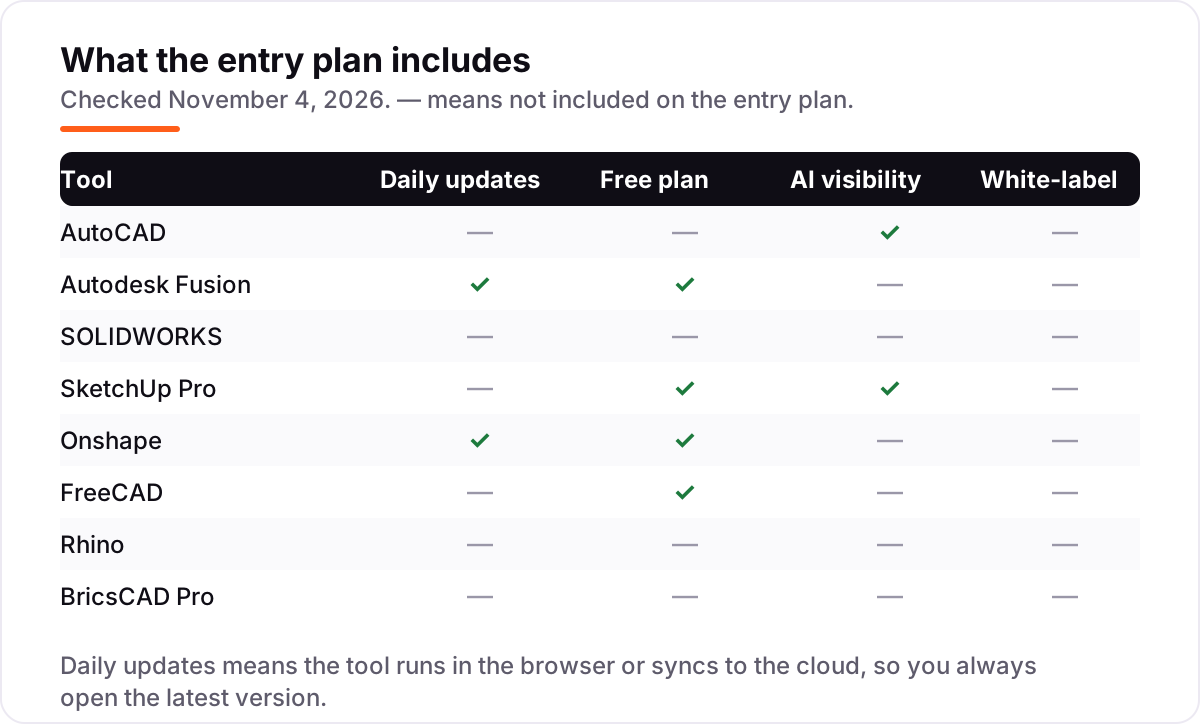
- Decide whether you work offline. Fusion and Onshape need an internet connection for sign-in and files, while AutoCAD, SOLIDWORKS, Rhino and BricsCAD Pro run locally. A workshop with patchy Wi-Fi should not buy a cloud-only tool.
- Try the free tier with a real project. FreeCAD, Fusion for personal use, SketchUp Free and the Onshape free plan all let you model a genuine part before paying. A weekend test project tells you more than any feature table.
- Check the operating system. SOLIDWORKS is Windows only, while AutoCAD, Fusion, SketchUp Pro, Onshape, FreeCAD, Rhino and BricsCAD Pro all run on Mac as well as Windows — Onshape runs in any browser.
CAD work rarely lives alone: the models usually end up on a website, in a portfolio or in a product page that needs to be found. Our guide to SEO companies for small business covers the visibility side, and before you publish a portfolio page, run your titles through the free SERP snippet preview tool to see exactly how they will look in Google.
Whatever you shortlist, run one real project through the trial before you pay. The free plans and trials in this list are long enough to model a genuine part — your geometry, your drawings, your export format — and that project tells you more than any review can. Check two things in the trial: that the export your manufacturer needs actually opens on their side, and that the drawings print the way your clients expect. Every tool here offers a free plan or a trial of 7 to 90 days, so there is no reason to buy before you have drawn something real in it.
CAD design software pricing: what you will actually pay
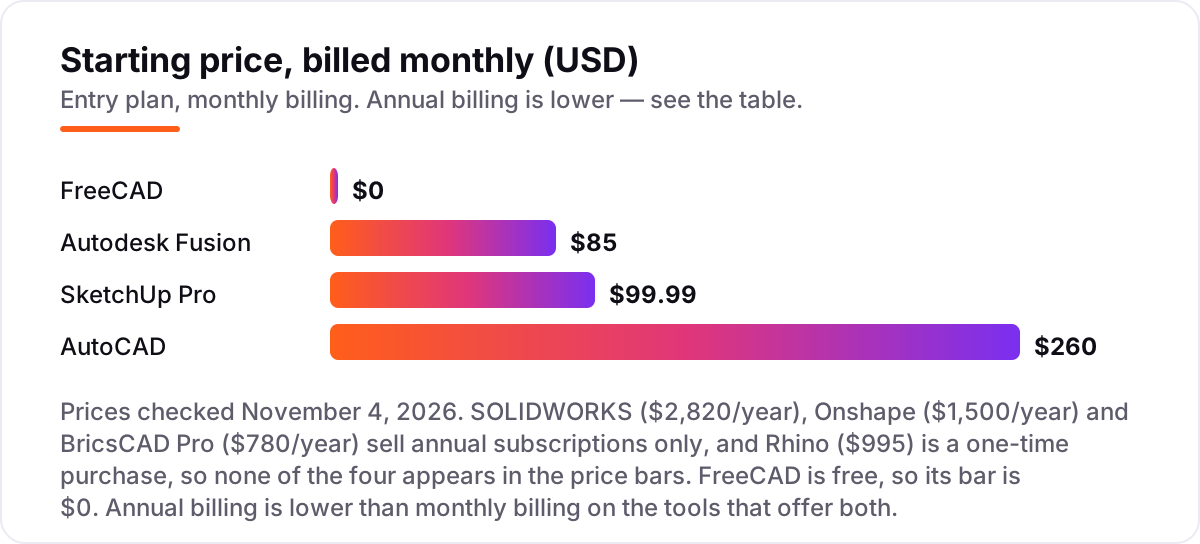
Take a five-person product-design team that needs one seat each for a year. On list prices, the subscription costs $0 on FreeCAD, $1,995 a year on SketchUp Pro, $3,400 on Fusion, $3,900 on BricsCAD Pro, $7,500 on Onshape, $10,475 on AutoCAD and $14,100 on SOLIDWORKS. Rhino sits outside that list: five perpetual licences cost $4,975 once, with no annual bill, and upgrades run $595 per seat when a new version ships.
Three of those numbers need adjusting before they are real. First, monthly billing costs far more than annual billing: five AutoCAD seats cost $15,600 a year on monthly billing against $10,475 annual, five Fusion seats cost $5,100 against $3,400, and five SketchUp Pro seats cost $5,999.40 against $1,995. Second, the annual figures hide the payment rhythm: SOLIDWORKS, Onshape and BricsCAD Pro charge the whole year up front, so the first invoice is the full $14,100, $7,500 or $3,900. Third, a perpetual licence is not a zero-cost licence forever: Rhino's $4,975 buys the current version, and staying current means $595 per seat per upgrade.
Over three years, the gap widens in a way the monthly headlines hide. Five seats of SketchUp Pro cost $5,985 over three years, Fusion $10,200, BricsCAD Pro $11,700 on annual subscriptions (or $8,760 once as perpetual licences, plus maintenance), Rhino $4,975 plus one $2,975 upgrade round, Onshape $22,500, AutoCAD $31,425 and SOLIDWORKS $42,300. The same five people and the same work cost $4,975 at the cheap end and $42,300 at the dear end — a gap that comes entirely from the licensing model, not from features.
One more cost sits outside every number above. Extensions and add-ons are where CAD budgets quietly grow: paid renderers for SketchUp Pro, the Manufacturing and Design extensions for Fusion, and simulation add-ons for SOLIDWORKS are all billed separately, and none of them is in the starting price. If your work needs photorealistic rendering or advanced simulation, price that add-on before you commit to the base tool — it can cost as much as the subscription itself. If the finished models end up in an online portfolio, our monthly SEO service handles the visibility side.
Know the difference: 2D drafting vs 3D modeling
The confusion in this category is between a drawing and a model. 2D drafting produces precise flat drawings — plans, sections and elevations — with dimensions, annotations and line weights that a builder or machinist can follow. 3D modeling produces a digital object with volume, mass and material properties that can be rendered, simulated and sent to a 3D printer or CNC machine. AutoCAD and BricsCAD Pro are drafting tools first; SOLIDWORKS, Fusion, Onshape and FreeCAD are modelers first; SketchUp Pro and Rhino sit in between, modeling in 3D but documenting in 2D.
There is a second, quieter confusion: parametric versus direct modeling. A parametric modeler like SOLIDWORKS or Fusion remembers the history of every sketch, extrude and fillet, so changing one dimension rebuilds the whole part. A direct modeler like Rhino lets you push, pull and reshape geometry freely, but changing a finished shape can mean remodeling it. Parametric history is what makes late design changes cheap; direct modeling is what makes organic shapes easy. If your designs change often after the first version, parametric history is worth paying for.
A third distinction worth knowing is file ownership versus file rental. A subscription tool like AutoCAD or SOLIDWORKS stops working when the subscription lapses, and the files it made may only open in that tool. A perpetual licence like Rhino keeps working forever, and an open-source tool like FreeCAD keeps its files in formats anyone can open. If the business depends on drawings it must be able to open in ten years, the licensing model matters as much as the feature list.
Quick comparison: tool type by need
| Buyer | Best pick | Why |
|---|---|---|
| Most design teams | AutoCAD | The DWG drafting standard, from $260/month |
| Best value all-rounder | Autodesk Fusion | CAD, CAM, CAE and PCB in one cloud workspace, from $85/month |
| Mechanical product design | SOLIDWORKS | Parametric parts and drawings that update together, $2,820/year |
| Fast concept modeling | SketchUp Pro | Push-pull modeling and LayOut, from $99.99/month or $399/year |
| Distributed teams | Onshape | Browser-based CAD with built-in version control, $1,500/year |
| Zero budget | FreeCAD | Full parametric modeling, free and open source |
Mistakes to avoid
- Budgeting on the monthly headline. The monthly price is the most expensive way to buy: AutoCAD costs $260 a month but about $175 a month when paid yearly, and SketchUp Pro costs $99.99 a month but $33.25 when paid yearly. Compare annual totals, not monthly headlines.
- Buying the tool your manufacturer cannot open. A beautiful model is useless if the machine shop cannot read it. Confirm the STEP, IGES or DWG export your manufacturer needs before you buy, and test it with a real file in the trial.
- Paying for a subscription when a perpetual licence fits. If one person uses the tool occasionally, Rhino's $995 once beats a $260-a-month subscription within four months. Subscriptions suit daily users; occasional users should check the one-time options first.
- Ignoring the add-on bill. Rendering, simulation and CAM extensions are billed separately on most tools here. Price the add-ons your work actually needs before you commit — they can cost as much as the subscription itself.
- Forgetting the operating system. SOLIDWORKS is Windows only. A Mac-based studio that buys it needs a Windows machine or a workaround, which is a second purchase the budget did not plan for.
How we chose
We checked each vendor's own pricing page on November 4, 2026 and recorded the starting price exactly as shown, including the annual-billing figure where the page lists one, and we ranked the tools by fit for the most common buyer — a designer or small team picking general-purpose CAD software — not by brand size. SOLIDWORKS publishes its prices through its own pricing page and vendor-provided listings; we recorded the $2,820 annual Standard figure from the vendor-provided pricing shown on G2, cross-checked against Dassault Systèmes reseller price lists; the vendor's own store lists $235 a month billed annually. Ratings come from G2 review pages opened on November 4, 2026. No vendor paid for a place in this list, and none of the links here are affiliate links.
What to do next
Start with the free plan or trial of your top pick and model one real project through it. Check that the export your manufacturer needs opens on their side and that the drawings print the way your clients expect before you commit to a year. If the models are sorted but new customers are not finding your portfolio, our monthly SEO service handles the visibility side — or compare providers in our guide to SEO companies for small business. Once your tools are in place, find out what's holding your rankings back.
Your stack only works if people find you
SerpAstra fixes what keeps your site off page one and makes it easy for AI assistants to recommend.
Get a free audit→Sources we checked (16)
- AutoCAD pricing — autodesk.com/products/autocad/buy (checked November 4, 2026)
- Autodesk Fusion pricing — autodesk.com/products/fusion-360/pricing (checked November 4, 2026)
- SOLIDWORKS pricing — solidworks.com/how-to-buy/solidworks-design-cloud-services-plans-pricing (checked November 4, 2026)
- SketchUp Pro pricing — sketchup.com/plans-and-pricing (checked November 4, 2026)
- Onshape pricing — onshape.com/en/pricing (checked November 4, 2026)
- FreeCAD — freecad.org (checked November 4, 2026)
- Rhino pricing — rhino3d.com/buy (checked November 4, 2026)
- BricsCAD pricing — bricscad.octave.com/store/bricscad (checked November 4, 2026)
- AutoCAD reviews — g2.com/products/autocad/reviews (checked November 4, 2026)
- Autodesk Fusion reviews — g2.com/products/autodesk-fusion/reviews (checked November 4, 2026)
- SOLIDWORKS reviews — g2.com/products/solidworks/reviews (checked November 4, 2026)
- SketchUp reviews — g2.com/products/sketchup/reviews (checked November 4, 2026)
- Onshape reviews — g2.com/products/onshape/reviews (checked November 4, 2026)
- FreeCAD reviews — g2.com/products/freecad/reviews (checked November 4, 2026)
- Rhino reviews — g2.com/products/rhinoceros/reviews (checked November 4, 2026)
- BricsCAD reviews — g2.com/products/octave-bricscad/reviews (checked November 4, 2026)
Shamim
Founder of SerpAstra
A full-stack SEO and digital marketer who spends most days on Local SEO for dental practices, AI search visibility and lead generation.
Frequently asked questions
What is the best CAD design software?
AutoCAD is the best fit for most buyers: the industry-standard DWG drafting tool, from $260/month. Fusion is the best value at $85/month when one person needs CAD, CAM and simulation together. SOLIDWORKS is the best pick for mechanical product teams, and SketchUp Pro is the fastest for concept modeling.
How much does CAD design software cost?
Entry prices run from $0 to $2,820 a year. FreeCAD is free, Rhino is $995 once, and the first paid subscriptions cost $399 to $1,500 a year. A five-person team pays $1,995 a year on SketchUp Pro, $3,400 on Fusion, $10,475 on AutoCAD and $14,100 on SOLIDWORKS, before any add-ons.
Is there really free CAD design software?
Yes. FreeCAD is completely free and open source, with no paid plan at all. Fusion is free for personal, non-commercial use, SketchUp Free runs in a browser for personal projects, and Onshape has a free plan for non-commercial work — though its documents are public.
What is the difference between AutoCAD and SOLIDWORKS?
AutoCAD is a drafting tool: it draws precise 2D plans and documents in DWG, the format most firms expect. SOLIDWORKS is a parametric 3D modeler: parts, assemblies and drawings update together when a dimension changes. Drafting produces drawings; parametric modeling produces parts that can be manufactured.
Can I buy CAD software outright, or is it all subscription now?
Two tools here still sell outright. Rhino costs $995 once for a perpetual commercial licence, and BricsCAD Pro costs $1,752 once for a perpetual licence. Everything else in this list is subscription-only, including AutoCAD, SOLIDWORKS, Fusion, SketchUp Pro and Onshape.
Which CAD design software is best for beginners?
SketchUp Pro is the easiest to learn: push-pull modeling produces a presentable model in minutes, and the free web version lets you try it first. Fusion for personal use is free and teaches parametric modeling properly. FreeCAD costs $0 too, but its interface and learning curve are steeper.
Can I switch CAD software later?
Yes, but plan the move carefully. Models export as STEP or IGES and drawings as DWG, so geometry transfers — but parametric history, constraints and native features do not. A switch means rebuilding the parametric intelligence of your library, so it is cheapest to pick the right tool first.
Free SEO and AI visibility audit
Find out what is holding your rankings back
Send us your site. Within 2 business days you get a written audit, an AI visibility check and a short fix list ranked by impact. Free, with no contract attached.
Request my free audit→Related guides
 Design, Video & Creative9 Best CAD Software for Architecture in 2026, ComparedCompare the 9 best cad software for architecture in 2026 on price, BIM, drafting and free plans, with prices checked November 4, 2026 for US firms.Read guide →
 Design, Video & Creative8 Best Beginner CAD Software for 3D Printing in 2026, ComparedCompare the 8 best beginner cad software for 3d printing on price, free plans and learning curve, with every price checked November 4, 2026.Read guide →
 Design, Video & Creative10 Best CAD Software for Hobbyist in 2026, ComparedCompare the 10 best cad software for hobbyist projects on price, free plans and 3D-printing exports, with every price checked November 4, 2026.Read guide →