
12 Best Digital Asset Management Software in 2026, Compared
Compare the 12 best digital asset management software options with prices checked November 10, 2026 — from $25/month self-serve tools to quote-only DAMs.
 Shamim Mia, Founder, SerpAstraLast verified November 10, 202613 min read
We compare pricing pages, documentation and public reviews. We never accept payment for rankings.

Key takeaways
- Canto is the best fit for most buyers at 4.4 out of 5 on G2 across 1,826 reviews, followed by Bynder at 4.5 and Brandfolder at 4.4; the only published prices here are Air at $25/month, Filecamp at $29/month and Cloudinary at $99/month.
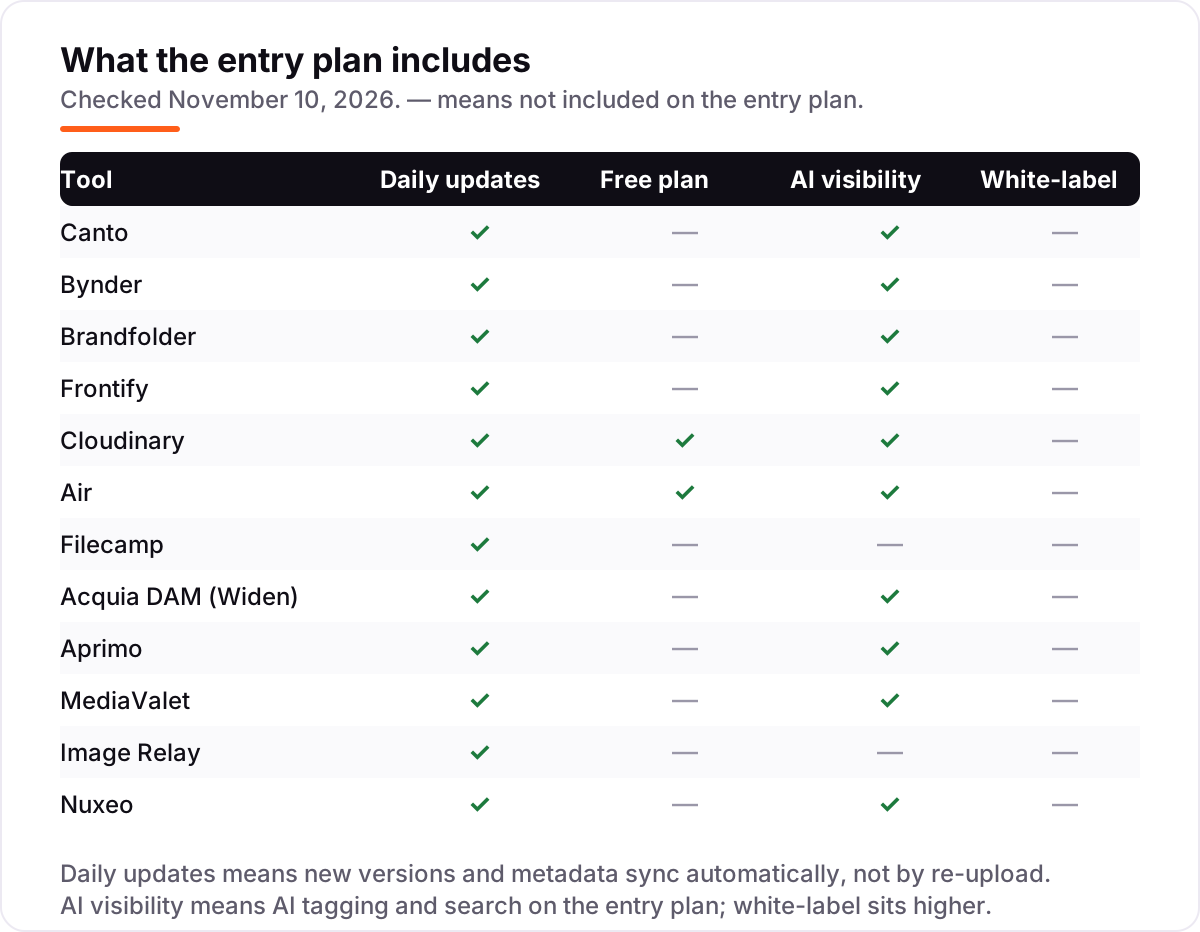
- Only Cloudinary and Air have free plans. The other ten tools are quote-only or trial-only, so budget for a sales process rather than a checkout.
- The single most important buying factor is the pricing unit: per user, per month, by storage or by credits. The unit, not the headline price, decides what a 10-person team actually pays.
- AI tagging and search is standard on the enterprise tools, but it costs extra or sits on higher tiers at Cloudinary and Filecamp, so check where it lives before you compare.
On this page
Quick comparison
| Tool | Best for | Starting price | Free plan |
|---|---|---|---|
| Canto | Mid-size marketing teams buying their first real DAM and wanting the easiest setup | Custom quote | No (7-day trial) |
| Bynder | Large brands that need strict brand governance across many teams and channels | Custom quote | No (demo only) |
| Brandfolder | Mid-market and enterprise teams that distribute brand assets to partners and agencies | Custom quote | No (free trial) |
| Frontify | Brand teams that want guidelines, templates and the asset library in one place | Custom quote | No (free trial) |
| Cloudinary | Developer-led teams that need media transformation and delivery as well as storage | $99/mo | Yes (free) |
| Air | Small creative teams that want a visual, self-serve library with AI editing built in | $25/mo | Yes (free) |
| Filecamp | Small teams that want the cheapest flat-rate DAM with unlimited users | $29/mo | No (30-day trial) |
| Acquia DAM (Widen) | Retail and consumer-goods teams that manage product imagery and catalogues | Custom quote | No (demo only) |
| Aprimo | Large marketing organisations running complex content operations and approvals | Custom quote | No (free trial) |
| MediaValet | Microsoft-centred organisations that want a DAM built on Azure | Custom quote | No (free trial) |
| Image Relay | Marketing teams that pair asset delivery with product information | Custom quote | No (free trial) |
| Nuxeo | Developers building a custom content platform on an API-first repository | Custom quote | No (free trial) |
Make one of these tools?
We re-check this list every quarter. Send a correction, request a review, or ask about a clearly labeled sponsored spot.
Request a listingThe best digital asset management software

Canto
Best for: Mid-size marketing teams buying their first real DAM and wanting the easiest setup
Canto is the best fit for most buyers because it does the core DAM job with the least friction. The library is visual first: drag files in, let AI tagging and visual search sort them, and share finished assets through portals that keep partners out of the raw library. Approvals, brand templates and usage reporting sit in higher packages, so a small team starts lean and adds collaboration later.
The catch is the quote. Canto publishes no prices, and its packages are priced by storage and users, so the only way to know the bill is to ask. Reported entry prices run roughly $6,000 to $12,000 a year, and one brand reported a $23,000-a-year quote for 1 TB in April 2026. Buy Canto when the team wants the easiest DAM to adopt, not the cheapest one to buy.
What we like
- Highest review volume here at 1,826 G2 reviews, with ease of use the most-cited strength
- AI visual search and auto-tagging find assets by what is in them, not just their file names
- Four packages from core storage to DAM Pro, so teams buy only the collaboration they need
- Portals share approved assets with partners without giving them access to the whole library
Watch out for
- No published prices, so every deal starts with a sales call and a tailored quote
- Advanced workflow features and the Shopify integration sit in higher-priced packages
- Guest viewers can raise the price, since Canto charges for external viewers as well as editors

Bynder
Best for: Large brands that need strict brand governance across many teams and channels
Bynder is the enterprise pick for brands where the wrong logo in the wrong place is a real risk. Guidelines, templates and the asset library live in one governed system, so local teams use approved files by default and permissions decide who sees what. AI search and tagging keep a library of tens of thousands of files findable, and the onboarding support is the best-reviewed in this list.
The price is the barrier. Bynder publishes no prices, and procurement data puts the median signed contract at about $41,400 a year, with small-team deployments reported from $20,000. Onboarding takes months, not days, and advanced features arrive as paid add-ons. Buy Bynder when brand control across many teams matters more than a fast start.
What we like
- Highest-rated enterprise DAM here at 4.5 out of 5 on G2, with onboarding reviewers praise
- Brand guidelines, templates and asset library live in one governed system
- AI-powered search and tagging across a central library with granular permissions
- Named a Leader in the November 2025 Gartner Magic Quadrant for Digital Asset Management
Watch out for
- Quote-only pricing with a sales cycle and an onboarding process measured in months
- Advanced features arrive as paid add-ons, so the first quote is rarely the final bill
- Admin and taxonomy setup is heavy, and reviewers say the learning curve is real

Brandfolder
Best for: Mid-market and enterprise teams that distribute brand assets to partners and agencies
Brandfolder is the distribution pick: it is built for getting approved assets out to partners, agencies and sales teams, not just storing them. Portals and collections hand each audience exactly the files they need, and the analytics show which assets get used and which sit untouched. Ease of use is the most-cited reviewer strength, which matters when the people fetching assets are not DAM specialists.
The quote is the hard part. Brandfolder publishes no prices, and procurement data puts the median signed contract at about $24,700 a year, with small-team deployments reported from $6,000. Reviewers also flag price rises at renewal. Buy Brandfolder when the job is distribution to many outside hands, not just internal storage.
What we like
- Ease of use is the most-cited reviewer strength, across 1,428 G2 reviews
- Brand portals and collections put the right assets in partners' hands fast
- AI tagging, video AI and usage analytics show which assets actually get used
- Smartsheet-backed, so it connects to wider work-management workflows
Watch out for
- No published prices: the pricing page lists plans and ends every path in a demo or a quote
- Reviewers cite high cost and price rises at renewal as the main drawback
- Enterprise-scale product, so small teams pay for capacity they will not use

Frontify
Best for: Brand teams that want guidelines, templates and the asset library in one place
Frontify is the brand-governance pick. Where most DAMs start with storage and bolt guidelines on, Frontify starts with the brand: guidelines, templates and the asset library share one home, so a local team adapts an approved template instead of improvising. It carries the highest G2 score here at 4.5 out of 5, and its support scores 9.3 out of 10.
The billing model needs care. Frontify charges by monthly active users, averaged over six months, and anyone who logs in counts — including external agencies and freelancers. Procurement data puts the median contract at about $32,400 a year. Buy Frontify when the brand book matters as much as the library.
What we like
- Highest G2 score in this list at 4.5 out of 5, with support reviewers rate 9.3 out of 10
- Brand guidelines, templates and DAM share one home, so assets stay on-brand by default
- Template management lets local teams adapt approved designs without breaking the brand
- Strongest fit for brand governance: guidelines are the product, not an add-on
Watch out for
- No published prices: billing is by monthly active users and quoted after a demo
- External agencies and freelancers who log in count as billable active users
- Recent price rises reported by reviewers, with legacy pricing honoured only for some

Cloudinary
Best for: Developer-led teams that need media transformation and delivery as well as storage
Cloudinary is the developer pick in this list. It is a media platform first: upload once, then transform, optimise and deliver every size and format through APIs, with the library acting as the organised home for the originals. Plus costs $99 a month billed monthly, or $89 billed annually, for 225 credits a month, and the free plan gives 25 credits to 3 users.
The catch is the credit meter. One credit covers 1,000 transformations, 1 GB of storage or 1 GB of image bandwidth, so video-heavy sites burn through the allowance fast and the next step is Advanced at $249 a month. The dedicated DAM product is also Enterprise custom, not Plus. Buy Cloudinary when delivery and transformation matter as much as storage.
What we like
- The only free plan here with real production use: 25 credits a month for 3 users
- One credit covers 1,000 transformations, 1 GB of storage or 1 GB of image bandwidth
- Auto-tagging search, S3 backup and role-based administration from the Plus plan
- APIs and transformations turn one upload into every size and format a site needs
Watch out for
- Credit-based pricing is hard to forecast, and heavy video use burns credits fast
- The dedicated DAM product is Enterprise custom; Plus is the image and video API plan
- AI add-ons such as auto-tagging are billed separately on top of the plan price

Air
Best for: Small creative teams that want a visual, self-serve library with AI editing built in
Air is the cheapest way into a real DAM, and the most modern one here. Starter costs $25 a month billed annually for 200 GB and up to 5 users, and the free plan gives 10 GB with no time limit. The library is visual first, with approvals and review links built in, and Canvas uses AI to resize and vary assets already in the library.
The ladder is the warning. Starter covers 5 users; the next step is Business at $900 a month billed annually, a 36-fold jump, and AI work runs on credits that cost $1,000 a year per 1,000-credit pack. Buy Air when the team is small and the work is visual, and check the Business price before the team grows past five.
What we like
- Cheapest published price here at $25 a month, with a real free plan underneath it
- No per-seat pricing: every plan includes unlimited users on Business and above
- AI Canvas edits, resizes and creates variations of assets already in the library
- Highest G2 score among the self-serve tools at 4.6 out of 5 across 960 reviews
Watch out for
- The jump from Starter at $25 a month to Business at $900 a month is steep
- Credits are the currency for AI work, so heavy AI editing needs credit packs at $1,000 a year
- Free plan covers only 10 GB, so a growing library outgrows it quickly

Filecamp
Best for: Small teams that want the cheapest flat-rate DAM with unlimited users
Filecamp is the budget pick, and its pricing is the whole story: Basic costs $29 a month flat, with unlimited users, 20 GB of storage, custom branding and folder permissions. Advanced at $59 adds collections and AI tags, and Professional at $89 adds a custom domain and white-label portals. There is no per-user math to do, and no setup fee.
The limits are the integrations. Filecamp has no public API and no single sign-on yet, and it does not connect to design tools such as Adobe or Figma, so teams that live in those tools will feel the gap. It also has the smallest review base here at 36 G2 reviews. Buy Filecamp when the budget is fixed and the team just needs a tidy, branded library.
What we like
- Highest G2 score in this list at 4.7 out of 5, praised for value and ease of setup
- Flat $29 a month with unlimited users on every plan, so headcount never raises the bill
- Custom branding, folder permissions and download presets included from Basic
- No setup fee, month-to-month billing, and a 30-day trial with no credit card
Watch out for
- AI auto-tagging is not on the $29 Basic plan; it starts on Advanced at $59 a month
- No public API and no single sign-on yet, both planned rather than shipped
- Storage is the only dial, so a large library pushes the bill up in $10 per 10 GB steps

Acquia DAM (Widen)
Best for: Retail and consumer-goods teams that manage product imagery and catalogues
Acquia DAM, built on Widen, is the retail pick. The entry Workgroup tier covers 50 users and 1 TB of storage, which is generous for a first tier, and AI-powered metadata and visual search are included from the start. The optional DAM plus PIM tier links each asset to its product data, so a catalogue team manages imagery and product information in one place.
The price is quoted, not published: three tiers run as annual SaaS subscriptions, with implementation quoted upfront on top. Reviewers also say the interface can feel clunky next to lighter tools, and the typical implementation runs about 4 months. Buy Acquia DAM when product imagery and catalogue data must live together.
What we like
- Workgroup covers 50 users and 1 TB, so the entry tier is genuinely usable
- AI-powered metadata and visual search included from the Workgroup tier
- Optional DAM plus PIM tier links assets to product data for retail catalogues
- Configurable metadata schemas fit teams with strict product-data rules
Watch out for
- No published prices: three tiers with annual SaaS subscriptions priced on request
- Implementation is quoted upfront and adds to the first-year bill
- Reviewers say the interface can feel clunky next to newer, lighter DAMs

Aprimo
Best for: Large marketing organisations running complex content operations and approvals
Aprimo is the content-operations pick, not just a library. It manages planning, budgets, reviews and approvals around the assets, so a large marketing organisation runs the whole campaign workflow in one system. AI auto-tagging and smart descriptions keep the library searchable, and rights management governs what can go out on each channel.
The commitment is the biggest here. Contracts carry a 12-month minimum, procurement data puts the median contract at about $50,000 a year, and Aprimo's own cost guide puts implementation at 15% to 50% of the yearly fee. Reviewers also flag a steep learning curve. Buy Aprimo when the workflow is the problem, not just the storage.
What we like
- Goes beyond storage into planning, budgets, reviews and approvals for large teams
- AI auto-tagging and smart descriptions, with suggestions for reusing existing assets
- Rights management and governance for approved content across channels
- Unlimited users included, so the bill does not grow with every new marketer
Watch out for
- Quote-only with a 12-month minimum contract, so there is no short-term way in
- Steep learning curve and a complex interface, per reviewers
- Implementation runs 15% to 50% of the yearly software fee, per Aprimo's own cost guide

MediaValet
Best for: Microsoft-centred organisations that want a DAM built on Azure
MediaValet is the Azure pick. It is the only DAM here built entirely on Microsoft Azure, which matters when the IT team already runs on Microsoft and the security review is the real gate. Contracts include unlimited users with unlimited support and training, and branded portals share assets with partners without opening the whole library.
The price is quoted per deployment, with no published starting point, and the typical implementation runs about 3 months. Reviewers praise the ease of use and the centralised library, but note slow upload speeds for larger files. Buy MediaValet when the organisation already runs on Microsoft and the DAM must fit that stack.
What we like
- Built only on Microsoft Azure, so it fits Microsoft shops and their security reviews
- Unlimited users with unlimited support and training included in the contract
- Strong integrations with Microsoft 365 and the wider marketing stack
- Branded portals share assets with partners without opening the whole library
Watch out for
- No published prices: the vendor quotes each deployment individually
- Reviewers note slow upload speeds for larger files
- Typical implementation runs about 3 months, so plan for a long rollout

Image Relay
Best for: Marketing teams that pair asset delivery with product information
Image Relay is the marketing-delivery pick. It keeps digital assets and product information in one place, so a campaign team pulls the approved photo and its product details together instead of hunting across systems. Upload links let partners send files in, and version control keeps only the signed-off file in circulation.
The evidence base is thinner than for the big names. Image Relay publishes no prices and has no G2 review listing, so buyers should lean on references and the trial. TrustRadius rates it 8.0 out of 10, with usability the highest-rated dimension. Buy Image Relay when delivery speed for marketing matters more than brand governance.
What we like
- Built for marketing delivery: assets and product information in one place
- Upload links let partners send files in, with an email when they arrive
- Version control and approval flows keep only the signed-off file in circulation
- Rated 8.0 out of 10 on TrustRadius, with usability the highest-rated dimension
Watch out for
- No published prices: the vendor quotes each deployment individually
- No G2 review listing, so there is no public reviewer score to check
- Smaller review footprint than the enterprise DAMs, so references matter more

Nuxeo
Best for: Developers building a custom content platform on an API-first repository
Nuxeo is the developer platform in this list, not a ready-made library. It is a cloud-native, API-first content repository that handles billions of assets — photos, PDFs, video and more — and teams build the DAM they need on top of it with its modular architecture. AI-powered content analysis and automatic publishing to web and social channels come with it.
The trade-off is effort. Nuxeo carries the lowest G2 score here at 4.0 out of 5, with setup rated the hardest in this list, and customisation often needs paid add-ons and the paid Studio tool. There are no published prices. Buy Nuxeo when the team has developers and the content model does not fit any off-the-shelf DAM.
What we like
- API-first, cloud-native repository that handles billions of assets across formats
- Modular architecture: teams build exactly the content platform they need
- AI-powered content analysis and automatic publishing to web and social channels
- Strong fit for finance, retail and media teams with huge mixed libraries
Watch out for
- No published prices: licensing is quoted per deployment and scales with use
- Lowest G2 score here at 4.0 out of 5, with setup rated the hardest in this list
- Customisation often needs paid add-ons and the paid Studio tool, raising the bill
The best digital asset management software turns a scattered pile of logos, photos and videos into one library every team can trust. We ranked the 12 tools below by fit for the most common buyer — a marketing team buying its first real DAM — starting with the easiest enterprise options and ending with the developer platform, and every price was checked on the vendor's own pricing page on November 10, 2026.
How to choose the best digital asset management software
- Work out the pricing unit first. Canto and Acquia DAM price by storage and users, Frontify by monthly active users, Cloudinary and Air by credits, and Filecamp by storage alone with unlimited users. The unit decides the real bill.
- Count who actually logs in. Frontify bills for every active user including outside agencies, Canto charges for guest viewers, and Air Starter covers only 5 users before the $900-a-month Business step.
- Check where AI tagging lives. It is standard on the enterprise tools, but at Cloudinary it is a paid add-on and at Filecamp it starts on Advanced at $59 a month, not Basic.
- Decide whether you need governance or just storage. Bynder, Frontify and Aprimo enforce brand rules and approvals; Air and Filecamp are lighter libraries for teams that mainly need to find and share files.
- Try the search before you buy. Upload 50 real files, then search by what is in them, not by file name. If the search misses, the library will not get used.
A DAM also needs to be found by the people who should use it, not just bought. Our guide to digital asset management software for photographers covers the photo-led side, and before you publish new asset pages, run your titles through the free SERP snippet preview tool — it shows exactly how the title and description will look in Google.
Whatever you shortlist, try it with real files before you pay. The trials in this list run 7 to 30 days, which is long enough to run one genuine week — your assets, your team, your partners — and that week tells you more than any review can. Check two things in the trial: that search finds a file by its contents, and that a partner can download an approved asset without seeing the whole library.
Digital asset management software pricing: what you will actually pay
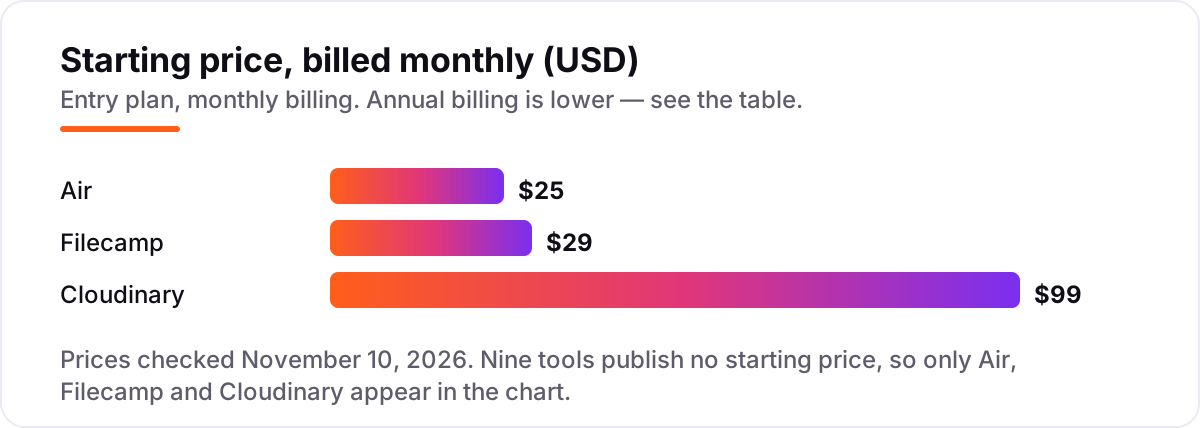
Take a small team of 3 people with a 20 GB library. On list prices, Air Starter costs $25 a month billed annually and covers 200 GB, Filecamp Basic costs $29 a month and covers exactly 20 GB with unlimited users, and Cloudinary Plus costs $99 a month for 225 credits. Over a year, that is $300 on Air, $348 on Filecamp and $1,188 on Cloudinary — an $888 gap between the cheapest and dearest published prices for the same three people and the same 20 GB.
The nine quote-only tools sit in a different band altogether. Procurement data from Vendr puts median annual contracts at about $24,700 for Brandfolder, $32,400 for Frontify, $41,400 for Bynder and $50,000 for Aprimo. Those are third-party figures from signed contracts, not vendor prices, but they show the scale: even the cheapest enterprise median costs about 80 times the Air Starter bill. If your budget is under $1,000 a year, the published-price tools are the only realistic shortlist.
Three costs sit outside every number above. First, the step-ups: Air jumps from $25 to $900 a month at Business, and Cloudinary jumps from $99 to $249 a month at Advanced, so price the team you will have in a year, not the team you have today. Second, the credits: Cloudinary charges by credits across storage, bandwidth and transformations, and Air charges credits for AI work, so heavy video or AI use moves the bill. Third, implementation: Aprimo's own cost guide puts it at 15% to 50% of the yearly software fee, and Acquia DAM quotes it upfront. If the library also needs product data attached to every image, see our guide to content marketing software for the catalogue-led side.
Know the difference: digital asset management software vs cloud file storage
The confusion in this category is between a tool that stores files and a tool that manages them. Google Drive and Dropbox store files well, and a small team can run on them for years. A DAM adds the layer on top: metadata and AI tagging so files are found by content, version control so only the approved file circulates, approval workflows, rights management, and branded portals that hand partners exactly the files they need.
There is a second, quieter confusion: DAMs and brand-guideline tools. Frontify and Bynder combine the library with the brand book, so the guidelines are enforced where the files live. Cloudinary and Air are closer to media platforms: they store and transform files, and governance is lighter. Neither model is better in itself; the question is whether the team needs rules or just retrieval.
A third distinction worth knowing is the pricing unit. Two tools can both advertise about $25 a month and cost very different amounts for the same team: Air at $25 covers 5 users and 200 GB, while Filecamp at $29 covers unlimited users and 20 GB. Always price the tool for your actual team size, at your actual storage, before comparing headline prices.
Quick comparison: tool type by need
| Buyer | Best pick | Why |
|---|---|---|
| First real DAM for a marketing team | Canto | Easiest setup among the enterprise tools, 4.4 out of 5 on G2 |
| Large brand with strict governance | Bynder | Guidelines, templates and library in one governed system |
| Distributing assets to partners | Brandfolder | Portals and collections built for outside hands |
| Brand guidelines plus library | Frontify | Guidelines are the product, not an add-on |
| Developer-led media delivery | Cloudinary | Storage plus transformation APIs from $99/month |
| Small creative team on a budget | Air | Cheapest published price at $25/month, with a free plan |
| Cheapest flat rate, unlimited users | Filecamp | $29/month flat, highest G2 score here at 4.7 out of 5 |
| Custom content platform | Nuxeo | API-first repository for developers building their own DAM |
Mistakes to avoid
- Budgeting on the headline price alone. A $25 tool can cost $900 a month once the team passes 5 users on Air, and a $99 Cloudinary plan can cost far more once video burns through the credits.
- Forgetting the people who log in. Frontify bills for outside agencies, Canto charges for guest viewers, and Air Starter caps at 5 users. Count every person who will log in, not just employees.
- Assuming AI tagging is included. It is standard on the enterprise tools, but at Cloudinary it is a paid add-on and at Filecamp it starts on Advanced, so check the plan, not the homepage.
- Buying a DAM for a Drive-sized problem. If the library is under a few hundred files and the team is under five, a shared drive costs nothing. Buy a DAM when the wrong version keeps going out.
- Skipping the implementation quote. Aprimo puts implementation at 15% to 50% of the yearly fee, and Acquia DAM quotes it upfront. Get the first-year total in writing before signing.
How we chose
We checked each vendor's own pricing page on November 10, 2026 and recorded the starting price exactly as shown. Nine of the twelve tools publish no starting price, so they are listed as custom quote rather than with a third-party figure; the Vendr contract medians quoted in the pricing section are third-party procurement data, clearly labelled as such, not vendor prices. Ratings are shown only where a fresh G2 page gave a clear score and review count on November 10, 2026. MediaValet carries no rating here because its G2 listings gave conflicting review counts across pages, and Image Relay has no G2 listing at all. Air's $25 figure is the annual-billed Starter price, and Cloudinary's dedicated DAM product is Enterprise custom — the $99 Plus price is the published image and video API plan. No vendor paid for a place in this list, and none of the links here are affiliate links.
What to do next
Start with the free plan or trial of your top pick and run one real week of work through it. Upload 50 genuine files, search for them by content, and share one approved asset with a partner before you commit to a year. If the library is sorted but new customers are not finding you, our AI search optimization service handles the visibility side — or compare providers in our guide to brand reputation management tools. Once your tools are in place, find out what's holding your rankings back.
Your stack only works if people find you
SerpAstra fixes what keeps your site off page one and makes it easy for AI assistants to recommend.
Get a free audit→Sources we checked (25)
- Canto pricing — canto.com/pricing (checked November 10, 2026)
- Bynder pricing — bynder.com/pricing (checked November 10, 2026)
- Brandfolder pricing — brandfolder.com/pricing (checked November 10, 2026)
- Frontify pricing — frontify.com/pricing (checked November 10, 2026)
- Cloudinary pricing — cloudinary.com/pricing (checked November 10, 2026)
- Air pricing — air.inc/pricing (checked November 10, 2026)
- Filecamp pricing — filecamp.com/pricing (checked November 10, 2026)
- Acquia DAM pricing — acquia.com/products/acquia-dam (checked November 10, 2026)
- Aprimo pricing — aprimo.com/pricing (checked November 10, 2026)
- MediaValet pricing — mediavalet.com (checked November 10, 2026)
- Image Relay — imagerelay.com (checked November 10, 2026)
- Nuxeo — nuxeo.com (checked November 10, 2026)
- Canto on G2 — g2.com/products/canto/reviews (checked November 10, 2026)
- Bynder vs Canto on G2 — g2.com/compare/bynder-vs-canto (checked November 10, 2026)
- Brandfolder vs Cloudinary on G2 — g2.com/compare/brandfolder-vs-cloudinary (checked November 10, 2026)
- Bynder vs Frontify on G2 — g2.com/compare/bynder-vs-frontify (checked November 10, 2026)
- Air on G2 — g2.com/products/air-labs-inc-air/reviews (checked November 10, 2026)
- Bynder vs Filecamp on G2 — g2.com/compare/bynder-vs-filecamp (checked November 10, 2026)
- Acquia DAM vs Bynder on G2 — g2.com/compare/acquia-dam-widen-vs-bynder (checked November 10, 2026)
- Aprimo vs Canto on G2 — g2.com/compare/aprimo-vs-canto (checked November 10, 2026)
- Hyland Nuxeo on G2 — g2.com/products/hyland-nuxeo/reviews (checked November 10, 2026)
- DAM contract medians (Vendr data) — getmasset.com/resources/blog/dam-pricing-2026 (checked November 10, 2026)
- Canto entry-price reports — dash.app/blog/canto-alternatives (checked November 10, 2026)
- Air pricing explained — air.inc/resources/what-users-are-actually-paying-for (checked November 10, 2026)
- Filecamp DAM pricing — filecamp.com/lp/cloud-digital-asset-management-dam (checked November 10, 2026)
Shamim
Founder of SerpAstra
A full-stack SEO and digital marketer who spends most days on Local SEO for dental practices, AI search visibility and lead generation.
Frequently asked questions
What is the best digital asset management software?
Canto is the best fit for most buyers: the easiest setup among the enterprise DAMs, AI visual search, and 4.4 out of 5 on G2 across 1,826 reviews. Bynder suits large brands that need strict governance, and Filecamp is the best budget pick at $29 a month with unlimited users.
How much does digital asset management software cost?
Published prices run from $25 a month for Air Starter to $99 a month for Cloudinary Plus, while Filecamp costs $29 a month flat. The nine enterprise tools publish no prices; procurement data puts their median annual contracts between about $24,700 and $50,000 a year.
Is there a free digital asset management software?
Yes, two tools here have free plans. Cloudinary gives 25 credits a month for 3 users, and Air gives 10 GB and 100 AI credits a month with no time limit. The other ten tools offer trials or demos only, so a free plan is the exception in this category, not the rule.
What is the difference between a DAM and Google Drive?
Google Drive stores files; a DAM manages them. A DAM adds metadata, AI tagging, version control, approval workflows, rights management and branded portals for sharing approved assets. Drive works for a small team sharing folders, but it cannot stop the wrong logo going out or show which assets get used.
Do I need a DAM or just a shared drive?
Use a shared drive while the library is small and the team is under five. Move to a DAM when people waste time hunting for files, the wrong version keeps going out, or outside partners need approved assets. If any of those sound familiar, the shared drive is already costing more than a DAM.
Can I switch DAM software later?
Yes, but plan the move for a quiet month. Export the assets with their metadata, tags and folder structure, then import them and check that search and permissions still work before going live. The hard part is the metadata: a library without its tags is just a pile of files again.
Which DAM is best for a small team?
Filecamp is the best small-team pick at $29 a month flat with unlimited users, and Air follows at $25 a month for up to 5 users with a free plan underneath. Both are self-serve with public prices. The enterprise tools are built for larger teams and quote-only pricing, so they rarely fit a small budget.
Free SEO and AI visibility audit
Find out what is holding your rankings back
Send us your site. Within 2 business days you get a written audit, an AI visibility check and a short fix list ranked by impact. Free, with no contract attached.
Request my free audit→Related guides
 Local Business & Vertical Software7 Best Digital Asset Management Software for Photographers in 2026, ComparedCompare the 7 best digital asset management software for photographers on price, catalogs, culling speed and free plans, with prices checked November 7, 2026.Read guide →
 Digital Marketing & Ads10 Best Content Marketing Software in 2026, Compared10 best content marketing software tools compared on price, planning, optimization and publishing, with starting prices and the right pick for every team size.Read guide →
 Digital Marketing & Ads10 Best Brand Reputation Management Tools in 2026, Compared10 best brand reputation management tools compared on price, review coverage and AI replies, with prices checked on vendor sites on November 4, 2026.Read guide →