
7 Best Digital Asset Management Software for Photographers in 2026, Compared
Compare the 7 best digital asset management software for photographers on price, catalogs, culling speed and free plans, with prices checked November 7, 2026.
 Shamim Mia, Founder, SerpAstraLast verified November 7, 202612 min read
We compare pricing pages, documentation and public reviews. We never accept payment for rankings.

Key takeaways
- Adobe Lightroom Classic is the best fit for most photographers at $9.99/month; Capture One follows at $26.25/month for studio and tethered work, and Photo Mechanic at $14.99/month for deadline culling.
- Adobe Bridge and digiKam both cost $0 — Bridge if you already live in folders and the Adobe ecosystem, digiKam if you want a real catalog with no vendor strings attached.
- The single most important buying factor is whether the tool keeps a catalog: catalogs find any frame in seconds, while folder browsers only search what you point them at.
On this page
Quick comparison
| Tool | Best for | Starting price | Free plan |
|---|---|---|---|
| Adobe Lightroom Classic | Photographers who want library management and RAW editing in one desktop program | $9.99/mo | No (7-day trial) |
| Capture One | Studio, fashion and tethered shooters who need exacting color and session workflows | $26.25/mo (annual) | No (free trial) |
| Photo Mechanic | Sports, news and wedding photographers who cull thousands of frames on deadline | $14.99/mo | No (30-day trial) |
| ACDSee Photo Studio | Windows photographers who want a perpetual license and fast folder browsing | $9.99/mo | No (15-day trial) |
| Adobe Bridge | Photographers who want to organize by folder and skip catalog databases entirely | Free | Yes (free) |
| digiKam | Photographers who want a free, open-source DAM with no vendor strings attached | Free | Yes (free) |
| Daminion | Small teams, studios and agencies that need one shared, searchable asset library | Custom quote | No (live demo) |
Make one of these tools?
We re-check this list every quarter. Send a correction, request a review, or ask about a clearly labeled sponsored spot.
Request a listingThe best digital asset management software for photographers

Adobe Lightroom Classic
Best for: Photographers who want library management and RAW editing in one desktop program
For most working photographers, Lightroom Classic is the safe default because the catalog and the darkroom live in the same program. One subscription covers importing, keywording, rating and developing, and the Photography Plan at $9.99 a month on annual billing throws in Photoshop and 20GB of cloud storage as well. Dated folders, smart collections and batch keywording mean a wedding's 4,000 frames can be sorted, culled and edited without ever leaving the app.
What you give up is ownership and portability. There is no perpetual license, so the catalog goes dark if you stop paying, and the database sits on a single computer unless you plan the move carefully. The 20GB of cloud storage also runs out quickly once you start syncing originals. Choose Classic when editing and organizing should share one roof; choose Bridge when organizing alone is enough.
What we like
- Catalog-based organization with collections, smart collections, keywords, flags and ratings
- Full non-destructive RAW development built in, so there is no round trip to another app
- Mature ecosystem of presets, plugins and mobile sync
- The Photography Plan also includes Photoshop and the cloud Lightroom app
Watch out for
- Subscription only — there is no perpetual license and the catalog stops working if you cancel
- The catalog lives on one machine, so moving between a desktop and a laptop takes planning
- The 20GB Photography Plan fills fast if you sync originals to the cloud

Capture One
Best for: Studio, fashion and tethered shooters who need exacting color and session workflows
If your work happens on a set with a client watching, Capture One earns its place. Tethered shooting puts each frame on screen seconds after the shutter, and the color tools handle skin tones and hue with a precision Lightroom does not match. You can run a shoot as a self-contained session or keep a long-term catalog, and the program supports more than 550 cameras.
The price is the hard part. Pro now costs $26.25 a month on annual billing, up from $18 earlier in 2026, and the perpetual license lists at $508 rather than the $349 older guides quote. Organization is solid but clearly second to capture and color in the product's priorities. Pick Capture One for studio, fashion and tethered work; pick Lightroom when the archive matters more than the shoot.
What we like
- Industry-leading tethered shooting with live view on set
- Color editing tools, including the Color Editor and skin-tone controls, that go beyond Lightroom
- Sessions and catalogs let you choose between project-based and archive-based organization
- A perpetual license is still sold for photographers who want to own a version
Watch out for
- The price rose again in 2026 — the $18/month figure in older roundups no longer matches the pricing page
- The organizing tools are competent but secondary to editing and capture
- The learning curve is real, especially coming from Lightroom

Photo Mechanic
Best for: Sports, news and wedding photographers who cull thousands of frames on deadline
Nobody buys Photo Mechanic to organize an archive. They buy it to survive a deadline: cards ingest in minutes, previews appear before a catalog app has finished importing, and keepers get rated, captioned and filed while the event is running. Code replacements expand a player's number into a full name and caption with a keystroke, and every field it writes follows the IPTC standard.
Because it writes standard metadata, the selections travel into Lightroom or Capture One afterwards, which is how most pros use it. On its own it cannot search an archive the way a catalog can, and $14.99 a month is steep for a photographer who shoots a few hundred frames a month. It pays for itself on the first wedding or match day; for quieter workloads, Bridge or digiKam do the job free.
What we like
- The fastest ingest and culling in the business, rendering RAW previews far quicker than catalog apps
- Code replacements, variables and IPTC templates built for wire-service metadata workflows
- Writes standard metadata that travels with the file into any other app
Watch out for
- It is a workflow accelerator, not a catalog, so long-term archival search is not its job
- The interface is utilitarian and the price is steep for casual use
- No RAW editing — selections must move into Lightroom, Capture One or another editor

ACDSee Photo Studio
Best for: Windows photographers who want a perpetual license and fast folder browsing
ACDSee takes the opposite approach from Lightroom: instead of importing your photos into a database, it reads the folders you already have. That makes browsing instant and the learning curve short, and you can add keywords, categories, face detection and AI tagging on top when a job needs it. The 365 Complete Plan costs $9.99 a month, or $99.99 a year, and bundles 200GB of cloud storage and a video editor.
The limits are platform and depth. The flagship edition is Windows-only, and its RAW development is good rather than best-in-class. What keeps photographers loyal is the choice: pay monthly, pay yearly, or buy the perpetual license outright, currently $149.95 on sale against a $179.99 list price. If you want folder browsing without paying at all, digiKam is the free equivalent.
What we like
- Fast browsing that reads folders directly, with cataloging optional
- AI keywords, face detection and media management tools aimed at large libraries
- Perpetual licenses still offered alongside 365 subscriptions
- The 365 subscription adds 200GB of cloud storage and video editing software
Watch out for
- Windows-first, so Mac photographers have limited options
- The catalog and editing depth trail Lightroom for heavy RAW workflows
- AI credits and cloud storage extras nudge toward ongoing spending even with a perpetual license
Adobe Bridge
Best for: Photographers who want to organize by folder and skip catalog databases entirely
Bridge costs nothing and asks for almost nothing in return: a free Adobe account, a download, and folders organized the way you like them. It previews RAW files, renames batches on import, edits keywords, labels and ratings, and hands files to Camera Raw or Photoshop when editing starts. For a photographer whose archive already runs on dated job folders, that is often the entire DAM problem solved.
What Bridge cannot do is find a needle in a haystack. With no central catalog, a search across 50,000 frames only covers the folders you open, and performance leans on your disk rather than an index. Opening RAW files in Camera Raw through Bridge also requires a qualifying Adobe product such as Photoshop. If your folders are disciplined, Bridge is the best free option Adobe makes.
What we like
- Completely free with no Adobe subscription required — only a free Adobe account
- Browses your actual folder structure with fast previews, metadata editing and batch rename
- Tight handoff to Camera Raw and Photoshop for editing
Watch out for
- No true catalog, so searches only work on folders you browse
- Performance depends on your disk, since nothing is pre-indexed
- Camera Raw editing through Bridge needs a qualifying Adobe product such as Photoshop

digiKam
Best for: Photographers who want a free, open-source DAM with no vendor strings attached
digiKam proves that free software can be a serious DAM. It is open source under the GPL, costs $0, and still covers the full job: importing from cards, albums, tags, face recognition, AI-assisted tagging, a built-in RAW processor and batch tools. The database runs on SQLite locally or MySQL and PostgreSQL on a server, so a library of 100,000 images stays searchable, and there is no account, no cloud and no telemetry.
The price shows in the polish, not the power. The interface is plain, the Mac and Windows builds lag the Linux original, and help comes from forums and documentation instead of a support desk. Setup takes an evening rather than an hour. If privacy, control and zero cost matter more than a guided experience, digiKam is unmatched; if they do not, start with a commercial free trial.
What we like
- No cost, no account, no cloud, with the source code public under the GPL
- Handles libraries over 100,000 images with albums, tags, labels, face recognition and AI-assisted tagging
- RAW processing, batch editing and metadata tools built in
- The database can live locally or on a network server
Watch out for
- The interface is functional rather than polished
- Mac and Windows builds trail the Linux version in maturity, and support is community-based
- Setup takes more patience than a commercial app

Daminion
Best for: Small teams, studios and agencies that need one shared, searchable asset library
Every other tool here serves one photographer; Daminion serves the whole studio. It puts a shared, searchable catalog on top of the folders you already have, with controlled vocabularies so three retouchers tag the same way, plus AI auto-tagging, duplicate detection, version stacks and permissions that decide who sees what. The self-hosted edition lives on your own server, so a large archive costs disk space instead of a monthly cloud bill.
That architecture comes with a sales-led buying process and quote-based pricing, which is why solo photographers should skip it: Bridge or digiKam cover one person's library for free. Daminion earns its keep when a producer, several retouchers and a client all need the same 80,000 files and the same tags. If that is not your problem, it is the wrong tool.
What we like
- A central, searchable hub a whole studio can use, with controlled vocabularies and role-based permissions
- AI auto-tagging, duplicate detection and version stacks on top of your existing folder structure
- Self-hosted edition runs inside your network, so large archives cost disk space, not a cloud bill
Watch out for
- Pricing is quote-based and aimed at teams, so solo photographers pay for architecture they do not need
- The platform's heritage is Windows infrastructure
- Buying requires talking to sales — there is no self-serve checkout
A wedding photographer comes home with 4,000 frames at midnight and the gallery is due Friday. The best digital asset management software for photographers turns that pile into a searchable library: every frame keyworded, rated and findable in seconds, instead of a folder maze you dread opening. We ranked the seven tools below by fit for the most common buyer — a working photographer who shoots, culls and delivers — starting with the catalog-and-editor suites and ending with the team option, and every price was checked on November 7, 2026.
How to choose the best digital asset management software for photographers
- Decide catalog or folders first. A catalog finds any frame in seconds; a folder browser only searches what you open. If your archive is already tidy, a browser may be enough.
- Count your frames per job. A wedding or match day means thousands of frames and a culling tool pays for itself; a few hundred frames a month does not need Photo Mechanic.
- Check tethering and culling needs. Studio shooters need live tethered capture; deadline shooters need fast ingest. Buy for the shoot, not the archive.
- Weigh subscription against ownership. Lightroom and Capture One are subscriptions; ACDSee and Photo Mechanic still sell perpetual licenses. Work out the two-year cost before you commit.
- Think about who else touches the library. A solo archive needs one seat; a studio with retouchers and clients needs shared catalogs and permissions, which only Daminion offers here.
Photography is a local business for most shooters, and the software is only half the job — clients still have to find you. Our local SEO service covers how photographers show up on Google Maps and in AI answers. And before you publish new portfolio pages, run your titles through the free SERP snippet preview tool — it shows exactly how the title and description will look in Google.
Whatever you shortlist, try it with real work before you pay. The free plans and trials in this list are long enough to run one genuine shoot through — your cards, your keywords, your export — and that shoot tells you more than any review can. Check two things in the trial: that culling a full card feels fast, and that your editor opens the selections without friction. If you also cut video from the same shoots, see our guide to the best video editing software for small business.
Digital asset management software for photographers pricing: what you will actually pay
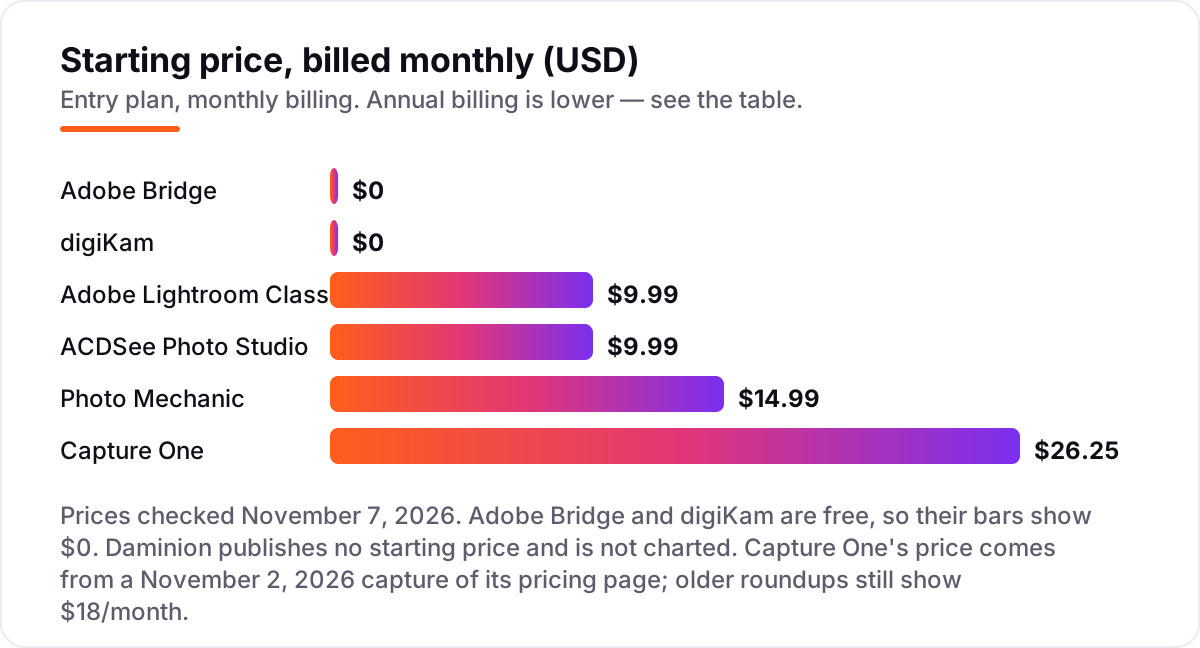
Take a wedding photographer who shoots two weddings a month, about 4,000 frames each. On list prices, the software costs $0 a month on Adobe Bridge or digiKam, $9.99 on Lightroom Classic or ACDSee Photo Studio, $14.99 on Photo Mechanic billed monthly, and $26.25 on Capture One Pro billed annually. Over a year, that is $0, $119.88, $119.88, $179.88 on Photo Mechanic billed monthly or $149 billed annually, and $315 on Capture One.
The realistic buy for that photographer is a pair, not a single tool: Photo Mechanic at $149 a year for culling plus Lightroom Classic at $119.88 a year for the catalog and editing, $268.88 a year together. That pair covers the whole job from card to gallery. A studio shooter swaps Lightroom for Capture One at $315 a year and skips Photo Mechanic, since tethered sessions cull on the set.
Two numbers deserve a second look before you pay. First, the perpetual licenses: ACDSee Photo Studio at $149.95 once beats its $99.99-a-year subscription after about eighteen months, and Capture One's $508 perpetual license beats its $315-a-year subscription after about nineteen months — but only if you can live without new features. Second, Daminion is the only quote-based price here, so a studio should budget for a sales conversation rather than a checkout page. If your work also includes quick social crops, our guide to the best image cropper app covers the free options.
The free tools change the math completely for a hobbyist. Bridge and digiKam cost $0 a year, every year, and the only price is your time: Bridge needs disciplined folders to stay useful, and digiKam needs an evening of setup. For a photographer shooting one portrait session a month, either one plus an editor you already own is a complete system, and the $120 to $315 a year a paid catalog costs stays in your pocket.
Know the difference: a catalog, a folder browser and a culling tool
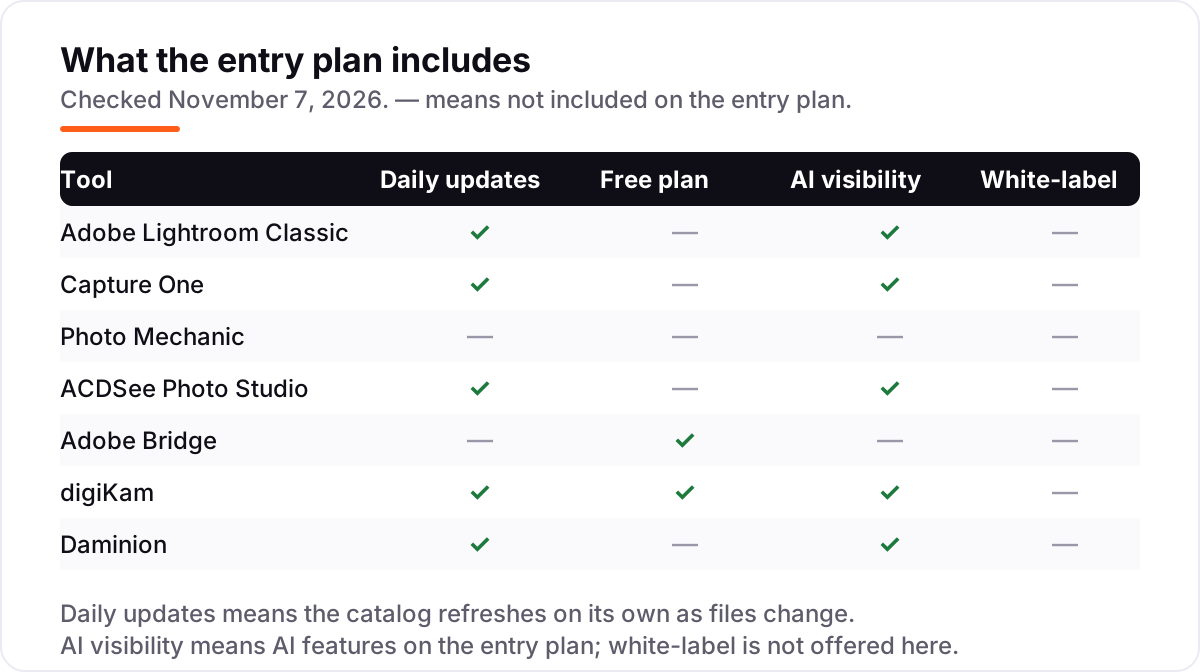
The confusion in this category is between three different jobs that look alike. A catalog keeps a database of every photo you own, so a search for "bride, five stars, 2025" returns results in seconds no matter which drive the files sit on. Lightroom Classic, Capture One and digiKam are catalogs, and Daminion is a catalog shared across a team.
A folder browser does not keep a database at all. It shows you the folders you already have, with thumbnails, metadata editing and batch rename, and it searches only the folders you open. Adobe Bridge and ACDSee Photo Studio work this way, and they are faster to start with because there is nothing to import — but they cannot find a photo you filed in the wrong folder three years ago.
A culling tool is neither of those. Photo Mechanic exists to get frames off the card, rated and captioned as fast as possible, and then hand them to a catalog or an editor. It is the first step in the workflow, not the library, which is why professionals pair it with Lightroom or Capture One rather than replacing them. Pick the tool that matches the job you actually do at midnight after the shoot.
Quick comparison: tool type by need
| Buyer | Best pick | Why |
|---|---|---|
| Most photographers | Adobe Lightroom Classic | Catalog plus RAW editing in one program, $9.99/month |
| Studio and tethered shooters | Capture One | Best color and live tethering, $26.25/month |
| Deadline culling | Photo Mechanic | Fastest ingest and culling, $14.99/month |
| Windows, no subscription | ACDSee Photo Studio | Perpetual license option, from $9.99/month |
| Free, folder-based | Adobe Bridge | Free browser that reads your folders, $0 |
| Free, full catalog | digiKam | Open-source catalog with face recognition, $0 |
| Team library | Daminion | Shared catalogs for a studio, custom quote |
Mistakes to avoid
- Buying a catalog when you needed a culling tool. Lightroom is slow at ingest; if your pain is deadline culling, Photo Mechanic solves it and a catalog does not.
- Buying a culling tool when you needed a catalog. Photo Mechanic cannot search last year's archive. If finding old frames is the job, you need Lightroom, Capture One or digiKam.
- Budgeting on the old price. Capture One's Pro price moved from $18 to $26.25 a month during 2026, and its perpetual license from $349 to $508. Check the pricing page on the day you buy.
- Ignoring the platform limit. ACDSee Photo Studio is Windows-only and Daminion's heritage is Windows infrastructure. Mac photographers should shortlist Lightroom, Capture One, Bridge or digiKam.
- Paying for a team tool as a solo shooter. Daminion's shared catalogs and permissions are built for studios. One photographer pays for architecture they will never use.
How we chose
We checked each vendor's own pricing page on November 7, 2026 and recorded the starting price exactly as shown, including the annual-billing figure where the page lists one, and we ranked the tools by fit for the most common buyer — a working photographer who shoots, culls and delivers — not by brand size. Two prices needed a dated capture because the vendor pages did not load from our machine on November 7: Adobe's Photography Plan at $9.99 a month was re-checked on Adobe's own plans page on November 1, 2026, and Capture One's Pro price of $26.25 a month comes from a November 2, 2026 capture of its pricing page; older roundups still quote Capture One at $18 a month, which no longer matches the page. Daminion publishes no starting price, so we list it as a custom quote rather than repeating a directory figure. Ratings come from G2 pages checked on November 7, 2026; ACDSee and Daminion carry no rating here because their G2 pages could not be freshly verified that day, and digiKam has no G2 listing. No vendor paid for a place in this list, and none of the links here are affiliate links.
What to do next
Start with the free option that matches your workflow: Bridge if your folders are already disciplined, digiKam if you want a real catalog for $0. Run one real shoot through it — import, cull, keyword and export — before you pay for anything, and check that your editor opens the selections without friction. If you shortlist a paid tool, use its trial on a deadline week, when speed differences show up fast. Once your tools are in place, find out what's holding your rankings back.
Your stack only works if people find you
SerpAstra fixes what keeps your site off page one and makes it easy for AI assistants to recommend.
Get a free audit→Sources we checked (11)
- Adobe Creative Cloud plans — adobe.com/creativecloud/plans.html (Photography Plan $9.99/month, re-checked November 1, 2026)
- Capture One pricing — captureone.com/en/pricing (Pro $26.25/month billed annually, captured November 2, 2026)
- ACDSee Photo Studio buy page — acdsee.com (365 Complete Plan $9.99/month, checked November 7, 2026)
- Adobe Bridge — adobe.com/products/bridge.html (free download, checked November 7, 2026)
- digiKam — digikam.org (free open-source download, checked November 7, 2026)
- Photo Mechanic pricing — docs.camerabits.com (from $14.99/month, checked November 7, 2026)
- Daminion — daminion.net (no published starting price, checked November 7, 2026)
- Adobe Photoshop Lightroom Classic reviews — g2.com (4.6/5, 917 reviews, checked November 7, 2026)
- Capture One Pro reviews — g2.com (4.5/5, 79 reviews, checked November 7, 2026)
- Adobe Bridge reviews — g2.com (4.3/5, 352 reviews, checked November 7, 2026)
- Photo Mechanic reviews — g2.com (4.8/5, 29 reviews, checked November 7, 2026)
Shamim
Founder of SerpAstra
A full-stack SEO and digital marketer who spends most days on Local SEO for dental practices, AI search visibility and lead generation.
Frequently asked questions
What is the best digital asset management software for photographers?
Adobe Lightroom Classic is the best fit for most photographers: a real catalog plus full RAW editing in one program, from $9.99 a month with Photoshop included. Capture One is the better pick for studio and tethered work, and Photo Mechanic is the better pick when culling speed decides the job. Bridge and digiKam are the best free options.
How much does digital asset management software for photographers cost?
Entry prices run from $0 to $26.25 a month. Adobe Bridge and digiKam are free, Lightroom Classic and ACDSee Photo Studio start at $9.99 a month, Photo Mechanic costs $14.99 a month or $149 a year, and Capture One Pro costs $26.25 a month on annual billing. Daminion is priced by quote for teams.
Is there really free digital asset management software for photographers?
Yes, with trade-offs. Adobe Bridge is free and browses your folders with metadata editing and batch rename, but it has no catalog. digiKam is free and open source with a real catalog, face recognition and RAW processing, but the interface is plain and support is community-based. Both are real tools, not trials.
What is the difference between a catalog and a folder browser?
A catalog keeps a database of every photo, so you can search 100,000 frames by keyword, rating or date in seconds. A folder browser shows only the folders you open and searches them on the spot, which is fast for tidy archives and slow for messy ones. Lightroom, Capture One and digiKam are catalogs; Bridge and ACDSee browse folders first.
Do I need Photo Mechanic if I already have Lightroom?
Only if you cull under deadline pressure. Photo Mechanic renders full-resolution previews and ingests cards far faster than Lightroom, so sports, news and wedding photographers finish culling while Lightroom is still importing. If you shoot a few hundred frames a month and cull at leisure, Lightroom alone is enough.
Can I switch digital asset management software later?
Yes, if your metadata travels with the files. Tools that write keywords, ratings and IPTC fields into the files themselves — Photo Mechanic, Bridge and digiKam — hand over cleanly to a catalog app. Lightroom catalogs need an export step, so test the move with one shoot before you commit your whole archive.
Free SEO and AI visibility audit
Find out what is holding your rankings back
Send us your site. Within 2 business days you get a written audit, an AI visibility check and a short fix list ranked by impact. Free, with no contract attached.
Request my free audit→Related guides
 Design, Video & Creative10 Best Video Editing Software for Small Business in 2026, ComparedCompare the 10 best video editing software for small business tools on price, free plans and AI features, with prices checked November 4, 2026.Read guide →
 Digital Marketing & Ads9 Best Editing Software for Social Media in 2026, ComparedCompare the 9 best editing software for social media on price, free plans, captions and AI tools, with every price checked November 5, 2026.Read guide →
 Design, Video & CreativeBest Image Cropper Apps (2026): 10 Apps Worth DownloadingCompare the 10 best image cropper app picks for social and web images, with real starting prices, free plans and crop presets, checked November 4, 2026.Read guide →