
11 Best Digital Menu Board Software in 2026, Compared
Compare the 11 best digital menu board software options on real per-screen prices, free plans and menu features, checked on November 10, 2026.
 Shamim Mia, Founder, SerpAstraLast verified November 10, 202615 min read
We compare pricing pages, documentation and public reviews. We never accept payment for rankings.
Key takeaways
- Yodeck is the best fit for most restaurants at $8 per screen per month, with one screen free forever; OptiSigns follows at $10 with three screens free, and Play Digital Signage matches Yodeck at $8 with a free first screen.
- PosterBooking is the cheapest way to cover a whole venue: 10 screens free to start, then a flat $54 a month for all 10, while truDigital is the dearest at $31 per screen plus a $249 player per screen.
- The single most important buying factor is the pricing unit: per screen, per device, a flat bundle or a custom quote. The unit, not the headline price, decides what a 3-screen menu wall actually costs.
- Menu-specific tools beat general signage here: truDigital and SmarterSign are built around dayparted menus, LTOs and 86'd items, while the cheaper general tools need menu prices typed by hand.
On this page
Quick comparison
| Tool | Best for | Starting price | Free plan |
|---|---|---|---|
| Yodeck | Small restaurants and cafes that want the lowest honest per-screen price and a free screen to start | $8/screen/mo | Yes (1 screen free) |
| OptiSigns | Restaurants and cafes that want the biggest app library and three screens free | $10/screen/mo | Yes (3 screens free) |
| Play Digital Signage | Lean teams that want simple month-to-month signage with a free first screen | $8/screen/mo | Yes (first screen free) |
| PosterBooking | Small venues with up to 10 screens that want the cheapest start and a flat monthly bill | $54/mo (10 screens) | Yes (10 screens free) |
| NoviSign | Restaurants that want touchscreens, kiosks and a Toast POS link on the menu board | $16/screen/mo | No (30-day trial) |
| TelemetryTV | Multi-location groups that want live data and dashboards on the menu wall | $8/device/mo | No (14-day trial) |
| Rise Vision | Cafes and restaurants that want simple scheduling and ready-made templates | $12/display/mo | No (14-day trial) |
| ScreenCloud | Multi-location brands that want polished templates and dashboard integrations | $24/screen/mo | No (14-day trial) |
| truDigital | Multi-location restaurants and franchises that want dayparted menus run from one login | $31/screen/mo | No (free trial) |
| SmarterSign | Independent restaurants that want a professionally designed menu board without hiring a designer | $30/screen/mo | No (14-day trial) |
| Enplug | Enterprise restaurant and retail groups that want a managed signage service, not software to run | Custom quote | No (demo only) |
Make one of these tools?
We re-check this list every quarter. Send a correction, request a review, or ask about a clearly labeled sponsored spot.
Request a listingThe best digital menu board software

Yodeck
Best for: Small restaurants and cafes that want the lowest honest per-screen price and a free screen to start
Yodeck is the best fit for most restaurants because the maths is simple: $8 per screen per month, the same whether you pay monthly or annually, with one screen free forever. That free screen runs the full feature set, so a cafe can put its menu on the wall this week and pay nothing while it decides. Annual plans also include a free Yodeck Player for each screen, which removes the usual hardware purchase per display.
The trade-off is that menu prices are typed by hand. Yodeck has no POS sync, so prices live in DSMenu, a separate account, and proof-of-play reports only start on Premium at $12. The free screen also stays free only while it is the account's only screen. Buy Yodeck when you want the cheapest honest per-screen price and a free screen to start.
What we like
- Lowest per-screen price here at $8 per screen per month, the same on monthly or annual billing
- One screen free forever with full features, and annual plans include a free Yodeck Player per screen
- Screens keep playing for 30 days or more offline, so a dead connection never blanks the menu
- 500+ templates plus a layout editor with multiple zones for menu, promo and branding areas
Watch out for
- No POS price sync: menu prices are typed by hand through DSMenu, a separate account
- Proof-of-play reports start on Premium ($12), and custom roles need Enterprise ($16)
- The free screen stays free only while it is the account's only screen

OptiSigns
Best for: Restaurants and cafes that want the biggest app library and three screens free
OptiSigns wins the app-library contest, and its free tier is the most generous here: three screens free forever, which covers a small cafe's whole menu wall at $0. Standard costs $10 per screen per month, or $9 billed annually, and adds scheduling, screen zones, templates and unlimited storage. The 140-plus apps pull Google Slides, YouTube, social feeds and dashboards straight into menu layouts.
The catch is the free tier's branding and caps: screens carry the OptiSigns logo, files are limited to 25 MB, and only 25 basic apps are included. Scheduling needs a paid plan, and approvals and proof of play sit on Pro Plus at $15. Pick OptiSigns when you want the most apps and the biggest free tier in this list.
What we like
- Three screens free forever, enough to run a small cafe's whole menu wall at $0
- 140+ apps pull Google Slides, YouTube, social feeds and dashboards into menu layouts
- Standard at $10 per screen per month ($9 billed annually) adds scheduling, zones and unlimited storage
- Runs on Fire TV sticks and smart TVs, so the hardware per screen can cost under $40
Watch out for
- The free tier shows OptiSigns branding and caps file sizes at 25 MB with only 25 basic apps
- Scheduling needs a paid plan; approvals and proof of play need Pro Plus ($15) or above
- Video walls, wireless presentation and background music are paid add-ons on top of the plan

Play Digital Signage
Best for: Lean teams that want simple month-to-month signage with a free first screen
Play Digital Signage keeps things deliberately simple: sign up, connect a player or a smart TV app, upload content, and the menu is live the same day. Essential costs $8 per screen per month, or $7.20 billed annually, and the first screen is free after a review is left within 30 days. It runs on more than 100 screen types, and the editor works like PowerPoint, so anyone on the team can build a menu.
The limits are the review catch on the free screen and the tier ladder. Proof of play and the analytics dashboard need the top tier at $16, and there is no POS link, so menu prices are typed by hand. Choose Play when you want Yodeck's price with a simpler setup and no annual contract.
What we like
- Essential at $8 per screen per month with 10% off on annual billing ($7.20 per screen)
- Runs on 100+ screen types, from Raspberry Pi and Chromecast to Tizen, webOS and BrightSign
- Keeps playing offline when the Wi-Fi drops, so the menu never goes dark mid-service
- Built-in content editor works like PowerPoint, with templates, multi-zone layouts and animations
Watch out for
- The free screen only stays free if a review is left on Capterra, G2 or another listed site within 30 days
- Proof of play and the analytics dashboard need the top tier ($16), not the $8 Essential plan
- No POS link: menu prices are typed by hand, with no automatic sync from the till

PosterBooking
Best for: Small venues with up to 10 screens that want the cheapest start and a flat monthly bill
PosterBooking is the flat-rate pick in this list. Ten screens are free to start, and Home Basic costs a flat $54 a month for all 10 without a watermark, so a cafe with a menu wall, a specials screen and a window display pays one predictable bill. Extra screens cost $7 each a month, and Business Pro at $520 covers unlimited screens, which gets very cheap per screen at scale.
The honest catch is the free tier: after the 3-month full-feature trial, free screens carry a PosterBooking watermark, and the terms say the free offer can change. White-label branding also sits in the flat unlimited plans, not Home Basic. Pick PosterBooking when you run up to 10 screens and want a flat bill.
What we like
- Ten screens free to start, the only free tier here that covers a whole multi-screen venue
- Flat $54 a month for 10 watermark-free screens, so the bill never grows per screen under 10
- Extra screens cost $7 each a month, and Business Pro at $520 covers unlimited screens
- Runs on Fire TV, Android, Windows and Raspberry Pi with no proprietary player to buy
Watch out for
- The free screens show a PosterBooking watermark after the 3-month full-feature trial
- White-label branding and security features sit in the $520 and $830 flat plans, not Home Basic
- Public complaints focus on the free-to-paid transition and chat support, not the software itself

NoviSign
Best for: Restaurants that want touchscreens, kiosks and a Toast POS link on the menu board
NoviSign is the interactive pick: touch widgets, quizzes, surveys and kiosk modes ship as core features, which is why it shows up in restaurants where a screen that answers questions removes work from staff. Business costs $16 per screen per month, or $14 billed annually, and the drag-and-drop editor with 500-plus templates and a Canva integration suits non-designers. It also carries the highest G2 score here at 5.0 out of 5.
The price to watch is the step-up: the Toast POS link, AI image creator and proof of play need Business Plus at $17, and SSO sits behind Premium at $25. At $14 a screen on annual billing, NoviSign costs nearly twice Yodeck for the same screens. Buy it when touch and a POS link matter more than the lowest price.
What we like
- Touch widgets, quizzes, surveys and kiosk modes ship as core features, not add-ons
- Highest G2 score here at 5.0 out of 5, with reviewers praising ease of use and support
- Drag-and-drop editor with 500+ templates and a Canva integration for non-designers
- Business Plus adds a Toast POS link, so menu prices can follow the till instead of being retyped
Watch out for
- Business Plus ($17) is needed for the Toast POS link, AI image creator and proof of play
- SSO, the open API and the audit log sit behind Premium at $25 per screen per month
- At $14 per screen, it costs nearly twice Yodeck or Play for the same number of screens

TelemetryTV
Best for: Multi-location groups that want live data and dashboards on the menu wall
TelemetryTV is the data pick in this list. Entry costs $8 per device per month and includes 70-plus turn-key apps, playlist scheduling, screen zones and a Canva integration, so a menu can sit beside live sales, wait times or kitchen stats on the same wall. That live-data angle is what sets it apart from the template-led tools, and it suits multi-location groups with more data to surface.
The gaps are the missing free plan and the tier ladder: proof of play needs Elite at $16, which also requires 10 devices, and reviewers report connection issues with slow troubleshooting. We show no G2 rating here because the freshest G2 copy was nine days old. Pick TelemetryTV when the menu wall should also show live numbers.
What we like
- Entry at $8 per device per month with 70+ turn-key apps, scheduling and screen zones
- Live dashboards and data apps put sales, wait times or kitchen stats on the wall next to the menu
- Canva integration and playlist scheduling are included on the entry plan
- Highest G2 satisfaction for support among the data-led tools, at 9.8 out of 10
Watch out for
- No permanent free plan; the entry tier is a trial, and lower tiers get thinner support
- Proof of play needs Elite ($16), which also requires a 10-device minimum
- Reviewers report connection issues and a troubleshooting process that can be slow

Rise Vision
Best for: Cafes and restaurants that want simple scheduling and ready-made templates
Rise Vision is the template pick: more than 500 professionally designed templates with scheduling simple enough for front-of-house staff rather than IT. Basic costs $12 per display per month for businesses, or $11 for schools and nonprofits, and it runs on the hardware a cafe already owns, from ChromeOS boxes to Raspberry Pi boards and old Windows PCs. An emergency override can push one message to every display at once.
The catch for restaurants is the template library: it leans toward classrooms, sports scoreboards and school announcements, not menu boards, and interactive touch templates cost an extra $1,200 per display per year. Qualifying K-12 schools get free access, which restaurants cannot use. Choose Rise Vision when simple scheduling and ready-made templates matter most.
What we like
- 500+ professionally designed templates with scheduling simple enough for front-of-house staff
- Runs on the hardware schools and cafes already own: ChromeOS, Raspberry Pi and old Windows PCs
- Emergency alert override can push a message to every display at once from one login
- Advanced at $13 adds emergency alerts, Google and Microsoft integrations and brand settings
Watch out for
- Templates lean toward classrooms and school announcements, not restaurant menus
- Interactive touch templates cost an extra $1,200 per display per year
- Businesses pay $12 per display, a dollar more than the $11 schools and nonprofits pay

ScreenCloud
Best for: Multi-location brands that want polished templates and dashboard integrations
ScreenCloud is the polished pick for multi-location brands. Core costs $24 per screen per month, or $20 billed annually, and buys 80-plus apps, live dashboards, Slack and Teams integrations and the cleanest template system here. Headquarters can lock brand templates while local managers edit only prices and specials, and the SOC 2 Type 2 report survives an IT review.
The price is the whole argument against it: $20 a screen on annual billing is two and a half times Yodeck, and proof-of-play logs, dashboards and custom permissions need Pro at $30. SSO only exists on the custom Enterprise plan with a 25-screen minimum. Buy ScreenCloud when brand control across many locations matters more than the per-screen price.
What we like
- 80+ apps with live dashboards, Slack and Teams integrations and embeddable channels
- Cleanest template and design system here, with lockable templates that keep branding intact
- Headquarters can lock brand templates while local managers edit only prices and specials
- SOC 2 Type 2 report and enterprise security layer that survives an IT review
Watch out for
- Most expensive mainstream option here at $20 per screen on annual billing ($24 monthly)
- Proof-of-play logs, dashboards and custom permissions need Pro at $30 per screen per month
- SSO only on the custom Enterprise plan, which starts at a 25-screen minimum

truDigital
Best for: Multi-location restaurants and franchises that want dayparted menus run from one login
truDigital is the one tool here built specifically around restaurant operations. Dayparted menus run themselves, breakfast until 10:30 and lunch after, LTOs push to every location from one login, and an item can be 86'd from a phone before the next guest orders. One plan covers unlimited users, roles and permissions, with unlimited US phone support and a person who sets the screens up with you.
The trade-off is price: $31 per screen per month on a two-year term billed annually, plus a one-time $249 player per screen, and the rate rises to $34 on a one-year term or $44 with no contract. Reviewers also call the interface dated and occasionally slow. Buy truDigital when you run many locations and the menu changes daily.
What we like
- Built for restaurants: dayparted menus, LTOs and 86'd items push to every location from one login
- One plan with unlimited users, roles and permissions, so franchisees never hit a seat limit
- Unlimited US phone support and training included, with a person who sets the screens up with you
- 200+ templates plus an AI graphic creator, and volume rates kick in at 8, 25 and 100 screens
Watch out for
- Most expensive per-screen price here at $31, and every screen also needs a $249 player
- The $31 rate needs a two-year term paid annually; one year is $34 and no contract is $44
- Reviewers call the interface dated and occasionally slow next to newer tools

SmarterSign
Best for: Independent restaurants that want a professionally designed menu board without hiring a designer
SmarterSign is the done-for-you pick: its in-house team builds a custom digital menu board design for your restaurant, free, using menu engineering techniques meant to drive revenue. After that, service and support run $30 per month per screen with unlimited users, storage and bandwidth, and no tiers to climb. Most deployments start around $600 per screen to get going, player and display included.
The price is the barrier: $30 a screen is nearly four times Yodeck before the setup bill, and there is no free plan, only a 14-day trial. Larger networks are quoted by the sales team, with no published volume pricing. Choose SmarterSign when you want a professionally designed board without hiring a designer.
What we like
- A free custom menu board design from its in-house team, built with menu engineering techniques
- One flat $30 per screen per month with unlimited users, storage and bandwidth, and no tiers
- Unlimited US-based support, technical and strategic, included in the monthly fee
- Hundreds of templates with a drag-and-drop manager, plus a free migration plan for switchers
Watch out for
- At $30 per screen per month it costs nearly four times Yodeck before the setup bill
- Most deployments start around $600 per screen to get going, player and display included
- No free plan and no published volume pricing; larger networks are quoted by the sales team

Enplug
Best for: Enterprise restaurant and retail groups that want a managed signage service, not software to run
Enplug is the managed-service pick in this list. Enplug is now sold by Spectrio, whose signage platform is built on it, and the deal covers the player, the install and done-for-you content rather than software you run yourself. It runs on bring-your-own hardware, from Apple TV and Android to BrightSign, and powers more than 150,000 locations, so a multi-site rollout is routine.
The catch is transparency: Spectrio publishes no prices, and every deal is quoted after a demo, with per-screen costs reported to climb past $50 a month once apps and modules are added. Reviewers also report slower support since the acquisition. The G2 rating shown is the Spectrio listing. Buy Enplug when you want signage handled for you.
What we like
- Sold as a managed service: Spectrio supplies the player, the install and done-for-you content
- Runs on bring-your-own hardware, from Apple TV and Android to BrightSign players
- Large app library with social feeds, news, dashboards and meeting-room calendars
- Powers more than 150,000 locations, so multi-site rollouts are a routine job, not a first
Watch out for
- No published prices: every deal is quoted after a demo, so budgeting needs a sales call
- Per-screen costs can climb past $50 a month once apps and modules are added
- Reviewers report support has slipped since the Spectrio acquisition, with slower responses
The best digital menu board software turns the screen above the counter into a menu you can change in minutes, without reprinting anything. We ranked the 11 tools below by fit for the most common buyer, a single restaurant or cafe with a small menu wall, starting with the cheapest honest options and ending with the managed-service pick, and every price was checked on the vendor's own pricing page on November 10, 2026.
How to choose the best digital menu board software
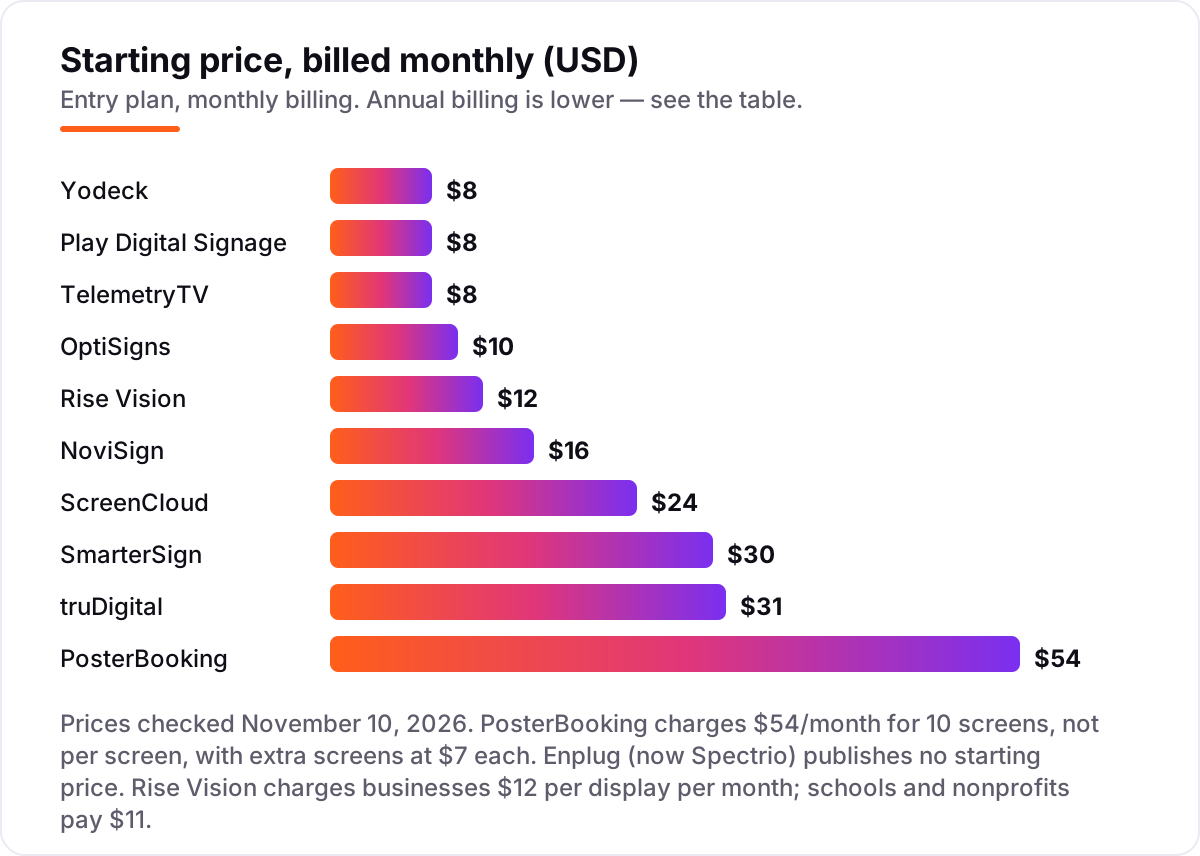
- Work out the pricing unit first. Yodeck, OptiSigns and NoviSign charge per screen, TelemetryTV per device, PosterBooking a flat $54 a month for 10 screens, and Enplug by custom quote. The unit decides the real bill.
- Count the screens on the plan you would actually buy. A 3-screen menu wall costs $0 a month on OptiSigns, $24 on Yodeck or TelemetryTV, $48 on NoviSign and $93 on truDigital, before any player or setup cost.
- Check the player and setup cost, not just the software. truDigital needs its own $249 player per screen, SmarterSign bundles a $300 player into a setup of around $600 per screen, and the rest run on a Fire TV stick or smart TV app you may already own.
- Decide whether the menu needs dayparting and 86'd items. truDigital and SmarterSign are built for breakfast-to-lunch switches and pulling sold-out items; the cheaper general tools schedule playlists but do not know what a daypart is.
- Check the POS link before you assume one exists. Only NoviSign here lists a POS link, with Toast on Business Plus at $17 per screen per month. Every other tool needs menu prices typed by hand.
- Try the editor as a non-designer. Build one real menu in the trial, change a price, and push it to a screen. If that takes more than ten minutes, the tool will cost staff time every single day.
A menu board also needs to be found online, not just seen on the wall. Our guide to restaurant management software covers the wider restaurant side, and before you publish new menu pages, run your titles through the free SERP snippet preview tool — it shows exactly how the title and description will look in Google. If the menu is sorted but new customers are not finding you, our local SEO service handles the visibility side for restaurants and cafes.
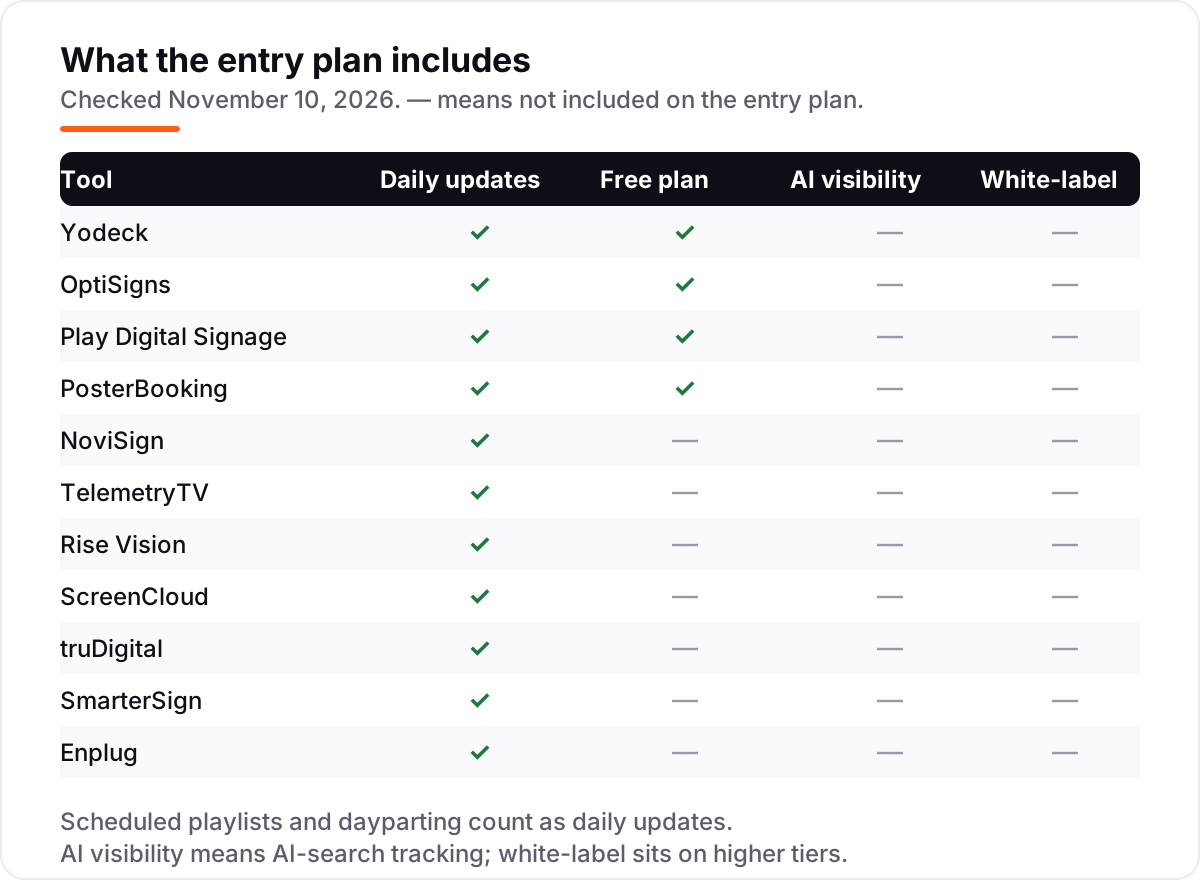
Whatever you shortlist, try it with a real menu before you pay. The trials in this list run 14 to 30 days, which is long enough to run one genuine week, your dishes, your prices, your staff, and that week tells you more than any review can. Check two things in the trial: that a price change lands on the screen within minutes, and that the screen keeps playing when the Wi-Fi drops. Every tool here supports scheduled updates, so there is no reason to buy before you have seen a change go live.
Digital menu board software pricing: what you will actually pay
Take a cafe with a 3-screen menu wall at one location, paying month to month. The software costs $0 a month on OptiSigns, since three screens are free, and $0 on PosterBooking during its free period. Yodeck and TelemetryTV each cost $24 a month, Play Digital Signage costs $16, since the first screen is free, Rise Vision costs $36, NoviSign costs $48, ScreenCloud costs $72, SmarterSign costs $90 and truDigital costs $93. Enplug is a custom quote, so it cannot be priced here.
Over a year on annual billing, that is $0 on OptiSigns, $192 on Play, $288 on Yodeck and TelemetryTV, $432 on Rise Vision, $504 on NoviSign, $648 on PosterBooking Home Basic, $720 on ScreenCloud, $1,080 on SmarterSign and $1,116 on truDigital. The same three screens and the same one location cost $0 a year at the cheap end and $1,116 at the dear end, a gap that comes entirely from the pricing unit, not from features.
Two costs sit outside every number above. First, the player: truDigital needs its own $249 player per screen, though the first one is free when annual service starts, so three screens add $498 once. SmarterSign bundles a $300 player into a setup of around $600 per screen including the display, so three screens add about $1,800 once. Second, the contract: truDigital's $31 rate needs a two-year term paid annually, and ScreenCloud's $20 rate needs annual billing, so compare tools on the billing cycle you will actually use. If the cafe also takes online orders, see our guide to restaurant POS systems for the till side.
Know the difference: menu board software vs general digital signage
The confusion in this category is between a tool built for menus and a general signage tool that happens to show a menu. A general tool like ScreenCloud or TelemetryTV plays any content on any screen, and a menu is just one playlist among many. A menu tool like truDigital or SmarterSign knows what a daypart is: breakfast until 10:30, lunch after, happy hour at four, with LTOs pushed to every location and sold-out items pulled from a phone. That is the difference you feel at 11 in the morning, when the breakfast board should already be lunch.
There is a second, quieter confusion: per-screen pricing against flat bundles. PosterBooking charges $54 a month for 10 screens, so a cafe with three screens pays $54, while Yodeck charges $8 a screen, so the same three screens cost $24. At 10 screens the maths flips: PosterBooking is still $54, while Yodeck is $80. Always price the tool for your actual screen count, not for one screen.
A third distinction worth knowing is the hardware lock. truDigital only works with its own $249 player, and SmarterSign bundles its player into the setup, while Yodeck, OptiSigns, Play and PosterBooking run on hardware you already own. A cheap per-screen price means little if every screen also needs a $249 box.
Quick comparison: tool type by need
| Buyer | Best pick | Why |
|---|---|---|
| Single cafe on a budget | Yodeck | Cheapest honest per-screen price at $8, with one screen free forever |
| Cafe that wants three screens free | OptiSigns | Three screens free forever, then $10 per screen per month |
| Lean team that wants it simple | Play Digital Signage | $8 per screen, month to month, with a free first screen |
| Venue with up to 10 screens | PosterBooking | 10 screens free to start, then a flat $54 a month for all 10 |
| Restaurant that wants touchscreens | NoviSign | Touch and kiosks built in, rated 5.0 out of 5 on G2 |
| Group that wants live data on the wall | TelemetryTV | Live dashboards beside the menu from $8 per device |
| Multi-location brand | ScreenCloud | Lockable brand templates and dashboard apps, from $20 billed annually |
| Franchise that needs dayparting | truDigital | Dayparted menus and LTOs across every location from one login |
| Restaurant that wants design done for it | SmarterSign | Free professionally designed menu board, then $30 per screen |
| Enterprise group that wants it managed | Enplug | Player, install and content handled for you, priced by quote |
Mistakes to avoid
- Budgeting on the headline price alone. A $31 tool also needs a $249 player per screen, and a $30 tool starts around $600 per screen to get going. Price the player and the setup, not just the subscription.
- Buying on the annual price, then paying monthly. ScreenCloud Core is $20 a screen billed annually but $24 month to month, and NoviSign Business is $14 billed annually but $16 monthly. Compare tools on the billing cycle you will actually use.
- Assuming the free tier lasts forever. PosterBooking's free screens gain a watermark after the 3-month trial, Play's free screen needs a review within 30 days, and Yodeck's free screen stays free only while it is the account's only screen.
- Assuming the menu syncs with the till. Only NoviSign here lists a POS link, with Toast on Business Plus at $17. Every other tool needs menu prices typed by hand, so a price change means editing the board yourself.
- Paying for a managed service when self-serve fits. Enplug is quoted after a demo and suits enterprise groups, while a single cafe gets the same screens on Yodeck or Play for $8 each. Match the service level to the size of the business.
How we chose
We checked each vendor's own pricing page on November 10, 2026 and recorded the starting price exactly as shown, including the annual-billing figure where the page lists one, and we ranked the tools by fit for the most common buyer, a single restaurant or cafe with a small menu wall, not by brand size. Two vendor pages disagree with each other on PosterBooking: its pricing page still shows $52 a month for Home Basic with $6.49 per extra screen, while its October and November 2026 pages list $54 and $7, so we used the newer figure. Rise Vision charges businesses $12 per display and schools $11, and we used the business figure since this list is for restaurants. Enplug publishes no prices, so it is listed as a custom quote, and its G2 rating is the Spectrio listing, since Enplug is sold as Spectrio's signage platform. Ratings are shown only where a fresh G2 page gave a clear score and review count on November 10, 2026. TelemetryTV carries no rating because the freshest G2 copy was nine days old, and PosterBooking and SmarterSign carry none because their Capterra pages were months old. No vendor paid for a place in this list, and none of the links here are affiliate links.
What to do next
Start with the free plan or trial of your top pick and run one real week of menus through it. Change a price, switch a daypart, pull a sold-out item, and check that every screen follows within minutes before you commit to a year. If the menus are sorted but new customers are not finding you, our local SEO service handles the visibility side, or compare providers in our guide to restaurant management software. Once your tools are in place, find out what's holding your rankings back.
Your stack only works if people find you
SerpAstra fixes what keeps your site off page one and makes it easy for AI assistants to recommend.
Get a free audit→Sources we checked (20)
- Yodeck pricing — yodeck.com/pricing (checked November 10, 2026)
- OptiSigns pricing — optisigns.com/pricing (checked November 10, 2026)
- Play Digital Signage pricing — playsignage.com/pricing (checked November 10, 2026)
- PosterBooking pricing — posterbooking.com/digital-signage-price (checked November 10, 2026)
- NoviSign pricing — novisign.com/pricing (checked November 10, 2026)
- TelemetryTV pricing — telemetrytv.com/digital-signage-software-pricing (checked November 10, 2026)
- Rise Vision pricing — risevision.com/pricing (checked November 10, 2026)
- ScreenCloud pricing — screencloud.com/pricing (checked November 10, 2026)
- truDigital pricing — trudigital.com/pricing (checked November 10, 2026)
- SmarterSign pricing — smartersign.com/pricing (checked November 10, 2026)
- Spectrio pricing — spectrio.com/pricing (checked November 10, 2026)
- Yodeck on G2 — g2.com/products/yodeck/reviews (checked November 10, 2026)
- OptiSigns on G2 — g2.com/products/optisigns/reviews (checked November 10, 2026)
- Play Digital Signage on G2 — g2.com/products/play-digital-signage/reviews (checked November 10, 2026)
- NoviSign on G2 — g2.com/products/novisign-digital-signage/reviews (checked November 10, 2026)
- Rise Vision on G2 — g2.com/products/rise-vision/reviews (checked November 10, 2026)
- ScreenCloud on G2 — g2.com/products/screencloud-digital-signage/reviews (checked November 10, 2026)
- truDigital on G2 — g2.com/products/trudigital-signage/reviews (checked November 10, 2026)
- Spectrio on G2 — g2.com/products/spectrio/reviews (checked November 10, 2026)
- ScreenCloud vs TelemetryTV on G2 — g2.com/compare/screencloud-digital-signage-vs-telemetryos-digital-signage (checked November 10, 2026)
Shamim
Founder of SerpAstra
A full-stack SEO and digital marketer who spends most days on Local SEO for dental practices, AI search visibility and lead generation.
Frequently asked questions
What is the best digital menu board software?
Yodeck is the best fit for most restaurants: $8 per screen per month with one screen free forever and a free player on annual plans. OptiSigns follows at $10 with three screens free, and truDigital is the best restaurant-specific option at $31 per screen, with dayparting and LTOs built in.
How much does digital menu board software cost?
Published prices run from $0 to $31 per screen per month. OptiSigns covers three screens free and Yodeck one, while paid plans start at $8 on Yodeck, Play and TelemetryTV. A 3-screen menu wall costs $0 to $93 a month in software alone, before players, displays and setup.
Is there free digital menu board software?
Yes, with limits. OptiSigns runs three screens free forever with its branding, Yodeck runs one screen free forever, and PosterBooking runs 10 screens free for a 3-month trial, then with a watermark. Play Digital Signage gives a free first screen after you leave a review within 30 days.
Do digital menu boards connect to my POS?
Mostly no. Only NoviSign here lists a POS link, with Toast on its Business Plus plan at $17 per screen per month. Yodeck, Play and ScreenCloud all need menu prices typed by hand. If prices change often, price the POS-linked tier, not the entry plan, before you commit.
What hardware do I need for a digital menu board?
A TV or commercial display plus a player. Most tools run on a Fire TV stick, smart TV app or Raspberry Pi you already own. truDigital needs its own $249 player per screen, and SmarterSign bundles a $300 player into a setup of around $600 per screen including the display.
Can I change menu prices from my phone?
Yes, on every tool here. They are cloud dashboards, so price edits, daypart switches and 86'd items update from a browser or phone and land on every screen. truDigital is built for exactly that: an item can be 86'd from a phone before the next guest orders.
What is the difference between menu board software and digital signage software?
Menu board software is digital signage tuned for food: dayparted menus, LTOs, 86'd items and price changes from one login. General signage tools like ScreenCloud and TelemetryTV handle menus fine, but they lack those restaurant features, so prices are typed by hand and dayparts are scheduled manually.
Free SEO and AI visibility audit
Find out what is holding your rankings back
Send us your site. Within 2 business days you get a written audit, an AI visibility check and a short fix list ranked by impact. Free, with no contract attached.
Request my free audit→Related guides
 Local Business & Vertical Software7 Best Restaurant Management Software in 2026, ComparedCompare the 7 best restaurant management software options on price, hardware, processing fees and AI features, with every price checked November 8, 2026.Read guide →
 Local Business & Vertical Software10 Best POS for Quick Service Restaurant in 2026Compare the 10 best pos for quick service restaurant systems on price, free plans and offline mode, with every price checked November 8, 2026.Read guide →
 Local Business & Vertical Software10 Best Restaurant Reservation Software in 2026, ComparedCompare the 10 best restaurant reservation software options on price, per-cover fees and free plans, with every price checked November 8, 2026.Read guide →