
12 Best Digital Sculpting Software in 2026, Compared
Compare the 12 best digital sculpting software options on price, free plans and sculpting power for every budget, with prices checked November 10, 2026.
 Shamim Mia, Founder, SerpAstraLast verified November 10, 202613 min read
We compare pricing pages, documentation and public reviews. We never accept payment for rankings.
Key takeaways
- ZBrush is the professional standard at $49/month ($399/year), Blender is free and genuinely competitive, and Nomad Sculpt is the tablet pick at $19.99 once.
- The single most important buying factor is polygon headroom: the tool must handle the detail level your characters need without slowing down.
- Free options cover real work — Blender and SculptGL cost $0, and Houdini Apprentice is free for learning — but the deepest sculpting still lives in ZBrush.
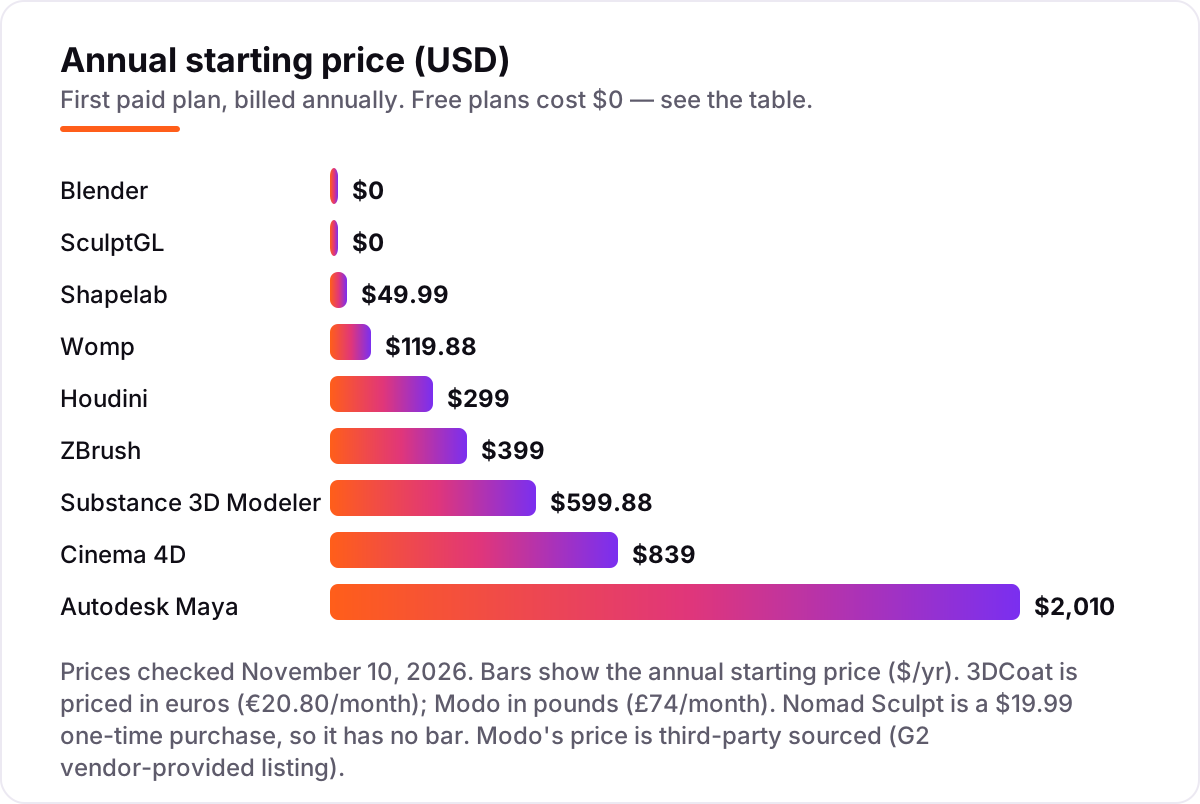
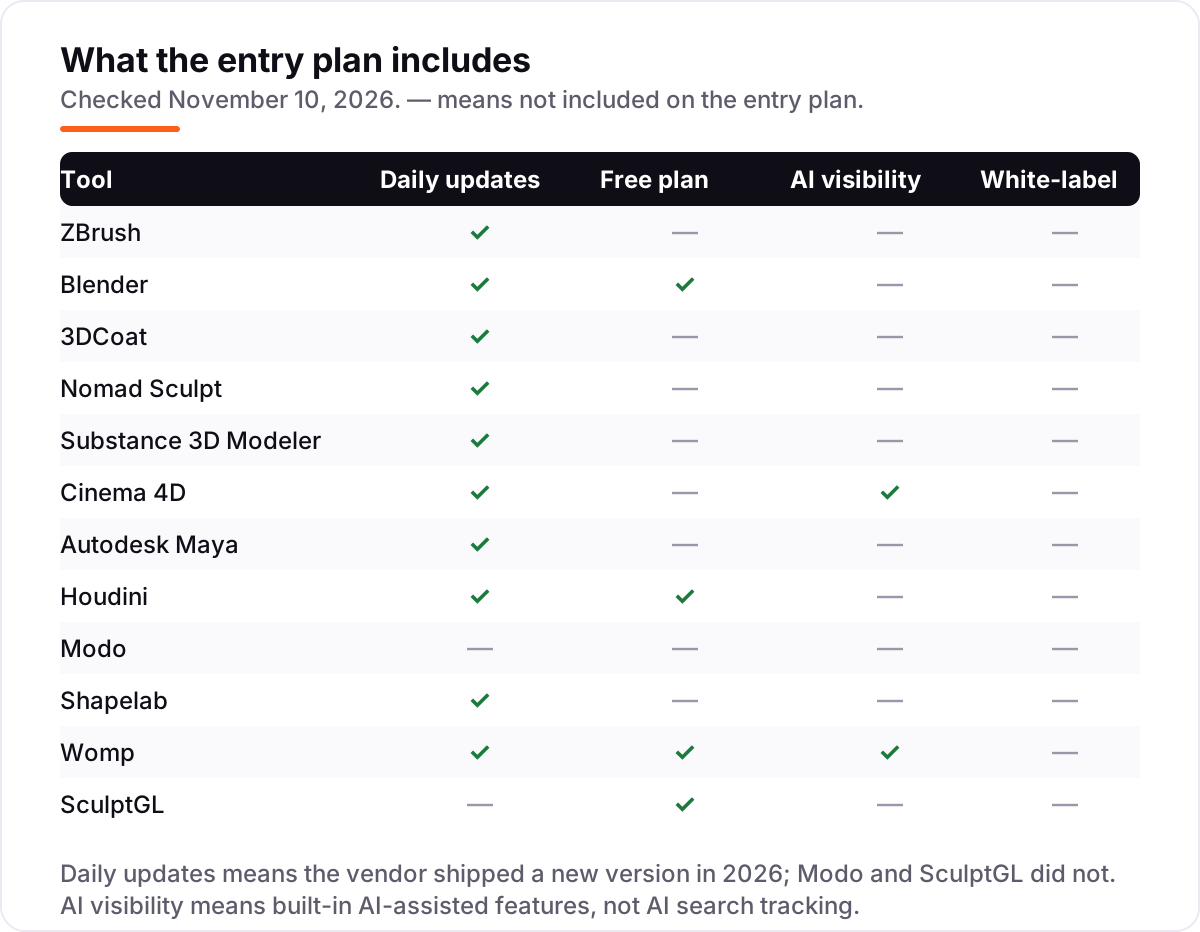
- Every price below was checked November 10, 2026; the chart shows annual prices, and Modo's price comes from a G2 vendor-provided listing.
On this page
Quick comparison
| Tool | Best for | Starting price | Free plan |
|---|---|---|---|
| ZBrush | Film and game artists sculpting high-detail characters and creatures | $399/yr | No (14-day trial) |
| Blender | Hobbyists and indie studios who want serious sculpting inside a complete free 3D suite | Free | Yes (free) |
| 3DCoat | Indie artists who want voxel sculpting plus retopology and PBR texturing in one app | €169.85/yr | No (30-day trial) |
| Nomad Sculpt | iPad and Android artists who want desktop-class sculpting on a tablet | $19.99 once | No (free trial) |
| Substance 3D Modeler | VR artists and concept designers who sculpt in 3D space with a headset | $599.88/yr | No (free trial) |
| Cinema 4D | Motion designers who need sculpting inside a friendly animation and motion-graphics suite | $839/yr | No (14-day trial) |
| Autodesk Maya | Film and game studios that sculpt characters inside a full animation and VFX pipeline | $2,010/yr | No (30-day trial) |
| Houdini | Technical artists and VFX studios that sculpt procedurally inside a simulation pipeline | $299/yr | Yes (Apprentice) |
| Modo | Game artists who want sculpting plus modelling, UVs and rendering in one package | £599/yr | No (30-day trial) |
| Shapelab | VR sculptors who want to shape characters and props by hand in virtual reality | $49.99/yr | No (7-day trial) |
| Womp | First-time sculptors who want to start in a browser with no install | $119.88/yr | Yes (free plan) |
| SculptGL | Beginners who want to try sculpting in a browser with zero setup | Free | Yes (free) |
Make one of these tools?
We re-check this list every quarter. Send a correction, request a review, or ask about a clearly labeled sponsored spot.
Request a listingThe best digital sculpting software

ZBrush
Best for: Film and game artists sculpting high-detail characters and creatures
ZBrush is the tool film and game studios reach for when a character needs pores, wrinkles and torn cloth at a level no other sculptor here matches. Its brush engine handles tens of millions of polygons in real time, so detail work never waits on the viewport, and Dynamesh and ZRemesher turn a rough blob into clean, animatable topology.
The price is the honest friction. At $49 a month or $399 a year it is a serious line item, and Maxon ended perpetual licences in December 2023, so there is no buy-once option. It also sculpts and paints brilliantly but does not animate or render full scenes, so it complements a pipeline tool rather than replacing one.
What we like
- Handles tens of millions of polygons in real time, the highest sculpting headroom here
- Over 200 brushes plus ZRemesher, Dynamesh and Sculptris Pro for organic detail work
- One subscription covers desktop ZBrush plus ZBrush for iPad with premium features
- Industry standard for film, games and collectibles, so skills transfer to studio jobs
Watch out for
- Subscription only since December 2023 — no perpetual licence is sold any more
- Steep learning curve, and it does not animate or render full scenes on its own
- The free iPad version cannot export 3D models, so it is a trial of the workflow only

Blender
Best for: Hobbyists and indie studios who want serious sculpting inside a complete free 3D suite
Blender is the reason free sculpting software is a serious category. Its sculpt mode covers multiresolution sculpting, dynamic topology, masking and dozens of brushes, and because it is a full 3D suite you can sculpt a character, retopologize it, paint textures, rig it and render the final image without leaving the program.
The honest catch is depth at the extreme end. At very high polygon counts ZBrush still pulls ahead, and the dense interface takes weeks to learn. For hobbyists, indie game developers and anyone learning, Blender is the obvious starting point: it costs nothing and the skills transfer.
What we like
- Completely free and open source under the GNU GPL, with no paid tier or feature locks
- Sculpt mode includes multiresolution sculpting, dynamic topology, masking and dozens of brushes
- One program covers sculpting, retopology, UVs, rigging, animation and rendering
- Largest tutorial library in 3D, so every sculpting question already has an answer
Watch out for
- Sculpt mode is very good but not as deep as ZBrush at extreme polygon counts
- Dense interface takes weeks to learn, and the defaults suit generalists, not sculptors
- No commercial support included; help comes from the community and documentation

3DCoat
Best for: Indie artists who want voxel sculpting plus retopology and PBR texturing in one app
3DCoat takes a different technical approach from the rest of this list: voxel sculpting, which lets you build forms from digital clay without worrying about polygon flow, then convert to clean meshes later. Retopology, UV mapping and PBR texture painting are built into the same app, so a sculpt can go from rough blockout to game-ready asset in one place.
The pricing is flexible in a way the subscription-only tools are not. The Individual subscription costs €20.80 a month, and a perpetual licence costs €379 once with 12 months of updates. The trade-off is community size: fewer tutorials and brushes than ZBrush or Blender, and prices are in euros.
What we like
- Voxel sculpting builds forms from digital clay without worrying about polygon flow
- Retopology, UV mapping and PBR texture painting are built in, not separate purchases
- Perpetual licence available at €379 for artists who do not want a subscription
- Runs on Windows, macOS and Linux, which the subscription-only rivals do not all do
Watch out for
- Priced in euros, so the dollar cost moves with the exchange rate at checkout
- Perpetual licence includes only 12 months of updates; later upgrades cost extra
- Smaller community than ZBrush or Blender, so fewer tutorials and ready-made brushes
Nomad Sculpt
Best for: iPad and Android artists who want desktop-class sculpting on a tablet
Nomad Sculpt proved that a tablet can run a real sculpting app. It offers clay, trim, smooth and mask brushes with pressure support, voxel remeshing, multiresolution sculpting and vertex painting, all in an interface designed for touch from the start. It now runs on iPad, Android, Windows and macOS, so many artists block out characters on the couch and finish them at a desk.
Pricing is refreshingly simple: $19.99 once on iPad, with a $35 desktop licence sold separately, and no subscription anywhere. The limit is hardware, since tablets cannot push as many polygons as a desktop, and Quad Remesher costs $15.99 extra.
What we like
- Genuine sculpting on a tablet: clay, trim, smooth and mask brushes with pressure support
- Voxel remeshing, multiresolution sculpting, layers and PBR vertex painting included
- One-time purchase per platform — no subscription, no login, no renewal to forget
- Now runs on iPad, Android, Windows and macOS, so sculpts move from couch to desk
Watch out for
- Tablet hardware caps polygon counts well below a desktop, so fine detail is limited
- The mobile purchase does not include the desktop version, which is sold separately
- Quad Remesher, the clean-topology add-on, costs an extra $15.99 on top of the app

Substance 3D Modeler
Best for: VR artists and concept designers who sculpt in 3D space with a headset
Substance 3D Modeler is the only tool here built around virtual reality first. It interprets spatial input from the physical world, so you sculpt a model as you would in a real workshop, using the natural, fluid gestures of the artistic flow. Symmetry, repeaters and linked copies speed up blocking out a scene, and you can switch to desktop mode whenever the task suits a mouse better.
The catch is the bundle. Modeler is only sold inside the Substance 3D Collection at $59.99 a month, so you pay for Painter, Designer, Sampler and Stager whether you use them or not. If you already live in Creative Cloud and own a headset, that bundle is good value; if you only want Modeler, it is not.
What we like
- Sculpt with natural hand gestures in VR, like working clay in a real workshop
- Switch between VR and desktop at any time, depending on the task in front of you
- Symmetry, repeaters and linked copies speed up blocking out scenes and props
- Collection also includes Painter, Designer, Sampler and Stager plus 20,000-plus assets
Watch out for
- Only sold inside the Substance 3D Collection — there is no standalone Modeler price
- Needs a VR headset for the full experience; desktop mode is the secondary workflow
- Subscription only, so access stops the moment billing stops, with no perpetual licence

Cinema 4D
Best for: Motion designers who need sculpting inside a friendly animation and motion-graphics suite
Cinema 4D is the package people recommend when someone asks for 3D that is enjoyable to learn. Its sculpting tools sit inside the friendliest professional interface here, beside MoGraph, animation and simulation, and the subscription now includes the Redshift GPU renderer. The 2026.4 release added generative AI features, first on the new iPad edition.
It is not a dedicated sculptor, and the price shows it: $109 a month or $839 a year is a lot to pay if sculpting is the only feature you will use. Buy Cinema 4D when motion graphics is the job and sculpting is part of it; buy ZBrush when sculpting is the whole job.
What we like
- Friendliest professional 3D interface here, with the strongest motion-graphics toolset
- Sculpting sits beside modelling, MoGraph, animation and simulation in one program
- Redshift GPU renderer and five Team Render nodes are included in the subscription
- Generative AI features arrived in the 2026.4 release, first on the new iPad edition
Watch out for
- Sculpting is a feature of a motion-graphics suite, not a dedicated sculpting tool
- Subscription only — Maxon ended perpetual licences, so there is no buy-once option
- At $839 a year it is expensive if sculpting is the only feature you will use

Autodesk Maya
Best for: Film and game studios that sculpt characters inside a full animation and VFX pipeline
Maya is the studio standard for a reason: it covers the whole character pipeline, from sculpting and modelling through rigging, animation, Bifrost simulation and Arnold rendering, in one subscription. A sculpt made in Maya never has to leave the program to become a rigged, animated character, which is why film and game pipelines are built around it.
The price is the obvious friction. At $2,010 a year, or $255 month to month, it is a serious line item for a freelancer, and the sculpting tools are good but secondary — Maya is bought for rigging and animation. Qualifying indie artists should check Maya Indie before paying the full rate.
What we like
- Studio standard for character rigging, animation and VFX, so sculpted assets stay in one pipeline
- Sculpting, modelling, UV mapping and Bifrost simulation ship in the same subscription
- Arnold renderer is included for production-quality look development
- Maya Indie offers a cheaper annual licence for qualifying artists under $100,000 revenue
Watch out for
- Most expensive entry price here at $2,010 a year, or $255 month to month
- Sculpting tools are good but secondary — Maya is bought for rigging and animation
- Steep learning curve, and the subscription price has risen repeatedly in recent years

Houdini
Best for: Technical artists and VFX studios that sculpt procedurally inside a simulation pipeline
Houdini is the tool behind the water, smoke, destruction and crowd shots in big films and AAA games, and its sculpting is procedural: every operation is a node that stays editable, so a sculpt can be rebuilt, varied and reused instead of re-done by hand. The Indie licence at $299 a year gives eligible small studios near-full FX capability, and Apprentice is free for learning.
Nobody buys Houdini just to sculpt. The node-based workflow takes weeks to grasp, the learning curve is the steepest here, and the Indie licence caps at $100,000 annual revenue and three seats. Buy it for procedural VFX and simulation; the sculpting comes along for the ride.
What we like
- Procedural, node-based sculpting that stays editable and non-destructive throughout
- Indie at $299 a year gives eligible small studios near-full FX capability
- Same tool behind the water, smoke, destruction and crowd shots in big films
- Free Apprentice tier is the full toolset for learning and non-commercial work
Watch out for
- Steepest learning curve here — the node-based workflow takes weeks to grasp
- Sculpting is one small part of a procedural VFX package, not the reason to buy it
- Indie licence caps at $100,000 annual revenue and three seats; studios pay far more

Modo
Best for: Game artists who want sculpting plus modelling, UVs and rendering in one package
Modo is the all-rounder for game artists: sculpting, direct modelling, MeshFusion booleans, retopology, UV tools and texture baking in one application, with a built-in physically based renderer so a sculpt can be visualised without opening a second app. Reviewers praise its intuitive interface and customisable workflow above everything else.
The caveats are pace and price. Development has slowed and reviewers note performance lags on complex scenes, and the vendor prices in pounds — £74 a month or £599 a year — so the dollar cost moves with the exchange rate. Pick Modo when one package must do the whole game-asset job.
What we like
- Sculpting, direct modelling, MeshFusion booleans and retopology in one application
- Intuitive interface with a customisable workflow that reviewers praise most
- Built-in physically based renderer, so sculpts can be visualised without a second app
- Strong UV tools and texture baking for game assets, with Unity and Unreal export
Watch out for
- Priced in pounds on the vendor's own store, so the dollar cost moves with exchange rates
- Development pace has slowed, and reviewers note performance lags on complex scenes
- Sculpting is a solid feature, not a ZBrush-level specialism, and the community is small
Shapelab
Best for: VR sculptors who want to shape characters and props by hand in virtual reality
Shapelab is a purpose-built VR sculpting app: voxel-based sketching blocks out rough forms fast, and polygon tools refine them into detailed characters and props, all shaped by hand in virtual reality. The Max 2026 edition runs on Windows in desktop mode or in VR with a tethered headset, so the same licence works with or without the hardware on your head.
The price is gentle for a VR tool. A subscription costs $49.99 a year, and a perpetual licence costs $69.99 once. The real cost is the headset, and the annual release cycle means last year's version stops getting updates at year end. Buy it when sculpting in VR is the point.
What we like
- Purpose-built VR sculpting: voxel sketching for rough forms, polygon tools for detail
- Desktop mode on Windows, so the same licence works with or without a headset
- Perpetual licence at $69.99 for artists who would rather buy once than subscribe
- Shapelab Lite at $34.99 brings the core tools to standalone Quest and Pico headsets
Watch out for
- Needs a VR headset for the main experience, which adds hardware cost on top
- Desktop mode exists, but the tool is designed around VR first and desktop second
- Annual releases mean last year's version stops getting updates at year end

Womp
Best for: First-time sculptors who want to start in a browser with no install
Womp takes a different philosophy from every other tool here. Instead of brushes on a mesh, you build with liquid Goop shapes that blend, merge and carve like digital clay, in a browser with nothing to install. The interface is playful rather than technical, the free tier includes the core tools and exports, and there is a real community sharing work.
It is not a ZBrush replacement. Shape-based modelling cannot match brush sculpting for fine detail, the best materials sit behind the $12.99 a month Pro plan, and the free tier caps rendering resolution. Pick Womp when you want the easiest possible first sculpt, not a production pipeline.
What we like
- Runs entirely in the browser — nothing to install, and it works on any device
- Goop-based shapes blend, merge and carve like clay, which beginners grasp fast
- Free tier includes the core tools and exports, with a 14-day Pro trial on top
- Built-in 3D printing service turns a finished sculpt into a shipped object
Watch out for
- Shape-based modelling, not brush sculpting, so it cannot match ZBrush detail
- Best materials and tools sit behind the Pro plan at $12.99 a month
- Young product with a changing workflow, and the free tier caps rendering resolution

SculptGL
Best for: Beginners who want to try sculpting in a browser with zero setup
SculptGL is the fastest way to try sculpting today: no download, no account, just a browser tab. Open the page and you are sculpting within seconds, with standard brushes, inflate, smooth, twist and drag, multiresolution subdivision, dynamic topology and PBR vertex painting. It exports to OBJ, PLY and STL, so a sculpt can go straight to a 3D printer.
The honest footnote is maintenance. The creator has moved on to Nomad Sculpt, so SculptGL gets only minor fixes now, and the interface shows its age. Treat it as a sketchbook, not a production tool — and when a sculpt outgrows it, Blender imports the OBJ and takes over.
What we like
- Open the page and sculpt within seconds — no download, no account, no cost
- Clay, crease, inflate, smooth and grab brushes with dynamic topology and symmetry
- Exports OBJ, STL and PLY, so a sculpt can go straight to a 3D printer
- Free and open source, made by the same developer who went on to build Nomad Sculpt
Watch out for
- Original author no longer actively develops it, so expect only minor fixes
- Interface shows its age, and there is no account system, so work lives in the browser
- Basic brush set only — no layers, no animation, and no path to production pipelines
The best digital sculpting software turns a lump of digital clay into a character, creature or prop you can print, animate or drop into a game. We ranked the twelve tools below by fit for the most common buyer — an individual artist sculpting characters, from a first-timer to a working freelancer — starting with the professional standard and the free tools, and ending with the browser and VR options. Every price was checked November 10, 2026.
How to choose the best digital sculpting software
- Check polygon headroom first. A tool that slows down at 5 million polygons cannot finish the detail a film or game character needs. ZBrush handles tens of millions; tablets and browser tools cap out far lower.
- Decide sculpting-first or pipeline-first. ZBrush, Nomad Sculpt and 3DCoat exist to sculpt; Maya, Cinema 4D, Houdini and Modo sculpt inside a bigger pipeline for animation, simulation or motion graphics.
- Match the price model to your work. Subscriptions suit steady paid work, perpetual licences suit artists who hate renewals, and one-time purchases suit tablet and VR tools. Check what happens when you stop paying.
- Test the trial with your own sculpt. Every paid tool here has a free trial or a free version. Sculpt something real in the trial week, then export it and check the file opens cleanly in the next tool in your chain.
- Count the hardware you already own. Nomad Sculpt needs a tablet with a stylus, Modeler and Shapelab want a VR headset, and ZBrush and Maya want a strong desktop. The cheapest licence is not cheap if it needs new hardware.
If you sell your sculpts or take commissions, being found matters as much as the sculpt itself. Our monthly SEO service handles the visibility side, and before you publish a portfolio page, run your titles through the free SERP snippet preview tool — it shows exactly how the title will look in Google. For the modelling side of the pipeline, see our guide to CAD software for 3D modelling.
Whatever you shortlist, try it with a real sculpt before you pay. The trials in this list run 7 to 30 days, which is long enough to block out one genuine character — your subject, your brushes, your export — and that week tells you more than any review can. Check two things in the trial: that the viewport stays smooth at the detail level you need, and that the export opens cleanly in the next tool you use.
Digital sculpting software pricing: what you will actually pay
Take a freelance character artist starting out. The free route costs $0: Blender for sculpting, retopology and rendering, plus SculptGL in the browser for quick sketches. Add Nomad Sculpt at $19.99 once, and the whole first year costs $19.99 — tablet sculpting included.
The mid route is ZBrush at $399 a year, which is the professional standard for character detail. Over two years that is $798, against $19.99 for the Nomad Sculpt licence, which never renews. Add Womp Pro at $119.88 a year for browser-based client previews, and the two-year total reaches $1,037.76. A VR route costs less than most people expect: Shapelab at $49.99 a year, or $69.99 once for the perpetual licence, plus the headset itself.
The studio route climbs fast. ZBrush at $399 a year plus the Substance 3D Collection at $599.88 a year plus Maya at $2,010 a year comes to $3,008.88 a year, before any render farm or asset purchases. Houdini Indie at $299 a year is the bargain of the high end, but only for studios under the $100,000 revenue cap. The lesson is the same as in every software category: the subscription is the small number, and the stack is the real bill.
Know the difference: digital sculpting vs 3D modelling
The confusion in this category is between sculpting and modelling, and it decides which tool to buy. Sculpting shapes organic forms like digital clay: you push, pull, smooth and pinch a surface with brushes, which suits characters, creatures and soft forms. Modelling builds with polygons, curves and precise measurements, which suits hard surfaces, architecture and products. Most tools here do both, but ZBrush, Nomad Sculpt and 3DCoat are sculpting-first, while Maya, Cinema 4D and Modo are modelling-first suites with sculpting inside.
There is a second, quieter confusion: subscription versus perpetual. ZBrush, Cinema 4D, Maya and Substance 3D Modeler are subscription only — access stops when billing stops, and there is no buy-once option. 3DCoat and Shapelab still sell perpetual licences, Nomad Sculpt is a one-time purchase, and Blender and SculptGL are free forever. Neither model is better in itself; the question is whether you want to rent the tool or own it.
A third distinction worth knowing is where the sculpting happens. Desktop tools handle the highest detail, tablets trade detail for portability, browsers trade detail for zero setup, and VR trades the familiar mouse for hand gestures in 3D space. The same artist may need two of these: Nomad Sculpt on the couch for blocking out, ZBrush at the desk for finishing.
Quick comparison: tool type by need
| Buyer | Best pick | Why |
|---|---|---|
| Professional character artist | ZBrush | Highest polygon headroom and the studio standard, from $399/year |
| Zero budget, full pipeline | Blender | Free and open source, sculpting through rendering in one program |
| Voxel sculpting plus texturing | 3DCoat | Voxel sculpting, retopology and PBR painting in one app, from €20.80/month |
| Tablet sculpting | Nomad Sculpt | Desktop-class sculpting on iPad and Android, $19.99 once |
| VR sculpting | Substance 3D Modeler or Shapelab | Hand-gesture sculpting in virtual reality, from $49.99/year |
| Motion graphics with sculpting | Cinema 4D | Friendliest professional suite, $839/year with Redshift included |
| Film and game pipeline | Autodesk Maya | Sculpt, rig and animate in the studio standard, $2,010/year |
| Procedural VFX | Houdini | Node-based sculpting plus film-grade simulation, Indie $299/year |
| First sculpt, zero setup | Womp or SculptGL | Browser-based and free to start, Pro from $119.88/year |
Mistakes to avoid
- Buying on the monthly price, then paying annually. ZBrush is $49 a month but $399 a year, and Maya is $255 a month but $2,010 a year. Compare tools on the billing cycle you will actually use.
- Comparing a subscription to a one-time purchase. Nomad Sculpt at $19.99 once costs less over two years than a single month of Maya. Price the tool over the time you will actually use it.
- Ignoring the currency. 3DCoat is priced in euros and Modo in pounds, so the dollar cost moves with the exchange rate at checkout. Check the price in your own currency before budgeting.
- Assuming sculpting software animates. ZBrush sculpts brilliantly but does not animate or render full scenes. If you need rigging and animation, budget for a pipeline tool like Blender or Maya as well.
- Buying a tool that is no longer sold. Mudbox ended new subscription sales in November 2026, Forger left the App Store in September 2025, and Sculptris and Meshmixer are discontinued. Old roundups still list them; do not buy a dead tool.
How we chose
We checked each vendor's own pricing page on November 10, 2026 and recorded the starting price exactly as shown, including the annual-billing figure where the page lists one, and we ranked the tools by fit for the most common buyer — an individual artist sculpting characters — not by brand size. Two prices could not be verified on the vendor's own page: Modo's £74 a month comes from a G2 vendor-provided listing, and Womp's $12.99 a month is corroborated by the vendor's own FAQ and independent 2026 reads rather than a directly opened pricing page. Ratings are shown only where a fresh G2 page gave a clear score and review count on November 10, 2026: ZBrush, Blender, 3DCoat, Cinema 4D, Maya, Houdini and Modo. Nomad Sculpt, Substance 3D Modeler, Shapelab, Womp and SculptGL carry no rating here because they have no G2 or Capterra listing, and we would rather show no rating than a store rating from another system. Four once-famous tools were left out because they can no longer be bought: Mudbox, Forger, Sculptris and Meshmixer. No vendor paid for a place in this list, and none of the links here are affiliate links.
What to do next
Start with the free route: download Blender, open SculptGL in a browser tab, and sculpt something this week. If the work clicks, try Nomad Sculpt on a tablet or the ZBrush trial for a month of real character work. When the sculpt is ready to show the world, our monthly SEO service can help people find it. Once your tools are in place, find out what's holding your rankings back.
Your stack only works if people find you
SerpAstra fixes what keeps your site off page one and makes it easy for AI assistants to recommend.
Get a free audit→Sources we checked (18)
- ZBrush pricing — maxon.net/en/buy (checked November 10, 2026)
- ZBrush on G2 — 4.7/5, 104 reviews (checked November 10, 2026)
- Blender download — blender.org/download (checked November 10, 2026)
- Blender on G2 — 4.6/5, 319 reviews (checked November 10, 2026)
- 3DCoat licensing — pilgway.com/licensing/2 (checked November 10, 2026)
- 3DCoat on G2 — 4.3/5, 21 reviews (checked November 10, 2026)
- Nomad Sculpt on the App Store — $19.99 (checked November 10, 2026)
- Substance 3D Modeler — adobe.com/products/substance3d-modeler.html (checked November 10, 2026)
- Cinema 4D pricing — maxon.net/en/buy (checked November 10, 2026)
- Cinema 4D on G2 — 4.6/5, 137 reviews (checked November 10, 2026)
- Autodesk Maya pricing — autodesk.com/products/maya/buy (checked November 10, 2026)
- Maya on G2 — 4.3/5, 266 reviews (checked November 10, 2026)
- Houdini pricing — sidefx.com/buy (checked November 10, 2026)
- Houdini on G2 — 4.5/5, 35 reviews (checked November 10, 2026)
- Modo pricing and G2 — 4.3/5, 86 reviews (checked November 10, 2026)
- Shapelab — shapelabvr.com (checked November 10, 2026)
- Womp — womp.com (checked November 10, 2026)
- SculptGL — stephaneginier.com/sculptgl (checked November 10, 2026)
Shamim
Founder of SerpAstra
A full-stack SEO and digital marketer who spends most days on Local SEO for dental practices, AI search visibility and lead generation.
Frequently asked questions
What is the best digital sculpting software in 2026?
ZBrush is the best for professional character work: the highest polygon headroom and the industry standard for film and games, from $399 a year. Blender is the best free option and genuinely competitive, while Nomad Sculpt is the best tablet app at $19.99 once. Pick by the detail level you need, not by the brand.
How much does digital sculpting software cost?
From $0 to $2,010 a year. Blender and SculptGL are free, Nomad Sculpt costs $19.99 once, Shapelab is $49.99 a year, and ZBrush is $399 a year. At the top end, Cinema 4D costs $839 a year and Maya costs $2,010 a year. The chart above shows the annual starting price for every tool in this list.
Is there a free digital sculpting software?
Yes. Blender is free and open source with a full sculpting toolset, SculptGL runs free in a browser, and Houdini Apprentice is free for learning and non-commercial work. Womp also has a free Starter plan. Free tools cover real character work; you pay when you need ZBrush-level detail or a studio pipeline.
Should I choose ZBrush or Blender for sculpting?
Choose ZBrush if character detail is your job: it handles tens of millions of polygons and is the studio standard, so the skill pays. Choose Blender if the budget is zero or you need the whole pipeline — sculpting, retopology, rigging and rendering — in one free program. Many artists learn in Blender and move to ZBrush for paid work.
Can I sculpt on an iPad?
Yes. Nomad Sculpt at $19.99 once is the best tablet option, with pressure support, voxel remeshing and multiresolution sculpting. ZBrush for iPad has a free version with 28 brushes, and the full version comes with a desktop ZBrush subscription or $9.99 a month standalone. Tablets cap polygon counts below a desktop, so finish fine detail there.
What is the difference between sculpting and 3D modelling?
Sculpting shapes organic forms like digital clay, pushing and pulling a surface with brushes — best for characters, creatures and soft forms. Modelling builds with polygons, curves and precise measurements — best for hard surfaces, architecture and products. Most tools here do both, but ZBrush, Nomad Sculpt and 3DCoat are sculpting-first.
Do I need a VR headset for digital sculpting?
No. Ten of the twelve tools here work with a mouse, stylus or tablet, and only Substance 3D Modeler and Shapelab are built around VR. A headset makes sculpting feel like working real clay, and both VR tools also offer a desktop mode. Try Blender or Nomad Sculpt first; buy a headset only if the VR workflow appeals to you.
Free SEO and AI visibility audit
Find out what is holding your rankings back
Send us your site. Within 2 business days you get a written audit, an AI visibility check and a short fix list ranked by impact. Free, with no contract attached.
Request my free audit→Related guides
 Design, Video & Creative10 Best CAD Software for 3D Modeling in 2026, ComparedCompare the 10 best cad software for 3d modeling on price, free plans and fit for every budget, with every single price checked November 4, 2026.Read guide →
 Design, Video & CreativeBest 3D CAD Software for 2026: 10 Options Compared by Use CaseCompare the best 3d cad software for 2026: 10 tools with real starting prices, free plans and G2 ratings, sorted by the job you need them for.Read guide →
 Local Business & Vertical Software9 Best Free 3D Landscape Design Software in 2026, ComparedCompare the 9 best free 3d landscape design software options on price, free plans and 3D views, with every price checked on November 7, 2026.Read guide →