
Best 3D CAD Software for 2026: 10 Options Compared by Use Case
Compare the best 3d cad software for 2026: 10 tools with real starting prices, free plans and G2 ratings, sorted by the job you need them for.
 Shamim Mia, Founder, SerpAstraLast verified November 4, 202614 min read
We compare pricing pages, documentation and public reviews. We never accept payment for rankings.

Key takeaways
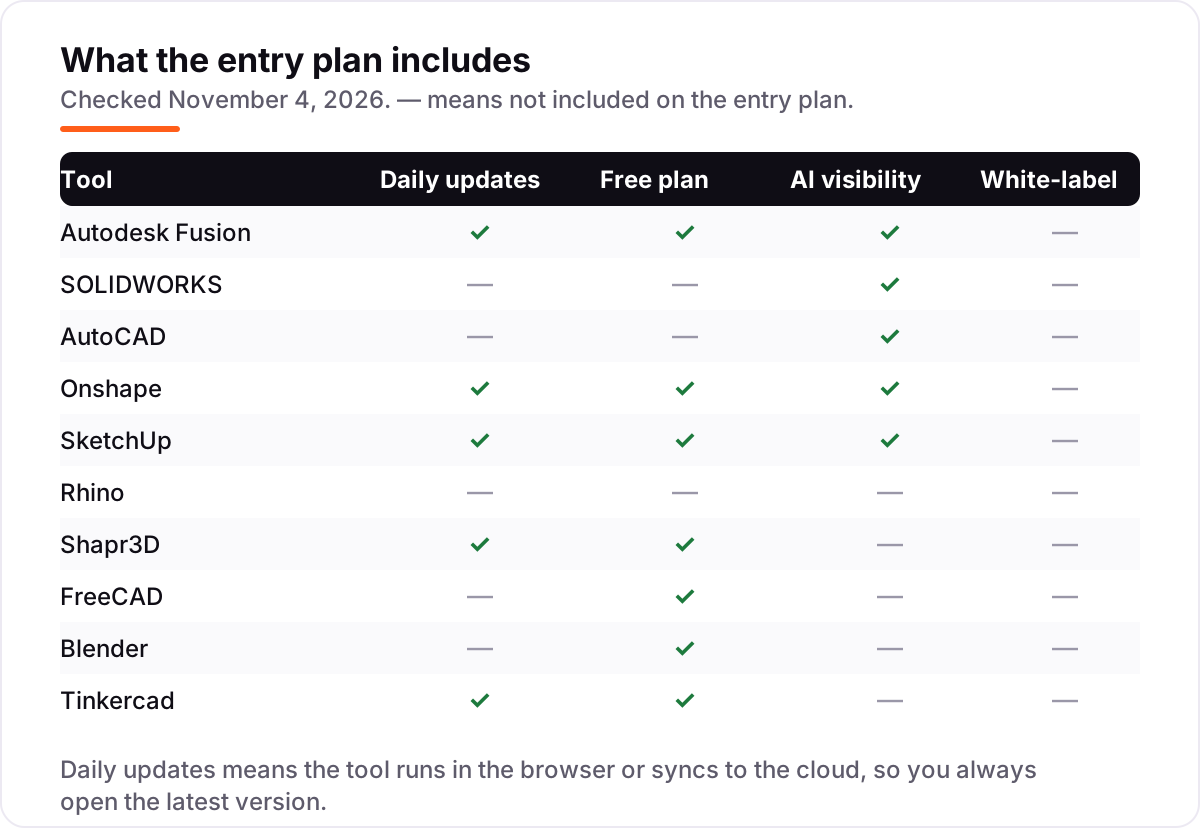
- Autodesk Fusion is the best fit for most buyers at $85/month; SOLIDWORKS follows at $2,820/year for professional mechanical design, and AutoCAD at $260/month for drafting and documentation.
- Three tools here cost nothing at all — FreeCAD, Blender and Tinkercad are free with no paid plan — while Rhino charges $995 once and never bills again.
- The single most important buying factor is the modeling style: parametric tools rebuild from dimensions, direct modelers push and pull geometry, and the wrong style slows every change you make.
- Annual billing is the norm in CAD: Fusion drops from $85 a month to $680 a year, and SketchUp Pro from $99.99 a month to $399 a year, so compare the annual figure, not the monthly one.
On this page
Quick comparison
| Tool | Best for | Starting price | Free plan |
|---|---|---|---|
| Autodesk Fusion | Small product teams that want CAD, CAM, simulation and PCB design in one cloud subscription | $85/mo | Yes (personal use) |
| SOLIDWORKS | Mechanical engineers and product teams that need the industry-standard parametric CAD for parts, assemblies and drawings | $2,820/yr | No |
| AutoCAD | Architects, engineers and drafters who need precise 2D drawings and DWG compatibility above all else | $260/mo | No (30-day trial) |
| Onshape | Distributed product teams that want real-time collaboration and built-in version control without a file server | $1,500/yr | Yes (Free plan) |
| SketchUp | Architects, interior designers and freelancers who need fast concept models and client-ready visuals | $99.99/mo | Yes (Free) |
| Rhino | Designers and architects who model freeform, organic shapes and want to pay once instead of every year | $995 once | No (90-day eval) |
| Shapr3D | Designers who sketch with an Apple Pencil and want real CAD on an iPad, Mac or Windows tablet | Free; Pro $299/yr | Yes (Basic) |
| FreeCAD | Makers and engineers who want fully free parametric CAD for dimensioned parts, with no licence strings | Free | Yes (free) |
| Blender | Artists, animators and 3D-printing makers who need free modeling, sculpting, rendering and animation in one tool | Free | Yes (free) |
| Tinkercad | Beginners, students and classrooms taking their first steps in 3D design and 3D printing | Free | Yes (free) |
Make one of these tools?
We re-check this list every quarter. Send a correction, request a review, or ask about a clearly labeled sponsored spot.
Request a listingThe best 3d cad software

Autodesk Fusion
Best for: Small product teams that want CAD, CAM, simulation and PCB design in one cloud subscription
Autodesk Fusion is the most complete subscription in this list: parametric CAD, CAM, simulation and PCB design in one cloud workspace, for $85 a month or $680 a year. You model a part, generate the toolpath, run a simulation and share the file with a teammate in one login, without exporting between programs. The parametric timeline means a late change to one dimension rebuilds the whole model, the workflow most product teams need.
The catch is the cloud. Fusion needs a connection for sign-in and syncing, and heavy meshes or large assemblies can lag on mid-range machines. Advanced simulation and generative design sit behind paid extensions, so the $680 headline is a floor, not a ceiling. Buy Fusion when one tool must carry a part from sketch to machined prototype; buy SOLIDWORKS when mechanical depth matters more than breadth.
What we like
- CAD, CAM, simulation and PCB design in one subscription, with cloud collaboration built in
- Parametric timeline makes late design changes cheap — edit a sketch and the model rebuilds
- Free personal-use plan for hobbyists, plus free education licences for students and teachers
- Annual billing cuts the price from $85 a month to $680 a year, a third off
Watch out for
- Cloud-dependent: offline work is limited, and a bad connection slows saving and syncing
- Advanced simulation and generative design need paid extensions on top of the base price
- Large assemblies and heavy meshes can lag on mid-range hardware

SOLIDWORKS
Best for: Mechanical engineers and product teams that need the industry-standard parametric CAD for parts, assemblies and drawings
SOLIDWORKS is the mechanical-design standard for a reason: parametric parts, assemblies, sheet metal, weldments and drawings that update together, in a tool most engineering firms already run. Standard costs $2,820 a year per user, with Professional at $3,456 and Premium at $4,716 adding simulation, rendering and data management. If your shop already speaks SOLIDWORKS, hiring, training and file exchange all get easier.
The price is the barrier. There is no monthly plan and no free trial, so the cheapest way in is $2,820 paid up front, and the 15-day money-back policy is your only safety net. Large assemblies can also slow down and crash, a complaint that recurs in reviews. Buy SOLIDWORKS when you design parts for manufacture every day; buy Fusion when the budget is smaller and CAM matters as much as CAD.
What we like
- The mechanical-design standard: parametric parts, assemblies, sheet metal and weldments in one tool
- Drawings update automatically when the model changes, which saves hours on revisions
- Simulation, rendering and data management are built in on the higher tiers, not separate purchases
- Huge community, training library and reseller network, so help is easy to find
Watch out for
- No monthly plan and no free trial — the cheapest entry is $2,820 a year, paid up front
- Large assemblies can slow down and crash, a complaint that recurs in user reviews
- Bought through resellers in most regions, so the final quote can vary from the list price

AutoCAD
Best for: Architects, engineers and drafters who need precise 2D drawings and DWG compatibility above all else
AutoCAD is the drafting standard: precise 2D drawings, DWG files that open everywhere, and seven industry toolsets for architecture, mechanical, electrical, plant design and mapping, all in one subscription. It costs $260 a month or $2,095 a year, and the subscription includes the desktop app plus web and mobile access, so drawings are reachable from the job site as well as the office.
The trade-off is that AutoCAD leads on 2D and lags on 3D. Its solid and surface modeling is serviceable but weaker than Fusion or SOLIDWORKS, and $260 a month makes it the dearest monthly subscription here. There is no free plan, only a 30-day trial and education access. Buy AutoCAD when drawings and DWG compatibility are the job; buy Fusion or SOLIDWORKS when the model itself is the product.
What we like
- The DWG standard: drawings open everywhere, and every firm you work with already uses it
- Seven industry toolsets included — architecture, mechanical, electrical, plant, mapping and more
- Autodesk AI automates repetitive drafting: markup assist, smart block placement and macro advice
- Runs on desktop, web and mobile, so drawings are reachable from the job site
Watch out for
- The most expensive monthly subscription here at $260 a month — annual billing is far cheaper
- 3D modeling is weaker than the dedicated 3D tools in this list; AutoCAD leads on 2D drafting
- No free plan beyond education access; a trial is the only way to test it before paying

Onshape
Best for: Distributed product teams that want real-time collaboration and built-in version control without a file server
Onshape is the only professional CAD here that runs entirely in a browser. Standard costs $1,500 a user a year and covers parametric modeling, surfacing, sheet metal and drawings, with built-in data management and version control. Several people can edit the same model at once, branching and merging like software developers, and there is no file server to maintain and no install to update.
The price structure is the catch: there is no monthly billing, so a single seat costs $1,500 up front, and the simulation, CAM and release-management features most teams want wait for Professional at $2,500 a year. It also needs a reliable connection, since there is no offline desktop mode. Buy Onshape when your team is distributed and collaboration is the bottleneck; buy Fusion when you need CAM in the same subscription.
What we like
- Runs entirely in the browser — no install, no IT overhead, and it works on any machine
- Several people edit the same model at once, with branching and merging like version control for CAD
- Built-in PDM: full edit history, release management and no broken file references
- Rated 4.7 out of 5 on G2, the highest score in this list
Watch out for
- No monthly billing — Standard is $1,500 a year per user, paid up front
- Needs a reliable internet connection; there is no offline desktop mode
- Advanced simulation, CAM and release management wait for Professional at $2,500 a year

SketchUp
Best for: Architects, interior designers and freelancers who need fast concept models and client-ready visuals
SketchUp is the fastest tool here to learn. Push-pull modeling turns a sketch into a 3D shape in minutes, and LayOut turns the model into dimensioned 2D documentation for clients and builders. Pro costs $99.99 a month or $399 a year, and the 3D Warehouse supplies millions of free ready-made models, materials and components, which is a genuine time-saver on real projects.
The weakness is depth. Organic curves and complex geometry are hard without paid extensions, rendering needs a separate tool such as V-Ray, and monthly billing at $99.99 is three times the annual rate, so month-to-month is a bad deal. Buy SketchUp when speed and client visuals matter most; buy Fusion or SOLIDWORKS when the model must carry exact dimensions into manufacture.
What we like
- The fastest tool here to learn — push-pull modeling turns ideas into 3D in minutes
- LayOut turns models into dimensioned 2D documentation for clients and builders
- 3D Warehouse holds millions of free ready-made models, materials and components
- Runs on desktop, iPad and web, so concepts start anywhere
Watch out for
- Monthly billing is $99.99 — three times the annual rate — so month-to-month is a bad deal
- Weak on organic curves and complex geometry without paid extensions
- Rendering and photorealistic materials need a separate tool such as V-Ray or Enscape

Rhino
Best for: Designers and architects who model freeform, organic shapes and want to pay once instead of every year
Rhino is the only professional tool here you can buy outright. One payment of $995 buys Rhino 9 forever, with no subscription and no maintenance fees, and the licence covers Windows and Mac. Its NURBS modeling handles freeform curves and surfaces that parametric tools struggle with, and Grasshopper adds parametric and algorithmic design without a separate purchase.
The trade-off is the missing history tree. Rhino is not parametric in the SOLIDWORKS sense, so a dimension-driven change often means rebuilding rather than editing a value, and its 2D drafting is weaker than AutoCAD. The 90-day evaluation is the longest free test here, with no feature limits. Buy Rhino when freeform shapes matter and you refuse to rent software; buy SOLIDWORKS when parametric history is essential.
What we like
- One payment of $995 and the licence is yours forever — no subscription, no maintenance fees
- NURBS modeling handles curves and freeform surfaces no parametric tool can match
- Grasshopper adds parametric and algorithmic design without a separate purchase
- The 90-day evaluation is the longest free test in this list, with no feature limits
Watch out for
- No parametric history tree, so dimension-driven changes mean rebuilding rather than editing a value
- Weak 2D drafting and documentation compared with AutoCAD or SOLIDWORKS
- Rendering is basic — photorealistic images need a plug-in such as V-Ray

Shapr3D
Best for: Designers who sketch with an Apple Pencil and want real CAD on an iPad, Mac or Windows tablet
Shapr3D is CAD rebuilt for touch. Sketching with an Apple Pencil on an iPad feels direct in a way mouse-based CAD never does, and it runs on the Siemens Parasolid kernel, the same geometry engine behind professional desktop CAD. The free Basic plan includes the full modeling toolset, limited to two designs, and Pro costs $299 a year for unlimited designs and engineering exports.
The limits are the free plan and the price. Basic caps you at two designs with low-resolution STL and 3MF export, and $299 a year is steep for a hobbyist who models a few parts a month. There is also no parametric history tree, so dimension changes mean direct edits. Buy Shapr3D when you model on a tablet or sketch ideas on the move; buy Fusion when the work lives on a desktop.
What we like
- Built for touch first: sketching with Apple Pencil feels direct in a way mouse CAD never does
- Runs on the Siemens Parasolid kernel, the same geometry engine behind professional CAD
- The free Basic plan includes the full modeling toolset, not a cut-down version
- Rated 4.8 out of 5 on G2, the joint-highest score in this list
Watch out for
- The free Basic plan caps you at two designs with low-resolution STL and 3MF export
- Pro at $299 a year is steep for a hobbyist who only models a few parts a month
- Direct modeling only — there is no parametric history tree to edit dimensions later

FreeCAD
Best for: Makers and engineers who want fully free parametric CAD for dimensioned parts, with no licence strings
FreeCAD is the only fully free parametric CAD in this list, and it costs nothing in every sense: no licence fee, no paywall, no vendor lock-in, no restriction on commercial use. It covers parametric part and assembly modeling, 2D drawings, and workbenches for FEA, BIM, sheet metal and CAM, and it reads and writes STEP, IGES, STL and DXF, so files move freely to other tools.
The price is polish. The interface is the roughest here and the learning curve is steep, large models can run slowly, and help comes from the community rather than a support desk. It is also the lowest-rated tool here on G2, at 4.1 out of 5. Use FreeCAD when the budget is zero and the parts must be dimensioned; use Fusion when you need a smoother workflow and someone to call.
What we like
- Completely free and open source — no licence fees, no vendor lock-in, no paywall
- Real parametric modeling: sketches, constraints and a feature history you can edit
- Workbenches cover FEA, BIM, CAM, sheet metal and more, all included
- Reads and writes STEP, IGES, STL, DXF and many other open formats
Watch out for
- The interface is the least polished here, and the learning curve is steep for beginners
- Large models can run slowly, and some operations such as fillets fail on complex geometry
- No official support — help comes from the community forum and documentation

Blender
Best for: Artists, animators and 3D-printing makers who need free modeling, sculpting, rendering and animation in one tool
Blender is the best free 3D tool in this list, but it is not CAD in the engineering sense. It is a complete creation suite — modeling, sculpting, animation, rendering and video editing — free and open source under the GPL, for any purpose including commercial work. Its Cycles and Eevee render engines produce professional images, and its tutorial library is the largest of any free 3D tool.
The catch is precision. Blender models meshes, not dimensioned parametric solids, so toleranced engineering parts are awkward, and the dense interface takes real time to learn. It is the right free pick for figures, product visuals and animation, and the wrong pick for a bracket that must fit a 12-millimetre hole. Use Blender for visuals and organic shapes; use FreeCAD when dimensions rule.
What we like
- Free and open source under the GPL, for any purpose including commercial work
- Modeling, sculpting, animation, rendering and video editing in a single download
- The largest tutorial library and add-on ecosystem of any free 3D tool
- Cycles and Eevee render engines produce professional images without extra software
Watch out for
- Not parametric CAD — there is no dimension-driven history tree for engineering parts
- The learning curve is steep, with a dense interface and many shortcuts to memorise
- Precise engineering work such as toleranced parts is awkward compared with FreeCAD or Fusion
Tinkercad
Best for: Beginners, students and classrooms taking their first steps in 3D design and 3D printing
Tinkercad is the easiest CAD in this list to start with, and it is free for everyone. It runs in a browser with nothing to install: drag shapes onto a workplane, resize them, combine them, and export an STL for the printer. It is built for classrooms, with lessons and teacher tools included, and it also covers circuits and block coding from the same account.
The simplicity is also the ceiling. There are no parametric constraints, no assemblies and no tolerancing, complex models slow down, and everything lives in the cloud, so a poor connection stops work. It is the right first step for a beginner, a student or a first 3D print. Move to FreeCAD or Fusion the month a design needs exact dimensions.
What we like
- The easiest CAD here to learn — drag, drop and combine shapes, no install needed
- Free for everyone, with classroom tools and lessons built in
- Exports STL, OBJ and SVG files ready for 3D printing
- Also covers circuits and block coding, so one account serves a whole STEM class
Watch out for
- Too simple for real engineering — no parametric constraints, assemblies or tolerancing
- Complex models slow down, and import options such as SVG can be unreliable
- Designs live in the cloud, so a poor connection stops work entirely
The best 3d cad software depends on what you make and how you work. A mechanical engineer designing parts for manufacture needs parametric modeling and drawings; an architect sketching a concept needs speed; a hobbyist with a 3D printer needs a tool that costs nothing. This list ranks ten tools by fit for the most common buyer, from the $85-a-month all-rounder to the free open-source options, and every price was checked on the vendor's own pricing page on November 4, 2026.
How to choose the best 3d cad software
- Start with the modeling style. Parametric tools such as Fusion, SOLIDWORKS and FreeCAD rebuild a part from dimensions, so a late change is cheap. Direct modelers such as Shapr3D and SketchUp push and pull geometry, which is faster for concepts but painful when dimensions change.
- Match the tool to the output. Parts for manufacture need drawings, tolerances and STEP export. Concept visuals need rendering and a big model library. A 3D print needs clean STL export, which every tool here provides except on the cheapest free tiers.
- Count the seats, not the headline. CAD is priced per user, and most of it is billed annually. A $85-a-month tool is $2,040 a year for three people, and a $2,820-a-year tool is $8,460 for the same three.
- Check the file formats before you buy. DWG, STEP and SLDPRT files lock you into an ecosystem. If clients send you SOLIDWORKS files, you need a tool that opens them; if you send drawings to builders, you need DWG.
- Try the free tier with a real project. Fusion, Onshape, SketchUp, Shapr3D, FreeCAD, Blender and Tinkercad all let you model for free. One genuine part tells you more than any review: does it export cleanly, does it run well on your machine, and can you find the tools?
CAD is one system in your stack, not the whole stack. If you sell designs or design services online, the work still needs to be found — our SEO audit service shows where a design business stands in search. And before you publish new pages for the services you sell, run your titles through the free SERP snippet preview tool — it shows exactly how the title and description will look in Google.
Whatever you shortlist, test it on a part you already know. Model the same bracket or enclosure in two tools and compare: how long it takes, whether the drawing updates when you change a dimension, and whether the exported file opens cleanly in the next tool in your chain. That one test answers the questions no feature list can.
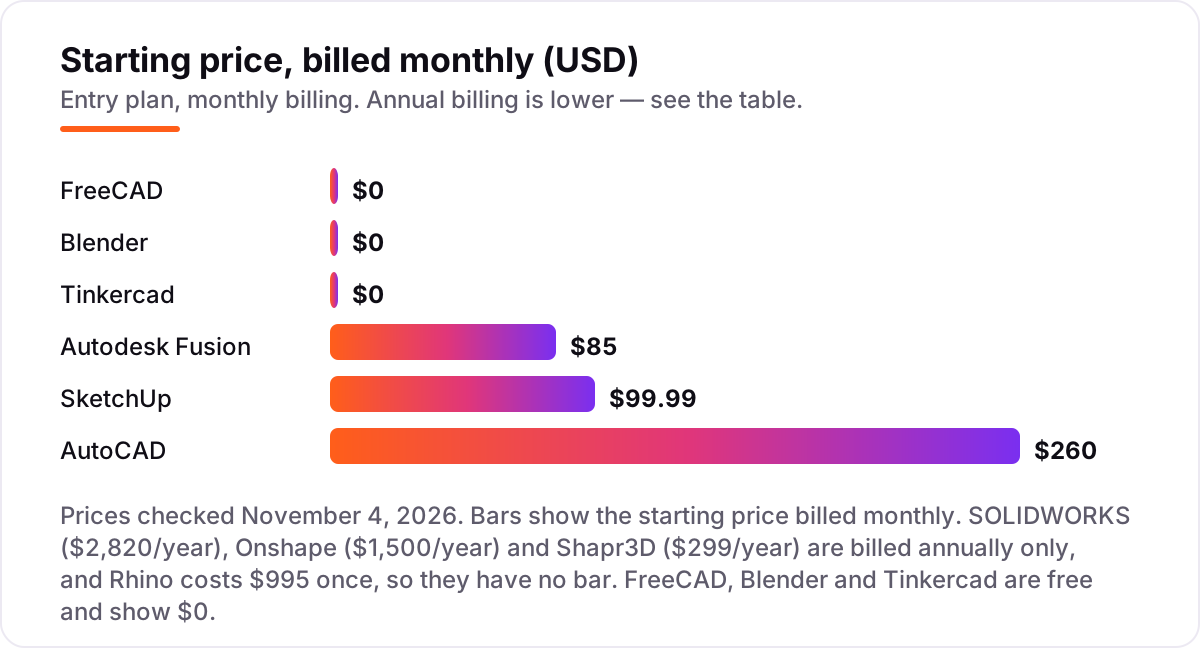
3D CAD software pricing: what you will actually pay
Take a three-person product design team buying CAD for one year, on list prices. Fusion costs $2,040 a year billed annually (3 × $680), or $3,060 if you pay monthly. SketchUp Pro costs $1,197 a year (3 × $399). Shapr3D Pro costs $897 a year (3 × $299). Onshape Standard costs $4,500 a year (3 × $1,500). AutoCAD costs $6,285 a year (3 × $2,095). SOLIDWORKS Standard costs $8,460 a year (3 × $2,820). Rhino costs $2,985 once (3 × $995) and nothing in year two. FreeCAD, Blender and Tinkercad cost $0.
The same three people and the same year of design work cost anywhere from $0 to $8,460, and the gap comes from licensing models, not features. The subscription tools bill again every year: in year two, Fusion costs another $2,040 and SOLIDWORKS another $8,460, while Rhino costs $0 unless you buy an upgrade when a new major version ships ($595 a seat). Over five years, three Rhino seats cost $2,985 plus one upgrade round, while three SOLIDWORKS seats cost $42,300.
Three costs sit outside every number above. First, the extensions: Fusion's advanced simulation and generative design, SOLIDWORKS Professional and Premium tiers, and Onshape Professional at $2,500 a seat all sit above the starting price. Second, rendering: SketchUp and Rhino need a separate renderer such as V-Ray for photorealistic images. Third, training: a team switching tools loses weeks of speed, so budget for courses or accept a slow first month. If free tools are the plan, our guide to the best free CAD software for 3D printing compares the no-cost options in depth.
Annual billing cuts the bill on the monthly tools: Fusion drops from $1,020 to $680 a year per seat, AutoCAD from $3,120 to $2,095, and SketchUp Pro from $1,199.88 to $399. The annual-only tools — SOLIDWORKS, Onshape and Shapr3D — offer no monthly option at all, so the yearly figure is the whole story. One more cost to check before you commit: a second seat is a second full subscription on every tool here, and none of them offers a meaningful multi-seat discount at this size.
Know the difference: parametric CAD vs direct modeling vs mesh modeling
The confusion in this category is between three ways of building a 3D shape, and buying the wrong one wastes months. Parametric CAD — Fusion, SOLIDWORKS, Onshape, FreeCAD — builds a part from sketches, dimensions and a feature history. Change one number and the whole model rebuilds, which is what engineering work needs: a bracket that must fit a 12-millimetre hole stays right through every revision. Direct modeling — SketchUp, Shapr3D, Rhino — pushes, pulls and edits the geometry itself, with no history to rewind. It is faster for concepts and freeform shapes, and painful when a client asks to move a hole 5 millimetres.
Mesh modeling is the third kind, and it is where buyers get caught. Blender models meshes — surfaces made of triangles — which is perfect for figures, product visuals and animation, but a mesh has no dimensions, no tolerances and no feature history. A Blender model can look exactly right and still be useless as an engineering part. If a tool does not let you type a dimension and have the model obey it, it is not engineering CAD, however good its renders look.
There is a second, quieter confusion: 2D drafting is not 3D CAD. AutoCAD is the best drafting tool in this list and a capable 3D modeler, but a team that buys it for mechanical design will find its 3D tools thin next to SOLIDWORKS or Fusion. Buy the tool for the job you actually do most — drawings, parts, concepts or visuals — and check the export format before you pay, because a model you cannot send to your manufacturer or your client is a model you cannot use.
Quick comparison: tool type by need
| Buyer | Best pick | Why |
|---|---|---|
| Small product team, one tool for everything | Autodesk Fusion | CAD, CAM and simulation in one cloud tool, from $85/month |
| Professional mechanical engineering | SOLIDWORKS | The mechanical-design standard, from $2,820/year |
| 2D drafting and DWG documentation | AutoCAD | The drafting standard every firm uses, from $260/month |
| Distributed team that collaborates | Onshape | Browser-based with built-in version control, from $1,500/year |
| Fast concept modeling and architecture | SketchUp | Easiest to learn, with LayOut documentation, from $99.99/month |
| Freeform shapes, pay once | Rhino | NURBS modeling and Grasshopper for a $995 one-time payment |
Mistakes to avoid
- Comparing monthly prices when most CAD is billed annually. Fusion looks like $85 and SketchUp like $99.99, but the real comparison is $680 versus $399 a year — and SOLIDWORKS, Onshape and Shapr3D have no monthly price at all.
- Renting software when a one-time or free tool covers the job. Rhino costs $995 once and FreeCAD costs nothing; a hobbyist or a small shop that models occasionally should try those before signing a $2,820-a-year subscription.
- Ignoring the file-format lock-in. SOLIDWORKS files, DWG drawings and SketchUp models do not move freely between tools. Check what your clients, suppliers and manufacturers send you before you choose.
- Buying a mesh modeler for engineering parts. Blender is superb for visuals and terrible for toleranced parts. If a dimension matters, you need parametric CAD, not a mesh.
- Skipping the trial and buying for the whole team. Every paid tool here offers a trial or a free tier. Test it on a real part first — a tool that lags on your machine or exports badly is a bad buy at any price.
How we chose
We checked each vendor's own pricing page on November 4, 2026 and recorded the starting price exactly as shown, including the annual figure where the page lists one, and we opened every G2 review page the same day to record the score and review count. Prices billed annually only — SOLIDWORKS at $2,820 a year, Onshape at $1,500 a year and Shapr3D at $299 a year — are stated as annual figures, and Rhino's $995 is a one-time payment, not a subscription. No price here comes from a third-party directory, and no vendor paid for a place in this list. We ranked the tools by fit for the most common buyer — a small team designing products or buildings — not by brand size.
What to do next
Start with the free plan or trial of your top pick and model one real part through to export — a bracket, an enclosure, a room — then check that the file opens cleanly in the next tool in your chain. If the tool passes that test, buy one seat and run it for a month before equipping the team. If the design work is sorted but new customers are not finding you, our monthly SEO service handles the visibility side — or compare providers in our guide to the best video editing software for small business. Once your tools are in place, find out what's holding your rankings back.
Your stack only works if people find you
SerpAstra fixes what keeps your site off page one and makes it easy for AI assistants to recommend.
Get a free audit→Sources we checked (20)
- Autodesk Fusion pricing — autodesk.com/products/fusion-360/subscribe (checked November 4, 2026)
- SOLIDWORKS pricing — solidworks.com/how-to-buy/solidworks-design-cloud-services-plans-pricing (checked November 4, 2026)
- AutoCAD pricing — autodesk.com/products/autocad/subscribe (checked November 4, 2026)
- Onshape pricing — onshape.com/en/pricing (checked November 4, 2026)
- SketchUp Pro pricing — sketchup.com/plans-and-pricing (checked November 4, 2026)
- Rhino pricing — rhino3d.com/buy (checked November 4, 2026)
- Shapr3D pricing — shapr3d.com/pricing (checked November 4, 2026)
- FreeCAD — freecad.org (checked November 4, 2026)
- Blender download — blender.org/download (checked November 4, 2026)
- Tinkercad — tinkercad.com (checked November 4, 2026)
- Autodesk Fusion on G2 — g2.com/products/autodesk-fusion/reviews (checked November 4, 2026)
- SOLIDWORKS on G2 — g2.com/products/solidworks/reviews (checked November 4, 2026)
- AutoCAD on G2 — g2.com/products/autocad/reviews (checked November 4, 2026)
- Onshape on G2 — g2.com/products/onshape/reviews (checked November 4, 2026)
- SketchUp on G2 — g2.com/products/sketchup/reviews (checked November 4, 2026)
- Rhinoceros on G2 — g2.com/products/rhinoceros/reviews (checked November 4, 2026)
- Shapr3D on G2 — g2.com/products/shapr3d/reviews (checked November 4, 2026)
- FreeCAD on G2 — g2.com/products/freecad/reviews (checked November 4, 2026)
- Blender on G2 — g2.com/products/blender/reviews (checked November 4, 2026)
- Tinkercad on G2 — g2.com/products/tinkercad/reviews (checked November 4, 2026)
Shamim
Founder of SerpAstra
A full-stack SEO and digital marketer who spends most days on Local SEO for dental practices, AI search visibility and lead generation.
Frequently asked questions
What is the best 3D CAD software?
Autodesk Fusion is the best fit for most buyers: CAD, CAM and simulation in one subscription from $85 a month. SOLIDWORKS is the better pick for professional mechanical design at $2,820 a year, and AutoCAD for drafting and DWG work at $260 a month. FreeCAD is the best free parametric option.
How much does 3D CAD software cost?
Entry prices run from $0 to $2,820 a year. FreeCAD, Blender and Tinkercad cost nothing, Shapr3D Pro is $299 a year, and the professional tools start at $680 a year for Fusion, $1,500 for Onshape, $2,095 for AutoCAD and $2,820 for SOLIDWORKS. Rhino is a one-time $995 payment.
Is there really free 3D CAD software?
Yes, with limits. FreeCAD is fully free parametric CAD with no licence strings, Blender is free for modeling and rendering, and Tinkercad is free for beginners. Fusion has a free personal-use plan for non-commercial work, and Onshape has a free plan with public documents. None of these charges a subscription.
What is the difference between parametric and direct modeling?
Parametric modeling builds a part from sketches, dimensions and a feature history you can edit — change one number and the model rebuilds. Direct modeling pushes, pulls and edits geometry itself, with no history to rewind. Parametric suits parts that change often; direct modeling suits quick concepts and freeform shapes.
Can I use 3D CAD software for 3D printing?
Yes, if it exports a printable file. FreeCAD, Fusion, Onshape, Shapr3D, Blender and Tinkercad all export STL or 3MF files your slicer can print. Check the export limits first: Shapr3D Basic only exports low-resolution STL, and Blender meshes may need repair before they print cleanly.
Do I need a powerful computer to run 3D CAD software?
Not always. Onshape and Tinkercad run in a browser, so any modern laptop works, and Fusion and Shapr3D sync to the cloud. Desktop tools such as SOLIDWORKS, AutoCAD and Rhino need a solid machine for large assemblies, and Blender rendering benefits from a good graphics card. Try the free plan first.
Free SEO and AI visibility audit
Find out what is holding your rankings back
Send us your site. Within 2 business days you get a written audit, an AI visibility check and a short fix list ranked by impact. Free, with no contract attached.
Request my free audit→Related guides
 Design, Video & Creative9 Best Free CAD Software for 3D Printing in 2026, ComparedCompare the 9 best free CAD software for 3D printing on price, free plans and print-ready export, with every price checked November 4, 2026.Read guide →
 Design, Video & Creative10 Best Free CAD Software for Home Design in 2026, ComparedCompare the 10 best free cad software for home design options on price, free plans, 3D views and rendering, with every price checked November 4, 2026.Read guide →
 Design, Video & Creative10 Best Video Editing Software for Small Business in 2026, ComparedCompare the 10 best video editing software for small business tools on price, free plans and AI features, with prices checked November 4, 2026.Read guide →