
10 Best CAD Software for 3D Modeling in 2026, Compared
Compare the 10 best cad software for 3d modeling on price, free plans and fit for every budget, with every single price checked November 4, 2026.
 Shamim Mia, Founder, SerpAstraLast verified November 4, 202615 min read
We compare pricing pages, documentation and public reviews. We never accept payment for rankings.

Key takeaways
- Autodesk Fusion is the best fit for most buyers at $680/year, with modeling, simulation and CAM in one workspace; FreeCAD and Blender are free and genuinely capable, and SketchUp Go is the cheapest paid plan at $129/year.
- Rhino is the only perpetual licence here at $995 one-time — every other paid tool is a subscription, so budget for a yearly bill, not a single purchase.
- The single most important buying factor is the modeling style: parametric tools suit measured parts you will revise, while direct and sculpting tools suit organic shapes and quick ideas.
- Four tools have genuinely free tiers — Fusion for personal use, Onshape Free, SketchUp Free and Shapr3D Basic — but three of the four are non-commercial or limited, so check the licence before selling anything you make.
On this page
Quick comparison
| Tool | Best for | Starting price | Free plan |
|---|---|---|---|
| Autodesk Fusion | Product designers and small engineering teams who want one workspace for modeling, simulation and CAM | $680/yr | Yes (personal use) |
| SolidWorks | Mechanical engineers designing parts, assemblies and drawings for manufacture | $2,820/yr | No |
| FreeCAD | Makers and engineers who want real parametric CAD free, with no licence strings or revenue limits | Free | Yes (free) |
| SketchUp | Designers who think in spaces and shapes and want the fastest path from idea to 3D model | $129/yr | Yes (free plan) |
| Onshape | Teams that want professional CAD in a browser, with version control and real-time collaboration | $1,500/yr | Yes (free plan) |
| Rhino | Designers modeling freeform surfaces, jewelry, architecture and products with complex curves | $995 once | No (90-day eval) |
| Shapr3D | iPad owners who want to sketch parts with a pencil and model them the same evening | $299/yr | Yes (Basic) |
| Blender | Artists and designers modeling organic shapes, characters, figures and props | Free | Yes (free) |
| Tinkercad | Complete beginners and kids making their first 3D model the same day they sign up | Free | Yes (free) |
| CATIA | Aerospace and automotive teams designing Class-A surfaces and assemblies of thousands of parts | $7,229/yr | No |
Make one of these tools?
We re-check this list every quarter. Send a correction, request a review, or ask about a clearly labeled sponsored spot.
Request a listingThe best cad software for 3d modeling

Autodesk Fusion
Best for: Product designers and small engineering teams who want one workspace for modeling, simulation and CAM
Autodesk Fusion is the all-rounder in this list: one cloud workspace covers parametric modeling, assemblies, simulation, CAM and PCB design, so a part can go from sketch to machined prototype without exporting files between programs. The paid subscription costs $680 a year, or $85 a month billed monthly, and the free personal-use tier gives hobbyists the same parametric modeling for non-commercial projects under $1,000 a year in revenue.
The trade-off is the cloud. Fusion needs a connection to save and sync, and the more advanced tools — generative design, deeper simulation and 5-axis CAM — sit behind paid extensions. Buy Fusion when you want one tool that covers design through manufacturing; buy SolidWorks when your clients and suppliers already work in it, or FreeCAD when the budget is zero and you can live without CAM.
What we like
- One workspace covers parametric modeling, assemblies, simulation, CAM and PCB, so a part goes from sketch to toolpath without exporting files
- The free personal-use tier is the most generous in pro-grade CAD, with full parametric modeling for hobbyists
- Cloud version history and branching mean a bad edit never costs you the working model
- The largest tutorial library and community in this list, so most beginner questions already have an answer
Watch out for
- Personal use is non-commercial, limited to 10 active documents and under $1,000 a year in revenue
- Advanced simulation, generative design and 5-axis CAM sit behind paid extensions at $595–$1,465 a year
- Cloud-based saving means a weak connection interrupts work, and large meshes can lag

SolidWorks
Best for: Mechanical engineers designing parts, assemblies and drawings for manufacture
SolidWorks is the mechanical-design standard: parametric parts, assemblies and manufacturing drawings in one desktop package, with sheet metal, weldments and configurations built in. Standard costs $2,820 a year, or $235 a month billed annually, and that price includes subscription, support and cloud PDM. Professional costs $3,456 a year and adds CAM and rendering; Premium costs $4,716 and adds simulation.
The price is the honest catch. At $2,820 a year, one SolidWorks seat costs more than four Fusion seats, and large assemblies can still slow the program down — the most common complaint in user reviews. Buy SolidWorks when your clients, suppliers or employer already work in it, because file compatibility and hiring matter more than the licence fee; buy Fusion or Onshape when you are choosing freely and the budget is tighter.
What we like
- The most widely used mechanical CAD in manufacturing, so suppliers, clients and new hires already know it
- Parametric history plus configurations makes design changes ripple through parts, assemblies and drawings
- Built-in sheet metal, weldments and drawing tools cover the whole path from part to shop floor
- AURA AI companion in the 2026 release helps with drawings and repetitive modeling tasks
Watch out for
- Standard at $2,820 a year is the dearest entry price among the mainstream tools here
- Large assemblies can slow down and crash, a complaint that recurs in user reviews
- Sold through resellers, so the quote and the support quality vary by region

FreeCAD
Best for: Makers and engineers who want real parametric CAD free, with no licence strings or revenue limits
FreeCAD is the only tool here that is both a real parametric modeler and completely free: no account, no subscription, no revenue limit on what you sell. It has sketches with constraints, a full feature history, assemblies, Python scripting and an add-on library, and it runs offline on Windows, macOS and Linux. Exports cover STL, OBJ and STEP, so files move into slicers and other CAD tools without fuss.
The cost is polish. The interface is rougher than the commercial tools, assembly work is split across workbenches that confuse new users, and large models can run slowly. Pick FreeCAD when the budget is zero and you want proper parametric modeling you can sell from; pick Fusion's free personal tier when you want a smoother start and can live with the non-commercial limit and the 10-document cap.
What we like
- Completely free and open source: no account, no subscription, no revenue limit on what you sell
- Real parametric modeling with sketches, constraints and a full feature history
- Python scripting and a large add-on library extend it into almost any workflow
- Runs offline on Windows, macOS and Linux, and exports STL, OBJ and STEP
Watch out for
- The interface is rougher than the commercial tools, and the learning curve is steep
- Assembly work is split across workbenches, which confuses new users
- Large models can run slowly, and some operations need workarounds

SketchUp
Best for: Designers who think in spaces and shapes and want the fastest path from idea to 3D model
SketchUp is the fastest way to get an idea into 3D: push and pull faces into shape in seconds, with no sketch constraints or feature tree to learn first. The free web plan covers personal projects, and Go costs $129 a year for commercial use, iPad modeling and AI Render credits. Pro costs $399 a year and adds the desktop app, LayOut documentation and extensions; Studio costs $859 and adds V-Ray rendering.
The speed comes with a limit. SketchUp has no parametric history, so changing one dimension often means rebuilding the shape, and precise mechanical parts take more effort than in Fusion or SolidWorks. Buy SketchUp when you model spaces, furniture, architecture or quick concepts and speed matters more than dimensions; buy a parametric tool when the model must survive ten revisions with exact measurements.
What we like
- The fastest way to sketch a shape: push and pull faces into 3D in seconds
- 3D Warehouse holds millions of ready-made models to start from or remix
- Gentle learning curve with a huge tutorial library aimed at non-engineers
- Go adds commercial use, iPad modeling and AI Render credits for $129 a year
Watch out for
- No parametric history: changing one dimension often means rebuilding the shape
- Precise, dimension-driven mechanical parts take more effort than in parametric tools
- Desktop modeling and LayOut wait for Pro at $399 a year

Onshape
Best for: Teams that want professional CAD in a browser, with version control and real-time collaboration
Onshape is full professional CAD that runs entirely in a browser: nothing to install, and it works on any device, including a Chromebook. The free plan covers unlimited public documents with parametric modeling, assemblies, drawings and built-in version control, and Standard costs $1,500 a user a year for private documents. Professional costs $2,500 and adds release management and advanced data tools.
The free plan's catch is visibility: every document is public and non-commercial, so anything you design is visible to anyone. There is also no offline mode at all. Choose Onshape when your team works across devices and locations and version control matters; choose Fusion when you want CAM and simulation in the same subscription, or FreeCAD when the budget is zero and the files must stay private.
What we like
- Full professional CAD in a browser: nothing to install, runs on any device including Chromebooks
- Built-in version control and branching, so you never lose a working version of a part
- Real-time collaboration: share a link and someone else can open and edit the same document
- Parametric modeling with a gentler learning curve than most pro tools
Watch out for
- Free documents are public and non-commercial, so anything you design is visible to anyone
- No offline mode: a dropped connection stops work entirely
- Standard at $1,500 a year is a steep jump when you need private documents

Rhino
Best for: Designers modeling freeform surfaces, jewelry, architecture and products with complex curves
Rhino is the surfacing specialist: its NURBS tools handle the curves and freeform shapes that box-and-extrude modelers struggle with, which is why it shows up in jewelry, architecture, footwear and product design. Rhino 9 costs $995 as a one-time purchase — a perpetual licence with no subscription and no maintenance fee, including support and service releases for the version. Students pay $195 for the same software.
Rhino is not a parametric history modeler by default, so dimension-driven engineering changes take more work than in Fusion or SolidWorks, and its rendering is basic. Buy Rhino when your models are curved, organic or surface-driven and you want to pay once and own the licence; buy a parametric tool when the job is measured parts, assemblies and drawings that will change ten times before production.
What we like
- The best NURBS surfacing in this list, built for curves and freeform shapes other tools struggle with
- A one-time $995 purchase with no subscription and no maintenance fee, and the licence never expires
- Grasshopper adds visual parametric design without writing code
- One licence runs on Windows and Mac, and files open in almost every other CAD tool
Watch out for
- No free plan: the only free option is a 90-day evaluation
- Not a parametric history modeler by default, so dimension-driven engineering changes take more work
- Rendering and animation are basic compared with dedicated visualization tools

Shapr3D
Best for: iPad owners who want to sketch parts with a pencil and model them the same evening
Shapr3D is the tablet pick: sketch directly on an iPad with a pencil and the part takes shape under your hand, with the same Parasolid geometry kernel that powers SolidWorks underneath. The free Basic plan covers 2 projects with low-resolution STL exports, and Pro costs $299 a year per editor seat for unlimited projects, high-resolution exports, technical drawings and history-based parametric modeling.
The catch is the cap. Two projects and low-resolution exports run out fast, and $299 a year is a lot for someone who models occasionally. The desktop apps exist but feel secondary to the iPad experience. Pick Shapr3D when you already own an iPad and a pencil and want to model away from a desk; pick Fusion or Onshape when the work happens at a computer and the budget needs to stretch further.
What we like
- Sketch directly on an iPad with a pencil: the most natural drawing feel in this list
- Parasolid kernel underneath, so the geometry stays precise and manufacturable
- History-based parametric modeling with technical drawings on the Pro plan
- Basic plan includes 3 AI generative renders a day, plus AR preview on iPad
Watch out for
- The free Basic plan caps you at 2 projects and low-resolution STL exports
- Pro costs $299 a year per editor seat, a lot for someone who models occasionally
- Fewer tutorials than Fusion or FreeCAD, and the desktop workflow feels secondary

Blender
Best for: Artists and designers modeling organic shapes, characters, figures and props
Blender is the sculpting pick: free and open source, with the best tools in this list for figures, creatures and organic shapes. It covers modeling, sculpting, texturing, rendering and animation in one program, with Geometry Nodes for reusable, adjustable setups and thousands of free add-ons. The 3D Print Toolbox add-on checks wall thickness and manifold errors before you slice, and exports cover STL, OBJ and 3MF.
Blender is not parametric CAD. There are no sketch constraints or dimensions, so measured parts and engineering drawings are the wrong job for it, and the crowded interface takes weeks to learn. Pick Blender when the model is organic — a character, a prop, a creature — and the shape matters more than the measurements; pick FreeCAD or Fusion when the part must fit a machine to the millimetre.
What we like
- Free and open source with no limits: sculpt, model, texture and render in one program
- The best sculpting tools here for figures, creatures and organic shapes
- Huge community and tutorial library, plus thousands of free add-ons
- Geometry Nodes turn repetitive modeling into reusable, adjustable setups
Watch out for
- Not parametric CAD: no sketch constraints or dimensions for measured parts
- Steep learning curve with a crowded interface and a lot of shortcuts to memorize
- Precision work needs add-ons and care, and the 3D Print Toolbox is not on by default
Tinkercad
Best for: Complete beginners and kids making their first 3D model the same day they sign up
Tinkercad is the easiest start in this list: drag-and-drop shapes in a browser, no install, no account needed to try it, and built-in lessons that get a first model out in under an hour. It is free forever with no paid tier, runs fine on a Chromebook, and one-click STL export sends models straight to any slicer. It also includes circuits and code blocks for classroom projects.
The simplicity is the ceiling. There is no parametric history, so changing one dimension often means rebuilding the shape, and precise mechanical parts, assemblies and tight tolerances are out of reach. Start on Tinkercad when the goal is a first model today — for a child, a classroom or a curious beginner; move to Fusion's free tier or FreeCAD when the models start needing real dimensions.
What we like
- The easiest start in this list: drag-and-drop shapes, no install, runs in any browser
- Built-in lessons and starter projects get a first model out in under an hour
- One-click STL export sends models straight to any slicer or viewer
- Free forever with no paid tier, and it runs fine on a Chromebook
Watch out for
- No parametric history, so changing one dimension often means rebuilding the shape
- Too simple for precise mechanical parts, assemblies and tight tolerances
- Designs live in Autodesk's cloud, so there is no offline mode

CATIA
Best for: Aerospace and automotive teams designing Class-A surfaces and assemblies of thousands of parts
CATIA is the enterprise pick: the industry standard for Class-A surfaces in automotive and aerospace, built to handle assemblies of thousands of parts that overwhelm lighter tools. Essential costs $7,229 a year, or $602 a month billed annually, and covers mechanical and surface design with 3DEXPERIENCE collaboration tools. Master costs $9,230 a year and Elite costs $14,926, adding deeper surfacing, simulation and cross-discipline tools.
The price and the learning curve are both the steepest in this list — training is measured in months, not weeks. For a small team making simple products, CATIA is overkill: the setup alone costs more than the job. Buy CATIA when your clients require it or your assemblies run into the thousands of parts; buy SolidWorks or Fusion for everything smaller, and spend the difference on the team.
What we like
- The industry standard for Class-A surfaces in automotive and aerospace
- Handles assemblies of thousands of parts that overwhelm lighter tools
- Deep integration across design, simulation, composites, wiring and manufacturing in one platform
- Aerospace and automotive clients often require it, so fluency wins contracts
Watch out for
- Essential starts at $7,229 a year, the dearest price in this list by a wide margin
- The steepest learning curve here, with training measured in months rather than weeks
- Overkill for small parts and simple products, where the setup alone costs more than the job
The best cad software for 3d modeling depends on what you model and who will open the file after you. A mechanical engineer needs parametric history and manufacturing drawings; a jewelry designer needs freeform surfaces; a beginner needs a tool that gets a first model out today. We ranked the ten tools below by fit for the most common buyer — someone modeling real parts and products, not just viewing them — starting with the all-rounders and ending with the specialist and enterprise picks, and every price was checked on the vendor's own pricing page on November 4, 2026.
How to choose the best cad software for 3d modeling
- Start with the shape. Curved, organic or surface-driven work points to Rhino or Blender; measured parts, assemblies and drawings point to Fusion, SolidWorks, Onshape or FreeCAD; quick spatial ideas point to SketchUp or Tinkercad.
- Check the licence before you sell anything. FreeCAD, Blender and Tinkercad have no revenue limit, but Fusion's personal tier is non-commercial under $1,000 a year, and Onshape's free documents are public and non-commercial.
- Count the seats, not the headline. Every paid tool here is priced per user per year, so a three-person team pays three times the chart price — except Rhino, which is $995 once per seat with no yearly bill.
- Check the file formats. If clients or suppliers work in SolidWorks or CATIA, your tool must export STEP and read their files cleanly; if you print, every tool here exports STL, but only some check the mesh for you.
- Test the learning curve honestly. SketchUp and Tinkercad take an evening; Fusion and Onshape take weeks; SolidWorks takes months; CATIA takes longer still. A tool you abandon in week two is the most expensive one here.
CAD is one system in your stack, not the whole stack. If the designs also need to be found online, our guide to architectural CAD software covers the building side, and our mechanical CAD guide goes deeper on engineering tools. And before you publish new pages for the products you design, run your titles through the free SERP snippet preview tool — it shows exactly how the title and description will look in Google.
Whatever you shortlist, try it with real work before you pay. The free plans and trials in this list are long enough to model one genuine part — your dimensions, your tolerances, your export — and that part tells you more than any review can. Check two things in the trial: that the file exports cleanly into whatever your client or printer uses, and that the workflow still feels natural on the third day, not just the first.
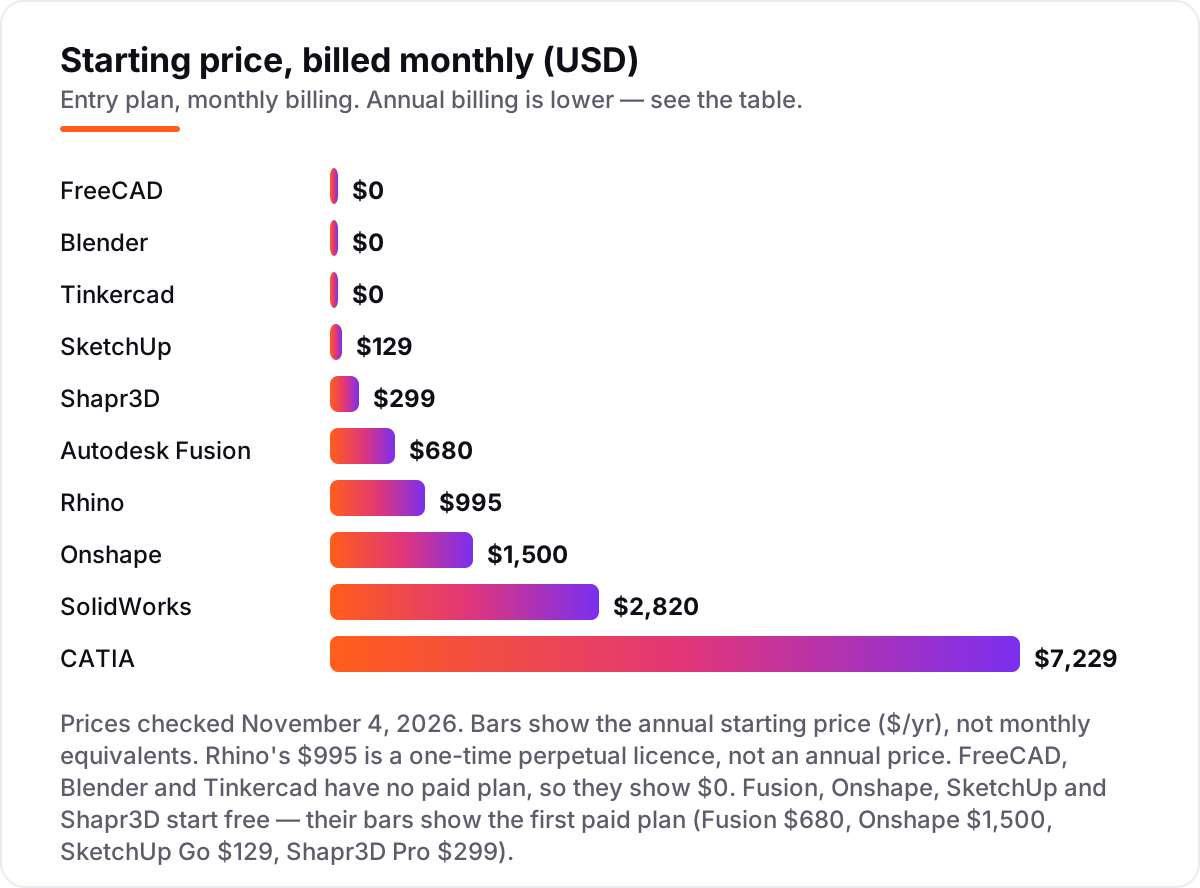
CAD software for 3D modeling pricing: what you will actually pay
Take a three-person team modeling products for a year. On list prices, the subscription costs $0 on FreeCAD, Blender or Tinkercad, $387 a year on SketchUp Go, $897 on Shapr3D Pro, $2,040 on Fusion, $2,985 once on Rhino, $4,500 on Onshape Standard, $8,460 on SolidWorks Standard and $21,687 on CATIA Essential. Two of those numbers need adjusting before they are real: SketchUp Go is web and iPad only, so a team that needs the desktop app and LayOut pays $1,197 a year for Pro instead, and Shapr3D Pro is priced per editor seat, so three viewers who never edit can stay on the free Basic plan.
Over three years, the gap widens. FreeCAD, Blender and Tinkercad still cost $0, Rhino still costs $2,985 because the licence never expires, and the subscriptions compound: SketchUp Go costs $1,161, Shapr3D Pro $2,691, Fusion $6,120, Onshape Standard $13,500, SolidWorks Standard $25,380 and CATIA Essential $65,061. The same three people and the same parts cost $0 at the cheap end and $65,061 at the dear end — a gap that comes entirely from licensing models and target markets, not from the ability to model a part.
Three costs sit outside every number above. First, the extensions: Fusion's Manufacturing, Simulation and Design extensions run $595–$1,465 a year each, and SolidWorks Professional and Premium add $636–$1,896 a year per seat over Standard. Second, training: a week of Fusion tutorials is free on YouTube, while CATIA training is measured in months and usually billed. Third, hardware: browser tools run on almost anything, but large assemblies in SolidWorks or CATIA want a workstation. If your work is architecture rather than products, the pricing logic differs — see our guide to the best CAD software for architecture.
Monthly billing is the expensive way to buy every subscription here. Fusion costs $85 a month billed monthly against $680 a year, a $340 penalty for paying monthly, and SketchUp Go costs $19.99 a month against $129 a year. The one exception is Rhino: there is no monthly option because there is no subscription at all. One more cost to check before you commit: a second seat is a second licence on every tool in this list, and CATIA and SolidWorks also route support through resellers, so the price on the page is the starting point, not always the final quote.
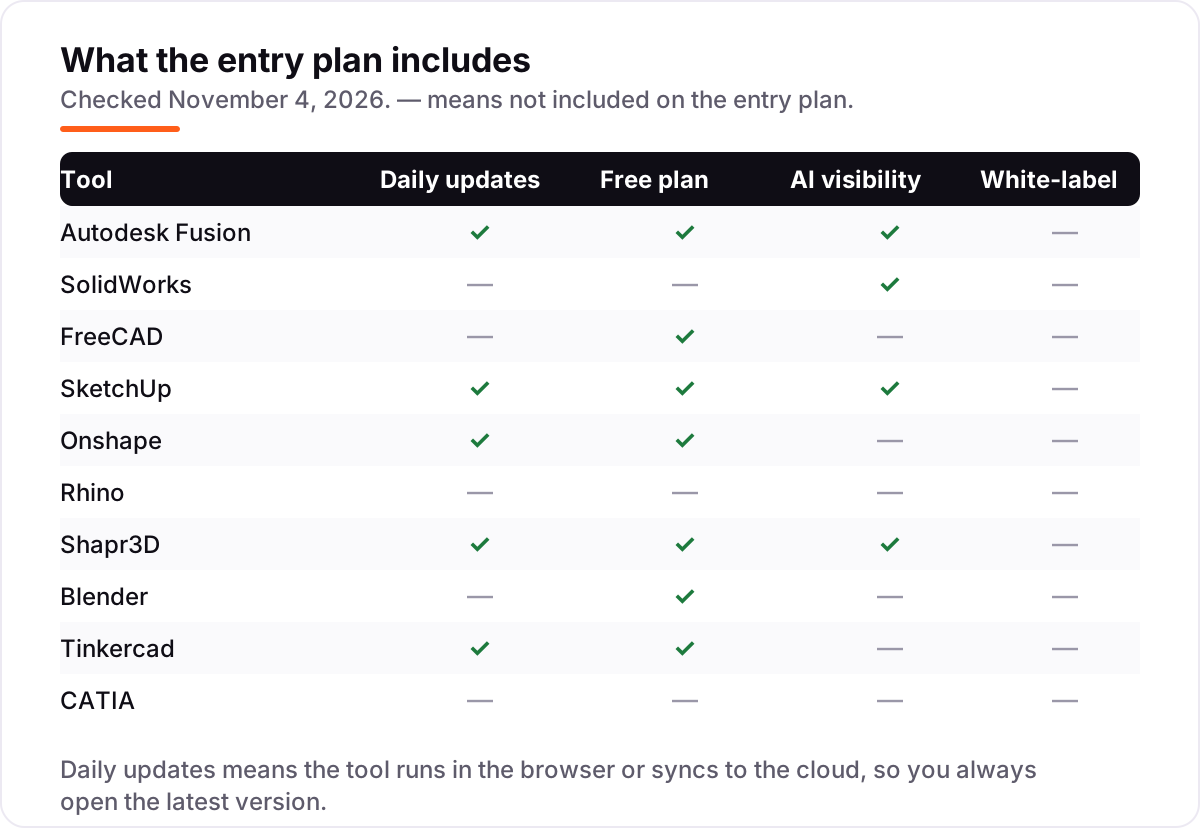
Know the difference: parametric modeling vs direct modeling
The confusion in this category is between two ways of building a shape. Parametric modeling — Fusion, SolidWorks, Onshape, FreeCAD — builds a feature history: sketches with dimensions, extrudes, fillets and patterns, each one recorded in order. Change a sketch dimension and the whole part updates. Direct modeling — SketchUp's push-pull, Rhino's surface tools, Tinkercad's drag-and-drop shapes — edits the geometry itself, with no history to replay. Both make 3D models; they differ in what happens when the design changes.
That difference decides the workflow. A measured part that will go through ten revisions — a bracket that must fit a housing, a housing that must fit a board — belongs in a parametric tool, because each revision is a number change, not a rebuild. A concept, a sculpture, a piece of jewelry or a building massing model belongs in a direct tool, because speed matters more than revisability and the shape may never be dimensioned at all. Blender sits further out still: it sculpts, with no dimensions and no history, which is why it is the best tool here for characters and the wrong tool for a bracket.
There is a second, quieter confusion: CAD software is not 3D printing software. A CAD tool designs the part; a slicer turns it into printer instructions, and the two are separate programs. Every tool in this list exports STL, the standard print format, but only some check the mesh for errors before export — Blender's 3D Print Toolbox and Fusion's mesh tools do, and the rest leave the checking to the slicer. If you print, test the STL export in the trial before you buy.
Quick comparison: tool type by need
| Buyer | Best pick | Why |
|---|---|---|
| Most buyers, one tool for everything | Autodesk Fusion | Modeling, simulation and CAM in one workspace, from $680/year |
| Mechanical engineering teams | SolidWorks | The industry standard for parts, assemblies and drawings, from $2,820/year |
| Zero budget, real parametric CAD | FreeCAD | Full parametric modeling free, with no revenue limit |
| Fastest idea to model | SketchUp | Push-pull modeling, free on the web, Go is $129/year |
| Teams working across devices | Onshape | Full CAD in a browser with version control, free for personal projects |
| Curves, jewelry and freeform surfaces | Rhino | Best NURBS surfacing here, $995 once, no subscription |
| Modeling on an iPad | Shapr3D | Sketch with a pencil, free for 2 projects, Pro is $299/year |
| Organic shapes and characters | Blender | Best sculpting tools here, free and open source |
| First model today | Tinkercad | Drag-and-drop in a browser, free forever |
| Aerospace and automotive | CATIA | Class-A surfaces and huge assemblies, from $7,229/year |
Mistakes to avoid
- Budgeting on the monthly price. Fusion is $85 a month billed monthly but $680 a year — paying monthly costs $340 more for the same software. Compare tools on the annual price, which is what the chart shows.
- Buying on the free plan, then finding commercial use costs extra. Fusion's personal tier is non-commercial, Onshape's free documents are public, and SketchUp Free is personal use only. If you sell what you make, count the paid plan in the price from day one.
- Ignoring the modelling style. A direct modeler is cheap and still the wrong buy for measured parts: SketchUp at $129 is no bargain once the tenth revision means rebuilding the shape, and Blender is no bargain for a bracket that must fit a housing.
- Paying for the enterprise tool before you need it. CATIA at $7,229 a year and SolidWorks at $2,820 solve problems a three-person team may never have. Buy the tool that fits this year's work, and upgrade when the assemblies outgrow it.
- Forgetting the second seat. Every paid tool here is priced per user, and Rhino's $995 is per seat too. Price the whole team before you commit to a tool for one person — three seats of CATIA Essential cost $21,687 a year.
How we chose
We checked each vendor's own pricing page on November 4, 2026 and recorded the starting price exactly as shown, including the annual-billing figure where the page lists one, and we ranked the tools by fit for the most common buyer — someone modeling real parts and products — not by brand size. This list carries review ratings only for Autodesk Fusion, SolidWorks and FreeCAD, because the G2 review pages for the other seven tools returned rate-limit errors when we tried to open them on November 4, 2026, and we would rather show no rating than a stale or estimated one. No vendor paid for a place in this list, and none of the links here are affiliate links.
What to do next
Start with the free plan or trial of your top pick and model one real part through it — your dimensions, your tolerances, your export. Check that the file opens cleanly in whatever your client, supplier or printer uses before you commit to a year. If the designs are sorted but new customers are not finding you, our monthly SEO service handles the visibility side — or compare options in our guide to free CAD software for beginners. Once your tools are in place, find out what's holding your rankings back.
Your stack only works if people find you
SerpAstra fixes what keeps your site off page one and makes it easy for AI assistants to recommend.
Get a free audit→Sources we checked (13)
- Autodesk Fusion pricing — autodesk.com/products/fusion-360/pricing (checked November 4, 2026)
- SOLIDWORKS Design pricing — 3ds.com/store/solidworks-design (checked November 4, 2026)
- FreeCAD — freecad.org (checked November 4, 2026)
- SketchUp plans and pricing — sketchup.com/plans-and-pricing (checked November 4, 2026)
- Onshape pricing — onshape.com/en/pricing (checked November 4, 2026)
- Rhino buy — rhino3d.com/en/sales/north-america/United_States/ (checked November 4, 2026)
- Shapr3D pricing — shapr3d.com/pricing (checked November 4, 2026)
- Blender download — blender.org/download/ (checked November 4, 2026)
- Tinkercad — tinkercad.com (checked November 4, 2026)
- CATIA price — 3ds.com/store/what-price-catia (checked November 4, 2026)
- Autodesk Fusion reviews — g2.com/products/autodesk-fusion/reviews (checked November 4, 2026)
- SOLIDWORKS reviews — g2.com/products/solidworks/reviews (checked November 4, 2026)
- FreeCAD reviews — g2.com/products/freecad/reviews (checked November 4, 2026)
Shamim
Founder of SerpAstra
A full-stack SEO and digital marketer who spends most days on Local SEO for dental practices, AI search visibility and lead generation.
Frequently asked questions
What is the best CAD software for 3D modeling?
Autodesk Fusion is the best fit for most buyers: parametric modeling, simulation and CAM in one workspace for $680 a year, with a free personal-use tier for hobbyists. SolidWorks is the better pick for mechanical engineering teams whose clients already use it, and FreeCAD is the best free option.
How much does CAD software for 3D modeling cost?
Entry prices run from $0 to $7,229 a year. FreeCAD, Blender and Tinkercad are free, SketchUp Go is $129 a year, Shapr3D Pro is $299, Fusion is $680, Onshape Standard is $1,500, SolidWorks Standard is $2,820 and CATIA Essential is $7,229. Rhino is the exception: $995 once, with no yearly bill.
Is there really free CAD software for 3D modeling?
Yes, with limits. FreeCAD and Blender are completely free with no revenue cap, and Tinkercad is free with no paid tier. Fusion, Onshape, SketchUp and Shapr3D all have free tiers too, but three of the four are non-commercial or capped, so check the licence before selling anything you make.
What is the difference between parametric and direct modeling?
Parametric modeling builds a feature history: change a sketch dimension and the whole part updates, which suits measured parts you will revise. Direct modeling pushes and pulls geometry with no history, which is faster for quick ideas and organic shapes but means rework when a dimension changes.
Can I use CAD software for 3D printing?
Yes — every tool here exports STL, the standard file format for 3D printing. Fusion, FreeCAD, Blender and Tinkercad all have mesh repair or print-checking tools built in, and Shapr3D exports 3MF as well. For printing, the export matters more than the modeling style, so check STL export before you buy.
Is Rhino or SolidWorks better for 3D modeling?
It depends on the shape. Rhino is better for freeform surfaces, curves and organic forms, and costs $995 once with no subscription. SolidWorks is better for measured mechanical parts, assemblies and manufacturing drawings, at $2,820 a year. Many design studios keep both, using Rhino for the shape and SolidWorks for the engineering.
Do I need a powerful computer for CAD software?
For most of this list, a mid-range laptop with 16 GB of memory and a dedicated graphics card is enough. Browser tools like Onshape, Tinkercad and SketchUp Free shift the load to the cloud, so they run on a Chromebook. Large assemblies in SolidWorks or CATIA are the exception — they want a workstation with more memory and a stronger card.
Free SEO and AI visibility audit
Find out what is holding your rankings back
Send us your site. Within 2 business days you get a written audit, an AI visibility check and a short fix list ranked by impact. Free, with no contract attached.
Request my free audit→Related guides
 Design, Video & Creative9 Best CAD Software for Architecture in 2026, ComparedCompare the 9 best cad software for architecture in 2026 on price, BIM, drafting and free plans, with prices checked November 4, 2026 for US firms.Read guide →
 Design, Video & CreativeBest Mechanical CAD Software for 2026: 7 Options Compared by Use CaseCompare the 7 best mechanical cad software options on price, free plans, simulation and sheet metal, with every price checked November 4, 2026.Read guide →
 Design, Video & Creative7 Best Free CAD Software for Beginners in 2026, ComparedCompare the 7 best free CAD software for beginners on ease of use, 3D vs 2D tools and real costs, with every price checked November 4, 2026.Read guide →