
10 Best Digital Signage Software for Offices in 2026, Compared
Compare the 10 best digital signage software for offices on price per screen, free plans and workplace features, with prices checked November 10, 2026.
 Shamim Mia, Founder, SerpAstraLast verified November 10, 202614 min read
We compare pricing pages, documentation and public reviews. We never accept payment for rankings.
Key takeaways
- Yodeck is the best fit for most offices at $8 per screen per month, with one screen free forever; OptiSigns follows at $10 per screen with three screens free, and ScreenCloud at $20 per screen billed annually for workplace comms.
- The single most important buying factor is the pricing unit: per screen, per player, per display, per user or per device. The unit, not the headline price, decides what a 10-screen office actually pays.
- Three tools here publish no price at all — Appspace, Korbyt and Poppulo are quote only — and Carousel's $22 per player figure comes from third-party directories, not a Carousel price page.
- Free plans are real but narrow: Yodeck covers one screen, OptiSigns three, and Appspace two users plus one device. Everything else is a trial or a demo.
On this page
Quick comparison
| Tool | Best for | Starting price | Free plan |
|---|---|---|---|
| Yodeck | Small and mid-size offices that want the lowest per-screen price and a free first screen | $8/mo | Yes (1 screen free) |
| OptiSigns | Offices that want the widest app library and a free plan covering three screens | $10/mo | Yes (3 screens free) |
| ScreenCloud | Mid-size and enterprise offices that run internal comms and live dashboards on screens | $24/mo | No (14-day trial) |
| Appspace | Larger offices that want signage, room and desk booking, intranet and visitor management in one platform | Custom quote | Yes (free tier) |
| NoviSign | Offices that want touchscreens, kiosks and interactive widgets without custom development | $16/mo | No (30-day trial) |
| Skykit | Offices that need screens running around the clock with matched hardware and software | $16.50/mo | No (free trial) |
| Carousel | IT teams in corporate, education and government offices that need strict governance across many screens | $22/mo | No (free trial) |
| Korbyt | Enterprises that want one workplace experience platform for signage, data and room booking | Custom quote | No (demo only) |
| Poppulo | Large enterprises that run employee comms across email, mobile and screens from one platform | Custom quote | No (demo only) |
| Visix | Campuses and large facilities that want on-premise signage with room signs and desktop publishing | $90/mo | No (demo only) |
Make one of these tools?
We re-check this list every quarter. Send a correction, request a review, or ask about a clearly labeled sponsored spot.
Request a listingThe best digital signage software for offices

Yodeck
Best for: Small and mid-size offices that want the lowest per-screen price and a free first screen
Yodeck is the best fit for most offices because the math is the simplest here. Basic costs $8 per screen per month, the same whether you pay monthly or annually, and the first screen is free forever. A five-screen office pays $40 a month, a ten-screen office pays $80, and annual plans include a free preconfigured Yodeck Player for each screen, so there is no separate hardware bill to model.
The trade-off is that the features offices grow into sit on higher tiers. Proof-of-play reports start on Premium at $12 per screen per month, and workspaces, custom roles and SSO need Enterprise at $16. The free screen also stays free only while it is the account's only screen. Buy Yodeck when the office wants the lowest honest per-screen price and can live without the enterprise extras.
What we like
- Cheapest paid plan here at $8 per screen per month, the same price monthly or annually
- One screen stays free forever, so a single lobby display costs nothing
- Annual plans include a free preconfigured Yodeck Player for each screen
- Screens keep playing for at least 30 days offline if the internet drops
Watch out for
- Proof-of-play reports start on Premium at $12 per screen per month, not Basic
- The free screen stays free only while it is the account's only screen
- Workspaces, custom roles and SSO need Enterprise at $16 per screen per month

OptiSigns
Best for: Offices that want the widest app library and a free plan covering three screens
OptiSigns wins the app-library contest in this list, and its free plan is the most generous: three screens free, with OptiSigns branding, which is enough to cover a lobby, a break room and a meeting floor. Standard costs $10 per screen per month, or $9 billed annually, and adds scheduling, screen zones, templates and unlimited storage on top of 140-plus apps.
The price curve is the thing to model. Approvals and proof of play need Pro at $12.50 per screen per month, and interactive kiosks need Engage at $30. The free tier also caps file sizes and apps, which pushes active offices upward. Pick OptiSigns when the office wants lots of content sources and a real free plan to start on.
What we like
- Free plan covers up to 3 screens, enough to run a small office for nothing
- 140+ apps pull in Google Slides, YouTube, social feeds and dashboards
- Standard at $10 per screen adds scheduling, zones, templates and unlimited storage
- Runs on Amazon Fire TV sticks, so the hardware per screen can cost under $40
Watch out for
- Approvals and proof of play need Pro at $12.50 per screen per month
- Interactive kiosks need Engage at $30 per screen per month
- Enterprise needs at least 25 screens, so small teams cannot buy the top tier

ScreenCloud
Best for: Mid-size and enterprise offices that run internal comms and live dashboards on screens
ScreenCloud is the workplace communications platform of digital signage: clean templates for company updates, KPI walls and onboarding content, deep integrations with Slack, Teams and BI tools, and an enterprise security layer with a SOC 2 Type 2 report that survives IT review. Core costs $20 per screen per month billed annually, or $24 month to month.
The price is the barrier. At $20 to $24 per screen, a ten-screen office pays $200 to $240 a month before any add-on, and SSO sits on Enterprise, which needs at least 25 screens. There is no free plan, only a 14-day trial. Choose ScreenCloud when the screens are an internal comms channel, not just a slideshow.
What we like
- Strongest workplace integrations here: Slack, Teams, Microsoft 365 and BI dashboards
- SOC 2 Type 2 report, so it passes most IT security reviews
- Core includes 80+ apps, unlimited file storage and remote device management
- Lockable templates let headquarters control the brand while local teams edit details
Watch out for
- Highest per-screen price here at $20 to $24, so a 10-screen office pays $200 to $240 a month
- No free plan, only a 14-day trial
- SSO sits on Enterprise, which needs at least 25 screens

Appspace
Best for: Larger offices that want signage, room and desk booking, intranet and visitor management in one platform
Appspace is the broadest platform in this list, and that is the reason to pick it. It combines digital signage with room and desk booking, an intranet, visitor management and wayfinding, and one announcement can go to office screens, mobile, Slack and Microsoft Teams at the same time. The free tier covers two premium users and one device, so a single-screen office can start without paying.
The catch is pricing opacity. Express and Enterprise publish no prices at all, and billing charges per user and per device, so both headcount and screen count grow the bill. It is built for enterprise scale, so a small office pays for breadth it may not use. Choose Appspace when the office wants one workplace platform, not just screens.
What we like
- One platform covers signage, room and desk booking, intranet and visitor management
- Publish once and reach screens, mobile, Slack and Microsoft Teams together
- Free tier covers 2 premium users and 1 device, so a one-screen office can start free
- Admins are always free; only premium users count toward the bill
Watch out for
- No published prices: Express and Enterprise are quote only, so budgeting needs a sales call
- Billing charges per user and per device, so both numbers grow the bill
- Built for enterprise scale, so a small office pays for breadth it may not use

NoviSign
Best for: Offices that want touchscreens, kiosks and interactive widgets without custom development
NoviSign is the interactive pick in this list. Touch widgets, quizzes, surveys and feedback forms ship as core features, which is why it shows up in lobbies, reception areas and waiting rooms where a screen that answers questions removes work from staff. Business costs $14 per screen per month billed annually, or $16 month to month, and it carries the highest G2 score here at 5.0 out of 5.
The trade-off is price versus depth. At $14 to $16 per screen it sits above Yodeck and OptiSigns while offering fewer third-party integrations than either, and SSO, the Open API and the audit log need Premium at $25. There are also no volume discounts. Pick NoviSign when the screens need to be touched, not just watched.
What we like
- Highest G2 score here at 5.0 out of 5, from 47 reviews
- Touch widgets, quizzes, surveys and kiosks ship without custom development
- 500+ templates and Canva integration, plus a drag-and-drop editor non-designers can use
- 30-day free trial, and one player licence covers each display
Watch out for
- At $14 to $16 per screen it sits above the budget rivals in this list
- SSO, Open API, user permissions and the audit log need Premium at $25 per screen
- No volume discounts: the per-screen price is the same at any network size
Skykit
Best for: Offices that need screens running around the clock with matched hardware and software
Skykit is built for screens that must stay on. It pairs its own media players with its software, which cuts the playback crashes that come from mixing third-party devices with generic signage software. Base costs $16.50 per display per month and includes unlimited users, unlimited storage, and Google Workspace and Microsoft 365 integrations, with SOC 2 certified security.
The gaps sit on the higher tiers. Real-time data dashboards from Tableau and Looker, emergency alerts and proof-of-play reporting all need Pro, which is quote only, and Enterprise adds SSO and developer APIs the same way. There is no free plan. Choose Skykit when reliability matters more than the lowest price.
What we like
- Own hardware paired with its software cuts the playback crashes of mixed setups
- Base at $16.50 per display includes unlimited users and unlimited storage
- Google Workspace and Microsoft 365 integrations are included on Base
- SOC 2 certified with enterprise-grade security on every plan
Watch out for
- Real-time data dashboards, emergency alerts and proof of play need Pro, which is quote only
- No free plan, only a free trial
- Priced per display with no published annual discount, so the monthly figure is the whole story

Carousel
Best for: IT teams in corporate, education and government offices that need strict governance across many screens
Carousel is an enterprise digital signage CMS built for complex deployments, multi-location governance and secure data management. It is designed for IT teams: centralized administration, granular role-based access control, single sign-on, and SOC 2-aligned security practices, with unlimited users included so the whole team can publish. It runs on BrightSign, Apple TV, Chromebooks and other players the office already owns.
The honest caveat is the price. Carousel publishes no price list, so the $22 per player per month figure comes from third-party directories such as SourceForge and GetApp, not from the vendor, and it should be confirmed with sales before budgeting. There is no free plan. Pick Carousel when governance and control matter more than self-serve pricing.
What we like
- Enterprise governance: granular roles, SSO and SOC 2-aligned security practices
- Unlimited users are included, so the whole team can publish without per-seat fees
- Hardware-flexible: runs on BrightSign, Apple TV, Chromebooks and other players you already own
- Emergency messaging and live data integrations are built for multi-location networks
Watch out for
- The $22 per player figure comes from third-party directories, not a Carousel price page
- No free plan, and the base subscription covers support and training for up to 10 players
- Enterprise focus means evaluation runs through sales rather than self-serve checkout

Korbyt
Best for: Enterprises that want one workplace experience platform for signage, data and room booking
Korbyt Anywhere is a workplace experience platform, not just a signage tool. It leads with data: hundreds of connectors pull live metrics and business applications onto screens, and one piece of content can reach screens, desktops and mobile at the same time. Beyond signage it covers room booking, wayfinding and visitor management, and the ScreenDetective add-on watches screen health.
The price is the barrier, and it is also a mystery: Korbyt publishes no prices, so every deal is a quote, and G2 reviewers call it significantly pricier than most rivals. G2 also reports an average implementation time of four months. Choose Korbyt when live data on screens is the point, and the budget allows an enterprise rollout.
What we like
- Hundreds of data connectors pull live metrics and business apps onto screens
- Publish once and reach screens, desktops and mobile from the same content
- Goes beyond signage with room booking, wayfinding and visitor management
- ScreenDetective add-on monitors screen health and flags failures before staff notice
Watch out for
- Quote-only pricing, so there is no published figure to budget against
- G2 reviewers call it significantly pricier than most rivals in this list
- G2 reports an average implementation time of 4 months, so rollout is a project, not an afternoon

Poppulo
Best for: Large enterprises that run employee comms across email, mobile and screens from one platform
Poppulo Harmony is the largest-scale platform in this list: it runs on nearly 600,000 screens in 80 countries for more than 6,000 customers, and it treats signage as one channel inside a wider employee communications system that also covers email, the mobile app and the intranet. Audience targeting and analytics show who saw what, not just what played.
Everything about the price is a conversation. Poppulo publishes no prices, offers no free plan and no free trial, and evaluation runs through a demo with the sales team. It is built for enterprises with thousands of employees across many sites. Pick Poppulo when comms run across countries, not when one office needs ten screens.
What we like
- Runs on nearly 600,000 screens in 80 countries, across 6,000+ customers
- Omnichannel platform: email, mobile app, intranet and digital signage in one system
- Audience targeting and analytics show who saw what, not just what played
- Built for global teams with multi-language and multi-location publishing
Watch out for
- Quote-only pricing with no published figure, so budgeting starts with a sales conversation
- No free plan and no free trial; evaluation runs through a demo
- Built for enterprise scale, so a small office pays for reach it will never use

Visix
Best for: Campuses and large facilities that want on-premise signage with room signs and desktop publishing
Visix AxisTV Signage Suite is the on-premise option in this list. It runs in the cloud or on the office's own servers, and it publishes to displays, room signs, desktops, webpages and mobile from one system, with more than 100 content sources, smart playlists and flexible scheduling. Its own pricing guide is public: $90 a month for a single screen on subscription, or a $3,250 perpetual licence.
The price is the obvious barrier. Ninety dollars a month covers one screen only, so a ten-screen office is already in quote territory, and a larger deployment can run to hundreds of thousands of dollars. There is no self-serve trial. Choose Visix when IT needs on-premise control, or when room signs and desktop publishing matter as much as the screens.
What we like
- Runs on-premise or in the cloud, so IT keeps control of where content lives
- Publishes to displays, room signs, desktops, webpages and mobile from one system
- 100+ content sources with smart playlists and flexible scheduling
- Vendor pricing guide is public: $90 a month for one screen, or a $3,250 perpetual licence
Watch out for
- $90 a month covers a single screen, so a multi-screen office needs a quote
- No self-serve trial; evaluation runs through a demo and the sales team
- On-premise heritage means setup is heavier than on cloud-only tools
The best digital signage software for offices turns lobby screens, break-room displays and meeting-room boards into one channel the whole office actually reads, instead of a pile of printed notices nobody updates. We ranked the ten tools below by fit for the most common buyer — an office with a handful of screens that needs announcements, schedules and dashboards without an IT project — starting with the cheapest honest options and ending with the enterprise suites, and every price was checked on the vendor's own pricing page on November 10, 2026, unless we say otherwise.
How to choose the best digital signage software for offices
- Work out the pricing unit first. Yodeck, OptiSigns, ScreenCloud and NoviSign charge per screen, Carousel charges per player, Skykit per display, and Appspace per user plus per device. The unit decides the real bill.
- Count the screens on the plan you would actually buy. A 10-screen office pays $80 a month on Yodeck, $100 on OptiSigns, $160 on NoviSign and $240 on ScreenCloud Core — four very different bills from four similar-looking products.
- Check what the entry plan leaves out. Proof of play, SSO, dashboards and approvals often sit one or two tiers up, so a cheap entry price can mean a dearer real plan.
- Test the player, not just the dashboard. A tool that needs a $300 player per screen costs far more than its subscription suggests, while Yodeck ships a free player on annual plans and OptiSigns runs on a Fire TV stick.
- Try the content workflow with a real announcement. Publish a schedule change, a visitor welcome and an emergency notice, and time how long each takes. If the workflow feels slow in the trial, it will feel slower every week.
An office also needs to be found online, not just informed on its screens. Our guide to digital signage companies covers the wider market, and before you publish new service pages, run your titles through the free SERP snippet preview tool — it shows exactly how the title and description will look in Google. If the screens are sorted but new customers are not finding the office, our local SEO service handles the visibility side.
Whatever you shortlist, try it on a real screen before you pay. The trials in this list run 14 to 30 days, which is long enough to run one genuine week — your announcements, your schedules, your dashboards — and that week tells you more than any review can. Check two things in the trial: that a non-technical colleague can publish without help, and that the screen recovers on its own after a power cut. Every tool here publishes instantly, so there is no reason to buy before you have seen a real update land.
Digital signage software for offices pricing: what you will actually pay
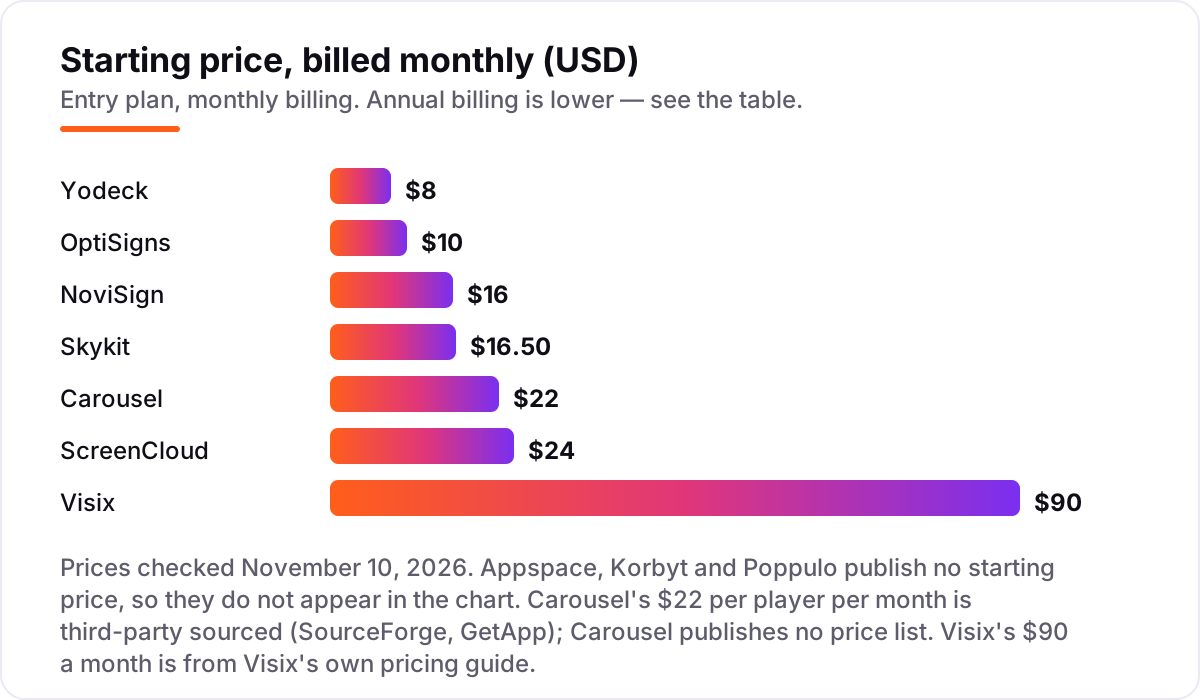
Take a 10-screen office at one location, paying monthly. On list prices, the software costs $80 a month on Yodeck Basic, $100 on OptiSigns Standard, $160 on NoviSign Business, $165 on Skykit Base, $220 on Carousel and $240 on ScreenCloud Core. Visix does not fit this math: $90 a month covers a single screen, so ten screens need a quote. Appspace, Korbyt and Poppulo publish no prices at all, so their cost for ten screens is a sales conversation.
Over a year on annual billing, that is $960 on Yodeck, $1,080 on OptiSigns Standard, $1,680 on NoviSign Business, $1,980 on Skykit Base, $2,400 on ScreenCloud Core and $2,640 on Carousel. The same ten screens cost $960 a year at the cheap end and $2,640 at the dear end — a $1,680 gap that comes from the per-screen rate, not from features. Yodeck charges the same $8 whether you pay monthly or annually, so its annual figure is just twelve months at $80.
Three costs sit outside every number above. First, the screens themselves: the software price never includes the display, and a commercial screen costs far more than the first year of software. Second, the players: Yodeck includes a free player per screen on annual plans, OptiSigns runs on a Fire TV stick, and ScreenCloud sells its own players from $95. Third, the tier jump: proof of play, SSO and dashboards sit above the entry plan on most tools here, so price the tier you will actually need, not the cheapest one on the page.
Know the difference: digital signage software vs a workplace platform
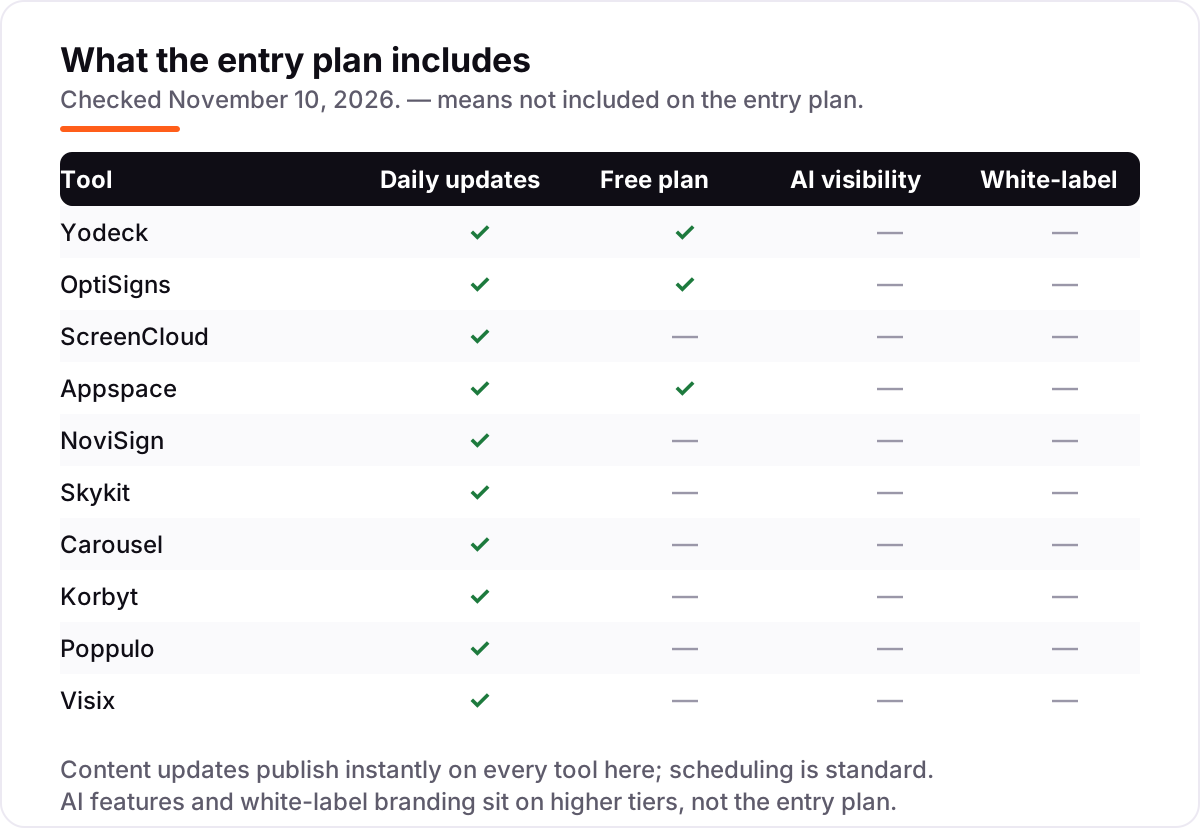
The confusion in this category is between a tool that runs screens and a platform that runs the office. Digital signage software — Yodeck, OptiSigns, ScreenCloud, NoviSign, Skykit, Carousel and Visix — manages content, schedules and players for displays. A workplace platform — Appspace, Korbyt and Poppulo — does that too, but also runs room and desk booking, an intranet, visitor management and employee email, all under one subscription.
The pricing follows the scope. Screen tools charge per screen or per player, so the bill is easy to model: count the displays and multiply. Workplace platforms charge per user, per device or by quote, and the bill depends on headcount and modules as well as screens. An office that only needs announcements on ten screens should buy a screen tool; an office that also wants booking, intranet and visitor management in one system should price a platform and compare the total against buying the pieces separately.
There is a second, quieter confusion: cloud subscriptions versus on-premise licences. Visix sells both, with a $90-a-month subscription or a $3,250 perpetual licence for one screen, while every other tool here is a cloud subscription that stops working when you stop paying. If IT needs content to live on the office's own servers, that distinction matters more than any per-screen price.
Quick comparison: tool type by need
| Buyer | Best pick | Why |
|---|---|---|
| Small office on a budget | Yodeck | Cheapest paid plan at $8 per screen, with one screen free forever |
| Office that wants a free start | OptiSigns | Three screens free, then $10 per screen with 140+ apps |
| Internal comms and dashboards | ScreenCloud | Slack, Teams and BI dashboards on screens, Core is $20 per screen billed annually |
| One platform for the whole office | Appspace | Signage plus room and desk booking, intranet and visitor management; quote only |
| Touchscreens and kiosks | NoviSign | Touch widgets built in, Business is $14 per screen billed annually |
| Screens that must stay on | Skykit | Matched hardware and software, Base is $16.50 per display |
| Strict IT governance | Carousel | Granular roles and SSO, $22 per player per month from third-party sources |
| Live data on screens | Korbyt | Hundreds of data connectors; quote only |
| Global employee comms | Poppulo | Nearly 600,000 screens across 80 countries; quote only |
| On-premise control | Visix | Cloud or on-premise, $90 a month for a single screen |
Mistakes to avoid
- Budgeting on the headline price alone. A $10 tool can cost $100 or $240 a month once the screens are counted. Price the tool for your actual screen count, not for one display.
- Forgetting the player and the screen. The subscription never includes the display, and some tools need a dedicated player per screen. Yodeck includes one on annual plans; others charge from $95.
- Buying on the annual price, then paying monthly. ScreenCloud Core is $20 a month billed annually but $24 month to month, and NoviSign Business is $14 billed annually but $16 monthly. Compare tools on the billing cycle you will actually use.
- Assuming the entry plan includes proof of play or SSO. Both sit on higher tiers on most tools here, so check the plan comparison before you assume everything is included.
- Treating a quote-only tool as a known cost. Appspace, Korbyt and Poppulo publish no prices, and Carousel's $22 figure comes from third-party directories. Get the quote in writing before you compare them against a published price.
How we chose
We checked each vendor's own pricing page on November 10, 2026 and recorded the starting price exactly as shown, including the annual-billing figure where the page lists one, and we ranked the tools by fit for the most common buyer — an office with a handful of screens — not by brand size. Three exceptions are disclosed: Appspace, Korbyt and Poppulo publish no starting price, so they are listed as custom quote; Carousel's $22 per player per month comes from third-party directories (SourceForge and GetApp), not a Carousel price page; and Visix's $90 a month comes from Visix's own published pricing guide. Ratings are shown only where a fresh G2 or Capterra page gave a clear score and review count on November 10, 2026: Yodeck, OptiSigns, ScreenCloud, Appspace, NoviSign, Skykit, Carousel and Korbyt. Poppulo carries no rating here because G2 pages gave conflicting scores and counts, and Visix carries none because the latest Capterra copy was six days old. No vendor paid for a place in this list, and none of the links here are affiliate links.
What to do next
Start with the free plan or trial of your top pick and run one real week of announcements through it. Check that a colleague can publish without help, that the screens recover after a power cut, and that the bill for your actual screen count matches the quote before you commit to a year. If the screens are sorted but new customers are not finding you, our local SEO service handles the visibility side — or compare providers in our guide to digital signage companies. Once your tools are in place, find out what's holding your rankings back.
Your stack only works if people find you
SerpAstra fixes what keeps your site off page one and makes it easy for AI assistants to recommend.
Get a free audit→Sources we checked (20)
- Yodeck pricing — yodeck.com/pricing (checked November 10, 2026)
- OptiSigns pricing — optisigns.com/pricing (checked November 10, 2026)
- ScreenCloud pricing — screencloud.com/pricing (checked November 10, 2026)
- Appspace pricing — appspace.com/pricing (checked November 10, 2026; paid plans quote only)
- NoviSign pricing — novisign.com/pricing (checked November 10, 2026)
- Skykit pricing — skykit.com/pricing (checked November 10, 2026)
- Carousel pricing, third-party sourced — sourceforge.net (checked November 10, 2026)
- Korbyt — korbyt.com (checked November 10, 2026; pricing on request)
- Poppulo — poppulo.com (checked November 10, 2026; pricing on request)
- Visix pricing guide — visix.com (checked November 10, 2026)
- Yodeck on G2 — g2.com (checked November 10, 2026)
- OptiSigns on G2 — g2.com (checked November 10, 2026)
- ScreenCloud on G2 — g2.com (checked November 10, 2026)
- Appspace on G2 — g2.com (checked November 10, 2026)
- NoviSign on G2 — g2.com (checked November 10, 2026)
- Skykit on G2 — g2.com (checked November 10, 2026)
- Carousel on Capterra — capterra.co.uk (checked November 10, 2026)
- Korbyt on G2 — g2.com (checked November 10, 2026)
- Yodeck small-business guide — yodeck.com (checked November 10, 2026)
- Digital signage costs — brixsignage.com (checked November 10, 2026)
Shamim
Founder of SerpAstra
A full-stack SEO and digital marketer who spends most days on Local SEO for dental practices, AI search visibility and lead generation.
Frequently asked questions
What is the best digital signage software for offices?
Yodeck is the best fit for most offices at $8 per screen per month, with one screen free forever and a free player on annual plans. OptiSigns is the best free start with three screens free, and ScreenCloud is the best choice for internal comms and live dashboards at $20 per screen billed annually.
How much does digital signage software cost for an office?
For 10 screens, expect $80 a month on Yodeck Basic, $100 on OptiSigns Standard, $160 on NoviSign Business and $240 on ScreenCloud Core at monthly billing. Appspace, Korbyt and Poppulo publish no prices, and Visix charges $90 a month for a single screen, so larger offices need a quote.
Is there really free digital signage software for offices?
Yes, but only for very small setups. Yodeck keeps one screen free forever, OptiSigns covers up to three screens free with its branding, and Appspace has a free tier for two users and one device. Every other tool here is a trial or a demo, so a 10-screen office always pays.
What is the difference between per-screen and per-user pricing?
Per-screen tools charge for every display, so the bill grows with the screen count. Per-user tools such as Appspace charge for people, and per-player tools such as Carousel charge per media player. Always price the tool for your actual screens, users and players before comparing headline prices.
Do I need a media player for each screen?
Usually yes, but the player can be cheap or free. Yodeck includes a free player per screen on annual plans, and OptiSigns runs on Amazon Fire TV sticks. Many smart TVs also run the apps directly. Budget the player separately, since the software price never includes the screen itself.
Can digital signage software show live dashboards and calendars?
Yes. ScreenCloud leads here with BI dashboards and Slack and Teams integrations, Korbyt pulls live data through hundreds of connectors, and NoviSign and OptiSigns both show web pages and calendar feeds. Check that the dashboard you need is on the entry plan, since some integrations sit on higher tiers.
What should an office check before signing a digital signage contract?
Confirm the pricing unit, the minimum screen count, and what the entry plan excludes — proof of play, SSO and dashboards often sit on higher tiers. Ask whether the price includes players, support and training, and test the trial on a real screen with real content before committing to a year.
Free SEO and AI visibility audit
Find out what is holding your rankings back
Send us your site. Within 2 business days you get a written audit, an AI visibility check and a short fix list ranked by impact. Free, with no contract attached.
Request my free audit→Related guides
 Companies & Services11 Best Digital Signage Companies in 2026Compare the 11 best digital signage companies on per-screen price, free plans and hardware, with every price checked November 4, 2026, before you buy.Read guide →
 HR & Recruiting9 Best Digital Employee Experience Software in 2026, ComparedCompare the 9 best digital employee experience software platforms on telemetry, experience scoring and remediation, with prices checked November 6, 2026.Read guide →
 Communication & Customer Support7 Best Communication Software for Small Business in 2026, ComparedCompare the 7 best communication software for small business on price, free plans, AI features and phone systems, with every price checked November 4, 2026.Read guide →