
12 Best Digital Work Instruction Software in 2026, Compared
Compare the 12 best digital work instruction software options on price, free plans, offline use and AR features, with prices checked November 10, 2026.
 Shamim Mia, Founder, SerpAstraLast verified November 10, 202615 min read
We compare pricing pages, documentation and public reviews. We never accept payment for rankings.

Key takeaways
- SwipeGuide leads for dedicated work instructions at €649 a month flat with unlimited users; Dozuki follows on a custom quote, and Tulip at $100 a month per interface for teams that build their own apps.
- MaintainX is the only genuinely free plan here, with a free Basic tier, while most of the dedicated tools are quote-only and publish no starting price at all.
- The single most important buying factor is the pricing unit: per user, per interface, per location or flat rate. The unit, not the headline price, decides what a 25-operator plant actually pays.
- AR guidance is a real split in this category: TeamViewer Frontline and Manifest put instructions in the worker's field of vision, while the rest put them on a tablet or phone screen.
On this page
Quick comparison
| Tool | Best for | Starting price | Free plan |
|---|---|---|---|
| SwipeGuide | Mid-size manufacturers that want dedicated work instructions with a flat monthly price and unlimited users | €649/mo | No (free trial) |
| Dozuki | Manufacturers that want the category-standard tool for instructions, training and document control | Custom quote | No (no trial) |
| Tulip | Manufacturers that want to build their own frontline apps, not just publish instructions | $100/mo per interface | No (free trial) |
| Azumuta | Mid-market manufacturers that want instructions, quality, audits and skills in one subscription | Custom quote | No (2-month pilot) |
| VKS | Manufacturers that want visual, photo-led instructions with smart forms and live production data | Custom quote | No (free trial) |
| MaintainX | Small maintenance and production teams that want to start free and digitize procedures fast | Free; Essential $20/mo | Yes (free) |
| WorkClout | Quality teams in automotive and parts manufacturing that want inspections and SOPs in one tool | $35/mo per user | No (14-day trial) |
| TeamViewer Frontline | Industrial teams that want AR-guided instructions on smart glasses and remote expert help | Custom quote | No (demo only) |
| Parsable | Large manufacturers that want one connected worker platform for safety, quality and productivity | Custom quote | No (demo only) |
| Acadia | Large enterprises that want instructions tied to skills, quizzing and execution accountability | Custom quote | No (demo only) |
| REWO | Manufacturers with multilingual floors that want video-led instructions operators actually watch | Custom quote | No (demo only) |
| Manifest | Aerospace, defense and complex-assembly teams that need AR instructions anchored to the real workpiece | Custom quote | No (demo only) |
Make one of these tools?
We re-check this list every quarter. Send a correction, request a review, or ask about a clearly labeled sponsored spot.
Request a listingThe best digital work instruction software

SwipeGuide
Best for: Mid-size manufacturers that want dedicated work instructions with a flat monthly price and unlimited users
SwipeGuide is the most focused work instruction tool in this list, and the flat price is the reason it leads. Pro costs €649 a month and covers one location with unlimited users and unlimited content, plus 10 content editors, 2 languages and an AI-powered instruction builder. Operators open a guide on a phone or tablet at the station, scan a QR code, and work through the steps with checklists.
The catch is the flat rate itself. A plant with one line and a handful of operators pays the same €649 as a plant with 200 operators, so small teams should compare it against MaintainX or WorkClout first. There is no free plan, and multi-location work needs the custom Enterprise tier. Buy SwipeGuide when the whole floor needs instructions and per-user pricing would punish that.
What we like
- Flat €649 a month with unlimited users, so adding operators never raises the bill
- AI-powered instruction builder drafts guides from existing documents and videos
- Guides work on phones and tablets at the station, with QR codes and checklists
- Skills management is built in, so training and instructions live in one place
Watch out for
- Flat €649 a month is steep for a single line or a very small team
- Now part of L2L, so the roadmap and branding sit inside a larger platform
- No free plan, and the entry plan covers one location only

Dozuki
Best for: Manufacturers that want the category-standard tool for instructions, training and document control
Dozuki is the standard work instruction software that most manufacturers compare everything else against. It covers the whole job: photo, video and text steps with annotations, version control, approval workflows, and training and skills tracking built from the same content. When a procedure changes, the revised version reaches every operator with an audit trail behind it.
The trade-off is that Dozuki is an enterprise sale. There is no published price and no free trial, so budgeting starts with a sales call, and G2 reviewers report implementation taking around 5 months on average. Reviewers also note reporting limits and a cap on images per step. Choose Dozuki when standard work, training and document control need to live in one system.
What we like
- Purpose-built for standard work instructions, with version control and approvals
- Training and skills tracking sit next to the instructions, so onboarding follows the same content
- Strongest review base in this list at 4.4 out of 5 on G2 across 210 reviews
- Photo, video and text steps with annotations, built for the shop floor
Watch out for
- Quote-only pricing, so small teams cannot budget without a sales call
- G2 reviewers report implementation taking around 5 months on average
- Reviewers note reporting limits and a cap on images per step

Tulip
Best for: Manufacturers that want to build their own frontline apps, not just publish instructions
Tulip is the builder's pick in this list. Essentials costs $100 a month per interface, billed annually, with a 10-interface minimum, and gives you a no-code app editor, Tulip AI, tables and analytics, and access to the Tulip Library. Instead of publishing static instructions, you build guided apps that walk operators through a task, capture data at each step, and feed dashboards.
The catch is the pricing unit. An interface is a device running Tulip Player, so 10 stations cost $1,000 a month before any add-on, and Essentials caps at 50 interfaces. Machine monitoring and computer vision cost extra, and building good apps takes real setup time. Pick Tulip when instructions are only the start and you want apps, data and machines in one platform.
What we like
- No-code app builder turns instructions into guided apps with data capture and dashboards
- Tulip AI is included on Essentials, with translation and AI chat in apps
- Connects to machines, sensors and ERP systems through connectors and edge devices
- Publishes its prices, unlike most tools here, so the entry cost is easy to model
Watch out for
- Priced per interface, not per user, with a 10-interface minimum, so the entry bill is $1,000 a month
- Essentials is capped at 50 interfaces, and machine monitoring and computer vision cost extra
- Building apps takes real setup time; it is not a ready-made instruction library

Azumuta
Best for: Mid-market manufacturers that want instructions, quality, audits and skills in one subscription
Azumuta is the all-in-one pick for a mid-market manufacturer that does not want five vendors. One subscription covers digital work instructions, quality management, audits and digital checklists, a skills matrix and training, and production tracking. Pricing is flat per user with every module included, and the vendor says there are no per-app, per-environment or hardware charges on top.
The weakness is price transparency. The pricing page asks for a custom quote, priced per user and per module with volume tiers, so you cannot model the bill without a sales call. The two-month Joint Pilot Program softens that: it runs the full platform on real production work with a dedicated customer success officer before you commit. Choose Azumuta when one platform should replace several.
What we like
- One platform covers digital work instructions, quality, audits, skills and production tracking
- Flat per-user model with every module included, and no per-app or per-environment charges
- Machine connectivity with outbound MQTT and no extra hardware required
- Two-month Joint Pilot Program runs the full platform on real production work before buying
Watch out for
- Quote-only pricing, priced per user and per module, so the bill needs a sales call to size
- Modules can be licensed individually, which makes comparing bundles harder
- Implementation help is a paid Customer Success Pack, not part of the subscription

VKS
Best for: Manufacturers that want visual, photo-led instructions with smart forms and live production data
VKS builds instructions the way operators actually read them: photos, videos and annotations in visual steps, with version control so nobody works from an old printout. Lite covers the instructions themselves, Pro adds smart forms, production reporting and live KPIs, and Enterprise adds integrations with ERP, MES and smart tools, with IoT data captured at the station.
The problem is the price. VKS publishes its tiers but no prices, and directories such as Capterra and GetApp report around $350 per user a month, which would make a 25-operator rollout very expensive if it is accurate. Implementation also takes about four months on average, per a competitor's research. Get a written quote and test the per-user math before shortlisting VKS.
What we like
- Visual instructions built from photos, videos and annotations, with version control
- Pro adds smart forms, production reporting and live KPIs on top of the instructions
- Connects to smart tools, ERP and MES systems, with IoT data capture at the station
- Lite, Pro and Enterprise tiers let a plant start with instructions and add data later
Watch out for
- No published price: the vendor lists Lite, Pro and Enterprise tiers and quotes each one
- Directories report around $350 per user a month, which would make a large rollout very expensive
- Reviewers report implementation taking about four months on average

MaintainX
Best for: Small maintenance and production teams that want to start free and digitize procedures fast
MaintainX is the cheapest way into digital procedures in this list, and the only tool with a genuinely free plan. Basic costs $0 and covers unlimited work orders, unlimited procedures, unlimited requester users and real-time messaging. Essential at $20 per user a month billed annually, or $25 billed monthly, adds unlimited repeating work orders and the preventive maintenance core most teams need.
The honest limit is scope. MaintainX is a maintenance system first, so instructions are procedures attached to work orders, not a dedicated authoring studio with approvals and skills tracking. Essential also caps procedures attached to work orders at 3. Start on MaintainX when the goal is to leave paper behind this month, and move up the list when instructions become the product.
What we like
- Only genuinely free plan here: Basic covers unlimited work orders, procedures and requesters
- Highest G2 score in this list at 4.8 out of 5 across 1,512 reviews
- Mobile-first app technicians actually use, with photos, messaging and offline mode
- Essential at $20 per user a month adds unlimited repeating work orders and preventive maintenance
Watch out for
- A maintenance system first: instructions are procedures inside work orders, not a dedicated authoring tool
- Essential caps procedures attached to work orders at 3, and analytics access is limited on Basic
- Premium jumps to $65 per user a month for parts, purchasing and the API

WorkClout
Best for: Quality teams in automotive and parts manufacturing that want inspections and SOPs in one tool
WorkClout is a quality management platform where work instructions sit next to the inspections that check them. Starter costs $35 a user a month for up to 4 users, with unlimited form templates and inspections, unlimited SOP documentation, incident tracking and corrective actions. Plus at $175 a month covers up to 10 users, and Professional at $425 a month covers 10 users with advanced analytics.
The caps are the thing to watch. Starter stops at 4 users, document uploads are rationed at 1 a month on Starter, and each extra location costs $350 a month billed monthly. WorkClout is strongest for automotive and parts manufacturers, where quality forms and SOPs are the same job. Pick it when inspections, not just instructions, are the daily work.
What we like
- Cheapest published per-user price for a dedicated quality tool at $35 a user a month
- Step-by-step work instructions and SOPs sit next to inspections, issues and corrective actions
- Unlimited form templates and inspections on every plan, with a template marketplace
- Publishes every plan price, including the per-location charge, so the total is easy to model
Watch out for
- Starter is capped at 4 users, so a team of 5 already needs Plus at $175 a month
- Document uploads are rationed: 1 a month on Starter, 3 on Plus, 5 on Professional
- Each extra location costs $350 a month billed monthly, or $250 billed annually

TeamViewer Frontline
Best for: Industrial teams that want AR-guided instructions on smart glasses and remote expert help
TeamViewer Frontline, formerly Proceedix, is the AR-guided entry in this list. Frontline Make puts dynamic visual instructions in the worker's field of vision on smart glasses or a mobile device, Frontline Assist lets a remote expert see what the worker sees and talk them through a fix, and Frontline Pick guides kitting and intralogistics by sight. It connects to ERP, WMS and PLM systems, so instructions pull live order and part data.
The cost is the open question. Frontline publishes no price and sells on a custom quote, and the best experience needs smart glasses, which are a separate hardware purchase. G2 reviewers also flag expense, crashes and bandwidth-heavy performance. Choose Frontline when hands-free guidance and remote expert help are worth a hardware and services budget.
What we like
- AR instructions appear in the worker's field of vision on smart glasses or mobile
- Frontline Assist lets a remote expert see what the worker sees and guide the fix
- Frontline Pick adds vision-guided picking for kitting and intralogistics
- Connects to ERP, WMS and PLM systems, so instructions pull live order and part data
Watch out for
- No published price: Frontline is sold on a custom quote through TeamViewer
- Best features need smart glasses or wearables, which are a separate hardware cost
- G2 reviewers flag expense, crashes and bandwidth-heavy performance

Parsable
Best for: Large manufacturers that want one connected worker platform for safety, quality and productivity
Parsable is the enterprise connected worker platform in this list. It gives frontline workers digital instructions on mobile devices and ties the execution data back to safety, quality and productivity reporting, so managers see what actually happened on the floor. It is built for large, multi-site manufacturers with complex workflows, not for a single line trying one tool.
The evidence problem is real. Parsable publishes no price, offers no self-serve plan, and carries only 3 G2 reviews, so there is almost no public record to judge it by. The sales and implementation cycle will also be longer than the smaller tools here. Shortlist Parsable for a multi-site enterprise rollout, and insist on customer references before signing.
What we like
- Digital instructions tied to safety, quality and productivity data in one platform
- Built for large, multi-site manufacturers with complex frontline workflows
- Mobile-first design for operators on the floor, with execution data feeding back to managers
- Longest-running connected worker brand here, founded for industrial frontline teams
Watch out for
- Quote-only enterprise pricing, with no published starting price or self-serve plan
- Only 3 G2 reviews, so the public review record is too thin to judge by
- Enterprise scope means a longer sales and implementation cycle than the smaller tools here

Acadia
Best for: Large enterprises that want instructions tied to skills, quizzing and execution accountability
Acadia is a connected worker platform built for employee productivity across the whole enterprise, not just the factory floor. Digital work instructions and job aids sit next to quizzing, a dynamic skills matrix, and task assignment to individuals, teams and across shifts, with execution accountability built in. The vendor says it works in manufacturing, transport and logistics, banking and other regulated industries.
Acadia is an enterprise sale through and through. There is no published price, no free plan and no trial, and the vendor says value starts in 10 to 12 weeks. Smaller teams will pay for depth they may not use. Choose Acadia when the goal is workforce capability across the business, with instructions as one part of a bigger program.
What we like
- Instructions, job aids, quizzing and a dynamic skills matrix in one platform
- Tasks can be assigned to individuals, teams and across shifts, with execution accountability
- Works beyond the factory floor, in any part of the business that runs procedures
- SOC 2 Type II report available, which matters for regulated enterprise buyers
Watch out for
- No published price and no free plan or trial listed
- Built for large organizations first, so smaller teams pay for enterprise depth they may not use
- Vendor says value starts in 10 to 12 weeks, so this is not a quick pilot

REWO
Best for: Manufacturers with multilingual floors that want video-led instructions operators actually watch
REWO is the video-first pick in this list. You film the best operator doing the job once, build it into annotated video steps with images, PDFs and 3D where they help, and REWO auto-translates it with voiceover into more than 100 languages. Guides are approved, versioned and e-signed before they go live, and delivered at the station by QR code or triggered by the MES.
The trade-off is authoring time. Filming an expert takes longer than writing text steps, and REWO publishes no price, so the budget starts with a quote. The review footprint is also smaller than the established tools, so ask for references in your industry. Pick REWO when operators ignore text SOPs but watch video, and when the floor speaks several languages.
What we like
- Video work instructions built from filming the best operator, with images, PDFs and 3D where they help
- Auto-translation with voiceover in more than 100 languages for multilingual floors
- Approval, versioning and e-sign-off before a guide goes live, audit-ready for ISO 9001 and IATF 16949
- QR code delivery at the station, or triggered by the MES, with cloud or on-premise hosting
Watch out for
- No published price: REWO sells on a custom quote
- Video-first approach means filming experts, which takes more authoring time than text steps
- Smaller review footprint than the established tools, so references matter more than ratings

Manifest
Best for: Aerospace, defense and complex-assembly teams that need AR instructions anchored to the real workpiece
Manifest, from Taqtile, is the spatial AR pick in this list. Instructions are anchored to the real workpiece in 3D, so each step appears exactly where the work happens, on a headset, phone or tablet. Manifest Maker 2.0 adds AI to draft step-by-step videos, and real-time collaboration lets a remote expert guide the worker inside the same AR view. It is built for aerospace, defense, manufacturing, transport and utilities.
Manifest is a specialist tool, not a general one. The platform publishes no price and sells on a custom quote, and the best experience needs AR headsets such as Apple Vision Pro, which are a separate cost. For simple step-by-step SOPs it is overkill. Choose Manifest when the assembly is complex, high-value and hard to get wrong.
What we like
- Spatial AR instructions anchor each step to the real workpiece, not just a screen
- Manifest Maker 2.0 adds AI to draft step-by-step videos, and runs on iPhone, iPad and Apple Vision Pro
- Real-time collaboration lets a remote expert guide the worker inside the same AR view
- Built for aerospace, defense, manufacturing, transport and utilities work
Watch out for
- No published price for the Manifest platform; it is sold on a custom quote
- Built for complex, high-value assembly, so it is overkill for simple step-by-step SOPs
- Best experience needs AR headsets such as Apple Vision Pro, a separate hardware cost
The best digital work instruction software replaces paper SOPs with step-by-step guides that operators follow on a tablet, phone or headset at the station, always the current revision, in their own language. We ranked the twelve tools below by fit for the most common buyer, a mid-size manufacturer digitising procedures across one or more lines, starting with the dedicated instruction tools and ending with the AR specialists, and every price was checked on November 10, 2026.
How to choose the best digital work instruction software
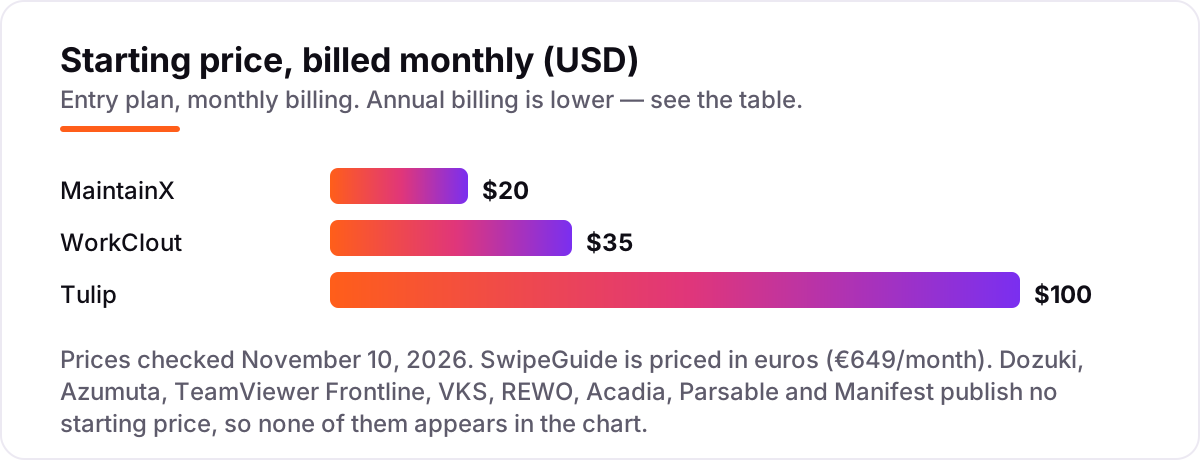
- Work out the pricing unit first. SwipeGuide charges a flat €649 a month, Tulip charges $100 a month per interface, MaintainX and WorkClout charge per user, and eight tools here charge a custom quote. The unit decides the real bill.
- Count the operators and the stations separately. A plant with 25 operators and 10 stations pays very different amounts on a per-user tool than on a per-interface tool, so price both counts before comparing headline prices.
- Check how revisions reach the floor. A guide is only as good as its latest version, so test approval workflows, version control and how fast a revised step replaces the old one on every device.
- Test the authoring flow with a real procedure. Rebuild your hardest 10-step job in the trial and watch how long it takes, including photos, video and translation, because authoring time is the hidden cost.
- Decide whether you need AR at all. Most plants run fine on tablets and phones; only complex, high-value assembly earns the headset cost of TeamViewer Frontline or Manifest.
A manufacturer also needs to be found online, not just run well on the floor. Our guide to manufacturing SEO tools covers the visibility side, and before you publish new service pages, run your titles through the free SERP snippet preview tool — it shows exactly how the title and description will look in Google. If search is the bottleneck rather than the shop floor, our AI search optimisation service handles that side.
Whatever you shortlist, try it with one real procedure before you pay. The trials and pilots in this list run from 14 days to two months, which is long enough to rebuild your hardest job and run it with real operators. Check two things in the trial: that a revised step reaches every device the same day, and that an operator can follow the guide without asking a supervisor for help. Every tool here publishes versioned instructions, so there is no reason to buy before you have seen a revision go live.
Digital work instruction software pricing: what you will actually pay
Take a plant with 25 operators working across 10 stations. On list prices, MaintainX Essential costs 25 users times $20, which is $500 a month billed annually, or $6,000 a year. WorkClout Professional costs $425 a month for 10 users plus 15 extra users at $35 each, which is $950 a month, or $11,400 a year. Tulip Essentials costs 10 interfaces times $100, which is $1,000 a month, or $12,000 a year, and the 10-interface minimum is met exactly. SwipeGuide Pro costs a flat €649 a month regardless of headcount, which is €7,788 a year.
Over a year, that is $6,000 on MaintainX Essential, $11,400 on WorkClout Professional, $12,000 on Tulip Essentials and €7,788 on SwipeGuide Pro, before any hardware, implementation or add-on. The same 25 people and the same 10 stations cost $6,000 a year at the cheap end and $12,000 at the dear end among the published prices, a gap that comes entirely from the pricing unit, not from features.
Three costs sit outside every number above. First, the eight custom-quote tools, Dozuki, Azumuta, TeamViewer Frontline, VKS, REWO, Acadia, Parsable and Manifest, publish no starting price, so their totals are unknown until you request a quote. Second, hardware: Tulip needs a device at each station, and TeamViewer Frontline and Manifest work best with smart glasses or AR headsets. Third, implementation: Dozuki averages around 5 months to implement according to G2, and VKS around four months, so budget the migration time as well as the subscription. If the plant also needs maintenance depth, see our guide to inventory tracking software for the operations side.
Know the difference: work instruction software vs a connected worker platform
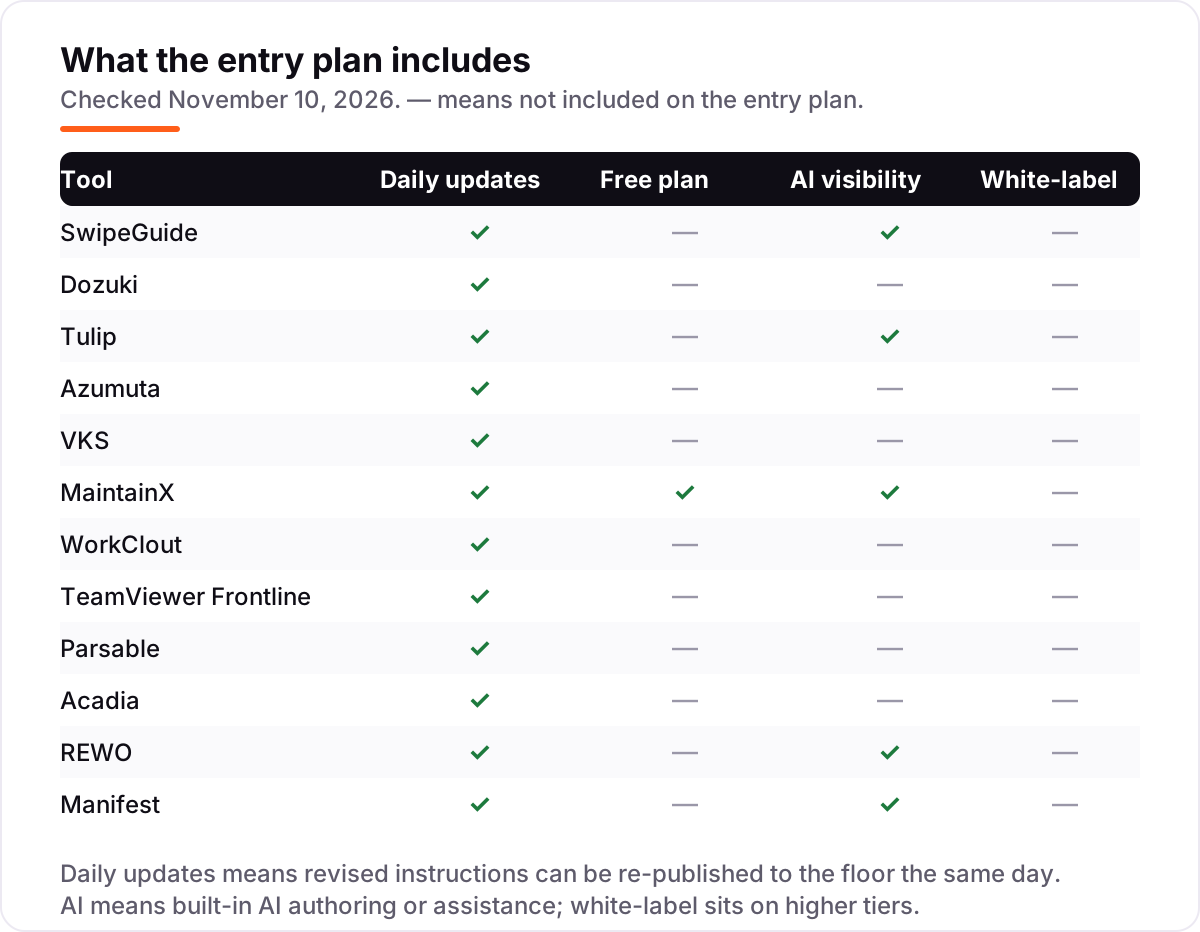
The confusion in this category is between a tool that publishes instructions and a platform that runs the frontline. Work instruction software does one job well: step-by-step guides with photos, video and version control, delivered at the station. SwipeGuide, Dozuki, VKS and REWO are that kind of tool, and they are the right buy when instructions are the problem you are solving.
A connected worker platform does that job plus skills, safety, quality, audits and execution data, usually on an enterprise contract with a longer implementation. Parsable, Acadia, Azumuta and TeamViewer Frontline are that kind of product, and they are the right buy when the plant needs the wider system, not just the guides. The risk is buying a platform when a tool would do, and paying enterprise prices and waiting months for a rollout that a dedicated tool could have finished in weeks.
There is a second, quieter confusion: per-user pricing and per-interface pricing. Tulip charges per device running its player, not per person, so a station shared by three shifts costs one interface, while a per-user tool charges for every operator. Count both operators and stations before you compare any two prices in this list.
Quick comparison: tool type by need
| Buyer | Best pick | Why |
|---|---|---|
| Most mid-size manufacturers | SwipeGuide | Dedicated instructions at a flat €649/month with unlimited users |
| Instructions, training and document control | Dozuki | Category standard, 4.4 out of 5 on G2, custom quote |
| Teams that build their own apps | Tulip | No-code app builder from $100/month per interface |
| One platform for instructions and quality | Azumuta | All modules in one subscription, custom quote |
| Visual instructions with live data | VKS | Photo-led guides with KPIs on Pro, custom quote |
| Small team starting free | MaintainX | Free Basic plan, Essential is $20/user/month, 4.8 out of 5 on G2 |
| Quality teams in automotive | WorkClout | Inspections and SOPs together from $35/user/month |
| AR-guided work on smart glasses | TeamViewer Frontline | Hands-free guidance plus remote expert help, custom quote |
| Large multi-site enterprise | Parsable | Connected worker platform for safety and quality, custom quote |
| Instructions tied to skills | Acadia | Skills matrix and quizzing in one platform, custom quote |
| Multilingual video instructions | REWO | Video guides in 100+ languages with voiceover, custom quote |
| Complex AR assembly | Manifest | Spatial instructions anchored to the workpiece, custom quote |
Mistakes to avoid
- Budgeting on the headline price alone. A $100 tool can cost $1,000 a month once the 10-interface minimum is counted, and a $35 tool can cost $950 a month once 25 users are counted. Price the tool for your actual operators and stations, not for one person.
- Buying a platform when a tool would do. Connected worker platforms carry enterprise prices and months of implementation. If instructions are the job, a dedicated tool ships in weeks.
- Assuming a quote will be small. Eight of the twelve tools here publish no price. Request the quote early, with your operator count, station count and site count in hand, so the shortlist is real.
- Skipping the offline test. A guide that needs a live connection fails in a dead zone on the floor. Test revision delivery and offline behaviour on your actual stations before signing.
- Paying for AR before you need it. Smart glasses and headsets are a separate hardware cost on top of the subscription. Start on tablets and phones, and add AR only for the assembly steps that earn it.
How we chose
We checked each vendor's own pricing page on November 10, 2026 and recorded the starting price exactly as shown, including the annual-billing figure where the page lists one, and we ranked the tools by fit for the most common buyer, a mid-size manufacturer digitising procedures across one or more lines, not by brand size. Tulip at $100 a month per interface and Azumuta's custom quote were read on the vendors' own pricing pages on November 10, 2026, and MaintainX at $20 a user a month was read on its pricing page in a fresh crawl from November 8, 2026. WorkClout at $35 a user a month comes from its own pricing page, last indexed on August 21, 2026, and corroborated at $35 by Software Advice and SelectHub. SwipeGuide at €649 a month is third-party-sourced, from Software Advice and GetApp, which trace it to the vendor's own site in September 2026; SwipeGuide publishes no pricing page of its own. VKS publishes tiers but no prices, so we list it as a custom quote, and we do not assert the $350 a user a month figure that directories report. Ratings are shown only where a fresh G2 page gave a clear score and review count: Dozuki at 4.4 out of 5 across 210 reviews and MaintainX at 4.8 out of 5 across 1,512 reviews. The other ten tools carry no rating here because their G2 pages were stale, conflicting or too thin to trust, and we would rather show no rating than a stale or estimated one. No vendor paid for a place in this list, and none of the links here are affiliate links.
What to do next
Start with the free plan or trial of your top pick and rebuild your hardest procedure in it. Check that a revised step reaches every device the same day, that operators can follow it without asking for help, and that the bill matches the operator and station counts you actually have before you commit to a year. If the procedures are sorted but new customers are not finding you, our local SEO service handles the visibility side — or compare providers in our guide to asset tracking software. Once your tools are in place, find out what's holding your rankings back.
Your stack only works if people find you
SerpAstra fixes what keeps your site off page one and makes it easy for AI assistants to recommend.
Get a free audit→Sources we checked (14)
- SwipeGuide pricing — softwareadvice.com (checked November 10, 2026)
- Dozuki pricing — g2.com/products/dozuki/pricing (checked November 10, 2026)
- Tulip pricing — tulip.co/plans/ (checked November 10, 2026)
- Azumuta pricing — azumuta.com/pricing/ (checked November 10, 2026)
- VKS pricing — knowby.co/blog/vks-pricing-what-you-need-to-know (checked November 10, 2026)
- MaintainX pricing — getmaintainx.com/pricing (checked November 10, 2026)
- WorkClout pricing — workclout.com/plans (checked November 10, 2026)
- TeamViewer Frontline — teamviewer.com/en-us/products/frontline/features/ (checked November 10, 2026)
- Parsable — parsable.com (checked November 10, 2026)
- Acadia — acadia-software.com (checked November 10, 2026)
- REWO — rewo.io/platform/guides (checked November 10, 2026)
- Manifest (Taqtile) — taqtile.com (checked November 10, 2026)
- Dozuki on G2 — g2.com/products/dozuki/reviews (checked November 10, 2026)
- MaintainX on G2 — g2.com/products/upkeep/competitors/alternatives (checked November 10, 2026)
Shamim
Founder of SerpAstra
A full-stack SEO and digital marketer who spends most days on Local SEO for dental practices, AI search visibility and lead generation.
Frequently asked questions
What is the best digital work instruction software?
SwipeGuide is the best fit for most manufacturers: dedicated work instructions at a flat €649 a month with unlimited users. Dozuki is the category standard on a custom quote, and Tulip is the pick for teams that want to build their own frontline apps from $100 a month per interface.
How much does digital work instruction software cost?
Published prices run from free to €649 a month. MaintainX starts free, WorkClout starts at $35 a user a month, and Tulip starts at $100 a month per interface with a 10-interface minimum. Eight of the twelve tools here publish no price and sell on a custom quote.
Is there a free digital work instruction software?
Only one tool here is genuinely free: MaintainX Basic costs $0 and covers unlimited work orders, procedures and requester users. SwipeGuide, Tulip, VKS and WorkClout offer free trials, and Azumuta offers a two-month pilot, but none of them has a free plan.
What is the difference between work instruction software and a connected worker platform?
Work instruction software publishes step-by-step guides and tracks revisions. A connected worker platform does that plus skills, safety, quality and execution data, usually on an enterprise contract. Buy the dedicated tool when instructions are the job; buy the platform when you need the wider system.
Do work instructions work offline on the shop floor?
Most cloud tools need a connection to fetch the latest revision, though several cache guides on the device. MaintainX offers offline mode in its mobile app, and REWO can run on-premise or on an air-gapped network. Always test offline behaviour on your actual floor before buying.
Can I switch work instruction software later?
Yes, but plan the move around a quiet period. Export your guides, images, videos and version history from the old tool, rebuild the top 20 procedures first, and run both systems in parallel for a week. Switching mid-production means operators may follow two different revisions.
Do I need AR headsets for digital work instructions?
No. Ten of the twelve tools here run on phones, tablets and touchscreens, and most plants never buy a headset. AR only earns its cost for complex, high-value assembly, where TeamViewer Frontline and Manifest anchor instructions to the workpiece itself.
Free SEO and AI visibility audit
Find out what is holding your rankings back
Send us your site. Within 2 business days you get a written audit, an AI visibility check and a short fix list ranked by impact. Free, with no contract attached.
Request my free audit→Related guides
 SEO & AI Search10 Best Tools for SEO for Manufacturing in 2026, Compared10 best tools for seo for manufacturing compared on price, catalog audits, local SEO and AI visibility, with real starting prices checked November 2, 2026.Read guide →
 Other Business Software12 Best Inventory Tracking Software for Small Business in 2026, ComparedThe 12 best inventory tracking software for small business, compared on real prices, free plans and stock features. Prices checked November 10, 2026.Read guide →
 Other Business Software8 Best Asset Tracking Software for Small Business in 2026, ComparedCompare the 8 best asset tracking software for small business options on price, free plans and check-out features, with prices checked November 10, 2026.Read guide →