
Best Disposable Email Services for 2026: 11 Providers Ranked by Value
Compare the best disposable email services on price, retention and privacy, with every price checked November 5, 2026. Most are free; three sell paid plans.
 Shamim Mia, Founder, SerpAstraLast verified November 5, 202613 min read
We compare pricing pages, documentation and public reviews. We never accept payment for rankings.

Key takeaways
- Eight of the eleven services here cost nothing at all. Temp Mail is the best all-rounder at $10 a month for Premium, Guerrilla Mail is the best free pick for sending as well as receiving, and YOPmail keeps mail longest at 8 days.
- Retention is the real price: 10 Minute Mail deletes everything after 10 minutes, Guerrilla Mail after about an hour, and YOPmail after 8 days, so match the window to the job.
- Public inboxes are readable by anyone who guesses the address, so never use a disposable address for banking, password recovery or anything you must get back into later.
On this page
Quick comparison
| Tool | Best for | Starting price | Free plan |
|---|---|---|---|
| Temp Mail | Anyone who wants the most popular disposable inbox, with a paid upgrade for custom domains and longer storage | $10/mo | Yes (free plan) |
| Guerrilla Mail | People who need to both send and receive from a throwaway address, with big attachments | Free | Yes (free) |
| YOPmail | Signups where the verification mail might arrive days later, not minutes | Free | Yes (free) |
| Mailinator | Developers and QA teams testing signup, OTP and password-reset flows | $99/mo | Yes (free public) |
| 10 Minute Mail | One-off verifications where ten minutes is genuinely enough | Free | Yes (free) |
| Maildrop | Quick tests where you want to invent the address name yourself | Free | Yes (free) |
| EmailOnDeck | Gaming, crypto and trial signups where the address must last longer than ten minutes | Free | Yes (free) |
| Mohmal | Arabic-speaking users and anyone who wants a 45-minute window | Free | Yes (free) |
| TrashMail | People who want disposable addresses that forward to their real inbox | $2.99/mo | Yes (free plan) |
| Spamgourmet | Long-running signups where you want to cap how many mails a sender may ever send | Free | Yes (free) |
| MinuteInbox | Signups where you want to choose the lifetime up front, from 10 minutes to a month | Free | Yes (free) |
Make one of these tools?
We re-check this list every quarter. Send a correction, request a review, or ask about a clearly labeled sponsored spot.
Request a listingThe best disposable email services

Temp Mail
Best for: Anyone who wants the most popular disposable inbox, with a paid upgrade for custom domains and longer storage
Temp Mail is the biggest name in disposable email, and it shows. The address appears the moment the page loads, the inbox refreshes on its own, and the mobile apps and browser extensions keep the address on every device. The free plan is genuinely free, with no account, no password and no personal details, the default choice for a throwaway address in a hurry.
Premium costs $10 a month, or $60 a year, and buys up to 10 addresses at once, custom domains, 100MB of storage and messages kept for a month instead of 1–2 hours. The trade-off is that Temp Mail only receives, so you cannot send or reply, and web Premium does not carry over to the mobile apps. Buy it for the most widely accepted disposable address with a cheap upgrade path.
What we like
- The most widely used disposable inbox, so most sites accept its addresses and its apps are polished
- Premium adds custom domains, up to 10 addresses at once and messages kept for a month
- Free plan needs no account, no password and no personal details at all
- Available as a website, mobile apps and browser extensions
Watch out for
- Free messages are kept only 1–2 hours, so a slow reply can vanish before you read it
- Receive-only by design: you cannot send mail or reply from a Temp Mail address
- Web Premium does not carry over to the mobile apps, which sell their own subscriptions

Guerrilla Mail
Best for: People who need to both send and receive from a throwaway address, with big attachments
Guerrilla Mail has been free since 2006, and it is the only service here that treats a disposable address like a real mailbox. It sends as well as receives, accepts attachments up to 150MB, and offers a documented API for developers. The address is ready in about two seconds on one of its rotating domains, with no account, no password and no personal details.
The catch is the one-hour clock: messages are deleted about an hour after they arrive, so Guerrilla Mail suits quick verifications and nothing longer. Its domains also sit on most disposable-email blocklists, so some sites refuse the address outright. Pick it when you need to reply from a throwaway address or send a file, and pick YOPmail when the reply might take days.
What we like
- Free since 2006 with no premium tier and no account, and the address is ready in about two seconds
- The only free service here that sends mail as well as receiving it, with attachments up to 150MB
- Rotating domains (guerrillamail.com, sharklasers.com, grr.la) give you a fresh address when one is blocked
- A documented API lets developers build throwaway inboxes into tests
Watch out for
- Messages are deleted after about an hour, so it suits quick verifications and nothing longer
- Its domains sit on most disposable-email blocklists, so some sites refuse the address outright
- No password or private inbox: anyone who guesses the address can read the mail

YOPmail
Best for: Signups where the verification mail might arrive days later, not minutes
YOPmail is the patient option in this list. Any name you type becomes a working address at yopmail.com, with no account, no password and no personal details, and messages stay readable for 8 days, far longer than the 10-minute and 1-hour rivals. A new alternate domain is published every day, which helps when sites block the main domain, and an alias feature hides your real inbox name.
The price of that patience is privacy: inboxes have no password, so anyone who guesses the name reads everything inside, and sending anonymous mail to outside addresses is prohibited, so you can reply but you cannot start a new conversation. YOPmail domains are also on many blocklists. Use it for signups where the confirmation might arrive days later, never for anything sensitive.
What we like
- Messages stay for 8 days, far longer than the 10-minute and 1-hour rivals here
- Any name becomes an address instantly, with no account, password or personal details
- A new alternate domain every day helps when sites block the main yopmail.com domain
- You can reply to mail, and an alias feature hides the real inbox name
Watch out for
- Inboxes have no password, so anyone who guesses the name reads everything in it
- Sending anonymous mail to outside addresses is prohibited, replies only
- YOPmail domains are on many blocklists, so banks and payment sites often reject them

Mailinator
Best for: Developers and QA teams testing signup, OTP and password-reset flows
Mailinator started as a disposable inbox and grew into a testing platform. The free Public plan needs no signup: any mailinator.com address is readable by typing its name on the site. Verified Pro is free after a quick verification and gives one person a private domain and inbox. Paid Business plans add API access, webhooks, routing rules and SMS testing for QA teams.
Business costs $99 a month, or $79 a month billed annually, the most expensive entry price here, but it is also the only tool in this list built for testing signup, OTP and password-reset flows at scale, with 5 team seats and 100,000 emails a month. It also carries the highest review score here, 4.6 out of 5 on G2. Buy it for QA work, and use the free public inbox for one-off checks.
What we like
- The only tool here built for QA: API, webhooks, routing rules and SMS testing on paid plans
- Verified Pro gives one person a free private domain and inbox after a quick verification
- Rated 4.6/5 on G2, the highest review score in this list
- Public inboxes need no signup at all, so a test address is ready in seconds
Watch out for
- The free public inbox is readable by anyone, so never use it for anything private
- Real private testing starts at $99/month, the most expensive entry price here
- SMS numbers cost extra on top of the plan, and Enterprise starts at $699/month

10 Minute Mail
Best for: One-off verifications where ten minutes is genuinely enough
10 Minute Mail is the simplest tool in this list. An address appears the moment the page loads, with no clicks, no account and no password, and a 10-minute countdown starts with it. When the clock hits zero, the address and every message in it are deleted for good. One click extends the timer, up to 30 minutes, and a fresh address is always one reload away.
Ten minutes is unforgiving, which is both the strength and the limit: it forces the address to die on schedule, but a slow verification mail means starting over with a new address. The service is receive-only, so you cannot send or reply, and expired mail can never be recovered. Use it for a single confirmation code or a download gate, and use YOPmail or Maildrop when the reply might take longer.
What we like
- The fastest start here: an address appears the moment the page loads, with no clicks at all
- The countdown forces clean habits, and the address and its mail vanish on their own
- Completely free with no paid tier, no trial and no card ever asked for
- Extending the timer takes one click, up to 30 minutes
Watch out for
- Ten minutes is unforgiving: a slow verification mail means starting over with a new address
- Receive-only, so you cannot send or reply, and expired mail can never be recovered
- The timer keeps running while you wait, so it suits single confirmations only

Maildrop
Best for: Quick tests where you want to invent the address name yourself
Maildrop is the most honest public inbox here: it says up front that it is designed for little to no privacy, and then does exactly what it promises. Invent any address name at maildrop.cc, read the inbox on the site, and walk away, with no account, no password and no waiting. Built-in spam filtering keeps junk out, and a GraphQL API lets developers pull test mail into their own tooling.
The limits are clear too. Inboxes hold at most 10 messages, attachments are stripped, messages over 500KB are discarded, and an inbox that receives nothing for 24 hours is cleared. Anyone who types the same address reads the same mail, so pick an unusual name. Use Maildrop for quick tests and one-off signups, never for anything personal or anything you might need to recover.
What we like
- Invent any address name on the spot, with no account, no password and no waiting
- Built-in spam filtering keeps junk out of the disposable inbox
- A GraphQL API lets developers pull test mail into their own tooling
- Inboxes stay alive as long as you revisit them at least once a day
Watch out for
- Public by design: anyone who types the same address reads the same mail
- Attachments are stripped and messages over 500KB are discarded
- Only 10 messages fit in an inbox, and idle inboxes are cleared after 24 hours

EmailOnDeck
Best for: Gaming, crypto and trial signups where the address must last longer than ten minutes
EmailOnDeck is a free two-step inbox: solve a captcha, click Get Email, and a working address is ready with no account and no personal details. The inbox lasts longer than the 10-minute services, so a slow verification mail or beta key still arrives in time, and the service runs in 10 languages with Chrome and Firefox extensions for one-click addresses from the toolbar.
The catch is the session: close the browser tab and the address is gone for good, with no login and no way to get it back. A Pro tier can send and reply and keep an address active for over a year, but EmailOnDeck publishes no price for it, so you cannot compare the upgrade before paying. Use the free tier for trials, gaming and crypto signups where a longer-lived throwaway helps.
What we like
- The inbox lasts longer than the 10-minute services, so slow verification mails still arrive
- Two steps and no account: solve a captcha, click Get Email, and the address is live
- Pro can send and reply and keep an address active for over a year
- Chrome and Firefox extensions put a fresh address in the browser toolbar
Watch out for
- The inbox is session-based: close the tab and the address is gone for good
- Pro pricing is not published on the site, so you cannot compare the upgrade before paying
- Some sites block EmailOnDeck domains at signup, like most disposable services

Mohmal is a free 45-minute inbox with an Arabic-first interface and an English one for everyone else. The address is ready the moment the page loads, with no account, no password and no personal details, and it expires on its own after 45 minutes, so nothing lingers. That window sits between the 10-minute services and the multi-day ones: long enough for a slow signup flow, short enough to stay truly disposable.
With no paid tier, sending, replying or API, Mohmal is a receive-only tool for quick jobs. It is also a smaller service than Temp Mail or Guerrilla Mail, which means its domains can be blocked by a site without warning. Pick it when 45 minutes is the right window and you want a simple, free, Arabic-friendly inbox, and pick YOPmail when the reply might take days.
What we like
- A 45-minute window, longer than the 10-minute services and shorter than the multi-day ones
- Free with no paid tier and no account, and the address is ready instantly
- Arabic-first design, with an English interface for everyone else
- The address expires on its own after 45 minutes, so nothing lingers
Watch out for
- 45 minutes still suits only quick signups, and anything slower needs YOPmail or Maildrop
- Receive-only, with no sending, replying or API for developers
- A smaller service than Temp Mail or Guerrilla Mail, so its domains can be blocked without warning

TrashMail
Best for: People who want disposable addresses that forward to their real inbox
TrashMail works differently from most of this list: instead of a separate inbox you visit, it forwards disposable mail to your real inbox. You register once for a username, then invent addresses on the spot, and the number in the address sets how many messages it may forward before TrashMail eats the rest. The free plan covers the basics, and Plus costs $2.99 a month.
Plus is the cheapest paid upgrade here at $2.99 a month, or $16.49 a year, and adds custom domains, more forwards and a longer address life. The trade-offs are real: you must register a username first, no attachments are forwarded, and your real address sits behind every disposable one. Use TrashMail when you want disposable addresses that land in the inbox you already read.
What we like
- Forwards mail to your real inbox, so you read disposable mail where you already read mail
- You set how many messages each address may forward (1–20) before it is eaten
- Plus costs $2.99/month, the cheapest paid upgrade in this list
- Addresses are invented on the spot, and you only register once for a username
Watch out for
- You must register a username first, and it is the only service here that asks for any signup
- No attachments are forwarded, so verification mails with files never arrive
- Your real address sits behind every disposable one, so a leak still points at your inbox

Spamgourmet
Best for: Long-running signups where you want to cap how many mails a sender may ever send
Spamgourmet is the veteran of this list, running since the early 2000s, and its trick is still unique: every address you invent carries a message limit. Create an address with a number in it and the first few messages are forwarded to your real inbox, and everything after that is eaten. You can invent addresses without visiting the site, and the service is free forever with no paid tier.
The forwarding model has the same limits as TrashMail: you must create an account and a username first, attachments are not handled, and your real address sits behind every disposable one. The interface is dated and there is no mobile app or modern API. Use Spamgourmet for long-running signups where you want a hard cap on how many mails a sender may ever reach you with.
What we like
- The message-count limit is unique: an address stops working after the number of mails you chose
- Free forever with no paid tier, and you can invent addresses without visiting the site
- Forwards to your real inbox, with whitelists and reply-address masking
- Running since the early 2000s, the longest track record in this list
Watch out for
- You must create an account and a username before the first address works
- Attachments are not handled, so file-bearing verification mails are lost
- The interface is dated, and there is no mobile app or modern API

MinuteInbox
Best for: Signups where you want to choose the lifetime up front, from 10 minutes to a month
MinuteInbox is the only free service here that lets you choose the inbox lifetime up front: 10 minutes, 1 day, 1 week, 3 weeks or up to a month. The address is ready in one click with no account and no paid tier, and the timer can be extended to 100 minutes when a verification mail is slow. Personal details are removed when the mailbox expires, so the address leaves no trace behind it.
A month-long disposable address is still disposable: once it expires it cannot be recovered, so it suits signups you plan to abandon, not accounts you might need later. The service is receive-only, with no sending, replying or forwarding, and it is less widely known than Temp Mail or Guerrilla Mail. Pick it when you want to set the lifetime yourself instead of accepting someone else's timer.
What we like
- You choose the lifetime up front: 10 minutes, 1 day, 1 week, 3 weeks or up to a month
- Free with no account and no paid tier, and a fresh address takes one click
- The timer can be extended to 100 minutes when a verification mail is slow
- Anonymous by design: personal details are removed when the mailbox expires
Watch out for
- A month-long disposable address is still disposable, and it cannot be recovered once it expires
- Receive-only, with no sending, replying or forwarding to a real inbox
- Less widely known than Temp Mail or Guerrilla Mail, so some sites may not recognise it
The best disposable email services give you an inbox that exists for minutes, hours or days, then disappears, taking the spam with it. We ranked the eleven services below by value for the most common buyer: someone signing up for a trial, a download or a newsletter who does not want another marketing list in their real inbox. Eight of them cost nothing at all, and only three sell a paid plan, so the real differences are retention time, whether the inbox is public, and whether you can send as well as receive. Every price was checked on the vendor's own page on November 5, 2026.
How to choose the best disposable email services
- Match the retention window to the job. A 10-minute inbox suits one confirmation code; YOPmail's 8 days suits a signup whose follow-up mail arrives later in the week.
- Check whether the inbox is public. Temp Mail, Guerrilla Mail, YOPmail, Maildrop and Mailinator's free tier are all readable by anyone who guesses the address, so never put anything private in one.
- Decide whether you need to send. Most services here only receive. Guerrilla Mail is the only free one that also sends, with attachments up to 150MB.
- Pick forwarding or a standalone inbox. TrashMail and Spamgourmet forward mail to your real inbox; the rest give you a separate inbox you visit on their site.
- Expect some sites to say no. Disposable domains sit on most blocklists, so a signup that rejects one address may accept another service's domain.
Disposable email is one tool in a privacy toolkit, not the whole toolkit. If the business also needs to be found online, our guide to email marketing platforms for creators covers the sending side. And before you publish new pages for the services you sell, run your titles through the free SERP snippet preview tool — it shows exactly how the title and description will look in Google.
Whatever you shortlist, test it with a throwaway signup before you rely on it. Send yourself a test message, check that it arrives, and confirm the timer: a 10-minute inbox that deletes your code before you read it is worse than no inbox at all. And remember the one rule that covers every service here — if losing access to the address would lock you out of an account, use a real address instead.
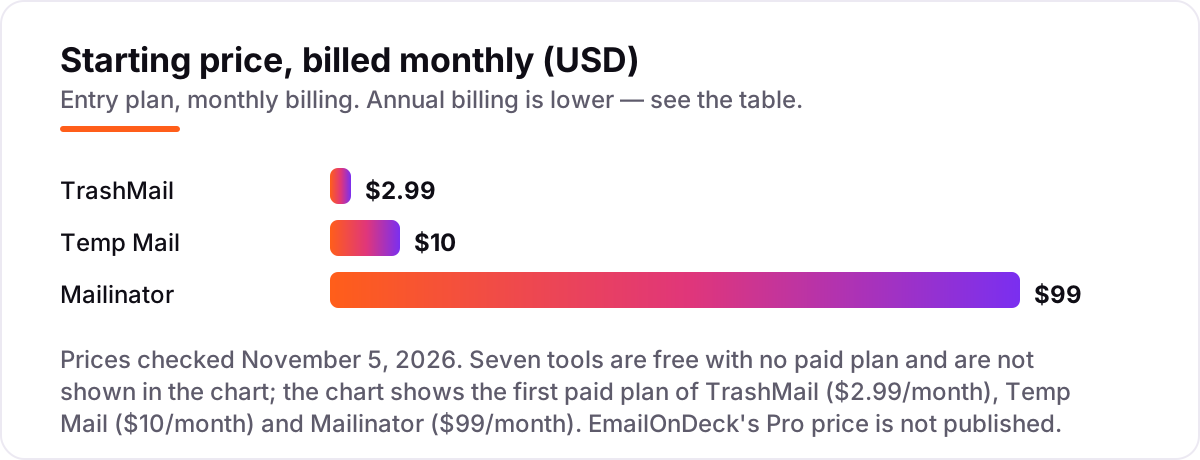
Disposable email services pricing: what you will actually pay
Take one person who verifies a couple of accounts a month. On eight of these services the bill is $0 forever, because there is no paid plan to buy. The three that sell an upgrade are cheap at the bottom and steep at the top: TrashMail Plus costs $2.99 a month, or $16.49 a year; Temp Mail Premium costs $10 a month, or $60 a year; Mailinator Business costs $99 a month, or $79 a month billed annually.
Over a year, that is $0 on the eight free services, $16.49 on TrashMail Plus, $60 on Temp Mail Premium and $948 on Mailinator Business billed annually ($1,188 if you pay month to month). The gap is the job, not the quality: TrashMail and Temp Mail sell a better throwaway inbox, while Mailinator sells a QA testing platform with 5 seats, a private domain and an API. EmailOnDeck's Pro tier has no published price, so it cannot be compared on cost at all.
Two costs sit outside every number above. First, the free plans are ad-supported, so the price of $0 is paid in attention rather than money, and Temp Mail Premium and TrashMail Plus both sell an ad-free inbox. Second, none of these services replaces a real mailbox: if a signup turns into an account you keep, moving it to a permanent address later is a second job. If the business behind the signup needs customers to find it, our monthly SEO service handles the visibility side.
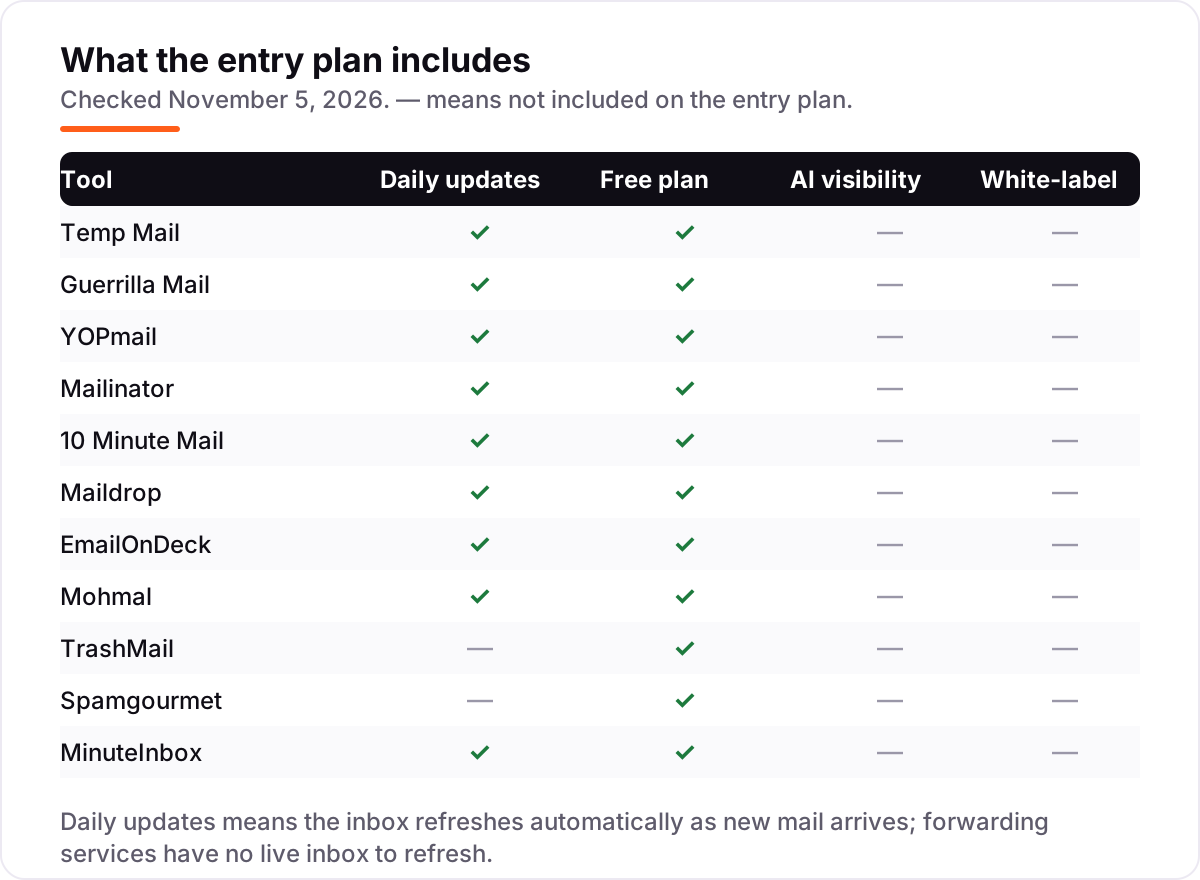
Know the difference: disposable inboxes vs forwarding aliases
The biggest confusion in this category is between two different designs. A disposable inbox — Temp Mail, Guerrilla Mail, YOPmail, 10 Minute Mail, Maildrop, EmailOnDeck, Mohmal and MinuteInbox — is a separate mailbox you visit on the provider's site. Nothing touches your real inbox, and when the timer ends the address and its mail are gone. A forwarding alias — TrashMail and Spamgourmet — is a disposable address that delivers to your real inbox, with a limit on how many messages get through.
The trade-off is control against exposure. A standalone inbox keeps your real address completely hidden, but you must remember to visit it before the timer ends. A forwarding alias lands in the inbox you already read, so nothing is missed, but your real address sits behind every disposable one, and a sender who keeps mailing after the limit is simply eaten, not blocked. Pick a standalone inbox for one-off signups and a forwarding alias for senders you want to cap.
There is a second distinction worth knowing: public versus private. On the free tiers of Mailinator, Maildrop, YOPmail and Guerrilla Mail, the inbox has no password, so anyone who types the same address name reads the same mail. Temp Mail, 10 Minute Mail, EmailOnDeck, Mohmal and MinuteInbox hand you a random address that only you know, which is safer but still not private, because the provider can read everything. Neither design suits confidential mail.
Quick comparison: tool type by need
| Buyer | Best pick | Why |
|---|---|---|
| Quick one-off verification | 10 Minute Mail | Free, address in seconds, gone in 10 minutes |
| Best all-rounder | Temp Mail | Free to start, Premium is $10/month for custom domains |
| Need to send as well as receive | Guerrilla Mail | Free, sends mail with 150MB attachments |
| Verification mail may take days | YOPmail | Free, messages kept 8 days |
| QA and email testing | Mailinator | Free public inbox; Business is $99/month with API |
| Forwarding to your real inbox | TrashMail | Free; Plus is $2.99/month with message limits |
Mistakes to avoid
- Using a disposable address for an account you must keep. If the service later asks you to confirm a password reset, the address will be gone. Use a real address for banking, email recovery and anything tied to money.
- Picking a public inbox for anything private. On Maildrop, YOPmail, Guerrilla Mail and Mailinator's free tier, anyone who guesses the address reads the mail. Use an unusual name, and never send personal details to a public inbox.
- Choosing a 10-minute timer for a slow sender. Some verification mails take 15 minutes to arrive. If the code lands after the address dies, you start over, so match the timer to the sender's speed.
- Paying before you need to. Eight services here are free forever, and the paid upgrades mostly buy longer storage and custom domains. Use the free tier for a month before deciding whether the upgrade earns its price.
- Assuming the address will be accepted. Disposable domains are blocklisted almost everywhere. If a signup rejects the address, try another service, and keep a real address ready for the sites that refuse all of them.
How we chose
We checked each vendor's own pricing page on November 5, 2026 and recorded the starting price exactly as shown. Mailinator's pricing page was opened live the same day; Temp Mail's $10-a-month Premium and TrashMail's $2.99-a-month Plus come from the vendors' own terms pages. Eight services publish no paid plan at all, and EmailOnDeck publishes a Pro tier with no price, so we show no price for it rather than guessing one. We ranked the tools by value for the most common buyer — someone signing up for a trial, a download or a newsletter — not by brand size. This list carries review ratings for two tools only: Mailinator at 4.6 out of 5 on G2 and Temp Mail at 4.3 out of 5 on Trustpilot. No G2, Capterra or Trustpilot listing could be found for the other nine, so we show no rating for them rather than an estimated one. No vendor paid for a place in this list, and none of the links here are affiliate links.
What to do next
Start with the free tier of your top pick and run one real signup through it. Check that the verification mail arrives, that the timer gives you enough time to read it, and that the site accepts the address at all. If the address is rejected, try a second service before giving up — different domains pass different blocklists. If the signup turns into a business you want found, our monthly SEO service handles the visibility side — or compare providers in our guide to SEO companies for small business. Once your tools are in place, find out what's holding your rankings back.
Your stack only works if people find you
SerpAstra fixes what keeps your site off page one and makes it easy for AI assistants to recommend.
Get a free audit→Sources we checked (13)
- Temp Mail terms of service — temp-mail.org/terms-of-service (checked November 5, 2026)
- Guerrilla Mail — guerrillamail.com (checked November 5, 2026)
- YOPmail — yopmail.com (checked November 5, 2026)
- Mailinator pricing — mailinator.com/pricing (checked November 5, 2026)
- 10 Minute Mail — 10minutemail.com (checked November 5, 2026)
- Maildrop — maildrop.cc (checked November 5, 2026)
- EmailOnDeck — emailondeck.com (checked November 5, 2026)
- Mohmal — mohmal.com (checked November 5, 2026)
- TrashMail terms of service — trashmail.com (checked November 5, 2026)
- Spamgourmet — spamgourmet.com (checked November 5, 2026)
- MinuteInbox — minuteinbox.com (checked November 5, 2026)
- Mailinator reviews — g2.com/products/mailinator/reviews (checked November 5, 2026)
- Temp Mail reviews — trustpilot.com/review/temp-mail.org (checked November 5, 2026)
Shamim
Founder of SerpAstra
A full-stack SEO and digital marketer who spends most days on Local SEO for dental practices, AI search visibility and lead generation.
Frequently asked questions
What is the best disposable email service?
Temp Mail is the best all-rounder: the most widely used disposable inbox, free to start, with Premium at $10 a month for custom domains and longer storage. Guerrilla Mail is the best free pick when you also need to send mail, and YOPmail is the best pick when the reply might take days, since it keeps messages for 8 days.
Are disposable email services really free?
Mostly, yes. Eight of the eleven services in this list cost nothing at all, and only Temp Mail, TrashMail and Mailinator sell a paid plan, from $2.99 to $99 a month. EmailOnDeck has a Pro tier but publishes no price for it. The free plans are funded by advertising, donations or paid upgrades.
How long does a disposable email address last?
It depends on the service: 10 Minute Mail deletes everything after 10 minutes, Guerrilla Mail after about an hour, Mohmal after 45 minutes, Temp Mail's free plan after 1–2 hours, and YOPmail after 8 days. MinuteInbox lets you choose the lifetime up front, from 10 minutes to a month.
Is it safe to use a disposable email address?
For low-stakes signups, yes, because the address hides your real inbox from spam. But most disposable inboxes are public: anyone who guesses the address can read the mail. Never use one for banking, password recovery, healthcare or any account you must get back into later.
Can I send email from a disposable address?
Usually not. Most services here are receive-only by design, including Temp Mail, 10 Minute Mail and Maildrop. Guerrilla Mail is the exception among the free services: it can send mail and accepts attachments up to 150MB. EmailOnDeck's paid Pro tier can also send and reply.
Will a disposable email work for account verification?
Usually, for one-time codes and confirmation links, since that is what these services are built for. But many sites block known disposable domains, and banks, payment processors and government services often reject them outright. If a signup rejects the address, try another service with a different domain.
Free SEO and AI visibility audit
Find out what is holding your rankings back
Send us your site. Within 2 business days you get a written audit, an AI visibility check and a short fix list ranked by impact. Free, with no contract attached.
Request my free audit→Related guides
 Digital Marketing & Ads7 Best Email Marketing Platforms for Creators in 2026, Compared7 best email marketing platforms for creators compared on price, free plans and monetization. Real prices checked November 4, 2026, sorted by creator need.Read guide →
 Digital Marketing & Ads7 Best B2B Email Marketing Software in 2026, ComparedCompare the 7 best b2b email marketing software tools on starting price, automation depth and free plans, with every price checked November 4, 2026.Read guide →
 Digital Marketing & Ads10 Best Email Drip Campaign Software in 2026, Compared10 best email drip campaign software tools compared on price, automation depth and free plans. Real starting prices checked November 4, 2026.Read guide →