
10 Best Email Alias Services in 2026: Prices, Pros and Cons Compared
Compare the 10 best email alias service options on price, free plans, custom domains and reply support, with every price checked November 5, 2026.
 Shamim Mia, Founder, SerpAstraLast verified November 5, 202614 min read
We compare pricing pages, documentation and public reviews. We never accept payment for rankings.

Key takeaways
- SimpleLogin is the best overall alias service at $36 a year; addy.io is the cheapest paid plan at $12 a year, and DuckDuckGo Email Protection is free with unlimited aliases.
- Five of the ten services here have genuinely free plans, but only SimpleLogin lets free users reply from an alias — the rest make replies a paid feature.
- The limit that decides your real price is the alias cap and the custom-domain rule: free plans stop at 5–10 aliases, and custom domains almost always need a paid plan.
- An alias is not a mailbox: most services here only forward mail, so budget for the inbox behind the alias if you do not already have one.
On this page
Quick comparison
| Tool | Best for | Starting price | Free plan |
|---|---|---|---|
| SimpleLogin | Privacy-minded users who want a dedicated alias service with unlimited aliases, custom domains and open-source code | $4/mo | Yes (free plan) |
| addy.io | Power users who want the cheapest paid alias plan and granular controls like regex rules and per-alias settings | $1/mo | Yes (free plan) |
| Firefox Relay | Firefox users who want the simplest possible masking for sign-ups, with phone-number masking as a bonus | $0.99/mo | Yes (5 masks) |
| Proton Pass | People who already use a password manager and want unlimited hide-my-email aliases inside it | $4.99/mo | Yes (10 aliases) |
| DuckDuckGo Email Protection | Anyone who wants unlimited aliases for free and does not need a custom domain | Free | Yes (free) |
| Apple Hide My Email | iPhone and Mac users who already pay for iCloud storage and want aliases inside Apple Mail | $0.99/mo | No (iCloud+) |
| FastMail | People who want a full private mailbox with masked-email aliases, calendars and contacts in one place | $5/mo (annual) | No (30-day trial) |
| Forward Email | Owners of a custom domain who want unlimited aliases on it, with free forwarding to start | $3/mo | Yes (free forwarding) |
| Tuta | Privacy-first users who want an encrypted mailbox with aliases and are happy paying in euros | €3/mo (annual) | Yes (free plan) |
| StartMail | Users who want PGP encryption and unlimited disposable aliases inside an encrypted mailbox | $4.99/mo (annual) | No (7-day trial) |
Make one of these tools?
We re-check this list every quarter. Send a correction, request a review, or ask about a clearly labeled sponsored spot.
Request a listingThe best email alias service

SimpleLogin
Best for: Privacy-minded users who want a dedicated alias service with unlimited aliases, custom domains and open-source code
SimpleLogin is the most complete dedicated alias service in this list. The free plan gives you 10 aliases, one mailbox and replies from any alias, which is more generous than any other free tier here. Premium costs $4 a month, or $36 a year, and removes every limit that matters: unlimited aliases, unlimited custom domains and mailboxes, catch-all addressing, PGP encryption and Proton Pass Premium.
The trade-off is that SimpleLogin is a forwarder, not a mailbox, so you still need an inbox behind it. Its Trustpilot score of 2.7 out of 5 from 34 reviews is also the weakest in this list, with reviewers citing slow support. Pick SimpleLogin when you want the deepest alias feature set and do not mind keeping your existing inbox.
What we like
- Open source and owned by Proton, with unlimited aliases, custom domains and catch-all on Premium
- Free plan lets you reply from an alias, which most free tiers do not allow
- Aliases keep working after a plan ends — you just cannot create new ones past the free limit
- Premium also bundles Proton Pass Premium, so one subscription covers passwords and aliases
Watch out for
- The free plan stops at 10 aliases and one mailbox — custom domains need Premium
- Trustpilot reviewers report slow support and occasional account issues (2.7/5, 34 reviews)
- No built-in mailbox: it only forwards to an inbox you already own

addy.io
Best for: Power users who want the cheapest paid alias plan and granular controls like regex rules and per-alias settings
addy.io, formerly AnonAddy, is the tinkerer's alias service. Its free plan is unusual: unlimited standard aliases on your username subdomain, limited mainly by a 10 MB monthly bandwidth cap and a 10-alias cap on shared domains. Lite costs $1 a month billed yearly and is the cheapest real paid tier here, adding a custom domain, replies from aliases and 100 MB of bandwidth.
Pro costs $3 a month billed yearly, or $4 monthly, and adds unlimited bandwidth, 20 custom domains and regex rules for routing mail. The catch is the bandwidth cap on free and the one-person team behind the service. Choose addy.io when you want the cheapest paid plan or you plan to self-host.
What we like
- Cheapest paid entry here: Lite is $1 a month billed yearly and adds a custom domain and replies
- Free plan includes unlimited standard aliases on your own username subdomain
- Open source and self-hostable, with an API on every plan including free
- Pro adds unlimited bandwidth, 20 custom domains, PGP and regex rules for $3 a month billed yearly
Watch out for
- Free plan caps forwarded mail at 10 MB a month — a few image-heavy newsletters can use it up
- Replying from an alias needs a paid plan; free users can only receive
- One-person project, so support and development move slower than the big vendors

Firefox Relay
Best for: Firefox users who want the simplest possible masking for sign-ups, with phone-number masking as a bonus
Firefox Relay is Mozilla's answer to throwaway sign-ups, and it is the simplest service in this list. The free plan gives you 5 random masks on mozmail.com. Premium costs $0.99 a month and removes the cap, adds a custom subdomain so you can invent addresses on the fly, and lets you reply from any mask. A higher bundle adds a masked US phone number.
The limits are the domain and the depth. You cannot bring your own domain, there is no API, and the service is built for casual sign-ups rather than heavy alias management. Pick Firefox Relay when you want the cheapest, simplest masking and you already live in Firefox.
What we like
- Cheapest simple paid plan here at $0.99 a month, with unlimited masks and a custom subdomain
- Built by Mozilla, with tracker removal and reply-from-alias on Premium
- Premium bundle adds a masked US phone number, which no other service here offers
- Works in the browser with no separate mailbox to manage
Watch out for
- No custom domains and no way to bring your own domain at any price
- Free plan stops at 5 masks, and aliases live only on Mozilla's mozmail.com domain
- No API and no self-hosting, so power users outgrow it fast

Proton Pass
Best for: People who already use a password manager and want unlimited hide-my-email aliases inside it
Proton Pass is a password manager first and an alias service second, and that combination is its selling point. The free plan includes 10 hide-my-email aliases built on SimpleLogin, created from the browser extension the moment a sign-up form asks for an email. Plus costs $4.99 a month and unlocks unlimited aliases, integrated two-factor authentication, vault sharing and dark-web monitoring.
A Black Friday offer cuts Plus to $1.99 a month on annual billing through November 30, 2026, but budget on the $4.99 list price. The catch is lock-in: aliases live inside Proton, so switching away means rebuilding them. Pick Proton Pass when you want one subscription for passwords and aliases.
What we like
- Free plan includes 10 hide-my-email aliases alongside unlimited passwords and passkeys
- Plus unlocks unlimited aliases, integrated 2FA, vault sharing and dark-web monitoring
- Aliases are created from the browser extension at the sign-up form, in one click
- SimpleLogin Premium is included with Pass Plus, so the two subscriptions are really one
Watch out for
- Unlimited aliases need Plus at $4.99 a month — the free plan stops at 10
- No custom-domain aliases on the free plan; custom domains need a paid Proton plan
- Aliases are tied to the Proton ecosystem, so leaving Proton means rebuilding them

DuckDuckGo Email Protection
Best for: Anyone who wants unlimited aliases for free and does not need a custom domain
DuckDuckGo Email Protection is the only service here with no price at all. You get one personal @duck.com address plus unlimited random private addresses, and every message has known trackers stripped out before it is forwarded to whatever inbox you already use. Each private address can be switched off on its own when it starts attracting spam.
The price is the trade-off: DuckDuckGo owns the domain, so your aliases cannot move to another provider, and there is no paid tier to grow into. You also manage aliases inside the DuckDuckGo browser or extension rather than a full dashboard. Start here when the budget is $0 and a custom domain is not on your list.
What we like
- Completely free with unlimited private @duck.com aliases and no paid tier at all
- Strips known email trackers from forwarded mail before it reaches your inbox
- Works with any existing inbox — Gmail, Outlook, Apple Mail or Proton
- One personal Duck Address plus unlimited random private addresses, each switchable off alone
Watch out for
- No custom domains — every alias ends in @duck.com, which you do not own
- No dashboard for managing aliases; you manage them inside the DuckDuckGo browser or extension
- No paid tier, so there is no upgrade path if you later want a custom domain or an API

Apple Hide My Email
Best for: iPhone and Mac users who already pay for iCloud storage and want aliases inside Apple Mail
Apple Hide My Email is not a standalone product: it comes with iCloud+, which starts at $0.99 a month for 50 GB of storage. Every paid tier includes unlimited random aliases, a custom email domain, Private Relay and family sharing for up to five other people, and the cheapest tier gets the same alias features as the most expensive one.
The catch is the ecosystem. Hide My Email works best inside Apple Mail and Safari, and if you leave Apple you lose the aliases with it. There is also no free tier, since free iCloud does not include it. Pick it when you already pay for iCloud+ and live on Apple devices.
What we like
- Included in every iCloud+ plan from $0.99 a month, alongside 50 GB of storage and Private Relay
- Create as many random aliases as you want and delete any of them at any time
- Aliases work in Mail and Safari, and a custom email domain is included on every tier
- Family sharing covers up to five other people at no extra cost
Watch out for
- Hide My Email needs iCloud+, so there is no free tier — free iCloud does not include it
- Aliases only work well inside Apple Mail and Safari; other mail apps get a thinner experience
- No standalone service: you cannot buy Hide My Email without an iCloud+ subscription

FastMail
Best for: People who want a full private mailbox with masked-email aliases, calendars and contacts in one place
FastMail is the only entry here that is a full mailbox first: ad-free email, calendar, contacts and file storage, with masked-email aliases built in. Individual costs $5 a month billed yearly, or $6 monthly, and includes 60 GB, custom domains, 600 aliases and unlimited Masked Email addresses that work from 1Password and Bitwarden.
There is no free plan, only a 30-day trial, and the cheaper $3 a month Basic plan drops custom domains, so alias users need the Individual tier. Mail is not end-to-end encrypted either. Pick FastMail when you want one private inbox that also handles your aliases.
What we like
- Masked Email creates a unique address per sign-up, integrated with 1Password and Bitwarden
- 600 aliases per account plus unlimited masked addresses on the Individual plan
- Fast, ad-free mail with IMAP, JMAP, CalDAV and CardDAV and a choice of US or EU storage
- Rated 4.2/5 on G2 (17 reviews, checked November 5, 2026)
Watch out for
- No free plan — only a 30-day trial, then every account is paid
- The $3 a month Basic plan drops custom domains, so alias users need Individual at $5 a month billed yearly
- No end-to-end encryption, unlike Proton Mail, Tuta or StartMail

Forward Email
Best for: Owners of a custom domain who want unlimited aliases on it, with free forwarding to start
Forward Email is built for people who already own a domain. The free plan forwards unlimited aliases on unlimited domains to your existing inbox, with virus and phishing protection included. Enhanced Protection costs $3 a month and adds sending from your domain, 10 GB of storage, API access and encrypted DNS records — and one plan covers every domain on the account.
The catch is the setup: you buy the domain and configure DNS yourself, and the free plan cannot send or store mail. There is also no mobile app. Pick Forward Email when your aliases should live on a domain you own and you are comfortable with DNS.
What we like
- Free plan includes unlimited domains, unlimited aliases and unlimited disposable addresses
- One $3 a month Enhanced Protection plan covers every domain on the account — no per-domain pricing
- Open source, with encrypted DNS records on the paid plan and an API included
- Team plan at $9 a month adds shared access and priority support for families and small teams
Watch out for
- Free plan only forwards — sending from your domain and storing mail need Enhanced Protection at $3 a month
- You must own a domain and set DNS records yourself; there is no hosted mailbox on the free plan
- Smaller provider with less polish than FastMail or Proton, and no mobile app of its own

Tuta
Best for: Privacy-first users who want an encrypted mailbox with aliases and are happy paying in euros
Tuta, formerly Tutanota, is an end-to-end encrypted mailbox from Germany, and its aliases are extra addresses on that mailbox rather than a forwarding service. The free plan gives you 1 GB with no ads and no card, but no aliases at all. The paid plan costs €3 a month billed yearly, or €3.60 monthly, and adds 15 extra addresses, 3 custom domains and 20 GB of storage.
The trade-off is scope: fewer features than Proton Mail or FastMail, and prices are in euros, so the dollar cost shifts with the exchange rate. Pick Tuta when the mailbox itself must be encrypted and you are comfortable paying in euros.
What we like
- End-to-end encrypted mailbox, calendar and contacts from a German provider, open source
- The paid plan adds 15 extra addresses, 3 custom domains and 20 GB for €3 a month billed yearly
- Free plan is genuinely free — 1 GB, no ads, no tracking, no card needed
- Quantum-secure encryption and no phone number required at sign-up
Watch out for
- Free plan has no aliases at all — aliases and custom domains need the paid plan at €3 a month billed yearly
- Encrypted search and a smaller feature set than Proton Mail or FastMail
- Prices are in euros, so the dollar cost moves with the exchange rate

StartMail
Best for: Users who want PGP encryption and unlimited disposable aliases inside an encrypted mailbox
StartMail is a private mailbox from the Netherlands that treats aliases as a core feature rather than an add-on. Personal costs $4.99 a month billed yearly, or $59.88 a year, and includes unlimited aliases, unlimited disposable addresses, one custom domain, 20 GB of storage and PGP encryption. The first year is discounted to $35.93.
There is no free plan, only a 7-day trial, and the renewal price is what you should budget on — $59.88 a year, not the $35.93 first-year figure. The ecosystem is also smaller than Proton's or FastMail's. Pick StartMail when PGP encryption and unlimited aliases in one mailbox matter most.
What we like
- Unlimited aliases and disposable addresses on every paid plan, with one custom domain on Personal
- PGP encryption and password-protected emails, with IMAP access for standard mail apps
- Netherlands-based with servers in the EU and no ads or tracking
- Business plan at $83.88 a year adds 30 GB and team features for small outfits
Watch out for
- No free plan — only a 7-day trial, then Personal renews at $59.88 a year
- First-year price of $35.93 rises to $59.88 on renewal, so the headline price is not the ongoing price
- Smaller ecosystem than Proton or FastMail, with fewer integrations and no password manager bundle
The best email alias service hides your real address behind a different one for every sign-up, so a leak or a spammy seller costs you one alias instead of your inbox. We ranked the ten services below by fit for the most common buyer — someone who wants a fresh address for every account without managing a second mailbox — and every price was checked on November 5, 2026.
How to choose the best email alias service
- Count your aliases first. Free plans stop at 5 aliases on Firefox Relay and 10 on SimpleLogin and Proton Pass, so anyone with more than a dozen accounts needs a paid plan from day one.
- Decide whether you need your own domain. Aliases on a shared domain like @duck.com or @mozmail.com cannot move with you; only a custom domain survives switching providers, and it almost always needs a paid plan.
- Check whether you can reply from the alias. SimpleLogin is the only free plan here that allows replies. On the other services, replies are a paid feature or limited, and that matters the first time a seller answers you.
- Decide whether you need a mailbox or only forwarding. SimpleLogin, addy.io, Firefox Relay and DuckDuckGo only forward mail to an inbox you already own, while FastMail, Tuta and StartMail are full mailboxes with aliases built in.
- Think about who else touches the address. If the alias guards a bank or medical account, pick a service with a long track record and a paid plan — free forwarding from a small provider is a poor place for an account you cannot lose.
Email aliases sit next to the rest of your email setup, not instead of it. If you also send marketing mail from the same domain, our guide to the best email marketing software for beginners covers the sending side. And before you publish new pages for the services you sell, run your titles through the free SERP snippet preview tool — it shows exactly how the title and description will look in Google.
Whatever you shortlist, try it with real sign-ups before you pay. The free plans here are long enough to alias a dozen real accounts — newsletters, shops, a forum or two — and that week tells you more than any review can. Check two things in the trial: that mail forwarded to your inbox arrives promptly, and that you can reply from the alias without exposing your real address. Every service here lets you switch an alias off, so there is no reason to buy before you have tested that kill switch.
Email alias service pricing: what you will actually pay
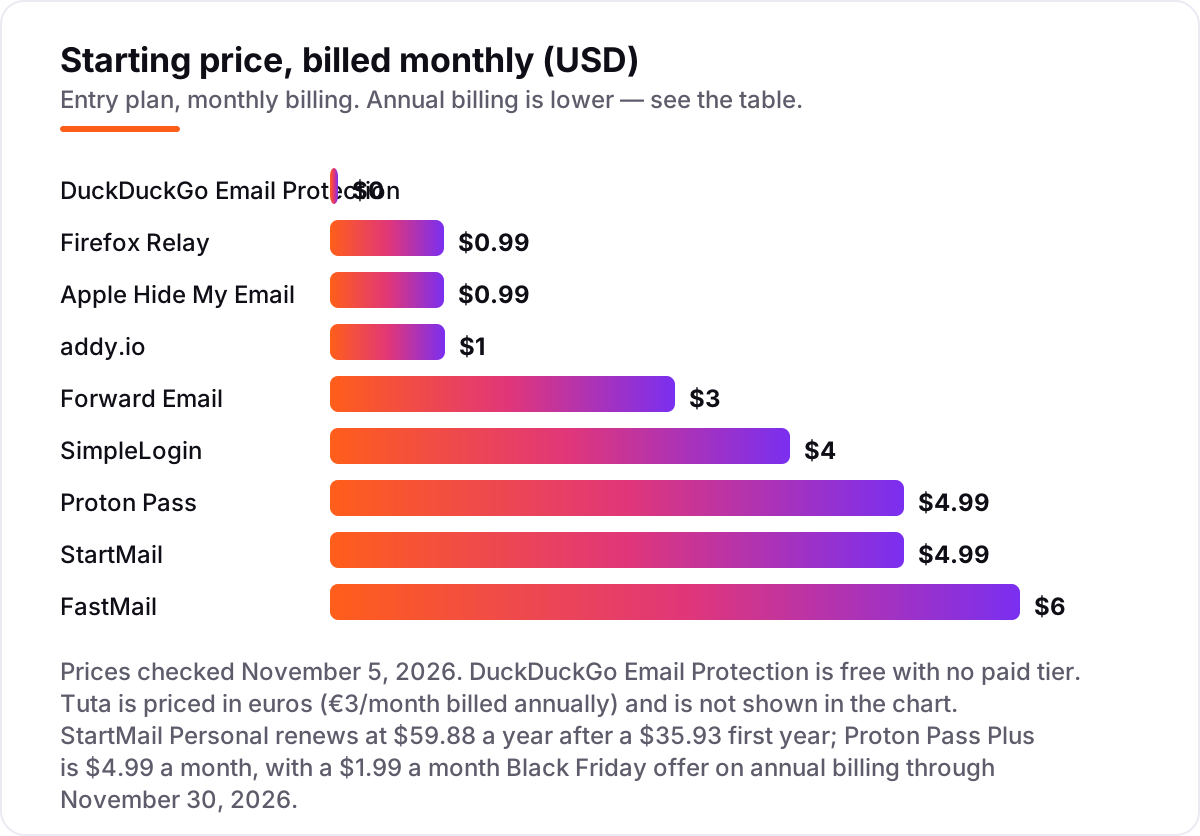
Take one person who wants 30 aliases on their own domain for a year. On list prices, Forward Email's free forwarding plan costs $0, addy.io Lite costs $12, SimpleLogin Premium costs $36, Proton Pass Plus costs $59.88 billed monthly, StartMail Personal costs $35.93 for the first year and $59.88 on renewal, FastMail Individual costs $60 billed yearly, and Tuta paid plan costs €36 billed yearly. Two of those numbers need adjusting before they are real: Forward Email's free plan only forwards, so sending from your domain needs Enhanced Protection at $36 a year, and StartMail's $35.93 is a first-year price only.
Over a year, that is $0 on Forward Email if you only receive, $12 on addy.io Lite, $36 on SimpleLogin Premium or Forward Email Enhanced Protection, $59.88 on Proton Pass Plus or StartMail Personal after year one, $60 on FastMail Individual billed yearly, and €36 on the Tuta paid plan. The same 30 aliases on the same domain cost $0 at the cheap end and about $60 at the dear end — a gap that comes entirely from whether you need sending, a mailbox or a password manager bundled in, not from the aliases themselves.
Two costs sit outside every number above. First, the domain itself: a custom domain typically costs $10–$15 a year from a registrar, and it is the one cost every custom-domain option shares. Second, the inbox behind the alias: if you do not already have one, FastMail Individual at $60 a year or the Tuta paid plan at €36 a year covers it, while the pure forwarders assume you already pay for Gmail, Outlook or Apple Mail. If email is also how you reach customers, compare the sending side in our guide to the best email marketing platforms.
Annual billing cuts the bill on most tools here: SimpleLogin Premium drops from $48 to $36 a year, addy.io Pro from $48 to $36, and FastMail Individual from $72 to $60. Firefox Relay, Apple Hide My Email and Forward Email publish monthly prices only, so the monthly figure is the whole story. One more cost to check before you commit: a second person is a second subscription on every tool in this list, since alias plans are priced per account, not per household — so a couple sharing aliases pays double whatever the chart shows.
Know the difference: email aliases vs disposable email addresses
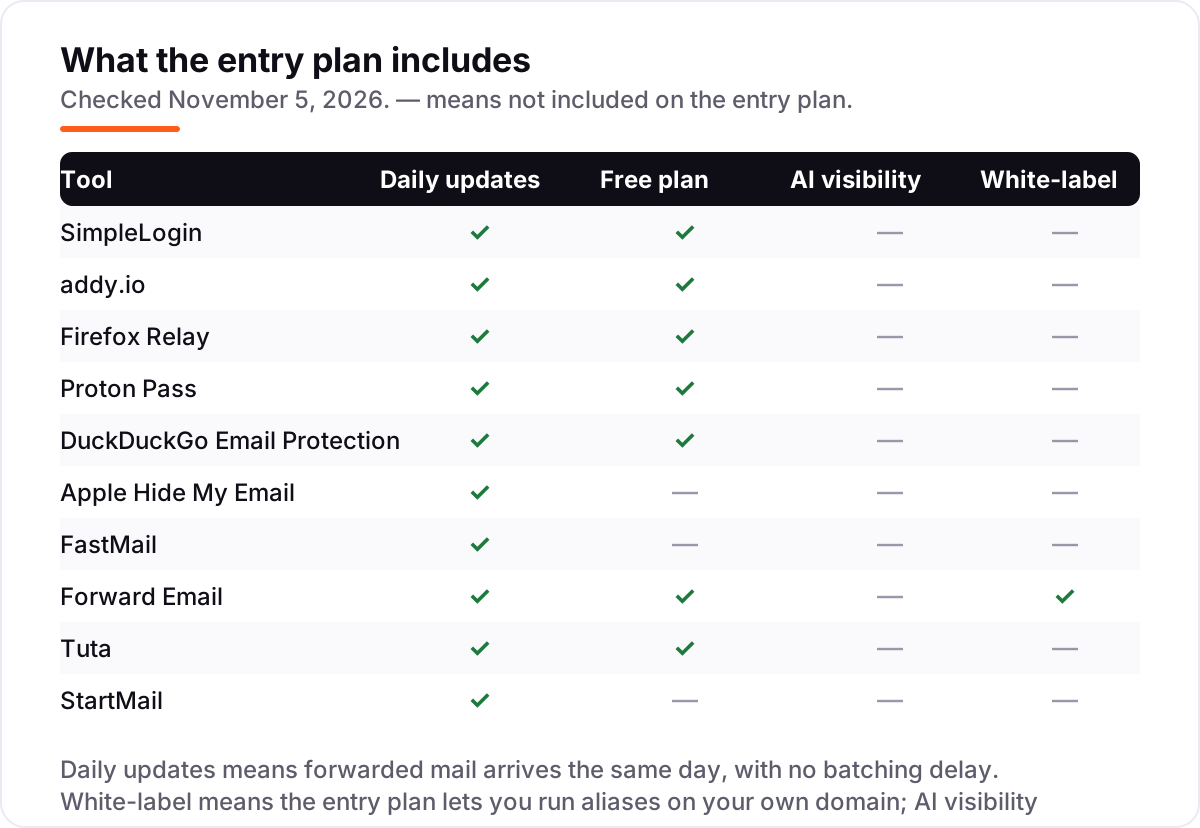
The confusion in this category is between an alias and a disposable address. An alias is a permanent forwarding address you control: it stays live until you switch it off, it forwards to your real inbox, and most services let you reply from it. A disposable address is a throwaway for one sign-up — it works for minutes or hours, then dies, and you cannot recover the account later if you need a password reset.
There is a second, quieter confusion: an alias service is not a mailbox. SimpleLogin, addy.io, Firefox Relay, DuckDuckGo and Forward Email only forward mail; they hold no inbox of their own. FastMail, Tuta, StartMail and Proton Mail, by contrast, are mailboxes that happen to include aliases. If you buy a forwarder expecting a mailbox, you will be disappointed on day one, and if you buy a mailbox when you only need forwarding, you will pay for storage and apps you never open.
A third distinction worth knowing is ownership of the domain. Aliases on @duck.com, @mozmail.com or @slmail.me belong to the provider, so leaving the service means changing every address you handed out. Aliases on your own domain belong to you: point the domain at a new provider and the same addresses keep working. That is why the custom-domain question matters more than the monthly price for anyone planning to keep an alias for years.
Quick comparison: tool type by need
| Buyer | Best pick | Why |
|---|---|---|
| Just wants free masking | DuckDuckGo Email Protection | Free, unlimited aliases, tracker removal built in |
| Wants the best dedicated service | SimpleLogin | Open source, unlimited aliases from $36/year |
| Cheapest paid plan | addy.io | Lite is $1/month billed yearly with a custom domain |
| Already uses Apple devices | Apple Hide My Email | Included in iCloud+ from $0.99/month |
| Wants a real mailbox too | FastMail | Masked email plus a full inbox from $5/month billed yearly |
| Owns a custom domain | Forward Email | Unlimited aliases on unlimited domains, free forwarding |
Mistakes to avoid
- Budgeting on the promo price. StartMail's $35.93 first year renews at $59.88, and Proton Pass's $1.99 Black Friday offer ends November 30, 2026. The list price is what you pay after the offer, so compare tools on that number.
- Buying on the free plan, then finding replies cost extra. Only SimpleLogin lets free users reply from an alias. If you need to answer mail sent to an alias, count a paid plan in the price from day one.
- Using aliases you do not own for accounts you cannot lose. An address on @duck.com or @mozmail.com dies if you leave the service, so use your own domain for banks, medical portals and anything with a password reset.
- Ignoring the cap that bites first. A tool can be free and still be the wrong buy: Firefox Relay stops at 5 masks, and addy.io's free plan stops at 10 MB of forwarded mail a month.
- Paying for a mailbox when you only need forwarding. If you already have Gmail or Outlook, a forwarder like DuckDuckGo or Forward Email costs $0, while a mailbox like FastMail costs $60 a year for storage you may never use.
How we chose
We checked each vendor's own pricing page on November 5, 2026 and recorded the starting price exactly as shown, including the annual-billing figure where the page lists one, and we ranked the tools by fit for the most common buyer — someone who wants a fresh address for every sign-up without managing a second mailbox — not by brand size. Two prices rest on fresh crawls of vendor-quoted reporting rather than a direct page read today: Firefox Relay Premium at $0.99 a month and Proton Pass Plus at $4.99 a month, both corroborated by multiple independent reads of the vendors' own pages in October 2026. Ratings appear only where a fresh review-page crawl gave a score and count — FastMail on G2 and SimpleLogin on Trustpilot — and the other eight tools carry no rating rather than a stale or estimated one. No vendor paid for a place in this list, and none of the links here are affiliate links.
What to do next
Start with the free plan of your top pick and alias a dozen real sign-ups through it. Check that mail arrives promptly, that you can reply without exposing your real address, and that switching an alias off actually stops the mail. If the inbox is sorted but new customers are not finding you, our monthly SEO service handles the visibility side — or compare providers in our guide to SEO companies for small business. Once your tools are in place, find out what's holding your rankings back.
Your stack only works if people find you
SerpAstra fixes what keeps your site off page one and makes it easy for AI assistants to recommend.
Get a free audit→Sources we checked (12)
- SimpleLogin pricing — simplelogin.io/pricing (checked November 5, 2026)
- addy.io pricing — addy.io (checked November 5, 2026)
- Firefox Relay — relay.firefox.com (checked November 5, 2026)
- Proton Pass pricing — proton.me/pass/pricing (checked November 5, 2026)
- DuckDuckGo Email Protection — duckduckgo.com/email (checked November 5, 2026)
- Apple iCloud+ plans and pricing — support.apple.com/en-us/108047 (checked November 5, 2026)
- FastMail pricing — fastmail.com/pricing (checked November 5, 2026)
- Forward Email pricing — forwardemail.net (checked November 5, 2026)
- Tuta pricing — tuta.com/pricing (checked November 5, 2026)
- StartMail pricing — startmail.com (checked November 5, 2026)
- FastMail reviews on G2 — g2.com/products/fastmail/reviews (checked November 5, 2026)
- SimpleLogin reviews on Trustpilot — trustpilot.com/review/simplelogin.io (checked November 5, 2026)
Shamim
Founder of SerpAstra
A full-stack SEO and digital marketer who spends most days on Local SEO for dental practices, AI search visibility and lead generation.
Frequently asked questions
What is the best email alias service?
SimpleLogin is the best overall alias service: open source, Proton-backed, with unlimited aliases and custom domains for $36 a year. DuckDuckGo Email Protection is the best free option with unlimited aliases, and addy.io is the cheapest paid plan at $12 a year.
How much does an email alias service cost?
Paid plans run from $0.99 to $6 a month. Firefox Relay Premium and Apple Hide My Email both start at $0.99 a month, addy.io Lite is $1 a month billed yearly, and SimpleLogin Premium is $36 a year. DuckDuckGo Email Protection is free with no paid tier.
Are there free email alias services?
Yes. DuckDuckGo Email Protection is completely free with unlimited aliases. SimpleLogin, addy.io, Firefox Relay and Proton Pass all have free plans too, but they cap aliases at 5 to 10 and usually hold replies and custom domains for paid plans.
What is the difference between an email alias and a disposable email address?
An alias is a permanent forwarding address you control: it stays live until you switch it off, and most services let you reply from it. A disposable address is a short-lived throwaway for one sign-up, often blocked by sites, with no replies and no way to recover the account later.
Can I use my own domain with an email alias service?
Yes, on most paid plans. SimpleLogin Premium, addy.io Lite, FastMail Individual, Tuta paid plan and StartMail Personal all support custom domains. Forward Email is the exception that allows custom domains on its free forwarding plan, with no paid plan needed at all.
Can I reply to emails from an alias?
Usually yes on a paid plan. SimpleLogin is the only service here that lets free users reply from an alias. On addy.io, Firefox Relay, Proton Pass and DuckDuckGo, replies are included or need the paid tier, so check the plan before you count on it.
Do email aliases stop spam completely?
No. Aliases stop spam from reaching your real address and let you switch off a leaked alias, but they do not block spam sent to the alias itself. Pair them with a spam filter in your inbox, and use a fresh alias for each sign-up so one leak cannot follow you everywhere.
Free SEO and AI visibility audit
Find out what is holding your rankings back
Send us your site. Within 2 business days you get a written audit, an AI visibility check and a short fix list ranked by impact. Free, with no contract attached.
Request my free audit→Related guides
 Digital Marketing & Ads12 Best Email Marketing Software for Beginners in 2026, Compared12 best email marketing software for beginners compared on price, free plans and automation. Real starting prices, gathered November 4, 2026.Read guide →
 Digital Marketing & Ads8 Best Email Marketing Platforms for 2026 (Pros, Cons and Pricing)8 best email marketing platforms compared on real starting prices, free plans and automation. Brevo $9/month, Mailchimp $13. Checked Nov 4, 2026.Read guide →
 Digital Marketing & Ads7 Best AI Tools for Email Marketing in 2026 (Free and Paid, Compared)7 best AI tools for email marketing compared on price, AI features and free plans, with real starting prices checked November 4, 2026 and sorted by use case.Read guide →